belt CHEVROLET DYNASTY 1993 Owners Manual
[x] Cancel search | Manufacturer: CHEVROLET, Model Year: 1993, Model line: DYNASTY, Model: CHEVROLET DYNASTY 1993Pages: 2438, PDF Size: 74.98 MB
Page 1702 of 2438
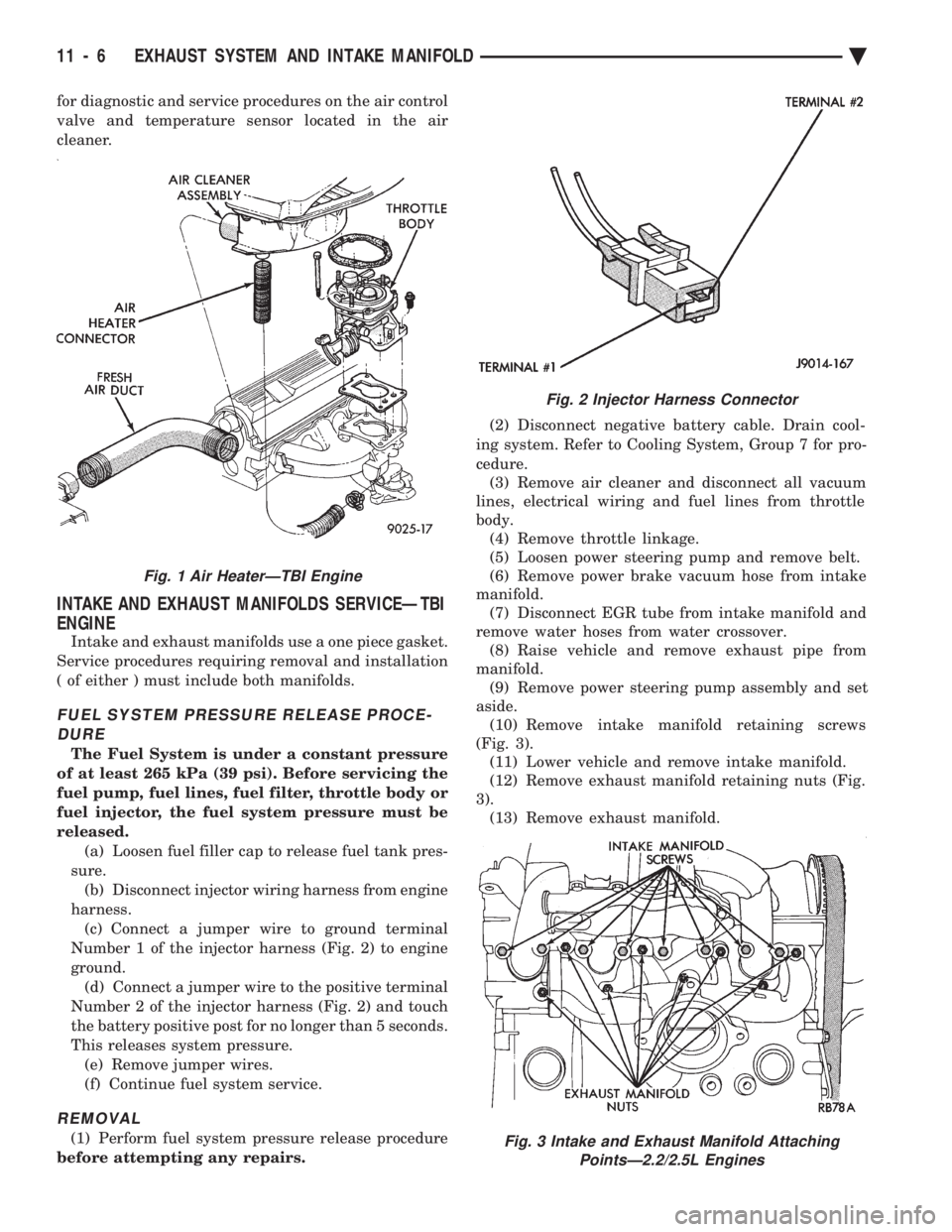
for diagnostic and service procedures on the air control
valve and temperature sensor located in the air
cleaner.
INTAKE AND EXHAUST MANIFOLDS SERVICEÐTBI
ENGINE
Intake and exhaust manifolds use a one piece gasket.
Service procedures requiring removal and installation
( of either ) must include both manifolds.
FUEL SYSTEM PRESSURE RELEASE PROCE- DURE
The Fuel System is under a constant pressure
of at least 265 kPa (39 psi). Before servicing the
fuel pump, fuel lines, fuel filter, throttle body or
fuel injector, the fuel system pressure must be
released. (a) Loosen fuel filler cap to release fuel tank pres-
sure. (b) Disconnect injector wiring harness from engine
harness. (c) Connect a jumper wire to ground terminal
Number 1 of the injector harness (Fig. 2) to engine
ground. (d) Connect a jumper wire to the positive terminal
Number 2 of the injector harness (Fig. 2) and touch
the battery positive post for no longer than 5 seconds.
This releases system pressure. (e) Remove jumper wires.
(f) Continue fuel system service.
REMOVAL
(1) Perform fuel system pressure release procedure
before attempting any repairs. (2) Disconnect negative battery cable. Drain cool-
ing system. Refer to Cooling System, Group 7 for pro-
cedure. (3) Remove air cleaner and disconnect all vacuum
lines, electrical wiring and fuel lines from throttle
body. (4) Remove throttle linkage.
(5) Loosen power steering pump and remove belt.
(6) Remove power brake vacuum hose from intake
manifold. (7) Disconnect EGR tube from intake manifold and
remove water hoses from water crossover. (8) Raise vehicle and remove exhaust pipe from
manifold. (9) Remove power steering pump assembly and set
aside. (10) Remove intake manifold retaining screws
(Fig. 3). (11) Lower vehicle and remove intake manifold.
(12) Remove exhaust manifold retaining nuts (Fig.
3). (13) Remove exhaust manifold.
Fig. 2 Injector Harness Connector
Fig. 3 Intake and Exhaust Manifold Attaching PointsÐ2.2/2.5L Engines
Fig. 1 Air HeaterÐTBI Engine
11 - 6 EXHAUST SYSTEM AND INTAKE MANIFOLD Ä
Page 1729 of 2438
(2) Remove nuts holding bumper fascia to quarter
panels. (3) Remove fasteners holding bumper fascia to
wheel opening flange. (4) Disconnect license plate lamp wire connectors.
(5) Remove bolts holding bumper to rear closure
panel. (6) Remove nuts holding bumper to energy ab-
sorber units. (7) Separate bumper from vehicle.
INSTALLATION
Reverse the preceding operation.
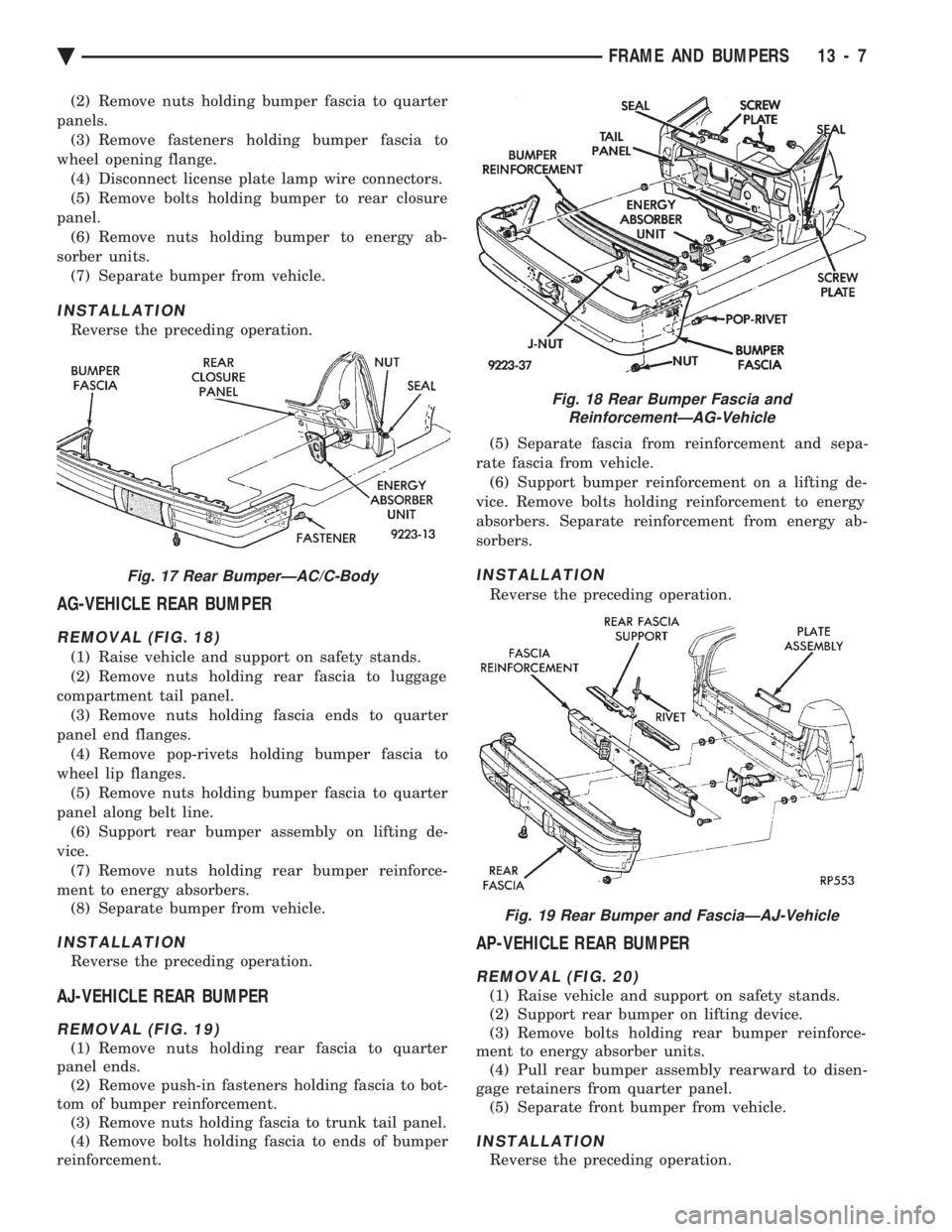
AG-VEHICLE REAR BUMPER
REMOVAL (FIG. 18)
(1) Raise vehicle and support on safety stands.
(2) Remove nuts holding rear fascia to luggage
compartment tail panel. (3) Remove nuts holding fascia ends to quarter
panel end flanges. (4) Remove pop-rivets holding bumper fascia to
wheel lip flanges. (5) Remove nuts holding bumper fascia to quarter
panel along belt line. (6) Support rear bumper assembly on lifting de-
vice. (7) Remove nuts holding rear bumper reinforce-
ment to energy absorbers. (8) Separate bumper from vehicle.
INSTALLATION
Reverse the preceding operation.
AJ-VEHICLE REAR BUMPER
REMOVAL (FIG. 19)
(1) Remove nuts holding rear fascia to quarter
panel ends. (2) Remove push-in fasteners holding fascia to bot-
tom of bumper reinforcement. (3) Remove nuts holding fascia to trunk tail panel.
(4) Remove bolts holding fascia to ends of bumper
reinforcement. (5) Separate fascia from reinforcement and sepa-
rate fascia from vehicle. (6) Support bumper reinforcement on a lifting de-
vice. Remove bolts holding reinforcement to energy
absorbers. Separate reinforcement from energy ab-
sorbers.
INSTALLATION
Reverse the preceding operation.
AP-VEHICLE REAR BUMPER
REMOVAL (FIG. 20)
(1) Raise vehicle and support on safety stands.
(2) Support rear bumper on lifting device.
(3) Remove bolts holding rear bumper reinforce-
ment to energy absorber units. (4) Pull rear bumper assembly rearward to disen-
gage retainers from quarter panel. (5) Separate front bumper from vehicle.
INSTALLATION
Reverse the preceding operation.
Fig. 17 Rear BumperÐAC/C-Body
Fig. 18 Rear Bumper Fascia and ReinforcementÐAG-Vehicle
Fig. 19 Rear Bumper and FasciaÐAJ-Vehicle
Ä FRAME AND BUMPERS 13 - 7
Page 1776 of 2438
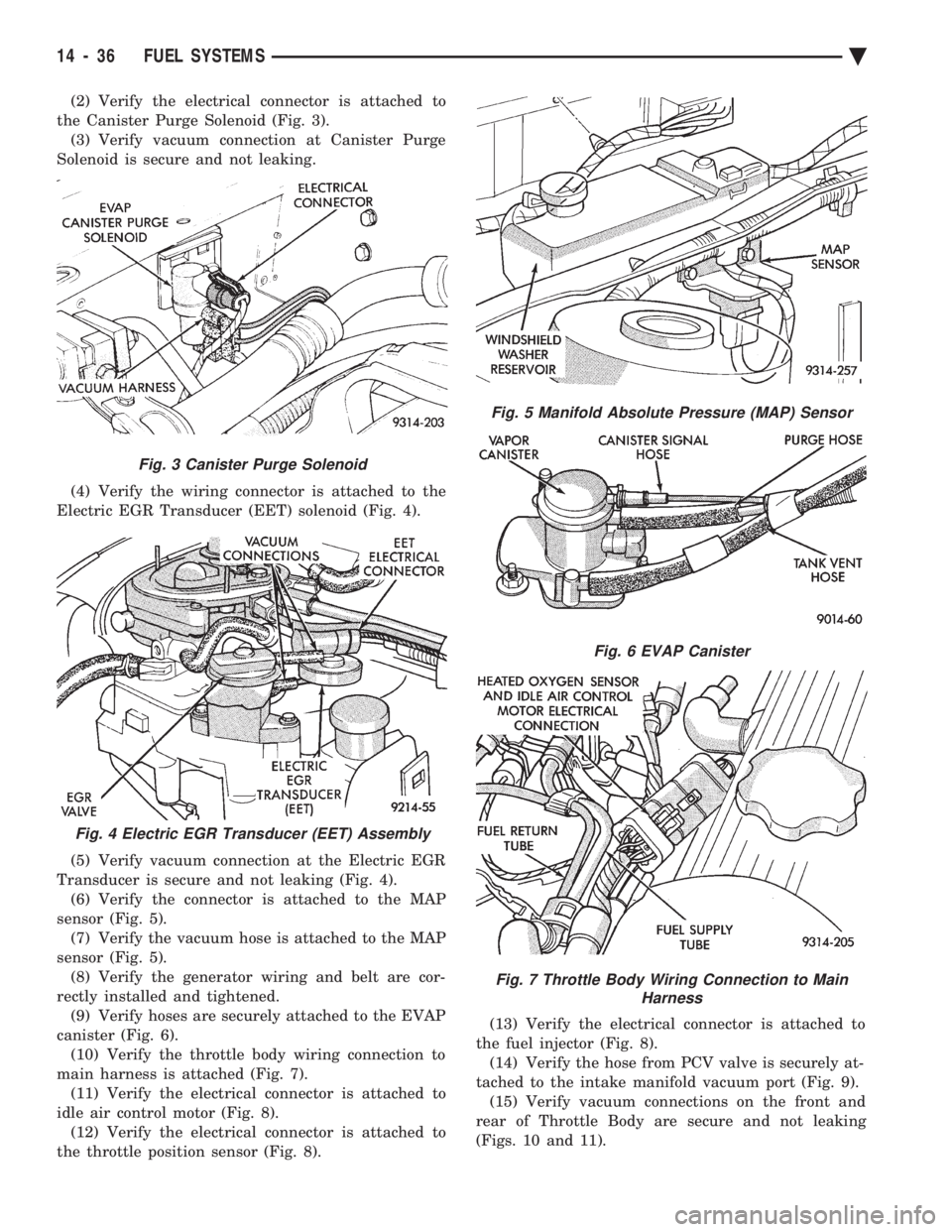
(2) Verify the electrical connector is attached to
the Canister Purge Solenoid (Fig. 3). (3) Verify vacuum connection at Canister Purge
Solenoid is secure and not leaking.
(4) Verify the wiring connector is attached to the
Electric EGR Transducer (EET) solenoid (Fig. 4).
(5) Verify vacuum connection at the Electric EGR
Transducer is secure and not leaking (Fig. 4). (6) Verify the connector is attached to the MAP
sensor (Fig. 5). (7) Verify the vacuum hose is attached to the MAP
sensor (Fig. 5). (8) Verify the generator wiring and belt are cor-
rectly installed and tightened. (9) Verify hoses are securely attached to the EVAP
canister (Fig. 6). (10) Verify the throttle body wiring connection to
main harness is attached (Fig. 7). (11) Verify the electrical connector is attached to
idle air control motor (Fig. 8). (12) Verify the electrical connector is attached to
the throttle position sensor (Fig. 8). (13) Verify the electrical connector is attached to
the fuel injector (Fig. 8). (14) Verify the hose from PCV valve is securely at-
tached to the intake manifold vacuum port (Fig. 9). (15) Verify vacuum connections on the front and
rear of Throttle Body are secure and not leaking
(Figs. 10 and 11).
Fig. 3 Canister Purge Solenoid
Fig. 4 Electric EGR Transducer (EET) Assembly
Fig. 5 Manifold Absolute Pressure (MAP) Sensor
Fig. 6 EVAP Canister
Fig. 7 Throttle Body Wiring Connection to Main Harness
14 - 36 FUEL SYSTEMS Ä
Page 1806 of 2438
2.5L FLEXIBLE FUEL MULTI-PORT FUEL INJECTIONÐGENERAL DIAGNOSIS INDEX
page page
Fuel System Diagram ..................... 66 Visual Inspection......................... 66
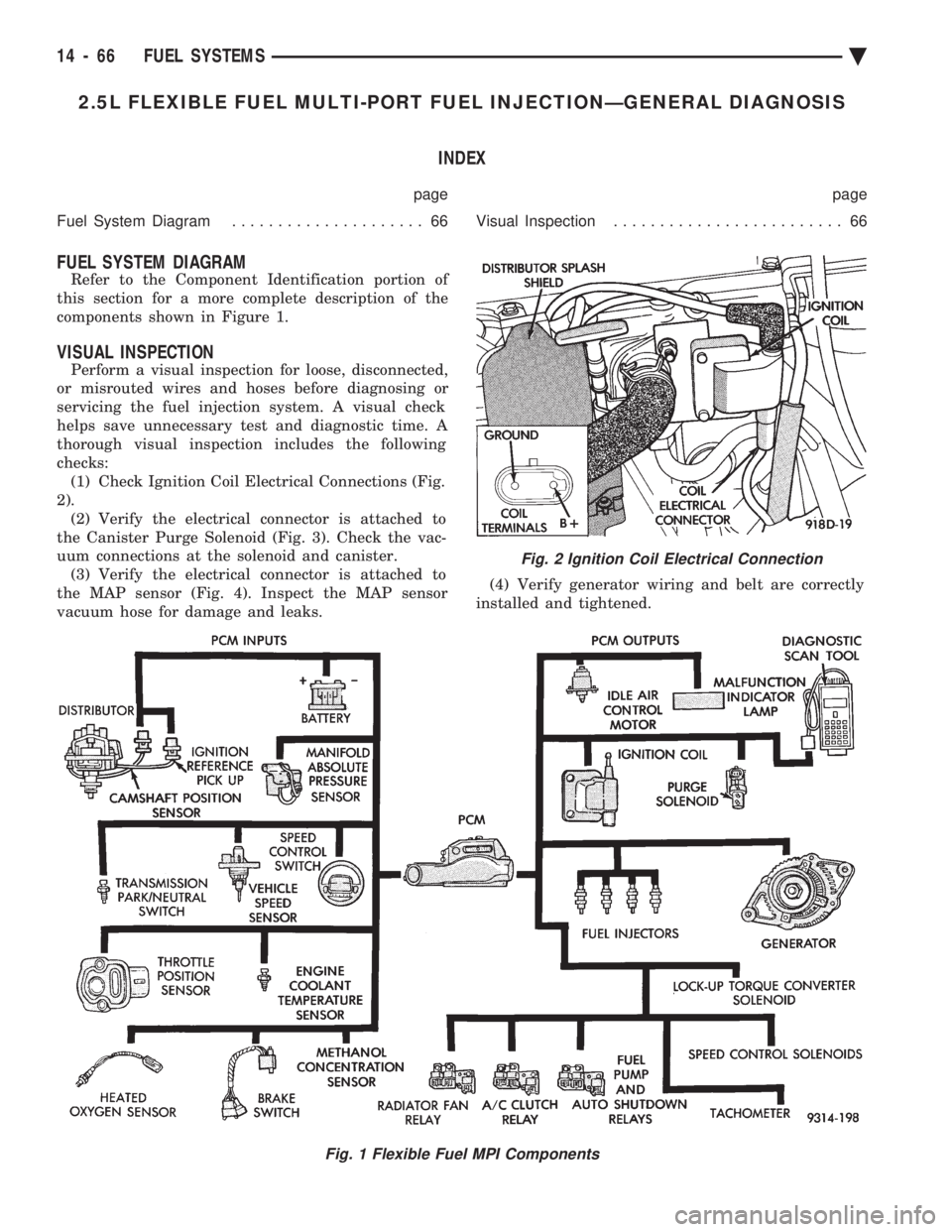
FUEL SYSTEM DIAGRAM
Refer to the Component Identification portion of
this section for a more complete description of the
components shown in Figure 1.
VISUAL INSPECTION
Perform a visual inspection for loose, disconnected,
or misrouted wires and hoses before diagnosing or
servicing the fuel injection system. A visual check
helps save unnecessary test and diagnostic time. A
thorough visual inspection includes the following
checks: (1) Check Ignition Coil Electrical Connections (Fig.
2). (2) Verify the electrical connector is attached to
the Canister Purge Solenoid (Fig. 3). Check the vac-
uum connections at the solenoid and canister. (3) Verify the electrical connector is attached to
the MAP sensor (Fig. 4). Inspect the MAP sensor
vacuum hose for damage and leaks. (4) Verify generator wiring and belt are correctly
installed and tightened.
Fig. 1 Flexible Fuel MPI Components
Fig. 2 Ignition Coil Electrical Connection
14 - 66 FUEL SYSTEMS Ä
Page 1811 of 2438
the PCM to store diagnostic trouble codes for other
systems. For example, a fuel pressure problem will not
register a fault directly, but could cause a rich or lean
condition. This could cause the PCM to store an oxygen
sensor diagnostic trouble code. Fuel Pressure - The vacuum assisted fuel pressure
regulator controls fuel system pressure. The PCM
cannot detect a clogged fuel pump inlet filter, clogged
in-line fuel filter, stuck open regulator, or a pinched
fuel supply or return line. However, these could result
in a rich or lean condition causing the PCM to store an
oxygen sensor diagnostic trouble code. Secondary Ignition Circuit - The PCM cannot
detect an inoperative ignition coil, fouled or worn spark
plugs, ignition cross firing, or open spark plug cables. Engine Timing - The PCM cannot detect an incor-
rectly indexed timing belt, camshaft sprocket and
crankshaft sprocket. However, these could result in a
rich or lean condition causing the PCM to store an
oxygen sensor diagnostic trouble code. Cylinder Compression - The PCM cannot detect
uneven, low, or high engine cylinder compression. Exhaust System - The PCM cannot detect a
plugged, restricted or leaking exhaust system. Fuel Injector Mechanical Malfunctions - The
PCM cannot determine if a fuel injector is clogged, the
needle is sticking or if the wrong injector is installed.
However, these could result in a rich or lean condition
causing the PCM to store an oxygen sensor diagnostic
trouble code. Excessive Oil Consumption - Although the PCM
monitors exhaust stream oxygen content when the
system is in closed loop, it cannot determine excessive
oil consumption. Throttle Body Air Flow - The PCM cannot detect a
clogged or restricted air cleaner inlet or filter element. Evaporative System - The PCM cannot detect a
disconnected (open vacuum line) restricted, plugged or
loaded evaporative purge canister. Vacuum Assist - The PCM cannot detect leaks or
restrictions in the vacuum circuits of vacuum assisted
engine control system devices. However, these could
cause the PCM to store a MAP sensor diagnostic
trouble code and cause a high idle condition. PCM System Ground - The PCM cannot determine
a poor system ground. However, one or more diagnostic
trouble codes may be generated as a result of this
condition. PCM Connector Engagement - The PCM may not
be able to determine spread or damaged connector
pins. However, it might store diagnostic trouble codes
as a result of spread connector pins.HIGH AND LOW LIMITS
The PCM compares input signal voltages from each
input device with established high and low limits for the
device. If the input voltage is not within limits and other
criteria are met, the PCM stores a diagnostic trouble code
in memory. Other diagnostic trouble code criteria might
include engine RPM limits or input voltages from other
sensors or switches that must be present before verifying
a diagnostic trouble code condition.
DIAGNOSTIC TROUBLE CODES
A diagnostic trouble code indicates the powertrain
control module (PCM) has recognized an abnormal
condition in the system. Abnormal conditions are usu-
ally shorted or open circuits.
The technician can display diagnostic trouble codes in
two ways. The first way is to cycle the ignition switch and
count the number of times the malfunction indicator lamp
(check engine lamp on the instrument panel) flashes on
and off. The DRBII scan tool provides the second method
of displaying diagnostic trouble codes. Diagnostic trouble
codes indicate the results of a circuit failure, but do not
directly identify the failed component.
For a list of Diagnostic Trouble Codes, refer to
the charts at the end of this section.
OBTAINING DIAGNOSTIC TROUBLE CODES
USING DRBII SCAN TOOL
WARNING: APPLY PARKING BRAKE AND/OR BLOCK
WHEELS BEFORE PERFORMING ANY TEST ON AN
OPERATING ENGINE. (1) Connect DRBII scan tool to the data link (diag-
nostic) connector located in the engine compartment,
next to the PCM (Fig. 1). (2) If possible, start the engine and cycle the A/C
switch if applicable. Shut off the engine. (3)
Turn the ignition switch on, access Read Fault
Screen. Record all the diagnostic trouble codes shown on
the DRBII scan tool. [Observe the malfunction indicator
lamp (check engine lamp) on the instrument panel. The
lamp should light for 2 seconds then go out (bulb check)].
To erase diagnostic trouble codes, use the Erase
Trouble Code data screen on the DRBII scan tool.
USING THE MALFUNCTION INDICATOR LAMP (1) Cycle the ignition key On - Off - On - Off - On
within 5 seconds. (2) Count the number of times the malfunction indi-
cator lamp (check engine lamp on the instrument
panel) flashes on and off. The number of flashes
represents the trouble code. There is a slight pause be-
Ä FUEL SYSTEMS 14 - 71
Page 1836 of 2438
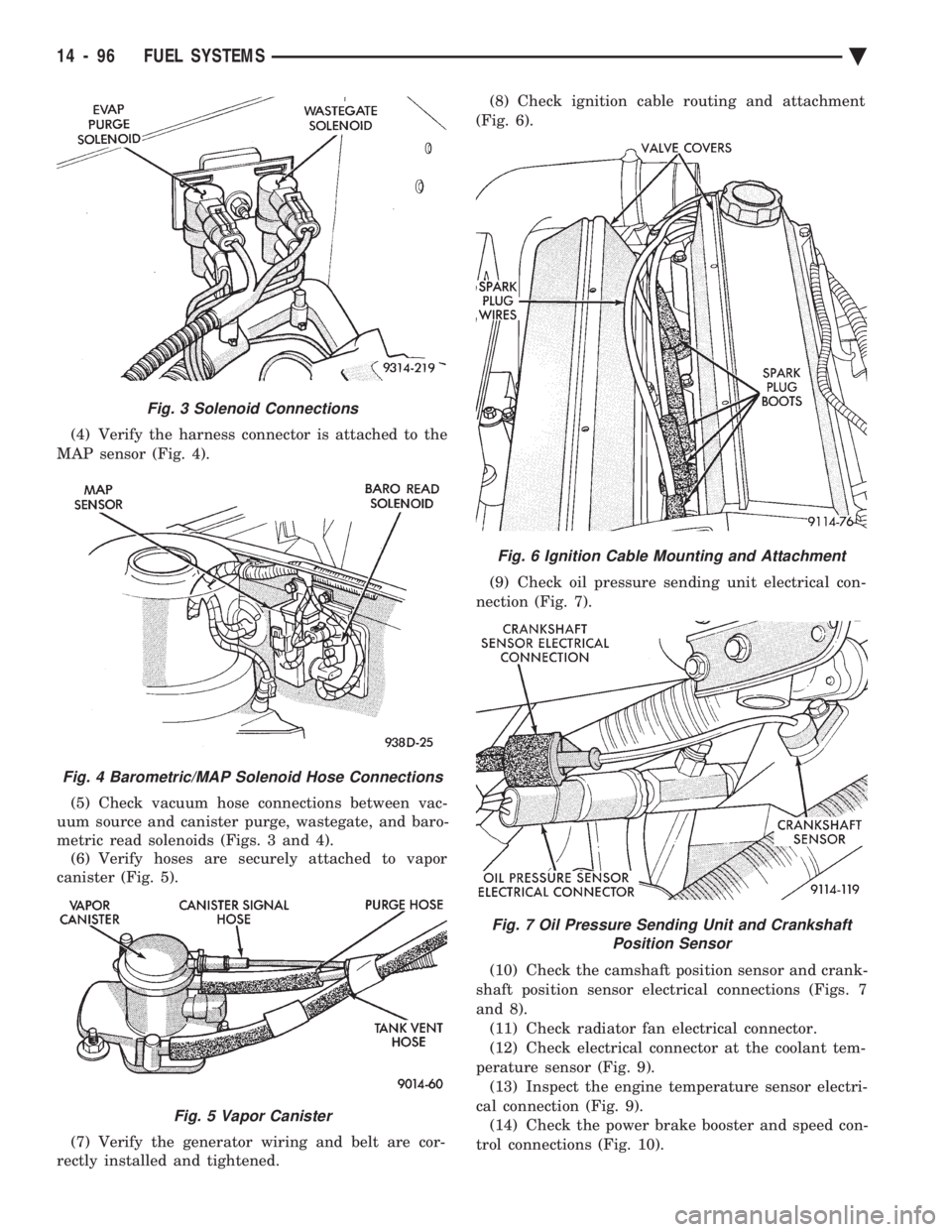
(4) Verify the harness connector is attached to the
MAP sensor (Fig. 4).
(5) Check vacuum hose connections between vac-
uum source and canister purge, wastegate, and baro-
metric read solenoids (Figs. 3 and 4). (6) Verify hoses are securely attached to vapor
canister (Fig. 5).
(7) Verify the generator wiring and belt are cor-
rectly installed and tightened. (8) Check ignition cable routing and attachment
(Fig. 6).
(9) Check oil pressure sending unit electrical con-
nection (Fig. 7).
(10) Check the camshaft position sensor and crank-
shaft position sensor electrical connections (Figs. 7
and 8). (11) Check radiator fan electrical connector.
(12) Check electrical connector at the coolant tem-
perature sensor (Fig. 9). (13) Inspect the engine temperature sensor electri-
cal connection (Fig. 9). (14) Check the power brake booster and speed con-
trol connections (Fig. 10).
Fig. 6 Ignition Cable Mounting and Attachment
Fig. 7 Oil Pressure Sending Unit and Crankshaft Position Sensor
Fig. 3 Solenoid Connections
Fig. 4 Barometric/MAP Solenoid Hose Connections
Fig. 5 Vapor Canister
14 - 96 FUEL SYSTEMS Ä
Page 1866 of 2438
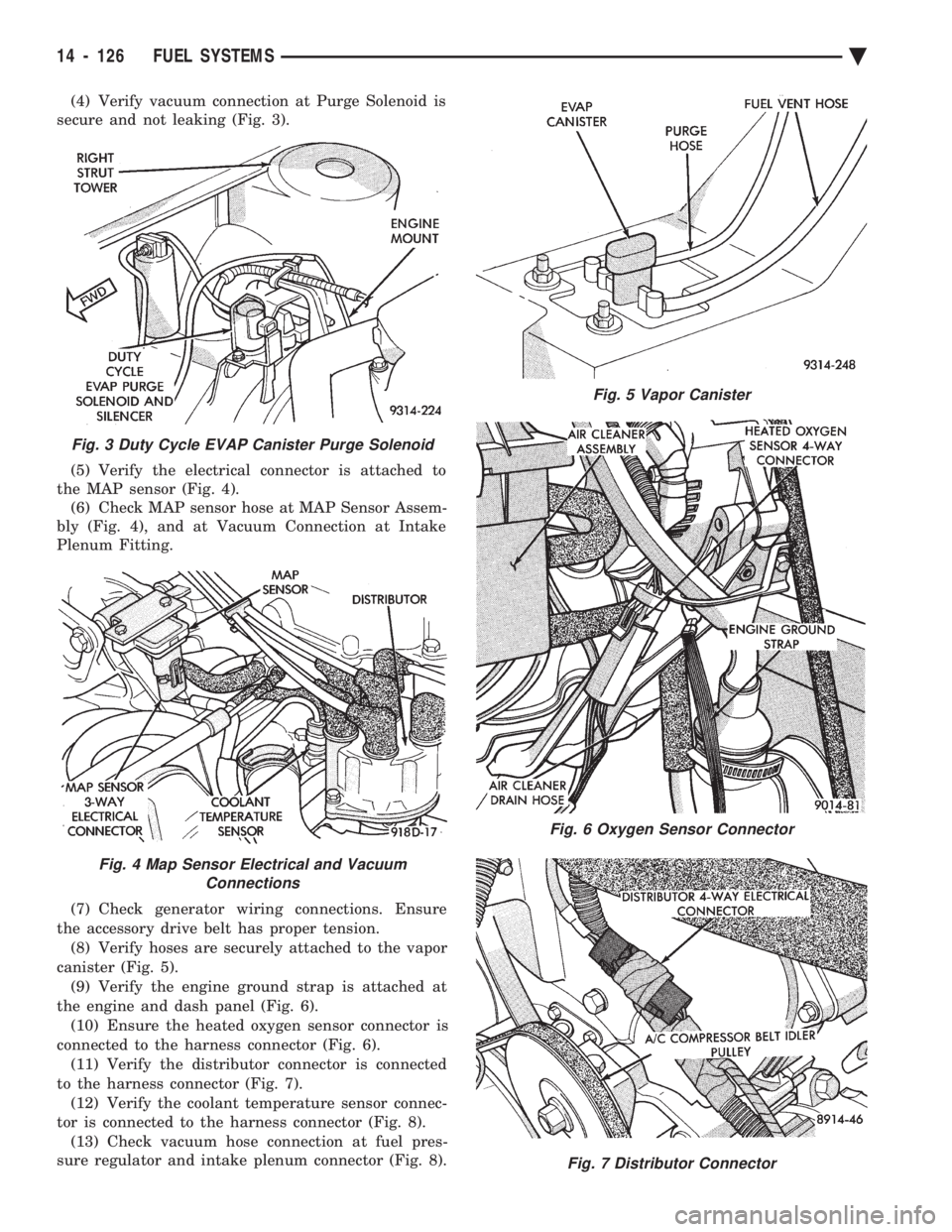
(4) Verify vacuum connection at Purge Solenoid is
secure and not leaking (Fig. 3).
(5) Verify the electrical connector is attached to
the MAP sensor (Fig. 4). (6) Check MAP sensor hose at MAP Sensor Assem-
bly (Fig. 4), and at Vacuum Connection at Intake
Plenum Fitting.
(7) Check generator wiring connections. Ensure
the accessory drive belt has proper tension. (8) Verify hoses are securely attached to the vapor
canister (Fig. 5). (9) Verify the engine ground strap is attached at
the engine and dash panel (Fig. 6). (10) Ensure the heated oxygen sensor connector is
connected to the harness connector (Fig. 6). (11) Verify the distributor connector is connected
to the harness connector (Fig. 7). (12) Verify the coolant temperature sensor connec-
tor is connected to the harness connector (Fig. 8). (13) Check vacuum hose connection at fuel pres-
sure regulator and intake plenum connector (Fig. 8).
Fig. 3 Duty Cycle EVAP Canister Purge Solenoid
Fig. 4 Map Sensor Electrical and Vacuum Connections
Fig. 5 Vapor Canister
Fig. 6 Oxygen Sensor Connector
Fig. 7 Distributor Connector
14 - 126 FUEL SYSTEMS Ä
Page 1900 of 2438
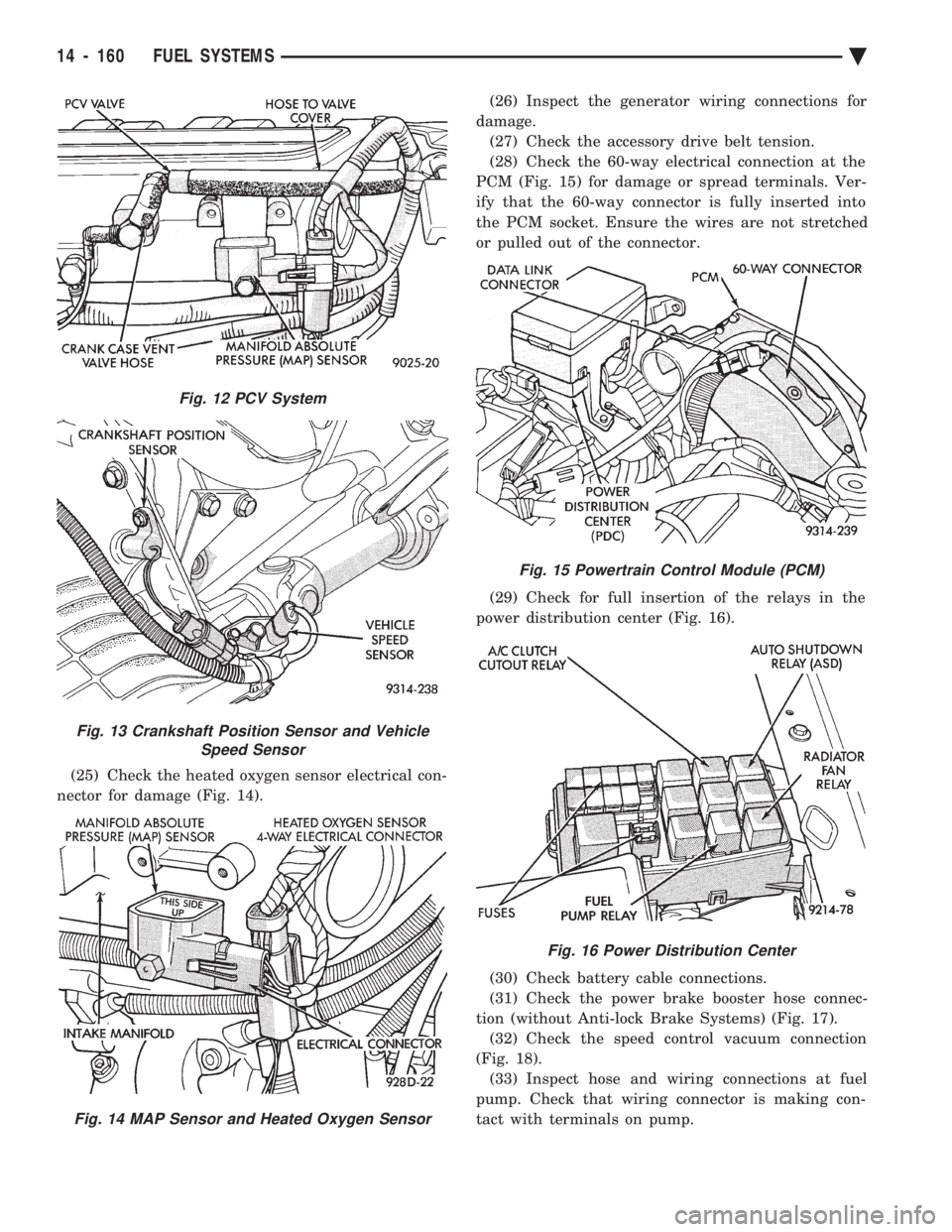
(25) Check the heated oxygen sensor electrical con-
nector for damage (Fig. 14). (26) Inspect the generator wiring connections for
damage. (27) Check the accessory drive belt tension.
(28) Check the 60-way electrical connection at the
PCM (Fig. 15) for damage or spread terminals. Ver-
ify that the 60-way connector is fully inserted into
the PCM socket. Ensure the wires are not stretched
or pulled out of the connector.
(29) Check for full insertion of the relays in the
power distribution center (Fig. 16).
(30) Check battery cable connections.
(31) Check the power brake booster hose connec-
tion (without Anti-lock Brake Systems) (Fig. 17). (32) Check the speed control vacuum connection
(Fig. 18). (33) Inspect hose and wiring connections at fuel
pump. Check that wiring connector is making con-
tact with terminals on pump.
Fig. 12 PCV System
Fig. 13 Crankshaft Position Sensor and Vehicle Speed Sensor
Fig. 14 MAP Sensor and Heated Oxygen Sensor
Fig. 15 Powertrain Control Module (PCM)
Fig. 16 Power Distribution Center
14 - 160 FUEL SYSTEMS Ä
Page 1917 of 2438
is made with the camshaft gear. While holding the
sensor in this position, install and tighten the retain-
ing bolt 12 N Im (105 in. lbs.) torque.
(2) Connect camshaft position sensor electrical con-
nector to harness connector. Position connector away
from the accessory belt.
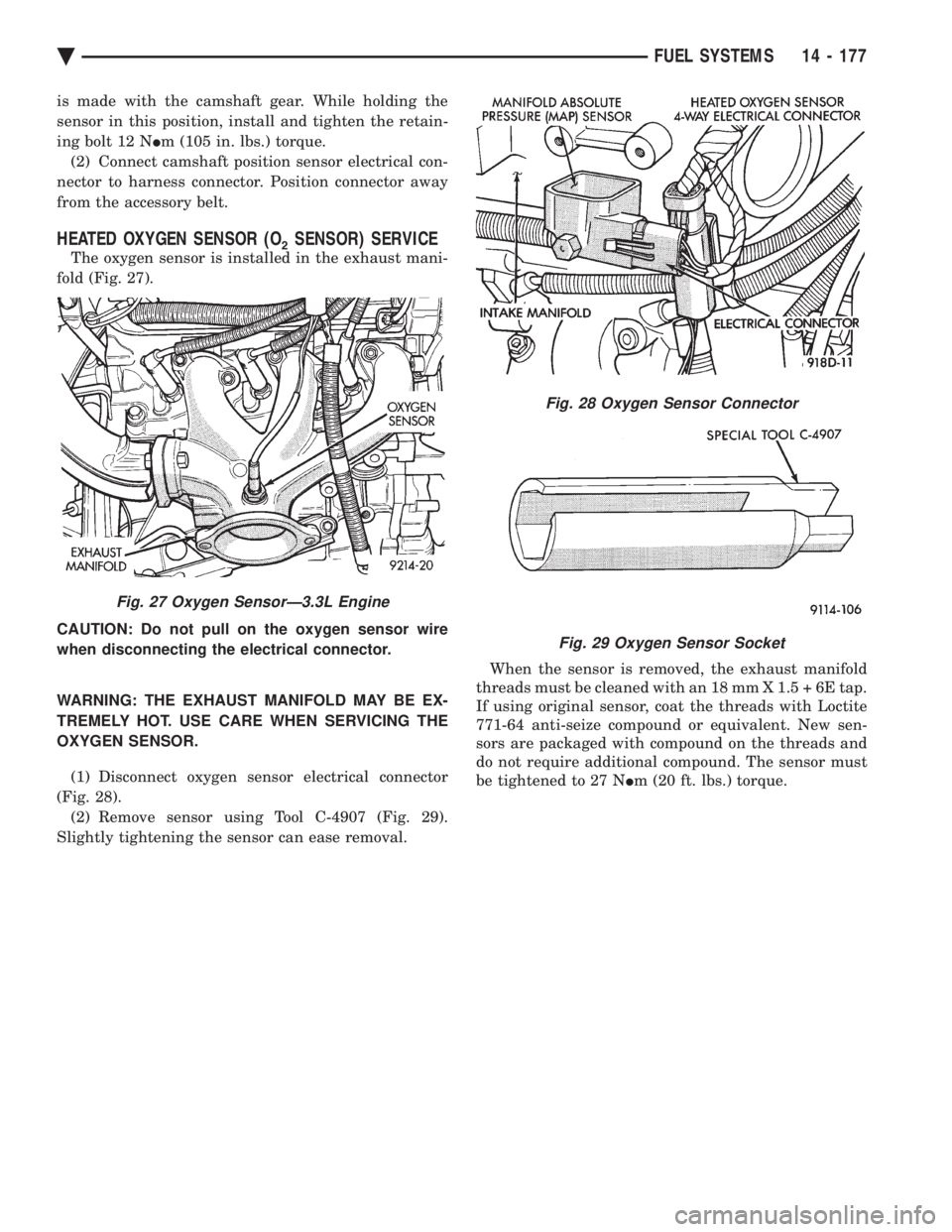
HEATED OXYGEN SENSOR (O2SENSOR) SERVICE
The oxygen sensor is installed in the exhaust mani-
fold (Fig. 27).
CAUTION: Do not pull on the oxygen sensor wire
when disconnecting the electrical connector.
WARNING: THE EXHAUST MANIFOLD MAY BE EX-
TREMELY HOT. USE CARE WHEN SERVICING THE
OXYGEN SENSOR.
(1) Disconnect oxygen sensor electrical connector
(Fig. 28). (2) Remove sensor using Tool C-4907 (Fig. 29).
Slightly tightening the sensor can ease removal. When the sensor is removed, the exhaust manifold
threads must be cleaned with an 18 mm X 1.5 + 6E tap.
If using original sensor, coat the threads with Loctite
771-64 anti-seize compound or equivalent. New sen-
sors are packaged with compound on the threads and
do not require additional compound. The sensor must
be tightened to 27 N Im (20 ft. lbs.) torque.
Fig. 27 Oxygen SensorÐ3.3L Engine
Fig. 28 Oxygen Sensor Connector
Fig. 29 Oxygen Sensor Socket
Ä FUEL SYSTEMS 14 - 177
Page 1919 of 2438
STEERING
CONTENTS
page page
ACUSTAR STANDARD AND TILT STEERING COLUMN ............................ 28
AUTOMATIC TRANSMISSION SHIFTER/IGNITION INTERLOCK .......................... 36
GENERAL INFORMATION .................. 1 POWER STEERING GEAR
................ 25
POWER STEERING PUMPS ................ 1
SPECIFICATIONS AND TIGHTENING REFERENCE .......................... 42
GENERAL INFORMATION
Safety goggles should be worn at all times
when working on any steering gear or pump. Throughout this group, references may be made to
a particular vehicle by letter or number designation.
A chart showing the breakdown of these designations
is included in the Introduction Section at the front of
this service manual. The power steering system consists of these four
major components. Power Steering Pump, Power
Steering Gear, Pressure Hose, and Return Line.
Turning of the steering wheel is converted into lin-
ear travel through the meshing of the helical pinion teeth with the rack teeth. Power assist steering is
provided by an open center, rotary type control valve.
It is used to direct oil from the power steering pump
to either side of the integral steering rack piston. Road feel is controlled by the diameter of a torsion
bar which initially steers the vehicle. As steering ef-
fort increases as in a turn, the torsion bar twists,
causing relative rotary motion between the rotary
valve body and valve spool. This movement directs
oil behind the integral rack piston, which in turn,
builds up hydraulic pressure and assists in the turn-
ing effort.
POWER STEERING PUMPS
INDEX
page page
Checking Power Steering Fluid Level .......... 9
Flow Control Valve Fitting O-Ring Seal ........ 23
General Information ........................ 1
Power Steering Hoses ..................... 11
Power Steering Pressure Switch ............. 10
Power Steering Pump Fluid Reservoirs ........ 22 Power Steering Pump Pressure Test
........... 9
Power Steering Pump Pulley Service .......... 20
Power Steering Pump Removal .............. 12
Power Steering Pump Service ................ 2
Power Steering PumpÐInitial Operation ....... 24
Steering Components Service Diagnosis ........ 2
GENERAL INFORMATION
Hydraulic pressure for operation of the power
steering gear is provided by a belt driven power
steering pump. The power steering pump is a con-
stant flow rate and displacement, vane type pump.
Different styles of Saginaw power steering pumps are
used depending on the engine application of the ve-
hicle. On all four cylinder and 3.0-liter V-6 applications
the Saginaw Ham Can power steering pump is used
(Fig. 1). On the 3.3 & 3.8-liter V-6 and Turbo III applica-
tions, different versions of the Saginaw T/C style
power steering pump is used (Fig. 2). The 3.3 & 3.8 liter V-6 engine application uses the T/C style power
steering pump with a remote mounted reservoir for
the power steering fluid. On the Turbo III application
of the T/C style power steering pump, the power
steering fluid reservoir is integral to the power steer-
ing pump. On the integral reservoir type pump (Fig. 1) the
pump housing and internal components are combined
with the reservoir to form a one-piece mechanism. The Saginaw T/C style power steering pump (Fig.
2), consists of the power steering pump internal com-
ponents and pump housing. The Saginaw T/C style
power steering pump though has no internal reser-
voir for the power steering fluid. Depending on vehi-
Ä STEERING 19 - 1