instrument panel CHEVROLET DYNASTY 1993 Owners Manual
[x] Cancel search | Manufacturer: CHEVROLET, Model Year: 1993, Model line: DYNASTY, Model: CHEVROLET DYNASTY 1993Pages: 2438, PDF Size: 74.98 MB
Page 585 of 2438
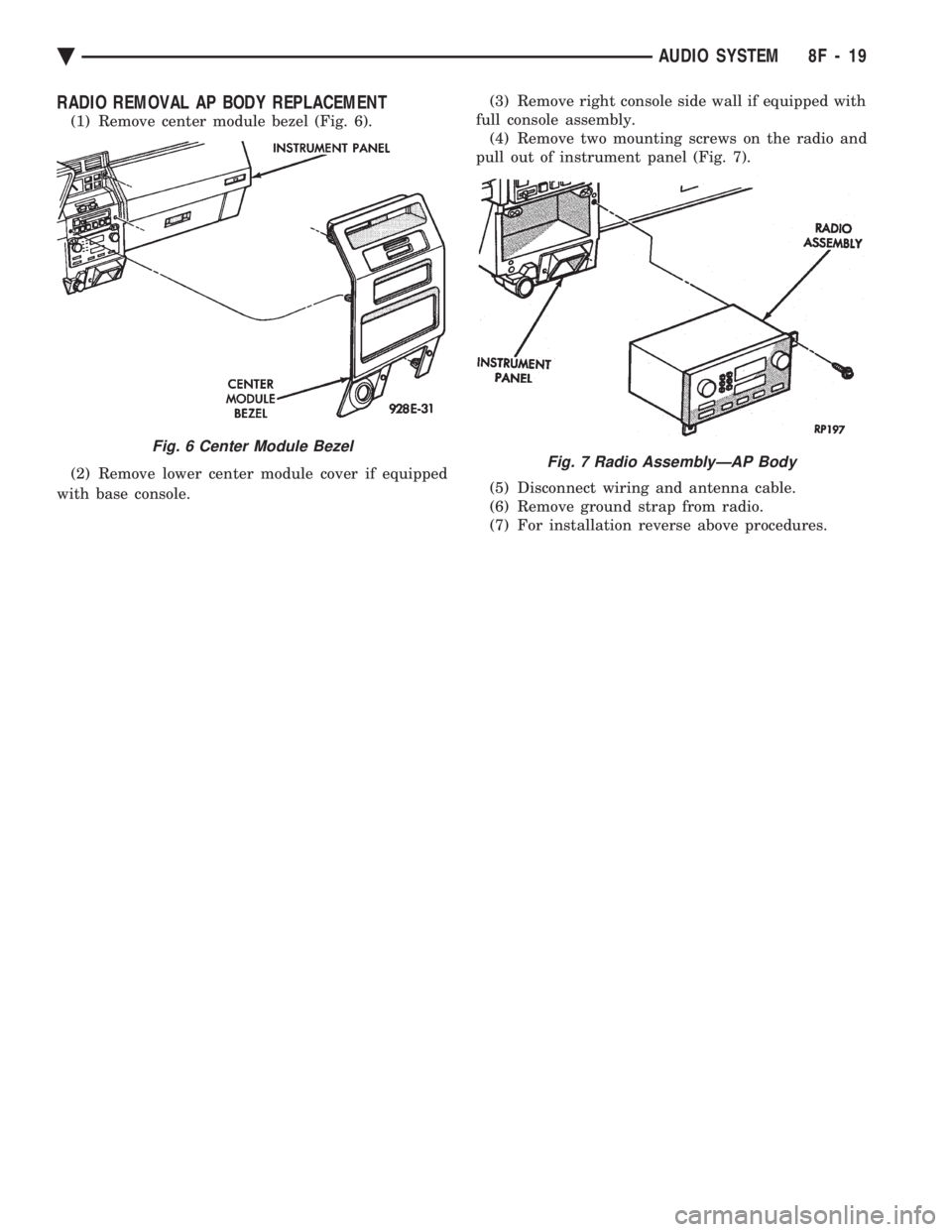
RADIO REMOVAL AP BODY REPLACEMENT
(1) Remove center module bezel (Fig. 6).
(2) Remove lower center module cover if equipped
with base console. (3) Remove right console side wall if equipped with
full console assembly. (4) Remove two mounting screws on the radio and
pull out of instrument panel (Fig. 7).
(5) Disconnect wiring and antenna cable.
(6) Remove ground strap from radio.
(7) For installation reverse above procedures.
Fig. 6 Center Module Bezel
Fig. 7 Radio AssemblyÐAP Body
Ä AUDIO SYSTEM 8F - 19
Page 590 of 2438
SPEAKERS INDEX
page page
AA Body ............................... 24
AC and AY Bodies ....................... 27
AC and AY Bodies ....................... 24
AG and AJ Bodies ....................... 25 AP Body
............................... 26
Infinity Remote Amplifier ................... 28
Relay/ChokeÐInfinity Speaker ............... 29
AA BODY
FRONT DOOR MOUNTED SPEAKER
REPLACEMENT
(1) Remove power window switch.
(2) Pry out on speaker grille at two locations on
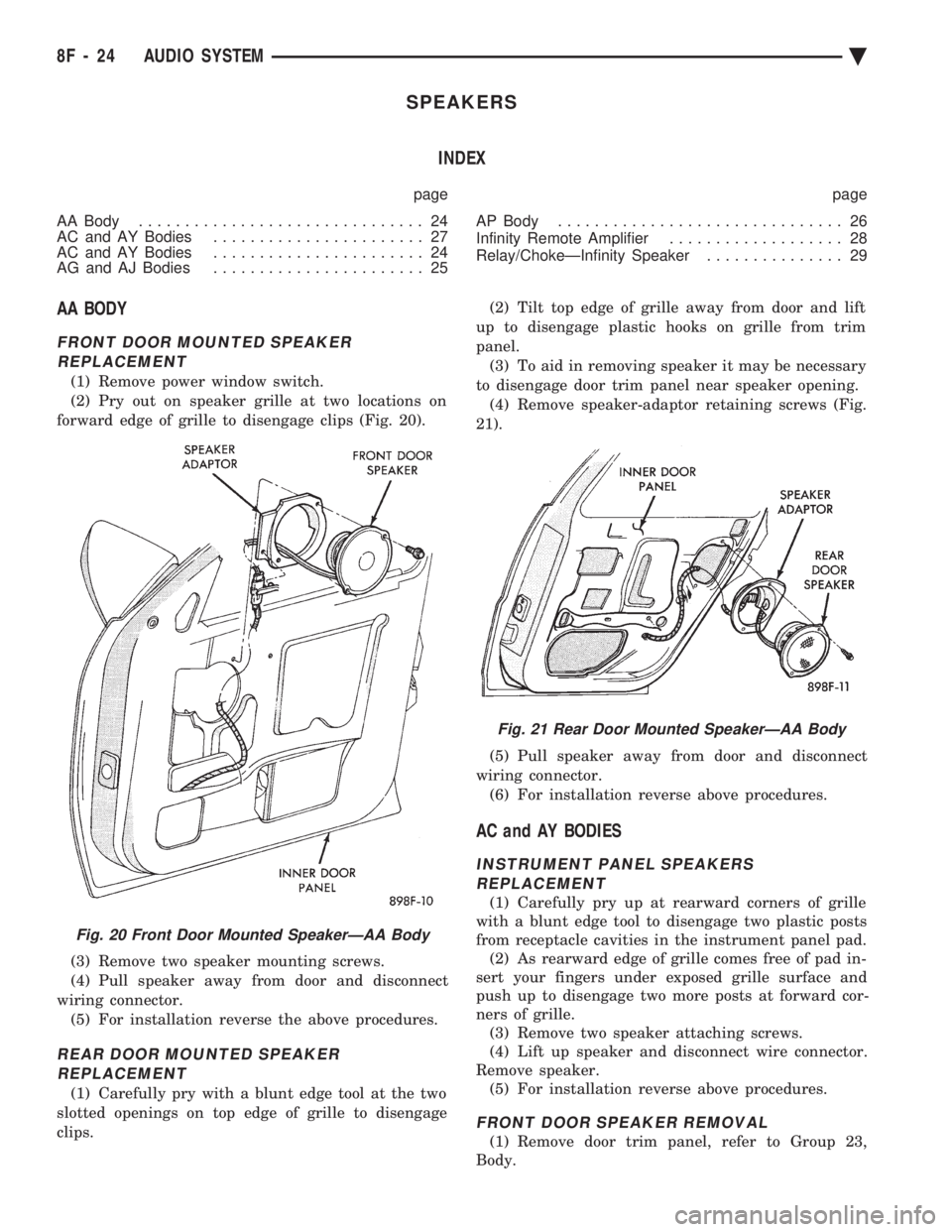
forward edge of grille to disengage clips (Fig. 20).
(3) Remove two speaker mounting screws.
(4) Pull speaker away from door and disconnect
wiring connector. (5) For installation reverse the above procedures.
REAR DOOR MOUNTED SPEAKERREPLACEMENT
(1) Carefully pry with a blunt edge tool at the two
slotted openings on top edge of grille to disengage
clips. (2) Tilt top edge of grille away from door and lift
up to disengage plastic hooks on grille from trim
panel. (3) To aid in removing speaker it may be necessary
to disengage door trim panel near speaker opening. (4) Remove speaker-adaptor retaining screws (Fig.
21).
(5) Pull speaker away from door and disconnect
wiring connector. (6) For installation reverse above procedures.
AC and AY BODIES
INSTRUMENT PANEL SPEAKERSREPLACEMENT
(1) Carefully pry up at rearward corners of grille
with a blunt edge tool to disengage two plastic posts
from receptacle cavities in the instrument panel pad. (2) As rearward edge of grille comes free of pad in-
sert your fingers under exposed grille surface and
push up to disengage two more posts at forward cor-
ners of grille. (3) Remove two speaker attaching screws.
(4) Lift up speaker and disconnect wire connector.
Remove speaker. (5) For installation reverse above procedures.
FRONT DOOR SPEAKER REMOVAL
(1) Remove door trim panel, refer to Group 23,
Body.
Fig. 20 Front Door Mounted SpeakerÐAA Body
Fig. 21 Rear Door Mounted SpeakerÐAA Body
8F - 24 AUDIO SYSTEM Ä
Page 591 of 2438
(2) Remove two speaker attaching screws and dis-
connect wire connector. (3) Remove speaker.
(4) For installation reverse above procedures.
REAR SHELF SPEAKERS REMOVAL
(1) Remove rear shelf, refer to Group 23, Body.
(2) Remove two speaker attaching screws and dis-
connect wire connector. (3) Remove speaker.
(4) For installation reverse above procedures.
AG and AJ BODIES
INSTRUMENT PANEL SPEAKERS REPLACEMENT
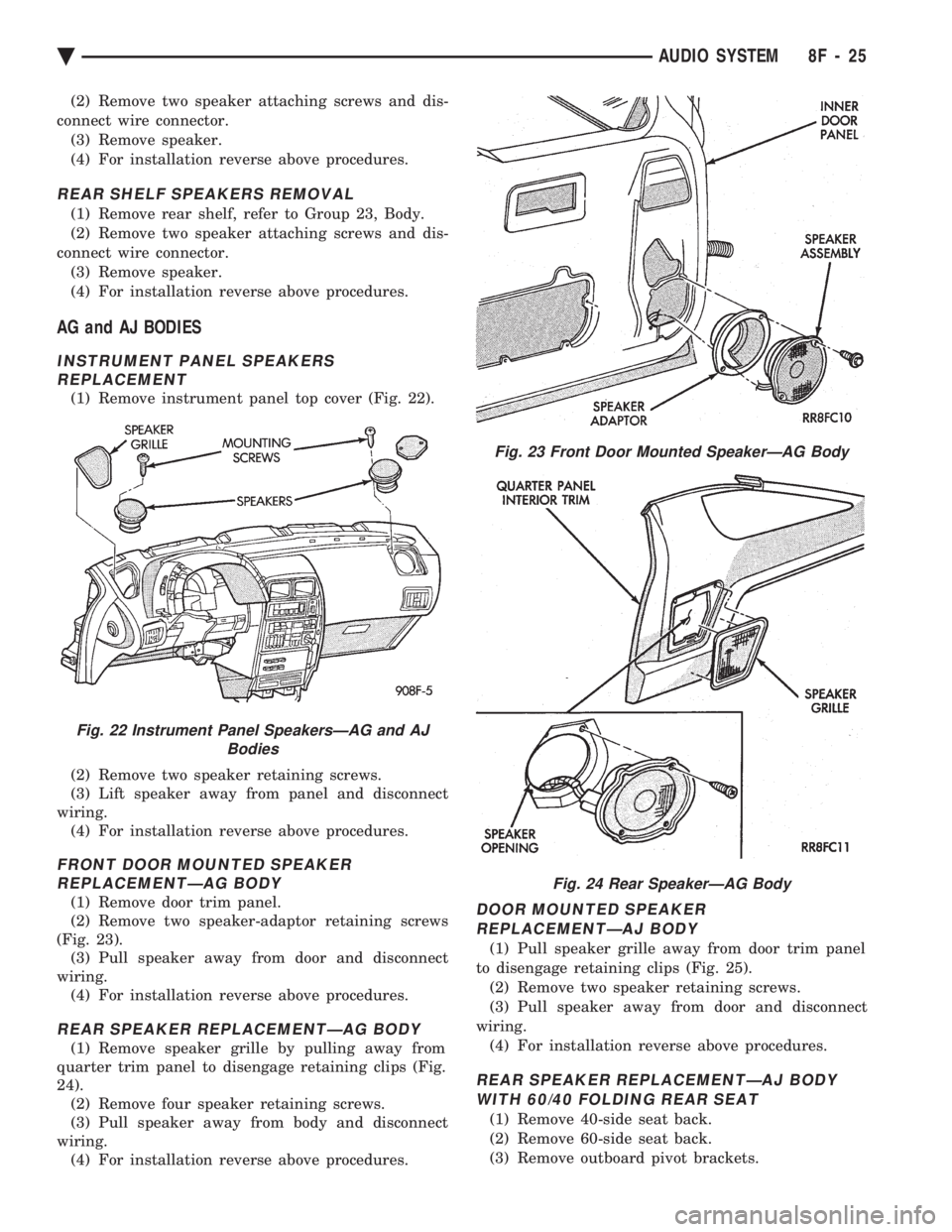
(1) Remove instrument panel top cover (Fig. 22).
(2) Remove two speaker retaining screws.
(3) Lift speaker away from panel and disconnect
wiring. (4) For installation reverse above procedures.
FRONT DOOR MOUNTED SPEAKERREPLACEMENTÐAG BODY
(1) Remove door trim panel.
(2) Remove two speaker-adaptor retaining screws
(Fig. 23). (3) Pull speaker away from door and disconnect
wiring. (4) For installation reverse above procedures.
REAR SPEAKER REPLACEMENTÐAG BODY
(1) Remove speaker grille by pulling away from
quarter trim panel to disengage retaining clips (Fig.
24). (2) Remove four speaker retaining screws.
(3) Pull speaker away from body and disconnect
wiring. (4) For installation reverse above procedures.
DOOR MOUNTED SPEAKER
REPLACEMENTÐAJ BODY
(1) Pull speaker grille away from door trim panel
to disengage retaining clips (Fig. 25). (2) Remove two speaker retaining screws.
(3) Pull speaker away from door and disconnect
wiring. (4) For installation reverse above procedures.
REAR SPEAKER REPLACEMENTÐAJ BODYWITH 60/40 FOLDING REAR SEAT
(1) Remove 40-side seat back.
(2) Remove 60-side seat back.
(3) Remove outboard pivot brackets.
Fig. 22 Instrument Panel SpeakersÐAG and AJ Bodies
Fig. 23 Front Door Mounted SpeakerÐAG Body
Fig. 24 Rear SpeakerÐAG Body
Ä AUDIO SYSTEM 8F - 25
Page 593 of 2438
REAR MOUNTED SPEAKER REPLACEMENTÐAP BODY
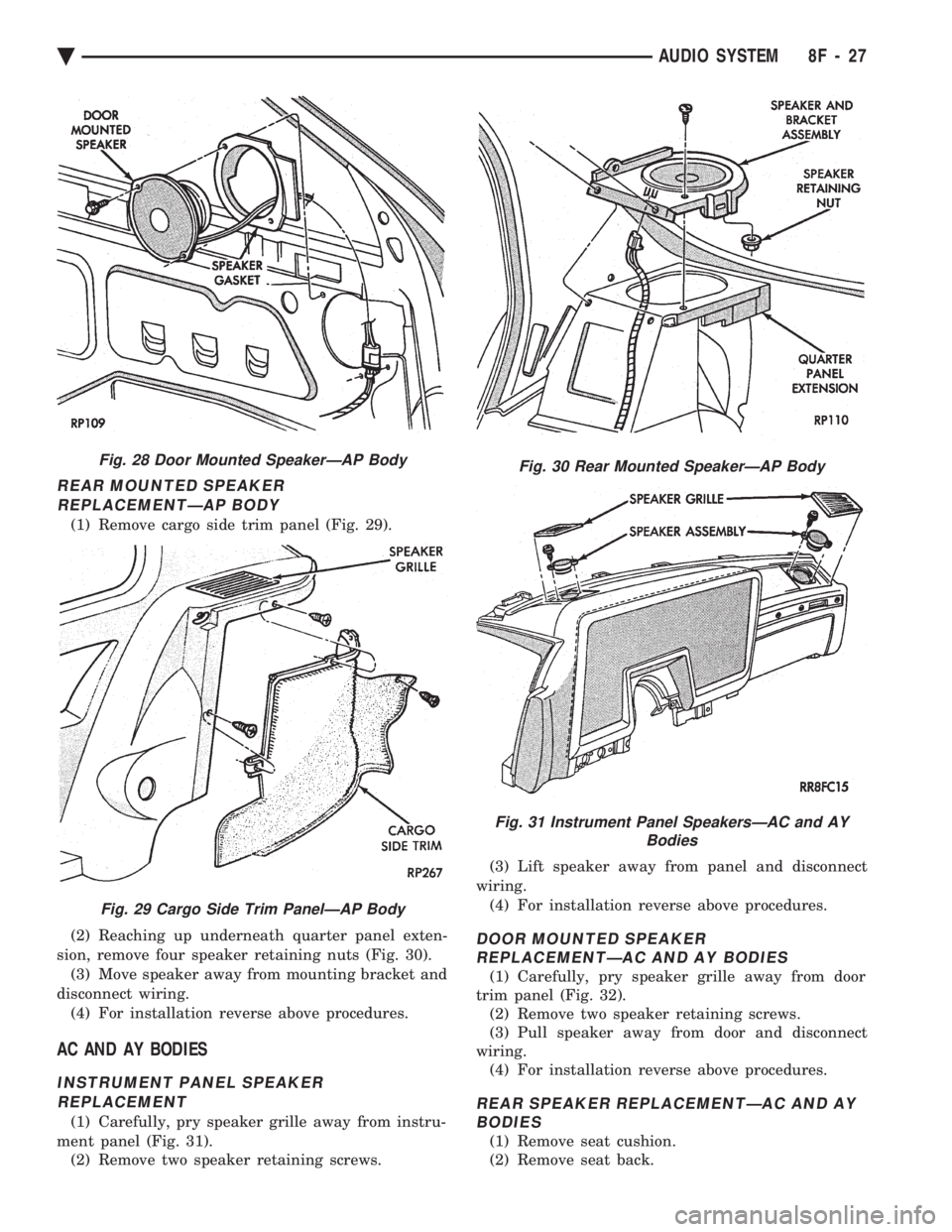
(1) Remove cargo side trim panel (Fig. 29).
(2) Reaching up underneath quarter panel exten-
sion, remove four speaker retaining nuts (Fig. 30). (3) Move speaker away from mounting bracket and
disconnect wiring. (4) For installation reverse above procedures.
AC AND AY BODIES
INSTRUMENT PANEL SPEAKERREPLACEMENT
(1) Carefully, pry speaker grille away from instru-
ment panel (Fig. 31). (2) Remove two speaker retaining screws. (3) Lift speaker away from panel and disconnect
wiring. (4) For installation reverse above procedures.
DOOR MOUNTED SPEAKER REPLACEMENTÐAC AND AY BODIES
(1) Carefully, pry speaker grille away from door
trim panel (Fig. 32). (2) Remove two speaker retaining screws.
(3) Pull speaker away from door and disconnect
wiring. (4) For installation reverse above procedures.
REAR SPEAKER REPLACEMENTÐAC AND AYBODIES
(1) Remove seat cushion.
(2) Remove seat back.
Fig. 28 Door Mounted SpeakerÐAP Body
Fig. 29 Cargo Side Trim PanelÐAP Body
Fig. 30 Rear Mounted SpeakerÐAP Body
Fig. 31 Instrument Panel SpeakersÐAC and AY Bodies
Ä AUDIO SYSTEM 8F - 27
Page 596 of 2438
COMPACT DISC PLAYER
WARNING: USE OF THE CONTROLS, ADJUST-
MENTS, OR SERVICE PROCEDURES NOT SPECI-
FIED HERE OR IN THE OWNER MANUAL MAY
RESULT IN HAZARDOUS RADIATION EXPOSURE.
REPAIR PROCEDURES SHOULD ONLY BE PER-
FORMED BY A TRAINED TECHNICIAN.
DIAGNOSIS TEST
Power to the compact disc player is supplied by the
radio through the CD interface cable. The compact
disc player will only work with the radio system
turned ON. When a compact disc is inserted with the
label side facing up, the disc is automatically loaded
and will begin to play. The CD player may eject the disc with a display of
E under the following conditions:
² The surface of the disc is dirty or wet
² The disc was inserted with the label side facing
down
² The disc is defective
² The CD player may skip or mute while playing a
disc under severe vibration conditions example pot
holes, railroad tracks, etc.
² If the CD player becomes too hot at temperatures
above 60ÉC (140 ÉF) the CD player will shut down
with a display of HOT until it cools down. Refer to
the Audio Diagnostic Charts.
COMPACT DISC PLAYER REPLACEMENT
With intergral compact disc player refer to Radio
Removal.
AJ BODY
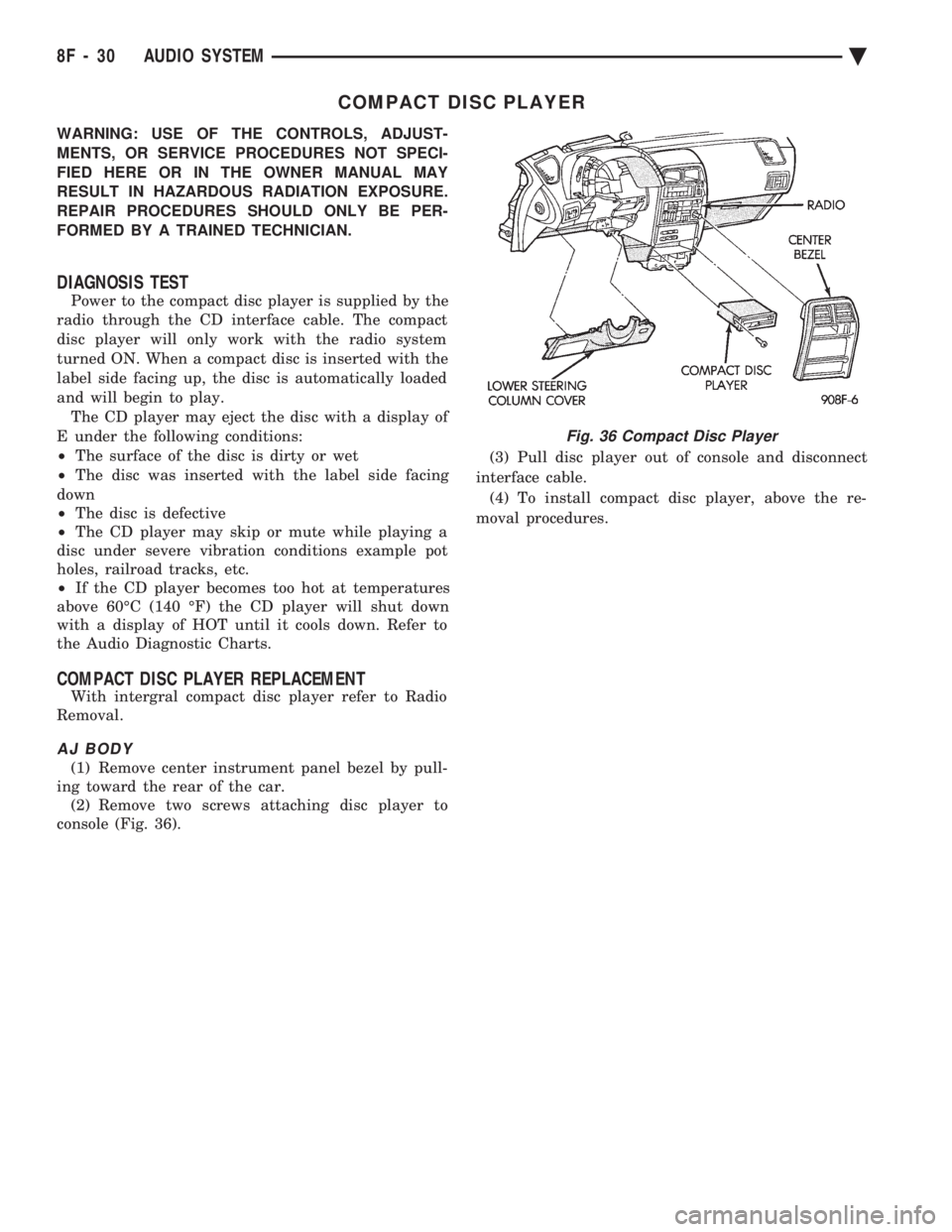
(1) Remove center instrument panel bezel by pull-
ing toward the rear of the car. (2) Remove two screws attaching disc player to
console (Fig. 36). (3) Pull disc player out of console and disconnect
interface cable. (4) To install compact disc player, above the re-
moval procedures.
Fig. 36 Compact Disc Player
8F - 30 AUDIO SYSTEM Ä
Page 613 of 2438
TURN SIGNALS AND HAZARD WARNING FLASHER
CONTENTS
page page
AG AND AJ BODIES ..................... 1
CHIME FUNCTIONÐAC, AG, AJ AND AY .... 1
DUAL-FUNCTION SWITCHÐAG AND AJ BODIES.5
GENERAL INFORMATION .................. 1
HAZARD WARNING SYSTEM .............. 1
MULTI-FUNCTION SWITCHÐAA, AC, AP AND AY BODIES .............................. 2 REMOTE TURN SIGNAL SWITCH REMOVALÐAG
AND AJ BODIES ....................... 5
TESTING PROCEDURES ................... 2
TURN SIGNAL AND HAZARD WARNING FLASHER LOCATION ............................ 6
TURN SIGNAL RELAYSÐAG AND AJ BODIES . 6
GENERAL INFORMATION
WARNING: ON VEHICLES EQUIPPED WITH AIR-
BAG, SEE GROUP 8M, RESTRAINT SYSTEMS FOR
AIRBAG REMOVAL PROCEDURES.
TURN SIGNALSÐAC, AY, AA AND AP BODIES
The turn signals are part of the multi-function switch.
Which contains electrical circuitry for turn signal, cor-
nering lamps, hazard warning, headlamp beam select,
headlamp optical horn, windshield wiper, pulse wipe
and windshield washer switching. The integrated switch
assembly is mounted to the left hand side of the steer-
ing column. When the driver wishes to signal his inten-
tions to change direction of travel, he moves the lever
upward to cause the right signals to flash and down-
ward to cause the left signals to flash. After completion
of a turn the system is deactivated automatically. As
the steering wheel returns to the straight ahead posi-
tion, a canceling cam of two lobes molded to the clock-
spring mechanism comes in contact with the cancel
actuator on the turn signal multi-function switch as-
sembly. Either cam lobe, pushing on the cancel actua-
tor, returns the switch to the off position. If only momentary signaling such as indication of a
lane change is desired, the switch is actuated to a left
or right intermediate detent position. In this position
the signal lamps flash as described above, but the
switch returns to the OFF position as soon as the lever
is released.
When the system is activated, 1 of 2 indicator
lamps mounted in the instrument cluster flashes in
unison with the turn signal lamps, indicating to the
driver that the system is operating.
AG AND AJ BODIES
The turn signals are actuated with lever on the left
side of the instrument panel switch pod. When the
driver wishes to signal his intentions to change di- rection of travel, he moves the lever upward to cause
the right signals to flash and downward to cause the
left signals to flash. After completion of a turn the system is deacti-
vated automatically. The cancellation switch in the
steering column sends a signal to a remote turn sig-
nal switch in the switch pod to cancel the turn signal
function. As the steering wheel returns to the
straight ahead position from a turn, a cancel cam
which is located on the steering wheel contacts a
cancel flipper located on the cancellation switch.
When the flipper is contacted by the cancel cam in
the proper rotational direction, the cancel switch
sends a signal to the remote turn signal switch. If only momentary signaling such as indication of a
lane change is desired, the switch is actuated to a
left or right intermediate detent position. In this po-
sition the signal lamps flash as described above, but
the switch returns to the OFF position as soon as the
lever is released. When the system is activated, 1 of 2 indicator
lamps mounted in the instrument cluster flashes in
unison with the turn signal lamps, indicating to the
driver that the system is operating.
HAZARD WARNING SYSTEM
The hazard warning system is actuated by a push
button located on the top of the steering column be-
tween the steering wheel and the instrument panel.
The hazard switch is identified with a double trian-
gle on top of the button. Push and release the button
to turn the hazard function ON or OFF. The button
will move out from the steering column in the ON
position and will remain in toward the column in the
OFF position.
CHIME FUNCTIONÐAC, AG, AJ AND AY
The chime will sound after the vehicle has traveled
a distance of 0.6 miles at a speed above 15 miles per
hour.
Ä TURN SIGNALS AND HAZARD WARNING FLASHER 8J - 1
Page 614 of 2438
TESTING PROCEDURES
MULTI-FUNCTION SWITCH TESTS AA, AC, AP, AND AY BODIES
The multi-function switch contains electrical cir-
cuitry for turn signal, cornering lamps (optional),
hazard warning, headlamp beam select, headlamp
optical horn, windshield wiper, pulse wipe, and wind-
shield washer switching. This integrated switch as-
sembly is mounted to the left hand side of the
steering column. Should any function of the switch
fail, the entire switch assembly must be replaced. Re-
fer to Fig. 1 for diagnosis. To test the switch, first disconnect the negative
battery cable, then remove the upper and lower col-
umn covers to gain access to the switch connector.
Remove switch connector. Using an ohmmeter, test
for continuity (no resistance) between the terminals
of the switch as shown in the following continuity
charts (Fig 2 or 3).
DUAL-FUNCTION SWITCH TESTSÐAG AND AJ BODIES
The dual-function switch contains electrical cir-
cuitry for hazard warning switching, and circuitry
and electronics for turn signal cancellation. The
switch assembly is mounted to the left hand side of
the steering column. To test the hazard warning portion of the switch,
first disconnect the negative battery cable, then re-
move the upper and lower steering column covers to
gain access to the switch connector. Remove switch
connector (Fig. 4). Using an ohmmeter, test for con-
tinuity between the terminals of the switch as shown
in the following continuity chart (Fig. 5). To test the cancellation portion of the switch:
(1) Reconnect battery and switch connector (Fig.
5). (2) Connect voltmeter positive lead (+) to pin 8
and negative lead (-) to ground. (3) Place ignition switch to the ON position. Volt-
meter should read battery voltage. If no voltage is
present, check feed wire to pin 8. If battery voltage is
present continue with switch test.
RIGHT CANCELLATION TEST (1) Connect one side of a jumper wire to pin 3 and
the other end of jumper wire to ground. (2) Connect the positive lead (+) of a voltmeter to
pin 5 and the negative lead (-) to ground.
CAUTION: Do not allow pin 5 to become grounded
during test, switch failure will result.
(3) With the ignition switch in the ON position,
push the cancellation pawl down and read the volt-
meter. (4) The voltmeter should show at least 9 volts. (5) If voltage is 0 to 8 volts the cancellation switch
is defective. If voltage is 9 volts or more the cancel-
lation switch is working correctly.
LEFT CANCELLATION TEST
(1) Connect one side of a jumper wire to pin 4 and
the other end of jumper wire to ground. (2) Connect the positive lead (+) of a voltmeter to
pin 5 and the negative lead (-) to ground.
CAUTION: Do not allow pin 5 to become grounded
during test, switch failure will result.
(3) With the ignition switch in the ON position,
push the cancellation pawl up and read the voltme-
ter. (4) The voltmeter should show at least 9 volts.
(5) If voltage is 0 to 8 volts the cancellation switch
is defective. If voltage is 9 volts or more the cancel-
lation switch is working correctly.
REMOTE TURN SIGNAL SWITCH TESTÐAA AND AJ BODIES
The remote turn signal switch is located on the left
side of the instrument panel switch pod. To test, re-
move switch pod assembly from instrument panel.
Using an ohmmeter, test for continuity between the
terminals of the switch as shown in the following
continuity chart (Fig. 6). The white 7 way connector
next to the 14 way connector must be connected
when performing continuity checks.
CANCELLATION SOLENOID TESTÐAG AND AJ BODIES
To test the turn signal cancellation solenoid:
(1) Remove switch pod from instrument panel.
(2) Connect one end of a jumper wire to the posi-
tive terminal of the battery, the other end to pin 6 of
the turn signal switch 14 way connector. (3) Place turn signal switch in the left turn mode.
(4) Take a second jumper wire and connect one end
to a good ground. Momentarily touch the other end of
the jumper wire to pin 11 or 14. The solenoid should
energize, and return the switch to its center OFF po-
sition. (5) Place turn signal switch in the right turn
mode. (6) Repeat step 4. The solenoid should energize,
and return the switch to its center OFF position. (7) If switch does not return to center in either di-
rection, the switch is defective.
MULTI-FUNCTION SWITCHÐAA, AC, AP AND AY
BODIES
REMOVAL
(1) Disconnect negative battery cable.
(2) Tilt column only remove tilt lever.
8J - 2 TURN SIGNALS AND HAZARD WARNING FLASHER Ä
Page 618 of 2438

(5) For installation reverse above procedure.
(6) Check for proper operation of all components
which are controlled by the pod mounted switch.
TURN SIGNAL AND HAZARD WARNING FLASHER
LOCATION
AA, AC, AP AND AY BODIES
The turn signal flasher and the hazard warning
flasher are two separate plug-in type units. On AC and AY both flashers are on the relay mod-
ule (Fig. 10).
On AA and AP Bodies the hazard flasher is located
on the relay module (Fig. 11). The turn signal flasher
is on the driver's side of A/C duct for AA Body (Fig.
12) and center A/C duct for AP Body.
AG AND AJ BODIES
The turn signal flasher and the hazard warning
flasher are combined into one unit called a combina-
tion flasher (combo-flasher). The combo-flasher con-
trols the flashing of the hazard warning system and the turn signal system. An inoperative bulb or in-
complete turn signal circuit will result in an increase
in flasher speed. The combo-flasher is located under the instrument
panel, right of the steering column and is clipped on
the A/C distribution duct. The combo-flasher is yel-
low in color for ease of identification.TURN SIGNAL RELAYSÐAG AND AJ BODIES
The AG and AJ models are equipped with four
turn signal relays.
Fig. 9 Remote Turn Signal SwitchÐAG and AJ Bodies
Fig. 10 Turn Signal and Hazard WarningFlasherÐAC and AY Bodies
Fig. 11 Hazard Warning FlasherÐAA and AP Bodies
Fig. 12 Turn Signal FlasherÐAA Body
8J - 6 TURN SIGNALS AND HAZARD WARNING FLASHER Ä
Page 619 of 2438

One relay controls the right rear turn signal and
stop lamp. The second relay controls the left rear
turn signal and stop lamp. The third relay controls
the right front turn signal. The fourth relay controls
the left front turn signal. The turn signal relays are located in the relay
bank, underneath the driver's side of the instrument
panel. The four turn signal relays are identical and
can be interchanged. The turn signal relays do not cycle on and off with
the turn signal lamp. Their function is to complete the turn signal circuit when the turn signal is
switched on. Turn signal cycling is done by the com-
bination flasher. To test the relay, remove the suspect relay and
switch it with 1 of the other 3 turn signal relays. If
the problem follows the relay, replace that relay. If
the problem remains in the same circuit, the relay is
not the problem. Refer to Group 8W, Wiring Dia-
grams.
Ä TURN SIGNALS AND HAZARD WARNING FLASHER 8J - 7
Page 635 of 2438
WIPER SWITCH SERVICE PROCEDURE
WARNING: ON VEHICLES EQUIPPED WITH AIR-
BAG, SEE GROUP 8M, RESTRAINT SYSTEMS FOR
STEERING WHEEL OR COLUMN REMOVAL PROCE-
DURES.
AC AND AY BODIES
The wiper switch is part of the multi-function
switch assembly. If the wiper switch fails, the multi-
function switch must be replaced. Refer to Group 8J,
Turn Signals and Hazard Warning Flasher for multi-
function switch service procedure.
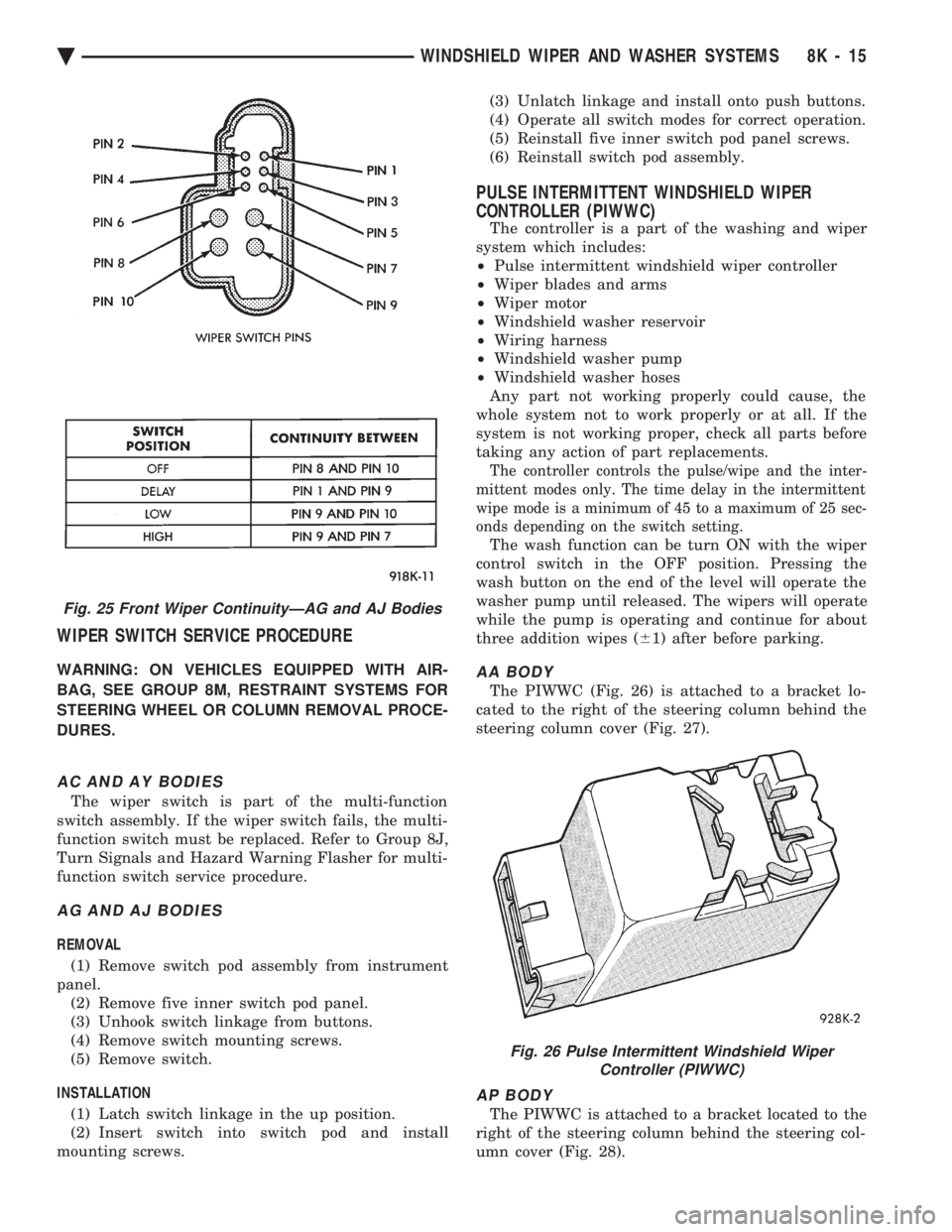
AG AND AJ BODIES
REMOVAL
(1) Remove switch pod assembly from instrument
panel. (2) Remove five inner switch pod panel.
(3) Unhook switch linkage from buttons.
(4) Remove switch mounting screws.
(5) Remove switch.
INSTALLATION (1) Latch switch linkage in the up position.
(2) Insert switch into switch pod and install
mounting screws. (3) Unlatch linkage and install onto push buttons.
(4) Operate all switch modes for correct operation.
(5) Reinstall five inner switch pod panel screws.
(6) Reinstall switch pod assembly.
PULSE INTERMITTENT WINDSHIELD WIPER
CONTROLLER (PIWWC)
The controller is a part of the washing and wiper
system which includes:
² Pulse intermittent windshield wiper controller
² Wiper blades and arms
² Wiper motor
² Windshield washer reservoir
² Wiring harness
² Windshield washer pump
² Windshield washer hoses
Any part not working properly could cause, the
whole system not to work properly or at all. If the
system is not working proper, check all parts before
taking any action of part replacements.
The controller controls the pulse/wipe and the inter-
mittent modes only. The time delay in the intermittent
wipe mode is a minimum of 45 to a maximum of 25 sec-
onds depending on the switch setting.
The wash function can be turn ON with the wiper
control switch in the OFF position. Pressing the
wash button on the end of the level will operate the
washer pump until released. The wipers will operate
while the pump is operating and continue for about
three addition wipes ( 61) after before parking.
AA BODY
The PIWWC (Fig. 26) is attached to a bracket lo-
cated to the right of the steering column behind the
steering column cover (Fig. 27).
AP BODY
The PIWWC is attached to a bracket located to the
right of the steering column behind the steering col-
umn cover (Fig. 28).
Fig. 25 Front Wiper ContinuityÐAG and AJ Bodies
Fig. 26 Pulse Intermittent Windshield Wiper Controller (PIWWC)
Ä WINDSHIELD WIPER AND WASHER SYSTEMS 8K - 15