ABS CHEVROLET DYNASTY 1993 Service Manual
[x] Cancel search | Manufacturer: CHEVROLET, Model Year: 1993, Model line: DYNASTY, Model: CHEVROLET DYNASTY 1993Pages: 2438, PDF Size: 74.98 MB
Page 323 of 2438
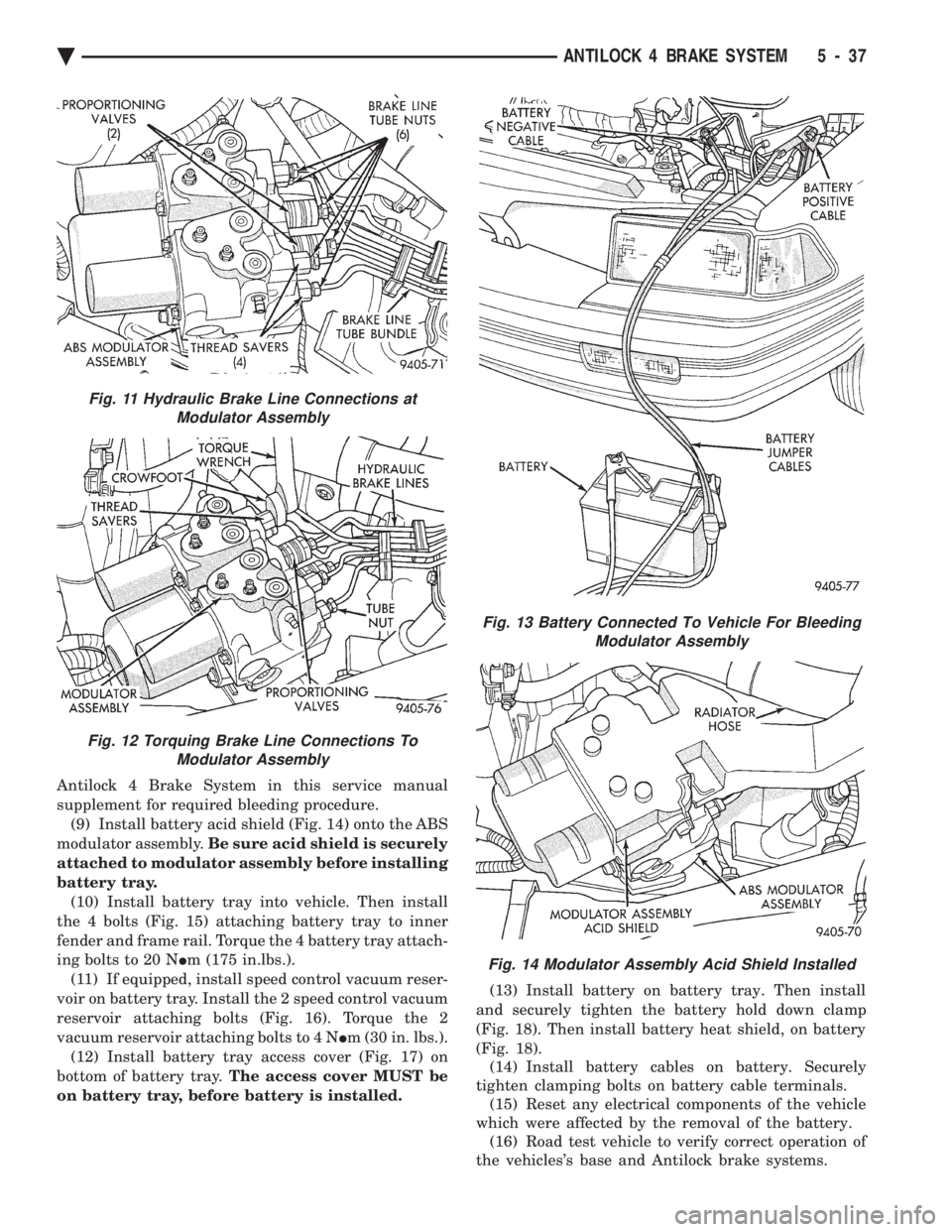
Antilock 4 Brake System in this service manual
supplement for required bleeding procedure.(9) Install battery acid shield (Fig. 14) onto the ABS
modulator assembly. Be sure acid shield is securely
attached to modulator assembly before installing
battery tray. (10) Install battery tray into vehicle. Then install
the 4 bolts (Fig. 15) attaching battery tray to inner
fender and frame rail. Torque the 4 battery tray attach-
ing bolts to 20 N Im (175 in.lbs.).
(11) If equipped, install speed control vacuum reser-
voir on battery tray. Install the 2 speed control vacuum
reservoir attaching bolts (Fig. 16). Torque the 2
vacuum reservoir attaching bolts to 4 N Im (30 in. lbs.).
(12) Install battery tray access cover (Fig. 17) on
bottom of battery tray. The access cover MUST be
on battery tray, before battery is installed. (13) Install battery on battery tray. Then install
and securely tighten the battery hold down clamp
(Fig. 18). Then install battery heat shield, on battery
(Fig. 18). (14) Install battery cables on battery. Securely
tighten clamping bolts on battery cable terminals. (15) Reset any electrical components of the vehicle
which were affected by the removal of the battery. (16) Road test vehicle to verify correct operation of
the vehicles's base and Antilock brake systems.
Fig. 13 Battery Connected To Vehicle For Bleeding Modulator Assembly
Fig. 14 Modulator Assembly Acid Shield Installed
Fig. 11 Hydraulic Brake Line Connections atModulator Assembly
Fig. 12 Torquing Brake Line Connections To Modulator Assembly
Ä ANTILOCK 4 BRAKE SYSTEM 5 - 37
Page 324 of 2438
MASTER CYLINDER AND POWER BOOSTER
REMOVAL AND INSTALLATION If the Master Cylinder or Power Booster need to be
removed for replacement or servicing of other vehicle
components. Refer to Master Cylinder or Power
Brake Service section in group 5 of the 1993 M.Y.
Front Wheel Drive Car service manual. After servicing master cylinder, refer back to this
service manual supplement for the appropriate proce-
dure and sequence used to bleed the base and Anti-
lock portion of the brake system.
PROPORTIONING VALVES (FIG. 1)
CAUTION: Proportioning valves should never be
disassembled.
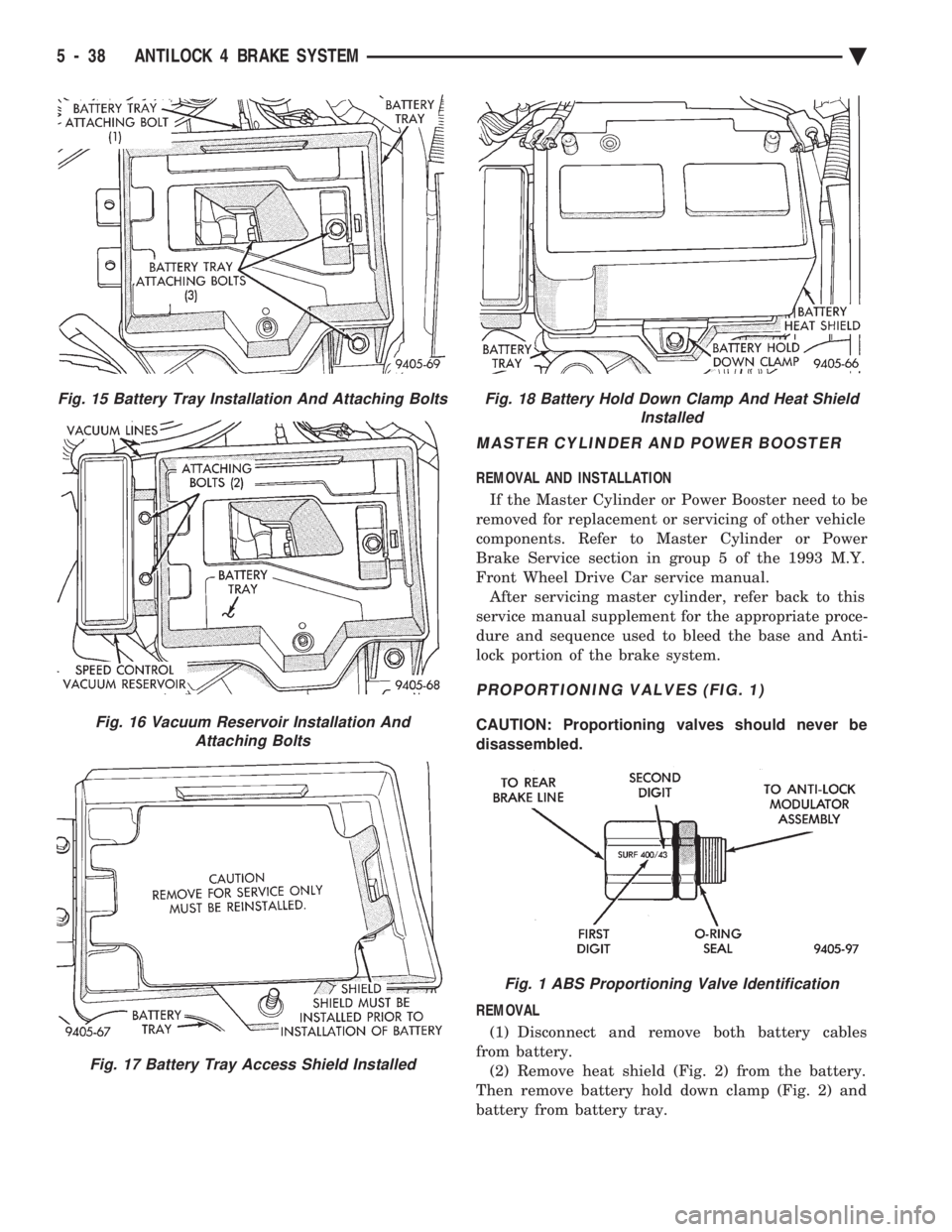
REMOVAL (1) Disconnect and remove both battery cables
from battery. (2) Remove heat shield (Fig. 2) from the battery.
Then remove battery hold down clamp (Fig. 2) and
battery from battery tray.
Fig. 15 Battery Tray Installation And Attaching Bolts
Fig. 16 Vacuum Reservoir Installation And Attaching Bolts
Fig. 17 Battery Tray Access Shield Installed
Fig. 18 Battery Hold Down Clamp And Heat Shield Installed
Fig. 1 ABS Proportioning Valve Identification
5 - 38 ANTILOCK 4 BRAKE SYSTEM Ä
Page 325 of 2438
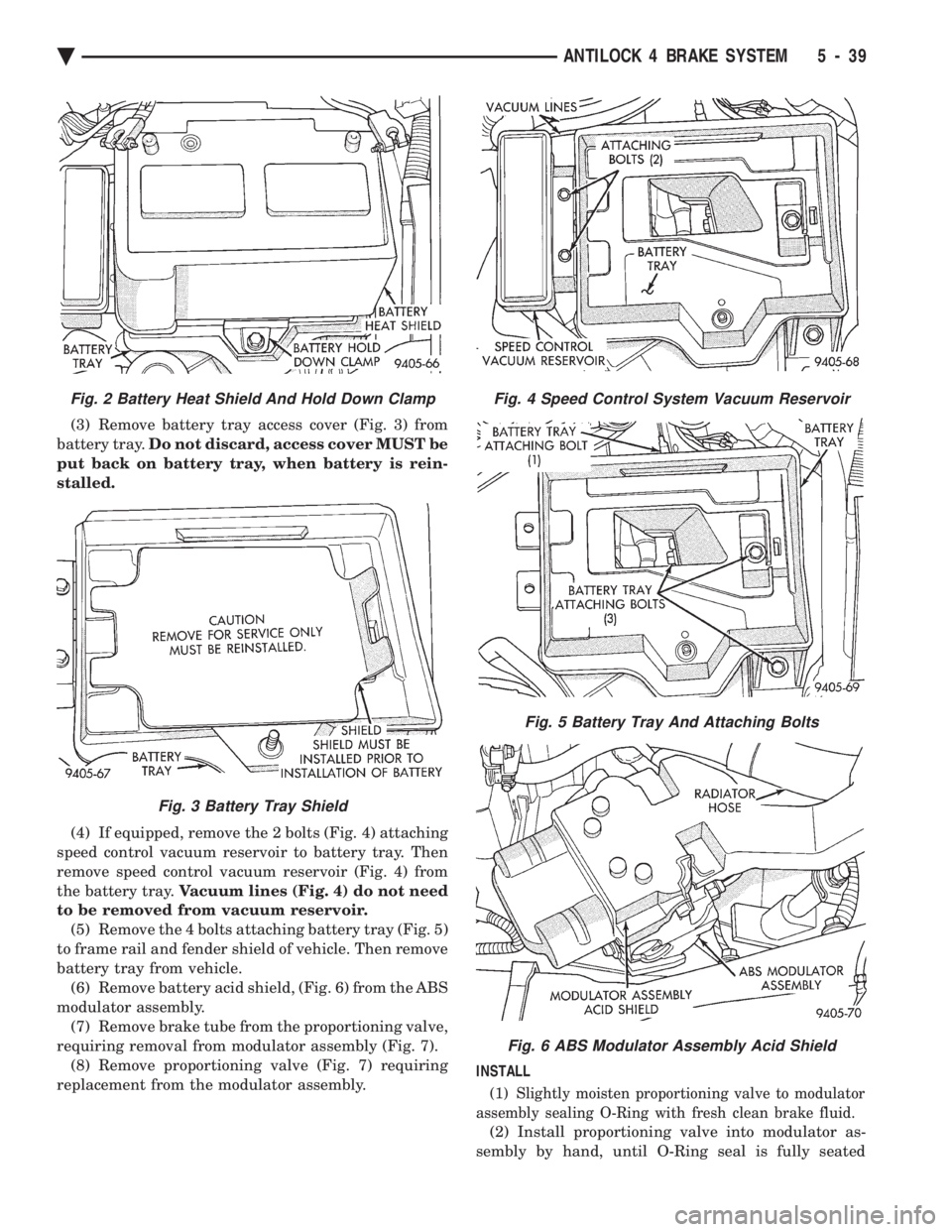
(3) Remove battery tray access cover (Fig. 3) from
battery tray. Do not discard, access cover MUST be
put back on battery tray, when battery is rein-
stalled.
(4) If equipped, remove the 2 bolts (Fig. 4) attaching
speed control vacuum reservoir to battery tray. Then
remove speed control vacuum reservoir (Fig. 4) from
the battery tray. Vacuum lines (Fig. 4) do not need
to be removed from vacuum reservoir. (5) Remove the 4 bolts attaching battery tray (Fig. 5)
to frame rail and fender shield of vehicle. Then remove
battery tray from vehicle. (6) Remove battery acid shield, (Fig. 6) from the ABS
modulator assembly. (7) Remove brake tube from the proportioning valve,
requiring removal from modulator assembly (Fig. 7). (8) Remove proportioning valve (Fig. 7) requiring
replacement from the modulator assembly. INSTALL
(1) Slightly moisten proportioning valve to modulator
assembly sealing O-Ring with fresh clean brake fluid.
(2) Install proportioning valve into modulator as-
sembly by hand, until O-Ring seal is fully seated
Fig. 4 Speed Control System Vacuum Reservoir
Fig. 5 Battery Tray And Attaching Bolts
Fig. 6 ABS Modulator Assembly Acid Shield
Fig. 2 Battery Heat Shield And Hold Down Clamp
Fig. 3 Battery Tray Shield
Ä ANTILOCK 4 BRAKE SYSTEM 5 - 39
Page 326 of 2438
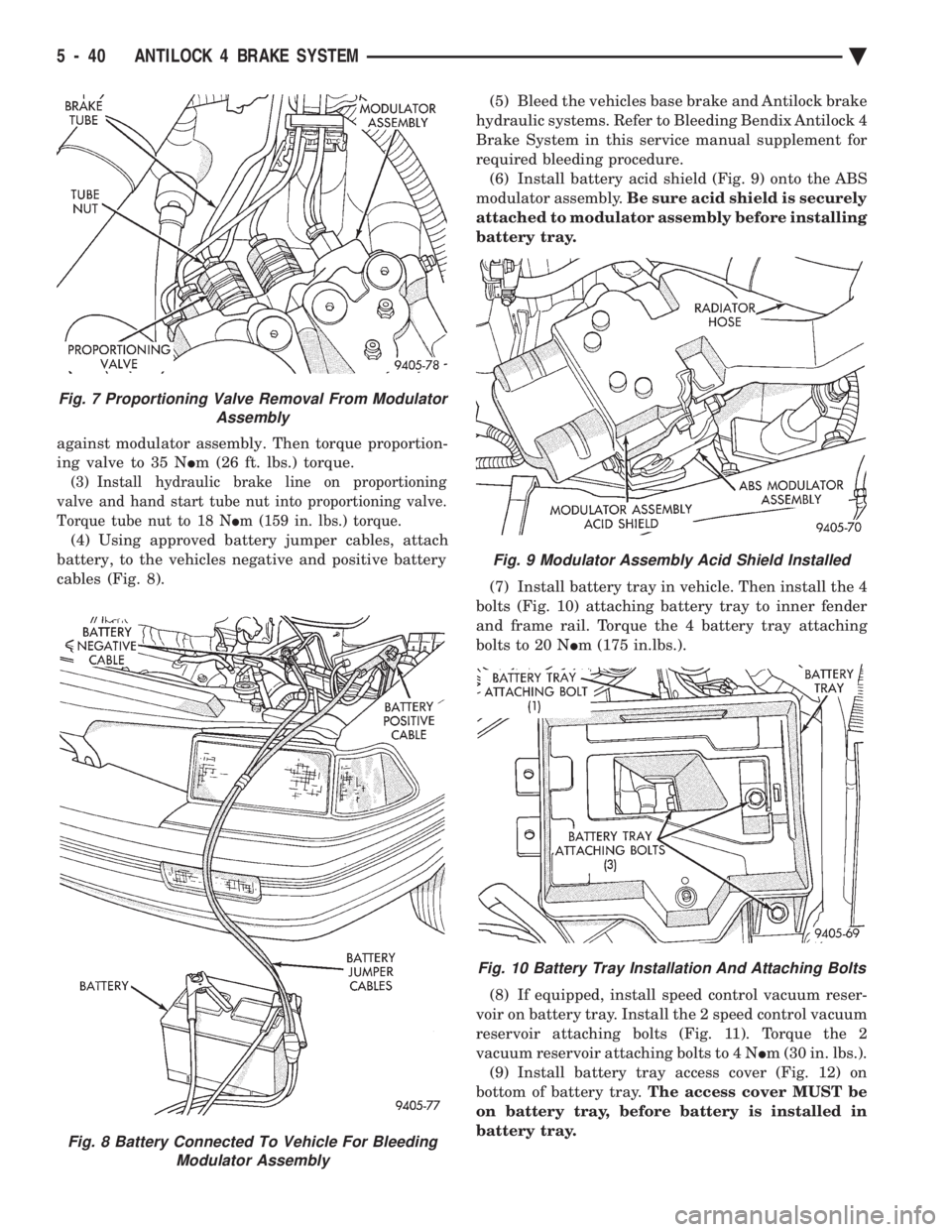
against modulator assembly. Then torque proportion-
ing valve to 35 N Im (26 ft. lbs.) torque.
(3) Install hydraulic brake line on proportioning
valve and hand start tube nut into proportioning valve.
Torque tube nut to 18 N Im (159 in. lbs.) torque.
(4) Using approved battery jumper cables, attach
battery, to the vehicles negative and positive battery
cables (Fig. 8). (5) Bleed the vehicles base brake and Antilock brake
hydraulic systems. Refer to Bleeding Bendix Antilock 4
Brake System in this service manual supplement for
required bleeding procedure. (6) Install battery acid shield (Fig. 9) onto the ABS
modulator assembly. Be sure acid shield is securely
attached to modulator assembly before installing
battery tray.
(7) Install battery tray in vehicle. Then install the 4
bolts (Fig. 10) attaching battery tray to inner fender
and frame rail. Torque the 4 battery tray attaching
bolts to 20 N Im (175 in.lbs.).
(8) If equipped, install speed control vacuum reser-
voir on battery tray. Install the 2 speed control vacuum
reservoir attaching bolts (Fig. 11). Torque the 2
vacuum reservoir attaching bolts to 4 N Im (30 in. lbs.).
(9) Install battery tray access cover (Fig. 12) on
bottom of battery tray. The access cover MUST be
on battery tray, before battery is installed in
battery tray.
Fig. 8 Battery Connected To Vehicle For Bleeding Modulator Assembly
Fig. 7 Proportioning Valve Removal From Modulator Assembly
Fig. 9 Modulator Assembly Acid Shield Installed
Fig. 10 Battery Tray Installation And Attaching Bolts
5 - 40 ANTILOCK 4 BRAKE SYSTEM Ä
Page 336 of 2438
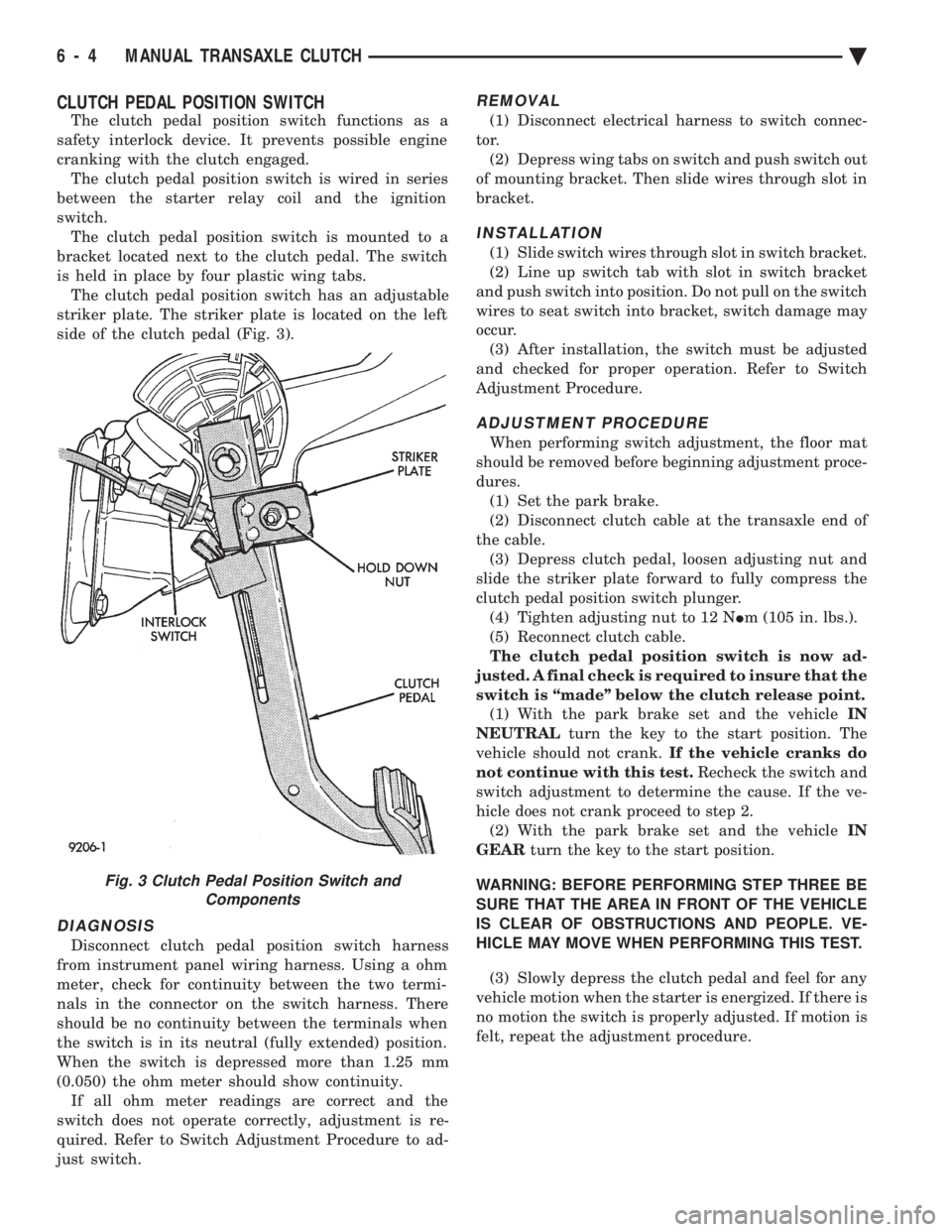
CLUTCH PEDAL POSITION SWITCH
The clutch pedal position switch functions as a
safety interlock device. It prevents possible engine
cranking with the clutch engaged. The clutch pedal position switch is wired in series
between the starter relay coil and the ignition
switch. The clutch pedal position switch is mounted to a
bracket located next to the clutch pedal. The switch
is held in place by four plastic wing tabs. The clutch pedal position switch has an adjustable
striker plate. The striker plate is located on the left
side of the clutch pedal (Fig. 3).
DIAGNOSIS
Disconnect clutch pedal position switch harness
from instrument panel wiring harness. Using a ohm
meter, check for continuity between the two termi-
nals in the connector on the switch harness. There
should be no continuity between the terminals when
the switch is in its neutral (fully extended) position.
When the switch is depressed more than 1.25 mm
(0.050) the ohm meter should show continuity. If all ohm meter readings are correct and the
switch does not operate correctly, adjustment is re-
quired. Refer to Switch Adjustment Procedure to ad-
just switch.
REMOVAL
(1) Disconnect electrical harness to switch connec-
tor. (2) Depress wing tabs on switch and push switch out
of mounting bracket. Then slide wires through slot in
bracket.
INSTALLATION
(1) Slide switch wires through slot in switch bracket.
(2) Line up switch tab with slot in switch bracket
and push switch into position. Do not pull on the switch
wires to seat switch into bracket, switch damage may
occur. (3) After installation, the switch must be adjusted
and checked for proper operation. Refer to Switch
Adjustment Procedure.
ADJUSTMENT PROCEDURE
When performing switch adjustment, the floor mat
should be removed before beginning adjustment proce-
dures. (1) Set the park brake.
(2) Disconnect clutch cable at the transaxle end of
the cable. (3) Depress clutch pedal, loosen adjusting nut and
slide the striker plate forward to fully compress the
clutch pedal position switch plunger. (4) Tighten adjusting nut to 12 N Im (105 in. lbs.).
(5) Reconnect clutch cable.
The clutch pedal position switch is now ad-
justed. A final check is required to insure that the
switch is ``made'' below the clutch release point. (1) With the park brake set and the vehicle IN
NEUTRAL turn the key to the start position. The
vehicle should not crank. If the vehicle cranks do
not continue with this test. Recheck the switch and
switch adjustment to determine the cause. If the ve-
hicle does not crank proceed to step 2. (2) With the park brake set and the vehicle IN
GEAR turn the key to the start position.
WARNING: BEFORE PERFORMING STEP THREE BE
SURE THAT THE AREA IN FRONT OF THE VEHICLE
IS CLEAR OF OBSTRUCTIONS AND PEOPLE. VE-
HICLE MAY MOVE WHEN PERFORMING THIS TEST.
(3) Slowly depress the clutch pedal and feel for any
vehicle motion when the starter is energized. If there is
no motion the switch is properly adjusted. If motion is
felt, repeat the adjustment procedure.
Fig. 3 Clutch Pedal Position Switch and Components
6 - 4 MANUAL TRANSAXLE CLUTCH Ä
Page 339 of 2438
hicle is steam cleaned. The facing of the disc will
absorb moisture. The force exerted by the pressure
plate will bond the facings to flywheel and/or, pres-
sure plate, if vehicle is allowed to stand for some
time before use. If this condition occurs, it will re- quire replacement of disc assembly, flywheel, and/or
clutch assembly. After cleaning, drive the vehicle to
its normal clutch operating temperature. This will
dry off disc assembly, pressure plate, and flywheel.
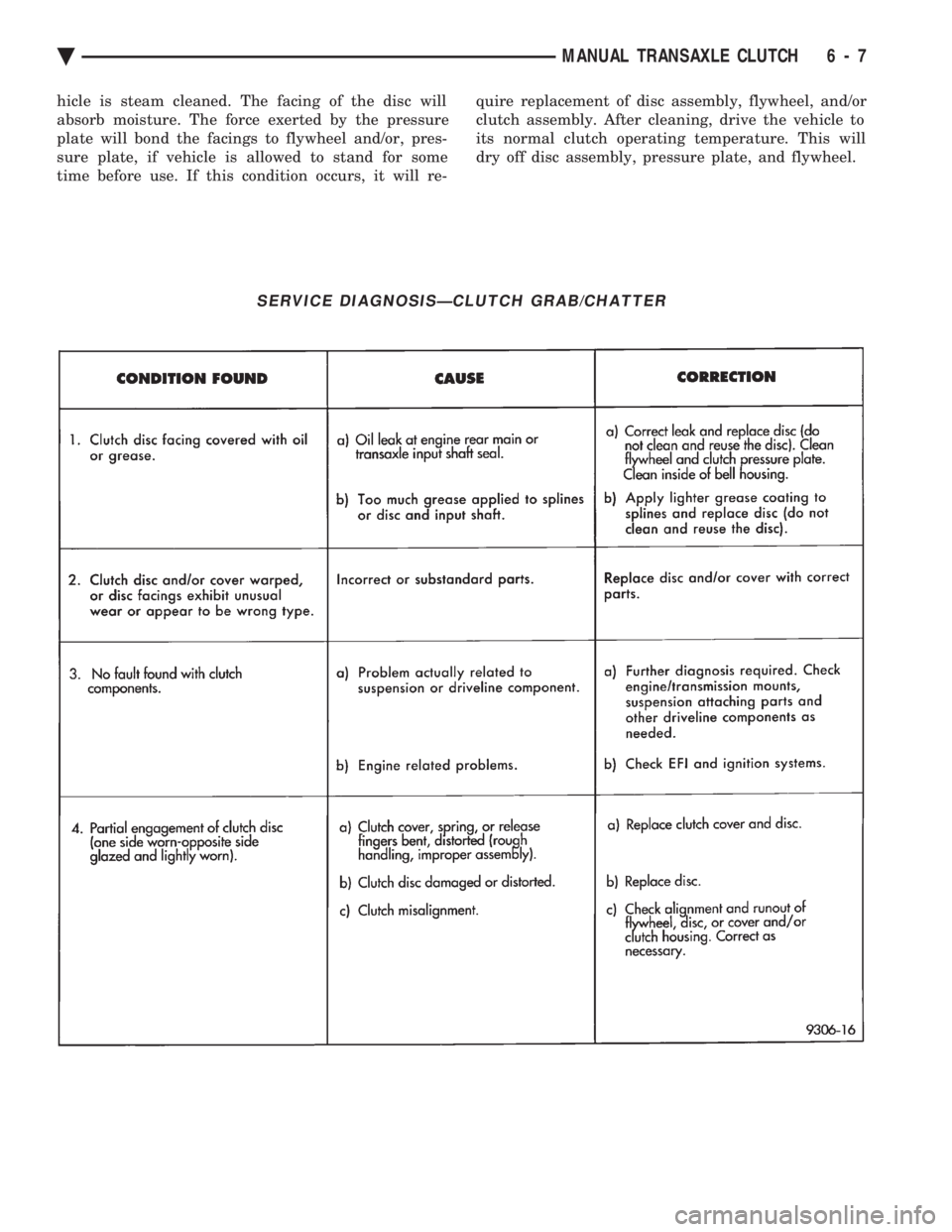
SERVICE DIAGNOSISÐCLUTCH GRAB/CHATTER
Ä MANUAL TRANSAXLE CLUTCH 6 - 7
Page 417 of 2438
OVERHEAD CONSOLE
CONTENTS
page page
AA BODY .............................. 1
AC AND AY BODY ....................... 6 AG AND AJ BODIES
.................... 13
AP BODY ............................. 21
GENERAL INFORMATION AA BODY
INDEX
page page
Ambient Temperature Sensor ................ 6
Compass Calibration ....................... 2
Compass Diagnostics ...................... 5
Compass Module Replacement ............... 6
Demagnetizing Procedure ................... 4 Map Reading Lamps
....................... 1
Overhead Console Replacement .............. 5
Self-Diagnostic Test ....................... 5
Thermometer and Compass Operation ......... 1
Variance ................................ 2
MAP READING LAMPS
The map reading and rear passenger lamps are
turned on and off by pressing their individual switch
marked LAMP. These same lamps also serve as cour-
tesy lamps whenever a door is opened, the illumi-
nated entry system is activated, or the headlamp
switch is turned fully clockwise.
LAMP REPLACEMENT
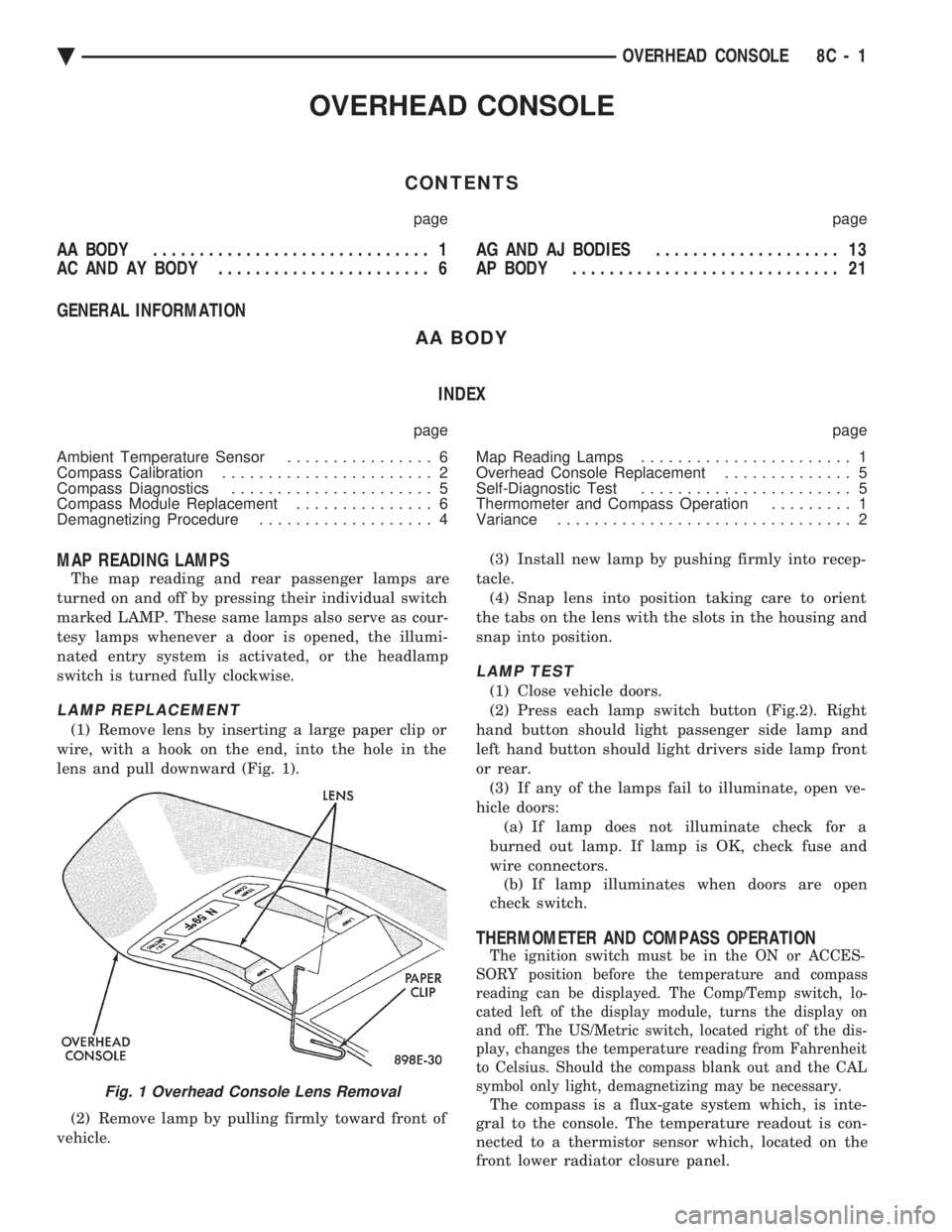
(1) Remove lens by inserting a large paper clip or
wire, with a hook on the end, into the hole in the
lens and pull downward (Fig. 1).
(2) Remove lamp by pulling firmly toward front of
vehicle. (3) Install new lamp by pushing firmly into recep-
tacle. (4) Snap lens into position taking care to orient
the tabs on the lens with the slots in the housing and
snap into position.
LAMP TEST
(1) Close vehicle doors.
(2) Press each lamp switch button (Fig.2). Right
hand button should light passenger side lamp and
left hand button should light drivers side lamp front
or rear. (3) If any of the lamps fail to illuminate, open ve-
hicle doors: (a) If lamp does not illuminate check for a
burned out lamp. If lamp is OK, check fuse and
wire connectors. (b) If lamp illuminates when doors are open
check switch.
THERMOMETER AND COMPASS OPERATION
The ignition switch must be in the ON or ACCES-
SORY position before the temperature and compass
reading can be displayed. The Comp/Temp switch, lo-
cated left of the display module, turns the display on
and off. The US/Metric switch, located right of the dis-
play, changes the temperature reading from Fahrenheit
to Celsius. Should the compass blank out and the CAL
symbol only light, demagnetizing may be necessary.
The compass is a flux-gate system which, is inte-
gral to the console. The temperature readout is con-
nected to a thermistor sensor which, located on the
front lower radiator closure panel.Fig. 1 Overhead Console Lens Removal
Ä OVERHEAD CONSOLE 8C - 1
Page 426 of 2438
BUS ACCESSED DIAGNOSTICS
The following diagnostic test may be used to check
the integrity of the EVIC's internal connections and
operations. Refer to the Body Chassis Diagnostic Test
Procedure Manual for test procedures. MODULE RESET TEST, when the EVIC receives
this request from the DRB II, the EVIC will immedi-
ately enter into reset. DISPLAY TEST: The EVIC receives a request from
the DBR II, the EVIC will enter into a visual display
mode. Also checks the integrity of the display driver
to anode connections. The test shall consist of walk-
ing through the vertical and horizontal rows of an-
odes in the dot matrix display. SWITCH STATUS TEST, when the EVIC receives
this request from the DRB II, the EVIC will report
the open/closed status of each individual switch. FAULT BYTE TEST, when the EVIC receives this
request from the DRB II, the EVIC will report fault
status. Messages reported are:
² NO FAULT
² DISPLAY DRIVER FAULT
² EVIC MISSING MESSAGES
² POWER SUPPLY FAILURE
² FAULT IN RAM
² FAULT IN ROM
EVIC missing message implies that there may be a
system failure and/or the body controller is not pro-
viding EVIC with sufficient information. DISPLAY DRIVER FAULT, power supply failure
and fault in RAM/ROM implies that the EVIC is de-
fective.
CONSOLE REMOVAL
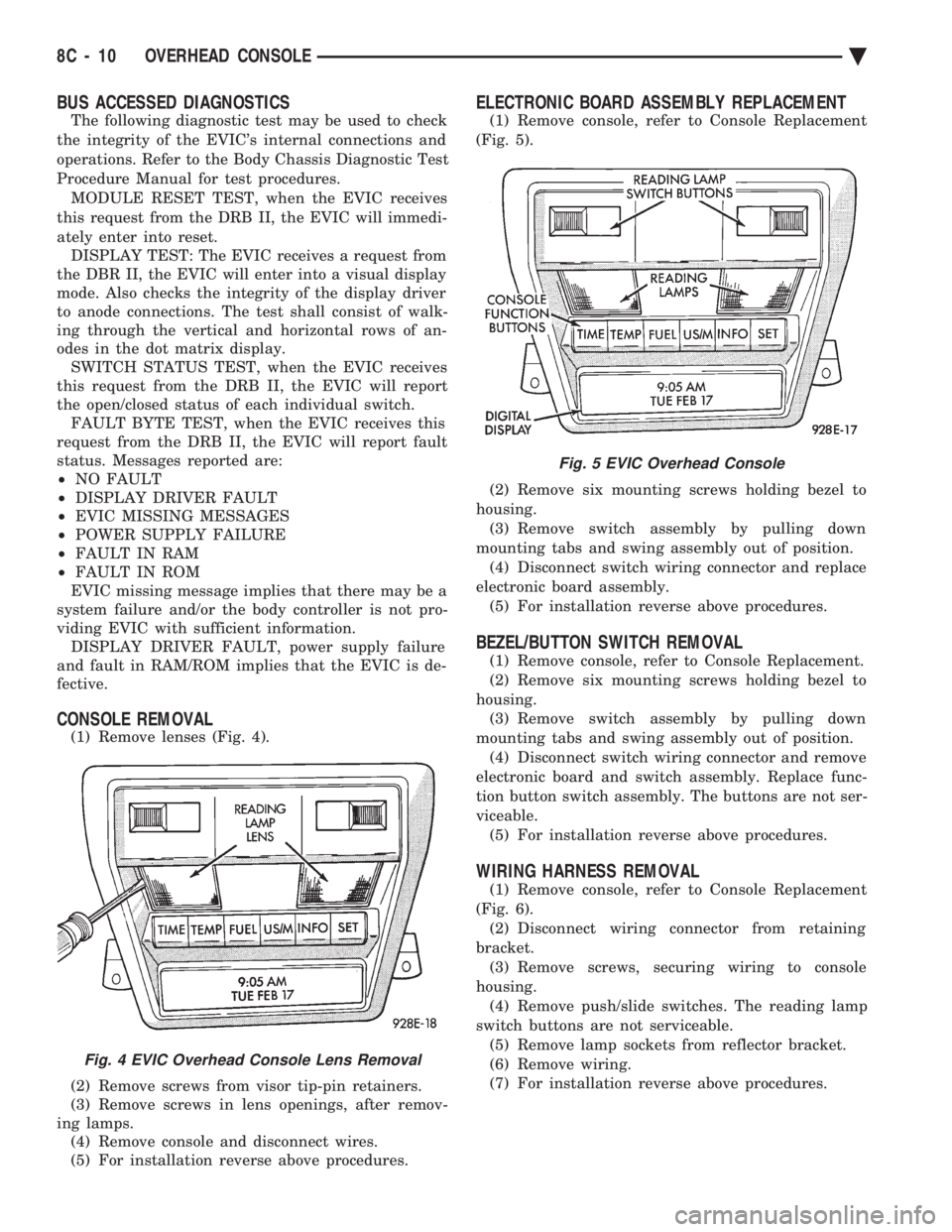
(1) Remove lenses (Fig. 4).
(2) Remove screws from visor tip-pin retainers.
(3) Remove screws in lens openings, after remov-
ing lamps. (4) Remove console and disconnect wires.
(5) For installation reverse above procedures.
ELECTRONIC BOARD ASSEMBLY REPLACEMENT
(1) Remove console, refer to Console Replacement
(Fig. 5).
(2) Remove six mounting screws holding bezel to
housing. (3) Remove switch assembly by pulling down
mounting tabs and swing assembly out of position. (4) Disconnect switch wiring connector and replace
electronic board assembly. (5) For installation reverse above procedures.
BEZEL/BUTTON SWITCH REMOVAL
(1) Remove console, refer to Console Replacement.
(2) Remove six mounting screws holding bezel to
housing. (3) Remove switch assembly by pulling down
mounting tabs and swing assembly out of position. (4) Disconnect switch wiring connector and remove
electronic board and switch assembly. Replace func-
tion button switch assembly. The buttons are not ser-
viceable. (5) For installation reverse above procedures.
WIRING HARNESS REMOVAL
(1) Remove console, refer to Console Replacement
(Fig. 6). (2) Disconnect wiring connector from retaining
bracket. (3) Remove screws, securing wiring to console
housing. (4) Remove push/slide switches. The reading lamp
switch buttons are not serviceable. (5) Remove lamp sockets from reflector bracket.
(6) Remove wiring.
(7) For installation reverse above procedures.
Fig. 4 EVIC Overhead Console Lens Removal
Fig. 5 EVIC Overhead Console
8C - 10 OVERHEAD CONSOLE Ä
Page 427 of 2438
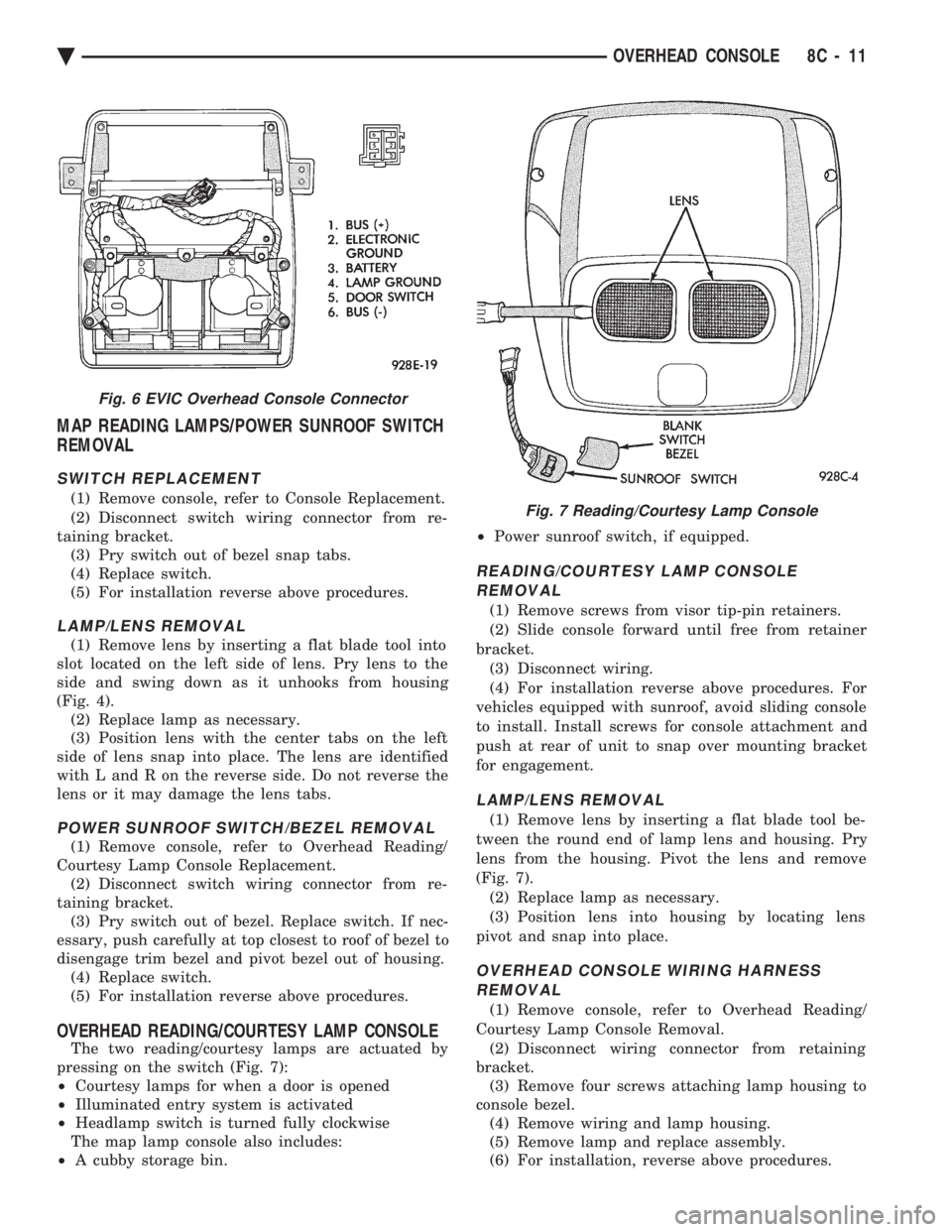
MAP READING LAMPS/POWER SUNROOF SWITCH
REMOVAL
SWITCH REPLACEMENT
(1) Remove console, refer to Console Replacement.
(2) Disconnect switch wiring connector from re-
taining bracket. (3) Pry switch out of bezel snap tabs.
(4) Replace switch.
(5) For installation reverse above procedures.
LAMP/LENS REMOVAL
(1) Remove lens by inserting a flat blade tool into
slot located on the left side of lens. Pry lens to the
side and swing down as it unhooks from housing
(Fig. 4). (2) Replace lamp as necessary.
(3) Position lens with the center tabs on the left
side of lens snap into place. The lens are identified
with L and R on the reverse side. Do not reverse the
lens or it may damage the lens tabs.
POWER SUNROOF SWITCH/BEZEL REMOVAL
(1) Remove console, refer to Overhead Reading/
Courtesy Lamp Console Replacement. (2) Disconnect switch wiring connector from re-
taining bracket. (3) Pry switch out of bezel. Replace switch. If nec-
essary, push carefully at top closest to roof of bezel to
disengage trim bezel and pivot bezel out of housing. (4) Replace switch.
(5) For installation reverse above procedures.
OVERHEAD READING/COURTESY LAMP CONSOLE
The two reading/courtesy lamps are actuated by
pressing on the switch (Fig. 7):
² Courtesy lamps for when a door is opened
² Illuminated entry system is activated
² Headlamp switch is turned fully clockwise
The map lamp console also includes:
² A cubby storage bin. ²
Power sunroof switch, if equipped.
READING/COURTESY LAMP CONSOLE
REMOVAL
(1) Remove screws from visor tip-pin retainers.
(2) Slide console forward until free from retainer
bracket. (3) Disconnect wiring.
(4) For installation reverse above procedures. For
vehicles equipped with sunroof, avoid sliding console
to install. Install screws for console attachment and
push at rear of unit to snap over mounting bracket
for engagement.
LAMP/LENS REMOVAL
(1) Remove lens by inserting a flat blade tool be-
tween the round end of lamp lens and housing. Pry
lens from the housing. Pivot the lens and remove
(Fig. 7). (2) Replace lamp as necessary.
(3) Position lens into housing by locating lens
pivot and snap into place.
OVERHEAD CONSOLE WIRING HARNESS REMOVAL
(1) Remove console, refer to Overhead Reading/
Courtesy Lamp Console Removal. (2) Disconnect wiring connector from retaining
bracket. (3) Remove four screws attaching lamp housing to
console bezel. (4) Remove wiring and lamp housing.
(5) Remove lamp and replace assembly.
(6) For installation, reverse above procedures.
Fig. 6 EVIC Overhead Console Connector
Fig. 7 Reading/Courtesy Lamp Console
Ä OVERHEAD CONSOLE 8C - 11
Page 429 of 2438
AG AND AJ BODIES INDEX
page page
Ambient Temperature Sensor Removal ......... 20
Compass Calibration ...................... 16
Compass Diagnostics ...................... 18
Compass Module Replacement .............. 20
Demagnetizing Procedure .................. 17
Electronic Vehicle Information Center (EVIC) ..... 13
Electronic Vehicle Information Center (EVIC) Removal .............................. 20 Engine Compartment Node (ECN)
............ 15
Engine Compartment Node Compass Calibration . 16
Engine Node Sensor Removal ............... 20
Map Reading Lamps ...................... 13
Overhead Console Replacement ............. 20
Thermometer and Compass ................. 16
Variance Procedure ....................... 17
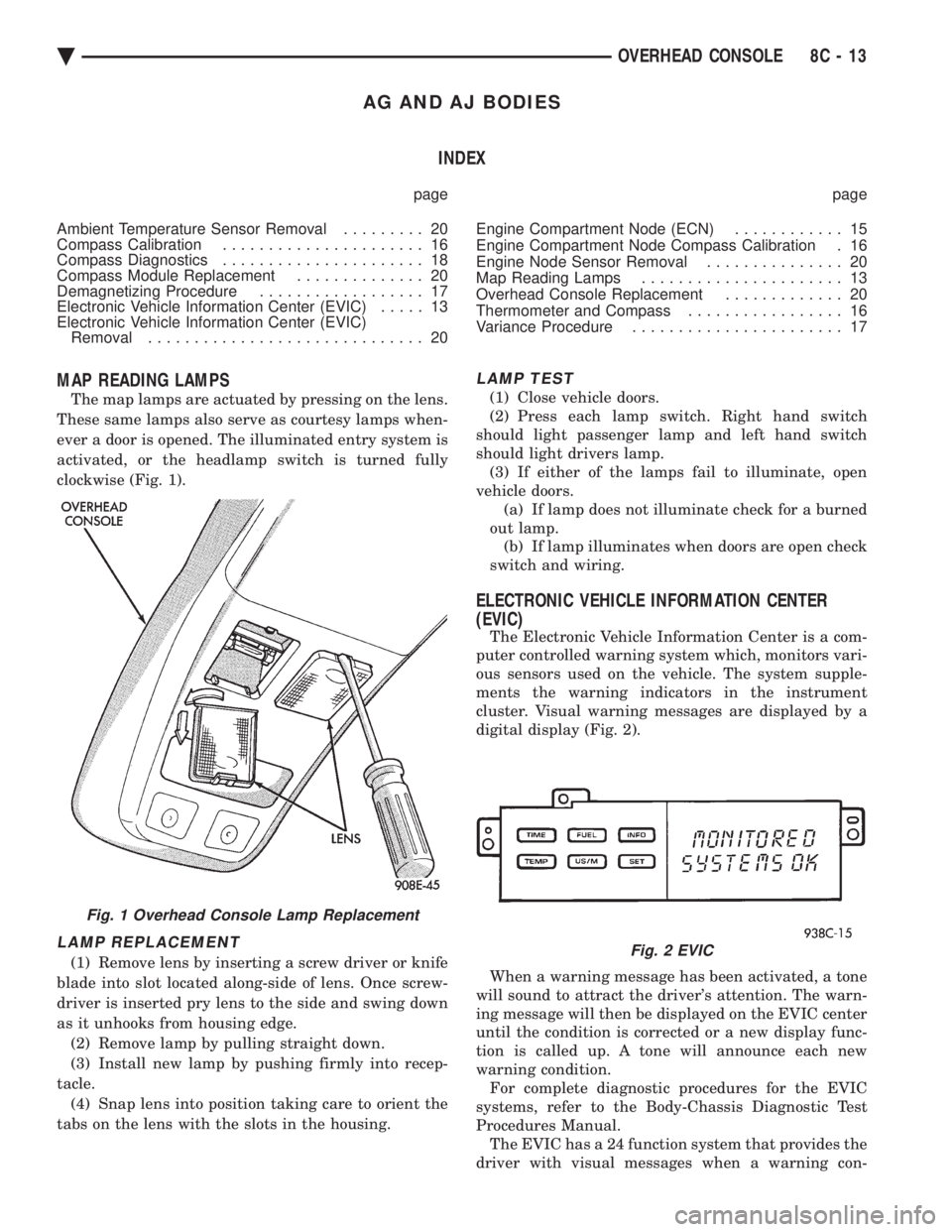
MAP READING LAMPS
The map lamps are actuated by pressing on the lens.
These same lamps also serve as courtesy lamps when-
ever a door is opened. The illuminated entry system is
activated, or the headlamp switch is turned fully
clockwise (Fig. 1).
LAMP REPLACEMENT
(1) Remove lens by inserting a screw driver or knife
blade into slot located along-side of lens. Once screw-
driver is inserted pry lens to the side and swing down
as it unhooks from housing edge. (2) Remove lamp by pulling straight down.
(3) Install new lamp by pushing firmly into recep-
tacle. (4) Snap lens into position taking care to orient the
tabs on the lens with the slots in the housing.
LAMP TEST
(1) Close vehicle doors.
(2) Press each lamp switch. Right hand switch
should light passenger lamp and left hand switch
should light drivers lamp. (3) If either of the lamps fail to illuminate, open
vehicle doors. (a) If lamp does not illuminate check for a burned
out lamp. (b) If lamp illuminates when doors are open check
switch and wiring.
ELECTRONIC VEHICLE INFORMATION CENTER
(EVIC)
The Electronic Vehicle Information Center is a com-
puter controlled warning system which, monitors vari-
ous sensors used on the vehicle. The system supple-
ments the warning indicators in the instrument
cluster. Visual warning messages are displayed by a
digital display (Fig. 2).
When a warning message has been activated, a tone
will sound to attract the driver's attention. The warn-
ing message will then be displayed on the EVIC center
until the condition is corrected or a new display func-
tion is called up. A tone will announce each new
warning condition. For complete diagnostic procedures for the EVIC
systems, refer to the Body-Chassis Diagnostic Test
Procedures Manual. The EVIC has a 24 function system that provides the
driver with visual messages when a warning con-
Fig. 1 Overhead Console Lamp Replacement
Fig. 2 EVIC
Ä OVERHEAD CONSOLE 8C - 13