ABS CHEVROLET DYNASTY 1993 Service Manual
[x] Cancel search | Manufacturer: CHEVROLET, Model Year: 1993, Model line: DYNASTY, Model: CHEVROLET DYNASTY 1993Pages: 2438, PDF Size: 74.98 MB
Page 515 of 2438
AC AND AY BODIES INDEX
page page
Electronic Cluster ........................ 34
Gauges ................................ 28
General Information ....................... 23
Interior Lamp Replacement ................. 41 Mechanical Cluster and Gauge Service
........ 24
Mechanical/Electronic Cluster Removal ........ 25
Switch and Panel Component Service ......... 37
GENERAL INFORMATION
MECHANICAL CLUSTER
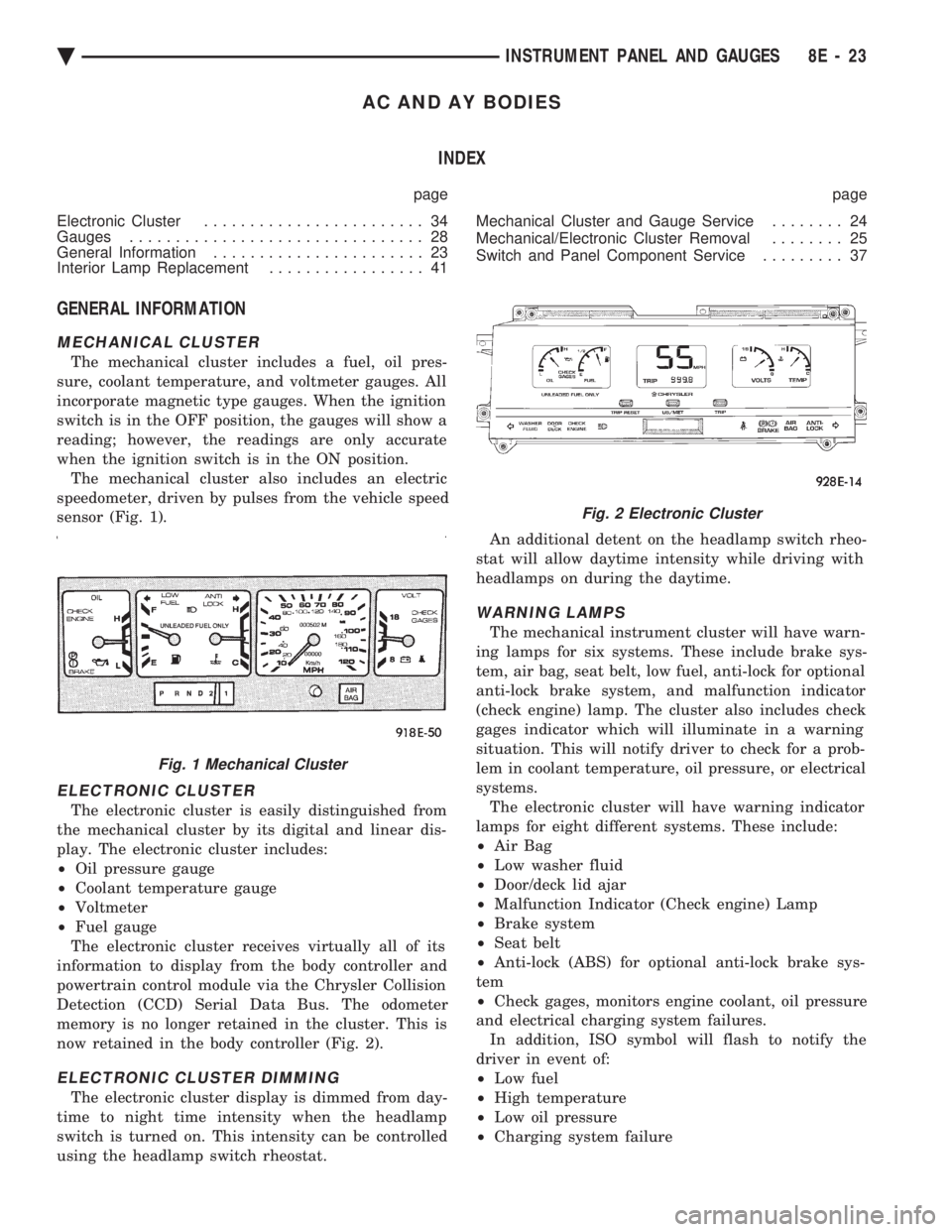
The mechanical cluster includes a fuel, oil pres-
sure, coolant temperature, and voltmeter gauges. All
incorporate magnetic type gauges. When the ignition
switch is in the OFF position, the gauges will show a
reading; however, the readings are only accurate
when the ignition switch is in the ON position. The mechanical cluster also includes an electric
speedometer, driven by pulses from the vehicle speed
sensor (Fig. 1).
ELECTRONIC CLUSTER
The electronic cluster is easily distinguished from
the mechanical cluster by its digital and linear dis-
play. The electronic cluster includes:
² Oil pressure gauge
² Coolant temperature gauge
² Voltmeter
² Fuel gauge
The electronic cluster receives virtually all of its
information to display from the body controller and
powertrain control module via the Chrysler Collision
Detection (CCD) Serial Data Bus. The odometer
memory is no longer retained in the cluster. This is
now retained in the body controller (Fig. 2).
ELECTRONIC CLUSTER DIMMING
The electronic cluster display is dimmed from day-
time to night time intensity when the headlamp
switch is turned on. This intensity can be controlled
using the headlamp switch rheostat. An additional detent on the headlamp switch rheo-
stat will allow daytime intensity while driving with
headlamps on during the daytime.
WARNING LAMPS
The mechanical instrument cluster will have warn-
ing lamps for six systems. These include brake sys-
tem, air bag, seat belt, low fuel, anti-lock for optional
anti-lock brake system, and malfunction indicator
(check engine) lamp. The cluster also includes check
gages indicator which will illuminate in a warning
situation. This will notify driver to check for a prob-
lem in coolant temperature, oil pressure, or electrical
systems. The electronic cluster will have warning indicator
lamps for eight different systems. These include:
² Air Bag
² Low washer fluid
² Door/deck lid ajar
² Malfunction Indicator (Check engine) Lamp
² Brake system
² Seat belt
² Anti-lock (ABS) for optional anti-lock brake sys-
tem
² Check gages, monitors engine coolant, oil pressure
and electrical charging system failures. In addition, ISO symbol will flash to notify the
driver in event of:
² Low fuel
² High temperature
² Low oil pressure
² Charging system failure
Fig. 1 Mechanical Cluster
Fig. 2 Electronic Cluster
Ä INSTRUMENT PANEL AND GAUGES 8E - 23
Page 519 of 2438
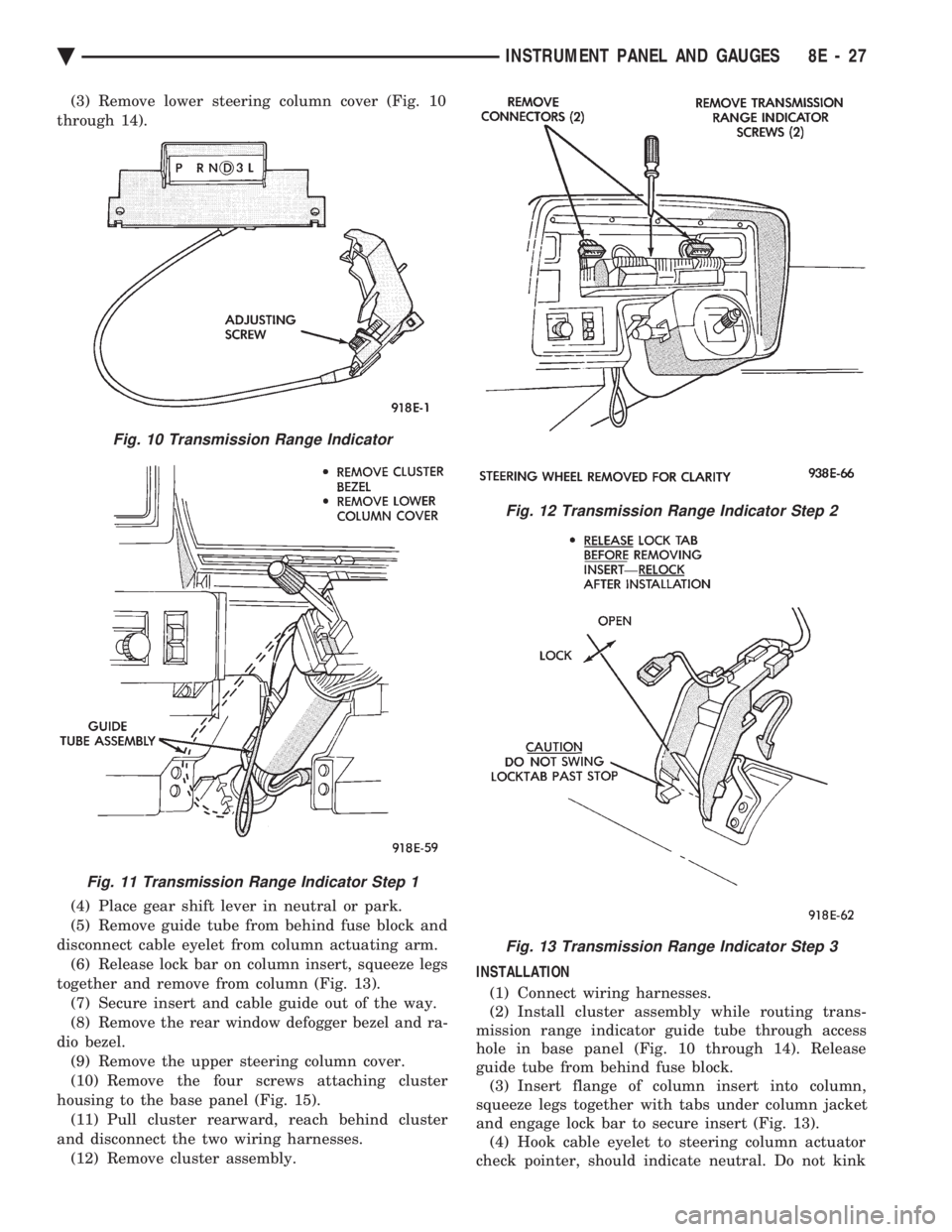
(3) Remove lower steering column cover (Fig. 10
through 14).
(4) Place gear shift lever in neutral or park.
(5) Remove guide tube from behind fuse block and
disconnect cable eyelet from column actuating arm. (6) Release lock bar on column insert, squeeze legs
together and remove from column (Fig. 13). (7) Secure insert and cable guide out of the way.
(8) Remove the rear window defogger bezel and ra-
dio bezel. (9) Remove the upper steering column cover.
(10) Remove the four screws attaching cluster
housing to the base panel (Fig. 15). (11) Pull cluster rearward, reach behind cluster
and disconnect the two wiring harnesses. (12) Remove cluster assembly. INSTALLATION
(1) Connect wiring harnesses.
(2) Install cluster assembly while routing trans-
mission range indicator guide tube through access
hole in base panel (Fig. 10 through 14). Release
guide tube from behind fuse block. (3) Insert flange of column insert into column,
squeeze legs together with tabs under column jacket
and engage lock bar to secure insert (Fig. 13). (4) Hook cable eyelet to steering column actuator
check pointer, should indicate neutral. Do not kink
Fig. 10 Transmission Range Indicator
Fig. 11 Transmission Range Indicator Step 1
Fig. 12 Transmission Range Indicator Step 2
Fig. 13 Transmission Range Indicator Step 3
Ä INSTRUMENT PANEL AND GAUGES 8E - 27
Page 532 of 2438
GLOVE BOX LAMP/SWITCH REPLACEMENT
(1) Disconnect battery negative cable and isolate
or remove fuse #13 prior to removing switch or wires
may short to ground. (2) Open glove box door. The lamp can be removed
without removing switch. (3) Remove switch by squeezing retaining tabs
from behind switch and slide rearward. Disconnect
wiring connectors. (4) Remove lamp/switch.
(5) For installation reverse above procedures.
CIGAR LIGHTER ASSEMBLY REPLACEMENT
(1) Remove four screws from ash receiver.
(2) Pull assembly rearward and disconnect wiring.
(3) Remove ash receiver and cigar lighter.
(4) For installation reverse above procedures.
FLOOR CONSOLE REPLACEMENT
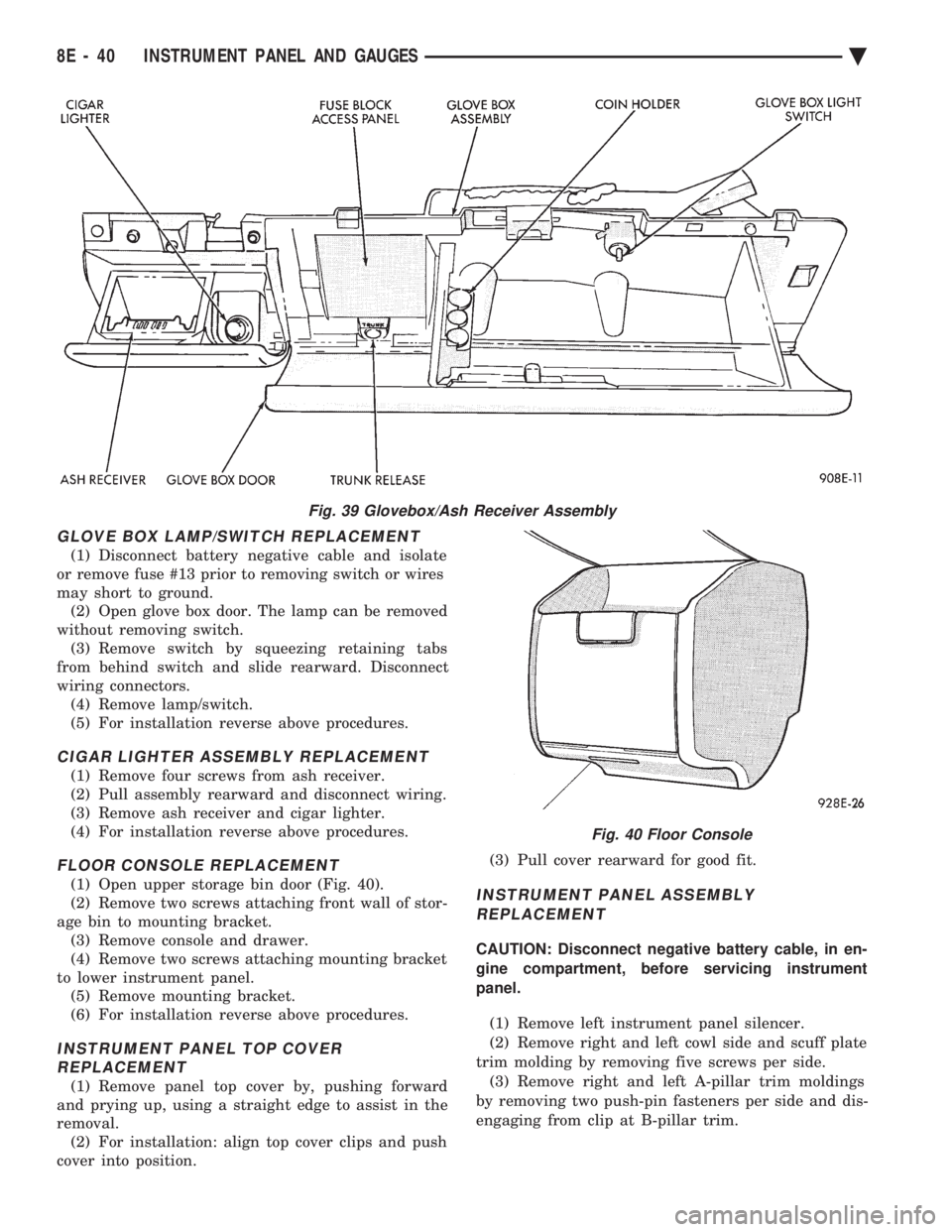
(1) Open upper storage bin door (Fig. 40).
(2) Remove two screws attaching front wall of stor-
age bin to mounting bracket. (3) Remove console and drawer.
(4) Remove two screws attaching mounting bracket
to lower instrument panel. (5) Remove mounting bracket.
(6) For installation reverse above procedures.
INSTRUMENT PANEL TOP COVER REPLACEMENT
(1) Remove panel top cover by, pushing forward
and prying up, using a straight edge to assist in the
removal. (2) For installation: align top cover clips and push
cover into position. (3) Pull cover rearward for good fit.
INSTRUMENT PANEL ASSEMBLY
REPLACEMENT
CAUTION: Disconnect negative battery cable, in en-
gine compartment, before servicing instrument
panel.
(1) Remove left instrument panel silencer.
(2) Remove right and left cowl side and scuff plate
trim molding by removing five screws per side. (3) Remove right and left A-pillar trim moldings
by removing two push-pin fasteners per side and dis-
engaging from clip at B-pillar trim.
Fig. 39 Glovebox/Ash Receiver Assembly
Fig. 40 Floor Console
8E - 40 INSTRUMENT PANEL AND GAUGES Ä
Page 550 of 2438
AP BODY INDEX
page page
Cluster and Gauge Service and Testing ....... 58
Gauges ................................ 61
General Information ....................... 58 Instrument Panel Replacement
.............. 72
Interior Lamp Replacement ................. 73
Switch and Panel Component Service ......... 67
GENERAL INFORMATION
INSTRUMENT CLUSTER
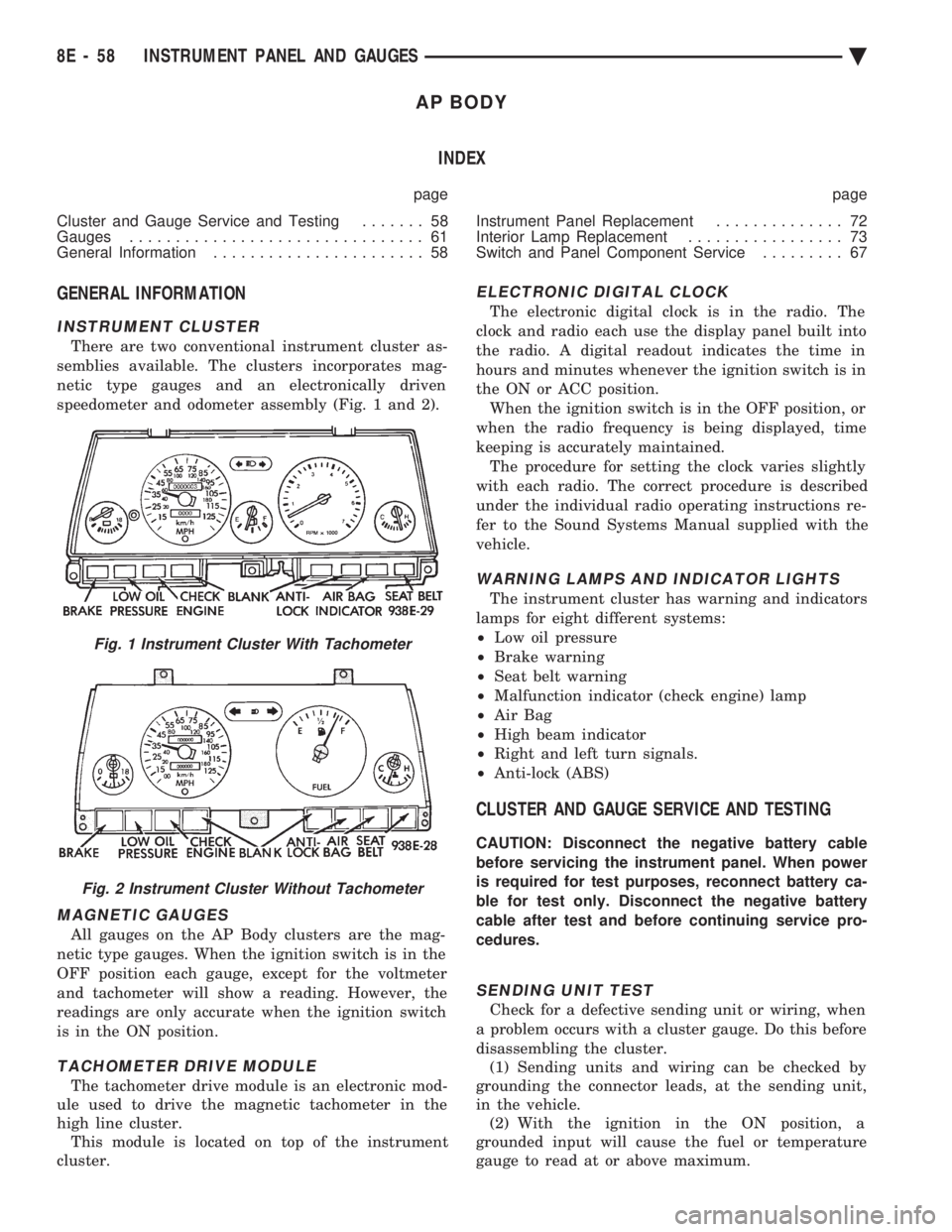
There are two conventional instrument cluster as-
semblies available. The clusters incorporates mag-
netic type gauges and an electronically driven
speedometer and odometer assembly (Fig. 1 and 2).
MAGNETIC GAUGES
All gauges on the AP Body clusters are the mag-
netic type gauges. When the ignition switch is in the
OFF position each gauge, except for the voltmeter
and tachometer will show a reading. However, the
readings are only accurate when the ignition switch
is in the ON position.
TACHOMETER DRIVE MODULE
The tachometer drive module is an electronic mod-
ule used to drive the magnetic tachometer in the
high line cluster. This module is located on top of the instrument
cluster.
ELECTRONIC DIGITAL CLOCK
The electronic digital clock is in the radio. The
clock and radio each use the display panel built into
the radio. A digital readout indicates the time in
hours and minutes whenever the ignition switch is in
the ON or ACC position. When the ignition switch is in the OFF position, or
when the radio frequency is being displayed, time
keeping is accurately maintained. The procedure for setting the clock varies slightly
with each radio. The correct procedure is described
under the individual radio operating instructions re-
fer to the Sound Systems Manual supplied with the
vehicle.
WARNING LAMPS AND INDICATOR LIGHTS
The instrument cluster has warning and indicators
lamps for eight different systems:
² Low oil pressure
² Brake warning
² Seat belt warning
² Malfunction indicator (check engine) lamp
² Air Bag
² High beam indicator
² Right and left turn signals.
² Anti-lock (ABS)
CLUSTER AND GAUGE SERVICE AND TESTING
CAUTION: Disconnect the negative battery cable
before servicing the instrument panel. When power
is required for test purposes, reconnect battery ca-
ble for test only. Disconnect the negative battery
cable after test and before continuing service pro-
cedures.
SENDING UNIT TEST
Check for a defective sending unit or wiring, when
a problem occurs with a cluster gauge. Do this before
disassembling the cluster. (1) Sending units and wiring can be checked by
grounding the connector leads, at the sending unit,
in the vehicle. (2) With the ignition in the ON position, a
grounded input will cause the fuel or temperature
gauge to read at or above maximum.
Fig. 1 Instrument Cluster With Tachometer
Fig. 2 Instrument Cluster Without Tachometer
8E - 58 INSTRUMENT PANEL AND GAUGES Ä
Page 561 of 2438
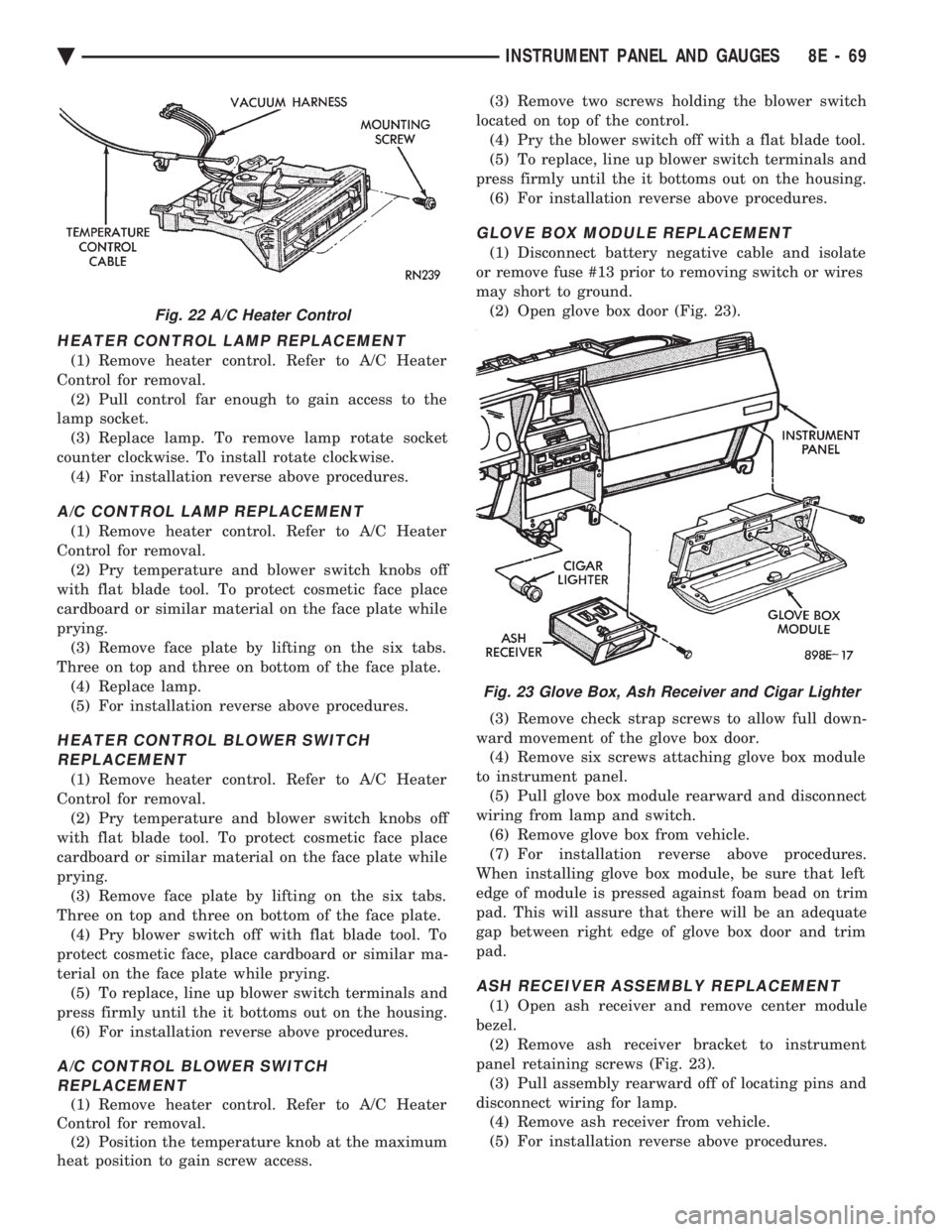
HEATER CONTROL LAMP REPLACEMENT
(1) Remove heater control. Refer to A/C Heater
Control for removal. (2) Pull control far enough to gain access to the
lamp socket. (3) Replace lamp. To remove lamp rotate socket
counter clockwise. To install rotate clockwise. (4) For installation reverse above procedures.
A/C CONTROL LAMP REPLACEMENT
(1) Remove heater control. Refer to A/C Heater
Control for removal. (2) Pry temperature and blower switch knobs off
with flat blade tool. To protect cosmetic face place
cardboard or similar material on the face plate while
prying. (3) Remove face plate by lifting on the six tabs.
Three on top and three on bottom of the face plate. (4) Replace lamp.
(5) For installation reverse above procedures.
HEATER CONTROL BLOWER SWITCHREPLACEMENT
(1) Remove heater control. Refer to A/C Heater
Control for removal. (2) Pry temperature and blower switch knobs off
with flat blade tool. To protect cosmetic face place
cardboard or similar material on the face plate while
prying. (3) Remove face plate by lifting on the six tabs.
Three on top and three on bottom of the face plate. (4) Pry blower switch off with flat blade tool. To
protect cosmetic face, place cardboard or similar ma-
terial on the face plate while prying. (5) To replace, line up blower switch terminals and
press firmly until the it bottoms out on the housing. (6) For installation reverse above procedures.
A/C CONTROL BLOWER SWITCHREPLACEMENT
(1) Remove heater control. Refer to A/C Heater
Control for removal. (2) Position the temperature knob at the maximum
heat position to gain screw access. (3) Remove two screws holding the blower switch
located on top of the control. (4) Pry the blower switch off with a flat blade tool.
(5) To replace, line up blower switch terminals and
press firmly until the it bottoms out on the housing. (6) For installation reverse above procedures.
GLOVE BOX MODULE REPLACEMENT
(1) Disconnect battery negative cable and isolate
or remove fuse #13 prior to removing switch or wires
may short to ground. (2) Open glove box door (Fig. 23).
(3) Remove check strap screws to allow full down-
ward movement of the glove box door. (4) Remove six screws attaching glove box module
to instrument panel. (5) Pull glove box module rearward and disconnect
wiring from lamp and switch. (6) Remove glove box from vehicle.
(7) For installation reverse above procedures.
When installing glove box module, be sure that left
edge of module is pressed against foam bead on trim
pad. This will assure that there will be an adequate
gap between right edge of glove box door and trim
pad.
ASH RECEIVER ASSEMBLY REPLACEMENT
(1) Open ash receiver and remove center module
bezel. (2) Remove ash receiver bracket to instrument
panel retaining screws (Fig. 23). (3) Pull assembly rearward off of locating pins and
disconnect wiring for lamp. (4) Remove ash receiver from vehicle.
(5) For installation reverse above procedures.
Fig. 22 A/C Heater Control
Fig. 23 Glove Box, Ash Receiver and Cigar Lighter
Ä INSTRUMENT PANEL AND GAUGES 8E - 69
Page 656 of 2438
EXTERIOR LAMPSÐAG BODY INDEX
page page
Back-Up Lamps .......................... 15
Center High Mounted Stop Lamp Bulb ........ 15
Fog Lamp or Bulb ........................ 14
Headlamp Diagnosis ...................... 14
Headlamp Housing and Bulb ................ 14 License Plate Lamp or Bulb
................ 15
Park and Turn Signal Lamp or Bulb .......... 14
Tail, Stop, Turn Signal, Side Marker, Back-Up Lamp ................................ 15
HEADLAMP DIAGNOSIS
For headlamp diagnosis, refer to the Headlamp Di-
agnosis at the beginning of this Group. Refer to Wir-
ing Diagrams manual for circuit and component
locations.
HEADLAMP HOUSING AND BULB
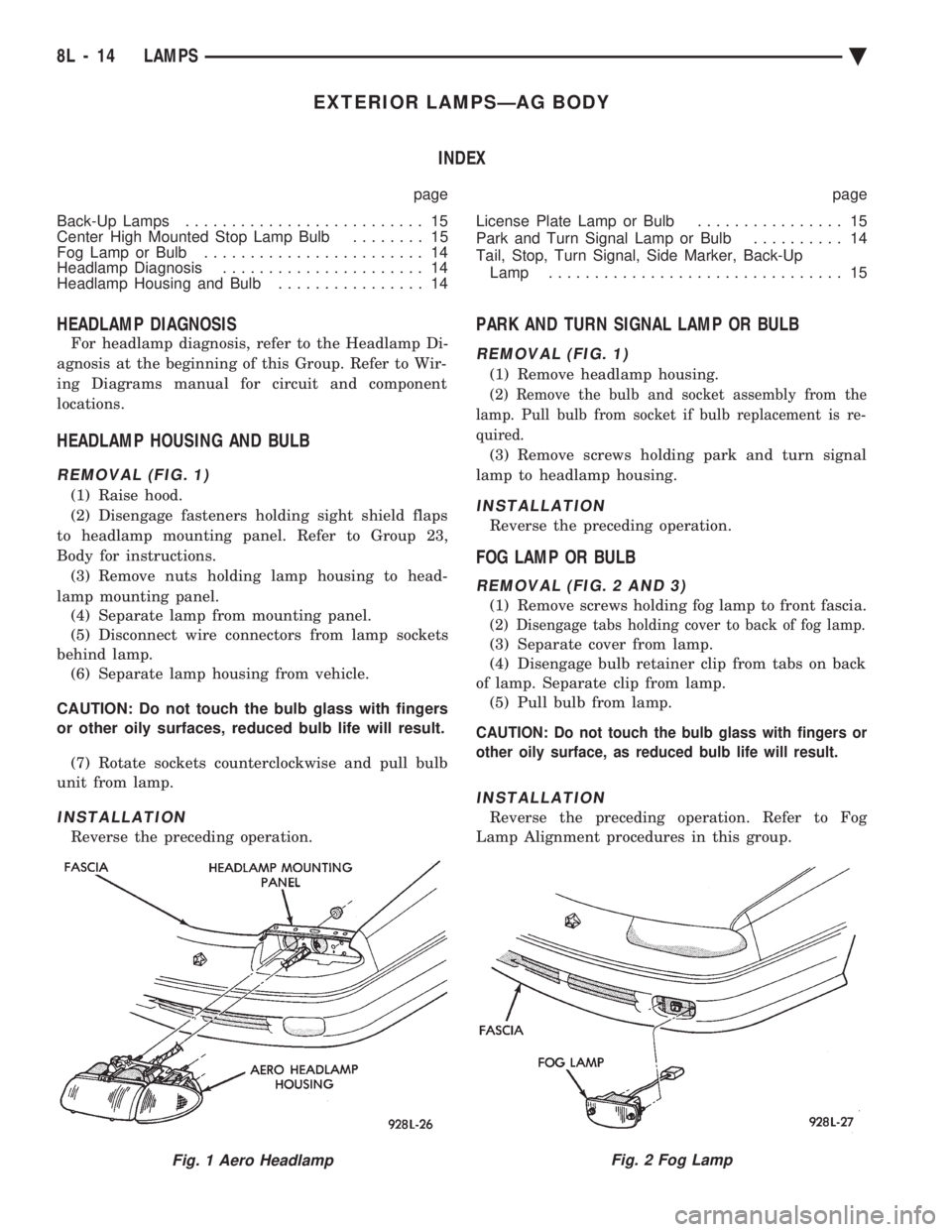
REMOVAL (FIG. 1)
(1) Raise hood.
(2) Disengage fasteners holding sight shield flaps
to headlamp mounting panel. Refer to Group 23,
Body for instructions. (3) Remove nuts holding lamp housing to head-
lamp mounting panel. (4) Separate lamp from mounting panel.
(5) Disconnect wire connectors from lamp sockets
behind lamp. (6) Separate lamp housing from vehicle.
CAUTION: Do not touch the bulb glass with fingers
or other oily surfaces, reduced bulb life will result. (7) Rotate sockets counterclockwise and pull bulb
unit from lamp.
INSTALLATION
Reverse the preceding operation.
PARK AND TURN SIGNAL LAMP OR BULB
REMOVAL (FIG. 1)
(1) Remove headlamp housing.
(2) Remove the bulb and socket assembly from the
lamp. Pull bulb from socket if bulb replacement is re-
quired.
(3) Remove screws holding park and turn signal
lamp to headlamp housing.
INSTALLATION
Reverse the preceding operation.
FOG LAMP OR BULB
REMOVAL (FIG. 2 AND 3)
(1) Remove screws holding fog lamp to front fascia.
(2) Disengage tabs holding cover to back of fog lamp.
(3) Separate cover from lamp.
(4) Disengage bulb retainer clip from tabs on back
of lamp. Separate clip from lamp. (5) Pull bulb from lamp.
CAUTION: Do not touch the bulb glass with fingers or
other oily surface, as reduced bulb life will result.
INSTALLATION
Reverse the preceding operation. Refer to Fog
Lamp Alignment procedures in this group.
Fig. 1 Aero HeadlampFig. 2 Fog Lamp
8L - 14 LAMPS Ä
Page 671 of 2438
PROBLEM
Headlamp door or doors fit poorly, rattle, or bang
when coming open or closed.
CHECK:
² Headlamp door fascia mounting bracket or adjust-
able stops for improper alignment.
² Headlamp door pivot brackets or door/crank lateral
adjustment for improperly aligned collar.
² For missing or worn pivot bushings.
² For defective motor.
HEADLAMP DOORÐAC-BODY
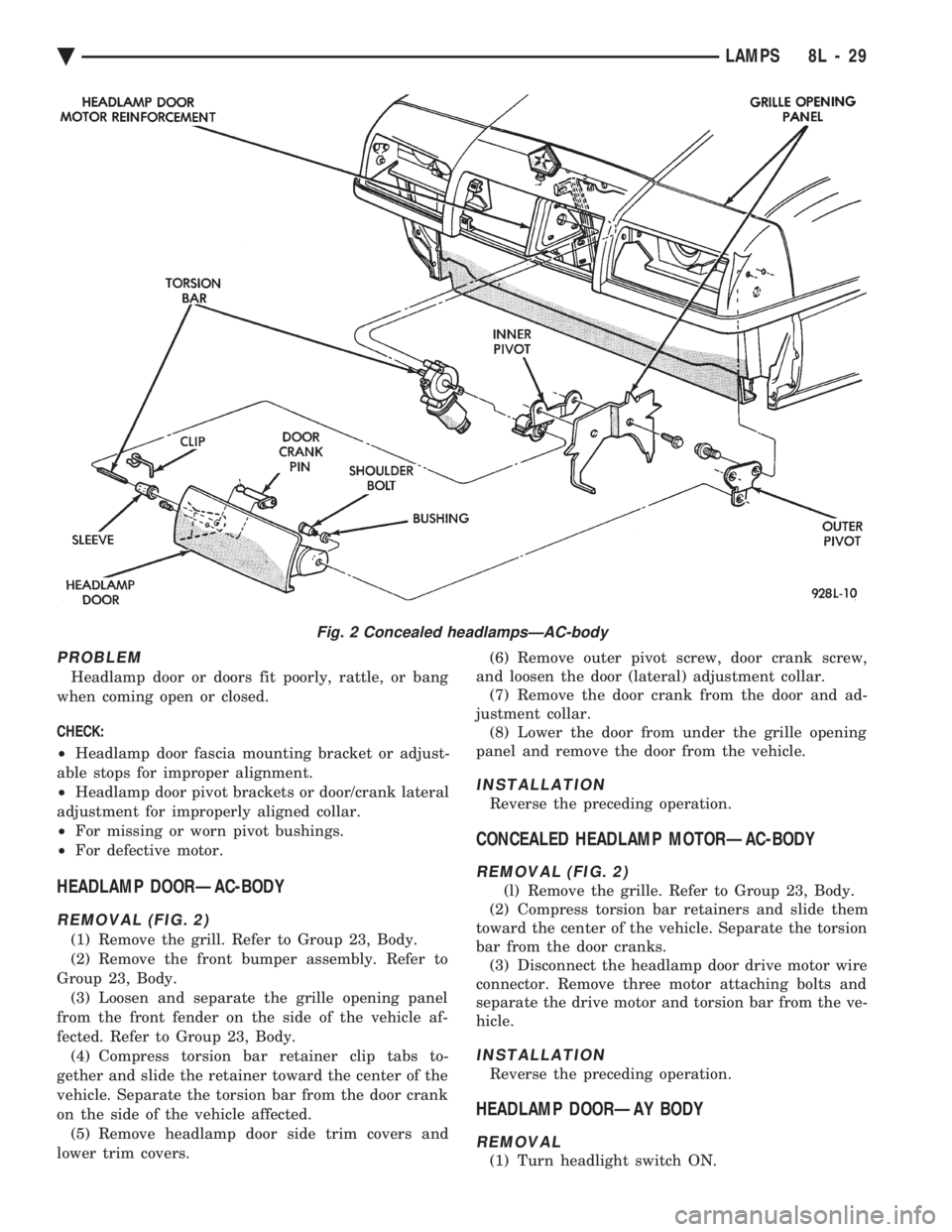
REMOVAL (FIG. 2)
(1) Remove the grill. Refer to Group 23, Body.
(2) Remove the front bumper assembly. Refer to
Group 23, Body. (3) Loosen and separate the grille opening panel
from the front fender on the side of the vehicle af-
fected. Refer to Group 23, Body. (4) Compress torsion bar retainer clip tabs to-
gether and slide the retainer toward the center of the
vehicle. Separate the torsion bar from the door crank
on the side of the vehicle affected. (5) Remove headlamp door side trim covers and
lower trim covers. (6) Remove outer pivot screw, door crank screw,
and loosen the door (lateral) adjustment collar. (7) Remove the door crank from the door and ad-
justment collar. (8) Lower the door from under the grille opening
panel and remove the door from the vehicle.
INSTALLATION
Reverse the preceding operation.
CONCEALED HEADLAMP MOTORÐAC-BODY
REMOVAL (FIG. 2)
(l) Remove the grille. Refer to Group 23, Body.
(2) Compress torsion bar retainers and slide them
toward the center of the vehicle. Separate the torsion
bar from the door cranks. (3) Disconnect the headlamp door drive motor wire
connector. Remove three motor attaching bolts and
separate the drive motor and torsion bar from the ve-
hicle.
INSTALLATION
Reverse the preceding operation.
HEADLAMP DOORÐAY BODY
REMOVAL
(1) Turn headlight switch ON.
Fig. 2 Concealed headlampsÐAC-body
Ä LAMPS 8L - 29
Page 687 of 2438
(2) Connect sensor wiring lead from harness to
connector on body of sensor. (3) Install coolant bottle, powertrain control mod-
ule, battery tray and battery. (4) Install speed control servo to battery tray, if
equipped. (5) Do not connect negative battery cable. Refer to
Air Bag Systems Check for proper procedure.
RIGHT FRONT IMPACT SENSOR
REMOVAL
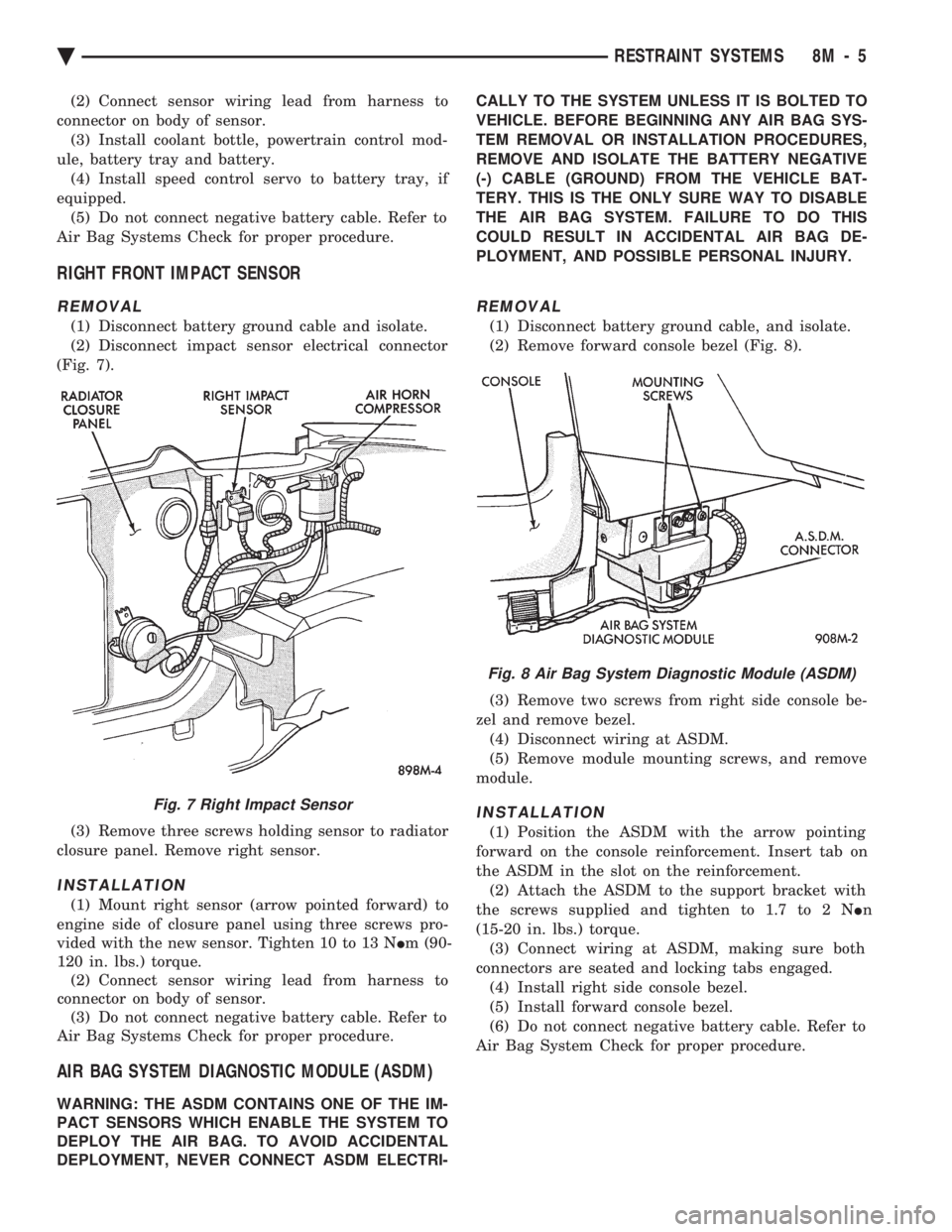
(1) Disconnect battery ground cable and isolate.
(2) Disconnect impact sensor electrical connector
(Fig. 7).
(3) Remove three screws holding sensor to radiator
closure panel. Remove right sensor.
INSTALLATION
(1) Mount right sensor (arrow pointed forward) to
engine side of closure panel using three screws pro-
vided with the new sensor. Tighten 10 to 13 N Im (90-
120 in. lbs.) torque. (2) Connect sensor wiring lead from harness to
connector on body of sensor. (3) Do not connect negative battery cable. Refer to
Air Bag Systems Check for proper procedure.
AIR BAG SYSTEM DIAGNOSTIC MODULE (ASDM)
WARNING: THE ASDM CONTAINS ONE OF THE IM-
PACT SENSORS WHICH ENABLE THE SYSTEM TO
DEPLOY THE AIR BAG. TO AVOID ACCIDENTAL
DEPLOYMENT, NEVER CONNECT ASDM ELECTRI- CALLY TO THE SYSTEM UNLESS IT IS BOLTED TO
VEHICLE. BEFORE BEGINNING ANY AIR BAG SYS-
TEM REMOVAL OR INSTALLATION PROCEDURES,
REMOVE AND ISOLATE THE BATTERY NEGATIVE
(-) CABLE (GROUND) FROM THE VEHICLE BAT-
TERY. THIS IS THE ONLY SURE WAY TO DISABLE
THE AIR BAG SYSTEM. FAILURE TO DO THIS
COULD RESULT IN ACCIDENTAL AIR BAG DE-
PLOYMENT, AND POSSIBLE PERSONAL INJURY.
REMOVAL
(1) Disconnect battery ground cable, and isolate.
(2) Remove forward console bezel (Fig. 8).
(3) Remove two screws from right side console be-
zel and remove bezel. (4) Disconnect wiring at ASDM.
(5) Remove module mounting screws, and remove
module.
INSTALLATION
(1) Position the ASDM with the arrow pointing
forward on the console reinforcement. Insert tab on
the ASDM in the slot on the reinforcement. (2) Attach the ASDM to the support bracket with
the screws supplied and tighten to 1.7 to 2 N In
(15-20 in. lbs.) torque. (3) Connect wiring at ASDM, making sure both
connectors are seated and locking tabs engaged. (4) Install right side console bezel.
(5) Install forward console bezel.
(6) Do not connect negative battery cable. Refer to
Air Bag System Check for proper procedure.
Fig. 7 Right Impact Sensor
Fig. 8 Air Bag System Diagnostic Module (ASDM)
Ä RESTRAINT SYSTEMS 8M - 5
Page 688 of 2438
CLOCKSPRING
WARNING: BEFORE BEGINNING ANY AIR BAG
SYSTEM REMOVAL OR INSTALLATION PROCE-
DURES, REMOVE AND ISOLATE THE BATTERY
NEGATIVE (-) CABLE (GROUND) FROM THE VEHI-
CLE BATTERY. THIS IS THE ONLY SURE WAY TO
DISABLE THE AIR BAG SYSTEM. FAILURE TO DO
SO COULD RESULT IN ACCIDENTAL AIR BAG DE-
PLOYMENT, AND POSSIBLE INJURY.
WHEN AN UNDEPLOYED AIR BAG ASSEMBLY
IS TO BE REMOVED FROM THE STEERING
WHEEL, DISCONNECT BATTERY GROUND CA-
BLE AND ISOLATE. ALLOW SYSTEM CAPACI-
TOR TO DISCHARGE FOR TWO MINUTES, THEN
BEGIN AIR BAG REMOVAL.
REMOVAL
(1) Place the front wheels in the straight ahead po-
sition before starting the repair. (2) Disconnect battery negative cable and isolate.
(3) Wait two minutes for the reserve capacitor to
discharge before removing undeployed module. (4) Remove the air bag module.
(5) Remove Speed Control switch and connector if
so equipped or cover. (6) Disconnect horn terminals.
(7) Remove the steering wheel.
(8) Remove upper and lower steering column
shrouds to gain access to clockspring wiring. (9) Disconnect the 2-way connector between the
clockspring and the instrument panel wiring harness
on top of the fuse block. (10) To remove, pull clockspring assembly from the
steering column by lifting locating fingers as neces-
sary. The clockspring cannot be repaired, and must
be replaced if faulty.
INSTALLATION
(1) Snap clockspring onto the steering column. If
the clockspring is not properly positioned, follow the
clockspring centering procedure before installing
steering wheel. (2) Connect the clockspring to the instrument
panel harness, ensure wiring locator clips are prop-
erly seated on wiring trough. Ensure harness locking
tabs are properly engaged. (3) Install steering column shrouds. Be sure air
bag wire is inside of shrouds. (4) Front wheels should still be in the straight-
ahead position. Install steering wheel, ensure the
flats on hub align with clockspring. Pull the horn
lead through the smaller upper hole. Pull the air bag
and speed control leads through the larger bottom
hole. Ensure leads are not pinched under the steer-
ing wheel. (5) Connect the horn lead wire, then the air bag
lead wire to the air bag module. (6) Install the air bag module and tighten nuts to
9to11N Im (80 to 100 in. lb.) torque.
(7) Install speed control switch and connector or
cover. (8) Do not connect battery negative cable. Refer to
Air Bag Systems Check for proper procedure.
CLOCKSPRING CENTERING PROCEDURE
If the rotating tape within the clockspring is not
positioned properly with the steering wheel and the
front wheels, the clockspring may fail during use.
The following procedure MUST BE USED to center
the clockspring if it is not known to be properly po-
sitioned, or if the front wheels were moved from the
straight ahead position.
WARNING: BEFORE BEGINNING ANY AIR BAG
SYSTEM REMOVAL OR INSTALLATION PROCE-
DURES, REMOVE AND ISOLATE THE BATTERY
NEGATIVE (-) CABLE (GROUND) FROM THE VEHI-
CLE BATTERY. THIS IS THE ONLY SURE WAY TO
DISABLE THE AIR BAG SYSTEM. FAILURE TO DO
THIS COULD RESULT IN ACCIDENTAL AIR BAG
DEPLOYMENT AND POSSIBLE INJURY.
WHEN AN UNDEPLOYED AIR BAG ASSEMBLY
IS TO BE REMOVED FROM THE STEERING
WHEEL, DISCONNECT BATTERY GROUND CA-
BLE AND ISOLATE. ALLOW SYSTEM CAPACI-
TOR TO DISCHARGE FOR TWO MINUTES, THEN
BEGIN AIR BAG REMOVAL. (1) Place front wheels in the straight ahead posi-
tion. (2) Wait two minutes for the reserve capacitor to
discharge before removing undeployed module. (3) Refer to Steering Wheel procedures for removal
of air bag module and steering wheel. (4) Depress the two plastic locking pins to disen-
gage locking mechanism (Fig. 10). (5) Keeping locking mechanism disengaged, rotate
the clockspring rotor in the CLOCKWISE DIREC-
TION to the end of travel. Do not apply excessive
torque. (6) From the end of travel, rotate the rotor two full
turns and a half in the counterclockwise direction.
The horn wire should end up at the top and the squib
wire at the bottom. Engage clockspring locking
mechanism. (7) Refer to Steering Wheel procedures for installa-
tion of steering wheel and air bag module. (8) Do not connect battery negative cable. Refer to
Air Bag System Check for proper procedure.
8M - 6 RESTRAINT SYSTEMS Ä
Page 733 of 2438
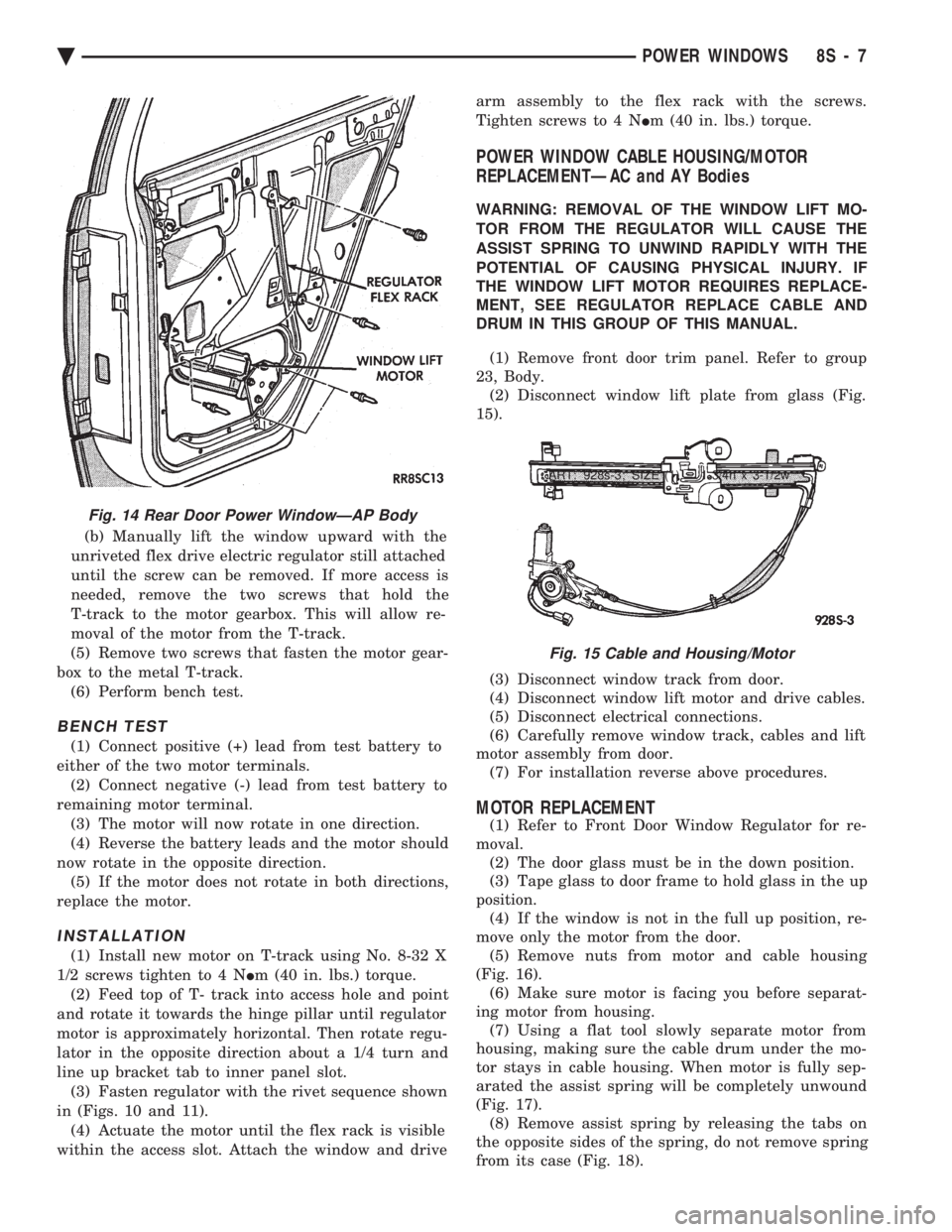
(b) Manually lift the window upward with the
unriveted flex drive electric regulator still attached
until the screw can be removed. If more access is
needed, remove the two screws that hold the
T-track to the motor gearbox. This will allow re-
moval of the motor from the T-track.
(5) Remove two screws that fasten the motor gear-
box to the metal T-track. (6) Perform bench test.
BENCH TEST
(1) Connect positive (+) lead from test battery to
either of the two motor terminals. (2) Connect negative (-) lead from test battery to
remaining motor terminal. (3) The motor will now rotate in one direction.
(4) Reverse the battery leads and the motor should
now rotate in the opposite direction. (5) If the motor does not rotate in both directions,
replace the motor.
INSTALLATION
(1) Install new motor on T-track using No. 8-32 X
1/2 screws tighten to 4 N Im (40 in. lbs.) torque.
(2) Feed top of T- track into access hole and point
and rotate it towards the hinge pillar until regulator
motor is approximately horizontal. Then rotate regu-
lator in the opposite direction about a 1/4 turn and
line up bracket tab to inner panel slot. (3) Fasten regulator with the rivet sequence shown
in (Figs. 10 and 11). (4) Actuate the motor until the flex rack is visible
within the access slot. Attach the window and drive arm assembly to the flex rack with the screws.
Tighten screws to 4 N Im (40 in. lbs.) torque.
POWER WINDOW CABLE HOUSING/MOTOR
REPLACEMENTÐAC and AY Bodies
WARNING: REMOVAL OF THE WINDOW LIFT MO-
TOR FROM THE REGULATOR WILL CAUSE THE
ASSIST SPRING TO UNWIND RAPIDLY WITH THE
POTENTIAL OF CAUSING PHYSICAL INJURY. IF
THE WINDOW LIFT MOTOR REQUIRES REPLACE-
MENT, SEE REGULATOR REPLACE CABLE AND
DRUM IN THIS GROUP OF THIS MANUAL.
(1) Remove front door trim panel. Refer to group
23, Body. (2) Disconnect window lift plate from glass (Fig.
15).
(3) Disconnect window track from door.
(4) Disconnect window lift motor and drive cables.
(5) Disconnect electrical connections.
(6) Carefully remove window track, cables and lift
motor assembly from door. (7) For installation reverse above procedures.
MOTOR REPLACEMENT
(1) Refer to Front Door Window Regulator for re-
moval. (2) The door glass must be in the down position.
(3) Tape glass to door frame to hold glass in the up
position. (4) If the window is not in the full up position, re-
move only the motor from the door. (5) Remove nuts from motor and cable housing
(Fig. 16). (6) Make sure motor is facing you before separat-
ing motor from housing. (7) Using a flat tool slowly separate motor from
housing, making sure the cable drum under the mo-
tor stays in cable housing. When motor is fully sep-
arated the assist spring will be completely unwound
(Fig. 17). (8) Remove assist spring by releasing the tabs on
the opposite sides of the spring, do not remove spring
from its case (Fig. 18).
Fig. 14 Rear Door Power WindowÐAP Body
ART: 928s-3; SIZE (1) = 1-3/4h x 3-1/2w
Fig. 15 Cable and Housing/Motor
Ä POWER WINDOWS 8S - 7