clutch CHEVROLET DYNASTY 1993 Service Manual
[x] Cancel search | Manufacturer: CHEVROLET, Model Year: 1993, Model line: DYNASTY, Model: CHEVROLET DYNASTY 1993Pages: 2438, PDF Size: 74.98 MB
Page 2336 of 2438
FIXED DISPLACEMENT COMPRESSORÐMODEL TR105 INDEX
page page
Compressor ............................. 32
Compressor Clutch/Coil Assembly ............ 32
Compressor Shaft Bearing/Seal .............. 35 Refrigerant System Diagnosis
............... 36
Thermal Limiter Switch .................... 34
COMPRESSOR
Cleanliness is extremely important when disassem-
bly of the compressor is necessary. The surfaces
around the suction and discharge ports of the com-
pressor should be cleaned thoroughly before opening
the system at these points. If compressor is removed
from vehicle, apply tape to the opened ports to pre-
vent any contamination.
REMOVAL
(1) Disconnect battery negative cable.
(2) Loosen and remove drive belts (refer to Group
7, Cooling System). (3) Disconnect compressor clutch wire lead.
(4) Using a refrigerant recovery machine, remove
refrigerant from the A/C system. (5) Remove refrigerant lines from compressor.
(6) Remove compressor attaching bolts.
(7) Remove compressor.
INSTALLATION
(1) Position the compressor on the mount and fit
drive belt. (2) Tighten the compressor attaching bolts to 41
N Im (30 ft. lbs.) torque.
(3) Adjust drive belt (see Group 7, Cooling Sys-
tem). (4) Install refrigerant hoses.
(5) Connect the clutch wire.
(6) Evacuate and charge the system.
(7) Connect the battery negative cable.
COMPRESSOR CLUTCH/COIL ASSEMBLY
CLUTCH INOPERATIVE
The air conditioning compressor clutch electrical
circuit is controlled by the engine controller. The
controller is located in the engine compartment out-
board of the battery. If the compressor clutch does not engage:
Verify refrigerant charge.
If the compressor clutch still does not engage check
for battery voltage at the low pressure or differential
pressure cut-off switch located on the expansion
valve. If voltage is not detected, refer to:
² Group 8W, Wiring Diagrams.
² The appropriate Powertrain Diagnostic Procedures
Manual for diagnostic information. If voltage is detected at the cut-off switch, recon-
nect switch. Then check for battery voltage between
the compressor clutch connector terminals. If voltage is detected, perform A/C Clutch Coil
Tests.
CLUTCH COIL TESTS
(1) Verify battery state of charge. (Test indicator
in battery should be green). (2) Connect an ammeter (0-10 ampere scale) in se-
ries with the clutch coil terminal. Use a volt meter
(0-20 volt scale) with clip leads measuring voltage
across the battery and A/C clutch. (3) With A/C control in A/C mode and blower at
low speed, start the engine and run at normal idle. (4) The A/C clutch should engage immediately and
the clutch voltage should be within two volts of the
battery voltage. If the A/C clutch does not engage,
test the fusible link. (5) The A/C clutch coil is acceptable if the current
draw is 2.0 to 3.7 amperes at 11.5-12.5 volts at clutch
coil. This is with the work area temperature at 21ÉC
(70ÉF). If voltage is more than 12.5 volts, add electri-
cal loads by turning on electrical accessories until
voltage reads below 12.5 volts. If coil current reads zero, the coil is open and
should be replaced. If the ammeter reading is 4 am-
peres or more, the coil is shorted and should be re-
placed. If the coil voltage is not within two volts of
the battery voltage, test clutch coil feed circuit for
excessive voltage drop.
REMOVAL
(1) Remove the compressor from the mount.
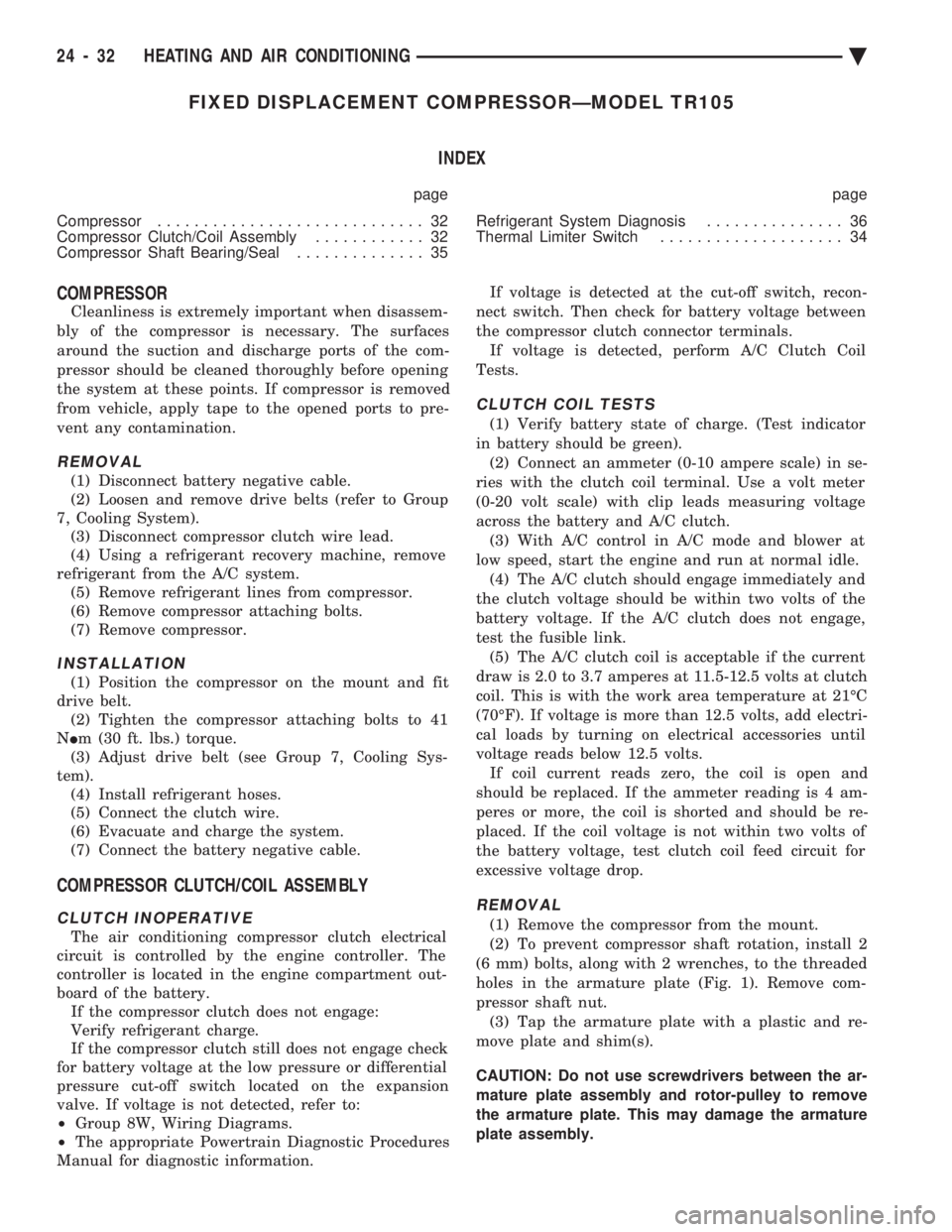
(2) To prevent compressor shaft rotation, install 2
(6 mm) bolts, along with 2 wrenches, to the threaded
holes in the armature plate (Fig. 1). Remove com-
pressor shaft nut. (3) Tap the armature plate with a plastic and re-
move plate and shim(s).
CAUTION: Do not use screwdrivers between the ar-
mature plate assembly and rotor-pulley to remove
the armature plate. This may damage the armature
plate assembly.
24 - 32 HEATING AND AIR CONDITIONING Ä
Page 2337 of 2438
(4) Remove rotor-pulley retaining snap ring with
Snap Ring Pliers C-4574. Slide rotor-pulley assembly
from compressor. Use a plastic hammer, if necessary. (5) Loosen the lead wire retaining clamps and re-
move lead wire from the compressor front end plate.
Disconnect the lead wire from the thermal limiter
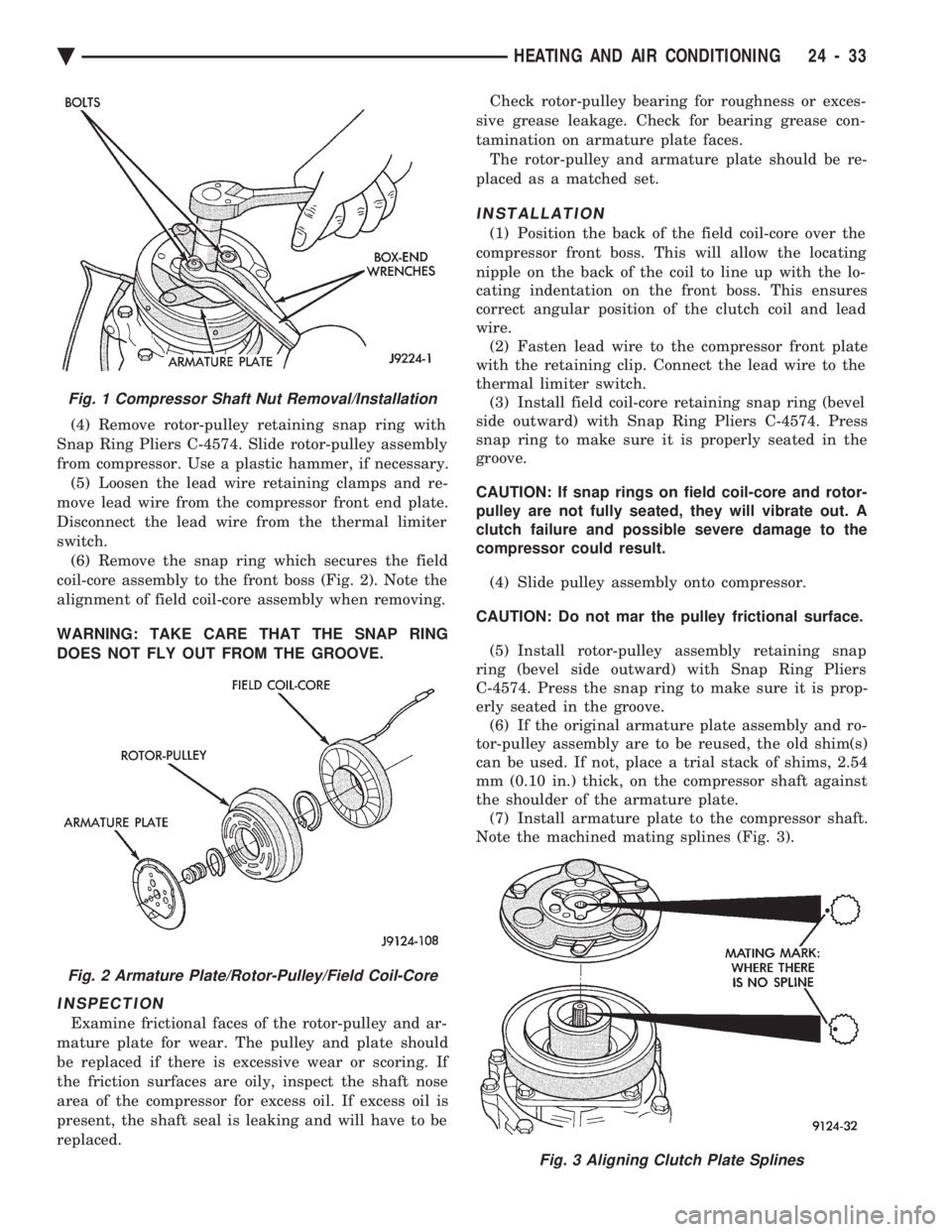
switch. (6) Remove the snap ring which secures the field
coil-core assembly to the front boss (Fig. 2). Note the
alignment of field coil-core assembly when removing.
WARNING: TAKE CARE THAT THE SNAP RING
DOES NOT FLY OUT FROM THE GROOVE.
INSPECTION
Examine frictional faces of the rotor-pulley and ar-
mature plate for wear. The pulley and plate should
be replaced if there is excessive wear or scoring. If
the friction surfaces are oily, inspect the shaft nose
area of the compressor for excess oil. If excess oil is
present, the shaft seal is leaking and will have to be
replaced. Check rotor-pulley bearing for roughness or exces-
sive grease leakage. Check for bearing grease con-
tamination on armature plate faces. The rotor-pulley and armature plate should be re-
placed as a matched set.
INSTALLATION
(1) Position the back of the field coil-core over the
compressor front boss. This will allow the locating
nipple on the back of the coil to line up with the lo-
cating indentation on the front boss. This ensures
correct angular position of the clutch coil and lead
wire. (2) Fasten lead wire to the compressor front plate
with the retaining clip. Connect the lead wire to the
thermal limiter switch. (3) Install field coil-core retaining snap ring (bevel
side outward) with Snap Ring Pliers C-4574. Press
snap ring to make sure it is properly seated in the
groove.
CAUTION: If snap rings on field coil-core and rotor-
pulley are not fully seated, they will vibrate out. A
clutch failure and possible severe damage to the
compressor could result.
(4) Slide pulley assembly onto compressor.
CAUTION: Do not mar the pulley frictional surface. (5) Install rotor-pulley assembly retaining snap
ring (bevel side outward) with Snap Ring Pliers
C-4574. Press the snap ring to make sure it is prop-
erly seated in the groove. (6) If the original armature plate assembly and ro-
tor-pulley assembly are to be reused, the old shim(s)
can be used. If not, place a trial stack of shims, 2.54
mm (0.10 in.) thick, on the compressor shaft against
the shoulder of the armature plate. (7) Install armature plate to the compressor shaft.
Note the machined mating splines (Fig. 3).
Fig. 1 Compressor Shaft Nut Removal/Installation
Fig. 2 Armature Plate/Rotor-Pulley/Field Coil-Core
Fig. 3 Aligning Clutch Plate Splines
Ä HEATING AND AIR CONDITIONING 24 - 33
Page 2338 of 2438
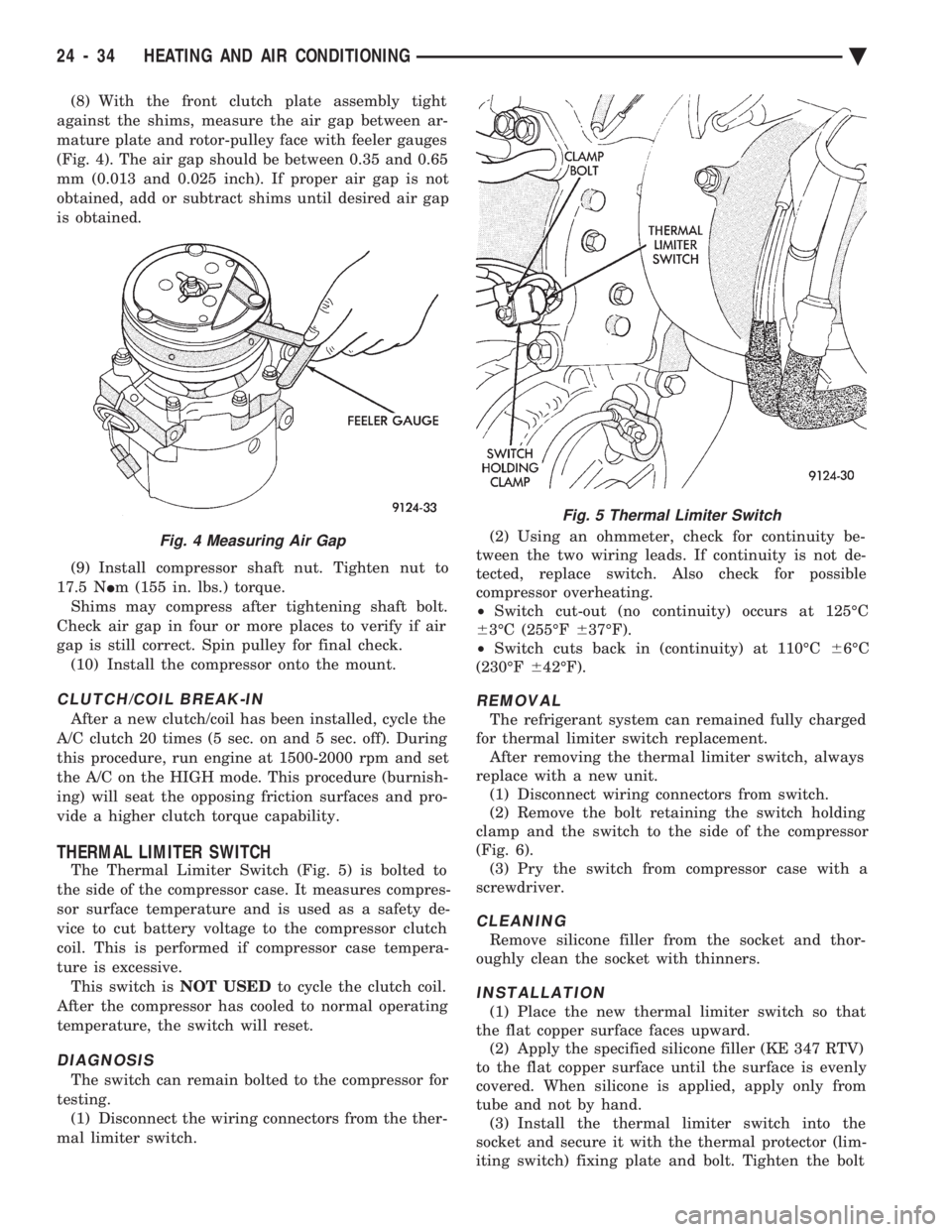
(8) With the front clutch plate assembly tight
against the shims, measure the air gap between ar-
mature plate and rotor-pulley face with feeler gauges
(Fig. 4). The air gap should be between 0.35 and 0.65
mm (0.013 and 0.025 inch). If proper air gap is not
obtained, add or subtract shims until desired air gap
is obtained.
(9) Install compressor shaft nut. Tighten nut to
17.5 N Im (155 in. lbs.) torque.
Shims may compress after tightening shaft bolt.
Check air gap in four or more places to verify if air
gap is still correct. Spin pulley for final check. (10) Install the compressor onto the mount.
CLUTCH/COIL BREAK-IN
After a new clutch/coil has been installed, cycle the
A/C clutch 20 times (5 sec. on and 5 sec. off). During
this procedure, run engine at 1500-2000 rpm and set
the A/C on the HIGH mode. This procedure (burnish-
ing) will seat the opposing friction surfaces and pro-
vide a higher clutch torque capability.
THERMAL LIMITER SWITCH
The Thermal Limiter Switch (Fig. 5) is bolted to
the side of the compressor case. It measures compres-
sor surface temperature and is used as a safety de-
vice to cut battery voltage to the compressor clutch
coil. This is performed if compressor case tempera-
ture is excessive. This switch is NOT USEDto cycle the clutch coil.
After the compressor has cooled to normal operating
temperature, the switch will reset.
DIAGNOSIS
The switch can remain bolted to the compressor for
testing. (1) Disconnect the wiring connectors from the ther-
mal limiter switch. (2) Using an ohmmeter, check for continuity be-
tween the two wiring leads. If continuity is not de-
tected, replace switch. Also check for possible
compressor overheating.
² Switch cut-out (no continuity) occurs at 125ÉC
6 3ÉC (255ÉF 637ÉF).
² Switch cuts back in (continuity) at 110ÉC 66ÉC
(230ÉF 642ÉF).
REMOVAL
The refrigerant system can remained fully charged
for thermal limiter switch replacement. After removing the thermal limiter switch, always
replace with a new unit. (1) Disconnect wiring connectors from switch.
(2) Remove the bolt retaining the switch holding
clamp and the switch to the side of the compressor
(Fig. 6). (3) Pry the switch from compressor case with a
screwdriver.
CLEANING
Remove silicone filler from the socket and thor-
oughly clean the socket with thinners.
INSTALLATION
(1) Place the new thermal limiter switch so that
the flat copper surface faces upward. (2) Apply the specified silicone filler (KE 347 RTV)
to the flat copper surface until the surface is evenly
covered. When silicone is applied, apply only from
tube and not by hand. (3) Install the thermal limiter switch into the
socket and secure it with the thermal protector (lim-
iting switch) fixing plate and bolt. Tighten the bolt
Fig. 4 Measuring Air Gap
Fig. 5 Thermal Limiter Switch
24 - 34 HEATING AND AIR CONDITIONING Ä
Page 2340 of 2438
INSTALLATION
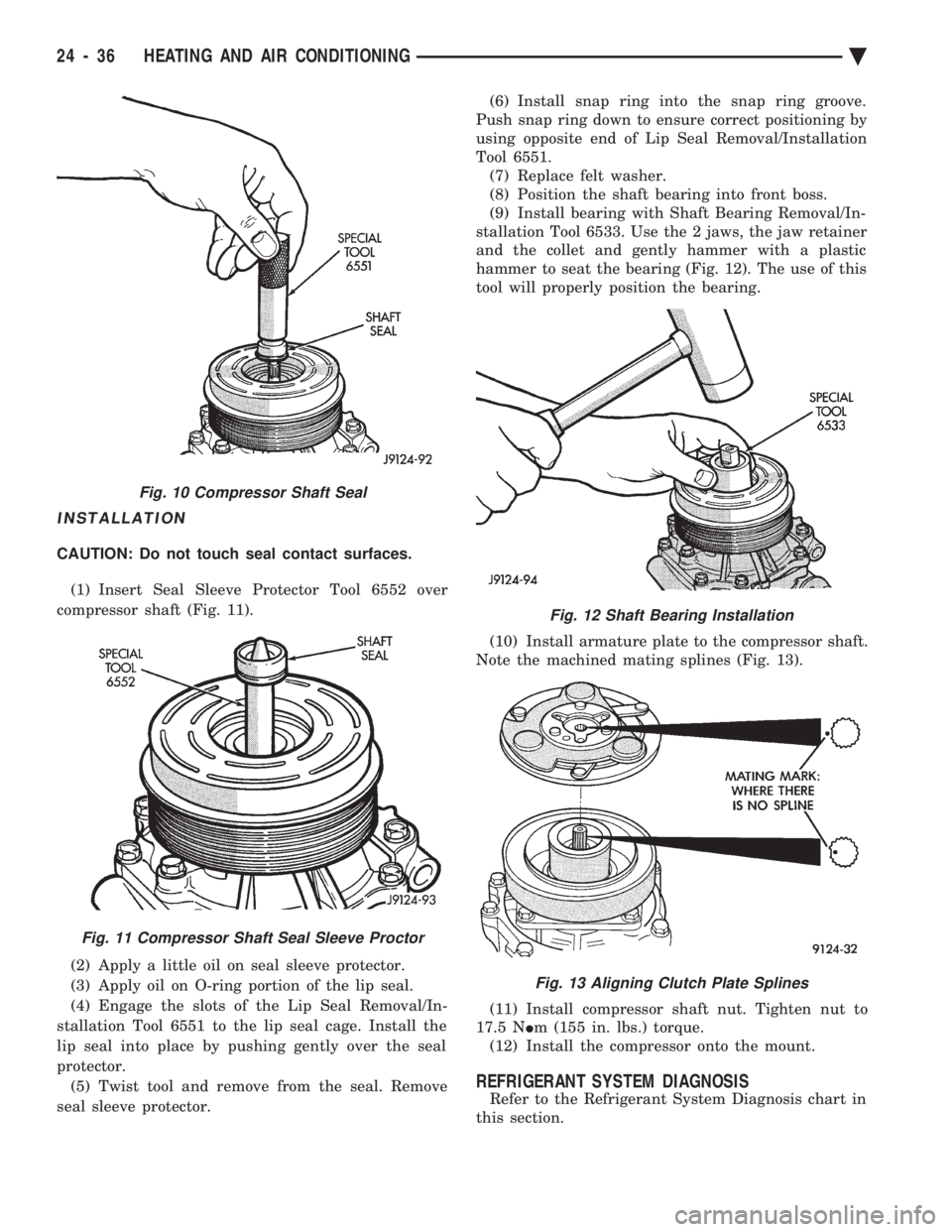
CAUTION: Do not touch seal contact surfaces. (1) Insert Seal Sleeve Protector Tool 6552 over
compressor shaft (Fig. 11).
(2) Apply a little oil on seal sleeve protector.
(3) Apply oil on O-ring portion of the lip seal.
(4) Engage the slots of the Lip Seal Removal/In-
stallation Tool 6551 to the lip seal cage. Install the
lip seal into place by pushing gently over the seal
protector. (5) Twist tool and remove from the seal. Remove
seal sleeve protector. (6) Install snap ring into the snap ring groove.
Push snap ring down to ensure correct positioning by
using opposite end of Lip Seal Removal/Installation
Tool 6551. (7) Replace felt washer.
(8) Position the shaft bearing into front boss.
(9) Install bearing with Shaft Bearing Removal/In-
stallation Tool 6533. Use the 2 jaws, the jaw retainer
and the collet and gently hammer with a plastic
hammer to seat the bearing (Fig. 12). The use of this
tool will properly position the bearing.
(10) Install armature plate to the compressor shaft.
Note the machined mating splines (Fig. 13).
(11) Install compressor shaft nut. Tighten nut to
17.5 N Im (155 in. lbs.) torque.
(12) Install the compressor onto the mount.
REFRIGERANT SYSTEM DIAGNOSIS
Refer to the Refrigerant System Diagnosis chart in
this section.
Fig. 10 Compressor Shaft Seal
Fig. 11 Compressor Shaft Seal Sleeve Proctor
Fig. 12 Shaft Bearing Installation
Fig. 13 Aligning Clutch Plate Splines
24 - 36 HEATING AND AIR CONDITIONING Ä
Page 2342 of 2438
FIXED DISPLACEMENT COMPRESSORÐMODEL SD709P INDEX
page page
Compressor ............................. 38
Compressor Clutch/Coil Assembly ............ 38
Compressor Shaft Seal .................... 41 Cylinder Head/Valve Plate
.................. 44
Description ............................. 38
Refrigerant System Diagnosis ............... 45
DESCRIPTION
The Sanden compressor is a 7 piston design. Sys-
tem lubrication is provided by 135 ml 615 ml (4.6 oz.
6 0.5 oz.) of 500 viscosity refrigerant oil.
The clutch used on the compressor consists of 3 ba-
sic components:
² The pulley
² Front plate
² Field coil
The pulley and field coil are attached to the front
head of the compressor with tapered snap rings. The
hub is keyed to the compressor shaft and is retained
on the shaft with a self-locking nut. Special service
tools are required to remove and install the clutch
plate on the compressor shaft.
COMPRESSOR
The A/C compressor may be removed and posi-
tioned without discharging the refrigerant system.
Discharging is not necessary if removing the A/C
compressor clutch/coil assembly, engine, cylinder
head, or generator.
WARNING: REFRIGERANT PRESSURES REMAIN
HIGH EVEN THOUGH THE ENGINE MAY BE
TURNED OFF. BEFORE REMOVING A FULLY
CHARGED COMPRESSOR, REVIEW THE SAFETY
PRECAUTIONS AND WARNINGS SECTION IN THIS
GROUP. DO NOT TWIST OR KINK THE REFRIGER-
ANT LINES WHEN REMOVING A FULLY CHARGED
COMPRESSOR. SAFETY GLASSES MUST BE
WORN.
REMOVAL
(1) Disconnect negative cable from battery.
(2) Loosen and remove drive belts (refer to group
7, Cooling System) and disconnect compressor clutch
wire lead. (3) Remove refrigerant lines from compressor (if
necessary). (4) Remove compressor attaching nuts and bolts.
(5) Remove compressor. If refrigerant lines were
not removed, lift compressor/clutch assembly and tie
it to a suitable component. To install, reverse the removal procedure.
COMPRESSOR CLUTCH/COIL ASSEMBLY
The magnetic clutch consists of a stationary elec-
tro-magnetic coil and a rotating pulley and plate as-
sembly. The electromagnetic coil is retained on the com-
pressor with a snap ring and is dimpled to maintain
its position. The pulley and plate assembly are mounted on the
compressor shaft. When the compressor is not in operation, the pul-
ley free wheels on the clutch hub bearing. When the
coil is energized the plate is magnetically engaged
with the pulley and turns the compressor shaft.
REMOVAL
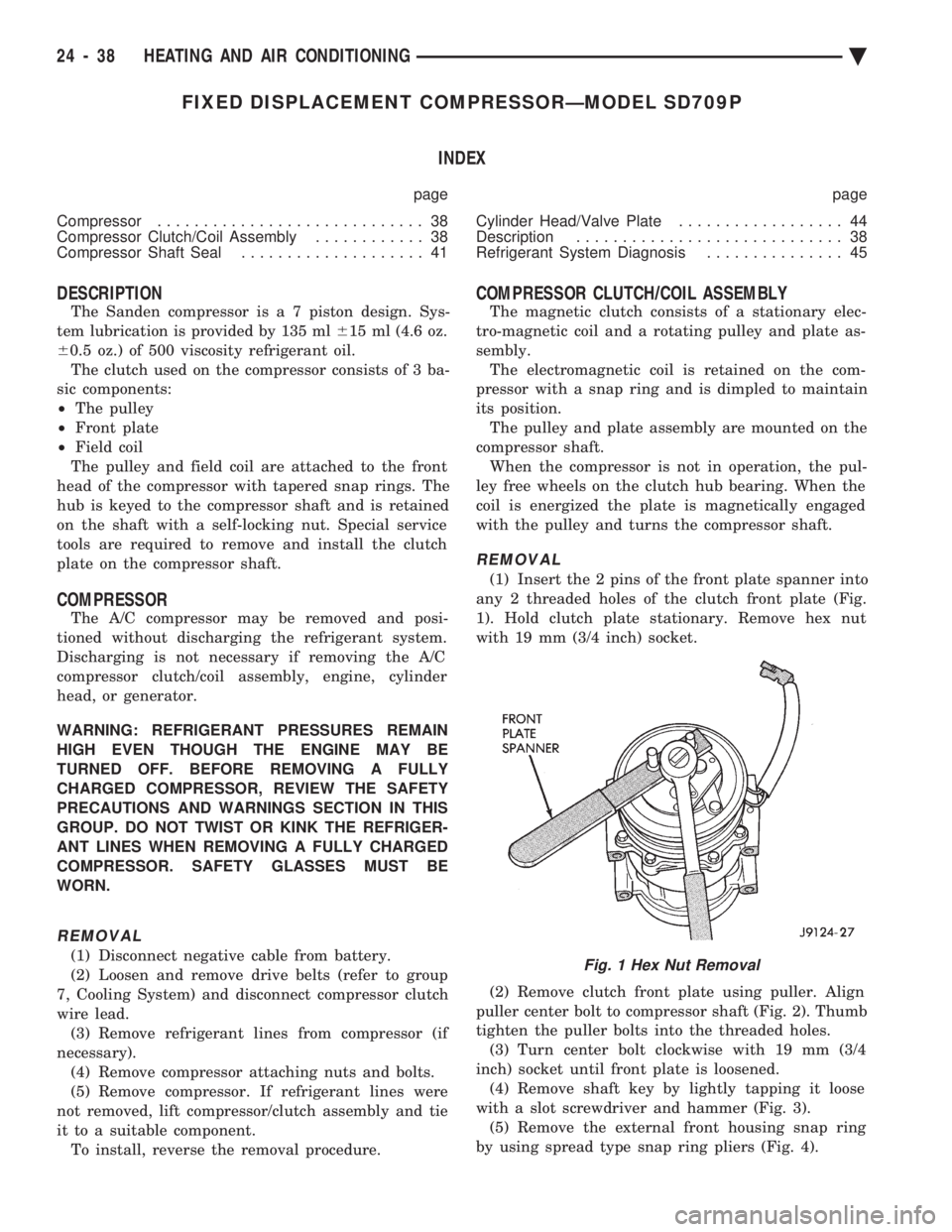
(1) Insert the 2 pins of the front plate spanner into
any 2 threaded holes of the clutch front plate (Fig.
1). Hold clutch plate stationary. Remove hex nut
with 19 mm (3/4 inch) socket.
(2) Remove clutch front plate using puller. Align
puller center bolt to compressor shaft (Fig. 2). Thumb
tighten the puller bolts into the threaded holes. (3) Turn center bolt clockwise with 19 mm (3/4
inch) socket until front plate is loosened. (4) Remove shaft key by lightly tapping it loose
with a slot screwdriver and hammer (Fig. 3). (5) Remove the external front housing snap ring
by using spread type snap ring pliers (Fig. 4).
Fig. 1 Hex Nut Removal
24 - 38 HEATING AND AIR CONDITIONING Ä
Page 2343 of 2438
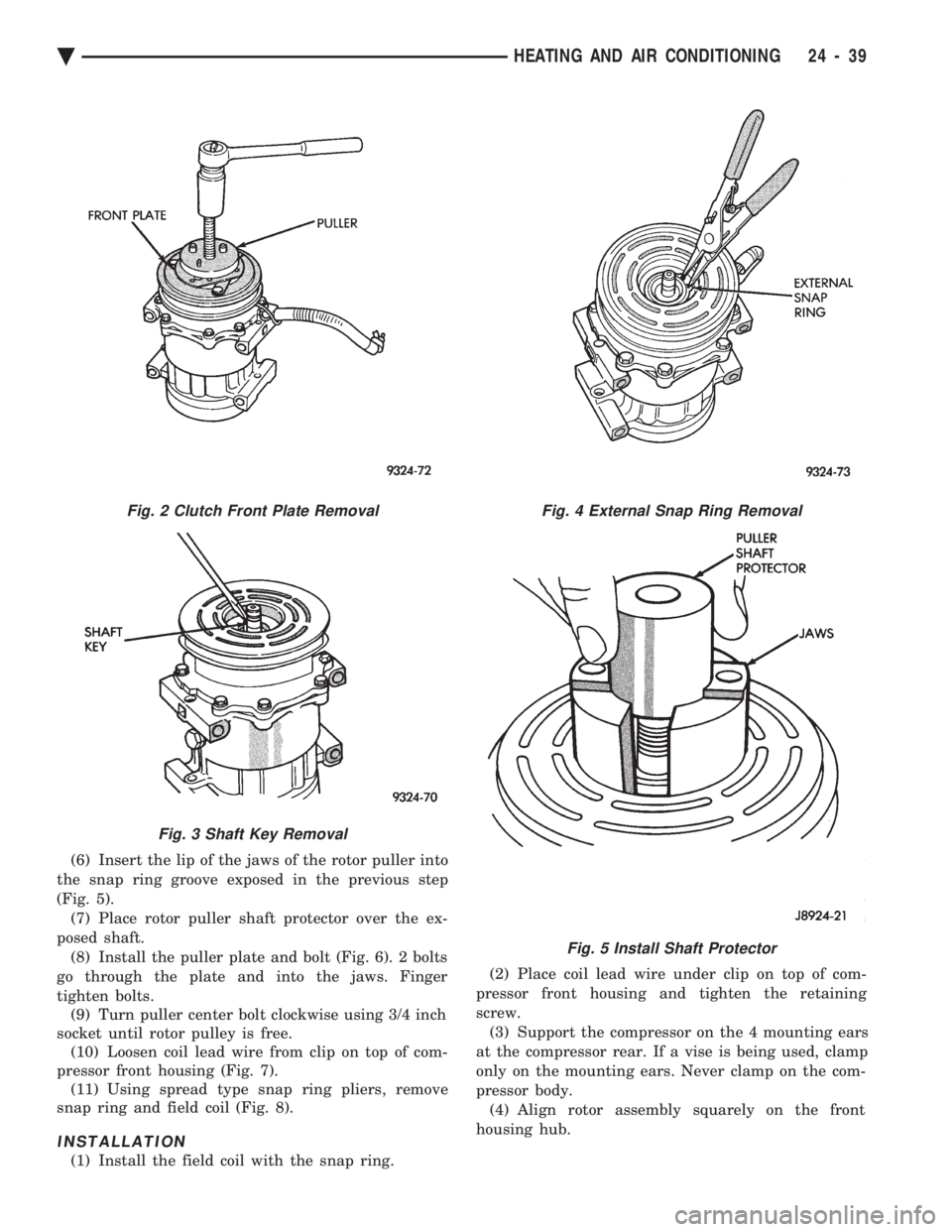
(6) Insert the lip of the jaws of the rotor puller into
the snap ring groove exposed in the previous step
(Fig. 5). (7) Place rotor puller shaft protector over the ex-
posed shaft. (8) Install the puller plate and bolt (Fig. 6). 2 bolts
go through the plate and into the jaws. Finger
tighten bolts. (9) Turn puller center bolt clockwise using 3/4 inch
socket until rotor pulley is free. (10) Loosen coil lead wire from clip on top of com-
pressor front housing (Fig. 7). (11) Using spread type snap ring pliers, remove
snap ring and field coil (Fig. 8).
INSTALLATION
(1) Install the field coil with the snap ring. (2) Place coil lead wire under clip on top of com-
pressor front housing and tighten the retaining
screw. (3) Support the compressor on the 4 mounting ears
at the compressor rear. If a vise is being used, clamp
only on the mounting ears. Never clamp on the com-
pressor body. (4) Align rotor assembly squarely on the front
housing hub.
Fig. 2 Clutch Front Plate Removal
Fig. 3 Shaft Key Removal
Fig. 4 External Snap Ring Removal
Fig. 5 Install Shaft Protector
Ä HEATING AND AIR CONDITIONING 24 - 39
Page 2344 of 2438
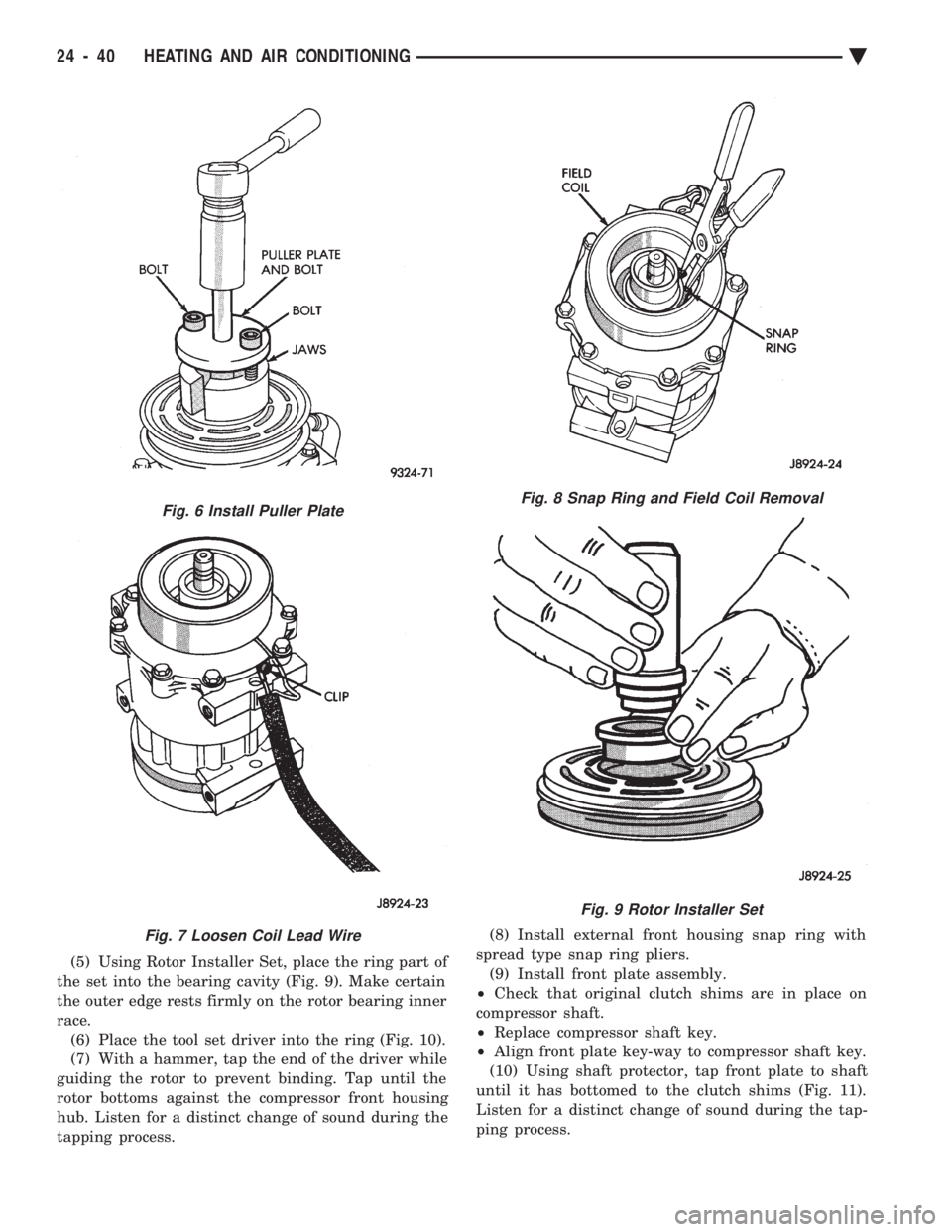
(5) Using Rotor Installer Set, place the ring part of
the set into the bearing cavity (Fig. 9). Make certain
the outer edge rests firmly on the rotor bearing inner
race. (6) Place the tool set driver into the ring (Fig. 10).
(7) With a hammer, tap the end of the driver while
guiding the rotor to prevent binding. Tap until the
rotor bottoms against the compressor front housing
hub. Listen for a distinct change of sound during the
tapping process. (8) Install external front housing snap ring with
spread type snap ring pliers. (9) Install front plate assembly.
² Check that original clutch shims are in place on
compressor shaft.
² Replace compressor shaft key.
² Align front plate key-way to compressor shaft key.
(10) Using shaft protector, tap front plate to shaft
until it has bottomed to the clutch shims (Fig. 11).
Listen for a distinct change of sound during the tap-
ping process.
Fig. 6 Install Puller Plate
Fig. 7 Loosen Coil Lead Wire
Fig. 8 Snap Ring and Field Coil Removal
Fig. 9 Rotor Installer Set
24 - 40 HEATING AND AIR CONDITIONING Ä
Page 2345 of 2438
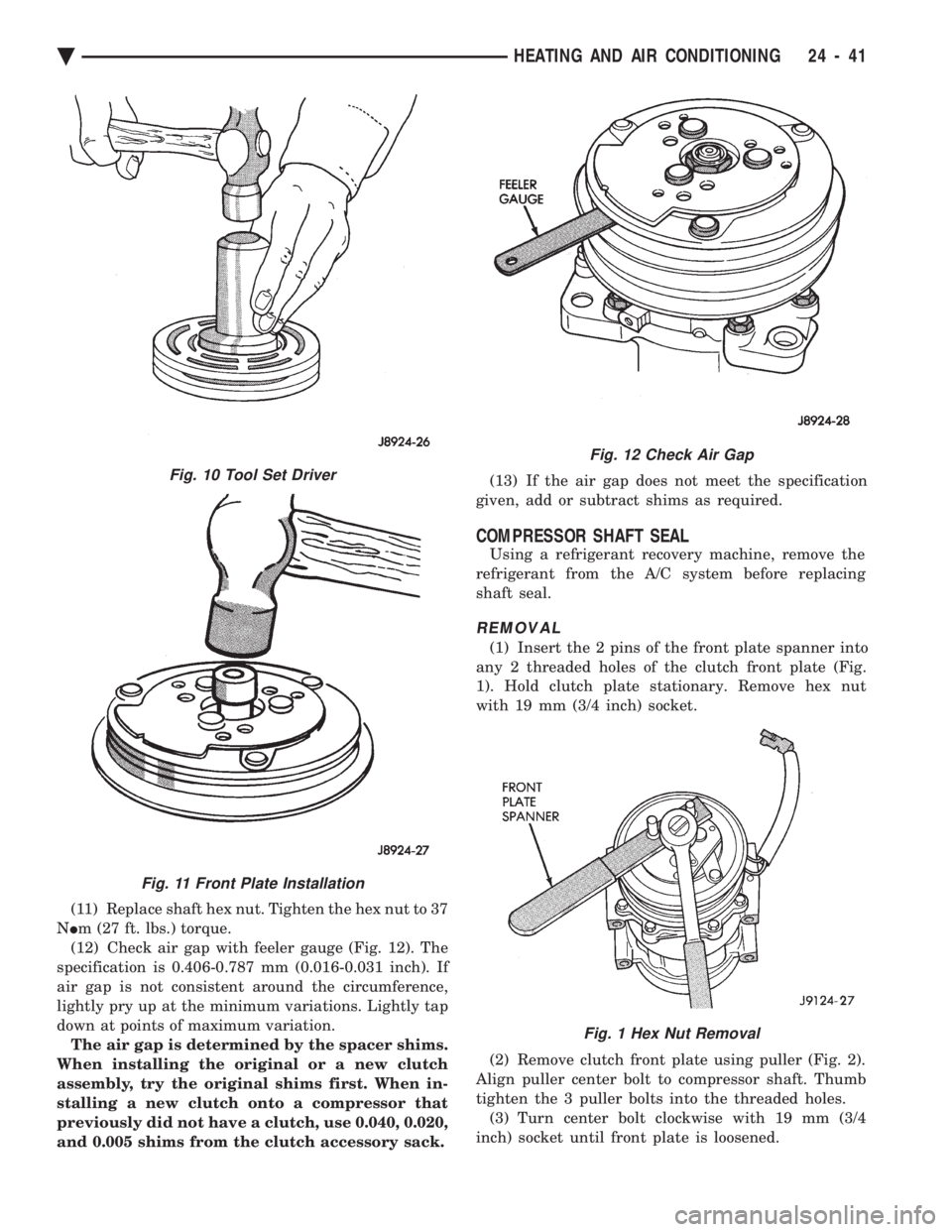
(11) Replace shaft hex nut. Tighten the hex nut to 37
N Im (27 ft. lbs.) torque.
(12) Check air gap with feeler gauge (Fig. 12). The
specification is 0.406-0.787 mm (0.016-0.031 inch). If
air gap is not consistent around the circumference,
lightly pry up at the minimum variations. Lightly tap
down at points of maximum variation. The air gap is determined by the spacer shims.
When installing the original or a new clutch
assembly, try the original shims first. When in-
stalling a new clutch onto a compressor that
previously did not have a clutch, use 0.040, 0.020,
and 0.005 shims from the clutch accessory sack. (13) If the air gap does not meet the specification
given, add or subtract shims as required.
COMPRESSOR SHAFT SEAL
Using a refrigerant recovery machine, remove the
refrigerant from the A/C system before replacing
shaft seal.
REMOVAL
(1) Insert the 2 pins of the front plate spanner into
any 2 threaded holes of the clutch front plate (Fig.
1). Hold clutch plate stationary. Remove hex nut
with 19 mm (3/4 inch) socket.
(2) Remove clutch front plate using puller (Fig. 2).
Align puller center bolt to compressor shaft. Thumb
tighten the 3 puller bolts into the threaded holes. (3) Turn center bolt clockwise with 19 mm (3/4
inch) socket until front plate is loosened.
Fig. 12 Check Air Gap
Fig. 1 Hex Nut Removal
Fig. 10 Tool Set Driver
Fig. 11 Front Plate Installation
Ä HEATING AND AIR CONDITIONING 24 - 41
Page 2346 of 2438
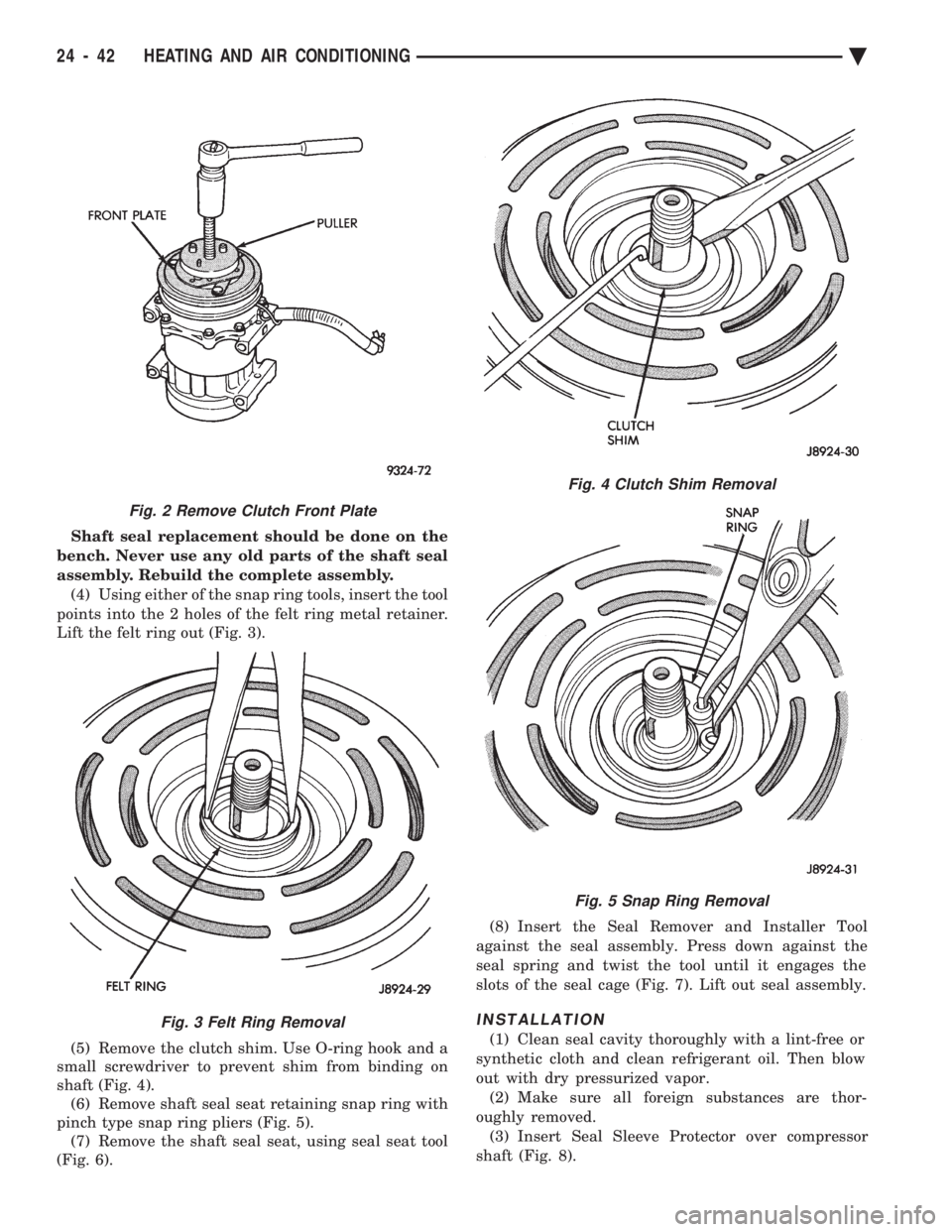
Shaft seal replacement should be done on the
bench. Never use any old parts of the shaft seal
assembly. Rebuild the complete assembly. (4) Using either of the snap ring tools, insert the tool
points into the 2 holes of the felt ring metal retainer.
Lift the felt ring out (Fig. 3).
(5) Remove the clutch shim. Use O-ring hook and a
small screwdriver to prevent shim from binding on
shaft (Fig. 4). (6) Remove shaft seal seat retaining snap ring with
pinch type snap ring pliers (Fig. 5). (7) Remove the shaft seal seat, using seal seat tool
(Fig. 6). (8) Insert the Seal Remover and Installer Tool
against the seal assembly. Press down against the
seal spring and twist the tool until it engages the
slots of the seal cage (Fig. 7). Lift out seal assembly.
INSTALLATION
(1) Clean seal cavity thoroughly with a lint-free or
synthetic cloth and clean refrigerant oil. Then blow
out with dry pressurized vapor. (2) Make sure all foreign substances are thor-
oughly removed. (3) Insert Seal Sleeve Protector over compressor
shaft (Fig. 8).
Fig. 4 Clutch Shim Removal
Fig. 5 Snap Ring Removal
Fig. 2 Remove Clutch Front Plate
Fig. 3 Felt Ring Removal
24 - 42 HEATING AND AIR CONDITIONING Ä
Page 2347 of 2438
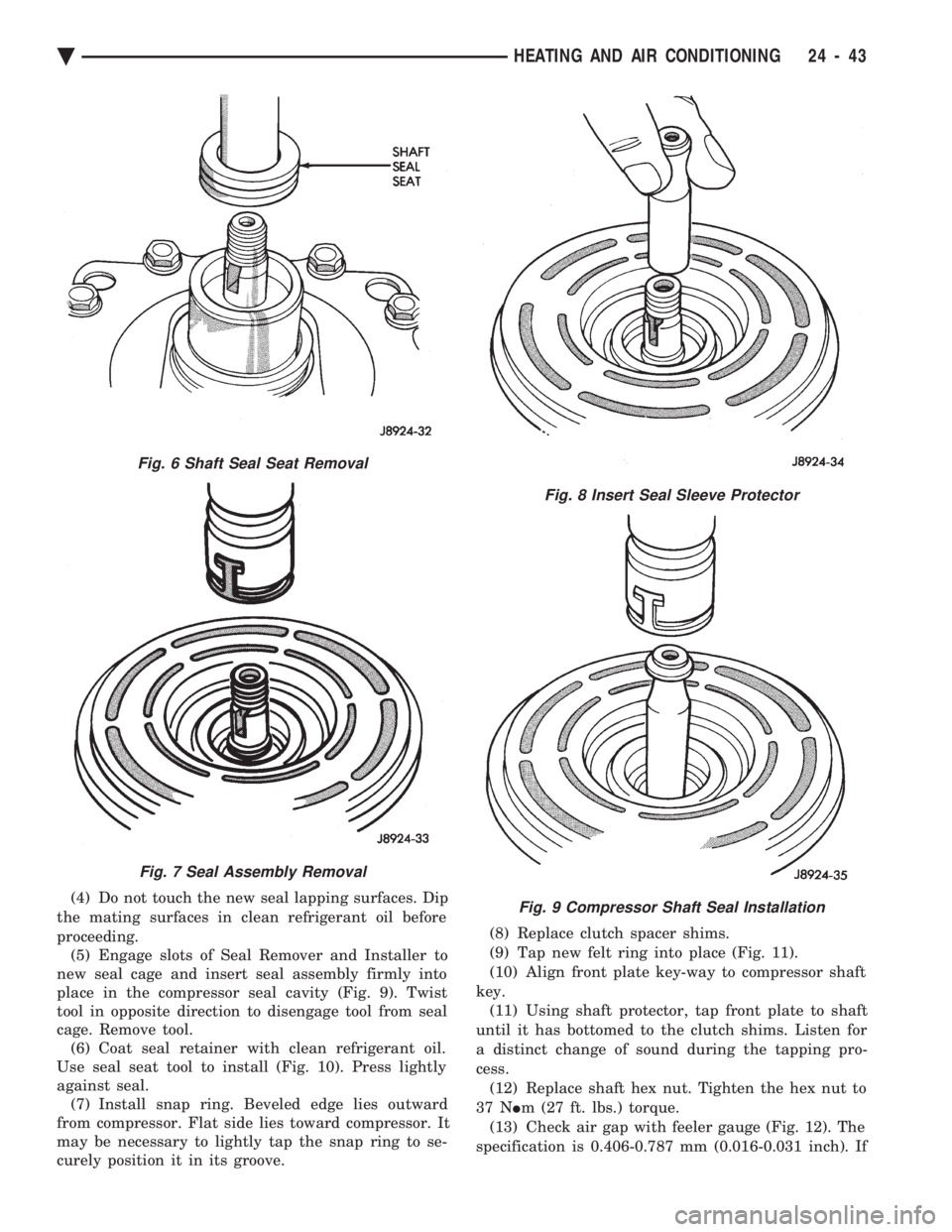
(4) Do not touch the new seal lapping surfaces. Dip
the mating surfaces in clean refrigerant oil before
proceeding. (5) Engage slots of Seal Remover and Installer to
new seal cage and insert seal assembly firmly into
place in the compressor seal cavity (Fig. 9). Twist
tool in opposite direction to disengage tool from seal
cage. Remove tool. (6) Coat seal retainer with clean refrigerant oil.
Use seal seat tool to install (Fig. 10). Press lightly
against seal. (7) Install snap ring. Beveled edge lies outward
from compressor. Flat side lies toward compressor. It
may be necessary to lightly tap the snap ring to se-
curely position it in its groove. (8) Replace clutch spacer shims.
(9) Tap new felt ring into place (Fig. 11).
(10) Align front plate key-way to compressor shaft
key. (11) Using shaft protector, tap front plate to shaft
until it has bottomed to the clutch shims. Listen for
a distinct change of sound during the tapping pro-
cess. (12) Replace shaft hex nut. Tighten the hex nut to
37 N Im (27 ft. lbs.) torque.
(13) Check air gap with feeler gauge (Fig. 12). The
specification is 0.406-0.787 mm (0.016-0.031 inch). If
Fig. 6 Shaft Seal Seat Removal
Fig. 7 Seal Assembly Removal
Fig. 8 Insert Seal Sleeve Protector
Fig. 9 Compressor Shaft Seal Installation
Ä HEATING AND AIR CONDITIONING 24 - 43