service CHEVROLET DYNASTY 1993 Service Manual
[x] Cancel search | Manufacturer: CHEVROLET, Model Year: 1993, Model line: DYNASTY, Model: CHEVROLET DYNASTY 1993Pages: 2438, PDF Size: 74.98 MB
Page 360 of 2438
RADIATOR PRESSURE CAP
Radiators are equipped with a pressure cap which
releases pressure at some point within a range of
97-124 kPa (14-18 psi) (Fig. 7). The system will operate at higher than atmospheric
pressure which raises the coolant boiling point allow-
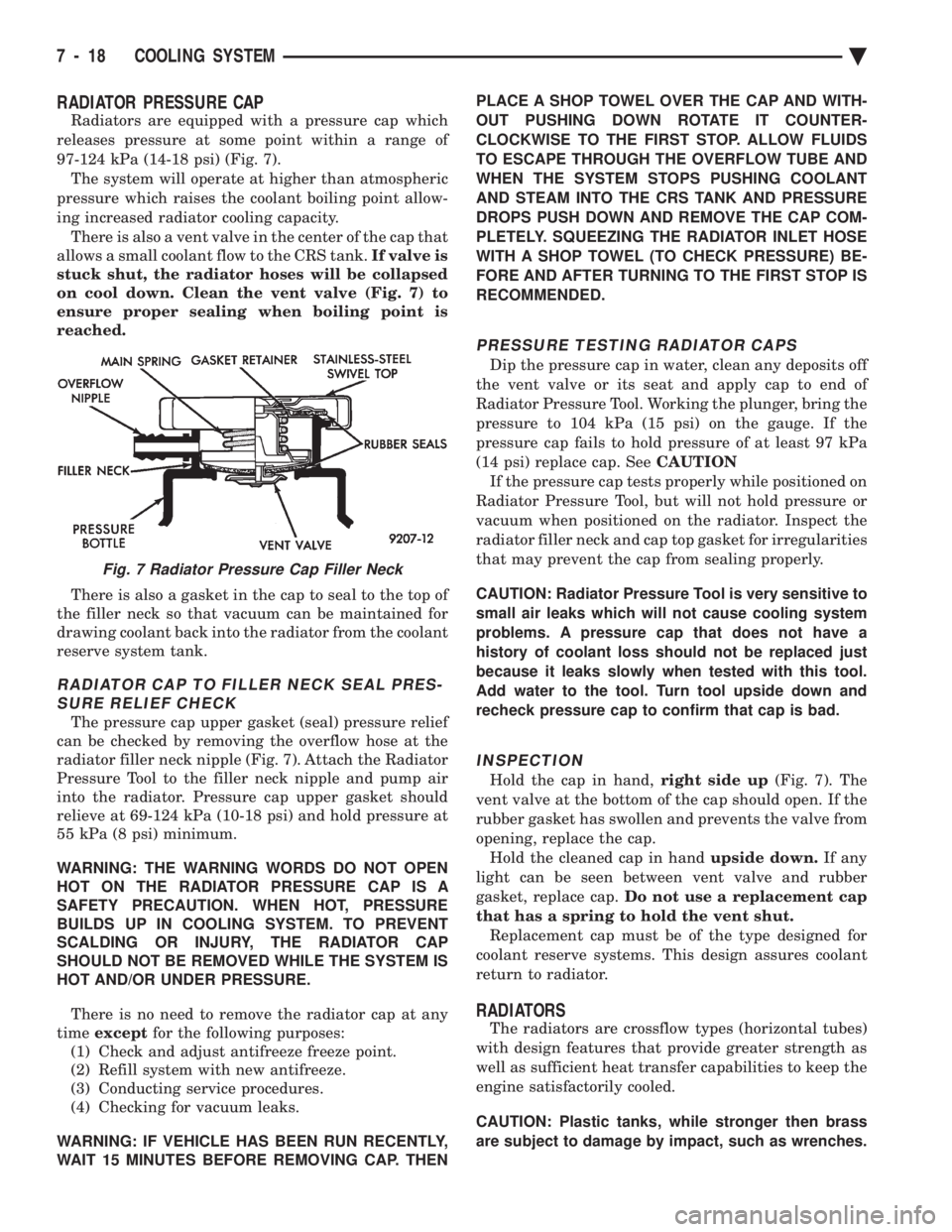
ing increased radiator cooling capacity. There is also a vent valve in the center of the cap that
allows a small coolant flow to the CRS tank. If valve is
stuck shut, the radiator hoses will be collapsed
on cool down. Clean the vent valve (Fig. 7) to
ensure proper sealing when boiling point is
reached.
There is also a gasket in the cap to seal to the top of
the filler neck so that vacuum can be maintained for
drawing coolant back into the radiator from the coolant
reserve system tank.
RADIATOR CAP TO FILLER NECK SEAL PRES- SURE RELIEF CHECK
The pressure cap upper gasket (seal) pressure relief
can be checked by removing the overflow hose at the
radiator filler neck nipple (Fig. 7). Attach the Radiator
Pressure Tool to the filler neck nipple and pump air
into the radiator. Pressure cap upper gasket should
relieve at 69-124 kPa (10-18 psi) and hold pressure at
55 kPa (8 psi) minimum.
WARNING: THE WARNING WORDS DO NOT OPEN
HOT ON THE RADIATOR PRESSURE CAP IS A
SAFETY PRECAUTION. WHEN HOT, PRESSURE
BUILDS UP IN COOLING SYSTEM. TO PREVENT
SCALDING OR INJURY, THE RADIATOR CAP
SHOULD NOT BE REMOVED WHILE THE SYSTEM IS
HOT AND/OR UNDER PRESSURE.
There is no need to remove the radiator cap at any
time except for the following purposes:
(1) Check and adjust antifreeze freeze point.
(2) Refill system with new antifreeze.
(3) Conducting service procedures.
(4) Checking for vacuum leaks.
WARNING: IF VEHICLE HAS BEEN RUN RECENTLY,
WAIT 15 MINUTES BEFORE REMOVING CAP. THEN PLACE A SHOP TOWEL OVER THE CAP AND WITH-
OUT PUSHING DOWN ROTATE IT COUNTER-
CLOCKWISE TO THE FIRST STOP. ALLOW FLUIDS
TO ESCAPE THROUGH THE OVERFLOW TUBE AND
WHEN THE SYSTEM STOPS PUSHING COOLANT
AND STEAM INTO THE CRS TANK AND PRESSURE
DROPS PUSH DOWN AND REMOVE THE CAP COM-
PLETELY. SQUEEZING THE RADIATOR INLET HOSE
WITH A SHOP TOWEL (TO CHECK PRESSURE) BE-
FORE AND AFTER TURNING TO THE FIRST STOP IS
RECOMMENDED.
PRESSURE TESTING RADIATOR CAPS
Dip the pressure cap in water, clean any deposits off
the vent valve or its seat and apply cap to end of
Radiator Pressure Tool. Working the plunger, bring the
pressure to 104 kPa (15 psi) on the gauge. If the
pressure cap fails to hold pressure of at least 97 kPa
(14 psi) replace cap. See CAUTION
If the pressure cap tests properly while positioned on
Radiator Pressure Tool, but will not hold pressure or
vacuum when positioned on the radiator. Inspect the
radiator filler neck and cap top gasket for irregularities
that may prevent the cap from sealing properly.
CAUTION: Radiator Pressure Tool is very sensitive to
small air leaks which will not cause cooling system
problems. A pressure cap that does not have a
history of coolant loss should not be replaced just
because it leaks slowly when tested with this tool.
Add water to the tool. Turn tool upside down and
recheck pressure cap to confirm that cap is bad.
INSPECTION
Hold the cap in hand, right side up(Fig. 7). The
vent valve at the bottom of the cap should open. If the
rubber gasket has swollen and prevents the valve from
opening, replace the cap. Hold the cleaned cap in hand upside down.If any
light can be seen between vent valve and rubber
gasket, replace cap. Do not use a replacement cap
that has a spring to hold the vent shut. Replacement cap must be of the type designed for
coolant reserve systems. This design assures coolant
return to radiator.
RADIATORS
The radiators are crossflow types (horizontal tubes)
with design features that provide greater strength as
well as sufficient heat transfer capabilities to keep the
engine satisfactorily cooled.
CAUTION: Plastic tanks, while stronger then brass
are subject to damage by impact, such as wrenches.
Fig. 7 Radiator Pressure Cap Filler Neck
7 - 18 COOLING SYSTEM Ä
Page 361 of 2438
RADIATOR DRAINCOCK SERVICE
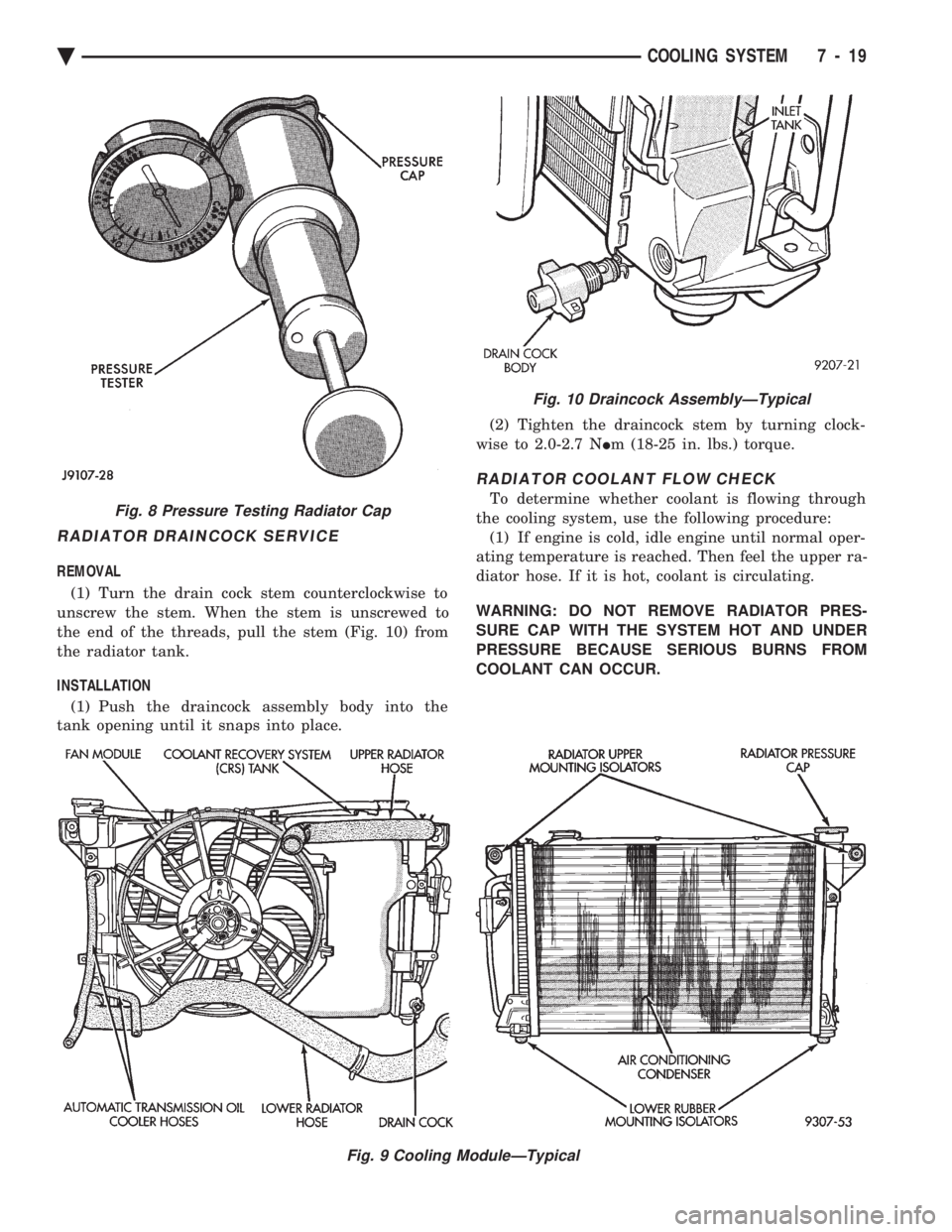
REMOVAL (1) Turn the drain cock stem counterclockwise to
unscrew the stem. When the stem is unscrewed to
the end of the threads, pull the stem (Fig. 10) from
the radiator tank.
INSTALLATION (1) Push the draincock assembly body into the
tank opening until it snaps into place. (2) Tighten the draincock stem by turning clock-
wise to 2.0-2.7 N Im (18-25 in. lbs.) torque.
RADIATOR COOLANT FLOW CHECK
To determine whether coolant is flowing through
the cooling system, use the following procedure: (1) If engine is cold, idle engine until normal oper-
ating temperature is reached. Then feel the upper ra-
diator hose. If it is hot, coolant is circulating.
WARNING: DO NOT REMOVE RADIATOR PRES-
SURE CAP WITH THE SYSTEM HOT AND UNDER
PRESSURE BECAUSE SERIOUS BURNS FROM
COOLANT CAN OCCUR.
Fig. 9 Cooling ModuleÐTypical
Fig. 8 Pressure Testing Radiator Cap
Fig. 10 Draincock AssemblyÐTypical
Ä COOLING SYSTEM 7 - 19
Page 373 of 2438
BATTERY/STARTING/CHARGING SYSTEMS DIAGNOSTICS
CONTENTS
page page
BATTERY TEST PROCEDURES ON-VEHICLE . . 3
FAULT CODESÐON BOARD DIAGNOSTICS . . 23
GENERAL INFORMATION .................. 1
GENERATOR TEST PROCEDURES ON VEHICLE.19 IGNITION OFF DRAW (IOD)
............... 9
SPECIFICATIONS ....................... 28
STARTER TEST PROCEDURES ON VEHICLE . 11
GENERAL INFORMATION
² For Battery, Starter or Generator replacement re-
fer to Group 8B, Battery/Starter/Generator Service.
This Group 8A will cover diagnostics only. The Battery, Starting, and Charging Systems oper-
ate with one another, and must be thoroughly tested
as a complete system. To enable the vehicle to start
and charge properly, it must have a battery that will
perform to specifications. The starter motor, genera-
tor, wiring, and electronics also must perform within
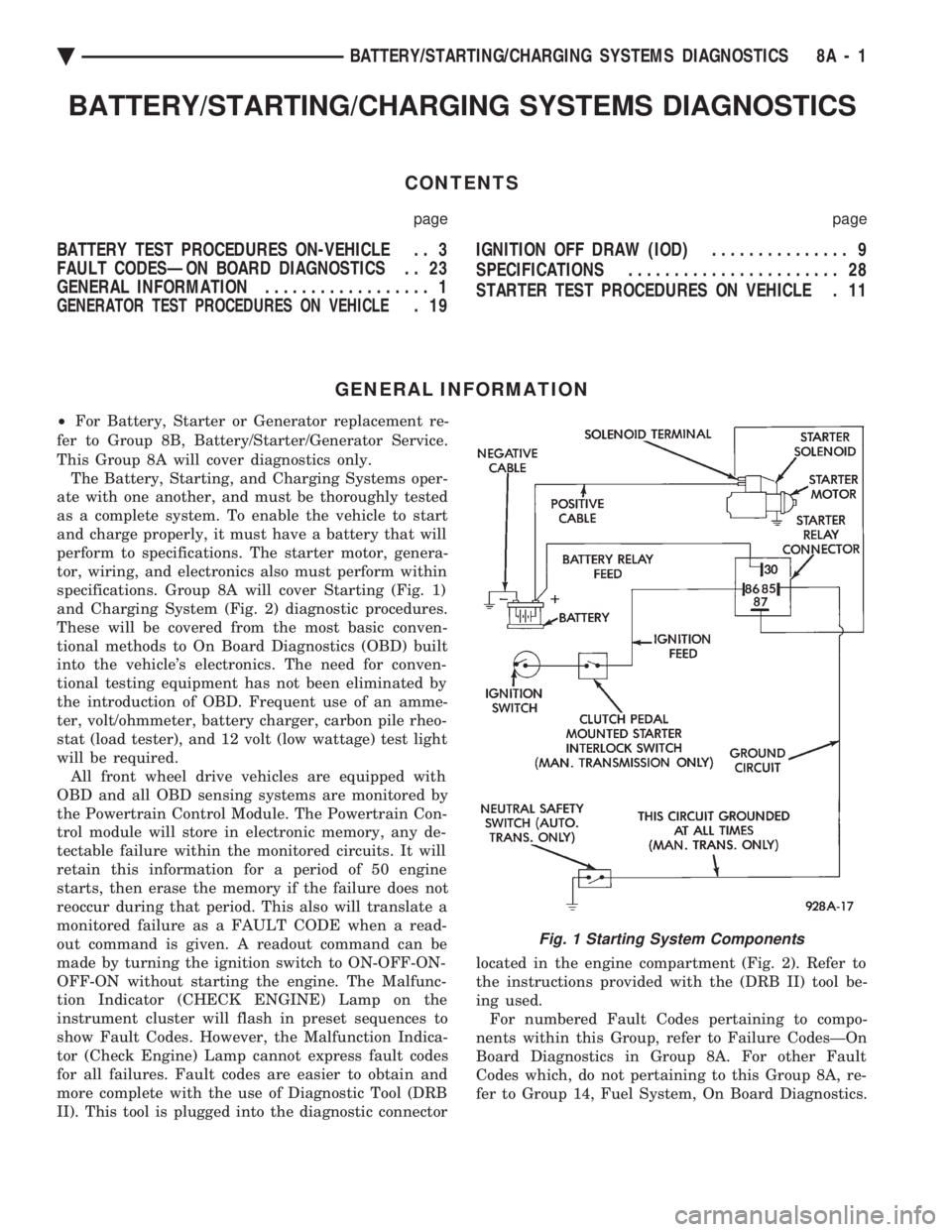
specifications. Group 8A will cover Starting (Fig. 1)
and Charging System (Fig. 2) diagnostic procedures.
These will be covered from the most basic conven-
tional methods to On Board Diagnostics (OBD) built
into the vehicle's electronics. The need for conven-
tional testing equipment has not been eliminated by
the introduction of OBD. Frequent use of an amme-
ter, volt/ohmmeter, battery charger, carbon pile rheo-
stat (load tester), and 12 volt (low wattage) test light
will be required. All front wheel drive vehicles are equipped with
OBD and all OBD sensing systems are monitored by
the Powertrain Control Module. The Powertrain Con-
trol module will store in electronic memory, any de-
tectable failure within the monitored circuits. It will
retain this information for a period of 50 engine
starts, then erase the memory if the failure does not
reoccur during that period. This also will translate a
monitored failure as a FAULT CODE when a read-
out command is given. A readout command can be
made by turning the ignition switch to ON-OFF-ON-
OFF-ON without starting the engine. The Malfunc-
tion Indicator (CHECK ENGINE) Lamp on the
instrument cluster will flash in preset sequences to
show Fault Codes. However, the Malfunction Indica-
tor (Check Engine) Lamp cannot express fault codes
for all failures. Fault codes are easier to obtain and
more complete with the use of Diagnostic Tool (DRB
II). This tool is plugged into the diagnostic connector located in the engine compartment (Fig. 2). Refer to
the instructions provided with the (DRB II) tool be-
ing used. For numbered Fault Codes pertaining to compo-
nents within this Group, refer to Failure CodesÐOn
Board Diagnostics in Group 8A. For other Fault
Codes which, do not pertaining to this Group 8A, re-
fer to Group 14, Fuel System, On Board Diagnostics.
Fig. 1 Starting System Components
Ä BATTERY/STARTING/CHARGING SYSTEMS DIAGNOSTICS 8A - 1
Page 375 of 2438
BATTERY TEST PROCEDURES ON-VEHICLE INDEX
page page
Battery Charging .......................... 7
Battery Load Test ......................... 6
Battery Open Circuit Voltage Test ............. 4
Causes of Battery Discharging ............... 4 General Information
........................ 3
State of Charge Tests ...................... 4
Test Indicator ............................ 3
GENERAL INFORMATION
The battery stores, stabilizes, and produces electri-
cal current to operate various electrical systems in
the vehicle. The determination of whether a battery
is good or bad is made by the battery's ability to ac-
cept a charge. It also must produce high amperage
current output over an extended period to be able to
start the vehicle. The capability of the battery to
store electrical current comes from a chemical reac-
tion. This reaction takes place between the sulfuric
acid solution electrolyte and the lead +/- plates in
each cell of the battery. As the battery discharges,
the plates react with the acid from the electrolyte.
When the charging system charges the battery, the
water is converted to sulfuric acid in the battery. The
amount of acid, specific gravity in the electrolyte can
be measured with a hydrometer. The factory in-
stalled battery is equipped with a built in hydrome-
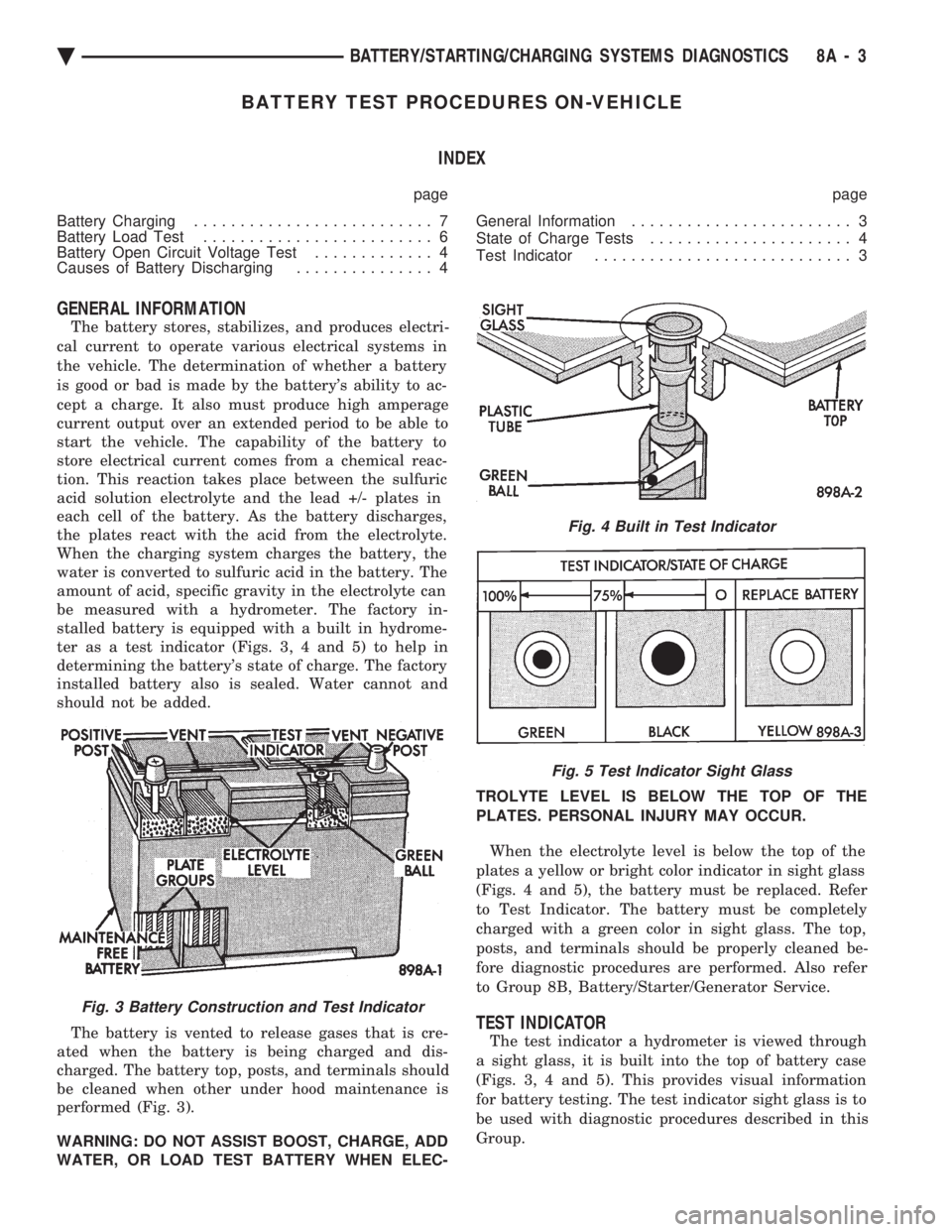
ter as a test indicator (Figs. 3, 4 and 5) to help in
determining the battery's state of charge. The factory
installed battery also is sealed. Water cannot and
should not be added.
The battery is vented to release gases that is cre-
ated when the battery is being charged and dis-
charged. The battery top, posts, and terminals should
be cleaned when other under hood maintenance is
performed (Fig. 3).
WARNING: DO NOT ASSIST BOOST, CHARGE, ADD
WATER, OR LOAD TEST BATTERY WHEN ELEC- TROLYTE LEVEL IS BELOW THE TOP OF THE
PLATES. PERSONAL INJURY MAY OCCUR.
When the electrolyte level is below the top of the
plates a yellow or bright color indicator in sight glass
(Figs. 4 and 5), the battery must be replaced. Refer
to Test Indicator. The battery must be completely
charged with a green color in sight glass. The top,
posts, and terminals should be properly cleaned be-
fore diagnostic procedures are performed. Also refer
to Group 8B, Battery/Starter/Generator Service.
TEST INDICATOR
The test indicator a hydrometer is viewed through
a sight glass, it is built into the top of battery case
(Figs. 3, 4 and 5). This provides visual information
for battery testing. The test indicator sight glass is to
be used with diagnostic procedures described in this
Group.
Fig. 3 Battery Construction and Test Indicator
Fig. 4 Built in Test Indicator
Fig. 5 Test Indicator Sight Glass
Ä BATTERY/STARTING/CHARGING SYSTEMS DIAGNOSTICS 8A - 3
Page 380 of 2438
ity. Refer to Battery Load Test. If the battery will
endure a load test, return the battery to use. If bat-
tery will not endure a load test, it must be replaced.
Properly clean and inspect battery hold downs, tray,
terminals, cables, posts, and top before completing
service. Also refer to Group 8B, Battery/Starter/Gen-
erator Service.
CHARGING TIME REQUIRED
The time required to charge a battery will vary de-
pending upon the following factors:
² SIZE OF BATTERY
A completely discharged large heavy-duty battery
requires more than twice the recharging time as a
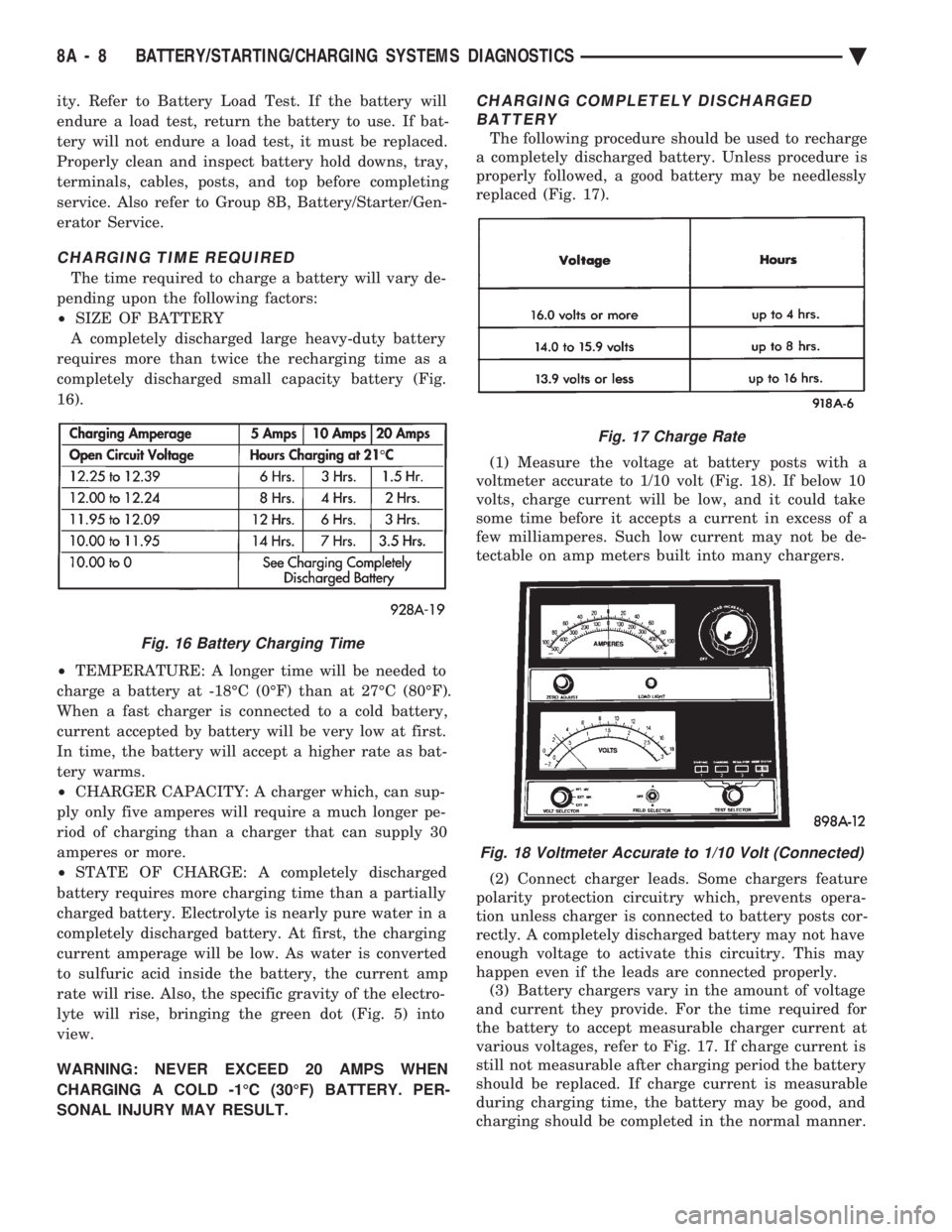
completely discharged small capacity battery (Fig.
16).
² TEMPERATURE: A longer time will be needed to
charge a battery at -18ÉC (0ÉF) than at 27ÉC (80ÉF).
When a fast charger is connected to a cold battery,
current accepted by battery will be very low at first.
In time, the battery will accept a higher rate as bat-
tery warms.
² CHARGER CAPACITY: A charger which, can sup-
ply only five amperes will require a much longer pe-
riod of charging than a charger that can supply 30
amperes or more.
² STATE OF CHARGE: A completely discharged
battery requires more charging time than a partially
charged battery. Electrolyte is nearly pure water in a
completely discharged battery. At first, the charging
current amperage will be low. As water is converted
to sulfuric acid inside the battery, the current amp
rate will rise. Also, the specific gravity of the electro-
lyte will rise, bringing the green dot (Fig. 5) into
view.
WARNING: NEVER EXCEED 20 AMPS WHEN
CHARGING A COLD -1ÉC (30ÉF) BATTERY. PER-
SONAL INJURY MAY RESULT.
CHARGING COMPLETELY DISCHARGED BATTERY
The following procedure should be used to recharge
a completely discharged battery. Unless procedure is
properly followed, a good battery may be needlessly
replaced (Fig. 17).
(1) Measure the voltage at battery posts with a
voltmeter accurate to 1/10 volt (Fig. 18). If below 10
volts, charge current will be low, and it could take
some time before it accepts a current in excess of a
few milliamperes. Such low current may not be de-
tectable on amp meters built into many chargers.
(2) Connect charger leads. Some chargers feature
polarity protection circuitry which, prevents opera-
tion unless charger is connected to battery posts cor-
rectly. A completely discharged battery may not have
enough voltage to activate this circuitry. This may
happen even if the leads are connected properly. (3) Battery chargers vary in the amount of voltage
and current they provide. For the time required for
the battery to accept measurable charger current at
various voltages, refer to Fig. 17. If charge current is
still not measurable after charging period the battery
should be replaced. If charge current is measurable
during charging time, the battery may be good, and
charging should be completed in the normal manner.
Fig. 16 Battery Charging Time
Fig. 17 Charge Rate
Fig. 18 Voltmeter Accurate to 1/10 Volt (Connected)
8A - 8 BATTERY/STARTING/CHARGING SYSTEMS DIAGNOSTICS Ä
Page 381 of 2438
IGNITION OFF DRAW (IOD)
GENERAL INFORMATION
A normal electrical system will draw from 5 to 30
milliamperes from the battery. This is with the ignition
in the OFF position, and all non-ignition controlled cir-
cuits in proper working order. The amount of IOD will
depend on body model and electrical components. A ve-
hicle that has not been operated for an extended period
of approximately 20 days may discharge the battery to
an inadequate level. In this case, the Main Fusible Link
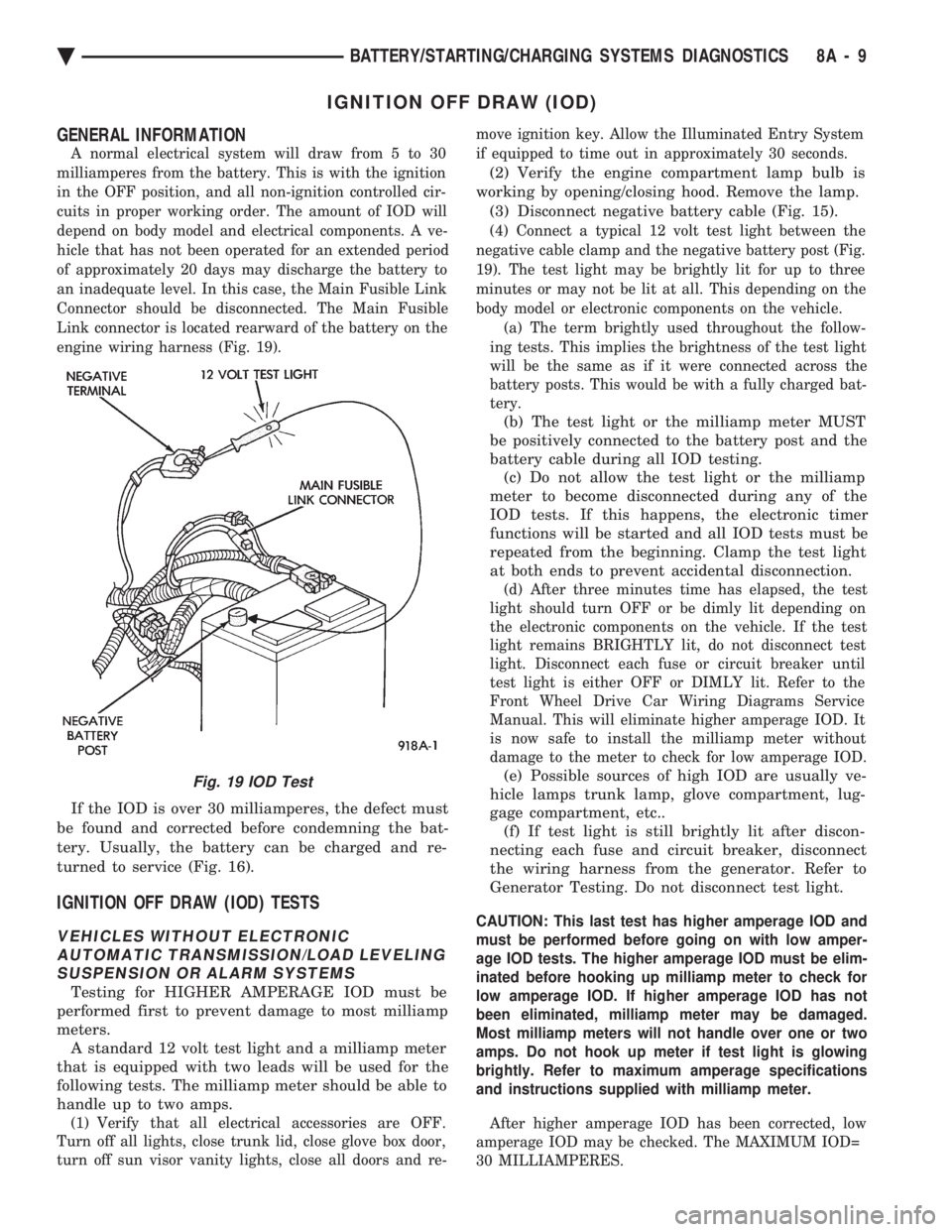
Connector should be disconnected. The Main Fusible
Link connector is located rearward of the battery on the
engine wiring harness (Fig. 19).
If the IOD is over 30 milliamperes, the defect must
be found and corrected before condemning the bat-
tery. Usually, the battery can be charged and re-
turned to service (Fig. 16).
IGNITION OFF DRAW (IOD) TESTS
VEHICLES WITHOUT ELECTRONIC AUTOMATIC TRANSMISSION/LOAD LEVELINGSUSPENSION OR ALARM SYSTEMS
Testing for HIGHER AMPERAGE IOD must be
performed first to prevent damage to most milliamp
meters. A standard 12 volt test light and a milliamp meter
that is equipped with two leads will be used for the
following tests. The milliamp meter should be able to
handle up to two amps.
(1) Verify that all electrical accessories are OFF.
Turn off all lights, close trunk lid, close glove box door,
turn off sun visor vanity lights, close all doors and re- move ignition key. Allow the Illuminated Entry System
if equipped to time out in approximately 30 seconds.
(2) Verify the engine compartment lamp bulb is
working by opening/closing hood. Remove the lamp. (3) Disconnect negative battery cable (Fig. 15).
(4) Connect a typical 12 volt test light between the
negative cable clamp and the negative battery post (Fig.
19). The test light may be brightly lit for up to three
minutes or may not be lit at all. This depending on the
body model or electronic components on the vehicle. (a) The term brightly used throughout the follow-
ing tests. This implies the brightness of the test light
will be the same as if it were connected across the
battery posts. This would be with a fully charged bat-
tery.
(b) The test light or the milliamp meter MUST
be positively connected to the battery post and the
battery cable during all IOD testing. (c) Do not allow the test light or the milliamp
meter to become disconnected during any of the
IOD tests. If this happens, the electronic timer
functions will be started and all IOD tests must be
repeated from the beginning. Clamp the test light
at both ends to prevent accidental disconnection.
(d) After three minutes time has elapsed, the test
light should turn OFF or be dimly lit depending on
the electronic components on the vehicle. If the test
light remains BRIGHTLY lit, do not disconnect test
light. Disconnect each fuse or circuit breaker until
test light is either OFF or DIMLY lit. Refer to the
Front Wheel Drive Car Wiring Diagrams Service
Manual. This will eliminate higher amperage IOD. It
is now safe to install the milliamp meter without
damage to the meter to check for low amperage IOD.
(e) Possible sources of high IOD are usually ve-
hicle lamps trunk lamp, glove compartment, lug-
gage compartment, etc.. (f) If test light is still brightly lit after discon-
necting each fuse and circuit breaker, disconnect
the wiring harness from the generator. Refer to
Generator Testing. Do not disconnect test light.
CAUTION: This last test has higher amperage IOD and
must be performed before going on with low amper-
age IOD tests. The higher amperage IOD must be elim-
inated before hooking up milliamp meter to check for
low amperage IOD. If higher amperage IOD has not
been eliminated, milliamp meter may be damaged.
Most milliamp meters will not handle over one or two
amps. Do not hook up meter if test light is glowing
brightly. Refer to maximum amperage specifications
and instructions supplied with milliamp meter.
After higher amperage IOD has been corrected, low
amperage IOD may be checked. The MAXIMUM IOD=
30 MILLIAMPERES.
Fig. 19 IOD Test
Ä BATTERY/STARTING/CHARGING SYSTEMS DIAGNOSTICS 8A - 9
Page 388 of 2438
relay to starter solenoid for loose or corroded connec-
tions. Particularly at starter terminals.
² Repeat test. If engine still fails to crank properly,
trouble is within starter or starter mounted solenoid,
and it must be removed for repairs. Refer to Group
8B, Battery/Starter/Generator Service, Starter re-
placement.
STARTER RELAY TEST
WARNING: CHECK TO ENSURE THAT THE TRANS-
MISSION IS IN PARK OR NEUTRAL WITH THE
PARKING BRAKE APPLIED
(1) Verify battery condition. Battery must be in
good condition with a full charge before performing
any starter tests. Refer to Battery Tests. (2) Perform the preceding starter solenoid tests
BEFORE performing starter relay tests. Refer to
Starter Solenoid Test. (3) Locate and remove the starter relay. For
starter relay locations, refer to Starter Solenoid Test
(Fig. 13 or 14). (4) After the starter relay has been located and re-
moved, refer to Starter Relay Tests (Fig. 15).
NEUTRAL STARTING AND BACK-UP SWITCH
AUTOMATIC TRANSMISSION ONLY
For electrical diagnostics, when checking starter
circuits, refer to Starter Relay Tests (Fig. 15). For replacement of switch, refer to Group 21, Tran-
saxle, Neutral Starting and Switch Replacement.
STARTER INTERLOCK SWITCHÐCLUTCH PEDAL MOUNTED
MANUAL TRANSMISSION ONLY
For electrical diagnostics, refer to the Starter Relay
Tests. For replacement and/or adjustment of the switch,
refer to Group 6, Manual Transaxle Clutch, Manual
Transaxle Starter Interlock Switch.
IGNITION SWITCH TEST
After testing the starter solenoid and relay, test ig-
nition switch and wiring. Refer to Group 8D, Ignition
Systems, or the Front Wheel Drive Car Wiring Dia-
grams Service Manual. Check all wiring for opens or
shorts, and all connectors for being loose or corroded.
BENCH TESTING STARTER SOLENOID
(1) Disconnect field coil wire from field coil termi-
nal (Fig. 16 or 17). (2) Check for continuity between solenoid terminal
and field coil terminal with a continuity tester. Con-
tinuity should be detected (Fig. 18 or 19). (3) Check for continuity between solenoid terminal
and solenoid housing (Fig. 20 or 21). Continuity
should be detected. If continuity is detected, solenoid
is good. (4) If continuity is not detected in either test, sole-
noid has an open circuit and is defective. If equipped
with:
² BOSCH STARTER: Replace the solenoid.
² NIPPONDENSO STARTER: Replace the starter
assembly.
8A - 16 BATTERY/STARTING/CHARGING SYSTEMS DIAGNOSTICS Ä
Page 394 of 2438
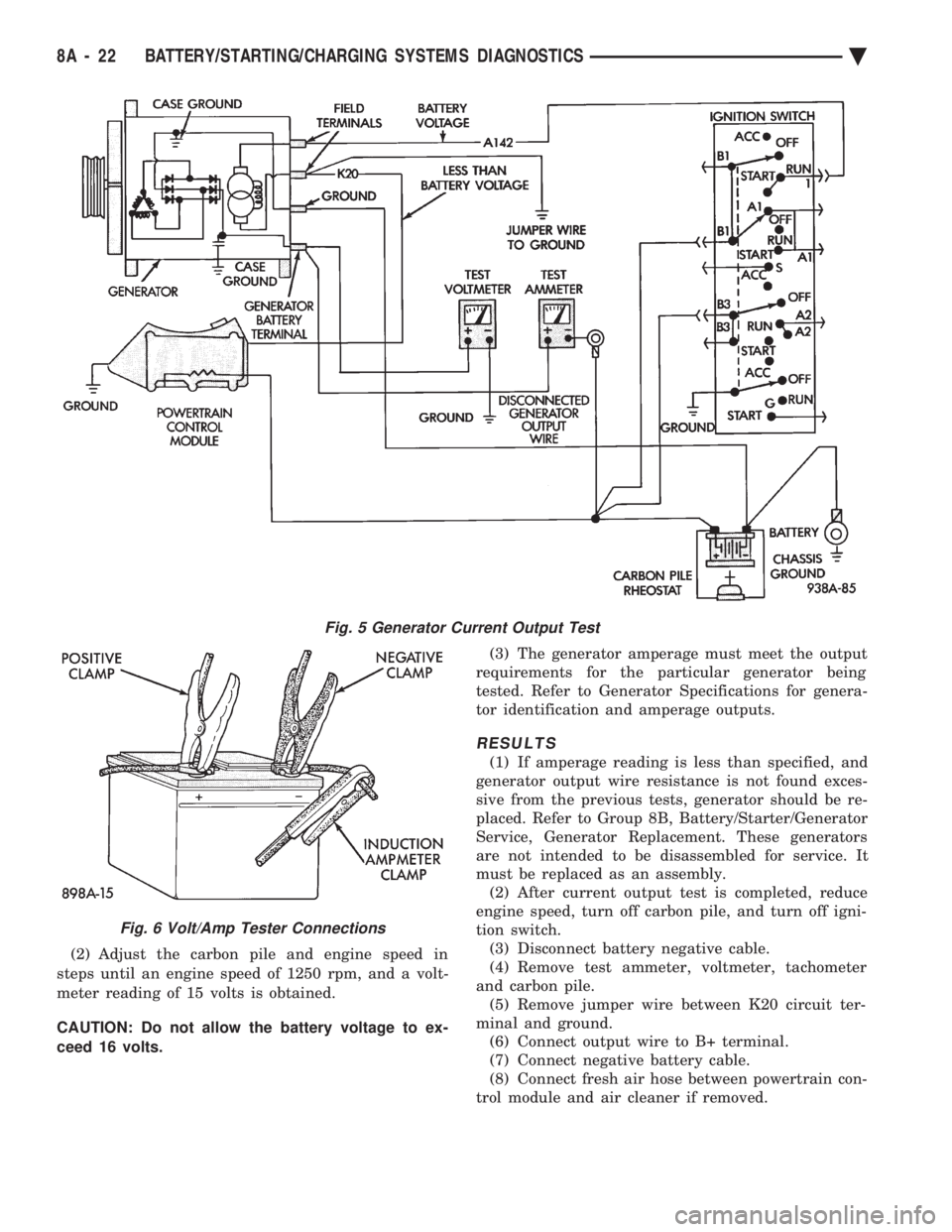
(2) Adjust the carbon pile and engine speed in
steps until an engine speed of 1250 rpm, and a volt-
meter reading of 15 volts is obtained.
CAUTION: Do not allow the battery voltage to ex-
ceed 16 volts. (3) The generator amperage must meet the output
requirements for the particular generator being
tested. Refer to Generator Specifications for genera-
tor identification and amperage outputs.
RESULTS
(1) If amperage reading is less than specified, and
generator output wire resistance is not found exces-
sive from the previous tests, generator should be re-
placed. Refer to Group 8B, Battery/Starter/Generator
Service, Generator Replacement. These generators
are not intended to be disassembled for service. It
must be replaced as an assembly. (2) After current output test is completed, reduce
engine speed, turn off carbon pile, and turn off igni-
tion switch. (3) Disconnect battery negative cable.
(4) Remove test ammeter, voltmeter, tachometer
and carbon pile. (5) Remove jumper wire between K20 circuit ter-
minal and ground. (6) Connect output wire to B+ terminal.
(7) Connect negative battery cable.
(8) Connect fresh air hose between powertrain con-
trol module and air cleaner if removed.
Fig. 5 Generator Current Output Test
Fig. 6 Volt/Amp Tester Connections
8A - 22 BATTERY/STARTING/CHARGING SYSTEMS DIAGNOSTICS Ä
Page 403 of 2438
BATTERY/STARTER/GENERATOR SERVICE
CONTENTS
page page
BATTERY REMOVAL, INSTALLATION AND SERVICE ............................. 1
GENERATOR ............................ 9 SPECIFICATIONS
....................... 12
STARTER ............................... 4
BATTERY REMOVAL, INSTALLATION AND SERVICE
GENERAL INFORMATION
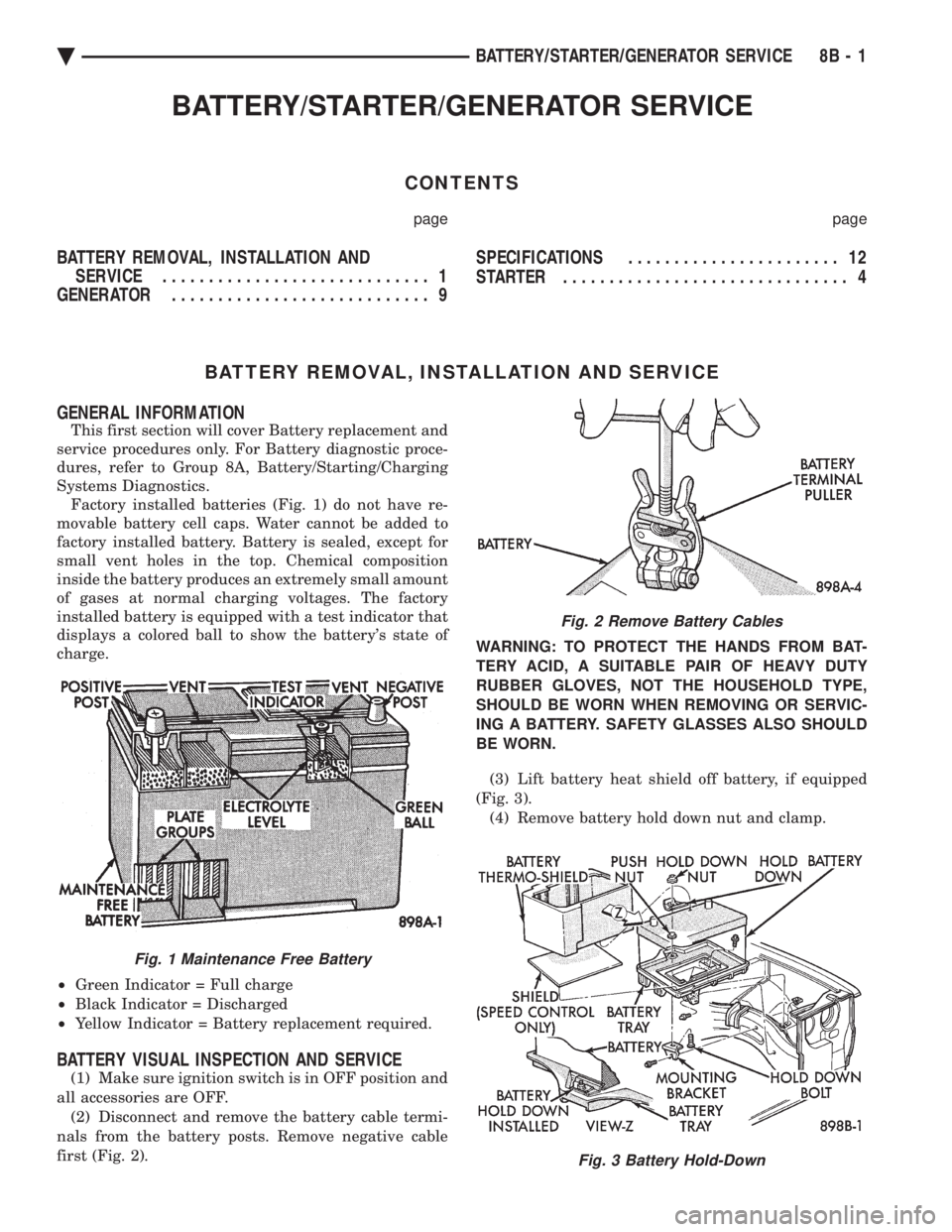
This first section will cover Battery replacement and
service procedures only. For Battery diagnostic proce-
dures, refer to Group 8A, Battery/Starting/Charging
Systems Diagnostics. Factory installed batteries (Fig. 1) do not have re-
movable battery cell caps. Water cannot be added to
factory installed battery. Battery is sealed, except for
small vent holes in the top. Chemical composition
inside the battery produces an extremely small amount
of gases at normal charging voltages. The factory
installed battery is equipped with a test indicator that
displays a colored ball to show the battery's state of
charge.
² Green Indicator = Full charge
² Black Indicator = Discharged
² Yellow Indicator = Battery replacement required.
BATTERY VISUAL INSPECTION AND SERVICE
(1) Make sure ignition switch is in OFF position and
all accessories are OFF. (2) Disconnect and remove the battery cable termi-
nals from the battery posts. Remove negative cable
first (Fig. 2). WARNING: TO PROTECT THE HANDS FROM BAT-
TERY ACID, A SUITABLE PAIR OF HEAVY DUTY
RUBBER GLOVES, NOT THE HOUSEHOLD TYPE,
SHOULD BE WORN WHEN REMOVING OR SERVIC-
ING A BATTERY. SAFETY GLASSES ALSO SHOULD
BE WORN.
(3) Lift battery heat shield off battery, if equipped
(Fig. 3). (4) Remove battery hold down nut and clamp.
Fig. 1 Maintenance Free Battery
Fig. 2 Remove Battery Cables
Fig. 3 Battery Hold-Down
Ä BATTERY/STARTER/GENERATOR SERVICE 8B - 1
Page 404 of 2438
(5) Remove the battery from vehicle.
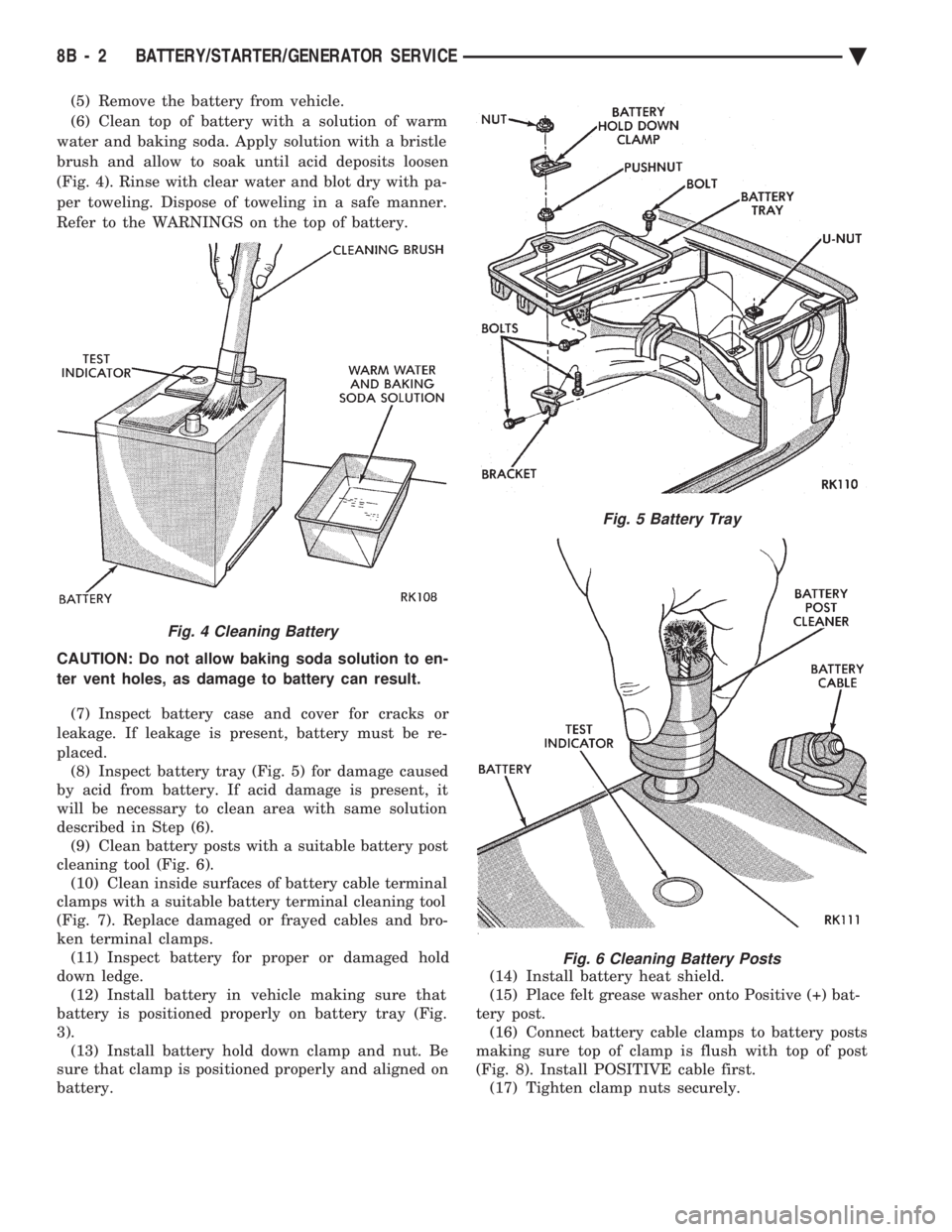
(6) Clean top of battery with a solution of warm
water and baking soda. Apply solution with a bristle
brush and allow to soak until acid deposits loosen
(Fig. 4). Rinse with clear water and blot dry with pa-
per toweling. Dispose of toweling in a safe manner.
Refer to the WARNINGS on the top of battery.
CAUTION: Do not allow baking soda solution to en-
ter vent holes, as damage to battery can result.
(7) Inspect battery case and cover for cracks or
leakage. If leakage is present, battery must be re-
placed. (8) Inspect battery tray (Fig. 5) for damage caused
by acid from battery. If acid damage is present, it
will be necessary to clean area with same solution
described in Step (6). (9) Clean battery posts with a suitable battery post
cleaning tool (Fig. 6). (10) Clean inside surfaces of battery cable terminal
clamps with a suitable battery terminal cleaning tool
(Fig. 7). Replace damaged or frayed cables and bro-
ken terminal clamps. (11) Inspect battery for proper or damaged hold
down ledge. (12) Install battery in vehicle making sure that
battery is positioned properly on battery tray (Fig.
3). (13) Install battery hold down clamp and nut. Be
sure that clamp is positioned properly and aligned on
battery. (14) Install battery heat shield.
(15) Place felt grease washer onto Positive (+) bat-
tery post. (16) Connect battery cable clamps to battery posts
making sure top of clamp is flush with top of post
(Fig. 8). Install POSITIVE cable first. (17) Tighten clamp nuts securely.
Fig. 4 Cleaning Battery
Fig. 5 Battery Tray
Fig. 6 Cleaning Battery Posts
8B - 2 BATTERY/STARTER/GENERATOR SERVICE Ä