battery CHEVROLET DYNASTY 1993 Owner's Guide
[x] Cancel search | Manufacturer: CHEVROLET, Model Year: 1993, Model line: DYNASTY, Model: CHEVROLET DYNASTY 1993Pages: 2438, PDF Size: 74.98 MB
Page 322 of 2438
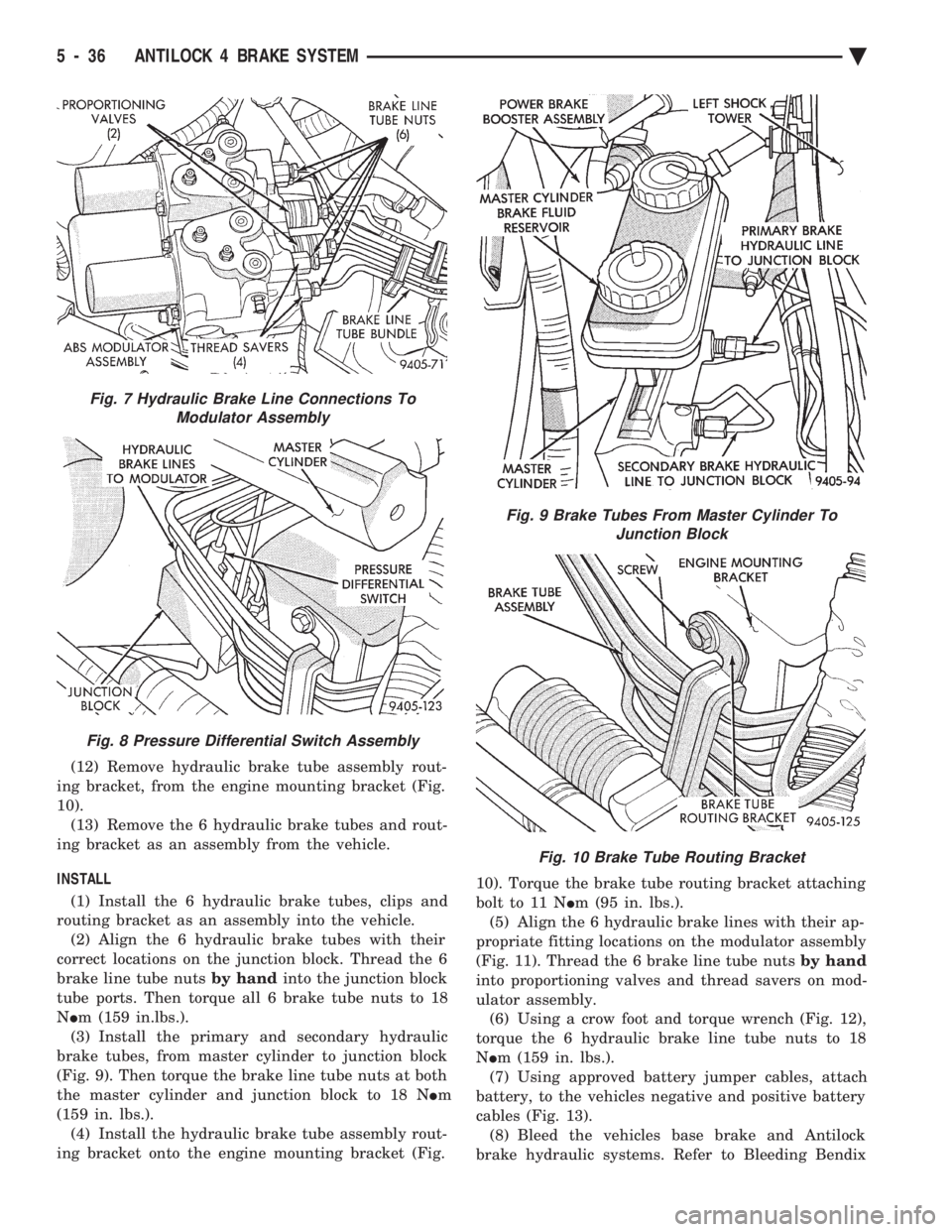
(12) Remove hydraulic brake tube assembly rout-
ing bracket, from the engine mounting bracket (Fig.
10). (13) Remove the 6 hydraulic brake tubes and rout-
ing bracket as an assembly from the vehicle.
INSTALL (1) Install the 6 hydraulic brake tubes, clips and
routing bracket as an assembly into the vehicle. (2) Align the 6 hydraulic brake tubes with their
correct locations on the junction block. Thread the 6
brake line tube nuts by handinto the junction block
tube ports. Then torque all 6 brake tube nuts to 18
N Im (159 in.lbs.).
(3) Install the primary and secondary hydraulic
brake tubes, from master cylinder to junction block
(Fig. 9). Then torque the brake line tube nuts at both
the master cylinder and junction block to 18 N Im
(159 in. lbs.). (4) Install the hydraulic brake tube assembly rout-
ing bracket onto the engine mounting bracket (Fig. 10). Torque the brake tube routing bracket attaching
bolt to 11 N
Im (95 in. lbs.).
(5) Align the 6 hydraulic brake lines with their ap-
propriate fitting locations on the modulator assembly
(Fig. 11). Thread the 6 brake line tube nuts by hand
into proportioning valves and thread savers on mod-
ulator assembly. (6) Using a crow foot and torque wrench (Fig. 12),
torque the 6 hydraulic brake line tube nuts to 18
N Im (159 in. lbs.).
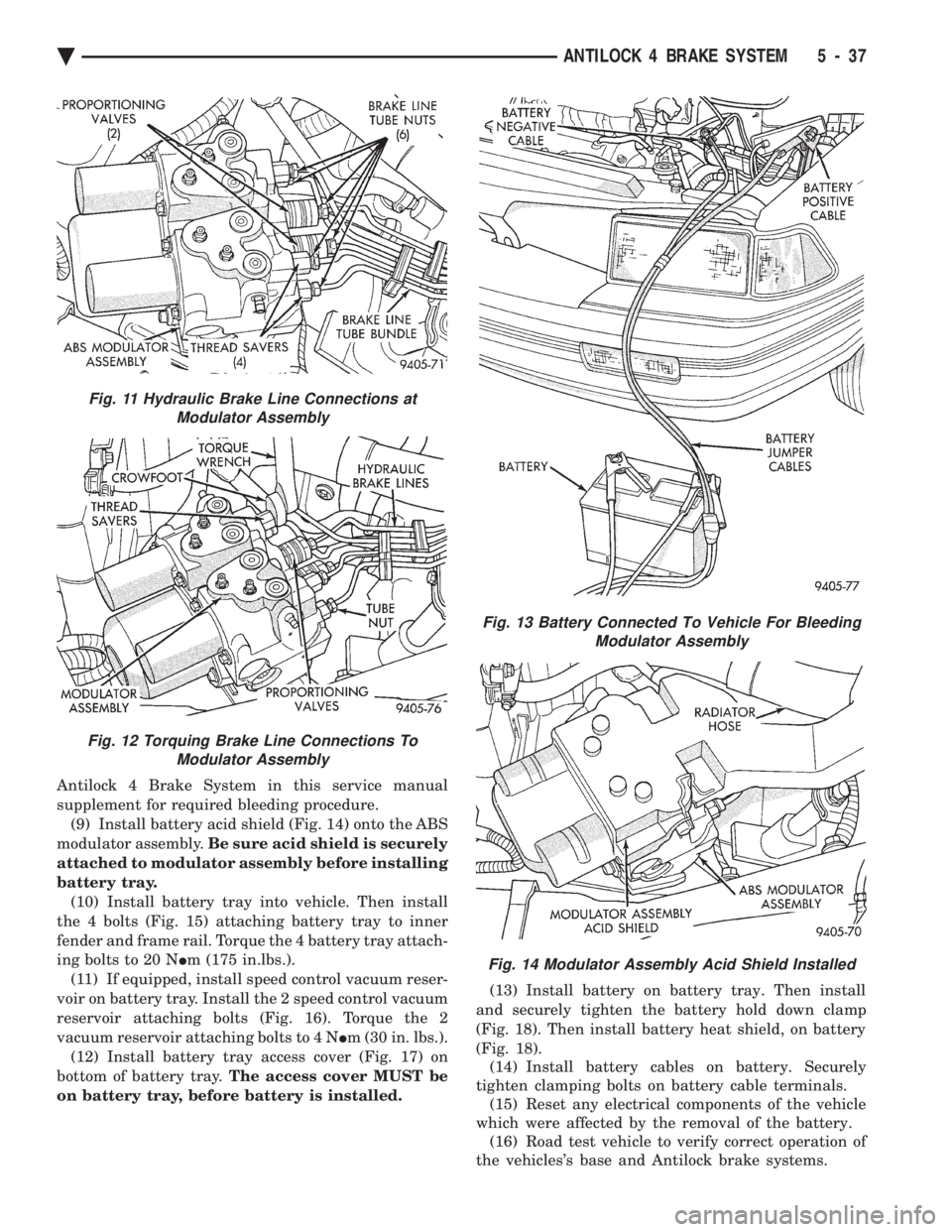
(7) Using approved battery jumper cables, attach
battery, to the vehicles negative and positive battery
cables (Fig. 13). (8) Bleed the vehicles base brake and Antilock
brake hydraulic systems. Refer to Bleeding Bendix
Fig. 7 Hydraulic Brake Line Connections To Modulator Assembly
Fig. 8 Pressure Differential Switch Assembly
Fig. 9 Brake Tubes From Master Cylinder To Junction Block
Fig. 10 Brake Tube Routing Bracket
5 - 36 ANTILOCK 4 BRAKE SYSTEM Ä
Page 323 of 2438
Antilock 4 Brake System in this service manual
supplement for required bleeding procedure.(9) Install battery acid shield (Fig. 14) onto the ABS
modulator assembly. Be sure acid shield is securely
attached to modulator assembly before installing
battery tray. (10) Install battery tray into vehicle. Then install
the 4 bolts (Fig. 15) attaching battery tray to inner
fender and frame rail. Torque the 4 battery tray attach-
ing bolts to 20 N Im (175 in.lbs.).
(11) If equipped, install speed control vacuum reser-
voir on battery tray. Install the 2 speed control vacuum
reservoir attaching bolts (Fig. 16). Torque the 2
vacuum reservoir attaching bolts to 4 N Im (30 in. lbs.).
(12) Install battery tray access cover (Fig. 17) on
bottom of battery tray. The access cover MUST be
on battery tray, before battery is installed. (13) Install battery on battery tray. Then install
and securely tighten the battery hold down clamp
(Fig. 18). Then install battery heat shield, on battery
(Fig. 18). (14) Install battery cables on battery. Securely
tighten clamping bolts on battery cable terminals. (15) Reset any electrical components of the vehicle
which were affected by the removal of the battery. (16) Road test vehicle to verify correct operation of
the vehicles's base and Antilock brake systems.
Fig. 13 Battery Connected To Vehicle For Bleeding Modulator Assembly
Fig. 14 Modulator Assembly Acid Shield Installed
Fig. 11 Hydraulic Brake Line Connections atModulator Assembly
Fig. 12 Torquing Brake Line Connections To Modulator Assembly
Ä ANTILOCK 4 BRAKE SYSTEM 5 - 37
Page 324 of 2438
MASTER CYLINDER AND POWER BOOSTER
REMOVAL AND INSTALLATION If the Master Cylinder or Power Booster need to be
removed for replacement or servicing of other vehicle
components. Refer to Master Cylinder or Power
Brake Service section in group 5 of the 1993 M.Y.
Front Wheel Drive Car service manual. After servicing master cylinder, refer back to this
service manual supplement for the appropriate proce-
dure and sequence used to bleed the base and Anti-
lock portion of the brake system.
PROPORTIONING VALVES (FIG. 1)
CAUTION: Proportioning valves should never be
disassembled.
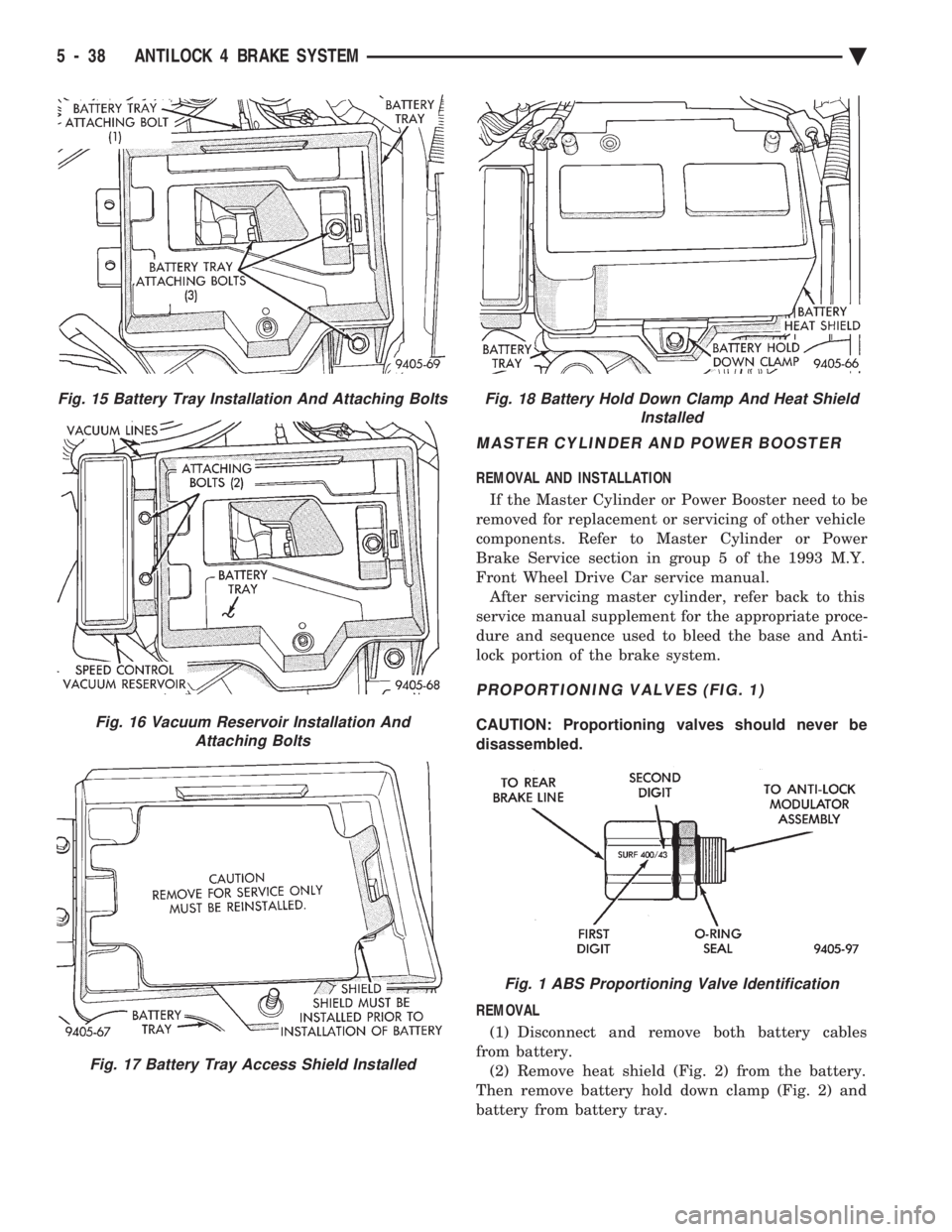
REMOVAL (1) Disconnect and remove both battery cables
from battery. (2) Remove heat shield (Fig. 2) from the battery.
Then remove battery hold down clamp (Fig. 2) and
battery from battery tray.
Fig. 15 Battery Tray Installation And Attaching Bolts
Fig. 16 Vacuum Reservoir Installation And Attaching Bolts
Fig. 17 Battery Tray Access Shield Installed
Fig. 18 Battery Hold Down Clamp And Heat Shield Installed
Fig. 1 ABS Proportioning Valve Identification
5 - 38 ANTILOCK 4 BRAKE SYSTEM Ä
Page 325 of 2438
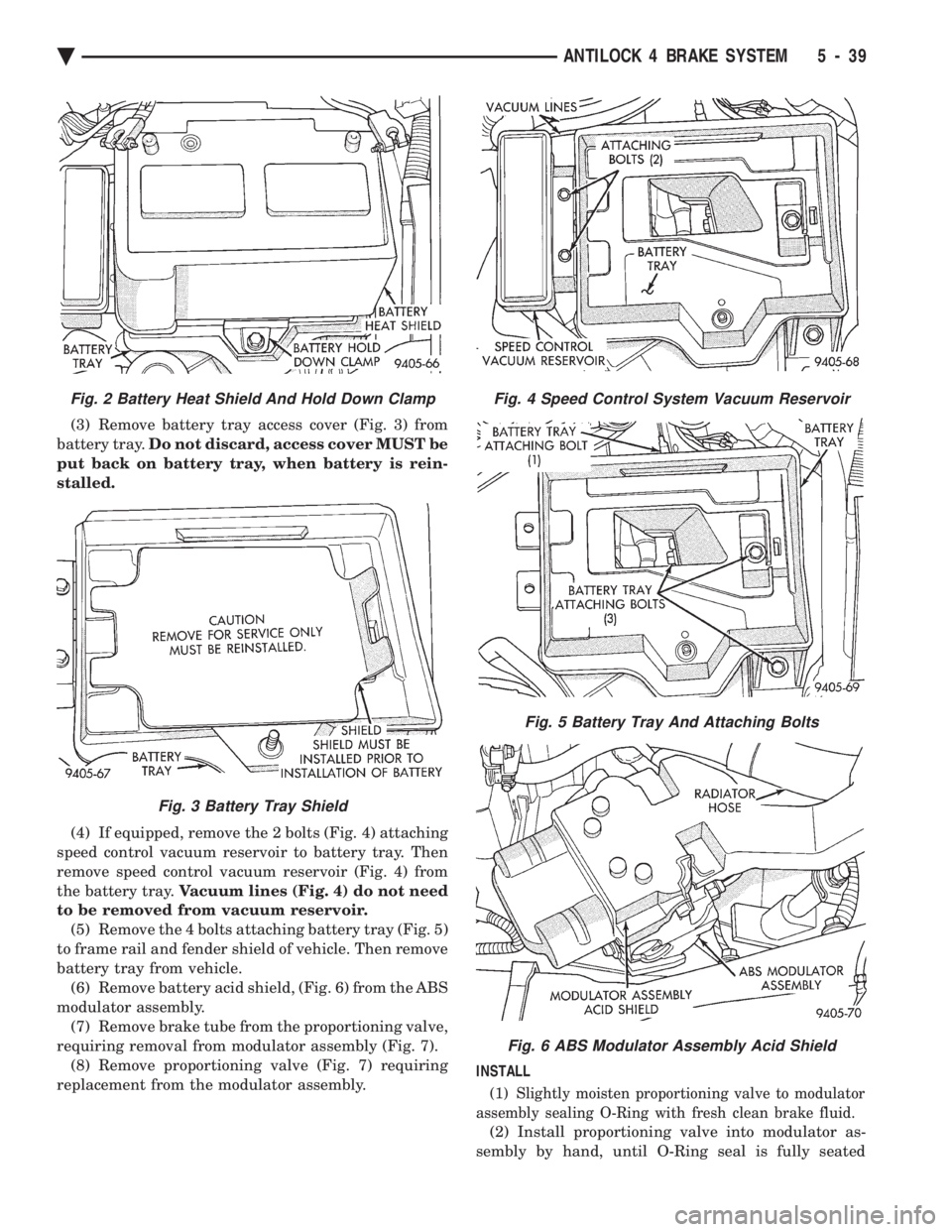
(3) Remove battery tray access cover (Fig. 3) from
battery tray. Do not discard, access cover MUST be
put back on battery tray, when battery is rein-
stalled.
(4) If equipped, remove the 2 bolts (Fig. 4) attaching
speed control vacuum reservoir to battery tray. Then
remove speed control vacuum reservoir (Fig. 4) from
the battery tray. Vacuum lines (Fig. 4) do not need
to be removed from vacuum reservoir. (5) Remove the 4 bolts attaching battery tray (Fig. 5)
to frame rail and fender shield of vehicle. Then remove
battery tray from vehicle. (6) Remove battery acid shield, (Fig. 6) from the ABS
modulator assembly. (7) Remove brake tube from the proportioning valve,
requiring removal from modulator assembly (Fig. 7). (8) Remove proportioning valve (Fig. 7) requiring
replacement from the modulator assembly. INSTALL
(1) Slightly moisten proportioning valve to modulator
assembly sealing O-Ring with fresh clean brake fluid.
(2) Install proportioning valve into modulator as-
sembly by hand, until O-Ring seal is fully seated
Fig. 4 Speed Control System Vacuum Reservoir
Fig. 5 Battery Tray And Attaching Bolts
Fig. 6 ABS Modulator Assembly Acid Shield
Fig. 2 Battery Heat Shield And Hold Down Clamp
Fig. 3 Battery Tray Shield
Ä ANTILOCK 4 BRAKE SYSTEM 5 - 39
Page 326 of 2438
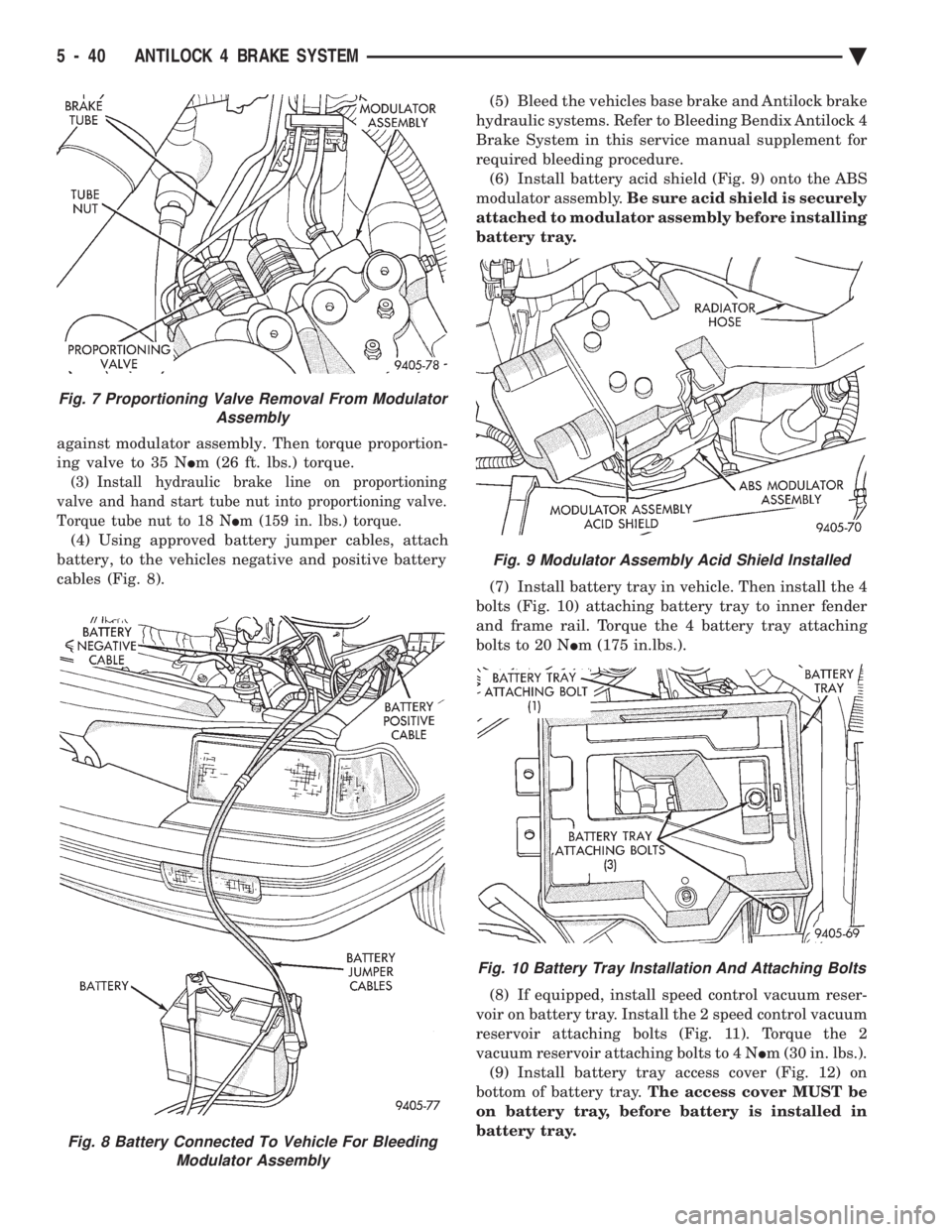
against modulator assembly. Then torque proportion-
ing valve to 35 N Im (26 ft. lbs.) torque.
(3) Install hydraulic brake line on proportioning
valve and hand start tube nut into proportioning valve.
Torque tube nut to 18 N Im (159 in. lbs.) torque.
(4) Using approved battery jumper cables, attach
battery, to the vehicles negative and positive battery
cables (Fig. 8). (5) Bleed the vehicles base brake and Antilock brake
hydraulic systems. Refer to Bleeding Bendix Antilock 4
Brake System in this service manual supplement for
required bleeding procedure. (6) Install battery acid shield (Fig. 9) onto the ABS
modulator assembly. Be sure acid shield is securely
attached to modulator assembly before installing
battery tray.
(7) Install battery tray in vehicle. Then install the 4
bolts (Fig. 10) attaching battery tray to inner fender
and frame rail. Torque the 4 battery tray attaching
bolts to 20 N Im (175 in.lbs.).
(8) If equipped, install speed control vacuum reser-
voir on battery tray. Install the 2 speed control vacuum
reservoir attaching bolts (Fig. 11). Torque the 2
vacuum reservoir attaching bolts to 4 N Im (30 in. lbs.).
(9) Install battery tray access cover (Fig. 12) on
bottom of battery tray. The access cover MUST be
on battery tray, before battery is installed in
battery tray.
Fig. 8 Battery Connected To Vehicle For Bleeding Modulator Assembly
Fig. 7 Proportioning Valve Removal From Modulator Assembly
Fig. 9 Modulator Assembly Acid Shield Installed
Fig. 10 Battery Tray Installation And Attaching Bolts
5 - 40 ANTILOCK 4 BRAKE SYSTEM Ä
Page 327 of 2438
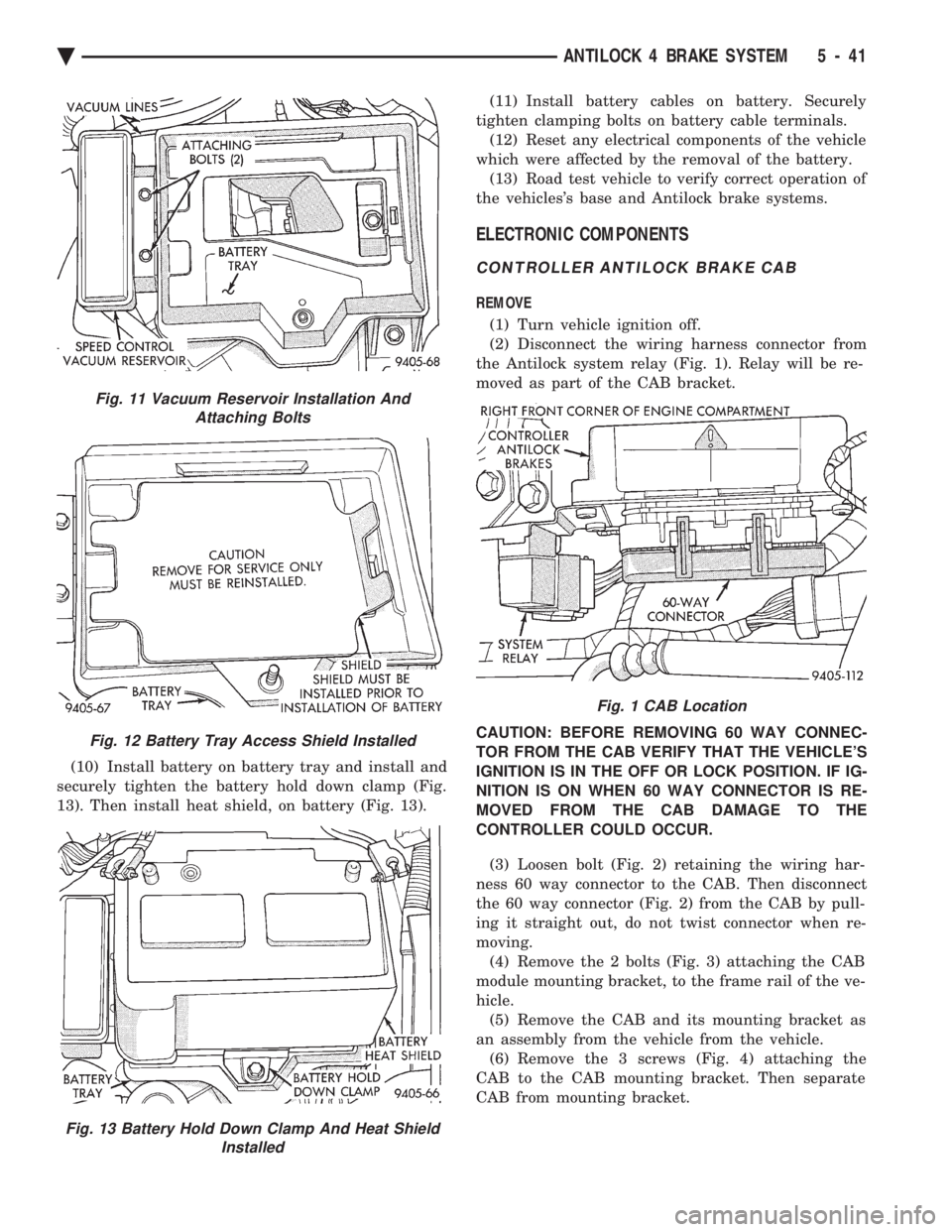
(10) Install battery on battery tray and install and
securely tighten the battery hold down clamp (Fig.
13). Then install heat shield, on battery (Fig. 13). (11) Install battery cables on battery. Securely
tighten clamping bolts on battery cable terminals. (12) Reset any electrical components of the vehicle
which were affected by the removal of the battery. (13) Road test vehicle to verify correct operation of
the vehicles's base and Antilock brake systems.
ELECTRONIC COMPONENTS
CONTROLLER ANTILOCK BRAKE CAB
REMOVE
(1) Turn vehicle ignition off.
(2) Disconnect the wiring harness connector from
the Antilock system relay (Fig. 1). Relay will be re-
moved as part of the CAB bracket.
CAUTION: BEFORE REMOVING 60 WAY CONNEC-
TOR FROM THE CAB VERIFY THAT THE VEHICLE'S
IGNITION IS IN THE OFF OR LOCK POSITION. IF IG-
NITION IS ON WHEN 60 WAY CONNECTOR IS RE-
MOVED FROM THE CAB DAMAGE TO THE
CONTROLLER COULD OCCUR.
(3) Loosen bolt (Fig. 2) retaining the wiring har-
ness 60 way connector to the CAB. Then disconnect
the 60 way connector (Fig. 2) from the CAB by pull-
ing it straight out, do not twist connector when re-
moving. (4) Remove the 2 bolts (Fig. 3) attaching the CAB
module mounting bracket, to the frame rail of the ve-
hicle. (5) Remove the CAB and its mounting bracket as
an assembly from the vehicle from the vehicle. (6) Remove the 3 screws (Fig. 4) attaching the
CAB to the CAB mounting bracket. Then separate
CAB from mounting bracket.
Fig. 11 Vacuum Reservoir Installation And Attaching Bolts
Fig. 12 Battery Tray Access Shield Installed
Fig. 13 Battery Hold Down Clamp And Heat Shield Installed
Fig. 1 CAB Location
Ä ANTILOCK 4 BRAKE SYSTEM 5 - 41
Page 362 of 2438
(2) Remove radiator pressure cap when engine is
cold, Idle engine until thermostat opens, you should
observe coolant flow while looking down the filler
neck. Once flow is detected install radiator pressure
cap.
RADIATOR
REMOVAL
(1) Disconnect negative battery cable from battery.
WARNING: DO NOT REMOVE THE CYLINDER
BLOCK PLUG OR THE RADIATOR DRAINCOCK
WITH THE SYSTEM HOT AND UNDER PRESSURE
BECAUSE SERIOUS BURNS FROM COOLANT CAN
OCCUR.
(2) Drain cooling system. Refer to Draining Cool-
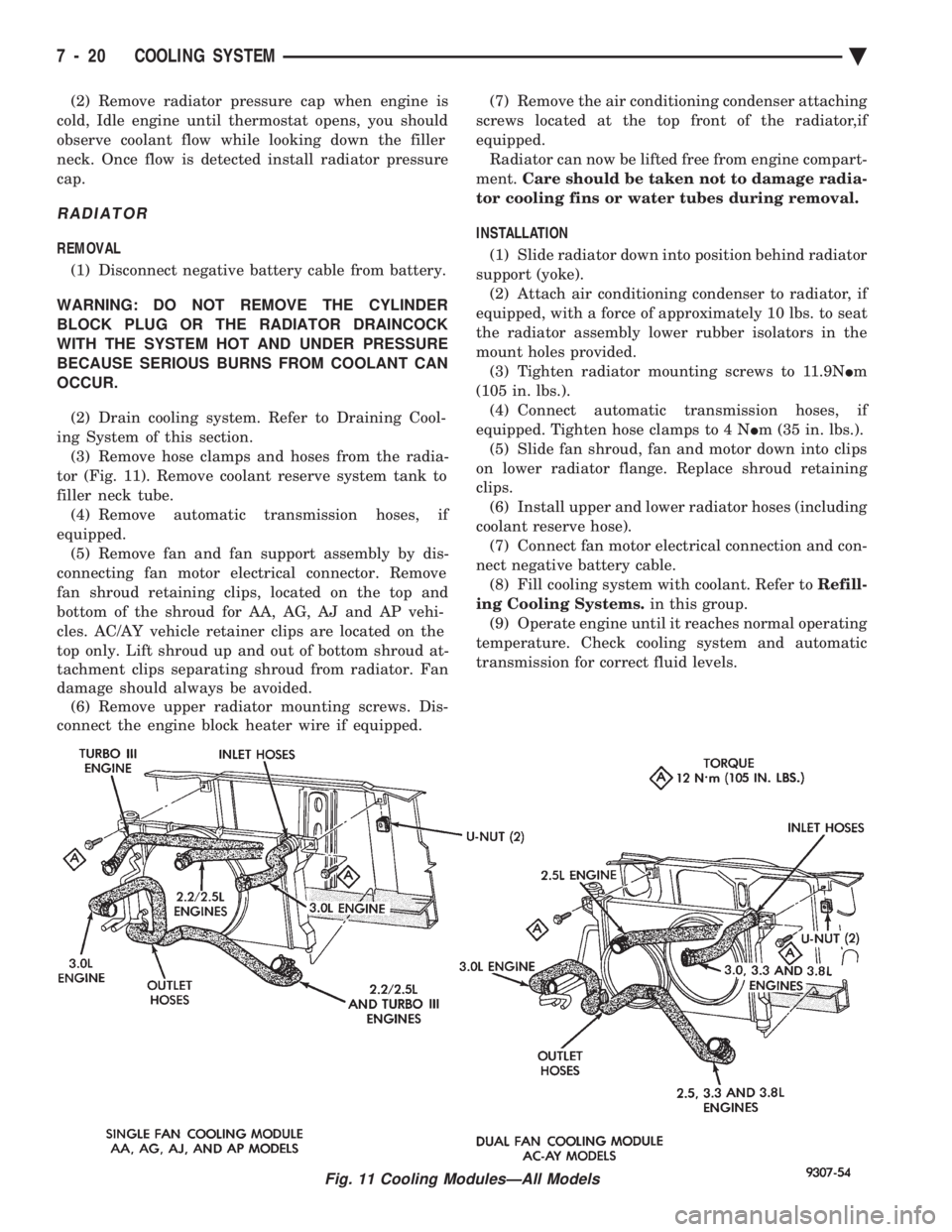
ing System of this section. (3) Remove hose clamps and hoses from the radia-
tor (Fig. 11). Remove coolant reserve system tank to
filler neck tube. (4) Remove automatic transmission hoses, if
equipped. (5) Remove fan and fan support assembly by dis-
connecting fan motor electrical connector. Remove
fan shroud retaining clips, located on the top and
bottom of the shroud for AA, AG, AJ and AP vehi-
cles. AC/AY vehicle retainer clips are located on the
top only. Lift shroud up and out of bottom shroud at-
tachment clips separating shroud from radiator. Fan
damage should always be avoided. (6) Remove upper radiator mounting screws. Dis-
connect the engine block heater wire if equipped. (7) Remove the air conditioning condenser attaching
screws located at the top front of the radiator,if
equipped. Radiator can now be lifted free from engine compart-
ment. Care should be taken not to damage radia-
tor cooling fins or water tubes during removal.
INSTALLATION
(1) Slide radiator down into position behind radiator
support (yoke). (2) Attach air conditioning condenser to radiator, if
equipped, with a force of approximately 10 lbs. to seat
the radiator assembly lower rubber isolators in the
mount holes provided. (3) Tighten radiator mounting screws to 11.9N Im
(105 in. lbs.). (4) Connect automatic transmission hoses, if
equipped. Tighten hose clamps to 4 N Im (35 in. lbs.).
(5) Slide fan shroud, fan and motor down into clips
on lower radiator flange. Replace shroud retaining
clips. (6) Install upper and lower radiator hoses (including
coolant reserve hose). (7) Connect fan motor electrical connection and con-
nect negative battery cable. (8) Fill cooling system with coolant. Refer to Refill-
ing Cooling Systems. in this group.
(9) Operate engine until it reaches normal operating
temperature. Check cooling system and automatic
transmission for correct fluid levels.
Fig. 11 Cooling ModulesÐAll Models
7 - 20 COOLING SYSTEM Ä
Page 364 of 2438
sends the message to the Engine Controller. The En-
gine Controller turns on the fan through the fan re-
lay. See Wiring Diagrams Manual for circuity and
diagnostics provided.Switching through the Engine Controller provides
fan control for the following conditions.
² The fan will not run during cranking until the en-
gine starts no matter what the coolant temperature
is.
² Fan will run when the air conditioning clutch is
engaged and low pressure cutout switch is closed.
² For 4 cylinder application the fan will run at ve-
hicle speeds above about 40 mph only if coolant tem-
perature reaches 110ÉC (230ÉF). It will turn off when
the temperature drops to 104ÉC (220ÉF). At speeds
below 40 mph the fan switches on at 102ÉC (215ÉF)
and off at 93ÉC (200ÉF).
² This is to help prevent steaming. The fan will run
only below 16ÉC (60ÉF) ambient. Between 38ÉC
(100ÉF) to 97ÉC (195ÉF) coolant temperature, at idle
and then only for three minutes.
RADIATOR FAN CONTROLÐAC/AY BODY V-6 ONLY
For this application, fan control is accomplished
based on coolant temperature, and on A/C head pres-
sure. These vehicles receive the variable displace-
ment compressor. The fan will go on when;
² Coolant temperature reaches 102ÉC (215ÉF) and off
at 93.4ÉC (200ÉF) regardless of vehicle speed.
² When the head pressure reaches 1516.9 kPa (220
psi) and turn off when the pressure reaches 1103 kPa
(160 psi).
TEMPERATURE GAUGE INDICATION
At idle the temperature gauge will rise slowly to
about 5/8 gauge travel. The fan will come on and the
gauge will drop to about 1/2 gauge travel, this is nor-
mal.
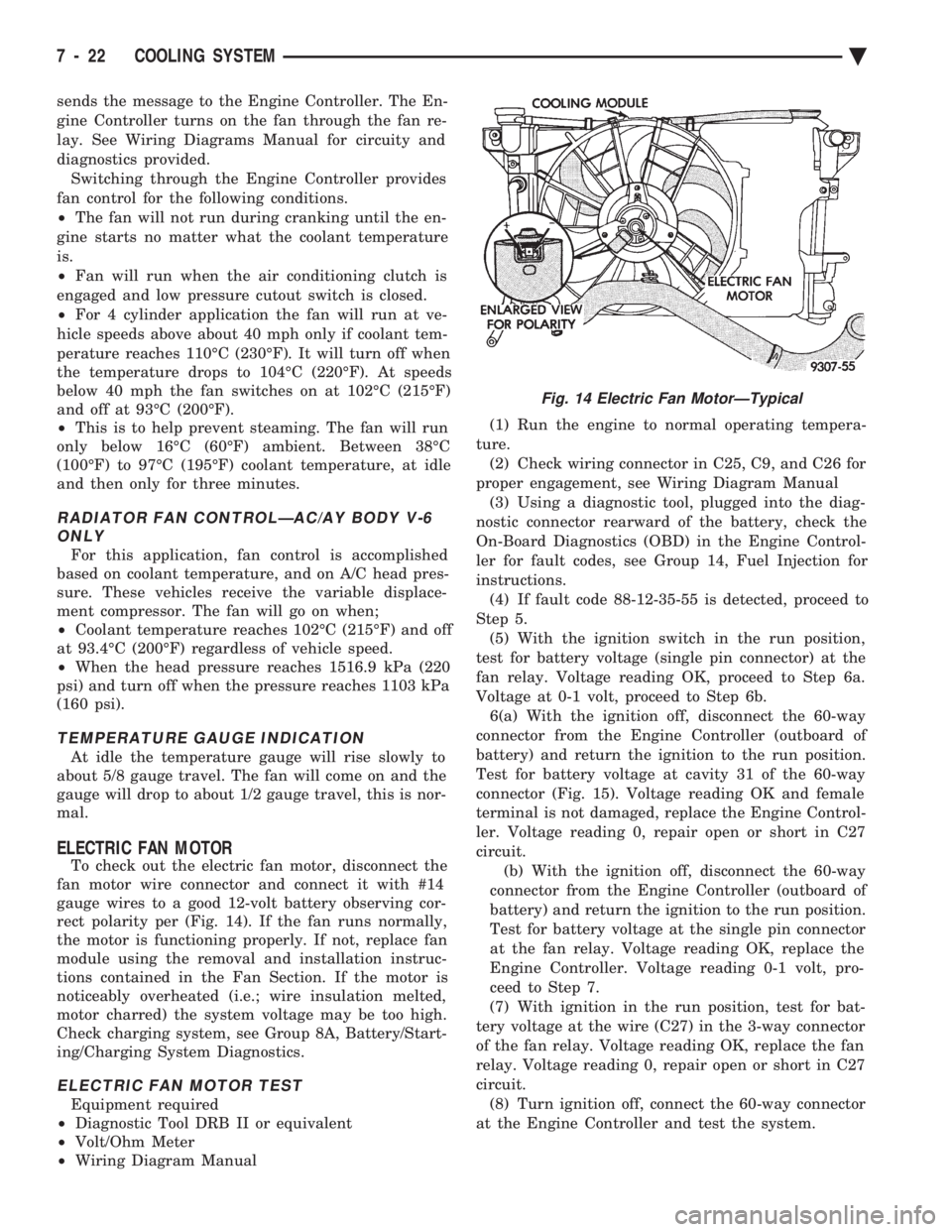
ELECTRIC FAN MOTOR
To check out the electric fan motor, disconnect the
fan motor wire connector and connect it with #14
gauge wires to a good 12-volt battery observing cor-
rect polarity per (Fig. 14). If the fan runs normally,
the motor is functioning properly. If not, replace fan
module using the removal and installation instruc-
tions contained in the Fan Section. If the motor is
noticeably overheated (i.e.; wire insulation melted,
motor charred) the system voltage may be too high.
Check charging system, see Group 8A, Battery/Start-
ing/Charging System Diagnostics.
ELECTRIC FAN MOTOR TEST
Equipment required
² Diagnostic Tool DRB II or equivalent
² Volt/Ohm Meter
² Wiring Diagram Manual (1) Run the engine to normal operating tempera-
ture. (2) Check wiring connector in C25, C9, and C26 for
proper engagement, see Wiring Diagram Manual (3) Using a diagnostic tool, plugged into the diag-
nostic connector rearward of the battery, check the
On-Board Diagnostics (OBD) in the Engine Control-
ler for fault codes, see Group 14, Fuel Injection for
instructions. (4) If fault code 88-12-35-55 is detected, proceed to
Step 5. (5) With the ignition switch in the run position,
test for battery voltage (single pin connector) at the
fan relay. Voltage reading OK, proceed to Step 6a.
Voltage at 0-1 volt, proceed to Step 6b. 6(a) With the ignition off, disconnect the 60-way
connector from the Engine Controller (outboard of
battery) and return the ignition to the run position.
Test for battery voltage at cavity 31 of the 60-way
connector (Fig. 15). Voltage reading OK and female
terminal is not damaged, replace the Engine Control-
ler. Voltage reading 0, repair open or short in C27
circuit. (b) With the ignition off, disconnect the 60-way
connector from the Engine Controller (outboard of
battery) and return the ignition to the run position.
Test for battery voltage at the single pin connector
at the fan relay. Voltage reading OK, replace the
Engine Controller. Voltage reading 0-1 volt, pro-
ceed to Step 7.
(7) With ignition in the run position, test for bat-
tery voltage at the wire (C27) in the 3-way connector
of the fan relay. Voltage reading OK, replace the fan
relay. Voltage reading 0, repair open or short in C27
circuit. (8) Turn ignition off, connect the 60-way connector
at the Engine Controller and test the system.
Fig. 14 Electric Fan MotorÐTypical
7 - 22 COOLING SYSTEM Ä
Page 373 of 2438
BATTERY/STARTING/CHARGING SYSTEMS DIAGNOSTICS
CONTENTS
page page
BATTERY TEST PROCEDURES ON-VEHICLE . . 3
FAULT CODESÐON BOARD DIAGNOSTICS . . 23
GENERAL INFORMATION .................. 1
GENERATOR TEST PROCEDURES ON VEHICLE.19 IGNITION OFF DRAW (IOD)
............... 9
SPECIFICATIONS ....................... 28
STARTER TEST PROCEDURES ON VEHICLE . 11
GENERAL INFORMATION
² For Battery, Starter or Generator replacement re-
fer to Group 8B, Battery/Starter/Generator Service.
This Group 8A will cover diagnostics only. The Battery, Starting, and Charging Systems oper-
ate with one another, and must be thoroughly tested
as a complete system. To enable the vehicle to start
and charge properly, it must have a battery that will
perform to specifications. The starter motor, genera-
tor, wiring, and electronics also must perform within
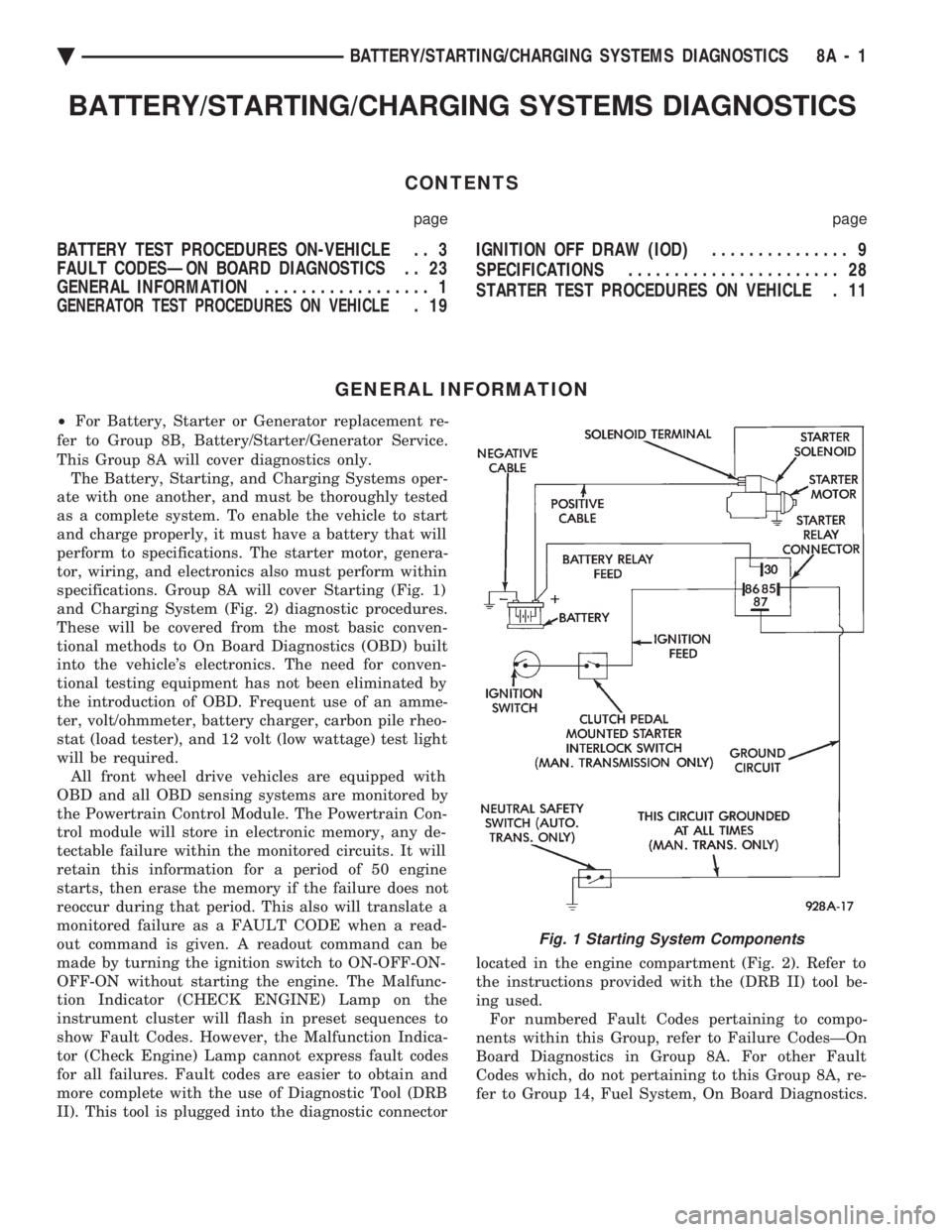
specifications. Group 8A will cover Starting (Fig. 1)
and Charging System (Fig. 2) diagnostic procedures.
These will be covered from the most basic conven-
tional methods to On Board Diagnostics (OBD) built
into the vehicle's electronics. The need for conven-
tional testing equipment has not been eliminated by
the introduction of OBD. Frequent use of an amme-
ter, volt/ohmmeter, battery charger, carbon pile rheo-
stat (load tester), and 12 volt (low wattage) test light
will be required. All front wheel drive vehicles are equipped with
OBD and all OBD sensing systems are monitored by
the Powertrain Control Module. The Powertrain Con-
trol module will store in electronic memory, any de-
tectable failure within the monitored circuits. It will
retain this information for a period of 50 engine
starts, then erase the memory if the failure does not
reoccur during that period. This also will translate a
monitored failure as a FAULT CODE when a read-
out command is given. A readout command can be
made by turning the ignition switch to ON-OFF-ON-
OFF-ON without starting the engine. The Malfunc-
tion Indicator (CHECK ENGINE) Lamp on the
instrument cluster will flash in preset sequences to
show Fault Codes. However, the Malfunction Indica-
tor (Check Engine) Lamp cannot express fault codes
for all failures. Fault codes are easier to obtain and
more complete with the use of Diagnostic Tool (DRB
II). This tool is plugged into the diagnostic connector located in the engine compartment (Fig. 2). Refer to
the instructions provided with the (DRB II) tool be-
ing used. For numbered Fault Codes pertaining to compo-
nents within this Group, refer to Failure CodesÐOn
Board Diagnostics in Group 8A. For other Fault
Codes which, do not pertaining to this Group 8A, re-
fer to Group 14, Fuel System, On Board Diagnostics.
Fig. 1 Starting System Components
Ä BATTERY/STARTING/CHARGING SYSTEMS DIAGNOSTICS 8A - 1
Page 374 of 2438
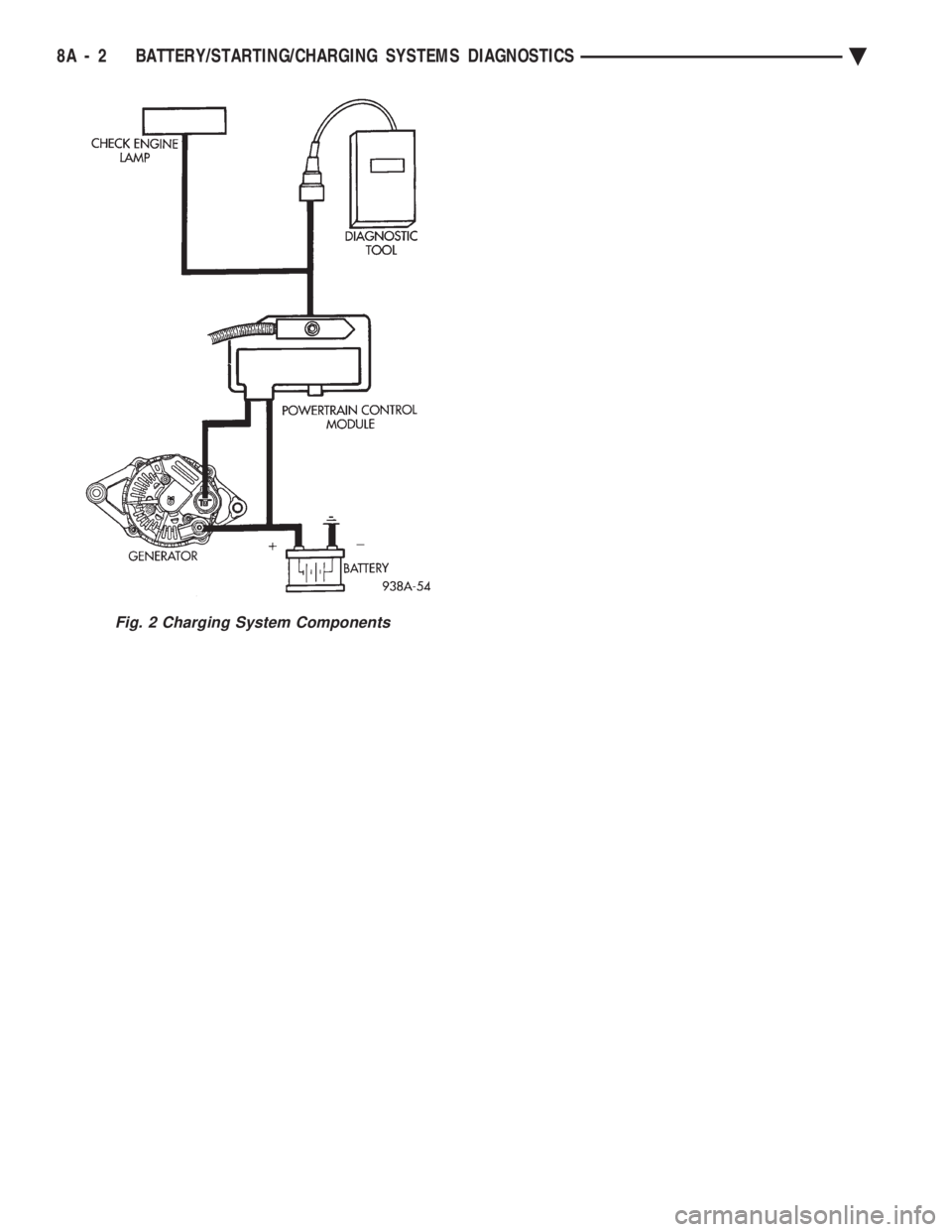
Fig. 2 Charging System Components
8A - 2 BATTERY/STARTING/CHARGING SYSTEMS DIAGNOSTICS Ä