battery CHEVROLET DYNASTY 1993 Repair Manual
[x] Cancel search | Manufacturer: CHEVROLET, Model Year: 1993, Model line: DYNASTY, Model: CHEVROLET DYNASTY 1993Pages: 2438, PDF Size: 74.98 MB
Page 395 of 2438
FAULT CODESÐON BOARD DIAGNOSTICS INDEX
page page
Diagnostic Testing Using Fault Codes ......... 24
Drb II Diagnostic Tester ................... 24 General Description/Information
.............. 23
GENERAL DESCRIPTION/INFORMATION
Another way of diagnosing charging system prob-
lems can be accomplished using the On Board Diag-
nostic System Fault Codes. A Fault Code shows a potential problem in a mon-
itored circuit, or a condition caused by a faulty component. A
Fault Code can be retrieved by turning the ignition
switch ON-OFF-ON-OFF-ON without starting the
engine, and counting the number of flashes of the
Malfunction Indicator (CHECK ENGINE) Lamp in
the instrument cluster.
EXAMPLES:
² If the Malfunction Indicator (Check Engine) Lamp
flashes four times, pauses, and flashes one more
time, a Code 41 is shown. The first set of four flashes
indicates number four. The second set of one flash in-
dicates one.
² If the Malfunction Indicator (Check Engine) Lamp
flashes four times, pauses, and flashes six more
times, a Code 46 is shown. The first set of four
flashes indicates number four. The second set of six
flashes indicates six.
² If the Malfunction Indication (Check Engine)
Lamp flashes four times, pauses, and flashes seven
more times, a Code 47 is shown. The first set of four
flashes indicates number four. The second set of
seven flashes indicates seven. POWERTRAIN CONTROL MODULE
The Powertrain Control Module is equipped with
On Board Diagnostic features and monitors all en-
gine control circuits during a run/drive period. If a
circuit or system does not perform properly, the pow-
ertrain control module will file in memory a preset
Fault Code. This can be used to help in diagnosing a
problem. After 50 to 100 ignition switch ON/RUN cy-
cles, the memory will be erased if the fault does not
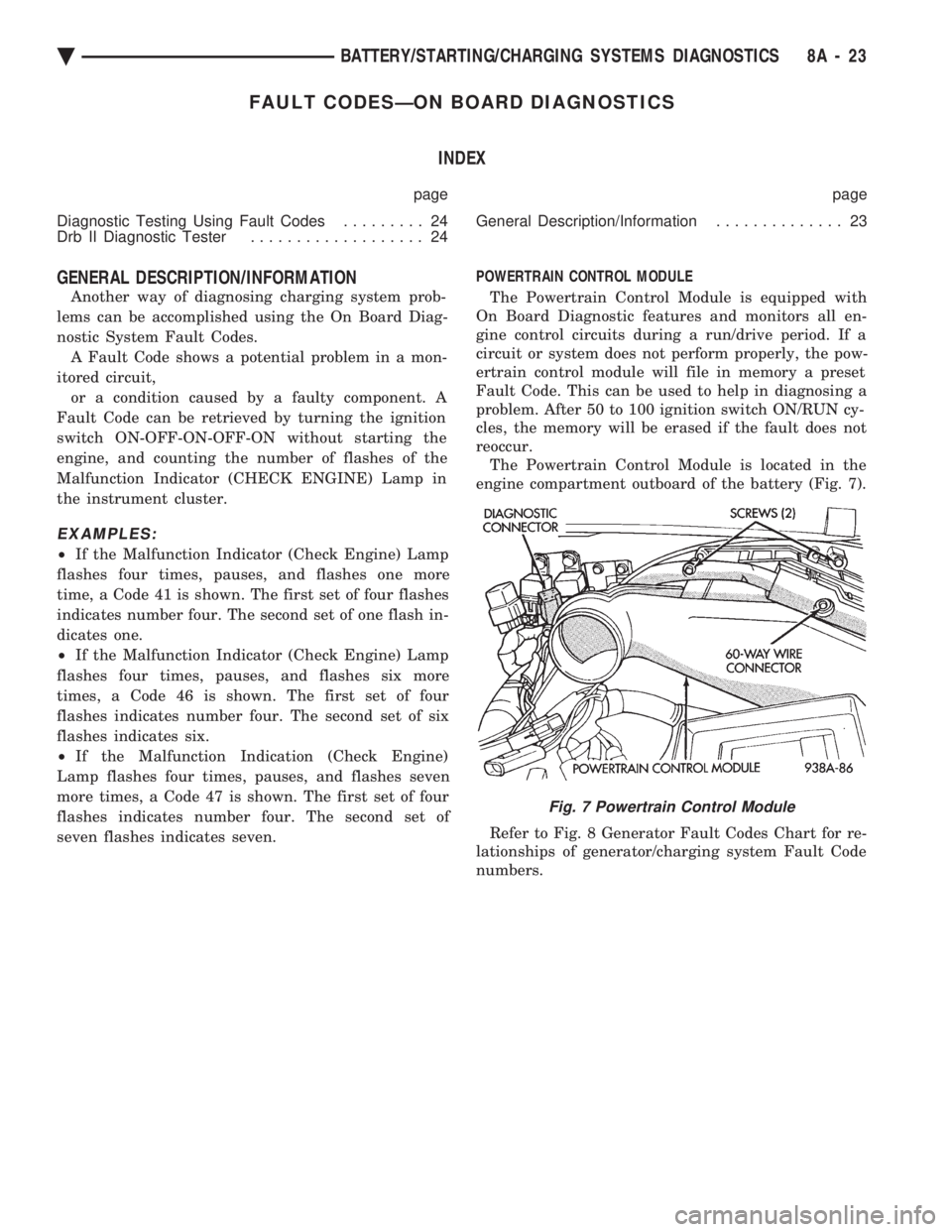
reoccur. The Powertrain Control Module is located in the
engine compartment outboard of the battery (Fig. 7).
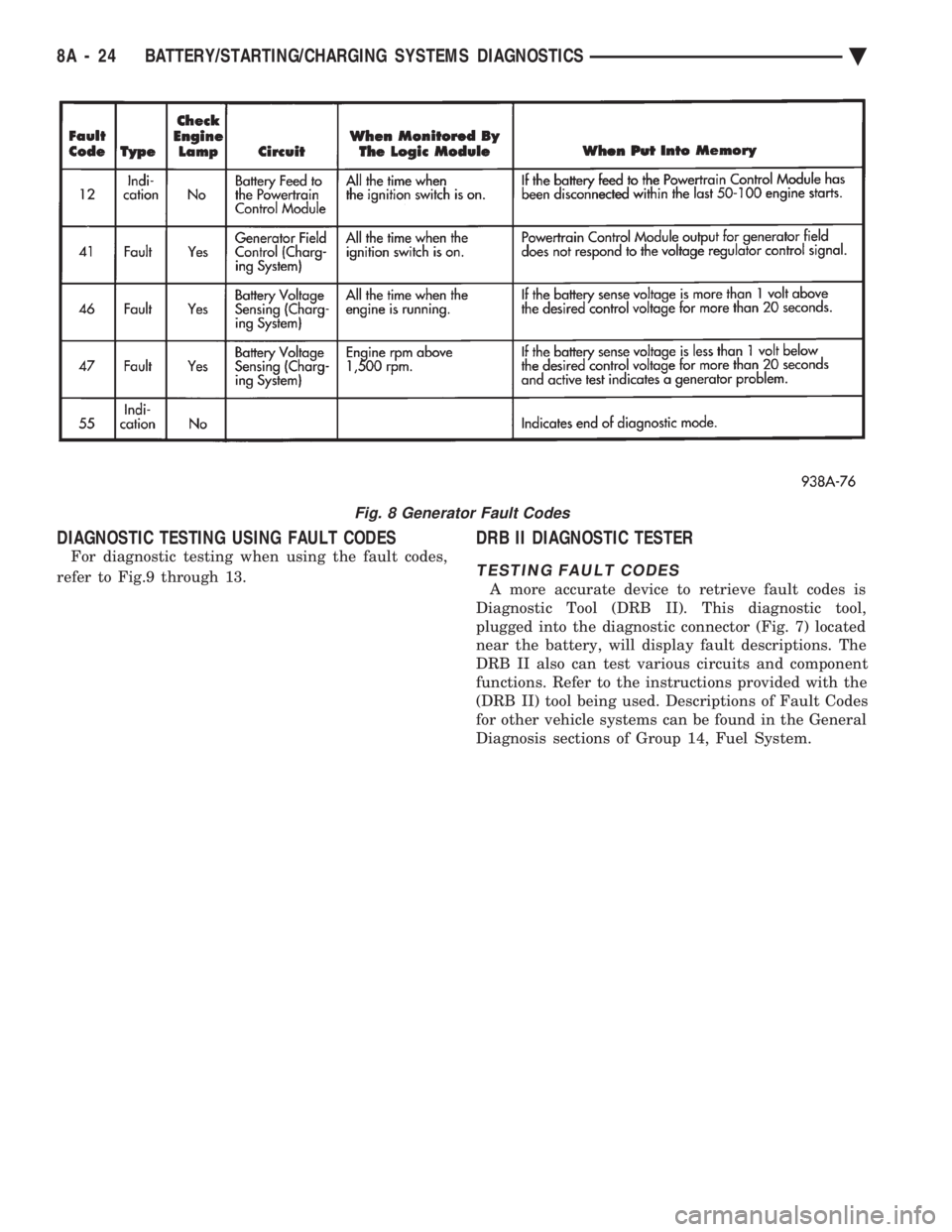
Refer to Fig. 8 Generator Fault Codes Chart for re-
lationships of generator/charging system Fault Code
numbers.
Fig. 7 Powertrain Control Module
Ä BATTERY/STARTING/CHARGING SYSTEMS DIAGNOSTICS 8A - 23
Page 396 of 2438
DIAGNOSTIC TESTING USING FAULT CODES
For diagnostic testing when using the fault codes,
refer to Fig.9 through 13.
DRB II DIAGNOSTIC TESTER
TESTING FAULT CODES
A more accurate device to retrieve fault codes is
Diagnostic Tool (DRB II). This diagnostic tool,
plugged into the diagnostic connector (Fig. 7) located
near the battery, will display fault descriptions. The
DRB II also can test various circuits and component
functions. Refer to the instructions provided with the
(DRB II) tool being used. Descriptions of Fault Codes
for other vehicle systems can be found in the General
Diagnosis sections of Group 14, Fuel System.
Fig. 8 Generator Fault Codes
8A - 24 BATTERY/STARTING/CHARGING SYSTEMS DIAGNOSTICS Ä
Page 397 of 2438
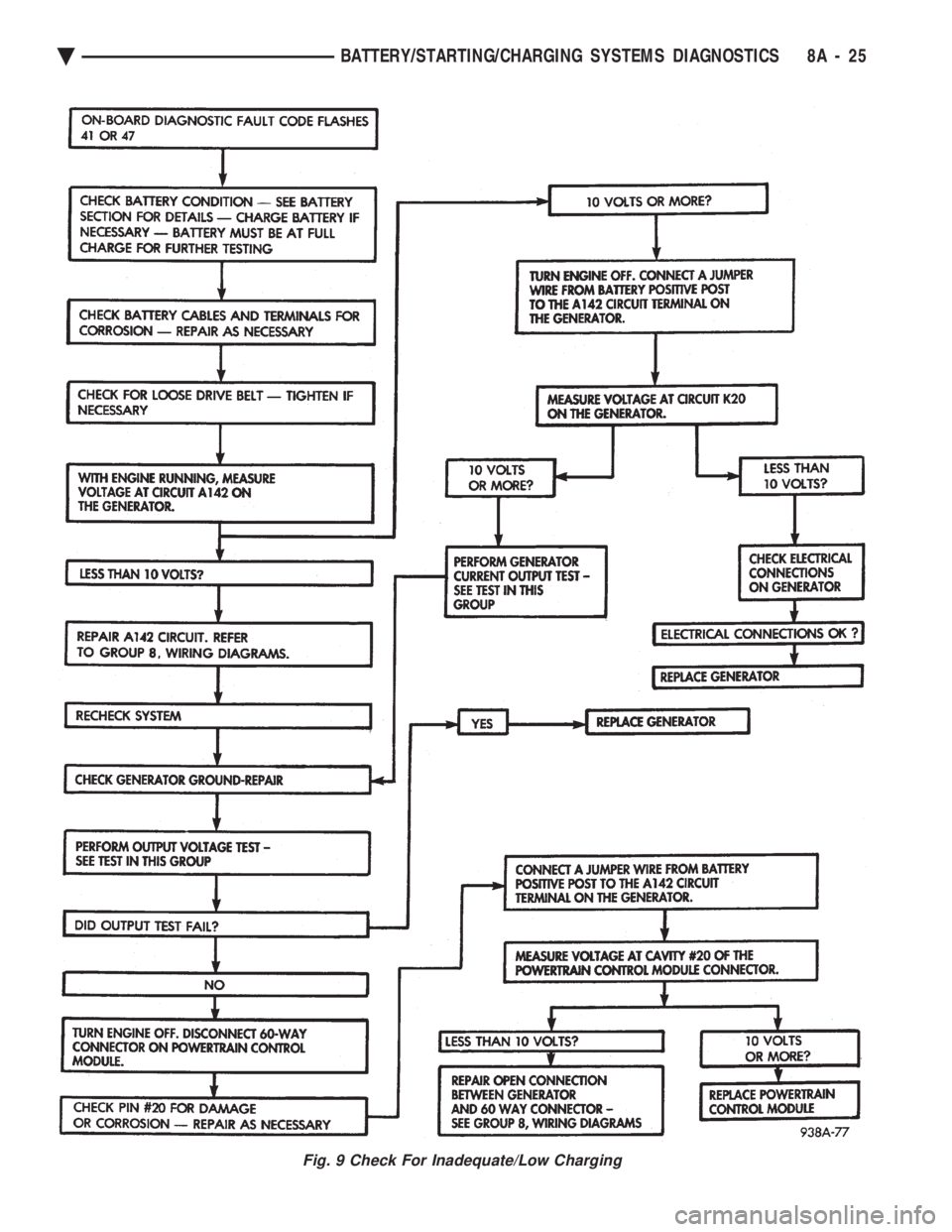
Fig. 9 Check For Inadequate/Low Charging
Ä BATTERY/STARTING/CHARGING SYSTEMS DIAGNOSTICS 8A - 25
Page 398 of 2438
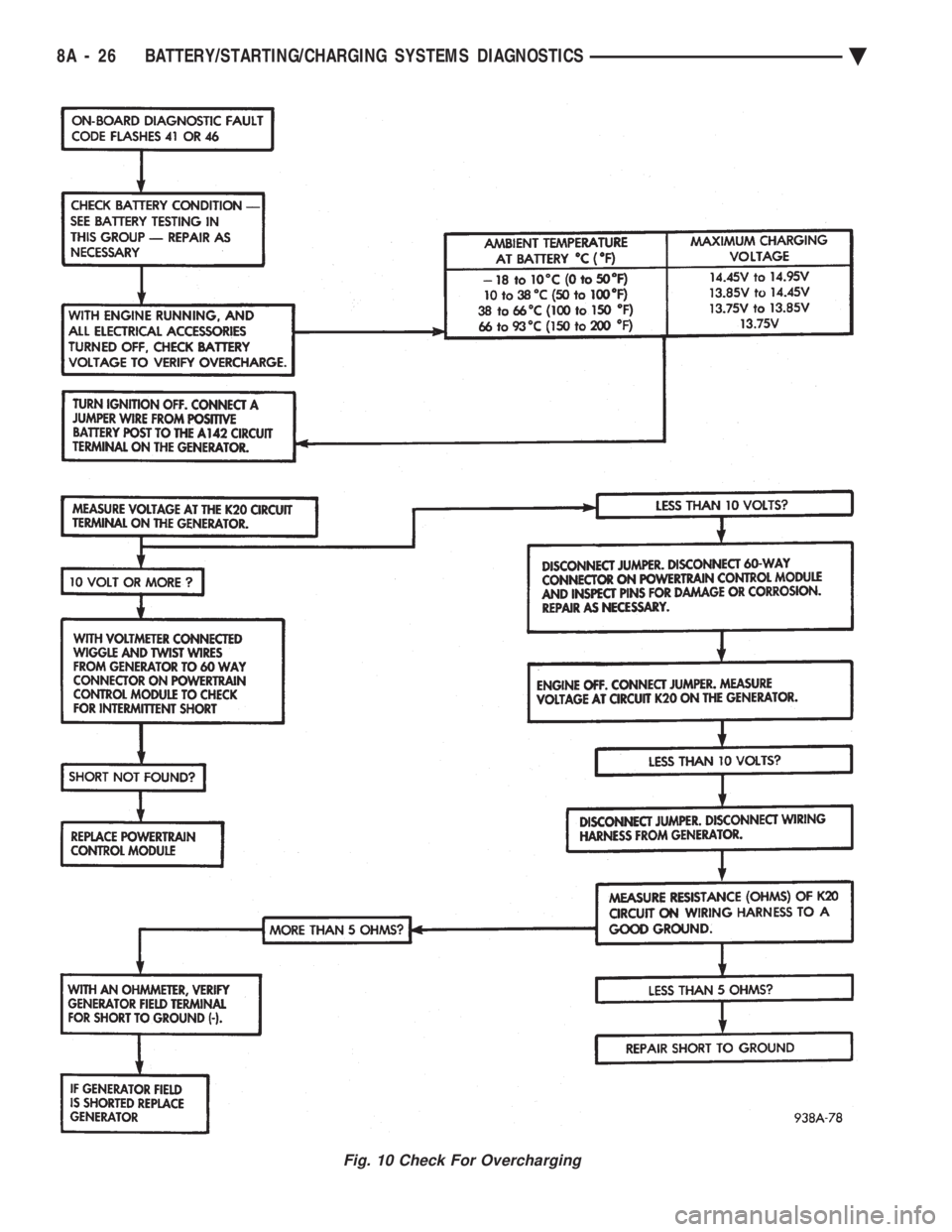
Fig. 10 Check For Overcharging
8A - 26 BATTERY/STARTING/CHARGING SYSTEMS DIAGNOSTICS Ä
Page 399 of 2438
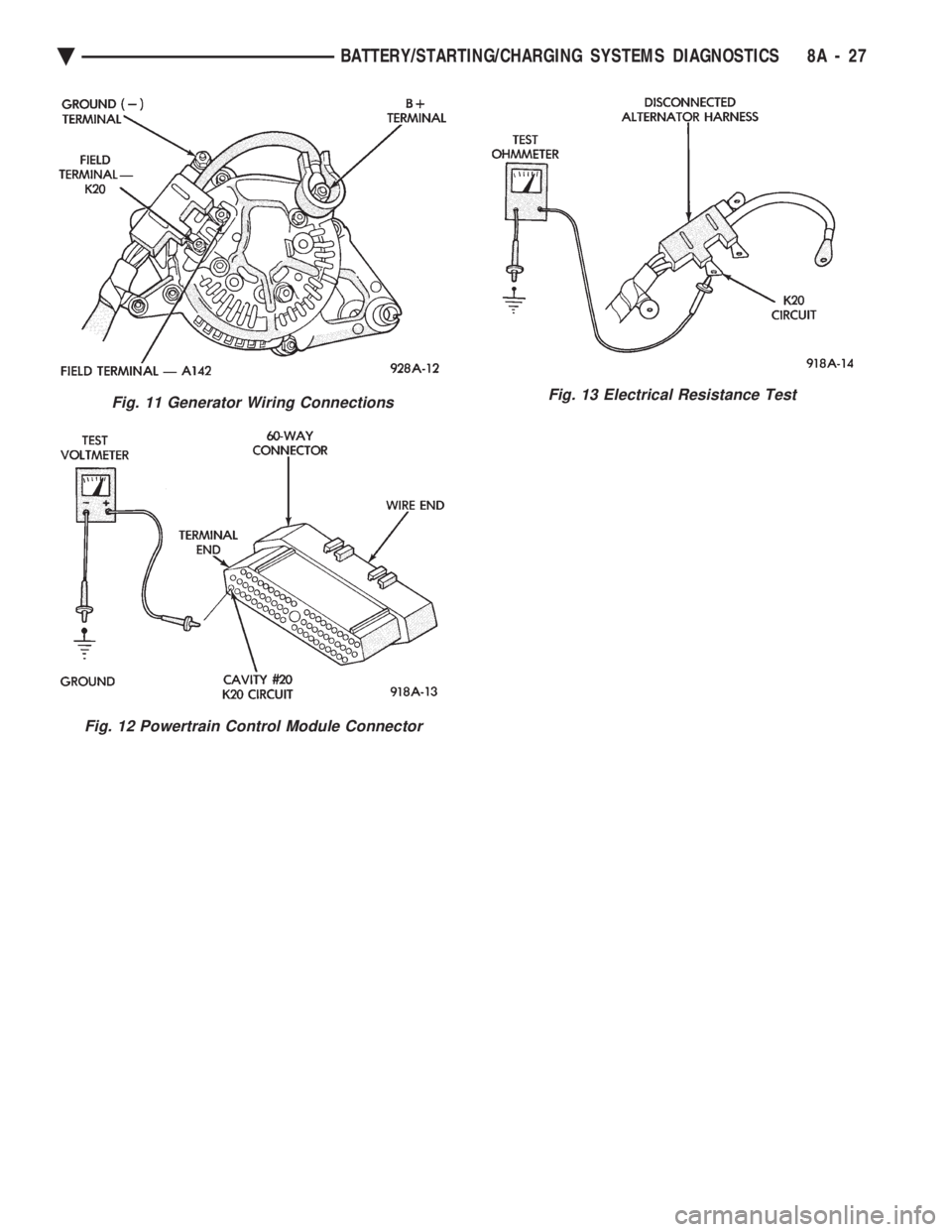
Fig. 11 Generator Wiring Connections
Fig. 12 Powertrain Control Module Connector
Fig. 13 Electrical Resistance Test
Ä BATTERY/STARTING/CHARGING SYSTEMS DIAGNOSTICS 8A - 27
Page 400 of 2438
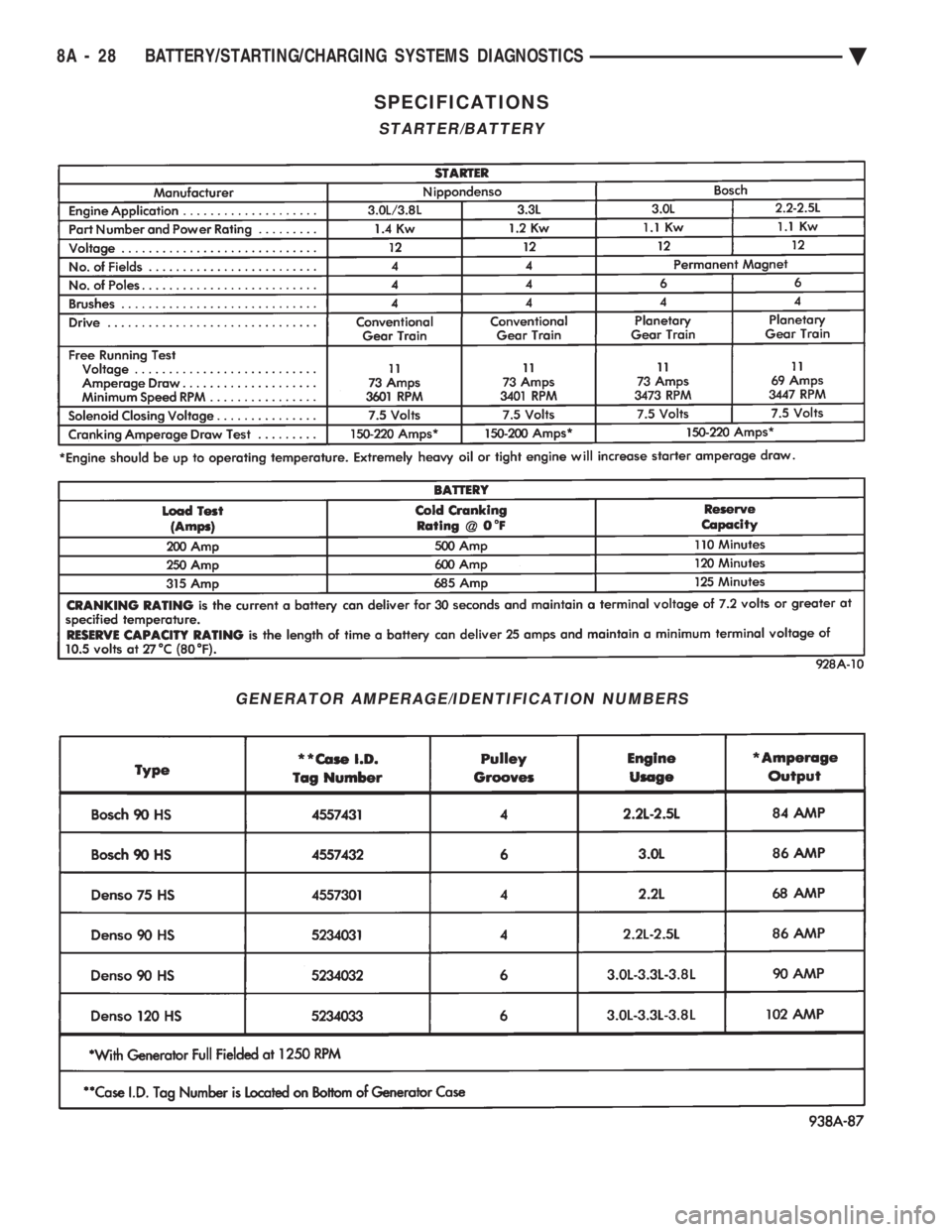
SPECIFICATIONS
STARTER/BATTERY
GENERATOR AMPERAGE/IDENTIFICATION NUMBERS
8A - 28 BATTERY/STARTING/CHARGING SYSTEMS DIAGNOSTICS Ä
Page 401 of 2438
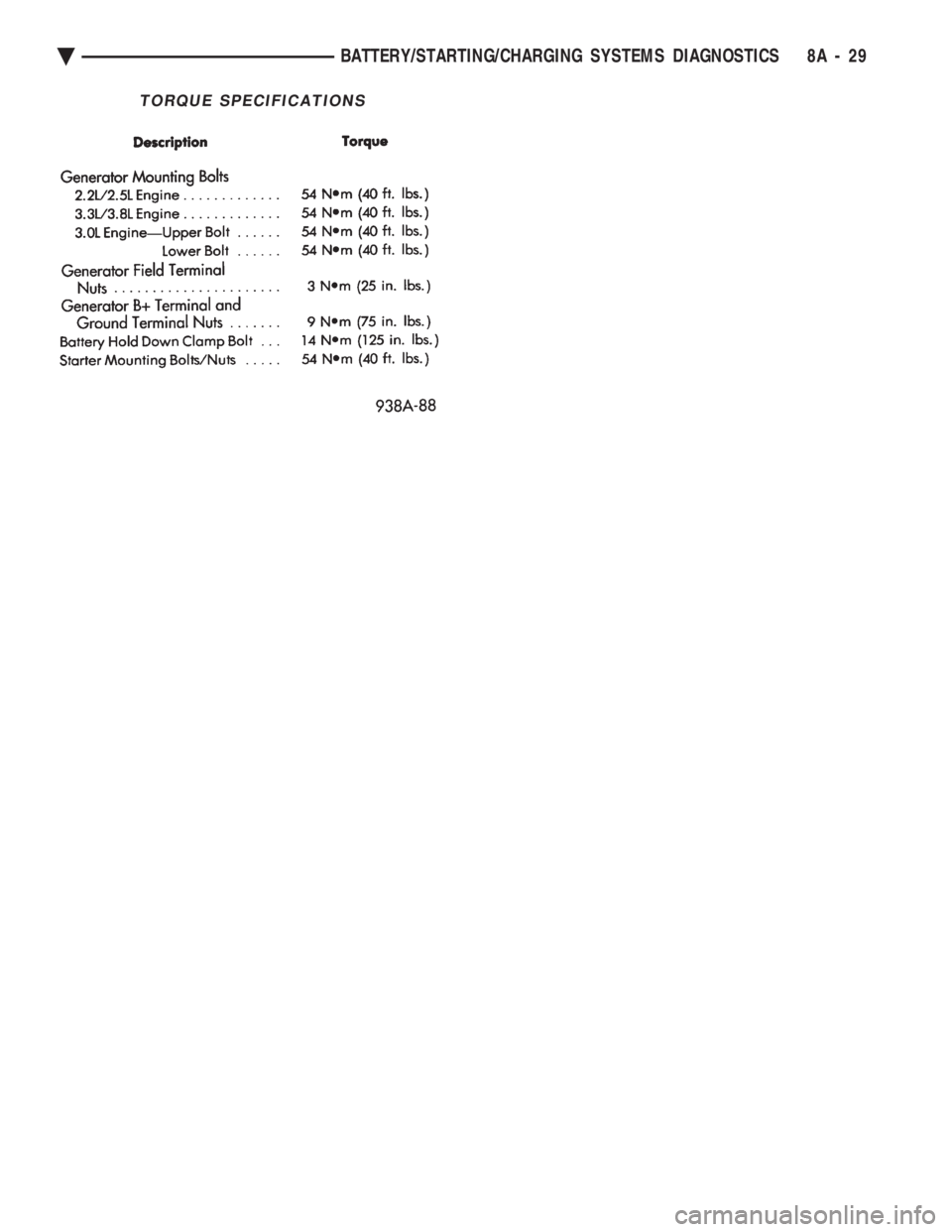
TORQUE SPECIFICATIONS
Ä BATTERY/STARTING/CHARGING SYSTEMS DIAGNOSTICS 8A - 29
Page 403 of 2438
BATTERY/STARTER/GENERATOR SERVICE
CONTENTS
page page
BATTERY REMOVAL, INSTALLATION AND SERVICE ............................. 1
GENERATOR ............................ 9 SPECIFICATIONS
....................... 12
STARTER ............................... 4
BATTERY REMOVAL, INSTALLATION AND SERVICE
GENERAL INFORMATION
This first section will cover Battery replacement and
service procedures only. For Battery diagnostic proce-
dures, refer to Group 8A, Battery/Starting/Charging
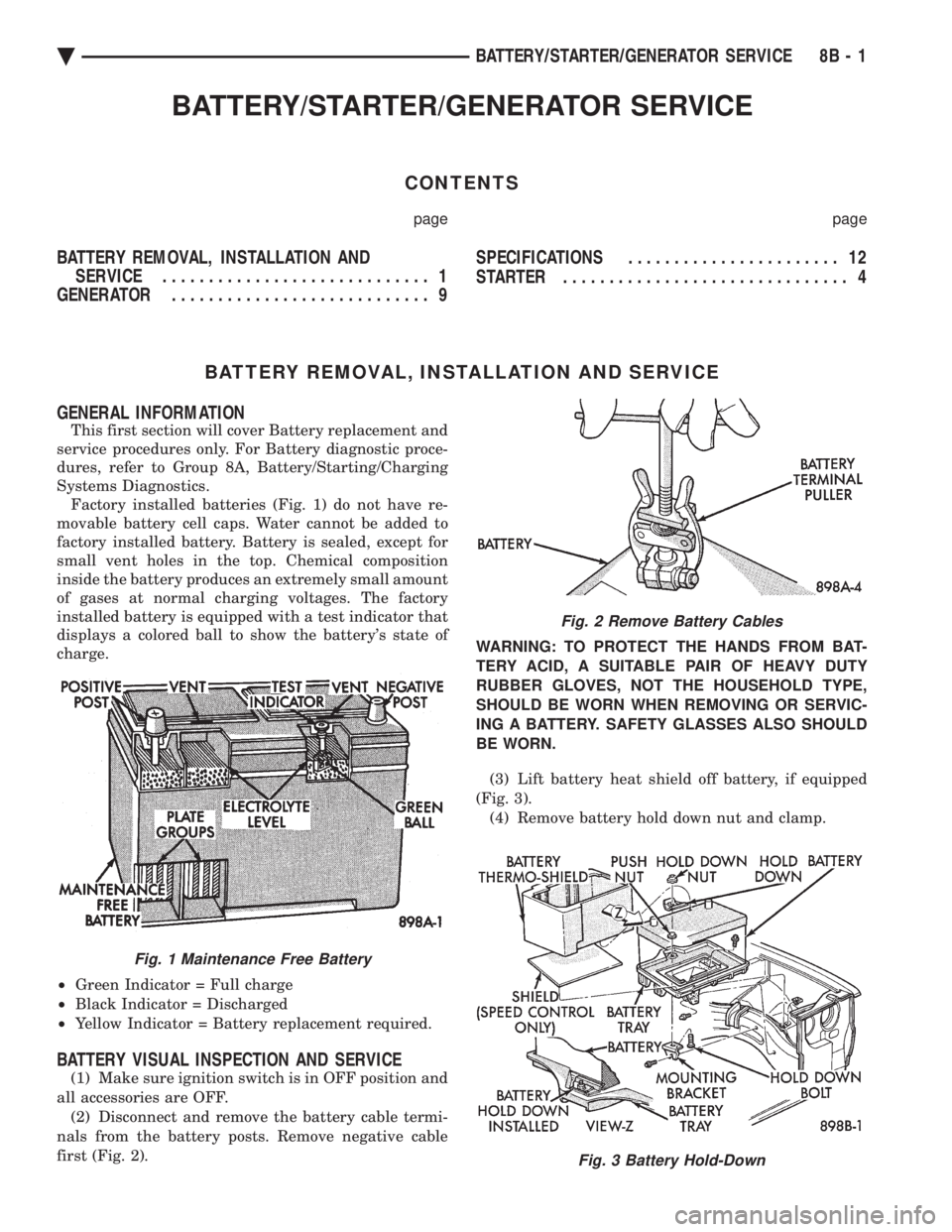
Systems Diagnostics. Factory installed batteries (Fig. 1) do not have re-
movable battery cell caps. Water cannot be added to
factory installed battery. Battery is sealed, except for
small vent holes in the top. Chemical composition
inside the battery produces an extremely small amount
of gases at normal charging voltages. The factory
installed battery is equipped with a test indicator that
displays a colored ball to show the battery's state of
charge.
² Green Indicator = Full charge
² Black Indicator = Discharged
² Yellow Indicator = Battery replacement required.
BATTERY VISUAL INSPECTION AND SERVICE
(1) Make sure ignition switch is in OFF position and
all accessories are OFF. (2) Disconnect and remove the battery cable termi-
nals from the battery posts. Remove negative cable
first (Fig. 2). WARNING: TO PROTECT THE HANDS FROM BAT-
TERY ACID, A SUITABLE PAIR OF HEAVY DUTY
RUBBER GLOVES, NOT THE HOUSEHOLD TYPE,
SHOULD BE WORN WHEN REMOVING OR SERVIC-
ING A BATTERY. SAFETY GLASSES ALSO SHOULD
BE WORN.
(3) Lift battery heat shield off battery, if equipped
(Fig. 3). (4) Remove battery hold down nut and clamp.
Fig. 1 Maintenance Free Battery
Fig. 2 Remove Battery Cables
Fig. 3 Battery Hold-Down
Ä BATTERY/STARTER/GENERATOR SERVICE 8B - 1
Page 404 of 2438
(5) Remove the battery from vehicle.
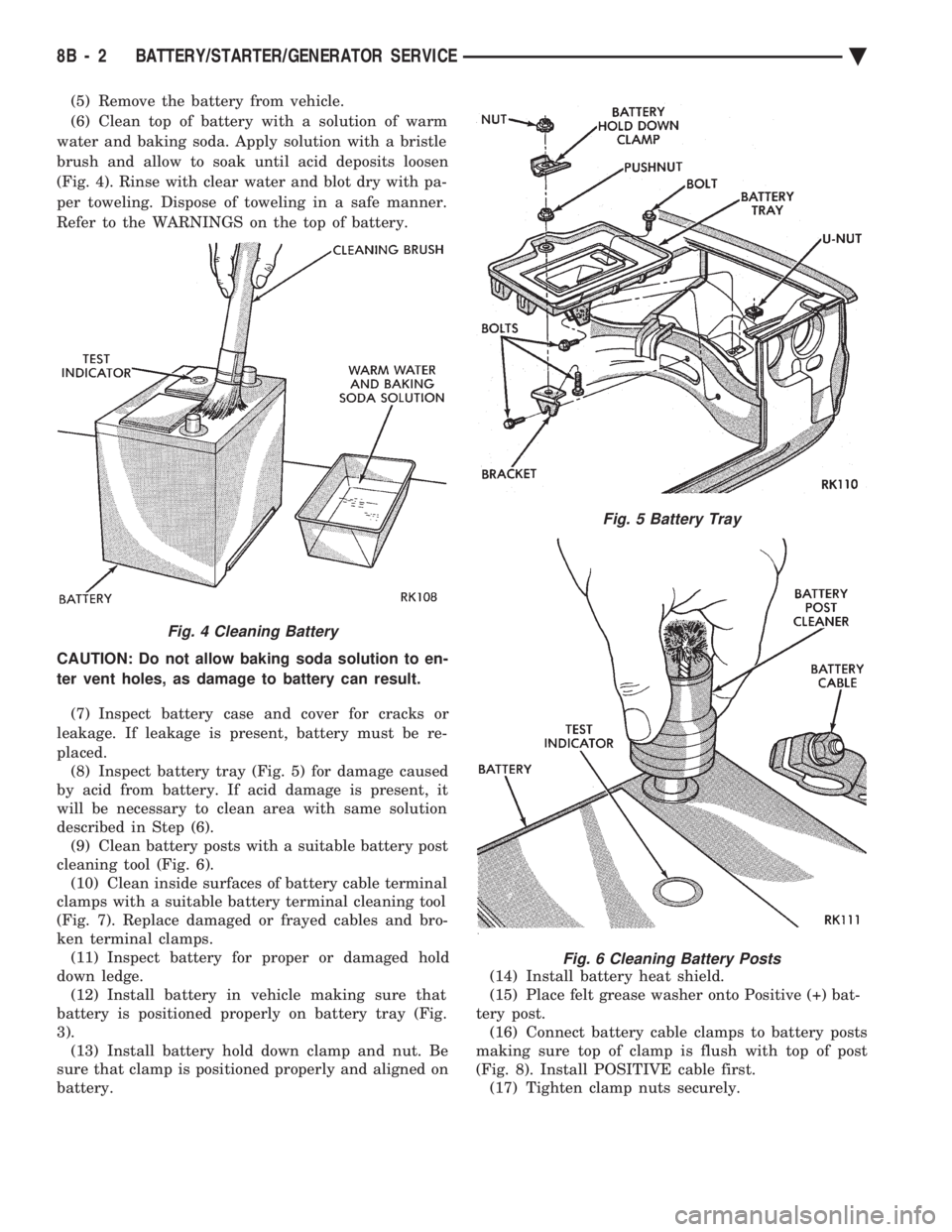
(6) Clean top of battery with a solution of warm
water and baking soda. Apply solution with a bristle
brush and allow to soak until acid deposits loosen
(Fig. 4). Rinse with clear water and blot dry with pa-
per toweling. Dispose of toweling in a safe manner.
Refer to the WARNINGS on the top of battery.
CAUTION: Do not allow baking soda solution to en-
ter vent holes, as damage to battery can result.
(7) Inspect battery case and cover for cracks or
leakage. If leakage is present, battery must be re-
placed. (8) Inspect battery tray (Fig. 5) for damage caused
by acid from battery. If acid damage is present, it
will be necessary to clean area with same solution
described in Step (6). (9) Clean battery posts with a suitable battery post
cleaning tool (Fig. 6). (10) Clean inside surfaces of battery cable terminal
clamps with a suitable battery terminal cleaning tool
(Fig. 7). Replace damaged or frayed cables and bro-
ken terminal clamps. (11) Inspect battery for proper or damaged hold
down ledge. (12) Install battery in vehicle making sure that
battery is positioned properly on battery tray (Fig.
3). (13) Install battery hold down clamp and nut. Be
sure that clamp is positioned properly and aligned on
battery. (14) Install battery heat shield.
(15) Place felt grease washer onto Positive (+) bat-
tery post. (16) Connect battery cable clamps to battery posts
making sure top of clamp is flush with top of post
(Fig. 8). Install POSITIVE cable first. (17) Tighten clamp nuts securely.
Fig. 4 Cleaning Battery
Fig. 5 Battery Tray
Fig. 6 Cleaning Battery Posts
8B - 2 BATTERY/STARTER/GENERATOR SERVICE Ä
Page 405 of 2438
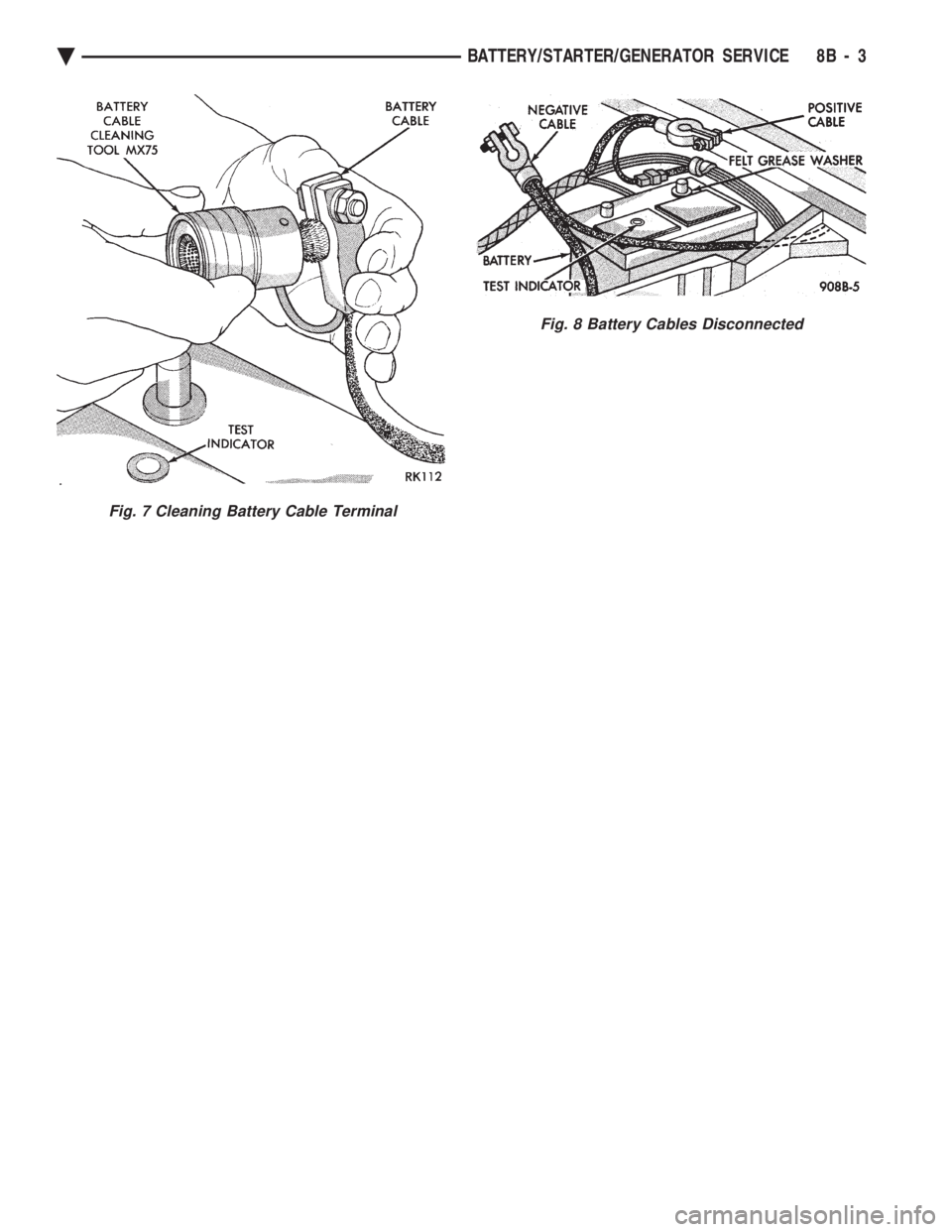
Fig. 7 Cleaning Battery Cable Terminal
Fig. 8 Battery Cables Disconnected
Ä BATTERY/STARTER/GENERATOR SERVICE 8B - 3