ignition CHEVROLET DYNASTY 1993 Workshop Manual
[x] Cancel search | Manufacturer: CHEVROLET, Model Year: 1993, Model line: DYNASTY, Model: CHEVROLET DYNASTY 1993Pages: 2438, PDF Size: 74.98 MB
Page 309 of 2438
earlier in this service manual supplement. Then follow
the diagnostic procedures outlined in this section. Many conditions that generate customer complaints
may be normal operating conditions, but are judged to
be a problem due to not being familiar with the ABS
system. These conditions can be recognized without
performing extensive diagnostic work, given adequate
understanding of the operating principles and perfor-
mance characteristics of the ABS system.
DEFINITIONS
Several abbreviations are used in this manual. They
are presented here for reference.
² CABÐController Antilock Brake
² ABSÐAntilock Brake System
² PSIÐPounds per Square Inch (pressure)
² WSSÐWheel Speed Sensor
² ACÐAlternating Current
ABS COMPUTER SYSTEM SERVICE PRECAUTIONS
The ABS system uses an electronic control module,
the CAB. This module is designed to withstand normal
current draws associated with vehicle operation. How-
ever care must be taken to avoid overloading the CAB
circuits. In testing for open or short circuits, do
not ground or apply voltage to any of the circuits
unless instructed to do so by the appropriate
diagnostic procedure. These circuits should only be
tested using a high impedance multi-meter, special
tools or the DRB II tester as described in this section.
Power should never be removed or applied to any
control module with the ignition in the ON position.
Before removing or connecting battery cables, fuses, or
connectors, always turn the ignition to the OFF posi-
tion.
ABS GENERAL SERVICE PRECAUTIONS
TEST DRIVING ABS COMPLAINT VEHICLES
Most ABS complaints will require a test drive as a
part of the diagnostic procedure. The purpose of the
test drive is to duplicate the condition. Remember conditions that result in the turn-
ing on of the Red Brake Warning Lamp may
indicate reduced braking ability. The following
procedure should be used to test drive an ABS
complaint vehicle. Before test driving a brake complaint vehicle, note
whether the Red or Amber Brake Warning Lamp is
turned on. If the Red Brake Warning Lamp, is
turned on, refer to the base brake Control Valves
Section in the Front Wheel Drive, chassis service
manual. If the Amber Antilock Warning light was or
is on, read record and erase the faults. While the
Amber ABS Warning Lamp is on the ABS system is
not functional. The standard brake system and abil- ity to stop the car is not affected, if only the Amber
Antilock Warning Lamp is on.
(1) Turn ignition key to the off position and then
back to the on position. Note whether the Amber ABS
Warning Lamp continues to stay on. If it does refer to
the 1994 Bendix Antilock 4 Brake System Diagnostic
Manual for the required diagnostic test procedures. (2) If the Amber ABS Warning Lamp goes out, shift
vehicle into gear and drive car to a speed of 5 mph to
complete the ABS drive-off cycle. If at this time, the
Amber ABS Warning Lamp goes on refer to the 1994
Bendix Antilock 4 Brake System Diagnostic Manual. (3) If the Amber ABS Warning Lamp remains OUT,
continue to drive the vehicle a short distance. During
this test drive be sure that the vehicle achieves at least
25 mph. Brake to at least one complete stop and again
accelerate to 25 mph. (4) If a functional problem with the ABS system is
determined while test driving a vehicle. Refer to the
Bendix Antilock 4 Brake System Diagnostics Manual
for required diagnostic test procedures and proper use
of the DRB II tester.
ABS BRAKE SYSTEM ON VEHICLE SERVICE
The following are general precautions which
should be observed whenever servicing and or
diagnosing the ABS system and other vehicle
electronic systems. Failure to observe these pre-
cautions may result in ABS system damage. (1) If welding work is to be performed on a vehicle
using an arc welder. The wiring harness connector
should be disconnected from the CAB before beginning
any welding operation. (2) The CAB 60 way connector and modulator as-
sembly 10 way connector, should never be connected or
disconnected with the ignition in the on position. (3) Some components of Bendix Antilock 4 Brake
System assemblies can not be serviced separately from
the assembly and will require replacement of the
complete assembly for servicing. Do not disassemble
any component which is designated as non-serviceable.
CAUTION: Brake fluid will damage painted surfaces.
If brake fluid is spilled on any painted surfaces, wash
off with water immediately.
WHEEL SPEED SENSOR CABLES
Proper installation and routing of the Wheel Speed
Sensor Cables is critical to continued system opera-
tion. Be sure that cables are installed, routed and
clipped properly. Failure to install speed sensor ca-
bles as shown in the on car service section of this
Ä ANTILOCK 4 BRAKE SYSTEM 5 - 23
Page 310 of 2438
manual. May result in contact with moving parts or
over extension of cables, resulting in component fail-
ure and an open circuit.
MECHANICAL DIAGNOSTICS AND SERVICE
PROCEDURES
SPECIAL SERVICE TOOL
Some diagnostic procedures in this section require
the use of the DRB diagnostics tester. The proper ap-
plication and procedures for the use of this tool are
described below.
DRB DIAGNOSTIC TESTER
Some of the diagnostic procedures that are ex-
plained in this section require the use of the DRB Di-
agnostics Tester to insure that proper diagnostics are
performed. Refer to those sections for proper testing
procedures and the DRB operators manual for its
proper operational information.
INTERMITTENT FAULTS
As with virtually any electronic system, intermit-
tent faults in the ABS system may be difficult to ac-
curately diagnose. Most intermittent faults are caused by faulty elec-
trical connections or wiring. When an intermittent
fault is encountered, check suspect circuits for: (1) Poor mating of wiring harness connector halves
or terminals not fully seated in the connector body. (2) Improperly formed or damaged terminals. All
connector terminals in a suspect circuit should be
checked and carefully reformed to increase contact
tension with its mating terminal. (3) Poor terminal to wire connection. This requires
removing the terminal from the connector body to in-
spect. (4) Pin presence in the connector assembly
(5) Connector push-in, spread, and corrosion.
If a visual check does not find the cause of the
problem, operate the car in an attempt to duplicate
the condition and record the set Fault code. Most failures of the ABS system will disable the
Antilock function for the entire ignition cycle even if
the fault clears before key-off. There are some failure
conditions, however, which will allow ABS operation
to resume during the ignition cycle in which it oc-
curred, if the failure condition is no longer present.
The following conditions may result in intermittent
illumination of the Amber Antilock Warning Lamp.
All other failures will cause the lamp to remain on
until the ignition switch is turned off. Circuits in-
volving these inputs to the CAB should be investi-
gated if a complaint of intermittent warning system
operation is encountered. (1) Low system voltage: If Low System Voltage is
detected by the CAB, the CAB will turn on the Am-
ber Antilock Warning Lamp until normal system voltage is achieved. Once normal voltage is seen at
the CAB, normal operation resumes.
(2) Antilock system and pump/motor relay. If the
relays fail to make the ground circuit connection or
has an intermittent ground. The CAB will turn on
the Amber Antilock Warning Light. (3) Excess decay, an extended pressure decay pe-
riod, will turn on the Amber Antilock Warning Light
until the vehicle comes to a complete stop. Additionally, any condition which results in inter-
ruption of electrical current to the CAB or modulator
assembly, may cause the Amber Antilock Warning
Lamp to turn on intermittently.
ABS BRAKE SYSTEM DIAGNOSTIC FEATURES
ABS SYSTEM SELF DIAGNOSIS
The ABS system is equipped with a self diagnostic
capability which may be used to assist in isolation of
ABS faults. The features of the self diagnostics sys-
tem are described below.
START-UP CYCLE
The self diagnostic ABS start up cycle begins when
the ignition switch is turned to the on position. An
electrical check is completed on the ABS components.
Such as Wheel Speed Sensor Continuity and System
and other Relay continuity. During this check the
Amber Antilock Light is turned on for approximately
1- 2 seconds. Further Functional testing is accomplished once
the vehicle is set in motion, known as drive-off.
² The solenoid valves and the pump/motor are acti-
vated briefly to verify function.
² The voltage output from the wheel speed sensors is
verified to be within the correct operating range. If the vehicle is not set in motion within 3 minutes
from the time the ignition switch is set in the on po-
sition. The solenoid test is bypassed but the pump/
motor is activated briefly to verify that it is
operating correctly.
CONTROLLER ANTILOCK BRAKE CAB
Fault codes are kept in a Non-Volatile memory un-
til either erased by the technician using the DRB or
erased automatically after 50 ignition cycles (key
ON-OFF cycles). The only fault that will not be
erased after 50 (KEY CYCLES) is the CAB fault. A
CAB fault can only be erased by the technician using
the DRB diagnostic tester. More than one fault can
be stored at a time. The number of key cycles since
the most recent fault was stored is also displayed.
Most functions of the CAB and ABS system can be
accessed by the technician for testing and diagnostic
purposes by using the DRB.
5 - 24 ANTILOCK 4 BRAKE SYSTEM Ä
Page 327 of 2438
(10) Install battery on battery tray and install and
securely tighten the battery hold down clamp (Fig.
13). Then install heat shield, on battery (Fig. 13). (11) Install battery cables on battery. Securely
tighten clamping bolts on battery cable terminals. (12) Reset any electrical components of the vehicle
which were affected by the removal of the battery. (13) Road test vehicle to verify correct operation of
the vehicles's base and Antilock brake systems.
ELECTRONIC COMPONENTS
CONTROLLER ANTILOCK BRAKE CAB
REMOVE
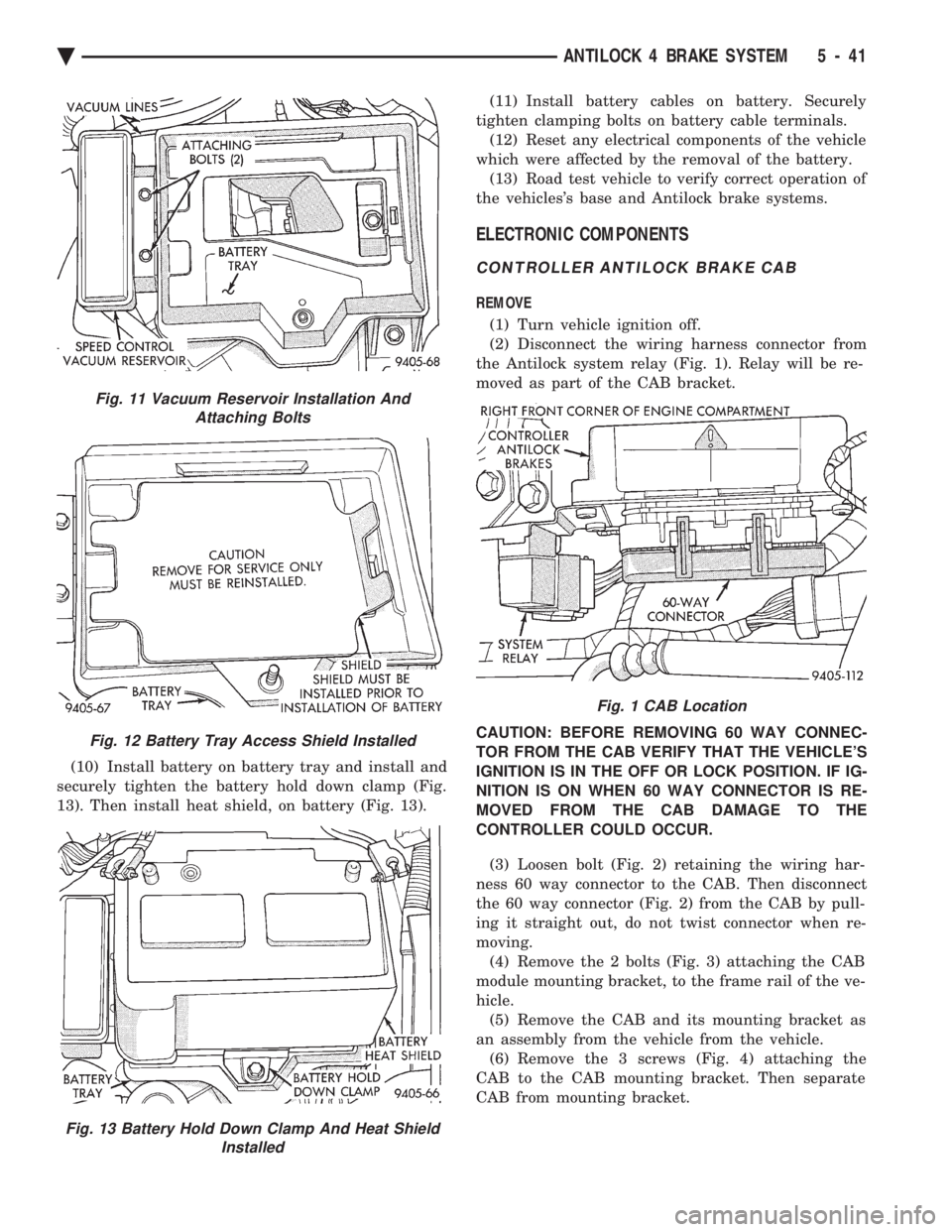
(1) Turn vehicle ignition off.
(2) Disconnect the wiring harness connector from
the Antilock system relay (Fig. 1). Relay will be re-
moved as part of the CAB bracket.
CAUTION: BEFORE REMOVING 60 WAY CONNEC-
TOR FROM THE CAB VERIFY THAT THE VEHICLE'S
IGNITION IS IN THE OFF OR LOCK POSITION. IF IG-
NITION IS ON WHEN 60 WAY CONNECTOR IS RE-
MOVED FROM THE CAB DAMAGE TO THE
CONTROLLER COULD OCCUR.
(3) Loosen bolt (Fig. 2) retaining the wiring har-
ness 60 way connector to the CAB. Then disconnect
the 60 way connector (Fig. 2) from the CAB by pull-
ing it straight out, do not twist connector when re-
moving. (4) Remove the 2 bolts (Fig. 3) attaching the CAB
module mounting bracket, to the frame rail of the ve-
hicle. (5) Remove the CAB and its mounting bracket as
an assembly from the vehicle from the vehicle. (6) Remove the 3 screws (Fig. 4) attaching the
CAB to the CAB mounting bracket. Then separate
CAB from mounting bracket.
Fig. 11 Vacuum Reservoir Installation And Attaching Bolts
Fig. 12 Battery Tray Access Shield Installed
Fig. 13 Battery Hold Down Clamp And Heat Shield Installed
Fig. 1 CAB Location
Ä ANTILOCK 4 BRAKE SYSTEM 5 - 41
Page 328 of 2438
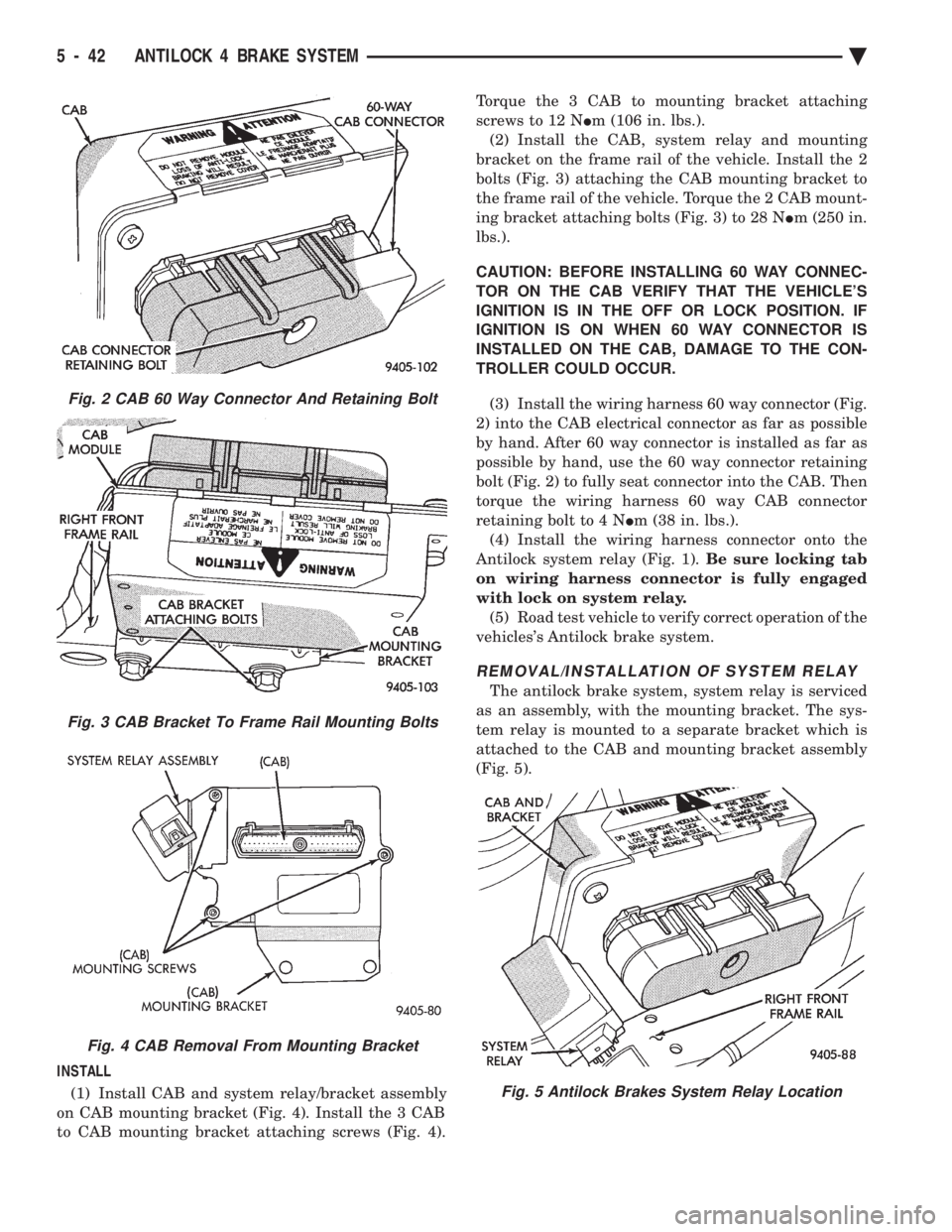
INSTALL (1) Install CAB and system relay/bracket assembly
on CAB mounting bracket (Fig. 4). Install the 3 CAB
to CAB mounting bracket attaching screws (Fig. 4). Torque the 3 CAB to mounting bracket attaching
screws to 12 N Im (106 in. lbs.).
(2) Install the CAB, system relay and mounting
bracket on the frame rail of the vehicle. Install the 2
bolts (Fig. 3) attaching the CAB mounting bracket to
the frame rail of the vehicle. Torque the 2 CAB mount-
ing bracket attaching bolts (Fig. 3) to 28 N Im (250 in.
lbs.).
CAUTION: BEFORE INSTALLING 60 WAY CONNEC-
TOR ON THE CAB VERIFY THAT THE VEHICLE'S
IGNITION IS IN THE OFF OR LOCK POSITION. IF
IGNITION IS ON WHEN 60 WAY CONNECTOR IS
INSTALLED ON THE CAB, DAMAGE TO THE CON-
TROLLER COULD OCCUR.
(3) Install the wiring harness 60 way connector (Fig.
2) into the CAB electrical connector as far as possible
by hand. After 60 way connector is installed as far as
possible by hand, use the 60 way connector retaining
bolt (Fig. 2) to fully seat connector into the CAB. Then
torque the wiring harness 60 way CAB connector
retaining bolt to 4 N Im (38 in. lbs.).
(4) Install the wiring harness connector onto the
Antilock system relay (Fig. 1). Be sure locking tab
on wiring harness connector is fully engaged
with lock on system relay. (5) Road test vehicle to verify correct operation of the
vehicles's Antilock brake system.
REMOVAL/INSTALLATION OF SYSTEM RELAY
The antilock brake system, system relay is serviced
as an assembly, with the mounting bracket. The sys-
tem relay is mounted to a separate bracket which is
attached to the CAB and mounting bracket assembly
(Fig. 5).
Fig. 2 CAB 60 Way Connector And Retaining Bolt
Fig. 3 CAB Bracket To Frame Rail Mounting Bolts
Fig. 4 CAB Removal From Mounting Bracket
Fig. 5 Antilock Brakes System Relay Location
5 - 42 ANTILOCK 4 BRAKE SYSTEM Ä
Page 336 of 2438
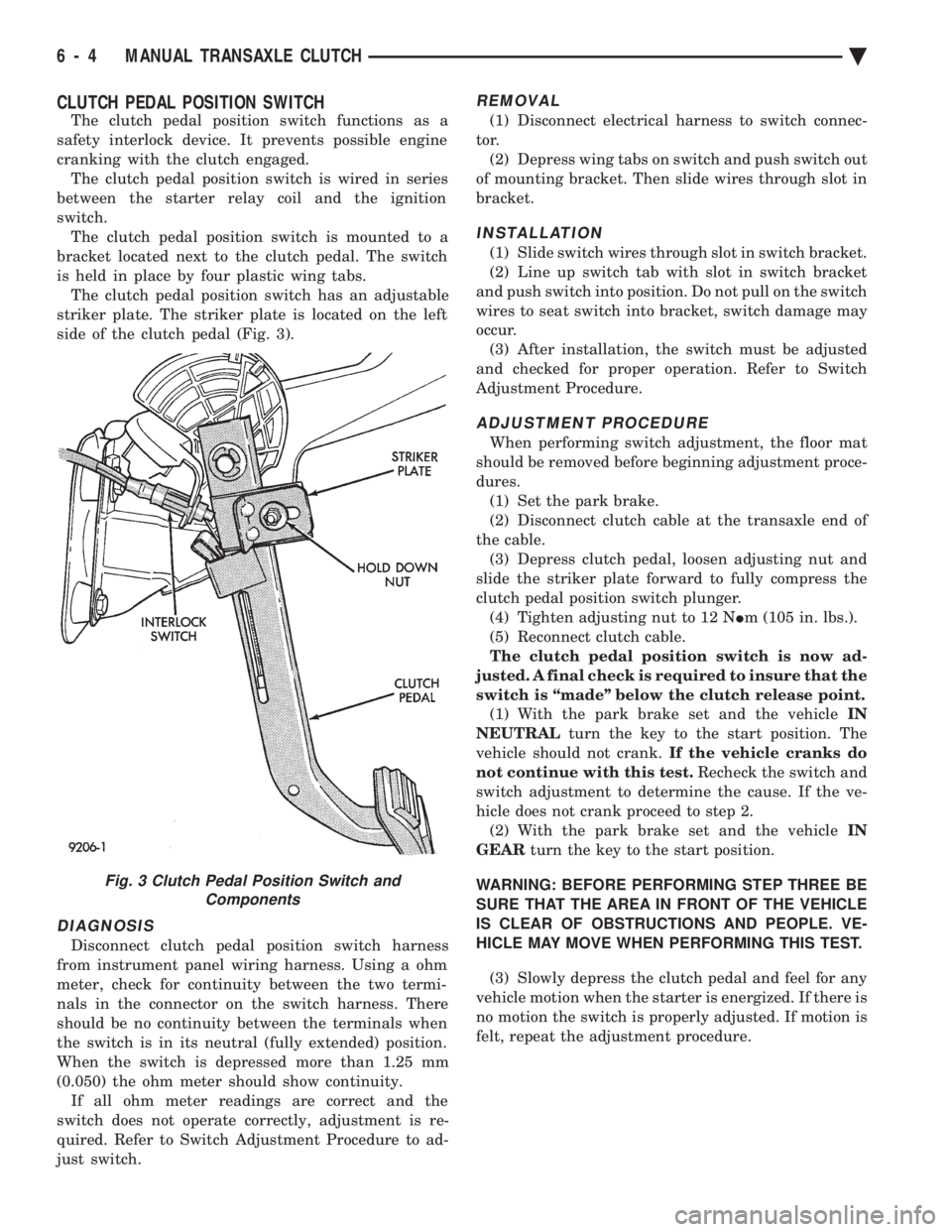
CLUTCH PEDAL POSITION SWITCH
The clutch pedal position switch functions as a
safety interlock device. It prevents possible engine
cranking with the clutch engaged. The clutch pedal position switch is wired in series
between the starter relay coil and the ignition
switch. The clutch pedal position switch is mounted to a
bracket located next to the clutch pedal. The switch
is held in place by four plastic wing tabs. The clutch pedal position switch has an adjustable
striker plate. The striker plate is located on the left
side of the clutch pedal (Fig. 3).
DIAGNOSIS
Disconnect clutch pedal position switch harness
from instrument panel wiring harness. Using a ohm
meter, check for continuity between the two termi-
nals in the connector on the switch harness. There
should be no continuity between the terminals when
the switch is in its neutral (fully extended) position.
When the switch is depressed more than 1.25 mm
(0.050) the ohm meter should show continuity. If all ohm meter readings are correct and the
switch does not operate correctly, adjustment is re-
quired. Refer to Switch Adjustment Procedure to ad-
just switch.
REMOVAL
(1) Disconnect electrical harness to switch connec-
tor. (2) Depress wing tabs on switch and push switch out
of mounting bracket. Then slide wires through slot in
bracket.
INSTALLATION
(1) Slide switch wires through slot in switch bracket.
(2) Line up switch tab with slot in switch bracket
and push switch into position. Do not pull on the switch
wires to seat switch into bracket, switch damage may
occur. (3) After installation, the switch must be adjusted
and checked for proper operation. Refer to Switch
Adjustment Procedure.
ADJUSTMENT PROCEDURE
When performing switch adjustment, the floor mat
should be removed before beginning adjustment proce-
dures. (1) Set the park brake.
(2) Disconnect clutch cable at the transaxle end of
the cable. (3) Depress clutch pedal, loosen adjusting nut and
slide the striker plate forward to fully compress the
clutch pedal position switch plunger. (4) Tighten adjusting nut to 12 N Im (105 in. lbs.).
(5) Reconnect clutch cable.
The clutch pedal position switch is now ad-
justed. A final check is required to insure that the
switch is ``made'' below the clutch release point. (1) With the park brake set and the vehicle IN
NEUTRAL turn the key to the start position. The
vehicle should not crank. If the vehicle cranks do
not continue with this test. Recheck the switch and
switch adjustment to determine the cause. If the ve-
hicle does not crank proceed to step 2. (2) With the park brake set and the vehicle IN
GEAR turn the key to the start position.
WARNING: BEFORE PERFORMING STEP THREE BE
SURE THAT THE AREA IN FRONT OF THE VEHICLE
IS CLEAR OF OBSTRUCTIONS AND PEOPLE. VE-
HICLE MAY MOVE WHEN PERFORMING THIS TEST.
(3) Slowly depress the clutch pedal and feel for any
vehicle motion when the starter is energized. If there is
no motion the switch is properly adjusted. If motion is
felt, repeat the adjustment procedure.
Fig. 3 Clutch Pedal Position Switch and Components
6 - 4 MANUAL TRANSAXLE CLUTCH Ä
Page 364 of 2438
sends the message to the Engine Controller. The En-
gine Controller turns on the fan through the fan re-
lay. See Wiring Diagrams Manual for circuity and
diagnostics provided.Switching through the Engine Controller provides
fan control for the following conditions.
² The fan will not run during cranking until the en-
gine starts no matter what the coolant temperature
is.
² Fan will run when the air conditioning clutch is
engaged and low pressure cutout switch is closed.
² For 4 cylinder application the fan will run at ve-
hicle speeds above about 40 mph only if coolant tem-
perature reaches 110ÉC (230ÉF). It will turn off when
the temperature drops to 104ÉC (220ÉF). At speeds
below 40 mph the fan switches on at 102ÉC (215ÉF)
and off at 93ÉC (200ÉF).
² This is to help prevent steaming. The fan will run
only below 16ÉC (60ÉF) ambient. Between 38ÉC
(100ÉF) to 97ÉC (195ÉF) coolant temperature, at idle
and then only for three minutes.
RADIATOR FAN CONTROLÐAC/AY BODY V-6 ONLY
For this application, fan control is accomplished
based on coolant temperature, and on A/C head pres-
sure. These vehicles receive the variable displace-
ment compressor. The fan will go on when;
² Coolant temperature reaches 102ÉC (215ÉF) and off
at 93.4ÉC (200ÉF) regardless of vehicle speed.
² When the head pressure reaches 1516.9 kPa (220
psi) and turn off when the pressure reaches 1103 kPa
(160 psi).
TEMPERATURE GAUGE INDICATION
At idle the temperature gauge will rise slowly to
about 5/8 gauge travel. The fan will come on and the
gauge will drop to about 1/2 gauge travel, this is nor-
mal.
ELECTRIC FAN MOTOR
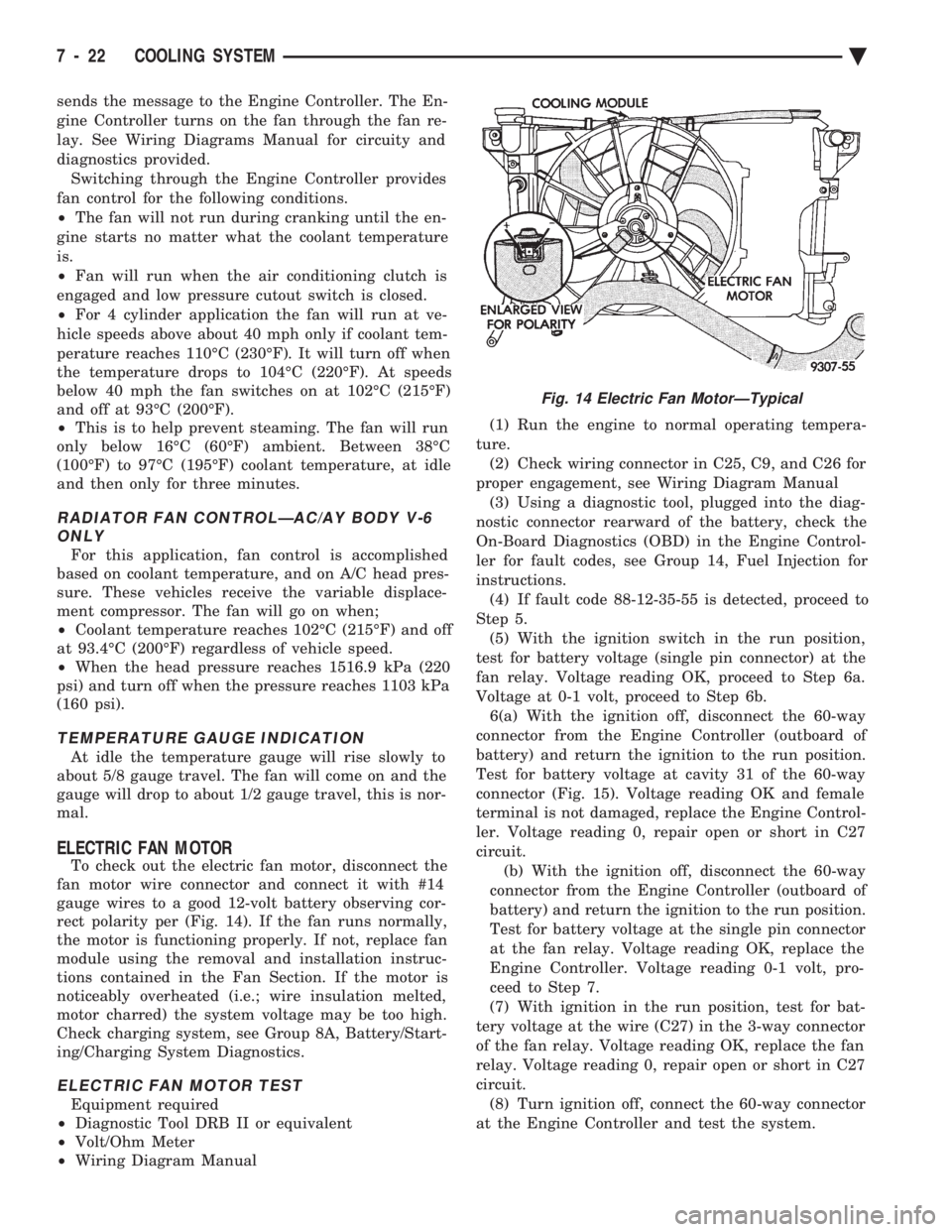
To check out the electric fan motor, disconnect the
fan motor wire connector and connect it with #14
gauge wires to a good 12-volt battery observing cor-
rect polarity per (Fig. 14). If the fan runs normally,
the motor is functioning properly. If not, replace fan
module using the removal and installation instruc-
tions contained in the Fan Section. If the motor is
noticeably overheated (i.e.; wire insulation melted,
motor charred) the system voltage may be too high.
Check charging system, see Group 8A, Battery/Start-
ing/Charging System Diagnostics.
ELECTRIC FAN MOTOR TEST
Equipment required
² Diagnostic Tool DRB II or equivalent
² Volt/Ohm Meter
² Wiring Diagram Manual (1) Run the engine to normal operating tempera-
ture. (2) Check wiring connector in C25, C9, and C26 for
proper engagement, see Wiring Diagram Manual (3) Using a diagnostic tool, plugged into the diag-
nostic connector rearward of the battery, check the
On-Board Diagnostics (OBD) in the Engine Control-
ler for fault codes, see Group 14, Fuel Injection for
instructions. (4) If fault code 88-12-35-55 is detected, proceed to
Step 5. (5) With the ignition switch in the run position,
test for battery voltage (single pin connector) at the
fan relay. Voltage reading OK, proceed to Step 6a.
Voltage at 0-1 volt, proceed to Step 6b. 6(a) With the ignition off, disconnect the 60-way
connector from the Engine Controller (outboard of
battery) and return the ignition to the run position.
Test for battery voltage at cavity 31 of the 60-way
connector (Fig. 15). Voltage reading OK and female
terminal is not damaged, replace the Engine Control-
ler. Voltage reading 0, repair open or short in C27
circuit. (b) With the ignition off, disconnect the 60-way
connector from the Engine Controller (outboard of
battery) and return the ignition to the run position.
Test for battery voltage at the single pin connector
at the fan relay. Voltage reading OK, replace the
Engine Controller. Voltage reading 0-1 volt, pro-
ceed to Step 7.
(7) With ignition in the run position, test for bat-
tery voltage at the wire (C27) in the 3-way connector
of the fan relay. Voltage reading OK, replace the fan
relay. Voltage reading 0, repair open or short in C27
circuit. (8) Turn ignition off, connect the 60-way connector
at the Engine Controller and test the system.
Fig. 14 Electric Fan MotorÐTypical
7 - 22 COOLING SYSTEM Ä
Page 373 of 2438
BATTERY/STARTING/CHARGING SYSTEMS DIAGNOSTICS
CONTENTS
page page
BATTERY TEST PROCEDURES ON-VEHICLE . . 3
FAULT CODESÐON BOARD DIAGNOSTICS . . 23
GENERAL INFORMATION .................. 1
GENERATOR TEST PROCEDURES ON VEHICLE.19 IGNITION OFF DRAW (IOD)
............... 9
SPECIFICATIONS ....................... 28
STARTER TEST PROCEDURES ON VEHICLE . 11
GENERAL INFORMATION
² For Battery, Starter or Generator replacement re-
fer to Group 8B, Battery/Starter/Generator Service.
This Group 8A will cover diagnostics only. The Battery, Starting, and Charging Systems oper-
ate with one another, and must be thoroughly tested
as a complete system. To enable the vehicle to start
and charge properly, it must have a battery that will
perform to specifications. The starter motor, genera-
tor, wiring, and electronics also must perform within
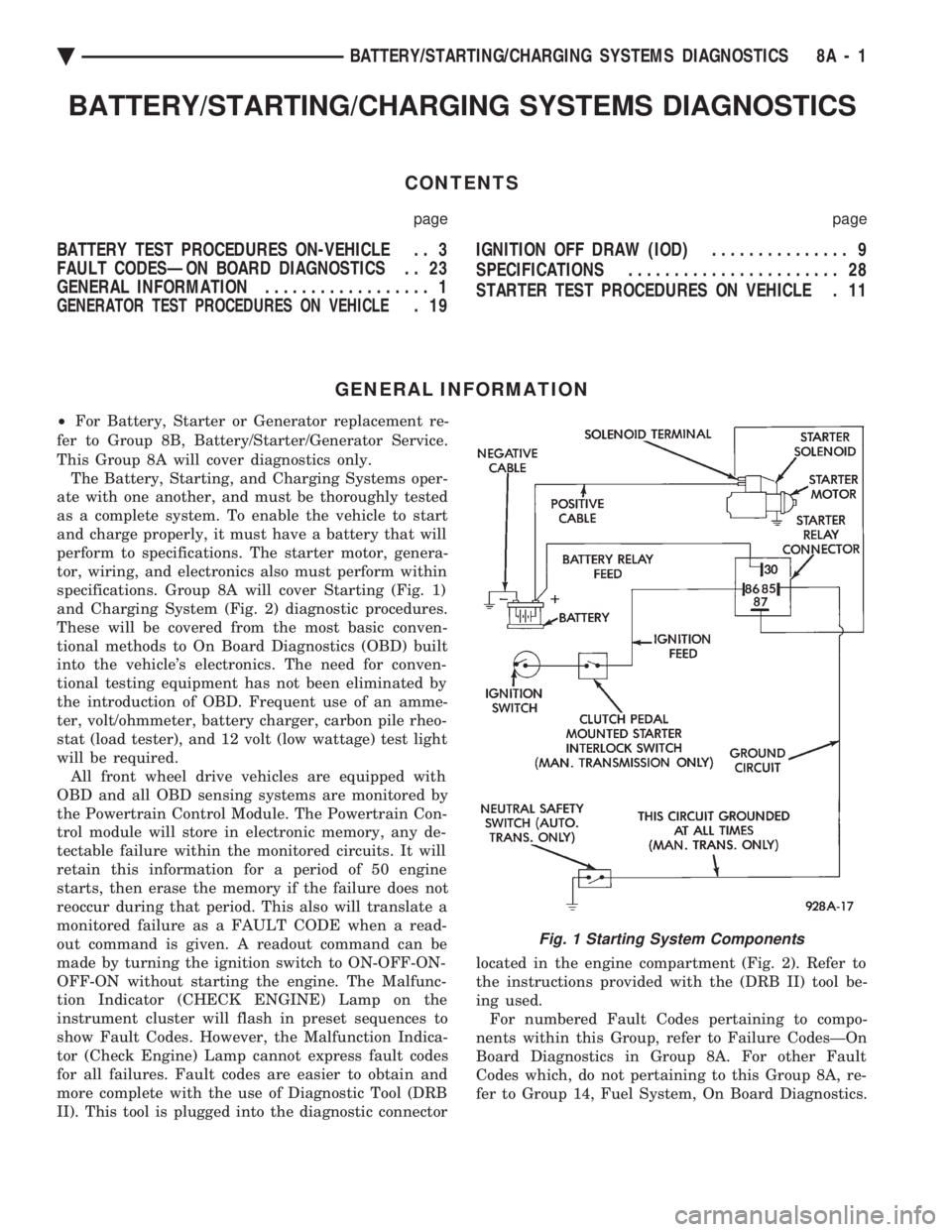
specifications. Group 8A will cover Starting (Fig. 1)
and Charging System (Fig. 2) diagnostic procedures.
These will be covered from the most basic conven-
tional methods to On Board Diagnostics (OBD) built
into the vehicle's electronics. The need for conven-
tional testing equipment has not been eliminated by
the introduction of OBD. Frequent use of an amme-
ter, volt/ohmmeter, battery charger, carbon pile rheo-
stat (load tester), and 12 volt (low wattage) test light
will be required. All front wheel drive vehicles are equipped with
OBD and all OBD sensing systems are monitored by
the Powertrain Control Module. The Powertrain Con-
trol module will store in electronic memory, any de-
tectable failure within the monitored circuits. It will
retain this information for a period of 50 engine
starts, then erase the memory if the failure does not
reoccur during that period. This also will translate a
monitored failure as a FAULT CODE when a read-
out command is given. A readout command can be
made by turning the ignition switch to ON-OFF-ON-
OFF-ON without starting the engine. The Malfunc-
tion Indicator (CHECK ENGINE) Lamp on the
instrument cluster will flash in preset sequences to
show Fault Codes. However, the Malfunction Indica-
tor (Check Engine) Lamp cannot express fault codes
for all failures. Fault codes are easier to obtain and
more complete with the use of Diagnostic Tool (DRB
II). This tool is plugged into the diagnostic connector located in the engine compartment (Fig. 2). Refer to
the instructions provided with the (DRB II) tool be-
ing used. For numbered Fault Codes pertaining to compo-
nents within this Group, refer to Failure CodesÐOn
Board Diagnostics in Group 8A. For other Fault
Codes which, do not pertaining to this Group 8A, re-
fer to Group 14, Fuel System, On Board Diagnostics.
Fig. 1 Starting System Components
Ä BATTERY/STARTING/CHARGING SYSTEMS DIAGNOSTICS 8A - 1
Page 376 of 2438
It is important when using the Test Indicator that
the battery be level and have a clean top to see the
correct indications. A light may be required to view
the Indicator.
WARNING: DO NOT USE OPEN FLAME NEAR BAT-
TERY BECAUSE OF EXPLOSIVE GASES AT FORM
ABOVE BATTERY.
STATE OF CHARGE TESTS
USING TEST INDICATOR
The built in test hydrometer (Figs. 3, 4 and 5) mea-
sures the specific gravity of the electrolyte. Specific
Gravity (SG) of the electrolyte will show state of
charge voltage. The test indicator WILL NOT show
cranking capacity of the battery. Refer to Battery
Load. Look into the sight glass (Figs. 4 and 5) and
note the color of the indicator (Fig. 5). Refer to the
following description of colors:
² GREEN = 75 to 100 degree state of charge
The battery is adequately charged for further test-
ing and may be returned to use. If the vehicle will
not crank for a maximum 15 seconds, refer to Bat-
tery Load Test in this Group for more information.
² BLACK OR DAR K=0to75degree state of
charge The battery is INADEQUATELY charged and
must be charged until green dot is visible, (12.4 volts
or greater) before the battery is tested or returned to
use. Refer to Causes of Battery Discharging.
² YELLOW OR BRIGHT COLOR = Battery must
be replace
WARNING: DO NOT CHARGE, ASSIST BOOST,
LOAD TEST, OR ADD WATER TO THE BATTERY
WHEN YELLOW OR BRIGHT COLOR DOT IS VISI-
BLE. PERSONAL INJURY MAY OCCUR.
A yellow or bright color dot shows electrolyte level
in battery is below the test indicator (Fig. 5). Water
cannot be added to a maintenance free battery. The
battery must be replaced. A low electrolyte level may
be caused by an over charging condition. Refer to
Generator Test Procedures on Vehicle.
CAUSES OF BATTERY DISCHARGING
It is normal to have a small 5 to 30 milliamperes
continuous electrical draw from the battery. This
draw will take place with the ignition in the OFF po-
sition, and the courtesy, dome, storage compart-
ments, and engine compartment lights OFF. The
continuous draw is due to various electronic features
or accessories that require electrical current with the
ignition OFF to function properly. When a vehicle is
not used over an extended period approximately 20
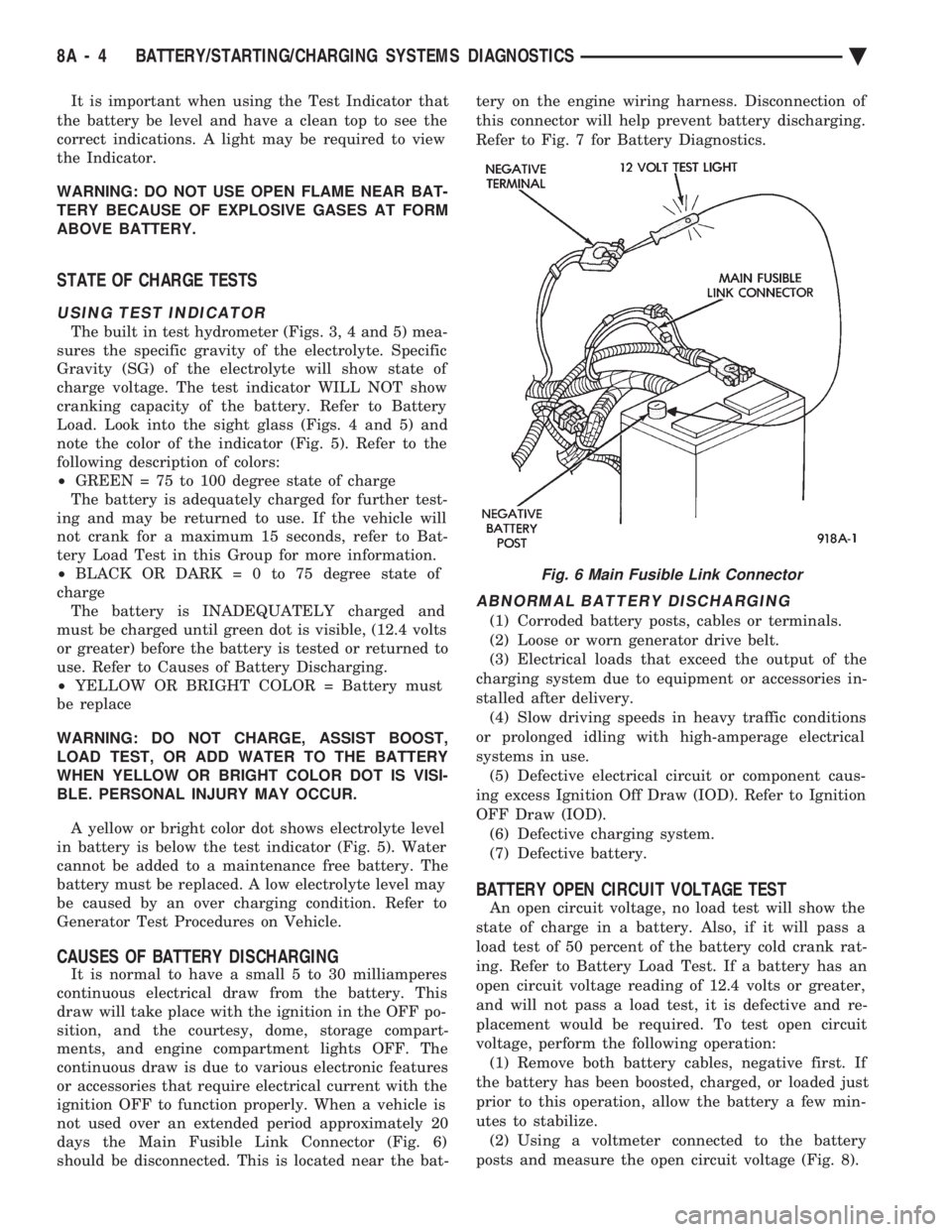
days the Main Fusible Link Connector (Fig. 6)
should be disconnected. This is located near the bat- tery on the engine wiring harness. Disconnection of
this connector will help prevent battery discharging.
Refer to Fig. 7 for Battery Diagnostics.
ABNORMAL BATTERY DISCHARGING
(1) Corroded battery posts, cables or terminals.
(2) Loose or worn generator drive belt.
(3) Electrical loads that exceed the output of the
charging system due to equipment or accessories in-
stalled after delivery. (4) Slow driving speeds in heavy traffic conditions
or prolonged idling with high-amperage electrical
systems in use. (5) Defective electrical circuit or component caus-
ing excess Ignition Off Draw (IOD). Refer to Ignition
OFF Draw (IOD). (6) Defective charging system.
(7) Defective battery.
BATTERY OPEN CIRCUIT VOLTAGE TEST
An open circuit voltage, no load test will show the
state of charge in a battery. Also, if it will pass a
load test of 50 percent of the battery cold crank rat-
ing. Refer to Battery Load Test. If a battery has an
open circuit voltage reading of 12.4 volts or greater,
and will not pass a load test, it is defective and re-
placement would be required. To test open circuit
voltage, perform the following operation: (1) Remove both battery cables, negative first. If
the battery has been boosted, charged, or loaded just
prior to this operation, allow the battery a few min-
utes to stabilize. (2) Using a voltmeter connected to the battery
posts and measure the open circuit voltage (Fig. 8).
Fig. 6 Main Fusible Link Connector
8A - 4 BATTERY/STARTING/CHARGING SYSTEMS DIAGNOSTICS Ä
Page 378 of 2438
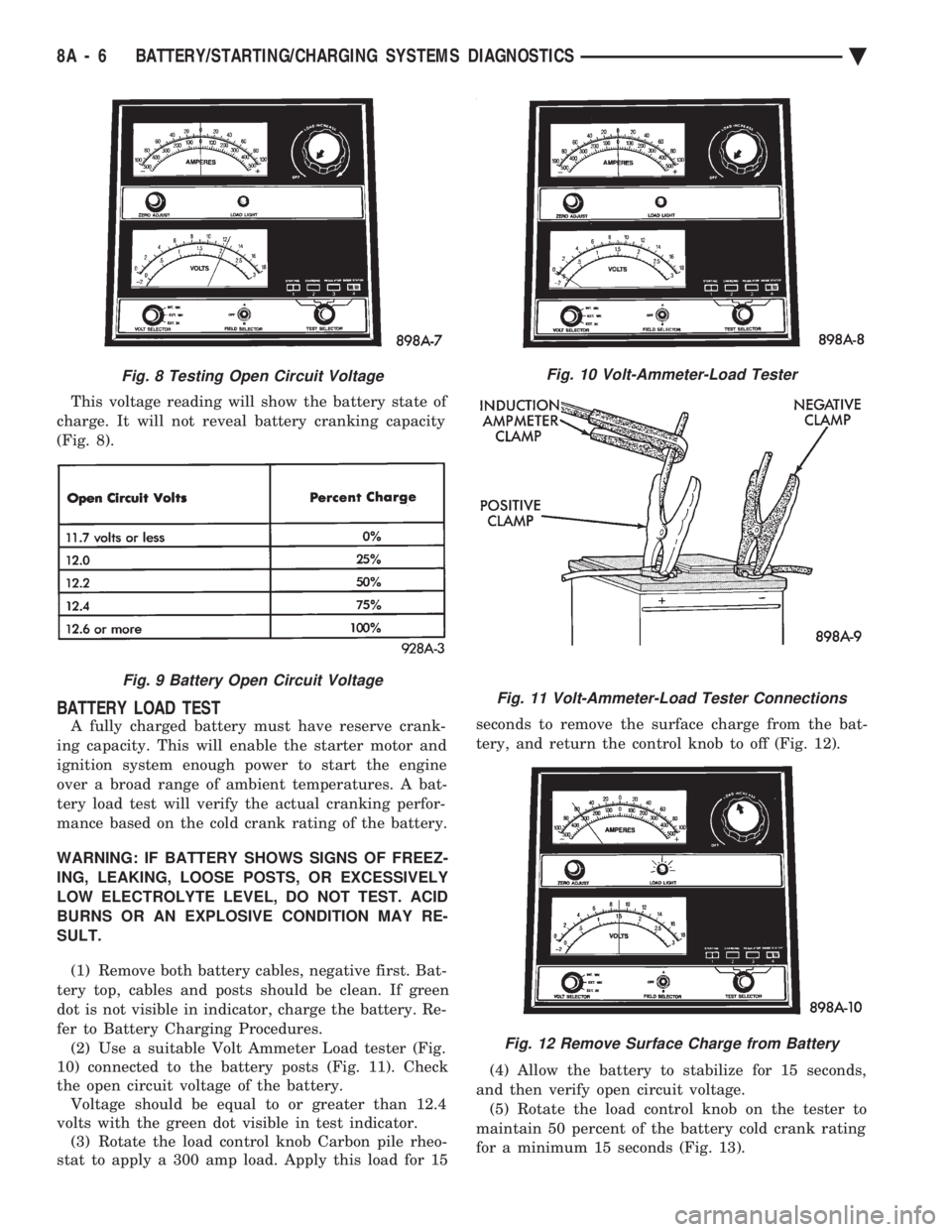
This voltage reading will show the battery state of
charge. It will not reveal battery cranking capacity
(Fig. 8).
BATTERY LOAD TEST
A fully charged battery must have reserve crank-
ing capacity. This will enable the starter motor and
ignition system enough power to start the engine
over a broad range of ambient temperatures. A bat-
tery load test will verify the actual cranking perfor-
mance based on the cold crank rating of the battery.
WARNING: IF BATTERY SHOWS SIGNS OF FREEZ-
ING, LEAKING, LOOSE POSTS, OR EXCESSIVELY
LOW ELECTROLYTE LEVEL, DO NOT TEST. ACID
BURNS OR AN EXPLOSIVE CONDITION MAY RE-
SULT. (1) Remove both battery cables, negative first. Bat-
tery top, cables and posts should be clean. If green
dot is not visible in indicator, charge the battery. Re-
fer to Battery Charging Procedures. (2) Use a suitable Volt Ammeter Load tester (Fig.
10) connected to the battery posts (Fig. 11). Check
the open circuit voltage of the battery. Voltage should be equal to or greater than 12.4
volts with the green dot visible in test indicator. (3) Rotate the load control knob Carbon pile rheo-
stat to apply a 300 amp load. Apply this load for 15 seconds to remove the surface charge from the bat-
tery, and return the control knob to off (Fig. 12).
(4) Allow the battery to stabilize for 15 seconds,
and then verify open circuit voltage. (5) Rotate the load control knob on the tester to
maintain 50 percent of the battery cold crank rating
for a minimum 15 seconds (Fig. 13).
Fig. 8 Testing Open Circuit Voltage
Fig. 9 Battery Open Circuit Voltage
Fig. 10 Volt-Ammeter-Load Tester
Fig. 11 Volt-Ammeter-Load Tester Connections
Fig. 12 Remove Surface Charge from Battery
8A - 6 BATTERY/STARTING/CHARGING SYSTEMS DIAGNOSTICS Ä
Page 381 of 2438
IGNITION OFF DRAW (IOD)
GENERAL INFORMATION
A normal electrical system will draw from 5 to 30
milliamperes from the battery. This is with the ignition
in the OFF position, and all non-ignition controlled cir-
cuits in proper working order. The amount of IOD will
depend on body model and electrical components. A ve-
hicle that has not been operated for an extended period
of approximately 20 days may discharge the battery to
an inadequate level. In this case, the Main Fusible Link
Connector should be disconnected. The Main Fusible
Link connector is located rearward of the battery on the
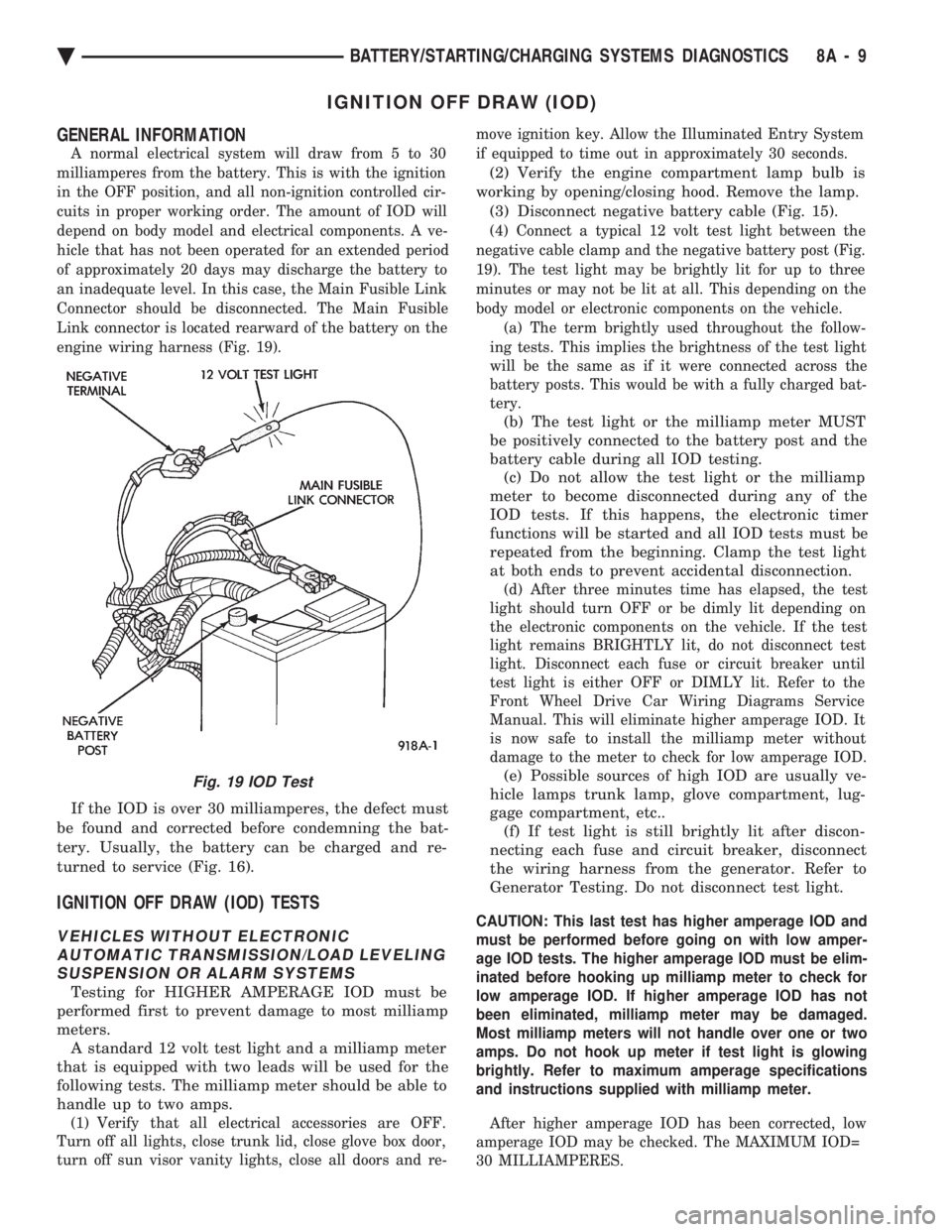
engine wiring harness (Fig. 19).
If the IOD is over 30 milliamperes, the defect must
be found and corrected before condemning the bat-
tery. Usually, the battery can be charged and re-
turned to service (Fig. 16).
IGNITION OFF DRAW (IOD) TESTS
VEHICLES WITHOUT ELECTRONIC AUTOMATIC TRANSMISSION/LOAD LEVELINGSUSPENSION OR ALARM SYSTEMS
Testing for HIGHER AMPERAGE IOD must be
performed first to prevent damage to most milliamp
meters. A standard 12 volt test light and a milliamp meter
that is equipped with two leads will be used for the
following tests. The milliamp meter should be able to
handle up to two amps.
(1) Verify that all electrical accessories are OFF.
Turn off all lights, close trunk lid, close glove box door,
turn off sun visor vanity lights, close all doors and re- move ignition key. Allow the Illuminated Entry System
if equipped to time out in approximately 30 seconds.
(2) Verify the engine compartment lamp bulb is
working by opening/closing hood. Remove the lamp. (3) Disconnect negative battery cable (Fig. 15).
(4) Connect a typical 12 volt test light between the
negative cable clamp and the negative battery post (Fig.
19). The test light may be brightly lit for up to three
minutes or may not be lit at all. This depending on the
body model or electronic components on the vehicle. (a) The term brightly used throughout the follow-
ing tests. This implies the brightness of the test light
will be the same as if it were connected across the
battery posts. This would be with a fully charged bat-
tery.
(b) The test light or the milliamp meter MUST
be positively connected to the battery post and the
battery cable during all IOD testing. (c) Do not allow the test light or the milliamp
meter to become disconnected during any of the
IOD tests. If this happens, the electronic timer
functions will be started and all IOD tests must be
repeated from the beginning. Clamp the test light
at both ends to prevent accidental disconnection.
(d) After three minutes time has elapsed, the test
light should turn OFF or be dimly lit depending on
the electronic components on the vehicle. If the test
light remains BRIGHTLY lit, do not disconnect test
light. Disconnect each fuse or circuit breaker until
test light is either OFF or DIMLY lit. Refer to the
Front Wheel Drive Car Wiring Diagrams Service
Manual. This will eliminate higher amperage IOD. It
is now safe to install the milliamp meter without
damage to the meter to check for low amperage IOD.
(e) Possible sources of high IOD are usually ve-
hicle lamps trunk lamp, glove compartment, lug-
gage compartment, etc.. (f) If test light is still brightly lit after discon-
necting each fuse and circuit breaker, disconnect
the wiring harness from the generator. Refer to
Generator Testing. Do not disconnect test light.
CAUTION: This last test has higher amperage IOD and
must be performed before going on with low amper-
age IOD tests. The higher amperage IOD must be elim-
inated before hooking up milliamp meter to check for
low amperage IOD. If higher amperage IOD has not
been eliminated, milliamp meter may be damaged.
Most milliamp meters will not handle over one or two
amps. Do not hook up meter if test light is glowing
brightly. Refer to maximum amperage specifications
and instructions supplied with milliamp meter.
After higher amperage IOD has been corrected, low
amperage IOD may be checked. The MAXIMUM IOD=
30 MILLIAMPERES.
Fig. 19 IOD Test
Ä BATTERY/STARTING/CHARGING SYSTEMS DIAGNOSTICS 8A - 9