key CHEVROLET EXPRESS CARGO VAN 2017 1.G Owners Manual
[x] Cancel search | Manufacturer: CHEVROLET, Model Year: 2017, Model line: EXPRESS CARGO VAN, Model: CHEVROLET EXPRESS CARGO VAN 2017 1.GPages: 346, PDF Size: 6.54 MB
Page 2 of 346

Chevrolet Express Owner Manual (GMNA-Localizing-U.S./Canada/Mexico-9967827) - 2017 - crc - 5/2/16
ContentsIntroduction . . . . . . . . . . . . . . . . . . . . . . 2
In Brief . . . . . . . . . . . . . . . . . . . . . . . . . . . 5
Keys, Doors, and Windows . . . . . 23
Seats and Restraints . . . . . . . . . . . 40
Storage . . . . . . . . . . . . . . . . . . . . . . . . . 85
Instruments and Controls . . . . . . . 87
Lighting . . . . . . . . . . . . . . . . . . . . . . . 125
Infotainment System . . . . . . . . . . 132
Climate Controls . . . . . . . . . . . . . . 158
Driving and Operating . . . . . . . . . 164
Vehicle Care . . . . . . . . . . . . . . . . . . 214
Service and Maintenance . . . . . 296
Te c h n i c a l D a t a . . . . . . . . . . . . . . . . 3 0 8
Customer Information . . . . . . . . . 312
Reporting Safety Defects . . . . . . 323
OnStar . . . . . . . . . . . . . . . . . . . . . . . . 326
Index . . . . . . . . . . . . . . . . . . . . 336
Page 6 of 346
Chevrolet Express Owner Manual (GMNA-Localizing-U.S./Canada/Mexico-9967827) - 2017 - crc - 5/2/16
In Brief 5
In Brief
Instrument Panel
Instrument Panel . . . . . . . . . . . . . . . . 6
Initial Drive Information
Initial Drive Information . . . . . . . . . . 8Remote Keyless Entry (RKE)System . . . . . . . . . . . . . . . . . . . . . . . . 8Remote Vehicle Start . . . . . . . . . . . 8Door Locks . . . . . . . . . . . . . . . . . . . . . 9Windows . . . . . . . . . . . . . . . . . . . . . . . . 9Seat Adjustment . . . . . . . . . . . . . . . 10Safety Belts . . . . . . . . . . . . . . . . . . . . 11Airbag On-Off Switch . . . . . . . . . . 11Mirror Adjustment . . . . . . . . . . . . . . 12Steering Wheel Adjustment . . . . 13Interior Lighting . . . . . . . . . . . . . . . . 13Exterior Lighting . . . . . . . . . . . . . . . 14Windshield Wiper/Washer . . . . . . 14Climate Controls . . . . . . . . . . . . . . . 15Transmission . . . . . . . . . . . . . . . . . . 16
Vehicle Features
Infotainment System . . . . . . . . . . . 17Radio(s) . . . . . . . . . . . . . . . . . . . . . . . 17Satellite Radio . . . . . . . . . . . . . . . . . 18Portable Audio Devices . . . . . . . . 18Bluetooth®..................... 19Steering Wheel Controls . . . . . . . 19
Cruise Control . . . . . . . . . . . . . . . . . 19Rear Vision Camera (RVC) . . . . 20Parking Assist . . . . . . . . . . . . . . . . . 20Power Outlets . . . . . . . . . . . . . . . . . 20
Performance and Maintenance
Traction Control/ElectronicStability Control . . . . . . . . . . . . . . 20Tire Pressure Monitor . . . . . . . . . . 21Fuel . . . . . . . . . . . . . . . . . . . . . . . . . . . 21E85 or FlexFuel . . . . . . . . . . . . . . . . 21Engine Oil Life System . . . . . . . . 22Driving for Better FuelEconomy . . . . . . . . . . . . . . . . . . . . . 22Roadside AssistanceProgram . . . . . . . . . . . . . . . . . . . . . . 22
Page 9 of 346
Chevrolet Express Owner Manual (GMNA-Localizing-U.S./Canada/Mexico-9967827) - 2017 - crc - 5/2/16
8 In Brief
Initial Drive
Information
This section provides a briefoverview about some of theimportant features that may or maynot be on your specific vehicle.
For more detailed information, referto each of the features which can befound later in this owner manual.
Remote Keyless Entry
(RKE) System
If equipped, the Remote KeylessEntry (RKE) transmitter is used toremotely lock and unlock the doorsfrom up to 60 m (197 ft) away fromthe vehicle.
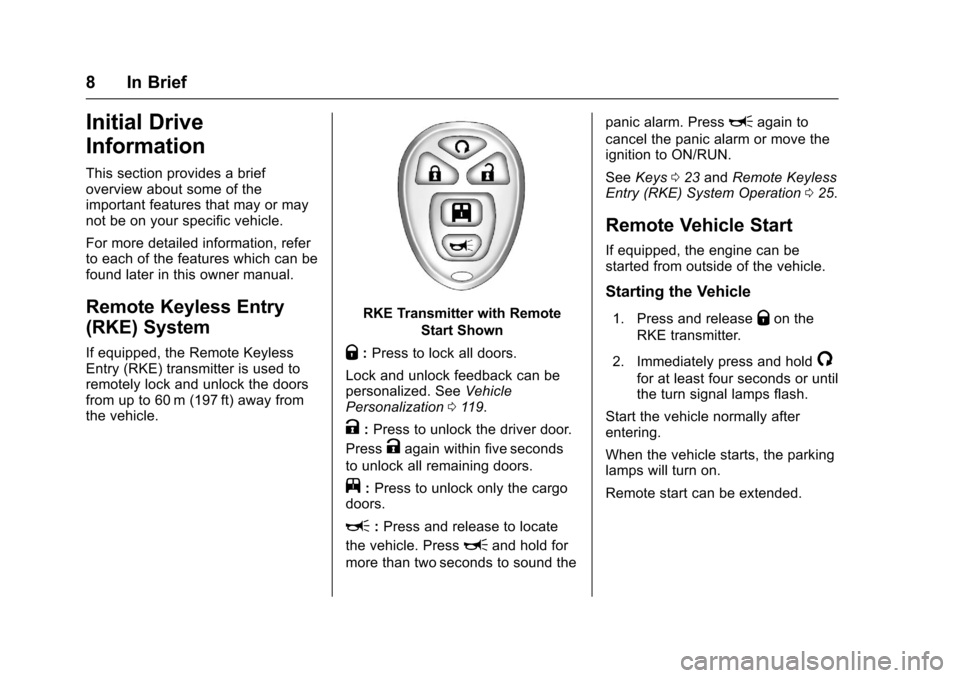
RKE Transmitter with Remote
Start Shown
Q:Press to lock all doors.
Lock and unlock feedback can bepersonalized. SeeVehiclePersonalization011 9.
K:Press to unlock the driver door.
PressKagain within five seconds
to unlock all remaining doors.
j:Press to unlock only the cargodoors.
L:Press and release to locate
the vehicle. PressLand hold for
more than two seconds to sound the
panic alarm. PressLagain to
cancel the panic alarm or move theignition to ON/RUN.
SeeKeys023andRemote KeylessEntry (RKE) System Operation025.
Remote Vehicle Start
If equipped, the engine can bestarted from outside of the vehicle.
Starting the Vehicle
1. Press and releaseQon the
RKE transmitter.
2. Immediately press and hold/
for at least four seconds or untilthe turn signal lamps flash.
Start the vehicle normally afterentering.
When the vehicle starts, the parkinglamps will turn on.
Remote start can be extended.
Page 10 of 346
Chevrolet Express Owner Manual (GMNA-Localizing-U.S./Canada/Mexico-9967827) - 2017 - crc - 5/2/16
In Brief 9
Canceling a Remote Start
To c a n c e l a r e m o t e s t a r t , d o o n e o fthe following:
.Press and hold/until the
parking lamps turn off.
.Turn on the hazard warningflashers.
.Turn the vehicle on and then off.
SeeRemote Vehicle Start027.
Door Locks
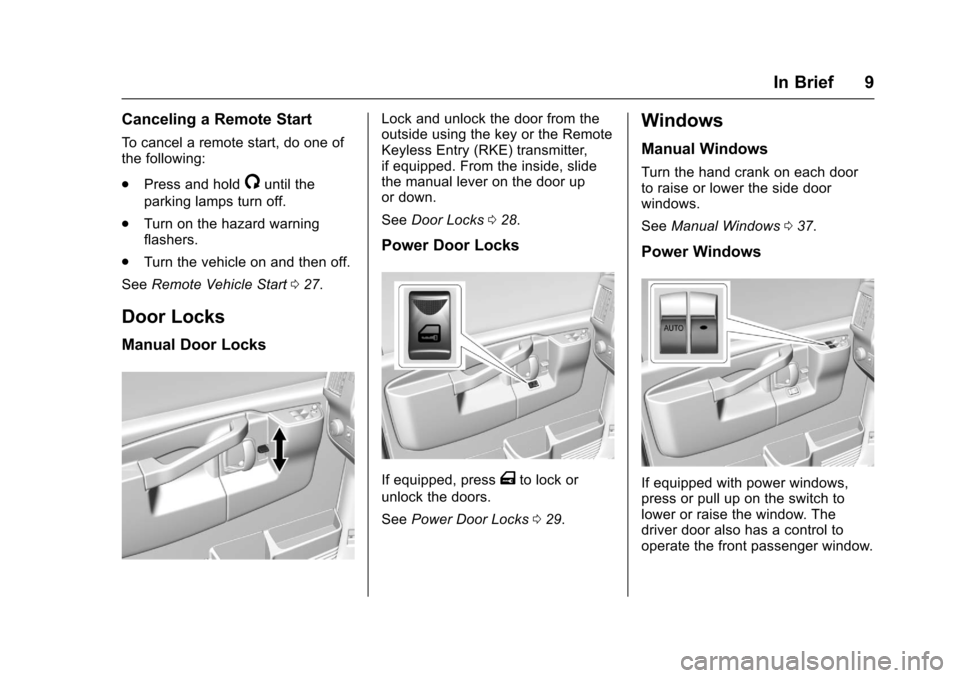
Manual Door Locks
Lock and unlock the door from theoutside using the key or the RemoteKeyless Entry (RKE) transmitter,if equipped. From the inside, slidethe manual lever on the door upor down.
SeeDoor Locks028.
Power Door Locks
If equipped, pressTto lock or
unlock the doors.
SeePower Door Locks029.
Windows
Manual Windows
Turn the hand crank on each doorto raise or lower the side doorwindows.
SeeManual Windows037.
Power Windows
If equipped with power windows,press or pull up on the switch tolower or raise the window. Thedriver door also has a control tooperate the front passenger window.
Page 13 of 346
Chevrolet Express Owner Manual (GMNA-Localizing-U.S./Canada/Mexico-9967827) - 2017 - crc - 5/2/16
12 In Brief
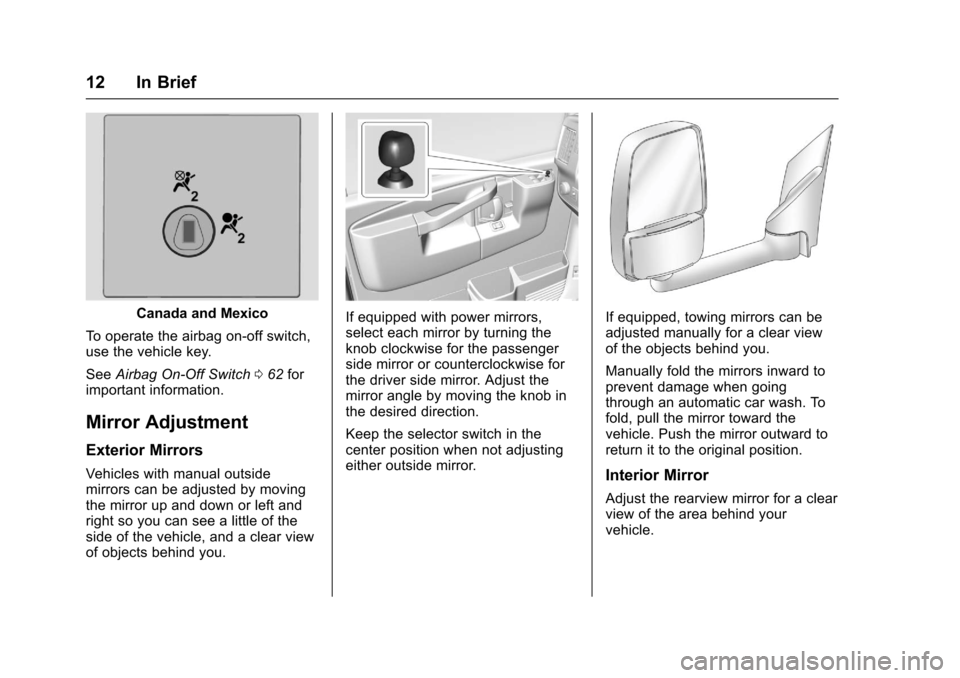
Canada and Mexico
To o p e r a t e t h e a i r b a g o n - o f f s w i t c h ,use the vehicle key.
SeeAirbag On-Off Switch062forimportant information.
Mirror Adjustment
Exterior Mirrors
Vehicles with manual outsidemirrors can be adjusted by movingthe mirror up and down or left andright so you can see a little of theside of the vehicle, and a clear viewof objects behind you.
If equipped with power mirrors,select each mirror by turning theknob clockwise for the passengerside mirror or counterclockwise forthe driver side mirror. Adjust themirror angle by moving the knob inthe desired direction.
Keep the selector switch in thecenter position when not adjustingeither outside mirror.
If equipped, towing mirrors can beadjusted manually for a clear viewof the objects behind you.
Manually fold the mirrors inward toprevent damage when goingthrough an automatic car wash. Tofold, pull the mirror toward thevehicle. Push the mirror outward toreturn it to the original position.
Interior Mirror
Adjust the rearview mirror for a clearview of the area behind yourvehicle.
Page 19 of 346
Chevrolet Express Owner Manual (GMNA-Localizing-U.S./Canada/Mexico-9967827) - 2017 - crc - 5/2/16
18 In Brief
Achoiceofadditionalinformationsuch as Channel, Song, Artist, andCAT (category) can display.Continue pressing to highlight thedesired tab, or press the softkeylocated under any one of the tabsand the information about that tabdisplays.
For more information about theseand other radio features, seeInfotainment0132.
Storing a Favorite Station
Depending on which radio thevehicle has, radio stations arestored as either favorites or presets.
For vehicles with a FAV button, amaximum of 36 stations can bestored as favorites using the sixsoftkeys below the radio stationfrequency tabs and by using theradio FAV button. Press FAV to gothrough up to six pages of favorites,each having six favorite stationsavailable per page. Each page offavorites can contain anycombination of AM and FM stations.
For more information on storing afavorite station, seeOperation0136.
Setting the Clock
To s e t t h e t i m e a n d d a t e f o r t h eRadio with CD/MP3:
1. PressHand the HR, MIN, MM,
DD, and YYYY (hour, minute,month, day, and year) display.
2. Press the softkey under anyone of the tabs to be changed.
3. Press©SEEK or¨SEEK,s
REV or\FWD, or turnf
clockwise or counterclockwiseto increase or decrease thetime or date.
For detailed instructions on settingthe clock for your specific audiosystem, seeClock092.
Satellite Radio
SiriusXM®is a satellite radio servicebased in the 48 contiguous UnitedStates and 10 Canadian provinces.SiriusXM satellite radio has a wide
variety of programming andcommercial-free music, coast tocoast, and in digital-quality sound.
AfeeisrequiredtoreceivetheSiriusXM service.
For more information, refer to:
.www.siriusxm.com or call1-888-601-6296 (U.S.)
.www.siriusxm.ca or call1-877-438-9677 (Canada)
SeeSatellite Radio0139.
Portable Audio Devices
This vehicle may have an auxiliaryinput on the radio faceplate and aUSB port on the instrument panel.External devices such as an iPod®,laptop computer, MP3 player,or USB storage device can beconnected to the auxiliary port usinga3.5mm(1/8in)inputcableortheUSB port depending on the audiosystem.
See "Using the Auxiliary Input Jack"and "Using the USB Port" inAuxiliary Devices0146.
Page 23 of 346
Chevrolet Express Owner Manual (GMNA-Localizing-U.S./Canada/Mexico-9967827) - 2017 - crc - 5/2/16
22 In Brief
Engine Oil Life System
The engine oil life system calculatesengine oil life based on vehicle useand displays a DIC message whenit is necessary to change the engineoil and filter. The oil life systemshould be reset to 100% onlyfollowing an oil change.
Resetting the Oil Life System
1. Turn the ignition to ON/RUN,with the engine off.
2. Fully press and release theaccelerator pedal slowly threetimes within five seconds.
3. Turn the key to LOCK/OFF.
SeeEngine Oil Life System0221.
Driving for Better Fuel
Economy
Driving habits can affect fuelmileage. Here are some driving tipsto get the best fuel economypossible.
.Avoid fast starts and acceleratesmoothly.
.Brake gradually and avoidabrupt stops.
.Avoid idling the engine for longperiods of time.
.When road and weatherconditions are appropriate, usecruise control.
.Always follow posted speedlimits or drive more slowly whenconditions require.
.Keep vehicle tires properlyinflated.
.Combine several trips into asingle trip.
.Replace the vehicle's tires withthe same TPC Spec numbermolded into the tire's sidewallnear the size.
.Follow recommended scheduledmaintenance.
Roadside Assistance
Program
U.S.: 1-800-243-8872
TTY Users (U.S. Only):1-888-889-2438
Canada: 1-800-268-6800
New Chevrolet owners areautomatically enrolled in theRoadside Assistance Program.
SeeRoadside AssistanceProgram0316.
Page 24 of 346
Chevrolet Express Owner Manual (GMNA-Localizing-U.S./Canada/Mexico-9967827) - 2017 - crc - 5/2/16
Keys, Doors, and Windows 23
Keys, Doors, and
Windows
Keys and Locks
Keys . . . . . . . . . . . . . . . . . . . . . . . . . . . 23Remote Keyless Entry (RKE)System . . . . . . . . . . . . . . . . . . . . . . . 25Remote Keyless Entry (RKE)System Operation . . . . . . . . . . . . 25Remote Vehicle Start . . . . . . . . . . 27Door Locks . . . . . . . . . . . . . . . . . . . . 28Power Door Locks . . . . . . . . . . . . . 29Cargo Door Relocking . . . . . . . . . 29Delayed Locking . . . . . . . . . . . . . . . 29Automatic Door Locks . . . . . . . . . 30Lockout Protection . . . . . . . . . . . . . 30Safety Locks . . . . . . . . . . . . . . . . . . . 30
Doors
Side Door (60/40Swing-Out) . . . . . . . . . . . . . . . . . . . 31Sliding Door . . . . . . . . . . . . . . . . . . . 32Rear Doors . . . . . . . . . . . . . . . . . . . . 32
Vehicle Security
Vehicle Security . . . . . . . . . . . . . . . . 33Immobilizer . . . . . . . . . . . . . . . . . . . . 33Immobilizer Operation . . . . . . . . . 33
Exterior Mirrors
Convex Mirrors . . . . . . . . . . . . . . . . 35Manual Mirrors . . . . . . . . . . . . . . . . . 35Trailer-Tow Mirrors . . . . . . . . . . . . . 35Power Mirrors . . . . . . . . . . . . . . . . . . 35Heated Mirrors . . . . . . . . . . . . . . . . . 36
Interior Mirrors
Interior Rearview Mirrors . . . . . . . 36Manual Rearview Mirror . . . . . . . . 36
Windows
Windows . . . . . . . . . . . . . . . . . . . . . . . 36Manual Windows . . . . . . . . . . . . . . 37Power Windows . . . . . . . . . . . . . . . 37Swing-Out Windows . . . . . . . . . . . 37Enhanced Technology Glass . . . 38Sun Visors . . . . . . . . . . . . . . . . . . . . . 39
Keys and Locks
Keys
{Warning
Leaving children in a vehicle with
the ignition key is dangerous and
children or others could be
seriously injured or killed. They
could operate the power windows
or other controls or make the
vehicle move. The windows will
function with the keys in the
ignition, and children or others
could be caught in the path of a
closing window. Do not leave
children in a vehicle with the
ignition key.
Page 25 of 346
Chevrolet Express Owner Manual (GMNA-Localizing-U.S./Canada/Mexico-9967827) - 2017 - crc - 5/2/16
24 Keys, Doors, and Windows
{Warning
If the key is unintentionally
rotated while the vehicle is
running, the ignition could be
moved out of the RUN position.
This could be caused by heavy
items hanging from the key ring,
or by large or long items attached
to the key ring that could be
contacted by the driver or
steering wheel. If the ignition
moves out of the RUN position,
the engine will shut off, braking
and steering power assist may be
(Continued)
Warning (Continued)
impacted, and airbags may not
deploy. To reduce the risk of
unintentional rotation of the
ignition key, do not change the
way the ignition key and Remote
Keyless Entry (RKE) transmitter,
if equipped, are connected to the
provided key rings.
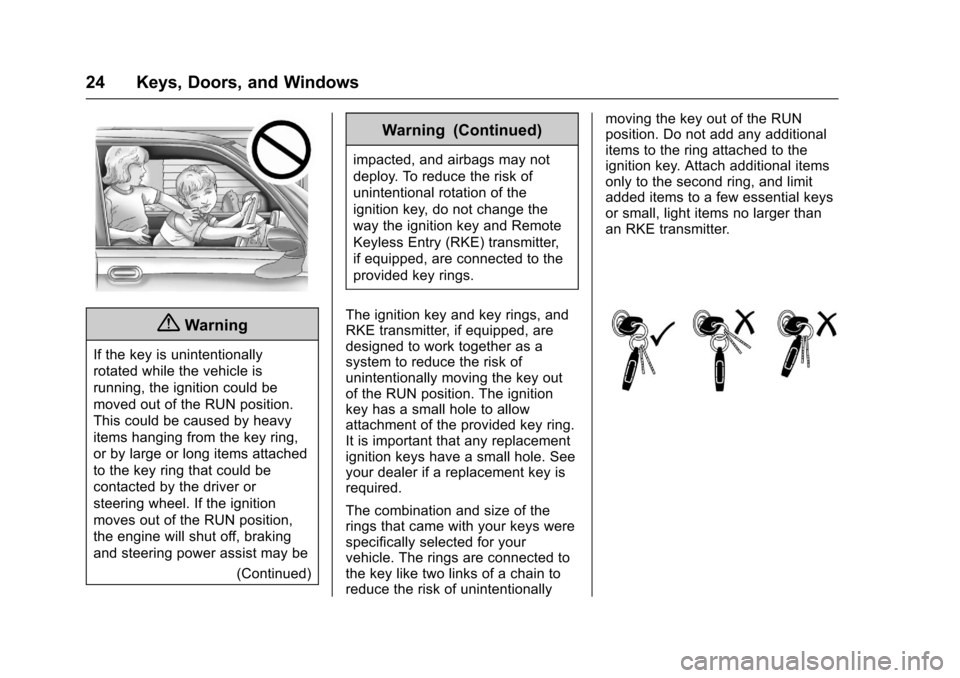
The ignition key and key rings, andRKE transmitter, if equipped, aredesigned to work together as asystem to reduce the risk ofunintentionally moving the key outof the RUN position. The ignitionkey has a small hole to allowattachment of the provided key ring.It is important that any replacementignition keys have a small hole. Seeyour dealer if a replacement key isrequired.
The combination and size of therings that came with your keys werespecifically selected for yourvehicle. The rings are connected tothe key like two links of a chain toreduce the risk of unintentionally
moving the key out of the RUNposition. Do not add any additionalitems to the ring attached to theignition key. Attach additional itemsonly to the second ring, and limitadded items to a few essential keysor small, light items no larger thanan RKE transmitter.
Page 26 of 346
Chevrolet Express Owner Manual (GMNA-Localizing-U.S./Canada/Mexico-9967827) - 2017 - crc - 5/2/16
Keys, Doors, and Windows 25
Interference from radio-frequencyidentification (RFID) tags mayprevent the key from starting thevehicle. Keep RFID tags away fromthe key when starting the vehicle.
The key is used for the ignition andall door locks.
The key has a bar-coded key tagthat the dealer or qualified locksmithcan use to make new keys. Storethis information in a safe place, notin the vehicle.
See your dealer if a replacementkey or additional key is needed.
If it becomes difficult to turn a key,inspect the key blade for debris.Periodically clean with a brushor pick.
With an active OnStar subscription,an OnStar Advisor may remotelyunlock the vehicle. SeeOnStarOverview0326.
Remote Keyless Entry
(RKE) System
SeeRadio FrequencyStatement0322.
If there is a decrease in the RemoteKeyless Entry (RKE) operatingrange:
.Check the distance. Thetransmitter may be too far fromthe vehicle.
.Check the location. Othervehicles or objects may beblocking the signal.
.Check the transmitter's battery.See“Battery Replacement”laterin this section.
.If the transmitter is still notworking correctly, see yourdealer or a qualified technicianfor service.
Remote Keyless Entry
(RKE) System Operation
If equipped, the RKE transmitterfunctions work up to 60 m (197 ft)away from the vehicle.
Other conditions can affect theperformance of the transmitter. SeeRemote Keyless Entry (RKE)System025.