audio CHEVROLET HHR 2007 1.G Owners Manual
[x] Cancel search | Manufacturer: CHEVROLET, Model Year: 2007, Model line: HHR, Model: CHEVROLET HHR 2007 1.GPages: 446, PDF Size: 2.43 MB
Page 1 of 446
Seats and Restraint Systems
....................... 7
Front Seats
.............................................. 8
Rear Seats
............................................. 17
Safety Belts
............................................ 20
Child Restraints
...................................... 43
Airbag System
........................................ 71
Restraint System Check
......................... 90
Features and Controls
................................ 93
Keys
....................................................... 95
Doors and Locks
.................................. 103
Windows
............................................... 109
Theft-Deterrent Systems
....................... 111
Starting and Operating Your Vehicle
..... 115
Mirrors
.................................................. 134OnStar®System
................................... 139
Storage Areas
...................................... 143
Sunroof
................................................ 147
Instrument Panel
....................................... 149
Instrument Panel Overview
................... 152
Climate Controls
................................... 170
Warning Lights, Gages, and Indicators
.... 177
Driver Information Center (DIC)
............ 194
Audio System(s)
................................... 206
Driving Your Vehicle
................................. 237
Your Driving, the Road, and
Your Vehicle
..................................... 238
Towing
................................................. 274
2007 Chevrolet HHR Owner ManualM
1
Page 5 of 446
Vehicle Damage Warnings
Also, in this manual you will nd these notices:
Notice:These mean there is something
that could damage your vehicle.
A notice tells about something that can damage
the vehicle. Many times, this damage would not be
covered by your vehicle’s warranty, and it could
be costly. But the notice will tell what to do to help
avoid the damage.
When you read other manuals, you might see
CAUTION and NOTICE warnings in different colors
or in different words.
There are also warning labels on the vehicle. They
use the same words, CAUTION or NOTICE.
Vehicle Symbols
The vehicle has components and labels that use
symbols instead of text. Symbols are shown along
with the text describing the operation or information
relating to a specic component, control, message,
gage, or indicator.
If you need help guring out a specic name of a
component, gage, or indicator, reference the
following topics:
Seats and Restraint Systems in Section 1
Features and Controls in Section 2
Instrument Panel Overview in Section 3
Climate Controls in Section 3
Warning Lights, Gages, and Indicators in
Section 3
Audio System(s) in Section 3
Engine Compartment Overview in Section 5
5
Page 141 of 446
OnStar®Hands-Free Calling
OnStar®Hands-Free Calling allows eligible
OnStar®subscribers to make and receive calls
using voice commands. Hands-Free Calling is fully
integrated into the vehicle, and can be used
with OnStar
®Pre-Paid Minute Packages.
Hands-Free Calling may also be linked to a
Verizon Wireless service plan in the U.S. or a Bell
Mobility service plan in Canada, depending on
eligibility. To nd out more, refer to the OnStar
®
Owners Guide in the vehicle’s glove box, visit
www.onstar.com or www.onstar.ca, or speak with
an OnStar
®advisor by pressing the OnStar®
button or calling 1-888-4-ONSTAR
(1-888-466-7827).
OnStar®Virtual Advisor
OnStar®Virtual Advisor is a feature of OnStar®
Hands-Free Calling that uses your minutes to
access location-based weather, local traffic reports,
and stock quotes. By pressing the phone button
and giving a few simple voice commands, you can
browse through the various topics. See the OnStar
®
Owners Guide for more information (Only available
in the continental U.S.).
OnStar®Steering Wheel Controls
Your vehicle may have a Talk/Mute button that
can be used to interact with OnStar®Hands-Free
Calling. SeeAudio Steering Wheel Controls on
page 234for more information.
On some vehicles, you may have to hold the
button for a few seconds and give the command
“ONSTAR” in order to activate the OnStar
®
Hands-Free Calling feature.
On some vehicles, the mute button can be used to
dial numbers into voicemail systems, or to dial
phone extensions. See the OnStar
®Owner’s
Guide for more information.
141
Page 150 of 446
Brake System Warning Light..................... 185
Anti-Lock Brake System Warning Light........ 186
Enhanced Traction System Warning Light.... 187
Engine Coolant Temperature
Warning Light........................................ 187
Engine Coolant Temperature Gage............ 188
Malfunction Indicator Lamp........................ 188
Oil Pressure Light..................................... 192
Security Light............................................ 193
Fog Lamp Light......................................... 193
Highbeam On Light................................... 193
Fuel Gage................................................. 193
Driver Information Center (DIC).................. 194
DIC Operation and Displays...................... 195
DIC Warnings and Messages.................... 197
DIC Vehicle Personalization....................... 200Audio System(s)......................................... 206
Setting the Time (Without Date Display).... 207
Setting the Time (With Date Display)......... 208
Radio with CD (Base)............................... 210
Radio with CD (MP3)................................ 215
Using an MP3........................................... 226
XM Radio Messages................................. 232
Theft-Deterrent Feature............................. 233
Audio Steering Wheel Controls.................. 234
Radio Reception........................................ 234
Care of Your CDs..................................... 235
Care of the CD Player.............................. 235
Fixed Mast Antenna.................................. 236
XM™ Satellite Radio Antenna System....... 236
Section 3 Instrument Panel
150
Page 153 of 446
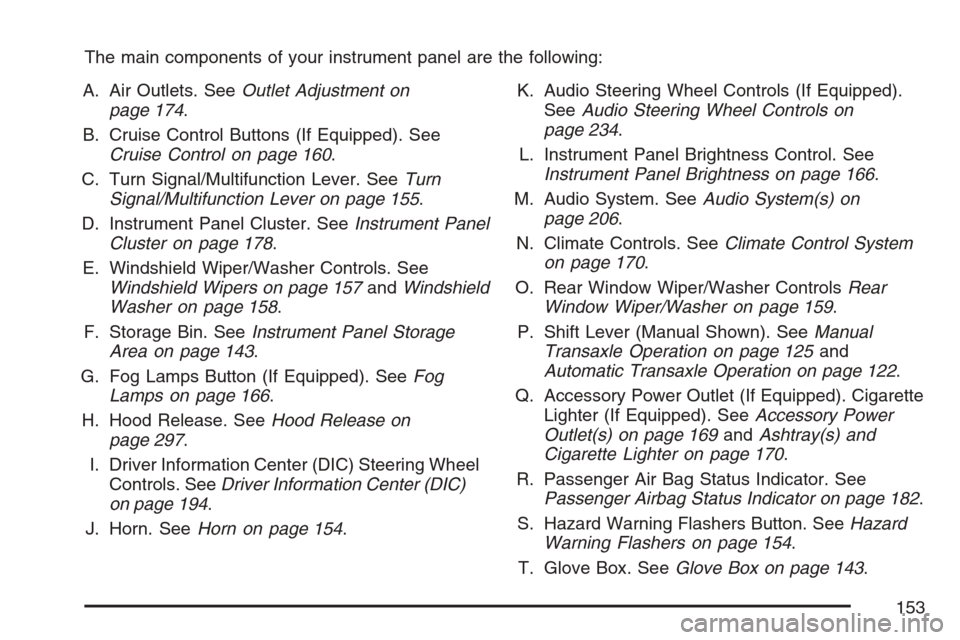
The main components of your instrument panel are the following:
A. Air Outlets. SeeOutlet Adjustment on
page 174.
B. Cruise Control Buttons (If Equipped). See
Cruise Control on page 160.
C. Turn Signal/Multifunction Lever. SeeTurn
Signal/Multifunction Lever on page 155.
D. Instrument Panel Cluster. SeeInstrument Panel
Cluster on page 178.
E. Windshield Wiper/Washer Controls. See
Windshield Wipers on page 157andWindshield
Washer on page 158.
F. Storage Bin. SeeInstrument Panel Storage
Area on page 143.
G. Fog Lamps Button (If Equipped). SeeFog
Lamps on page 166.
H. Hood Release. SeeHood Release on
page 297.
I. Driver Information Center (DIC) Steering Wheel
Controls. SeeDriver Information Center (DIC)
on page 194.
J. Horn. SeeHorn on page 154.K. Audio Steering Wheel Controls (If Equipped).
SeeAudio Steering Wheel Controls on
page 234.
L. Instrument Panel Brightness Control. See
Instrument Panel Brightness on page 166.
M. Audio System. SeeAudio System(s) on
page 206.
N. Climate Controls. SeeClimate Control System
on page 170.
O. Rear Window Wiper/Washer ControlsRear
Window Wiper/Washer on page 159.
P. Shift Lever (Manual Shown). SeeManual
Transaxle Operation on page 125and
Automatic Transaxle Operation on page 122.
Q. Accessory Power Outlet (If Equipped). Cigarette
Lighter (If Equipped). SeeAccessory Power
Outlet(s) on page 169andAshtray(s) and
Cigarette Lighter on page 170.
R. Passenger Air Bag Status Indicator. See
Passenger Airbag Status Indicator on page 182.
S. Hazard Warning Flashers Button. SeeHazard
Warning Flashers on page 154.
T. Glove Box. SeeGlove Box on page 143.
153
Page 206 of 446
Exiting Personalization Menu
The personalization menu will be exited when any
of the following conditions occur:
A ten second time period has elapsed.
The ignition is turned off.
The end of the personalization menu list is
reached.
Audio System(s)
Determine which radio your vehicle has and then
read the pages following to familiarize yourself
with its features.
Driving without distraction is a necessity for a
safer driving experience. SeeDefensive Driving on
page 238. By taking a few moments to read this
manual and get familiar with your vehicle’s
audio system, you can use it with less effort, as
well as take advantage of its features. While your
vehicle is parked, set up your audio system by
presetting your favorite radio stations, setting the
tone and adjusting the speakers. Then, when
driving conditions permit, you can tune to
your favorite stations using the presets and
steering wheel controls if the vehicle has them.
{CAUTION:
This system provides you with a far greater
access to audio stations and song listings.
Giving extended attention to entertainment
tasks while driving can cause a crash and
you or others can be injured or killed.
Always keep your eyes on the road and
your mind on the drive — avoid engaging
in extended searching while driving.
Keeping your mind on the drive is important for
safe driving. For more information, seeDefensive
Driving on page 238.
Here are some ways in which you can help avoid
distraction while driving.
While your vehicle is parked:
Familiarize yourself with all of its controls.
Familiarize yourself with its operation.
206
Page 207 of 446
Set up your audio system by presetting your
favorite radio stations, setting the tone, and
adjusting the speakers. Then, when driving
conditions permit, you can tune to your favorite
radio stations using the presets and steering
wheel controls if the vehicle has them.
Notice:Before adding any sound equipment to
your vehicle, such as an audio system, CD
player, CB radio, mobile telephone, or two-way
radio, make sure that it can be added by
checking with your dealer. Also, check federal
rules covering mobile radio and telephone
units. If sound equipment can be added, it is
very important to do it properly. Added sound
equipment may interfere with the operation of
your vehicle’s engine, radio, or other systems,
and even damage them. Your vehicle’s systems
may interfere with the operation of sound
equipment that has been added.
Your vehicle has a feature called Retained
Accessory Power (RAP). With RAP, the audio
system can be played even after the ignition is
turned off. SeeRetained Accessory Power (RAP)
on page 119for more information.Setting the Time
(Without Date Display)
If your vehicle has an AM/FM base radio with a
single CD player and preset buttons numbered one
through six, the radio will have a clock button
for setting the time. You can set the time by
following these steps:
1. Turn the ignition key to ACC (accessory) or
RUN. Press the power knob, located in the
center of the radio, to turn the radio on.
2. Press the clock button until the hour numbers
begin ashing on the display. Press the clock
button a second time and the minute
numbers will begin ashing on the display.
3. While either the hour or the minute numbers
are ashing, turn the tune knob, located on
the upper right side of the radio, clockwise or
counterclockwise to increase or decrease
the time.
4. Press the clock button again until the clock
display stops ashing to set the currently
displayed time; otherwise, the ashing will stop
after ve seconds and the current time
displayed will be automatically set.
207
Page 211 of 446
Setting Preset Stations
Up to 18 stations (six FM1, six FM2, and six AM),
can be programmed on the six numbered
pushbuttons, by performing the following steps:
1. Turn the radio on.
2. Press BAND to select FM1, FM2, or AM.
3. Tune in the desired station.
4. Press and hold one of the six numbered
pushbuttons for three seconds until a beep
sounds. When that pushbutton is pressed and
released, the station that was set, returns.
5. Repeat Steps 2 through 4 for each pushbutton.
Setting the Tone (Bass/Treble)
BASS/TREB (Bass/Treble):To adjust the bass
or treble, press the tune knob or the
BASS/TREBLE pushbutton until the desired tone
control label displays. Turn the tune knob
clockwise or counterclockwise to increase or
decrease the setting. The current bass or treble
level displays. If a station’s frequency is weak, or
has static, decrease the treble.
EQ (Equalization):Press this button to adjust
BASS and TREBLE Settings.
Adjusting the Speakers (Balance/Fade)
`
BAL/FADE (Balance/Fade):To adjust the
balance or fade, press this button or the tune knob
until the desired speaker control label displays.
Turn the tune knob clockwise or counterclockwise
to adjust the setting.
Radio Messages
Calibration Error:The audio system has been
calibrated for your vehicle from the factory. If
Calibration Error displays, it means that the radio
has not been congured properly for your
vehicle and it must be returned to your dealer for
service.
Loc (Locked):This message is displayed while
the THEFTLOCK
®system has locked up the radio.
Take the vehicle to your dealer for service.
If any error occurs repeatedly or if an error cannot
be corrected, contact your dealer.
Playing a CD (Single CD Player)
Insert a CD partway into the slot, label side up.
The player pulls it in and the CD should begin
playing.
211
Page 212 of 446
If the ignition or radio is turned off with a CD in
the player, it stays in the player. When the ignition
or radio is turned on, the CD starts playing
where it stopped, if it was the last selected audio
source.
When a CD is inserted, the CD symbol displays.
As each new track starts to play, the track number
displays.
The CD player can play the smaller 3 inch (8 cm)
single CDs with an adapter ring. Full-size CDs
and the smaller CDs are loaded in the same
manner.
If playing a CD-R, the sound quality can be
reduced due to CD-R quality, the method of
recording, the quality of the music that has been
recorded, and the way the CD-R has been
handled. There can be an increase in skipping,
difficulty in nding tracks, and/or difficulty in loading
and ejecting. If these problems occur, check the
bottom surface of the CD. If the surface of the CD
is damaged, such as cracked, broken, or
scratched, the CD will not play properly. If the
surface of the CD is soiled, seeCare of Your CDs
on page 235for more information.If there is no apparent damage, try a known
good CD.
Notice:If you add any label to a CD, insert
more than one CD into the slot at a time, or
attempt to play scratched or damaged CDs, you
could damage the CD player. When using the
CD player, use only CDs in good condition
without any label, load one CD at a time, and
keep the CD player and the loading slot free of
foreign materials, liquids, and debris.
Do not add any label to a CD, it could get caught
in the CD player. If a CD is recorded on a
personal computer and a description label is
needed, try labeling the top of the recorded CD
with a marking pen.
If an error displays, see “CD Messages” later in
this section.
ZEJECT:Press the CD eject button to eject
the CD. If the CD is not removed, after several
seconds, the CD automatically pulls back into the
player.
f(Tune):Turn this knob to select tracks on the
CD currently playing.
212
Page 213 of 446
©SEEK¨:Press the left SEEK arrow to
go to the start of the current track, if more than
ten seconds have played. Press the right SEEK
arrow to go to the next track. If either SEEK arrow is
held or pressed multiple times, the player continues
moving backward or forward through the CD.
sREV (Reverse):Press and hold this button
to reverse playback quickly. You will hear sound at
a reduced volume. Release this pushbutton to
resume playing the track. The elapsed time of the
track displays.
\FWD (Fast Forward):Press and hold this
pushbutton to advance playback quickly. You will
hear sound at a reduced volume. Release this
pushbutton to resume playing the track. The
elapsed time of the track displays.
RDM (Random):With the random setting, you
can listen to CD tracks in random, rather than
sequential order. To use random, do the following:
1. Press this button to play tracks from the
CD you are listening to in random order.
The random icon displays.
2. Press this button again to turn off random play.
The random icon disappears from the display.RPT (Repeat):With the repeat setting, one track
can be repeated.
To repeat the track you are listening to, press and
release the RPT button. An arrow symbol
displays. Press RPT again to turn off repeat play.
4(Information):Press this button to switch
the display between the track number, elapsed
time of the track, and the time. When the ignition is
off, press this button to display the time.
BAND:Press this button to listen to the radio
while a CD is playing. The CD remains inside the
radio for future listening.
CD/AUX (CD/Auxiliary):Press this button to play
a CD while listening to the radio. The CD icon
and track number displays while a CD is in
the player. Press this button again and the system
automatically searches for an auxiliary input
device such as a portable audio player.
213