stop start CHEVROLET HHR 2011 1.G User Guide
[x] Cancel search | Manufacturer: CHEVROLET, Model Year: 2011, Model line: HHR, Model: CHEVROLET HHR 2011 1.GPages: 430, PDF Size: 4.57 MB
Page 185 of 430
Black plate (29,1)Chevrolet HHR Owner Manual - 2011
Brake System Warning Light
The vehicle brake system consists of two hydraulic
circuits. If one circuit is not working, the remaining
circuit can still work to stop the vehicle. For normal
braking performance, both circuits need to be working.
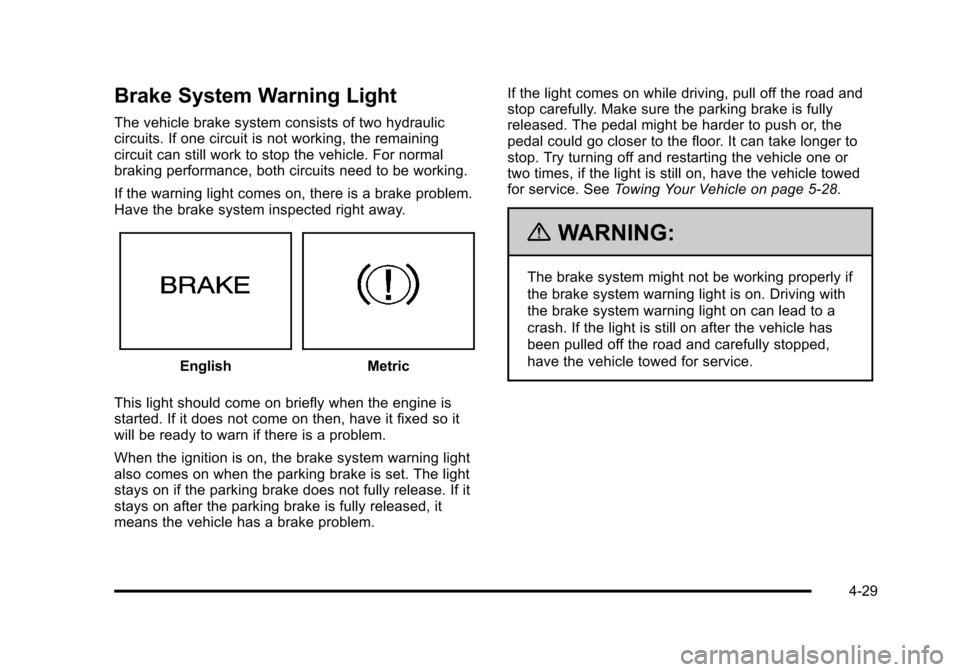
If the warning light comes on, there is a brake problem.
Have the brake system inspected right away.
EnglishMetric
This light should come on briefly when the engine is
started. If it does not come on then, have it fixed so it
will be ready to warn if there is a problem.
When the ignition is on, the brake system warning light
also comes on when the parking brake is set. The light
stays on if the parking brake does not fully release. If it
stays on after the parking brake is fully released, it
means the vehicle has a brake problem. If the light comes on while driving, pull off the road and
stop carefully. Make sure the parking brake is fully
released. The pedal might be harder to push or, the
pedal could go closer to the floor. It can take longer to
stop. Try turning off and restarting the vehicle one or
two times, if the light is still on, have the vehicle towed
for service. See
Towing Your Vehicle on page 5‑28.
{WARNING:
The brake system might not be working properly if
the brake system warning light is on. Driving with
the brake system warning light on can lead to a
crash. If the light is still on after the vehicle has
been pulled off the road and carefully stopped,
have the vehicle towed for service.
4-29
Page 186 of 430
Black plate (30,1)Chevrolet HHR Owner Manual - 2011
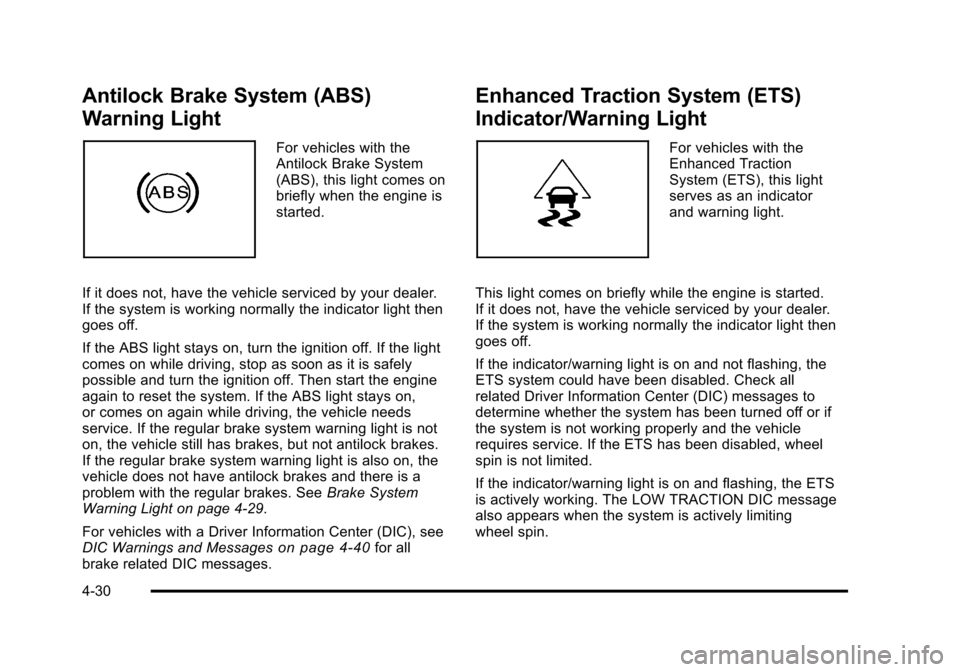
Antilock Brake System (ABS)
Warning Light
For vehicles with the
Antilock Brake System
(ABS), this light comes on
briefly when the engine is
started.
If it does not, have the vehicle serviced by your dealer.
If the system is working normally the indicator light then
goes off.
If the ABS light stays on, turn the ignition off. If the light
comes on while driving, stop as soon as it is safely
possible and turn the ignition off. Then start the engine
again to reset the system. If the ABS light stays on,
or comes on again while driving, the vehicle needs
service. If the regular brake system warning light is not
on, the vehicle still has brakes, but not antilock brakes.
If the regular brake system warning light is also on, the
vehicle does not have antilock brakes and there is a
problem with the regular brakes. See Brake System
Warning Light on page 4‑29.
For vehicles with a Driver Information Center (DIC), see
DIC Warnings and Messages
on page 4‑40for all
brake related DIC messages.
Enhanced Traction System (ETS)
Indicator/Warning Light
For vehicles with the
Enhanced Traction
System (ETS), this light
serves as an indicator
and warning light.
This light comes on briefly while the engine is started.
If it does not, have the vehicle serviced by your dealer.
If the system is working normally the indicator light then
goes off.
If the indicator/warning light is on and not flashing, the
ETS system could have been disabled. Check all
related Driver Information Center (DIC) messages to
determine whether the system has been turned off or if
the system is not working properly and the vehicle
requires service. If the ETS has been disabled, wheel
spin is not limited.
If the indicator/warning light is on and flashing, the ETS
is actively working. The LOW TRACTION DIC message
also appears when the system is actively limiting
wheel spin.
4-30
Page 188 of 430
Black plate (32,1)Chevrolet HHR Owner Manual - 2011
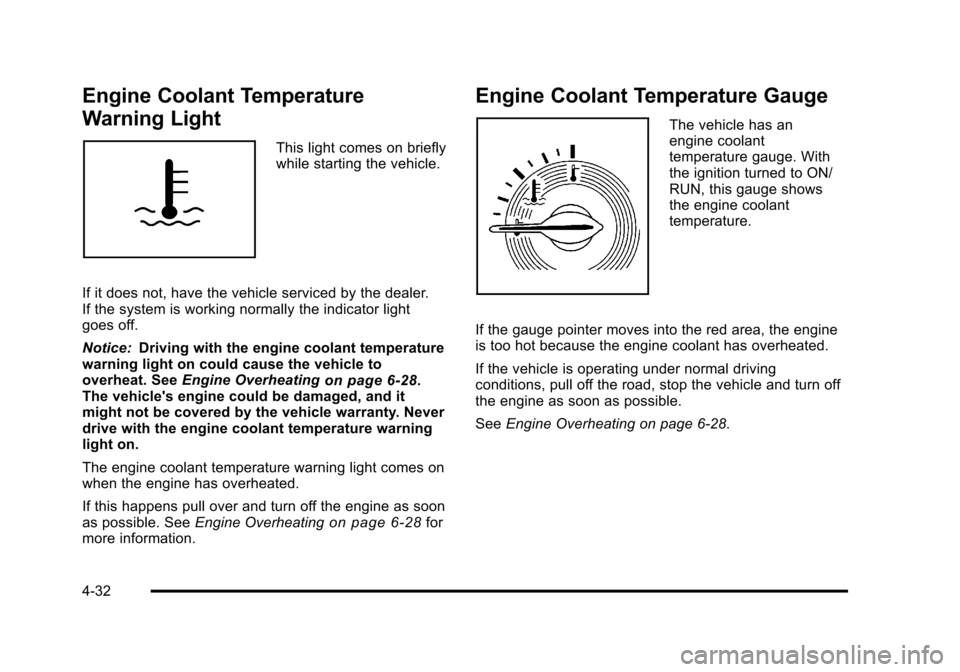
Engine Coolant Temperature
Warning Light
This light comes on briefly
while starting the vehicle.
If it does not, have the vehicle serviced by the dealer.
If the system is working normally the indicator light
goes off.
Notice: Driving with the engine coolant temperature
warning light on could cause the vehicle to
overheat. See Engine Overheating
on page 6‑28.
The vehicle's engine could be damaged, and it
might not be covered by the vehicle warranty. Never
drive with the engine coolant temperature warning
light on.
The engine coolant temperature warning light comes on
when the engine has overheated.
If this happens pull over and turn off the engine as soon
as possible. See Engine Overheating
on page 6‑28for
more information.
Engine Coolant Temperature Gauge
The vehicle has an
engine coolant
temperature gauge. With
the ignition turned to ON/
RUN, this gauge shows
the engine coolant
temperature.
If the gauge pointer moves into the red area, the engine
is too hot because the engine coolant has overheated.
If the vehicle is operating under normal driving
conditions, pull off the road, stop the vehicle and turn off
the engine as soon as possible.
See Engine Overheating on page 6‑28.
4-32
Page 189 of 430
Black plate (33,1)Chevrolet HHR Owner Manual - 2011
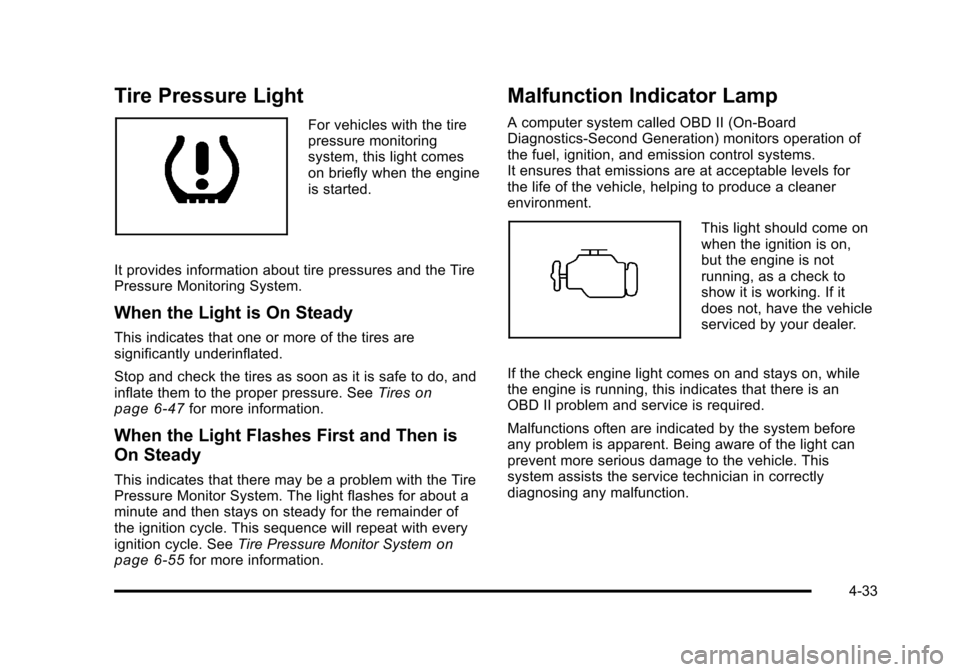
Tire Pressure Light
For vehicles with the tire
pressure monitoring
system, this light comes
on briefly when the engine
is started.
It provides information about tire pressures and the Tire
Pressure Monitoring System.
When the Light is On Steady
This indicates that one or more of the tires are
significantly underinflated.
Stop and check the tires as soon as it is safe to do, and
inflate them to the proper pressure. See Tires
on
page 6‑47for more information.
When the Light Flashes First and Then is
On Steady
This indicates that there may be a problem with the Tire
Pressure Monitor System. The light flashes for about a
minute and then stays on steady for the remainder of
the ignition cycle. This sequence will repeat with every
ignition cycle. See Tire Pressure Monitor System
on
page 6‑55for more information.
Malfunction Indicator Lamp
A computer system called OBD II (On-Board
Diagnostics-Second Generation) monitors operation of
the fuel, ignition, and emission control systems.
It ensures that emissions are at acceptable levels for
the life of the vehicle, helping to produce a cleaner
environment.
This light should come on
when the ignition is on,
but the engine is not
running, as a check to
show it is working. If it
does not, have the vehicle
serviced by your dealer.
If the check engine light comes on and stays on, while
the engine is running, this indicates that there is an
OBD II problem and service is required.
Malfunctions often are indicated by the system before
any problem is apparent. Being aware of the light can
prevent more serious damage to the vehicle. This
system assists the service technician in correctly
diagnosing any malfunction.
4-33
Page 190 of 430
Black plate (34,1)Chevrolet HHR Owner Manual - 2011
Notice:If the vehicle is continually driven with this
light on, after a while, the emission controls might
not work as well, the vehicle fuel economy might
not be as good, and the engine might not run as
smoothly. This could lead to costly repairs that
might not be covered by the vehicle warranty.
Notice: Modifications made to the engine,
transmission, exhaust, intake, or fuel system of the
vehicle or the replacement of the original tires with
other than those of the same Tire Performance
Criteria (TPC) can affect the vehicle's emission
controls and can cause this light to come on.
Modifications to these systems could lead to costly
repairs not covered by the vehicle warranty. This
could also result in a failure to pass a required
Emission Inspection/Maintenance test. See
Accessories and Modifications on page 6‑3.
This light comes on during a malfunction in one of
two ways:
Light Flashing: A misfire condition has been detected.
A misfire increases vehicle emissions and could
damage the emission control system on the vehicle.
Diagnosis and service might be required.
To prevent more serious damage to the vehicle:
.Reduce vehicle speed.
.Avoid hard accelerations.
.Avoid steep uphill grades.
.If towing a trailer, reduce the amount of cargo
being hauled as soon as it is possible.
If the light continues to flash, when it is safe to do so,
stop the vehicle. Find a safe place to park the vehicle.
Turn the vehicle off, wait at least 10 seconds, and
restart the engine. If the light is still flashing, follow the
previous steps and see your dealer for service as soon
as possible.
Light On Steady: An emission control system
malfunction has been detected on the vehicle.
Diagnosis and service might be required.
An emission system malfunction might be corrected by
doing the following:
.Make sure the fuel cap is fully installed. See Filling
the Tankon page 6‑9. The diagnostic system
can determine if the fuel cap has been left off or
improperly installed. A loose or missing fuel cap
allows fuel to evaporate into the atmosphere. A few
driving trips with the cap properly installed should
turn the light off.
.If the vehicle has been driven through a deep
puddle of water, the vehicle's electrical system
might be wet. The condition is usually corrected
when the electrical system dries out. A few driving
trips should turn the light off.
4-34
Page 198 of 430
Black plate (42,1)Chevrolet HHR Owner Manual - 2011
ENG (Engine) PWR (Power) REDUCED
This message displays to inform you that the vehicle
has reduced engine power to avoid damaging the
engine. Reduced engine power can affect the vehicle's
ability to accelerate. If this message is on, but there is
no reduction in performance, proceed to your
destination. The performance may be reduced the next
time the vehicle is driven. The vehicle may be driven at
a reduced speed while this message is on, but
acceleration and speed may be reduced. Anytime this
message stays on, the vehicle should be taken to your
dealer for service as soon as possible.
ESC (Electronic Stability Control) ACTIVE
If your vehicle has Electronic Stability Control (ESC),
this message displays and the ESC/TCS light on the
instrument panel cluster flashes when ESC is assisting
you with directional control of the vehicle. You may feel
or hear the system working and see this message
displayed in the DIC. Slippery road conditions may exist
when this message is displayed, so adjust your driving
accordingly. This message may stay on for a few
seconds after ESC stops assisting you with directional
control of the vehicle. This is normal when the system is
operating. SeeElectronic Stability Control (ESC)
on
page 5‑6and Electronic Stability Control (ESC)/
Traction Control System (TCS) Indicator/Warning Light
on page 4‑31for more information.
ESC (Electronic Stability Control) NOT
READY
If your vehicle has Electronic Stability Control (ESC),
this message may display briefly after starting the
vehicle if the system's sensors are not yet calibrated.
The system is not functional until the message stops
displaying. Adjust your driving accordingly. When the
message is no longer displayed, the system is
functional. See Electronic Stability Control (ESC)
on
page 5‑6for more information.
ESC (Electronic Stability Control) OFF
If your vehicle has Electronic Stability Control (ESC),
this message displays and the ESC/TCS light on the
instrument panel cluster comes on solid when ESC is
turned off. Adjust your driving accordingly. See
Electronic Stability Control (ESC)
on page 5‑6and
Electronic Stability Control (ESC)/Traction Control
System (TCS) Indicator/Warning Light
on page 4‑31for
more information.
GATE AJAR
This message displays when the liftgate is open. Make
sure that the liftgate is closed completely. See Liftgate
on page 3‑11for more information.
4-42
Page 216 of 430
Black plate (60,1)Chevrolet HHR Owner Manual - 2011
XM Satellite Radio Service
For vehicles with XM, it is a satellite radio service
that is based in the 48 contiguous United States and
10 Canadian provinces. XM Satellite Radio has a wide
variety of programming and commercial-free music,
coast-to-coast, and in digital-quality sound. A service
fee is required to receive the XM service. If XM Service
needs to be reactivated, the radio will display‘No
Subscription Please Renew’ on channel XM1. For more
information, contact XM at www.xmradio.com or call
1-800-929-2100 in the U.S. And www.xmradio.ca or call
1-877-438-9677 in Canada.
Radio Messages for XM Only
See XM Radio Messageson page 4‑70for more
information.
Loading a CD
Insert a CD partway into the slot, label side up. The
player pulls it in and the CD begins playing.
When the CD is inserted, the CD symbol displays. As
each new track starts to play, the track number displays.
The CD player can play the smaller 3 inch (8 cm) single
CDs with an adapter ring. Full-size CDs and the smaller
CDs are loaded in the same manner.
Ejecting a CD
Z
EJECT: Press to eject the CD. If the CD is not
removed, after several seconds, the CD automatically
pulls back into the player.
Playing a CD
If the ignition or radio is turned off with a CD in the
player it stays in the player. When the ignition or radio is
turned on, the CD starts to play where it stopped, if it
was the last selected audio source.
f(Tune): Turn to select tracks on the CD currently
playing.
©SEEK: Press to go to the start of the current track,
if more than ten seconds have played. Press and hold
or press multiple times to continue moving backward
through the tracks on the CD.
¨SEEK: Press to go to the next track. Press and hold
or press multiple times to continue moving forward
through the tracks on the CD.
sREV (Reverse): Press and hold to reverse playback
quickly within a track. Sound is heard at a reduced
volume and the elapsed time of the track displays.
Release to resume playing the track.
\FWD (Fast Forward): Press and hold to advance
playback quickly within a track. Sound is heard at a
reduced volume and the elapsed time of the track
displays. Release to resume playing the track.
4-60
Page 218 of 430
Black plate (62,1)Chevrolet HHR Owner Manual - 2011
Care of CDs
Store CD(s) in their original cases or other protective
cases and away from direct sunlight and dust. The
CD player scans the bottom of the disc. If the bottom
of a CD is damaged it may not play properly or at all.
Do not touch the bottom of a CD while handling it. Pick
up CDs by grasping the outer edges or the edge of the
hole and the outer edge.
If the surface of a CD is dirty, take a soft, lint free
cloth or dampen a clean, soft cloth in a mild, neutral
detergent solution mixed with water, and clean it.
Make sure the wiping process starts from the center
to the edge.
Care of the CD Player
Do not add labels to a CD, it could get caught in the
CD player. Use a marking pen to write on the top of
the CD if a description is needed.
Do not use CD lens cleaners, they could damage the
CD player.
Notice:If a label is added to a CD, or more than
one CD is inserted into the slot at a time, or an
attempt is made to play scratched or damaged CDs,
the CD player could be damaged. While using the
CD player, use only CDs in good condition without
any label, load one CD at a time, and keep the
CD player and the loading slot free of foreign
materials, liquids, and debris. If an error displays, see
“CD Messages”earlier in this
section.
Using the Auxiliary Input Jack
The radio system may have an auxiliary input jack
located on the lower right side of the faceplate. This is
not an audio output; do not plug the headphone set into
the front auxiliary input jack. An external audio device
such as an iPod
®, laptop computer, MP3 player,
CD changer, etc. can be connected to the auxiliary
input jack for use as another audio source.
Drivers are encouraged to set up any auxiliary device
while the vehicle is in P (Park). See Defensive Driving
on page 5‑2for more information on driver distraction.
To use a portable audio player, connect a 3.5 mm
(1/8 in) cable to the radio's front auxiliary input jack.
When a device is connected, press the radio
CD/AUX button to begin playing audio from the
device over the vehicle speakers.
O(Power/Volume): Turn to adjust the volume.
Additional volume adjustments may have to be made
from the portable device if the volume is too quiet or
not loud.
BAND: Press to listen to the radio while a portable
audio device is connected to the auxiliary input. The
portable audio device continues playing until it is
stopped or turned off.
4-62
Page 242 of 430
Black plate (4,1)Chevrolet HHR Owner Manual - 2011
allowing realistic following distances eliminates a lot of
unnecessary braking. That means better braking and
longer brake life.
If the engine ever stops while the vehicle is being
driven, brake normally but do not pump the brakes.
If the brakes are pumped, the pedal could get harder to
push down. If the engine stops, there will still be some
power brake assist but it will be used when the brake is
applied. Once the power assist is used up, it can take
longer to stop and the brake pedal will be harder
to push.
If the vehicle has Electronic Stability Control (ESC) and
the 2.0L turbocharged engine, it also has a hydraulic
brake boost feature which supplements the power brake
system to maintain consistent brake performance under
conditions of low brake booster vacuum. Low brake
booster vacuum conditions can include initial start up
after the vehicle has been parked for several hours,
very frequent brake stops, or high altitude driving. When
hydraulic brake boost is active, minor brake pulsation or
movement might be felt but this is normal. If brake pedal
feel changes or the brake pedal feels hard to push, the
system might not be receiving the intended brake boost
and the SVC BRAKE SYSTEM DIC message may be
displayed.
Adding non‐dealer accessories can affect vehicle
performance. SeeAccessories and Modifications
on
page 6‑3.
Antilock Brake System (ABS)
The vehicle might have the Antilock Brake
System (ABS), an advanced electronic braking
system that helps prevent a braking skid.
If the vehicle has ABS,
this warning light on the
instrument panel comes
on briefly when the
vehicle is started.
When the engine is started, or when the vehicle begins
to drive away, ABS checks itself. A momentary motor or
clicking noise might be heard while this test is going on,
and it might even be noticed that the brake pedal
moves or pulses a little. This is normal.
Let us say the road is wet and you are driving safely.
Suddenly, an animal jumps out in front of you. You slam
on the brakes and continue braking. Here is what
happens with ABS:
A computer senses that the wheels are slowing down.
If one of the wheels is about to stop rolling, the
computer will separately work the brakes at each wheel.
5-4
Page 259 of 430
Black plate (21,1)Chevrolet HHR Owner Manual - 2011
To save fuel, run the engine for only short periods as
needed to warm the vehicle and then shut the engine
off and close the window most of the way to save heat.
Repeat this until help arrives but only when you feel
really uncomfortable from the cold. Moving about to
keep warm also helps.
If it takes some time for help to arrive, now and then
when you run the engine, push the accelerator pedal
slightly so the engine runs faster than the idle speed.
This keeps the battery charged to restart the vehicle
and to signal for help with the headlamps. Do this as
little as possible to save fuel.
If Your Vehicle is Stuck in Sand,
Mud, Ice, or Snow
Slowly and cautiously spin the wheels to free the
vehicle when stuck in sand, mud, ice, or snow. See
Rocking Your Vehicle to Get It Out on page 5‑21.
If the vehicle has a traction system, it can often help to
free a stuck vehicle. Refer to the vehicle's traction
system in the Index. If stuck too severely for the traction
system to free the vehicle, turn the traction system off
and use the rocking method.
{WARNING:
If the vehicle's tires spin at high speed, they can
explode, and you or others could be injured. The
vehicle can overheat, causing an engine
compartment fire or other damage. Spin the
wheels as little as possible and avoid going above
55 km/h (35 mph) as shown on the speedometer.
For information about using tire chains on the vehicle,
see Tire Chains on page 6‑68.
Rocking Your Vehicle to Get It Out
Turn the steering wheel left and right to clear the area
around the front wheels. Turn off any traction system.
Shift back and forth between R (Reverse) and a forward
gear, or with a manual transmission, between 1 (First) or
2 (Second) and R (Reverse), spinning the wheels as
little as possible. To prevent transmission wear, wait
until the wheels stop spinning before shifting gears.
Release the accelerator pedal while shifting, and press
lightly on the accelerator pedal when the transmission is
in gear. Slowly spinning the wheels in the forward and
5-21