ABS CHEVROLET IMPALA 2010 9.G User Guide
[x] Cancel search | Manufacturer: CHEVROLET, Model Year: 2010, Model line: IMPALA, Model: CHEVROLET IMPALA 2010 9.GPages: 432, PDF Size: 1.89 MB
Page 241 of 432

Antilock Brake System (ABS)The vehicle might have the Antilock Brake System
(ABS), an advanced electronic braking system that helps
prevent a braking skid.
If the vehicle has ABS, this
warning light on the
instrument panel cluster
comes on briefly when the
vehicle is started.
When the engine is started, or when the vehicle begins
to drive away, ABS checks itself. A momentary motor
or clicking noise might be heard while this test is going
on, and it might even be noticed that the brake pedal
moves or pulses a little. This is normal.Let us say the road is wet and you are driving safely.
Suddenly, an animal jumps out in front of you. You slam
on the brakes and continue braking. Here is what
happens with ABS:
A computer senses that the wheels are slowing down.
If one of the wheels is about to stop rolling, the computer
will separately work the brakes at each front wheel
and at both rear wheels.
ABS can change the brake pressure to each wheel, as
required, faster than any driver could. This can help
the driver steer around the obstacle while braking hard.
As the brakes are applied, the computer keeps
receiving updates on wheel speed and controls braking
pressure accordingly.
Remember: ABS does not change the time needed to
get a foot up to the brake pedal or always decrease
stopping distance. If you get too close to the vehicle in
front of you, there will not be enough time to apply
the brakes if that vehicle suddenly slows or stops.
Always leave enough room up ahead to stop, even
with ABS.
5-5
Page 242 of 432

Using ABSDo not pump the brakes. Just hold the brake pedal
down firmly and let antilock work. A slight brake pedal
pulsation might be felt or some noise might be
heard, but this is normal.Braking in EmergenciesABS allows the driver to steer and brake at the same
time. In many emergencies, steering can help more than
even the very best braking.Electronic Stability Control (ESC)Your vehicle may have an Electronic Stability Control
(ESC) system which combines antilock brake, traction
and stability control systems and helps the driver
maintain directional control of the vehicle in most driving
conditions.
When you first start your vehicle and begin to drive
away, the system performs several diagnostic checks to
ensure there are no problems. You may hear or feel
the system working. This is normal and does not mean
there is a problem with your vehicle. The system
should initialize before the vehicle reaches 20 mph
(32 km/h).If the system fails to turn on or activate, the ESC/TCS
light will be on solid, and the SERVICE STABILITRAK
message will be displayed.
For more information, seeDriver Information Center
(DIC) on page 4-37.
This light will flash on the
instrument panel cluster
when the ESC system
is both on and activated.
You may also feel or hear the system working; this is
normal.
When the light is on solid and the SERVICE
STABILITRAK message is displayed, the system will not
assist the driver in maintaining directional control of
the vehicle. Adjust your driving accordingly. See
DIC Warnings and Messages on page 4-44.
The Electronic Stability Control (ESC) system is
automatically enabled whenever you start your vehicle.
To assist the driver with vehicle directional control,
especially in slippery road conditions, you should always
leave the system on. But, you can turn ESC off if you ever
need to.5-6
Page 248 of 432

SkiddingIn a skid, a driver can lose control of the vehicle.
Defensive drivers avoid most skids by taking reasonable
care suited to existing conditions, and by not overdriving
those conditions. But skids are always possible.
The three types of skids correspond to the vehicle’s
three control systems. In the braking skid, the wheels
are not rolling. In the steering or cornering skid, too
much speed or steering in a curve causes tires to slip
and lose cornering force. And in the acceleration
skid, too much throttle causes the driving wheels
to spin.
If the vehicle starts to slide, ease your foot off the
accelerator pedal and quickly steer the way you want
the vehicle to go. If you start steering quickly enough,
the vehicle may straighten out. Always be ready for
a second skid if it occurs.
Of course, traction is reduced when water, snow, ice,
gravel, or other material is on the road. For safety, slow
down and adjust your driving to these conditions. It is
important to slow down on slippery surfaces because
stopping distance will be longer and vehicle control more
limited.While driving on a surface with reduced traction, try your
best to avoid sudden steering, acceleration, or braking,
including reducing vehicle speed by shifting to a lower
gear. Any sudden changes could cause the tires to
slide. You may not realize the surface is slippery until
the vehicle is skidding. Learn to recognize warning
clues — such as enough water, ice, or packed snow on
the road to make a mirrored surface — and slow down
when you have any doubt.
If the vehicle has the Antilock Brake System (ABS),
remember: It helps avoid only the braking skid. If
the vehicle does not have ABS, then in a braking skid,
where the wheels are no longer rolling, release
enough pressure on the brakes to get the wheels rolling
again. This restores steering control. Push the brake
pedal down steadily when you have to stop suddenly. As
long as the wheels are rolling, you will have steering
control.
5-12
Page 253 of 432

Winter DrivingDriving on Snow or IceDrive carefully when there is snow or ice between the
tires and the road, creating less traction or grip. Wet ice
can occur at about 0°C (32°F) when freezing rain
begins to fall, resulting in even less traction. Avoid
driving on wet ice or in freezing rain until roads can be
treated with salt or sand.
Drive with caution, whatever the condition. Accelerate
gently so traction is not lost. Accelerating too quickly
causes the wheels to spin and makes the surface under
the tires slick, so there is even less traction.
Try not to break the fragile traction. If you accelerate too
fast, the drive wheels will spin and polish the surface
under the tires even more.If the vehicle has theTraction Control System (TCS) on
page 5-7, it improves the ability to accelerate on
slippery roads, but slow down and adjust your driving to
the road conditions. When driving through deep snow,
turn off the traction control system to help maintain
vehicle motion at lower speeds.
TheAntilock Brake System (ABS) on page 5-5improves
vehicle stability during hard stops on a slippery roads,
but apply the brakes sooner than when on dry
pavement.
Allow greater following distance on any slippery road
and watch for slippery spots. Icy patches can occur on
otherwise clear roads in shaded areas. The surface
of a curve or an overpass can remain icy when
the surrounding roads are clear. Avoid sudden steering
maneuvers and braking while on ice.
Turn off cruise control, if equipped, on slippery surfaces.
5-17
Page 269 of 432

Turn Signals When Towing a TrailerThe arrows on the instrument panel flash whenever
signaling a turn or lane change. Properly hooked up, the
trailer lamps also flash, telling other drivers the vehicle
is turning, changing lanes or stopping.
When towing a trailer, the arrows on the instrument
panel flash for turns even if the bulbs on the trailer are
burned out. For this reason you may think other
drivers are seeing the signal when they are not. It is
important to check occasionally to be sure the
trailer bulbs are still working.Driving on GradesNotice:Do not tow on steep continuous grades
exceeding 6 miles (9.6 km). Extended, higher
than normal engine and transmission temperatures
may result and damage the vehicle. Frequent
stops are very important to allow the engine and
transmission to cool.
Reduce speed and shift to a lower gearbeforestarting
down a long or steep downgrade. If the transmission is
not shifted down, the brakes might have to be used so
much that they would get hot and no longer work well.
On a long uphill grade, shift down and reduce the
vehicle’s speed to around 45 mph (70 km/h) to reduce
the possibility of the engine and the transmission
overheating. If the engine does overheat, seeEngine
Overheating on page 6-29.
Parking on Hills
{
WARNING:
Parking the vehicle on a hill with the trailer
attached can be dangerous. If something goes
wrong, the rig could start to move. People can be
injured, and both the vehicle and the trailer can be
damaged. When possible, always park the rig on a
flat surface.
If parking the rig on a hill:
1. Press the brake pedal, but do not shift into P (Park)
yet. Turn the wheels into the curb if facing downhill
or into traffic if facing uphill.
2. Have someone place chocks under the trailer
wheels.
3. When the wheel chocks are in place, release the
brake pedal until the chocks absorb the load.
4. Reapply the brake pedal. Then apply the parking
brake and shift the transmission into P (Park).
5. Release the brake pedal.
5-33
Page 290 of 432

When to Inspect the Engine Air
Cleaner/FilterInspect the air cleaner/filter at the MaintenanceII
intervals and replace it at the first oil change after each
50,000 mile (80 000 km) interval. SeeScheduled
Maintenance on page 7-3for more information. If you
are driving in dusty/dirty conditions, inspect the filter
at each engine oil change.How to Inspect the Engine Air
Cleaner/FilterTo inspect the air cleaner/filter, remove the filter from
the vehicle and lightly shake the filter to release
loose dust and dirt. If the filter remains caked with dirt, a
new filter is required.To inspect or replace the engine air cleaner/filter do the
following:
1. Lift the filter cover tabs on top of the engine air
cleaner/filter housing.6-20
Page 291 of 432

2. Push the filter cover housing toward the engine.
3. Pull out the filter.
4. Inspect or replace the engine air cleaner/filter.
5. To reinstall the cover, position the tabs through the
hinges on the housing.
6. Push the cover tabs on top of the housing to lock
the cover in place.
{
WARNING:
Operating the engine with the air cleaner/filter off
can cause you or others to be burned. The air
cleaner not only cleans the air; it helps to stop
flames if the engine backfires. If it is not there and
the engine backfires, you could be burned. Do not
drive with it off, and be careful working on the
engine with the air cleaner/filter off.
Notice:If the air cleaner/filter is off, a backfire
can cause a damaging engine fire. And, dirt
can easily get into the engine, which will damage it.
Always have the air cleaner/filter in place when
you are driving.
6-21
Page 358 of 432

Products that remove odors from the vehicle’s
upholstery and clean the vehicle’s glass can be obtained
from your dealer/retailer.
Do not clean the vehicle using:•
A knife or any other sharp object to remove a soil
from any interior surface.
•
A stiff brush. It can cause damage to the vehicle’s
interior surfaces.
•
Heavy pressure or aggressive rubbing with a
cleaning cloth. Use of heavy pressure can damage
the interior and does not improve the effectiveness
of soil removal.
•
Laundry detergents or dishwashing soaps with
degreasers can leave residue that streaks and
attracts dirt. For liquid cleaners, about 20 drops
per gallon (3.78 L) of water is a good guide.
Use only mild, neutral-pH soaps.
•
Too much cleaner that saturates the upholstery.
•
Organic solvents such as naptha, alcohol, etc. that
can damage the vehicle’s interior.
Fabric/CarpetUse a vacuum cleaner with a soft brush attachment
frequently to remove dust and loose dirt. A canister
vacuum with a beater bar in the nozzle may only
be used on floor carpet and carpeted floor mats.
For any soil, always try to remove it first with plain
water or club soda. Before cleaning, gently remove as
much of the soil as possible using one of the following
techniques:•
For liquids: gently blot the remaining soil with a
paper towel. Allow the soil to absorb into the
paper towel until no more can be removed.
•
For solid dry soils: remove as much as possible
and then vacuum.
6-88
Page 368 of 432
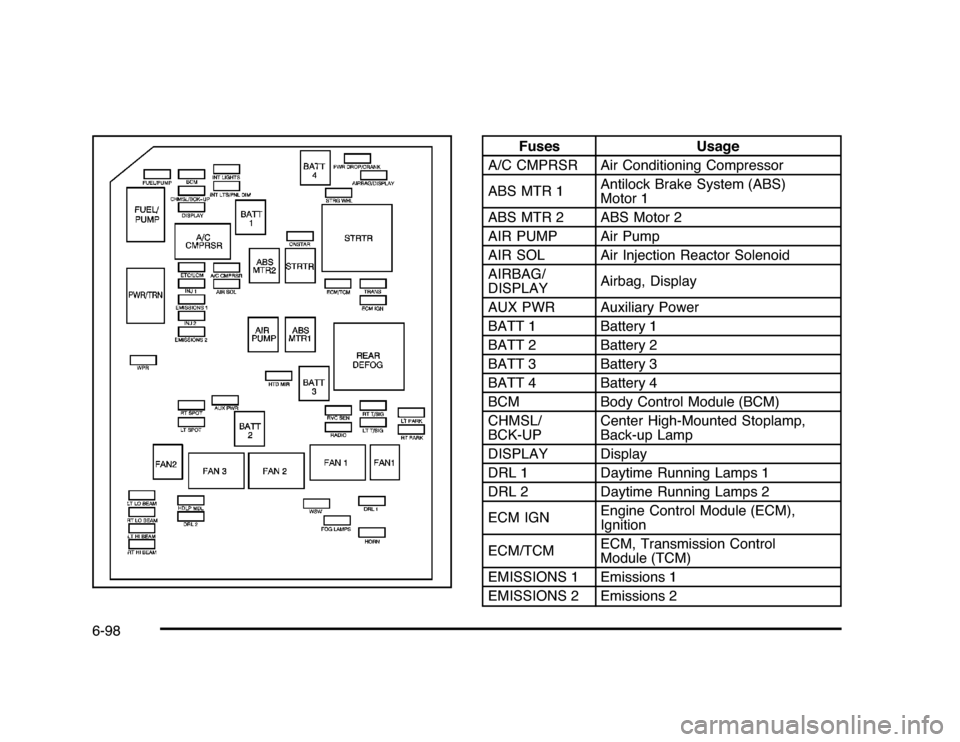
Fuses Usage
A/C CMPRSR Air Conditioning Compressor
ABS MTR 1Antilock Brake System (ABS)
Motor 1
ABS MTR 2 ABS Motor 2
AIR PUMP Air Pump
AIR SOL Air Injection Reactor Solenoid
AIRBAG/
DISPLAYAirbag, Display
AUX PWR Auxiliary Power
BATT 1 Battery 1
BATT 2 Battery 2
BATT 3 Battery 3
BATT 4 Battery 4
BCM Body Control Module (BCM)
CHMSL/
BCK-UPCenter High-Mounted Stoplamp,
Back-up Lamp
DISPLAY Display
DRL 1 Daytime Running Lamps 1
DRL 2 Daytime Running Lamps 2
ECM IGNEngine Control Module (ECM),
Ignition
ECM/TCMECM, Transmission Control
Module (TCM)
EMISSIONS 1 Emissions 1
EMISSIONS 2 Emissions 2
6-98
Page 409 of 432

A
Accessories and Modifications............................ 6-3
Accessory Power............................................3-21
Accessory Power Outlets . ................................4-15
Additives, Fuel................................................. 6-7
Add-On Electrical Equipment............................6-95
Air Cleaner/Filter, Engine . ................................6-19
Air Conditioning..............................................4-16
Air Filter, Passenger Compartment . . ..................4-20
Airbag
Adding Equipment to Your Airbag-Equipped
Vehicle ...................................................2-73
Airbag System
How Does an Airbag Restrain?......................2-63
Passenger Sensing System...........................2-66
Servicing Your Airbag-Equipped Vehicle..........2-72
What Makes an Airbag Inflate?......................2-63
What Will You See After an Airbag Inflates? . . . . 2-64
When Should an Airbag Inflate? . . ..................2-61
Where Are the Airbags?...............................2-59
Airbags
Passenger Status Indicator...........................4-25
Readiness Light..........................................4-24
System Check.............................................2-56
Antenna
Backglass ...................................................4-86
Antenna, XM™ Satellite Radio Antenna
System . . ....................................................4-86Antilock Brake System (ABS)............................. 5-5
Warning Light.............................................4-28
Appearance Care
Aluminum Wheels........................................6-93
Care of Safety Belts....................................6-90
Chemical Paint Spotting . . . . . ..........................6-94
Cleaning Exterior Lamps/Lenses....................6-91
Fabric/Carpet..............................................6-88
Finish Care.................................................6-92
Finish Damage............................................6-94
Instrument Panel, Vinyl, and Other Plastic
Surfaces.................................................6-90
Interior Cleaning..........................................6-87
Leather......................................................6-89
Sheet Metal Damage . . .................................6-94
Tires..........................................................6-93
Underbody Maintenance . . . . . ..........................6-94
Washing Your Vehicle . . . . ...............................6-91
Weatherstrips..............................................6-90
Windshield and Wiper Blades........................6-92
Ashtray.........................................................4-16
Assistance Program, Roadside........................... 8-7
Audio System.................................................4-57
Audio Steering Wheel Controls . . ....................4-84
Radio Reception..........................................4-85
Setting the Clock.........................................4-58
Theft-Deterrent Feature................................4-84
XM™ Satellite Radio Antenna System . . . . . . . . . . . . 4-86
Audio System(s).............................................4-59
1