change time CHEVROLET IMPALA 2011 9.G User Guide
[x] Cancel search | Manufacturer: CHEVROLET, Model Year: 2011, Model line: IMPALA, Model: CHEVROLET IMPALA 2011 9.GPages: 376, PDF Size: 5.71 MB
Page 159 of 376
Black plate (1,1)Chevrolet Impala Owner Manual - 2011
Lighting 6-1
Lighting
Exterior Lighting
Exterior Lamp Controls . . . . . . . . 6-2
Headlamp High/Low-BeamChanger . . . . . . . . . . . . . . . . . . . . . 6-3
Flash-to-Pass . . . . . . . . . . . . . . . . . 6-3
Daytime Running Lamps (DRL)/Automatic
Headlamp System . . . . . . . . . . . 6-4
Hazard Warning Flashers . . . . . 6-4
Turn and Lane-Change Signals . . . . . . . . . . . . . . . . . . . . . . 6-5
Fog Lamps . . . . . . . . . . . . . . . . . . . . 6-5
Interior Lighting
Instrument Panel Illumination Control . . . . . . . . . . . . . . . . . . . . . . 6-6
Courtesy Lamps . . . . . . . . . . . . . . 6-6
Dome Lamps . . . . . . . . . . . . . . . . . 6-6
Reading Lamps . . . . . . . . . . . . . . . 6-6
Lighting Features
Entry Lighting . . . . . . . . . . . . . . . . . 6-6
Delayed Entry Lighting . . . . . . . . 6-7
Delayed Exit Lighting . . . . . . . . . 6-7
Parade Dimming . . . . . . . . . . . . . . 6-7
Battery Load Management . . . . 6-7
Battery Power Protection . . . . . . 6-8
Page 162 of 376
Black plate (4,1)Chevrolet Impala Owner Manual - 2011
6-4 Lighting
Daytime Running
Lamps (DRL)/Automatic
Headlamp System
Daytime Running Lamps (DRL) can
make it easier for others to see the
front of your vehicle during the day.
Fully functional daytime running
lamps are required on all vehicles
first sold in Canada.
The DRL system makes the
low-beam headlamps come on at a
reduced brightness when the
following conditions are met:
.The ignition is in the ON/RUN
position.
.The exterior lamps control is
in AUTO.
.The engine is running.When the DRL are on, the regular
headlamps, taillamps, sidemarker,
and other lamps are not on. The
instrument panel and cluster are
also not on.
The headlamps automatically
change from DRL to the regular
headlamps depending on the
darkness of the surroundings.
The other lamps that come on with
the headlamps will also come on.
When it is bright enough outside,
the headlamps go off and the
DRL come on.
The regular headlamp system
should be turned on when needed.
Do not cover the light sensor on top
of the instrument panel because it
works with the DRL.
Hazard Warning Flashers
The hazard warning flashers let
you warn others that you have a
problem.
The hazard warning flasher button
is located on top of the steering
column.
|:
Press to make the front and
rear turn signal lamps flash on and
off. Press the button again to turn
the flashers off.
When the hazard warning flashers
are on, the turn signals will
not work.
Page 163 of 376
Black plate (5,1)Chevrolet Impala Owner Manual - 2011
Lighting 6-5
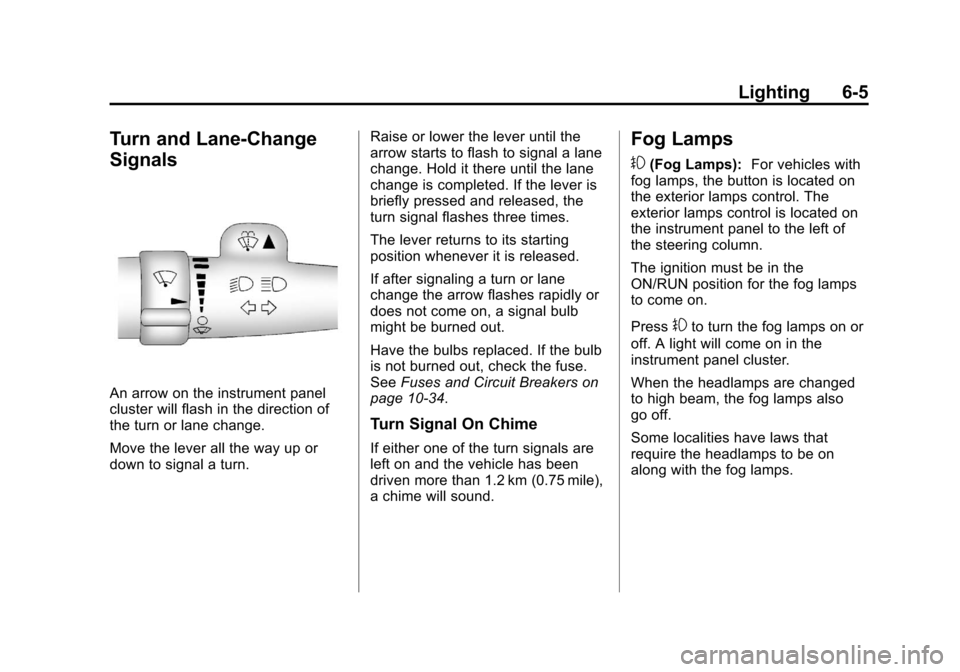
Turn and Lane-Change
Signals
An arrow on the instrument panel
cluster will flash in the direction of
the turn or lane change.
Move the lever all the way up or
down to signal a turn.Raise or lower the lever until the
arrow starts to flash to signal a lane
change. Hold it there until the lane
change is completed. If the lever is
briefly pressed and released, the
turn signal flashes three times.
The lever returns to its starting
position whenever it is released.
If after signaling a turn or lane
change the arrow flashes rapidly or
does not come on, a signal bulb
might be burned out.
Have the bulbs replaced. If the bulb
is not burned out, check the fuse.
See
Fuses and Circuit Breakers on
page 10‑34.
Turn Signal On Chime
If either one of the turn signals are
left on and the vehicle has been
driven more than 1.2 km (0.75 mile),
a chime will sound.
Fog Lamps
#
(Fog Lamps): For vehicles with
fog lamps, the button is located on
the exterior lamps control. The
exterior lamps control is located on
the instrument panel to the left of
the steering column.
The ignition must be in the
ON/RUN position for the fog lamps
to come on.
Press
#to turn the fog lamps on or
off. A light will come on in the
instrument panel cluster.
When the headlamps are changed
to high beam, the fog lamps also
go off.
Some localities have laws that
require the headlamps to be on
along with the fog lamps.
Page 174 of 376
Black plate (8,1)Chevrolet Impala Owner Manual - 2011
7-8 Infotainment System
Storing a Radio Station as a
Favorite, Radio with CD (MP3)
Radios that have a FAV button store
radio stations as favorites.
To store a station as a favorite:
1. Tune to a radio station.
2. Press the FAV button to displaythe page where the station will
be stored.
3. Press and hold one of the 6 softkeys until a beep sounds.
4. Repeat Steps 1 through 3 to store additional radio stations.
The number of favorites pages can
be set up using the MENU button.
To set up the number of favorites
pages:
1. Press the MENU button.
2. Press the softkey located below the FAV 1-6 tab.
3. Select the number of favorites pages by pressing the softkey
located below the displayed
page numbers. 4. Press the FAV button, or let the
menu time out, to return to the
original main radio screen
showing the radio station
frequency tabs and to begin the
process of programming
favorites.
Satellite Radio
XM™ Satellite Radio Service
XM is a satellite radio service that is
based in the 48 contiguous United
States and 10 Canadian provinces.
XM Satellite Radio has a wide
variety of programming and
commercial-free music,
coast-to-coast, and in digital-quality
sound. A service fee is required to
receive the XM service. If XM
Service needs to be reactivated, the
radio will display “No Subscription
Please Renew” on channel XM1.
For more information, contact XM at
www.xmradio.com or call
1-800-929-2100 in the U.S. and
www.xmradio.ca or call
1-877-438-9677 in Canada.
4(Information) (XM Satellite Radio
Service): For vehicles with XM,
press
4to display additional text
information related to the current
XM channel. If information is
available, the song title information
displays on the top line of the
display and artist information
displays on the bottom line.
When information is not available,
“NO INFO” displays.
Auto Text (Satellite Radio
Service): If additional information is
available for the current song being
played, Auto Text will automatically
page/scroll the information every
three seconds above the FAV
presets on the radio display. By
default, Auto Text is enabled.
To change the Auto Text setting:
1. Press MENU to display the radio
setup menu.
2. Press the softkey under AUTO TXT tab on the radio display.
Page 187 of 376
Black plate (21,1)Chevrolet Impala Owner Manual - 2011
Infotainment System 7-21
Pairing Information
.Up to five cell phones can be
paired to the Bluetooth system.
.The pairing process is disabled
when the vehicle is moving.
.Pairing only needs to be
completed once, unless the
pairing information on the cell
phone changes or the cell phone
is deleted from the system.
.Only one paired cell phone can
be connected to the Bluetooth
system at a time.
.If multiple paired cell phones are
within range of the system, the
system connects to the first
available paired cell phone in the
order that they were first paired
to the system. To connect to a
different paired phone, see
“Connecting to a Different
Phone”later in this section.
Pairing a Phone
1. Press and hold
b gfor
two seconds. 2. Say
“Bluetooth.”
3. Say “Pair.”The system responds
with instructions and a four‐digit
Personal Identification Number
(PIN). The PIN is used in Step 5.
4. Start the pairing process on the cell phone that you want to pair.
For help with this process, see
your cell phone manufacturer's
user guide.
5. Locate the device named “Your
Vehicle” in the list on the cell
phone. Follow the instructions
on the cell phone to enter the
PIN that was provided in Step 3.
After the PIN is successfully
entered, the system prompts you
to provide a name for the paired
cell phone. This name will be
used to indicate which phones
are paired and connected to the
vehicle. See “Listing All Paired
and Connected Phones” later in
this section for more information.
6. Repeat Steps 1 through 5 to pair additional phones. Listing All Paired and Connected
Phones
The system can list all cell phones
paired to it. If a paired cell phone is
also connected to the vehicle, the
system responds with
“is connected”
after that phone name.
1. Press and hold
b gfor
two seconds.
2. Say “Bluetooth.”
3. Say “List.”
Deleting a Paired Phone
If the phone name you want to
delete is unknown, see “Listing All
Paired and Connected Phones.”
1. Press and hold
b gfor
two seconds.
2. Say “Bluetooth.”
3. Say “Delete.” The system asks
which phone to delete.
4. Say the name of the phone you want to delete.
Page 188 of 376
Black plate (22,1)Chevrolet Impala Owner Manual - 2011
7-22 Infotainment System
Connecting to a Different Phone
To connect to a different cell phone,
the Bluetooth system looks for the
next available cell phone in the
order in which all the available cell
phones were paired. Depending on
which cell phone you want to
connect to, you may have to use
this command several times.
1. Press and hold
bgfor
two seconds.
2. Say “Bluetooth.”
3. Say “Change phone.”
.If another cell phone is
found, the response will be
“
connected.”
.If another cell phone is not
found, the original phone
remains connected.
Storing and Deleting Phone
Numbers
The system can store up to
30 phone numbers as name tags
in the Hands‐Free Directory that is
shared between the Bluetooth and
OnStar systems.
The following commands are used
to delete and store phone numbers.
Store:This command will store a
phone number, or a group of
numbers as a name tag.
Digit Store: This command allows
a phone number to be stored as a
name tag by entering the digits one
at a time.
Delete: This command is used to
delete individual name tags.
Delete All Name Tags: This
command deletes all stored name
tags in the Hands‐Free Calling
Directory and the OnStar
Turn‐by‐Turn Destinations Directory. Using the
“Store”Command
1. Press and holdb gfor
two seconds.
2. Say “Store.”
3. Say the phone number or group of numbers you want to store all
at once with no pauses, then
follow the directions given by the
system to save a name tag for
this number.
Using the “Digit Store” Command
If an unwanted number is
recognized by the system, say
“Clear” at any time to clear the
last number.
To hear all of the numbers
recognized by the system, say
“Verify” at any time.
1. Press and hold
b gfor
two seconds.
2. Say “Digit Store.”
Page 189 of 376
Black plate (23,1)Chevrolet Impala Owner Manual - 2011
Infotainment System 7-23
3. Say each digit, one at a time,that you want to store. After
each digit is entered, the system
repeats back the digit it heard
followed by a tone. After the last
digit has been entered, say
“Store,” and then follow the
directions given by the system to
save a name tag for this number.
Using the “Delete”Command
1. Press and hold
b gfor
two seconds.
2. Say “Delete.”
3. Say the name tag you want to delete. Using the
“Delete All Name Tags”
Command
This command deletes all stored
name tags in the Hands‐Free
Calling Directory and the OnStar
Turn‐by‐Turn Destinations Directory.
To delete all name tags:
1. Press and hold
b gfor
two seconds.
2. Say “Delete all name tags.”
Listing Stored Numbers
The list command will list all stored
numbers and name tags.
Using the “List”Command
1. Press and hold
b gfor
two seconds.
2. Say “Directory.”
3. Say “Hands‐Free Calling.”
4. Say “List.”
Making a Call
Calls can be made using the
following commands.
Dial or Call: The dial or call
command can be used
interchangeably to dial a phone
number or a stored name tag.
Digit Dial: This command allows a
phone number to be dialed by
entering the digits one at a time.
Re‐dial : This command is used to
dial the last number used on the cell
phone.
Using the “Dial”or“Call”
Command
1. Press and hold
b gfor
two seconds.
2. Say “Dial”or“Call.”
3. Say the entire number without pausing, or say the name tag.
Once connected, the person called
will be heard through the audio
speakers.
Page 195 of 376
Black plate (3,1)Chevrolet Impala Owner Manual - 2011
Climate Controls 8-3
Air Delivery Mode Control:Turn
clockwise or counterclockwise to
change the direction of the airflow
inside the vehicle.
To change the current mode, select
one of the following:
H(Vent): Air is directed to the
instrument panel outlets.
)(Bi-Level): Air is divided
between the instrument panel
outlets and the floor outlets.
6(Floor): Air is directed to the
floor outlets, with some of the air
directed to the windshield and side
window outlets. In this mode, the
system automatically selects
outside air.
-(Defog): This mode clears the
windshield of fog or moisture. Air is
directed equally to the windshield
and the floor outlets. When defog is
selected, the system turns off
recirculation and runs the air
conditioning compressor unless the
outside temperature is below
4°C (40°F).
0(Defrost): This mode clears
the windshield of fog or frost more
quickly. Air is directed to the
windshield with some air to the side
window vents and the floor vents.
When defrost is selected, the
system automatically forces outside
air into the vehicle. The air
conditioning compressor will run
automatically in this setting, unless
the outside temperature is below
4°C (40°F).
#(Air Conditioning): Press to
turn the air conditioning system on
or off. An indicator light comes
on to show that it is on. The air
conditioning can be selected in any
mode as long as the fan is on and
the outside temperature is above
freezing. A flashing indicator light
indicates that the air conditioning
compressor is currently not
available.
On hot days, open the windows to
let hot inside air escape; then close
them. This helps to reduce the time it takes for the vehicle to cool down.
It also helps the system to operate
more efficiently.
For quick cool down on hot days, do
the following:
1. Select the
Hmode.
2. Press the
#button.
3. Select the coolest temperature for both zones.
4. Select the highest
9speed.
5. When the coolest temperature is selected in the A/C mode, the
system automatically goes into
the recirculation mode to
improve cooling.
Using these settings together for
long periods of time may cause the
air inside the vehicle to become too
dry. To prevent this from happening,
after the air inside the vehicle has
cooled, turn the recirculation
mode off.
Page 217 of 376
Black plate (19,1)Chevrolet Impala Owner Manual - 2011
Driving and Operating 9-19
When the Low Fuel warning
lamp is on and the FUEL LEVEL
LOW message is displayed in
the Driver Information Center
(DIC), the Computer‐Controlled
Cranking System is disabled to
prevent possible vehicle
component damage. When this
happens, hold the ignition switch
in the START position to
continue engine cranking.
Notice: Cranking the engine for
long periods of time, by returning
the key to the START position
immediately after cranking has
ended, can overheat and damage
the cranking motor, and drain the
battery. Wait at least 15 seconds
between each try, to let the
cranking motor cool down. 2. If the engine does not start after
5‐10 seconds, especially in very
cold weather (below −18°C or
0°F), it could be flooded with too
much gasoline. Try pushing the
accelerator pedal all the way to
the floor and holding it there as
you hold the key in START for
up to a maximum of 15 seconds.
Wait at least 15 seconds
between each try, to allow the
cranking motor to cool down.
When the engine starts, let go of
the key and accelerator. If the
vehicle starts briefly but then
stops again, repeat these steps. This clears the extra gasoline
from the engine. Do not race the
engine immediately after starting
it. Operate the engine and
transmission gently until the oil
warms up and lubricates all
moving parts.
Notice: The engine is designed to
work with the electronics in the
vehicle. If you add electrical parts
or accessories, you could change
the way the engine operates.
Before adding electrical
equipment, check with your
dealer. If you do not, the engine
might not perform properly. Any
resulting damage would not be
covered by the vehicle warranty.
Page 226 of 376
Black plate (28,1)Chevrolet Impala Owner Manual - 2011
9-28 Driving and Operating
Let us say the road is wet and you
are driving safely. Suddenly, an
animal jumps out in front of you.
You slam on the brakes and
continue braking. Here is what
happens with ABS:
A computer senses that the wheels
are slowing down. If one of the
wheels is about to stop rolling, the
computer will separately work the
brakes at each wheel.
ABS can change the brake pressure
to each wheel, as required, faster
than any driver could. This can help
the driver steer around the obstacle
while braking hard.
As the brakes are applied, the
computer keeps receiving updates
on wheel speed and controls
braking pressure accordingly.Remember: ABS does not change
the time needed to get a foot up to
the brake pedal or always decrease
stopping distance. If you get too
close to the vehicle in front of you,
there will not be enough time to
apply the brakes if that vehicle
suddenly slows or stops. Always
leave enough room up ahead to
stop, even with ABS.
Using ABS
Do not pump the brakes. Just hold
the brake pedal down firmly and let
antilock work. You might feel a slight
brake pedal pulsation or hear some
noise, but this is normal.
Braking in Emergencies
At some time, nearly every driver
gets into a situation that requires
hard braking.
If the vehicle has ABS, it allows the
driver to steer and brake at the
same time. However, if the vehicle
does not have ABS, the first
reaction
—to hit the brake pedal
hard and hold it down —might be the wrong thing to do. The wheels
can stop rolling. Once they do, the
vehicle cannot respond to the
driver's steering. Momentum will
carry it in whatever direction it was
headed when the wheels stopped
rolling. That could be off the road,
into the very thing the driver was
trying to avoid, or into traffic.
If the vehicle does not have ABS,
use a
“squeeze” braking technique.
This gives maximum braking while
maintaining steering control. Do this
by pushing on the brake pedal with
steadily increasing pressure. In an
emergency, you will probably want
to squeeze the brakes hard without
locking the wheels. If you hear or
feel the wheels sliding, ease off the
brake pedal. This helps retain
steering control.
In many emergencies, steering can
help more than even the very best
braking.