Stop CHEVROLET MALIBU 2017 9.G Owners Manual
[x] Cancel search | Manufacturer: CHEVROLET, Model Year: 2017, Model line: MALIBU, Model: CHEVROLET MALIBU 2017 9.GPages: 419, PDF Size: 7.81 MB
Page 352 of 419
Chevrolet Malibu Owner Manual (GMNA-Localizing-U.S./Canada/Mexico-10122664) - 2017 - crc - 5/23/16
Vehicle Care 351
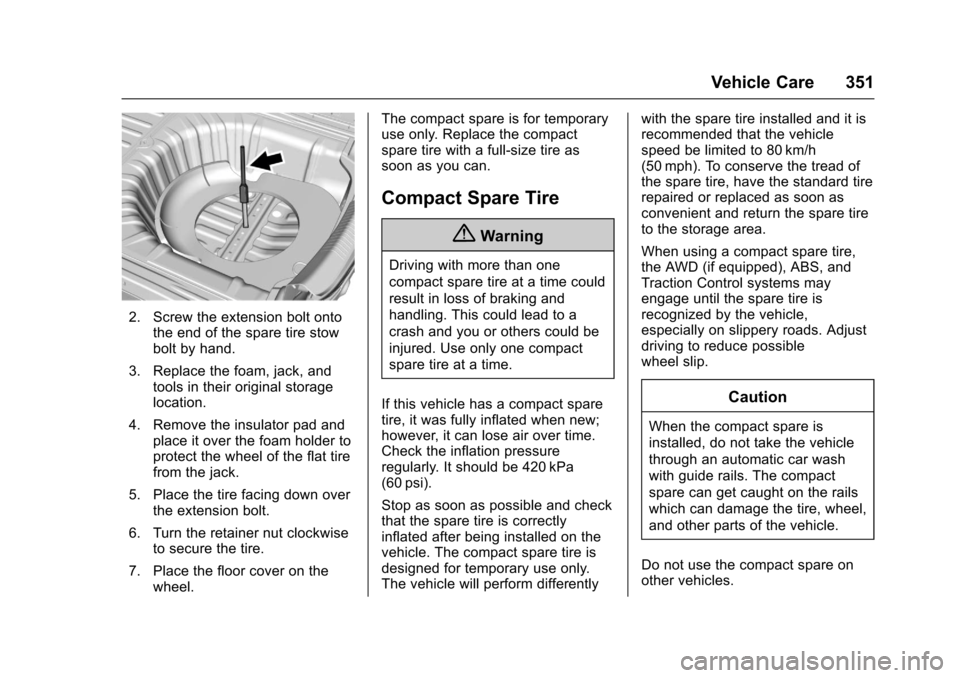
2. Screw the extension bolt ontothe end of the spare tire stowbolt by hand.
3. Replace the foam, jack, andtools in their original storagelocation.
4. Remove the insulator pad andplace it over the foam holder toprotect the wheel of the flat tirefrom the jack.
5. Place the tire facing down overthe extension bolt.
6. Turn the retainer nut clockwiseto secure the tire.
7. Place the floor cover on thewheel.
The compact spare is for temporaryuse only. Replace the compactspare tire with a full-size tire assoon as you can.
Compact Spare Tire
{Warning
Driving with more than one
compact spare tire at a time could
result in loss of braking and
handling. This could lead to a
crash and you or others could be
injured. Use only one compact
spare tire at a time.
If this vehicle has a compact sparetire, it was fully inflated when new;however, it can lose air over time.Check the inflation pressureregularly. It should be 420 kPa(60 psi).
Stop as soon as possible and checkthat the spare tire is correctlyinflated after being installed on thevehicle. The compact spare tire isdesigned for temporary use only.The vehicle will perform differently
with the spare tire installed and it isrecommended that the vehiclespeed be limited to 80 km/h(50 mph). To conserve the tread ofthe spare tire, have the standard tirerepaired or replaced as soon asconvenient and return the spare tireto the storage area.
When using a compact spare tire,the AWD (if equipped), ABS, andTraction Control systems mayengage until the spare tire isrecognized by the vehicle,especially on slippery roads. Adjustdriving to reduce possiblewheel slip.
Caution
When the compact spare is
installed, do not take the vehicle
through an automatic car wash
with guide rails. The compact
spare can get caught on the rails
which can damage the tire, wheel,
and other parts of the vehicle.
Do not use the compact spare onother vehicles.
Page 357 of 419
Chevrolet Malibu Owner Manual (GMNA-Localizing-U.S./Canada/Mexico-10122664) - 2017 - crc - 5/23/16
356 Vehicle Care
Recreational Vehicle
Towing
Recreational vehicle towing meanstowing the vehicle behind anothervehicle–such as behind a motorhome. The two most common typesof recreational vehicle towing areknown as dinghy towing and dollytowing. Dinghy towing is towing thevehicle with all four wheels on theground. Dolly towing is towing thevehicle with two wheels on theground and two wheels up on adevice known as a dolly.
Here are some important things toconsider before recreational vehicletowing:
.What is the towing capacity ofthe towing vehicle? Be sure toread the tow vehiclemanufacturer'srecommendations.
.How far will the vehicle betowed? Some vehicles haverestrictions on how far and howlong they can tow.
.Does the vehicle have theproper towing equipment? Seeyour dealer or traileringprofessional for additional adviceand equipmentrecommendations.
.Is the vehicle ready to betowed? Just as preparing thevehicle for a long trip, make surethe vehicle is prepared to betowed.
Dinghy Towing (1.5L Engine
without Active Shutters
RPO VRI)
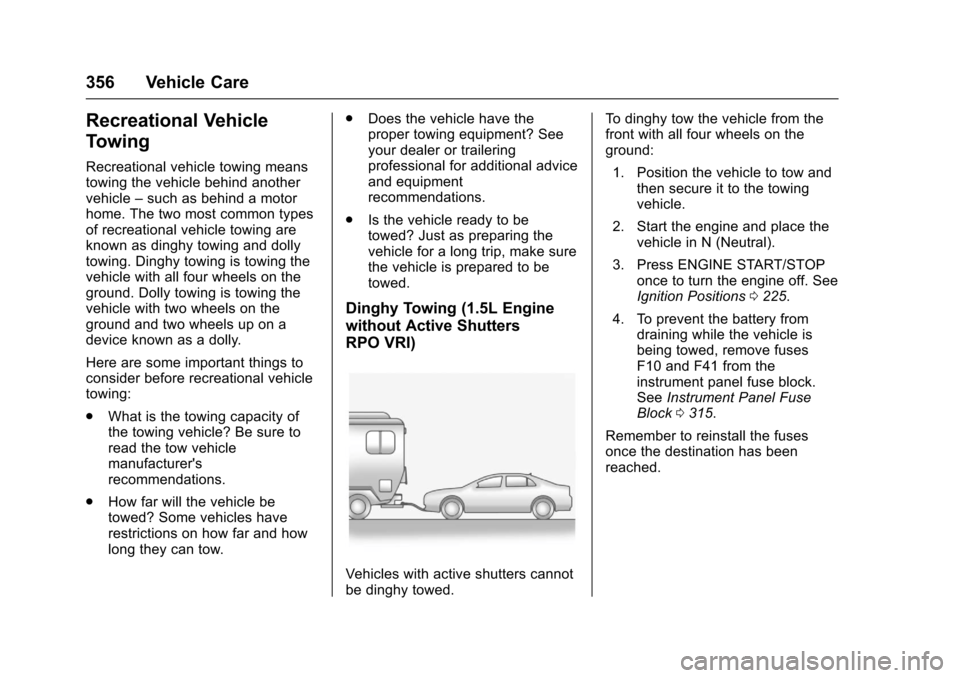
Vehicles with active shutters cannotbe dinghy towed.
To d i n g h y t o w t h e v e h i c l e f r o m t h efront with all four wheels on theground:
1. Position the vehicle to tow andthen secure it to the towingvehicle.
2. Start the engine and place thevehicle in N (Neutral).
3. Press ENGINE START/STOPonce to turn the engine off. SeeIgnition Positions0225.
4. To prevent the battery fromdraining while the vehicle isbeing towed, remove fusesF10 and F41 from theinstrument panel fuse block.SeeInstrument Panel FuseBlock0315.
Remember to reinstall the fusesonce the destination has beenreached.
Page 367 of 419
Chevrolet Malibu Owner Manual (GMNA-Localizing-U.S./Canada/Mexico-10122664) - 2017 - crc - 5/23/16
366 Vehicle Care
Cargo Cover and
Convenience Net
Wash with warm water and milddetergent. Do not use chlorinebleach. Rinse with cold water, andthen dry completely.
Care of Safety Belts
Keep belts clean and dry.
{Warning
Do not bleach or dye safety belt
webbing. It may severely weaken
the webbing. In a crash, they
might not be able to provide
adequate protection. Clean and
rinse safety belt webbing only
with mild soap and lukewarm
water. Allow the webbing to dry.
Floor Mats
{Warning
If a floor mat is the wrong size or
is not properly installed, it can
interfere with the pedals.
Interference with the pedals can
cause unintended acceleration
and/or increased stopping
distance which can cause a crash
and injury. Make sure the floor
mat does not interfere with the
pedals.
Use the following guidelines forproper floor mat usage:
.The original equipment floormats were designed for yourvehicle. If the floor mats needreplacing, it is recommendedthat GM certified floor mats bepurchased. Non-GM floor matsmay not fit properly and mayinterfere with the pedals. Alwayscheck that the floor mats do notinterfere with the pedals.
.Do not use a floor mat if thevehicle is not equipped with afloor mat retainer on the driverside floor.
.Use the floor mat with thecorrect side up. Do not turnit over.
.Do not place anything on top ofthe driver side floor mat.
.Use only a single floor mat onthe driver side.
.Do not place one floor mat ontop of another.
Removing and Replacing the
Floor Mats
If equipped, pull up on the rear ofthe floor mat to unlock each retainerand remove.
Page 370 of 419
Chevrolet Malibu Owner Manual (GMNA-Localizing-U.S./Canada/Mexico-10122664) - 2017 - crc - 5/23/16
Service and Maintenance 369
frequent checks and services. TheAdditional Required Services -Normal are for vehicles that:
.Carry passengers and cargowithin recommended limits onthe Tire and Loading Informationlabel. SeeVehicle LoadLimits0222.
.Are driven on reasonable roadsurfaces within legal drivinglimits.
.Use the recommended fuel. SeeFuel0268.
Refer to the information in theMaintenance Schedule AdditionalRequired Services - Normal chart.
The Additional Required Services -Severe are for vehicles that are:
.Mainly driven in heavy city trafficin hot weather.
.Mainly driven in hilly ormountainous terrain.
.Frequently towing a trailer.
.Used for high speed orcompetitive driving.
.Used for taxi, police, or deliveryservice.
Refer to the information in theMaintenance Schedule AdditionalRequired Services - Severe chart.
{Warning
Performing maintenance work can
be dangerous and can cause
serious injury. Perform
maintenance work only if the
required information, proper tools,
and equipment are available.
If they are not, see your dealer to
have a trained technician do the
work. SeeDoing Your Own
Service Work0280.
Maintenance
Schedule
Owner Checks and Services
At Each Fuel Stop
.Check the engine oil level. SeeEngine Oil0288.
Once a Month
.Check the tire inflationpressures. SeeTirePressure0325.
.Inspect the tires for wear. SeeTire Inspection0331.
.Check the windshield washerfluid level. SeeWasherFluid0299.
Engine Oil Change
When the CHANGE ENGINE OILSOON message displays, have theengine oil and filter changed withinthe next 1 000 km/600 mi. If drivenunder the best conditions, theengine oil life system may notindicate the need for vehicle servicefor up to a year. The engine oil andfilter must be changed at least once
Page 376 of 419
Chevrolet Malibu Owner Manual (GMNA-Localizing-U.S./Canada/Mexico-10122664) - 2017 - crc - 5/23/16
Service and Maintenance 375
.To a v o i d b r e a k - d o w n o r f a i l u r e t ostart the vehicle, maintain abattery with full cranking power.
.Trained dealer technicians havethe diagnostic equipment to testthe battery and ensure that theconnections and cables arecorrosion-free.
Belts
.Belts may need replacing if theysqueak or show signs ofcracking or splitting.
.Trained dealer technicians haveaccess to tools and equipmentto inspect the belts andrecommend adjustment orreplacement when necessary.
Brakes
Brakes stop the vehicle and arecrucial to safe driving.
.Signs of brake wear may includechirping, grinding, or squealingnoises, or difficulty stopping.
.Trained dealer technicians haveaccess to tools and equipmentto inspect the brakes andrecommend quality partsengineered for the vehicle.
Fluids
Proper fluid levels and approvedfluids protect the vehicle’ssystemsand components. SeeRecommended Fluids andLubricants0377for GM approvedfluids.
.Engine oil and windshieldwasher fluid levels should bechecked at every fuel fill.
.Instrument cluster lights maycome on to indicate that fluidsmay be low and need to befilled.
Hoses
Hoses transport fluids and shouldbe regularly inspected to ensurethat there are no cracks or leaks.With a multi-point inspection, yourdealer can inspect the hoses andadvise if replacement is needed.
Lamps
Properly working headlamps,taillamps, and brake lamps areimportant to see and be seen onthe road.
.Signs that the headlamps needattention include dimming, failureto light, cracking, or damage.The brake lamps need to bechecked periodically to ensurethat they light when braking.
.With a multi-point inspection,your dealer can check the lampsand note any concerns.
Shocks and Struts
Shocks and struts help aid in controlfor a smoother ride.
.Signs of wear may includesteering wheel vibration, bounce/sway while braking, longerstopping distance, or uneventire wear.
.As part of the multi-pointinspection, trained dealertechnicians can visually inspectthe shocks and struts for signs
Page 401 of 419
Chevrolet Malibu Owner Manual (GMNA-Localizing-U.S./Canada/Mexico-10122664) - 2017 - crc - 5/23/16
400 OnStar
from each other and use acombination of letters, numbers,and symbols to increase thesecurity.
.Change the default name of theSSID (Service Set Identifier).This is your network’snamethatis visible to other wirelessdevices. Choose a unique nameand avoid family names orvehicle descriptions.
OnStar Wi-Fi®Hotspot (IfEquipped)
The vehicle may have a built-inWi-Fi hotspot that provides accessto the Internet and web content at4G LTE speed. Up to seven mobiledevices can be connected. A dataplan is required. Use the in-vehiclecontrols only when it is safe todo so.
1. To retrieve Wi-Fi hotspot
information, press=,waitfor
the prompt, then say“Wi-Fisettings.”On some vehicles,touch Wi-Fi Settings on thescreen.
2. The Wi-Fi settings will displaythe Wi-Fi hotspot name (SSID),password, and on somevehicles, the connection type(no Internet connection, 3G,4G, 4G LTE), and signal quality(poor, good, excellent).
3. To change the SSID or
password, pressQor call
1-888-4ONSTAR to connectwith an Advisor.
After initial set-up, your vehicle’sWi-Fi hotspot will connectautomatically to your mobiledevices. Manage data usage byturning Wi-Fi on or off on yourmobile device, using theRemoteLink mobile app, or bycontacting an OnStar Advisor.
OnStar RemoteLink®Mobile App(If Equipped)
Download the OnStar RemoteLinkmobile app to select Apple®iOS,Android™,BlackBerry®,or Windows®mobile devices.OnStar Subscribers can access thefollowing services from a mobiledevice:
.Remotely start/stop the vehicle,if factory-equipped.
.Lock/unlock doors, if equippedwith automatic locks.
.Activate the horn and lamps.
.Check the vehicle’sfuellevel,oillife, or tire pressure,if factory-equipped with the TirePressure Monitor System.
.Send directions to the vehicle.
.Locate the vehicle on a map(U.S. market only).
.Turn the vehicle's Wi-Fi hotspoton/off, manage settings, andmonitor data consumption,if equipped.
For OnStar RemoteLink informationand compatibility, seewww.onstar.com (U.S.) orwww.onstar.ca (Canada).
Remote Services
Contact an OnStar Advisor tounlock the doors or sound the hornand flash the lamps.
Page 409 of 419

Chevrolet Malibu Owner Manual (GMNA-Localizing-U.S./Canada/Mexico-10122664) - 2017 - crc - 5/23/16
408 Index
Apple CarPlay and
Android Auto . . . . . . . . . . . . . . . . . . 199
Armrest
Rear Seat . . . . . . . . . . . . . . . . . . . . . . 64
Assistance Program,
Roadside . . . . . . . . . . . . . . . . . . . . . . 387
Assistance Systems for
Driving . . . . . . . . . . . . . . . . . . . . . . . . 257
Assistance Systems for
Parking and Backing . . . . . . . . . . 253
Audio
Theft-Deterrent Feature . . . . . . . 172
Automatic
Door Locks . . . . . . . . . . . . . . . . . . . . . 43
Forward Braking . . . . . . . . . . . . . . 260
Headlamp System . . . . . . . . . . . . 166
Transmission . . . . . . . . . . . . . . . . . 233
Transmission Fluid . . . . . . . . . . . 292
Automatic Transmission
Manual Mode . . . . . . . . . . . . . . . . . 235
Shift Lock Control Function
Check . . . . . . . . . . . . . . . . . . . . . . . 303
Avoiding Untrusted Media
Devices . . . . . . . . . . . . . . . . . . . . . . . 184
B
Backglass Antenna . . . . . . . . . . . . . 183
Battery
Exterior Lighting Battery
Saver . . . . . . . . . . . . . . . . . . . . . . . 170
Load Management . . . . . . . . . . . . 169
Power Protection . . . . . . . . . . . . . 170
Voltage and Charging
Messages . . . . . . . . . . . . . . . . . . . 138
Battery - North America . . . . 301, 352
Blade Replacement, Wiper . . . . . 304
Bluetooth
Overview . . . . . . . . . . . 190, 191, 195
Brake
Parking, Electric . . . . . . . . . . . . . . 238
System Warning Light . . . . . . . . 124
Brakes . . . . . . . . . . . . . . . . . . . . . . . . . . 299
Antilock . . . . . . . . . . . . . . . . . . . . . . . 236
Assist . . . . . . . . . . . . . . . . . . . . . . . . . 239
Fluid . . . . . . . . . . . . . . . . . . . . . . . . . . 300
Parking . . . . . . . . . . . . . . . . . . . . . . . 237
Regenerative Braking . . . . . . . . . 240
System Messages . . . . . . . . . . . . 138
Braking . . . . . . . . . . . . . . . . . . . . . . . . . 216
Automatic Forward . . . . . . . . . . . 260
Braking System
Front Pedestrian (FPB) . . . . . . . 261
Break-In, New Vehicle . . . . . . . . . . 225
Bulb Replacement . . . . . . . . . . . . . . 309
Halogen Bulbs . . . . . . . . . . . . . . . . 305
Headlamp Aiming . . . . . . . . . . . . . 305
Headlamps . . . . . . . . . . . . . . . . . . . 305
Headlamps, Front Turn
Signal, Sidemarker, and
Parking Lamps . . . . . . . . . . . . . . 305
License Plate Lamps . . . . . . . . . 308
Ta i l l a m p s , T u r n S i g n a l ,
Stoplamps, and
Back-up Lamps . . . . . . . . 307, 308
Buying New Tires . . . . . . . . . . . . . . . 333
C
Calibration . . . . . . . . . . . . . . . . . . . . . . 106
California
Fuel Requirements . . . . . . . . . . . 269
Perchlorate Materials
Requirements . . . . . . . . . . . . . . . 279
California
Proposition
65 Warning . . . . . . . . . .279, 301, 352
Canadian Vehicle Owners . . . . . . . . 2
Capacities and
Specifications . . . . . . . . . . . . . . . . . 381
Carbon Monoxide
Engine Exhaust . . . . . . . . . . . . . . . 232
Trunk . . . . . . . . . . . . . . . . . . . . . . . . . . . 44
Winter Driving . . . . . . . . . . . . . . . . 220
Page 417 of 419

Chevrolet Malibu Owner Manual (GMNA-Localizing-U.S./Canada/Mexico-10122664) - 2017 - crc - 5/23/16
416 Index
Seats (cont'd)
Power Adjustment, Front . . . . . . . 57
Rear . . . . . . . . . . . . . . . . . . . . . . . . . . . . 62
Reclining Seatbacks . . . . . . . . . . . . 57
Securing Child Restraints . . . . 96, 98
Security
Light . . . . . . . . . . . . . . . . . . . . . . . . . . 129
Messages . . . . . . . . . . . . . . . . . . . . 145
OnStar®...................... 398
Vehicle . . . . . . . . . . . . . . . . . . . . . . . . . 46
Vehicle Alarm . . . . . . . . . . . . . . . . . . . 46
Service . . . . . . . . . . . . . . . . . . . . . . . . . 213
Accessories and
Modifications . . . . . . . . . . . . . . . . 280
Climate Control System . . . . . . . 205
Doing Your Own Work . . . . . . . . 280
Engine Soon Light . . . . . . . . . . . . 122
Maintenance Records . . . . . . . . 379
Maintenance, General
Information . . . . . . . . . . . . . . . . . . 368
Parts Identification Label . . . . . 380
Publications Ordering
Information . . . . . . . . . . . . . . . . . . 392
Scheduling Appointments . . . . . 389
Vehicle Messages . . . . . . . . . . . . 145
Service Electric Parking
Brake Light . . . . . . . . . . . . . . . . . . . . 125
Services
Special Application . . . . . . . . . . . 374
Servicing the Airbag . . . . . . . . . . . . . 81
Shift Lock Control Function
Check, Automatic
Transmission . . . . . . . . . . . . . . . . . . 303
Shifting
Into Park . . . . . . . . . . . . . . . . . . . . . . 230
Out of Park . . . . . . . . . . . . . . . . . . . 231
Side Blind Zone Alert (SBZA) . . . 263
Signals, Turn and
Lane-Change . . . . . . . . . . . . . . . . . 167
Spare Tire
Compact . . . . . . . . . . . . . . . . . . . . . . 351
Special Application Services . . . . 374
Specifications and
Capacities . . . . . . . . . . . . . . . . . . . . . 381
Speedometer . . . . . . . . . . . . . . . . . . . 117
StabiliTrak
OFF Light . . . . . . . . . . . . . . . . . . . . . 127
Start Assist, Hill . . . . . . . . . . . . . . . . . 240
Start Vehicle, Remote . . . . . . . . . . . 38
Starter Switch Check . . . . . . . . . . . 303
Starting the Engine . . . . . . . . . . . . . 227
Starting the Vehicle
Messages . . . . . . . . . . . . . . . . . . . . . 146
Steering . . . . . . . . . . . . . . . . . . . . . . . . 217
Heated Wheel . . . . . . . . . . . . . . . . 105
Steering (cont'd)
Wheel Adjustment . . . . . . . . . . . . 104
Wheel Controls . . . . . . . . . . . . . . . 104
Steering System Messages . . . . . 145
Stoplamps and Back-up Lamps
Bulb Replacement . . . . . . . 307, 308
Storage Areas
Center Console . . . . . . . . . . . . . . . 102
Convenience Net . . . . . . . . . . . . . 102
Glove Box . . . . . . . . . . . . . . . . . . . . 101
Umbrella . . . . . . . . . . . . . . . . . . . . . . 102
Storage Compartments . . . . . . . . . 101
Storing the Tire Sealant and
Compressor Kit . . . . . . . . . . . . . . . 346
Stuck Vehicle . . . . . . . . . . . . . . . . . . . 221
Summer Tires . . . . . . . . . . . . . . . . . . 319
Sun Visors . . . . . . . . . . . . . . . . . . . . . . . 52
Sunroof . . . . . . . . . . . . . . . . . . . . . . . . . . 52
Symbols . . . . . . . . . . . . . . . . . . . . . . . . . . 3
System
Forward Collision
Alert (FCA) . . . . . . . . . . . . . . . . . . 258
Infotainment . . . . . . . . . . . . . 171, 396
Systems
Driver Assistance . . . . . . . . . . . . . 252