display CHEVROLET MALIBU 2017 9.G Owners Manual
[x] Cancel search | Manufacturer: CHEVROLET, Model Year: 2017, Model line: MALIBU, Model: CHEVROLET MALIBU 2017 9.GPages: 419, PDF Size: 7.81 MB
Page 266 of 419
Chevrolet Malibu Owner Manual (GMNA-Localizing-U.S./Canada/Mexico-10122664) - 2017 - crc - 5/23/16
Driving and Operating 265
system is operating. When thevehicle is in a forward gear, the leftor right side mirror display will lightup if a moving vehicle is detected inthe next lane over in that blind zoneor rapidly approaching that zone.If the turn signal is activated in thesame direction as a detectedvehicle, this display will flash as anextra warning not to change lanes.
LCA can be disabled throughvehicle personalization. See“Collision/Detection Systems”underVehicle Personalization0147.If LCA is disabled by the driver, theLCA mirror displays will not light up.
When the System Does Not
Seem to Work Properly
The LCA system requires somedriving for the system to calibrate tomaximum performance. Thiscalibration may occur more quickly ifthe vehicle is driven on a straighthighway road with traffic androadside objects (e.g., guardrails,barriers). During a trip, the LCAsystem is not operational until thevehicle first reaches a speed of24 km/h (15 mph).
LCA displays may not come onwhen passing a vehicle quickly, forastoppedvehicle,orwhentowingatrailer. The LCA detection zonesthat extend back from the side ofthe vehicle do not move further backwhen a trailer is towed. Use cautionwhile changing lanes when towing atrailer. LCA may alert to objectsattached to the vehicle, such as atrailer, bicycle, or object extendingout to either side of the vehicle.Attached objects may also interferewith the detection of vehicles. Thisis normal system operation; thevehicle does not need service.
LCA may not always alert the driverto vehicles in the next lane over,especially in wet conditions or whendriving on sharp curves. The systemdoes not need to be serviced. Thesystem may light up due toguardrails, signs, trees, shrubs, andother non-moving objects. This isnormal system operation; thevehicle does not need service.
LCA may not operate when the LCAsensors in the left or right corners ofthe rear bumper are covered withmud, dirt, snow, ice, or slush, or in
heavy rainstorms. For cleaninginstructions, see "Washing theVehicle" underExterior Care0358.If the DIC still displays the systemunavailable message after cleaningboth sides of the vehicle toward therear corners of the vehicle, see yourdealer.
If the LCA displays do not light upwhen moving vehicles are in theside blind zone or rapidlyapproaching this zone and thesystem is clean, the system mayneed service. Take the vehicle toyour dealer.
When LCA is disabled for anyreason other than the driver turningit off, the Lane Change Alert Onoption will not be available on thepersonalization menu.
Radio Frequency Information
SeeRadio FrequencyStatement0393.
Page 268 of 419
Chevrolet Malibu Owner Manual (GMNA-Localizing-U.S./Canada/Mexico-10122664) - 2017 - crc - 5/23/16
Driving and Operating 267
{Warning
Using LKA while towing a trailer
or on slippery roads could cause
loss of control of the vehicle and
acrash.Turnthesystemoff.
How the System Works
The LKA camera sensor is on thewindshield ahead of the rearviewmirror.
To t u r n L K A o n a n d o f f , p r e s sA
on the steering wheel.
When on,Ais green if LKA is
available to assist and provide LDWalerts. It may assist by gentlyturning the steering wheel and
displayAas amber if the vehicle
approaches a detected lane markingwithout using a turn signal in thatdirection. It may also provide an
LDW alert by flashingAamber
as the lane marking is crossed.Additionally, there will be threebeeps on the right or left, dependingon the lane departure direction.
The LKA system does notcontinuously steer the vehicle.If LKA does not detect active driversteering, an alert and chime may beprovided. Move the steering wheelto dismiss.
When the System Does Not
Seem to Work Properly
The system performance may beaffected by:
.Close vehicles ahead.
.Sudden lighting changes, suchas when driving through tunnels.
.Banked roads.
.Roads with poor lane markings,such as two-lane roads.
If the LKA system is not functioningproperly when lane markings areclearly visible, cleaning thewindshield may help.
LKA assistance and/or LDW alertsmay occur due to tar marks,shadows, cracks in the road,temporary or construction lanemarkings, or other roadimperfections. This is normal systemoperation; the vehicle does not needservice. Turn LKA off if theseconditions continue.
Page 289 of 419
Chevrolet Malibu Owner Manual (GMNA-Localizing-U.S./Canada/Mexico-10122664) - 2017 - crc - 5/23/16
288 Vehicle Care
1.Engine Air Cleaner/Filter0292.
2. Engine Oil Fill Cap. SeeEngine Oil0288.
3. Engine Oil Dipstick. SeeEngine Oil0288.
4. Engine Cooling Fan (Out ofView). SeeCooling System(Engine)0293orCoolingSystem (PowerElectronics)0294.
5. Brake Fluid Reservoir. SeeBrakes0299.
6. Coolant Surge Tank andPressure Cap. SeeEngineCoolant0295.
7.Battery - North America0301.
8. Remote Positive (+) BatteryTe r m i n a l ( U n d e r C o v e r ) . S e eJump Starting - NorthAmerica0352.
9.Engine Compartment FuseBlock0311.
10. Windshield Washer FluidReservoir. SeeWasherFluid0299.
11 . R e m o t e N e g a t i v e ( - ) B a t t e r yTe r m i n a l . S e eJump Starting -North America0352.
Engine Oil
To e n s u r e p r o p e r e n g i n eperformance and long life, carefulattention must be paid to engine oil.Following these simple, butimportant steps will help protectyour investment:
.Use engine oil approved to theproper specification and of theproper viscosity grade. See“Selecting the Right Engine Oil”in this section.
.Check the engine oil levelregularly and maintain theproper oil level. See“CheckingEngine Oil”and“When to AddEngine Oil”in this section.
.Change the engine oil at theappropriate time. SeeEngine OilLife System0291.
.Always dispose of engine oilproperly. See“What to Do withUsed Oil”later in this section.
Checking Engine Oil
Check the engine oil level regularly(every 650 km (400 mi), especiallyprior to a long trip. The engine oildipstick handle is a loop. SeeEngine Compartment Overview0283for the location.
{Warning
The engine oil dipstick handle
may be hot; it could burn you.
Use a towel or glove to touch the
dipstick handle.
If a low oil Driver Information Center(DIC) message displays, check theoil level.
Follow these guidelines:
.To g e t a n a c c u r a t e r e a d i n g , p a r kthe vehicle on level ground.Check the engine oil level afterthe engine has been off for atleast two hours. Checking theengine oil level on steep gradesor too soon after engine shutoffcan result in incorrect readings.Accuracy improves when
Page 292 of 419
Chevrolet Malibu Owner Manual (GMNA-Localizing-U.S./Canada/Mexico-10122664) - 2017 - crc - 5/23/16
Vehicle Care 291
Engine Oil Life System
When to Change Engine Oil
This vehicle has a computer systemthat indicates when to change theengine oil and filter. This is basedon a combination of factors whichinclude engine revolutions, enginetemperature, and miles driven.Based on driving conditions, themileage at which an oil change isindicated can vary considerably. Forthe oil life system to work properly,the system must be reset every timethe oil is changed.
When the system has calculatedthat oil life has been diminished, itindicates that an oil change isnecessary. A CHANGE ENGINEOIL SOON message comes on. SeeEngine Oil Messages0141.Change the oil as soon as possiblewithin the next 1 000 km (600 mi).It is possible that, if driving underthe best conditions, the oil lifesystem might indicate that an oilchange is not necessary for up to ayear. The engine oil and filter mustbe changed at least once a yearand, at this time, the system must
be reset. Your dealer has trainedservice people who will perform thiswork and reset the system. It is alsoimportant to check the oil regularlyover the course of an oil draininterval and keep it at the properlevel.
If the system is ever resetaccidentally, the oil must bechanged at 5 000 km (3,000 mi)since the last oil change.Remember to reset the oil lifesystem whenever the oil is changed.
How to Reset the Engine Oil
Life System
1. Using the DIC controls on theright side of the steering wheel,display REMAINING OIL LIFEon the DIC. SeeDriverInformation Center (DIC) (BaseLevel)0131orDriverInformation Center (DIC)(Uplevel)0134.Whenremaining oil life is low, theCHANGE ENGINE OIL SOONmessage will appear on thedisplay. SeeEngine OilMessages0141.
2. PressVon the DIC controls
and hold down for a fewseconds to clear the CHANGEENGINE OIL SOON messageand reset the oil life at 100%.
Be careful not to reset the oillife display accidentally at anytime other than after the oil ischanged. It cannot be resetaccurately until the next oilchange.
The system is reset when theCHANGE ENGINE OIL SOONmessage is off and the REMAININGOIL LIFE message is displayed.
If the CHANGE ENGINE OIL SOONmessage comes back on when thevehicle is started, the engine oil lifesystem has not been reset. Repeatthe procedure.
Page 299 of 419
Chevrolet Malibu Owner Manual (GMNA-Localizing-U.S./Canada/Mexico-10122664) - 2017 - crc - 5/23/16
298 Vehicle Care
Then check to see if the enginecooling fans are running. If theengine is overheating, both fansshould be running. If they are not,do not continue to run the engineand have the vehicle serviced.
Caution
Running the engine without
coolant may cause damage or a
fire. Vehicle damage would not be
covered by the vehicle warranty.
If Steam Is Coming from the
Engine Compartment
{Warning
Steam from an overheated engine
can burn you badly, even if you
just open the hood. Stay away
from the engine if you see or hear
steam coming from it. Just turn it
off and get everyone away from
the vehicle until it cools down.
(Continued)
Warning (Continued)
Wait until there is no sign of
steam or coolant before you open
the hood.
If you keep driving when the
engine is overheated, the liquids
in it can catch fire. You or others
could be badly burned. Stop the
engine if it overheats, and get out
of the vehicle until the engine
is cool.
If No Steam Is Coming from
the Engine Compartment
If an engine overheat warning isdisplayed but no steam can be seenor heard, the problem may not betoo serious. Sometimes the enginecan get a little too hot when thevehicle:
.Climbs a long hill on a hot day.
.Stops after high-speed driving.
.Idles for long periods in traffic.
If the overheat warning is displayedwith no sign of steam:
1. Turn the air conditioning off.
2. Turn the heater on to thehighest temperature and to thehighest fan speed. Open thewindows as necessary.
3. When it is safe to do so, pull offthe road, shift to P (Park) orN(Neutral), and let theengine idle.
If the engine coolant temperaturegauge is no longer in the overheatzone, the vehicle can be driven.Continue to drive the vehicle slowlyfor about 10 minutes. Keep a safedistance from the vehicle in front.If the warning does not come backon, continue to drive normally andhave the cooling system checkedfor proper fill and function.
If the warning continues, pull over,stop, and park the vehicleright away.
If there is no sign of steam, idle theengine for three minutes whileparked. If the warning is stilldisplayed, turn off the engine until itcools down.
Page 317 of 419
Chevrolet Malibu Owner Manual (GMNA-Localizing-U.S./Canada/Mexico-10122664) - 2017 - crc - 5/23/16
316 Vehicle Care
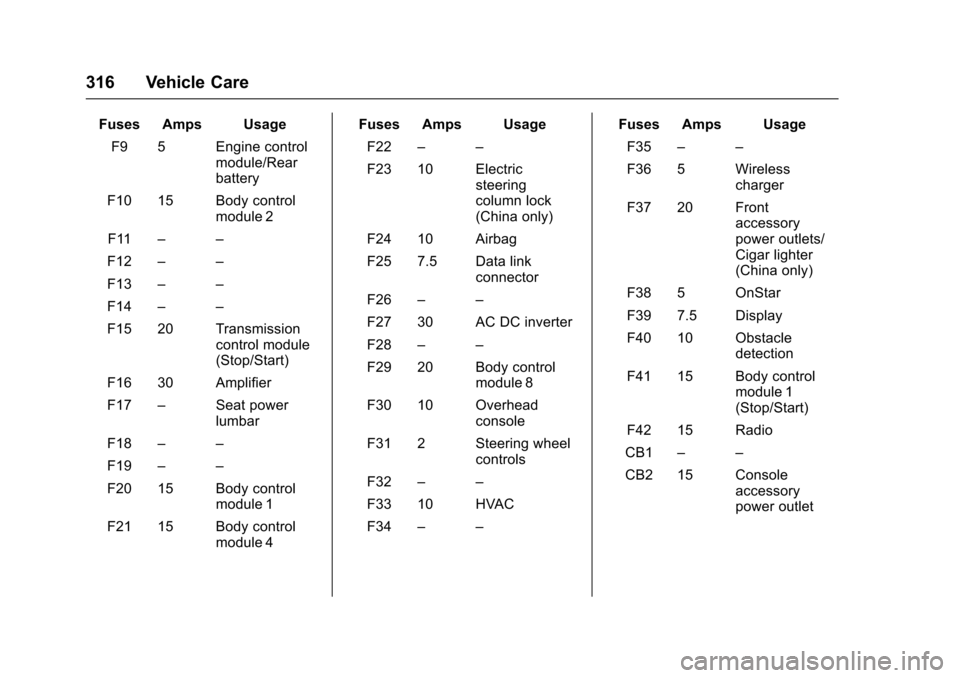
Fuses Amps Usage
F9 5 Engine controlmodule/Rearbattery
F10 15 Body controlmodule 2
F11––
F12––
F13––
F14––
F15 20 Transmissioncontrol module(Stop/Start)
F16 30 Amplifier
F17–Seat powerlumbar
F18––
F19––
F20 15 Body controlmodule 1
F21 15 Body controlmodule 4
Fuses Amps Usage
F22––
F23 10 Electricsteeringcolumn lock(China only)
F24 10 Airbag
F25 7.5 Data linkconnector
F26––
F27 30 AC DC inverter
F28––
F29 20 Body controlmodule 8
F30 10 Overheadconsole
F31 2 Steering wheelcontrols
F32––
F33 10 HVAC
F34––
Fuses Amps Usage
F35––
F36 5 Wirelesscharger
F37 20 Frontaccessorypower outlets/Cigar lighter(China only)
F38 5 OnStar
F39 7.5 Display
F40 10 Obstacledetection
F41 15 Body controlmodule 1(Stop/Start)
F42 15 Radio
CB1––
CB2 15 Consoleaccessorypower outlet
Page 329 of 419
Chevrolet Malibu Owner Manual (GMNA-Localizing-U.S./Canada/Mexico-10122664) - 2017 - crc - 5/23/16
328 Vehicle Care
Tire Pressure Monitor
Operation
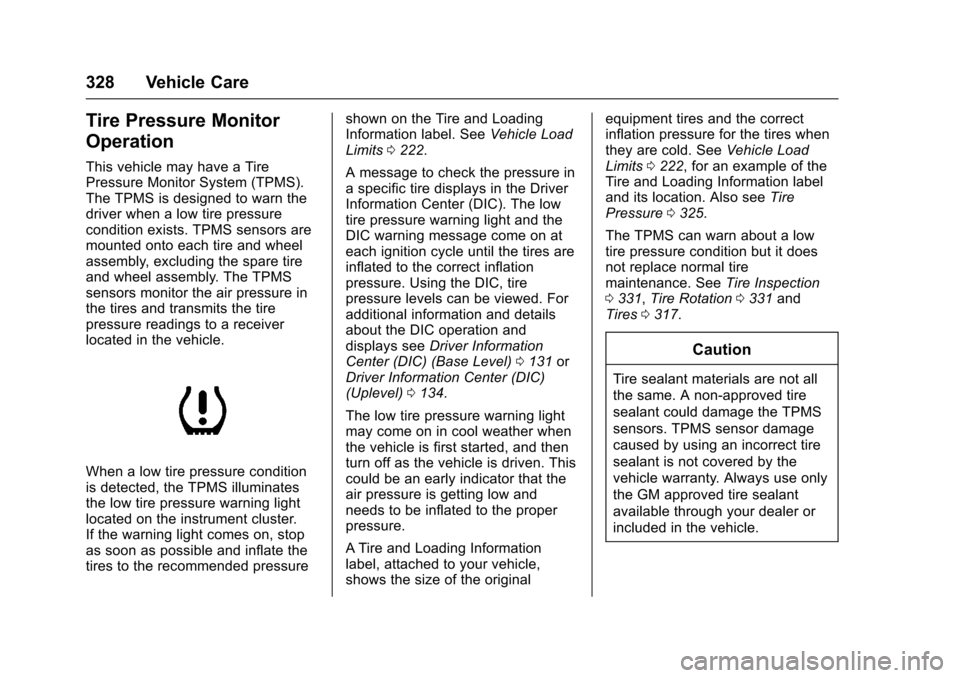
This vehicle may have a TirePressure Monitor System (TPMS).The TPMS is designed to warn thedriver when a low tire pressurecondition exists. TPMS sensors aremounted onto each tire and wheelassembly, excluding the spare tireand wheel assembly. The TPMSsensors monitor the air pressure inthe tires and transmits the tirepressure readings to a receiverlocated in the vehicle.
When a low tire pressure conditionis detected, the TPMS illuminatesthe low tire pressure warning lightlocated on the instrument cluster.If the warning light comes on, stopas soon as possible and inflate thetires to the recommended pressure
shown on the Tire and LoadingInformation label. SeeVehicle LoadLimits0222.
AmessagetocheckthepressureinaspecifictiredisplaysintheDriverInformation Center (DIC). The lowtire pressure warning light and theDIC warning message come on ateach ignition cycle until the tires areinflated to the correct inflationpressure. Using the DIC, tirepressure levels can be viewed. Foradditional information and detailsabout the DIC operation anddisplays seeDriver InformationCenter (DIC) (Base Level)0131orDriver Information Center (DIC)(Uplevel)0134.
The low tire pressure warning lightmay come on in cool weather whenthe vehicle is first started, and thenturn off as the vehicle is driven. Thiscould be an early indicator that theair pressure is getting low andneeds to be inflated to the properpressure.
ATire and Loading Informationlabel, attached to your vehicle,shows the size of the original
equipment tires and the correctinflation pressure for the tires whenthey are cold. SeeVehicle LoadLimits0222,foranexampleoftheTire and Loading Information labeland its location. Also seeTirePressure0325.
The TPMS can warn about a lowtire pressure condition but it doesnot replace normal tiremaintenance. SeeTire Inspection0331,Tire Rotation0331andTires0317.
Caution
Tire sealant materials are not all
the same. A non-approved tire
sealant could damage the TPMS
sensors. TPMS sensor damage
caused by using an incorrect tire
sealant is not covered by the
vehicle warranty. Always use only
the GM approved tire sealant
available through your dealer or
included in the vehicle.
Page 330 of 419
Chevrolet Malibu Owner Manual (GMNA-Localizing-U.S./Canada/Mexico-10122664) - 2017 - crc - 5/23/16
Vehicle Care 329
Factory-installed Tire Inflator Kitsuse a GM-approved liquid tiresealant. Using non-approved tiresealants could damage the TPMSsensors. SeeTire Sealant andCompressor Kit0339forinformation regarding the inflator kitmaterials and instructions.
TPMS Malfunction Light and
Message
The TPMS will not function properlyif one or more of the TPMS sensorsare missing or inoperable. When thesystem detects a malfunction, thelow tire warning light flashes forabout one minute and then stays onfor the remainder of the ignitioncycle. A DIC warning message alsodisplays. The malfunction light andDIC warning message come on ateach ignition cycle until the problemis corrected. Some of the conditionsthat can cause these to comeon are:
.One of the road tires has beenreplaced with the spare tire. Thespare tire does not have aTPMS sensor. The malfunctionlight and DIC message should
go off after the road tire isreplaced and the sensormatching process is performedsuccessfully. See“TPMS SensorMatching Process”later in thissection.
.The TPMS sensor matchingprocess was not done or notcompleted successfully afterrotating the tires. Themalfunction light and the DICmessage should go off aftersuccessfully completing thesensor matching process. See"TPMS Sensor MatchingProcess" later in this section.
.One or more TPMS sensors aremissing or damaged. Themalfunction light and the DICmessage should go off when theTPMS sensors are installed andthe sensor matching process isperformed successfully. Seeyour dealer for service.
.Replacement tires or wheels donot match the original equipmenttires or wheels. Tires and wheelsother than those recommended
could prevent the TPMS fromfunctioning properly. SeeBuyingNew Tires0333.
.Operating electronic devices orbeing near facilities using radiowave frequencies similar to theTPMS could cause the TPMSsensors to malfunction.
If the TPMS is not functioningproperly it cannot detect or signal alow tire condition. See your dealerfor service if the TPMS malfunctionlight and DIC message comes onand stays on.
TPMS Sensor Matching
Process
Each TPMS sensor has a uniqueidentification code. The identificationcode needs to be matched to a newtire/wheel position after rotating thevehicle’stiresorreplacingoneormore of the TPMS sensors. TheTPMS sensor matching processshould also be performed afterreplacing a spare tire with a roadtire containing the TPMS sensor.The malfunction light and the DICmessage should go off at the nextignition cycle. The sensors are
Page 331 of 419
Chevrolet Malibu Owner Manual (GMNA-Localizing-U.S./Canada/Mexico-10122664) - 2017 - crc - 5/23/16
330 Vehicle Care
matched to the tire/wheel positions,using a TPMS relearn tool, in thefollowing order: driver side front tire,passenger side front tire, passengerside rear tire, and driver side rear.See your dealer for service or topurchase a relearn tool. A TPMSrelearn tool can also be purchased.See Tire Pressure Monitor SensorActivation Tool atwww.gmtoolsandequipment.com orcall 1-800-GM TOOLS(1-800-468-6657).
There are two minutes to match thefirst tire/wheel position, andfive minutes overall to match all fourtire/wheel positions. If it takeslonger, the matching process stopsand must be restarted.
The TPMS sensor matchingprocess is:
1. Set the parking brake.
2. Place the vehicle in ON/RUN/START. SeeIgnitionPositions0225.
3. Make sure the Tire Pressureinfo page option is turned on.The info pages on the DIC can
be turned on and off throughthe Settings menu. SeeDriverInformation Center (DIC) (BaseLevel)0131orDriverInformation Center (DIC)(Uplevel)0134.
4. Use the DIC controls on theright side of the steering wheelto scroll to the Tire Pressurescreen under the DICinfo page.
5. Press and holdVin the center
of the DIC controls.
The horn sounds twice tosignal the receiver is in relearnmode and the TIRELEARNING ACTIVE messagedisplays on the DIC screen.
6. Start with the driver sidefront tire.
7. Place the relearn tool againstthe tire sidewall, near the valvestem. Then press the button toactivate the TPMS sensor.Ahornchirpconfirmsthatthesensor identification code hasbeen matched to this tire andwheel position.
8. Proceed to the passenger sidefront tire, and repeat theprocedure in Step 7.
9. Proceed to the passenger siderear tire, and repeat theprocedure in Step 7.
10. Proceed to the driver side reartire, and repeat the procedurein Step 7. The horn sounds twotimes to indicate the sensoridentification code has beenmatched to the driver side reartire, and the TPMS sensormatching process is no longeractive. The TIRE LEARNINGACTIVE message on the DICdisplay screen goes off.
11 . Tu r n t h e i g n i t i o n o f f .
12. Set all four tires to therecommended air pressurelevel as indicated on the Tireand Loading Information label.
Page 366 of 419
Chevrolet Malibu Owner Manual (GMNA-Localizing-U.S./Canada/Mexico-10122664) - 2017 - crc - 5/23/16
Vehicle Care 365
Cleaning High Gloss Surfaces
and Vehicle Information and
Radio Displays
Use a microfiber cloth on high glosssurfaces or vehicle displays. First,use a soft bristle brush to removedirt that can scratch the surface.Then gently clean by rubbing with amicrofiber cloth. Never use windowcleaners or solvents. Periodicallyhand wash the microfiber clothseparately, using mild soap. Do notuse bleach or fabric softener. Rinsethoroughly and air dry beforenext use.
Caution
Do not attach a device with a
suction cup to the display. This
may cause damage and would
not be covered by the vehicle
warranty.
Instrument Panel, Leather,
Vinyl, Other Plastic Surfaces,
Low Gloss Paint Surfaces, and
Natural Open Pore Wood
Surfaces
Use a soft microfiber clothdampened with water to removedust and loose dirt. For a morethorough cleaning, use a softmicrofiber cloth dampened with amild soap solution.
Caution
Soaking or saturating leather,
especially perforated leather, as
well as other interior surfaces,
may cause permanent damage.
Wipe excess moisture from these
surfaces after cleaning and allow
them to dry naturally. Never use
heat, steam, or spot removers. Do
not use cleaners that contain
silicone or wax-based products.
Cleaners containing these
solvents can permanently change
(Continued)
Caution (Continued)
the appearance and feel of
leather or soft trim, and are not
recommended.
Do not use cleaners that increasegloss, especially on the instrumentpanel. Reflected glare can decreasevisibility through the windshieldunder certain conditions.
Caution
Use of air fresheners may cause
permanent damage to plastics
and painted surfaces. If an air
freshener comes in contact with
any plastic or painted surface in
the vehicle, blot immediately and
clean with a soft cloth dampened
with a mild soap solution.
Damage caused by air fresheners
would not be covered by the
vehicle warranty.