ignition CHEVROLET MALIBU 2017 9.G Owner's Manual
[x] Cancel search | Manufacturer: CHEVROLET, Model Year: 2017, Model line: MALIBU, Model: CHEVROLET MALIBU 2017 9.GPages: 419, PDF Size: 7.81 MB
Page 125 of 419
Chevrolet Malibu Owner Manual (GMNA-Localizing-U.S./Canada/Mexico-10122664) - 2017 - crc - 5/23/16
124 Instruments and Controls
The vehicle may not passinspection if:
.The light is on when the engineis running.
.The light does not come onwhen the ignition is in ServiceOnly Mode.
.Critical emission control systemshave not been completelydiagnosed. If this happens, thevehicle would not be ready forinspection and might requireseveral days of routine drivingbefore the system is ready forinspection. This can happen ifthe 12-volt battery has recentlybeen replaced or run down, or ifthe vehicle has been recentlyserviced.
See your dealer if the vehicle willnot pass or cannot be made readyfor the test.
Brake System Warning
Light
The vehicle brake system consistsof two hydraulic circuits. If onecircuit is not working, the remaining
circuit can still work to stop thevehicle. For normal brakingperformance, both circuits need tobe working.
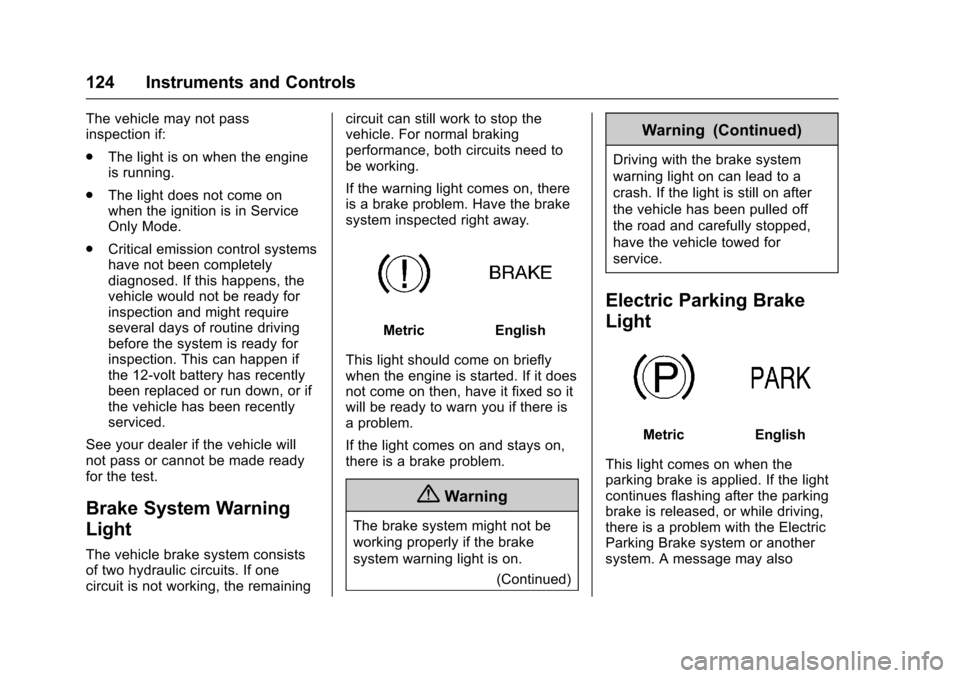
If the warning light comes on, thereis a brake problem. Have the brakesystem inspected right away.
MetricEnglish
This light should come on brieflywhen the engine is started. If it doesnot come on then, have it fixed so itwill be ready to warn you if there isaproblem.
If the light comes on and stays on,there is a brake problem.
{Warning
The brake system might not be
working properly if the brake
system warning light is on.
(Continued)
Warning (Continued)
Driving with the brake system
warning light on can lead to a
crash. If the light is still on after
the vehicle has been pulled off
the road and carefully stopped,
have the vehicle towed for
service.
Electric Parking Brake
Light
MetricEnglish
This light comes on when theparking brake is applied. If the lightcontinues flashing after the parkingbrake is released, or while driving,there is a problem with the ElectricParking Brake system or anothersystem. A message may also
Page 126 of 419
Chevrolet Malibu Owner Manual (GMNA-Localizing-U.S./Canada/Mexico-10122664) - 2017 - crc - 5/23/16
Instruments and Controls 125
display in the Driver InformationCenter (DIC). SeeBrake SystemMessages0138.
If the light does not come on,or remains flashing, see your dealer.
Service Electric Parking
Brake Light
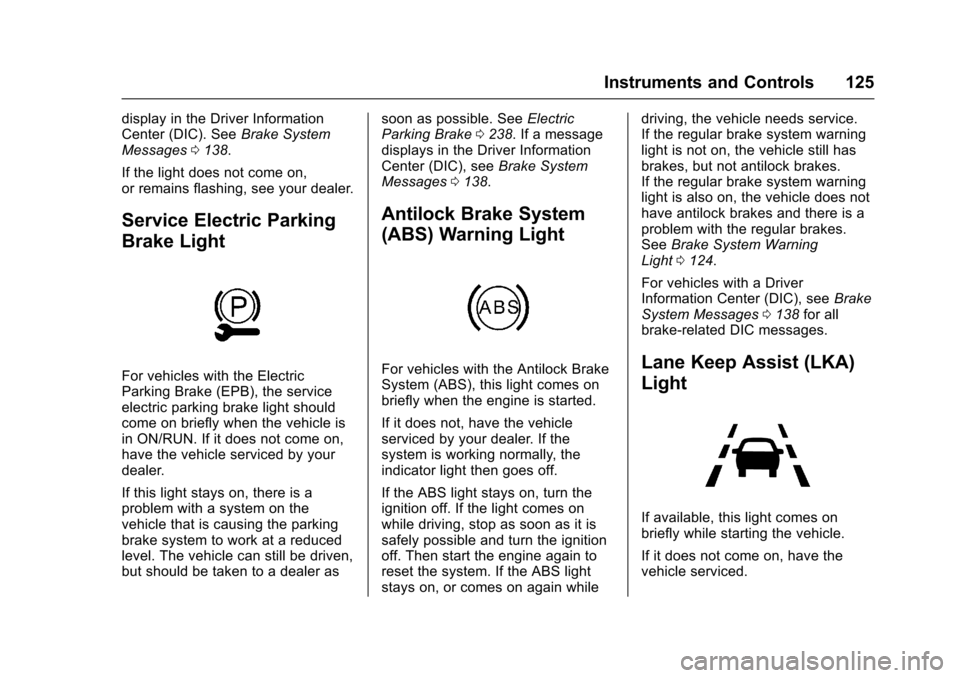
For vehicles with the ElectricParking Brake (EPB), the serviceelectric parking brake light shouldcome on briefly when the vehicle isin ON/RUN. If it does not come on,have the vehicle serviced by yourdealer.
If this light stays on, there is aproblem with a system on thevehicle that is causing the parkingbrake system to work at a reducedlevel. The vehicle can still be driven,but should be taken to a dealer as
soon as possible. SeeElectricParking Brake0238.Ifamessagedisplays in the Driver InformationCenter (DIC), seeBrake SystemMessages0138.
Antilock Brake System
(ABS) Warning Light
For vehicles with the Antilock BrakeSystem (ABS), this light comes onbriefly when the engine is started.
If it does not, have the vehicleserviced by your dealer. If thesystem is working normally, theindicator light then goes off.
If the ABS light stays on, turn theignition off. If the light comes onwhile driving, stop as soon as it issafely possible and turn the ignitionoff. Then start the engine again toreset the system. If the ABS lightstays on, or comes on again while
driving, the vehicle needs service.If the regular brake system warninglight is not on, the vehicle still hasbrakes, but not antilock brakes.If the regular brake system warninglight is also on, the vehicle does nothave antilock brakes and there is aproblem with the regular brakes.SeeBrake System WarningLight0124.
For vehicles with a DriverInformation Center (DIC), seeBrakeSystem Messages0138for allbrake-related DIC messages.
Lane Keep Assist (LKA)
Light
If available, this light comes onbriefly while starting the vehicle.
If it does not come on, have thevehicle serviced.
Page 129 of 419
Chevrolet Malibu Owner Manual (GMNA-Localizing-U.S./Canada/Mexico-10122664) - 2017 - crc - 5/23/16
128 Instruments and Controls
When the Light Flashes First andThen Is On Steady
If the light flashes for about a minuteand then stays on, there may be aproblem with the TPMS. If theproblem is not corrected, the lightwill come on at every ignition cycle.SeeTire Pressure MonitorOperation0328.
Engine Oil Pressure Light
Caution
Lack of proper engine oil
maintenance can damage the
engine. Driving with the engine oil
low can also damage the engine.
The repairs would not be covered
by the vehicle warranty. Check
the oil level as soon as possible.
Add oil if required, but if the oil
level is within the operating range
and the oil pressure is still low,
have the vehicle serviced. Always
follow the maintenance schedule
for changing engine oil.
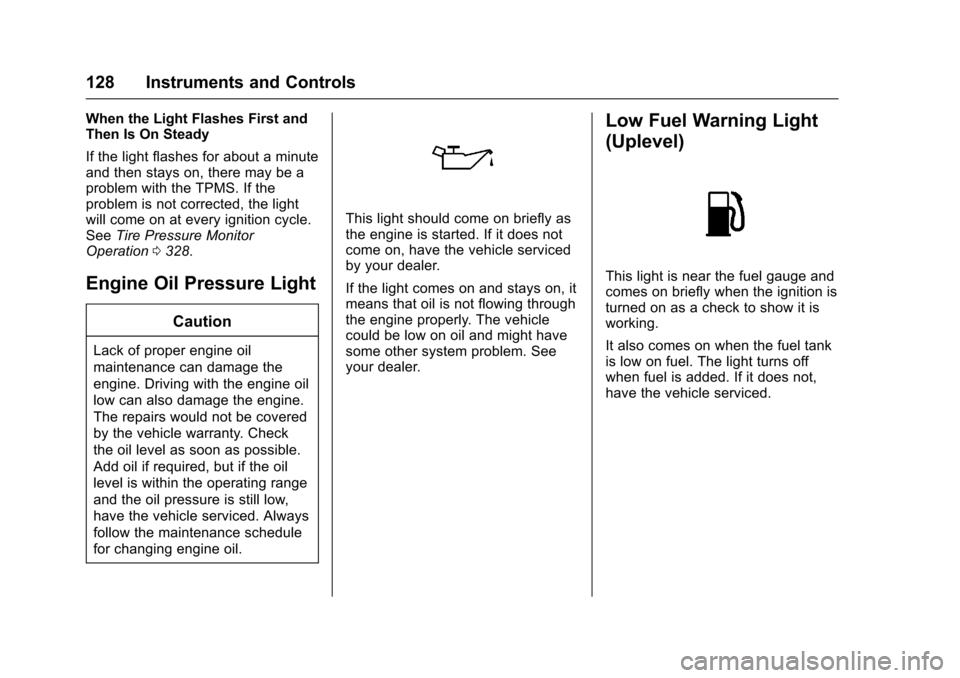
This light should come on briefly asthe engine is started. If it does notcome on, have the vehicle servicedby your dealer.
If the light comes on and stays on, itmeans that oil is not flowing throughthe engine properly. The vehiclecould be low on oil and might havesome other system problem. Seeyour dealer.
Low Fuel Warning Light
(Uplevel)
This light is near the fuel gauge andcomes on briefly when the ignition isturned on as a check to show it isworking.
It also comes on when the fuel tankis low on fuel. The light turns offwhen fuel is added. If it does not,have the vehicle serviced.
Page 130 of 419
Chevrolet Malibu Owner Manual (GMNA-Localizing-U.S./Canada/Mexico-10122664) - 2017 - crc - 5/23/16
Instruments and Controls 129
Low Fuel Warning Light
(Base Level)
Metric Shown
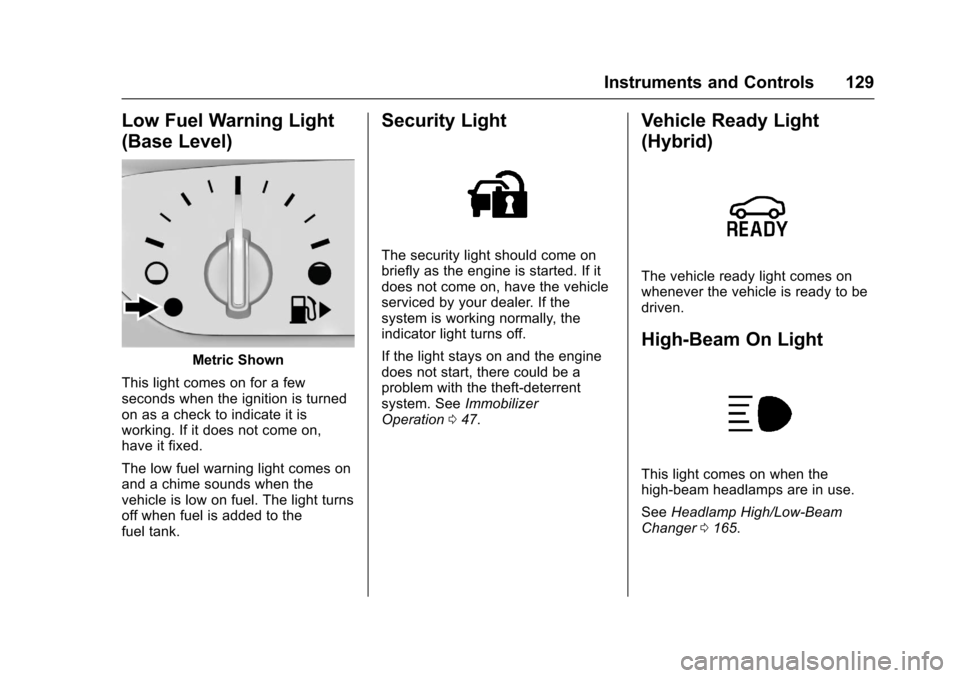
This light comes on for a fewseconds when the ignition is turnedon as a check to indicate it isworking. If it does not come on,have it fixed.
The low fuel warning light comes onand a chime sounds when thevehicle is low on fuel. The light turnsoff when fuel is added to thefuel tank.
Security Light
The security light should come onbriefly as the engine is started. If itdoes not come on, have the vehicleserviced by your dealer. If thesystem is working normally, theindicator light turns off.
If the light stays on and the enginedoes not start, there could be aproblem with the theft-deterrentsystem. SeeImmobilizerOperation047.
Vehicle Ready Light
(Hybrid)
The vehicle ready light comes onwhenever the vehicle is ready to bedriven.
High-Beam On Light
This light comes on when thehigh-beam headlamps are in use.
SeeHeadlamp High/Low-BeamChanger0165.
Page 133 of 419
Chevrolet Malibu Owner Manual (GMNA-Localizing-U.S./Canada/Mexico-10122664) - 2017 - crc - 5/23/16
132 Instruments and Controls
V:Press to open a menu or selectamenuitem.Pressandholdtoreset values on certain screens.
Trip/Fuel Menu (TRIP) Items
Usewxto scroll through the
menu items. Not all items areavailable on every vehicle. Thefollowing is a list of all possiblemenu items:
Digital Speed :Displays how fastthe vehicle is moving in eitherkilometers per hour (km/h) or milesper hour (mph). The speedometercannot be reset.
Tr i p 1 o r Tr i p 2 , Av e r a g e F u e lEconomy :Displays the currentdistance traveled, in eitherkilometers (km) or miles (mi), fromthe last reset for the trip odometer.The trip odometer can be reset to
zero by pressing and holdingV
while the trip odometer display isshowing.
Also displays the approximateaverage liters per 100 kilometers(L/100 km) or miles per gallon(mpg). This number is based on the
number of L/100 km (mpg) recordedsince the last time this menu itemwas reset. This number reflects onlythe approximate average fueleconomy that the vehicle has rightnow, and will change as drivingconditions change. Reset the
average consumption by pressingV
when it is displayed.
Fuel Range :Displays theapproximate distance the vehiclecan be driven without refueling. Thefuel range estimate is based on anaverage of the vehicle's fueleconomy over recent driving historyand the amount of fuel remaining inthe fuel tank. Fuel range cannot bereset.
Average Vehicle Speed :Displaysthe average vehicle speed of thevehicle in kilometers per hour (km/h)or miles per hour (mph). Thisaverage is based on the variousvehicle speeds recorded since thelast reset. Reset the average speed
by pressingVwhen it is displayed.
Timer :To s t a r t t h e t i m e r , p r e s sV
while Timer is displayed. Thedisplay will show the amount of timethat has passed since the timer waslast reset, not including time theignition is off. Time will continue tobe counted as long as the ignition ison, even if another display is beingshown on the DIC. The timer willrecord up to 99 hours, 59 minutes,and 59 seconds (99:59:59) afterwhich the display will return to zero.
To s t o p t h e t i m e r, p r e s sVbriefly
while Timer is displayed. To reset
the timer to zero, press and holdV.
Navigation :Used for the OnStarTurn-by-Turn guidance. SeeOnStarOverview0397.
Vehicle Information Menu
(VEHICLE) Items
Usewxto scroll through the
menu items. Not all items areavailable on every vehicle. Thefollowing is a list of all possiblemenu items:
Page 148 of 419
Chevrolet Malibu Owner Manual (GMNA-Localizing-U.S./Canada/Mexico-10122664) - 2017 - crc - 5/23/16
Instruments and Controls 147
SHIFT FROM NEUTRAL
(Hybrid)
This message displays when thevehicle should be shifted fromN(Neutral). If the vehicle is notshifted from N (Neutral) after sometime, the vehicle will shut off andrequire a restart. While inN(Neutral),thevehiclewillnotbeable to charge the high voltagebattery.
SHIFT TO PARK
This message displays when thetransmission needs to be shifted toP(Park). This may appear whenturning the ignition off or removingthe key from the vehicle if thevehicle is not in P (Park).
TRANSMISSION HOT—IDLE
ENGINE
This message displays and a chimesounds if the transmission fluid inthe vehicle gets hot. Driving with thetransmission fluid temperature highcan cause damage to the vehicle.Stop the vehicle and let it idle to
allow the transmission to cool. Thismessage clears when the fluidtemperature reaches a safe level.
Vehicle Reminder
Messages
ICE POSSIBLE DRIVE
WITH CARE
This message displays when iceconditions are possible.
Window Messages
OPEN, THEN CLOSE DRIVER
WINDOW
This message is displayed when thewindow needs to be reprogrammed.If the vehicle's battery has beenrecharged or disconnected, you willneed to reprogram the front windowfor the express-up feature to work.SeePower Windows050.
Vehicle
Personalization
Personalization Menu (Radio
without Touchscreen)
The audio system controls are usedto access the personalizationmenus for customizing vehiclefeatures.
The following are all possiblepersonalization features. Dependingon the vehicle, some may not beavailable.
MENU :Turn to scroll through themenus or setup items. Press toenter the menus and select themenu items.
BACK :Press to exit or return tothe previous screen or menu.
To a c c e s s a m e n u :
1. Press MENU.
2. Turn MENU to thedesired menu.
3. Press MENU to select.
Menus and functions may varydepending on vehicle options.
Page 150 of 419
Chevrolet Malibu Owner Manual (GMNA-Localizing-U.S./Canada/Mexico-10122664) - 2017 - crc - 5/23/16
Instruments and Controls 149
Climate and Air Quality
Select and the following maydisplay:
.Auto Fan Speed
.Air Quality Sensor
.Auto Defog
.Auto Rear Defog
Auto Fan Speed
This adjusts the blower level duringautomatic operation.
Select Low, Medium, or High.
Air Quality Sensor
This automatically selectsrecirculate when certain gases aredetected.
Select Off, Low Sensitivity, or HighSensitivity.
Auto Defog
This allows the climate controlsystem to prevent fog on the insideof the windows. See“Auto Defog”inDual Automatic Climate ControlSystem0208.
Select Off or On.
Auto Rear Defog
This allows the rear windowdefogger to turn on automaticallywhen the interior temperature is coldand the outside temperature isabout 7 °C (44 °F) and below. See“Rear Window Defogger”inDualAutomatic Climate ControlSystem0208.
Select Off or On.
Comfort and Convenience
Select and the following maydisplay:
.Auto Memory Recall
.Easy Exit Options
.Chime Volume
.Reverse Tilt Mirror
.Extended Hill Start Assist
Auto Memory Recall
This feature automatically recallsthe current driver’spreviouslystored1or2positionswhentheignitionischanged from OFF to ON/RUN/START or ACCESSORY. SeeMemory Seats059.
Select Off or On.
Easy Exit Options
This feature automatically recallsthe current driver’spreviouslystoredExit button position when exiting thevehicle. SeeMemory Seats059.
Select Off or On.
Chime Volume
Select to set the chime volumelevel.
Reverse Tilt Mirror
When on, both the driver andpassenger, driver, or passengermirrors will tilt downward when thevehicle is shifted to R (Reverse) toimprove visibility of the ground nearthe rear wheels. They will return totheir previous driving position whenthe vehicle is shifted out ofR(Reverse)ortheignitionisturnedto OFF.
Select Off, On - Driver andPassenger, On - Driver, or On -Passenger.
Page 152 of 419
Chevrolet Malibu Owner Manual (GMNA-Localizing-U.S./Canada/Mexico-10122664) - 2017 - crc - 5/23/16
Instruments and Controls 151
Remote Door Unlock
Select to set which doors will unlock
when pressingKon the RKE
transmitter. SeeRemote KeylessEntry (RKE) System Operation032.
Select Driver Door or All Doors.
Remote Start Auto Cool Seats
If equipped and turned on, thisfeature will turn the ventilated seatson when using remote start onwarm days.
Select Off, On-Driver andPassenger, or On-Driver.
Remote Start Auto Heat Seats
Select to enable or disable whichseat will come on when remote startis used. SeeHeated and VentilatedFront Seats060.
Select Off, On-Driver andPassenger, or On-Driver.
Passive Door Unlock
Select to set which doors will unlockwhen the RKE transmitter is withinrange and using the button on the
outside driver door handle to unlockthe vehicle. SeeRemote KeylessEntry (RKE) System Operation032.
Select Driver Door Only or AllDoors.
Passive Door Lock
This allows passive locking to beturned on or off and selectsfeedback. SeeRemote KeylessEntry (RKE) System Operation032.
Select Off, On, or On With HornChirp.
Remote Left in Vehicle Reminder
This feature sounds an alert whenthe RKE transmitter is left in thevehicle. This menu also enablesRemote No Longer Left in Vehiclealert.
Select Off or On.
Return to Factory Settings
Select to return all vehiclepersonalizations to the defaultsettings.
Select Yes or No.
Software Information
Select to view the radio softwareinformation.
Valet Mode (If Equipped)
This will lock the infotainmentsystem and steering wheel controls.It may also limit access to vehiclestorage locations (if equipped).
To e n a b l e v a l e t m o d e :
1. Enter a four-digit code on thekeypad.
2. Select Enter to go to theconfirmation screen.
3. Re-enter the four-digit code.
Select LOCK or UNLOCK to lock orunlock the system. Press BACK togo back to the previous menu.
Personalization Menu (Radio
with Touchscreen)
Settings can be made with theignition on and the vehicle notmoving.
Page 156 of 419
Chevrolet Malibu Owner Manual (GMNA-Localizing-U.S./Canada/Mexico-10122664) - 2017 - crc - 5/23/16
Instruments and Controls 155
stopping vehicle, and then thatvehicle drives on. SeeAdaptiveCruise Control0245.
Select Off or On.
Lane Change Alert
This allows the feature to be turnedon or off. SeeLane Change Alert(LCA)0264.
Select Off or On.
Comfort and Convenience
Select and the following maydisplay:
.Auto Memory Recall
.Easy Exit Options
.Chime Volume
.Reverse Tilt Mirror
.Extended Hill Start Assist
Auto Memory Recall
This feature automatically recallsthe current driver’spreviouslystored1or2buttonpositionswhentheignition is changed from off to ON/RUN or ACC/ACCESSORY. SeeMemory Seats059.
Select Off or On.
Easy Exit Options
This feature automatically recallsthe current driver’spreviouslystoredexit button position when exiting thevehicle. SeeMemory Seats059.
Select Off or On.
Chime Volume
Select to set the chime volumelevel.
Select Normal or High.
Reverse Tilt Mirror
When on, both the driver andpassenger outside mirrors will tiltdownward when the vehicle isshifted to R (Reverse) to improvevisibility of the ground near the rearwheels. They will return to theirprevious driving position when thevehicle is shifted out of R (Reverse)or the engine is turned off. SeeReverse Tilt Mirrors049.
Select Off, On - Driver andPassenger, On - Driver, or On -Passenger.
Extended Hill Start Assist
This allows the duration of the HillStart Assist to be changed. See“Extended Hill Start Assist (EHSA)”inHill Start Assist (HSA)0240.
Select Extended Hold orStandard Hold.
Lighting
Select and the following maydisplay:
.Vehicle Locator Lights
.Exit Lighting
Vehicle Locator Lights
This feature will flash the exteriorlamps and allows the headlamps,parking lamps, taillamps, and mostof the interior lamps to turn on
briefly whenKon the Remote
Keyless Entry (RKE) transmitter ispressed to locate the vehicle.
Select Off or On.
Page 166 of 419
Chevrolet Malibu Owner Manual (GMNA-Localizing-U.S./Canada/Mexico-10122664) - 2017 - crc - 5/23/16
Lighting 165
.The other vehicle's lamps cannotbe detected due to denseexhaust, smoke, fog, snow, roadspray, mist, or other airborneobstructions.
.The vehicle's windshield is dirty,cracked, or obstructed bysomething that blocks the viewof the light sensor.
.The vehicle is loaded such thatthe front end points upward,causing the light sensor to aimhigh and not detect headlampsand taillamps.
.Driving on winding or hilly roads.
The IntelliBeam system may need tobe disabled if any of the aboveconditions exist.
Exterior Lamps Off
Reminder
Awarningchimesoundsifthedriverdoor is opened while the ignition isoff and the exterior lamps are on.
Headlamp High/
Low-Beam Changer
3:Push the turn signal lever awayfrom you and release, to turn thehigh beams on. To return to lowbeams, push the lever again or pullit toward you and release.
This indicator light turns on in theinstrument cluster when thehigh-beam headlamps are on.
Flash-to-Pass
To f l a s h t h e h i g h b e a m s , p u l l t h eturn signal lever toward you, andrelease.
Daytime Running
Lamps (DRL)
DRL can make it easier for others tosee the front of your vehicle duringthe day. Fully functional DRL arerequired on all vehicles first sold inCanada.
The DRL system comes on indaylight when the followingconditions are met:
.The ignition is on.
.The exterior lamp control is inAUTO, if equipped.
.The light sensor determines it isdaytime.
.The vehicle is not in P (Park).
When the DRL are on, the taillamps,sidemarker lamps, instrument panellights, and other lamps will notbe on.
The DRL turn off when the
headlamps are turned toOor(,
or when the ignition is off.