lock CHEVROLET MALIBU 2017 9.G Repair Manual
[x] Cancel search | Manufacturer: CHEVROLET, Model Year: 2017, Model line: MALIBU, Model: CHEVROLET MALIBU 2017 9.GPages: 419, PDF Size: 7.81 MB
Page 154 of 419
Chevrolet Malibu Owner Manual (GMNA-Localizing-U.S./Canada/Mexico-10122664) - 2017 - crc - 5/23/16
Instruments and Controls 153
Radio
Select and the following maydisplay:
.Manage Favorites
.Number of Favorites Shown
.Audible Touch Feedback
.Te x t S c r o l l
.To n e S e t t i n g s
.Auto Volume
.Maximum Startup Volume
.Audio Cue
Manage Favorites
This allows favorites to be edited.See“Manage Favorites”in“RadioSetup”underHome Page (Radiowith Touchscreen)0175or“Manage Favorites”in“Settings”under“Radio”in the infotainmentmanual.
Number of Favorites Shown
Press to set the number of favoritesto display.
Select the desired number or selectAuto and the infotainment systemwill automatically adjust the numberof favorites shown.
Audible Touch Feedback
This allows Audible TouchFeedback to be turned on or off.
Select Off or On.
Text Scroll
Select to see text scroll on thescreen.
Select Off or On.
Tone Settings
Select to adjust the radio tone. SeeOperation0176.
Auto Volume
This feature adjusts the volumebased on vehicle speed andambient noise.
Select Off, Low, Medium-Low,Medium, Medium-High, or High.
Maximum Startup Volume
This feature sets the maximumstartup volume. If the vehicle isstarted and the volume is greaterthan this level, the volume isadjusted to this level. To set themaximum startup volume, press +or✓to increase or decrease.
Audio Cue
If equipped, this feature adjusts thestartup and shutdown sounds. Toadjust the volume, select + or✓toincrease or decrease.
Vehicle
Select and the following maydisplay:
.Climate and Air Quality
.Collision/Detection Systems
.Comfort and Convenience
.Lighting
.Power Door Locks
.Remote Lock, Unlock, Start
Page 157 of 419
Chevrolet Malibu Owner Manual (GMNA-Localizing-U.S./Canada/Mexico-10122664) - 2017 - crc - 5/23/16
156 Instruments and Controls
Exit Lighting
This allows the selection of howlong the exterior lamps stay onwhen leaving the vehicle when it isdark outside.
Select Off, 30 Seconds, 60Seconds, or 120 Seconds.
Power Door Locks
Select and the following maydisplay:
.Unlocked Door Anti Lock Out
.Auto Door Unlock
.Delayed Door Lock
Unlocked Door Anti Lock Out
When on, this feature will keep thedriver door from locking when thedoor is open. If this feature is turnedon, the Delayed Door Lock menuwill not be available.
Select Off or On.
Auto Door Unlock
This allows selection of which of thedoors will automatically unlock whenthe vehicle is shifted into P (Park).
Select Off, All Doors, or Driver Door.
Delayed Door Lock
When on, this feature will delay thelocking of the doors. To override thedelay, press the power door lockswitch on the door.
Select Off or On.
Remote Lock, Unlock, Start
Select and the following maydisplay:
.Remote Unlock Light Feedback
.Remote Lock Feedback
.Remote Door Unlock
.Remote Start Auto Cool Seats
.Remote Start Auto Heat Seats
.Passive Door Unlock
.Passive Door Lock
.Remote Left in Vehicle Alert
Remote Unlock Light Feedback
When on, the exterior lamps willflash when unlocking the vehiclewith the RKE transmitter.
Select Off or Flash Lights.
Remote Lock Feedback
This allows selection of what type offeedback is given when locking thevehicle with the RKE transmitter.
Select Off, Lights and Horn, LightsOnly, or Horn Only.
Remote Door Unlock
This allows selection of which doors
will unlock when pressingKon the
RKE transmitter.
Select All Doors or Driver Door.
Remote Start Auto Cool Seats
If equipped and turned on, thisfeature will turn the ventilated seatson when using remote start onwarm days.
Select Off, On-Driver andPassenger, or On-Driver.
Remote Start Auto Heat Seats
If equipped and turned on, thisfeature will turn the heated seats onwhen using remote start oncold days.
Select Off, On-Driver andPassenger, or On-Driver.
Page 158 of 419
Chevrolet Malibu Owner Manual (GMNA-Localizing-U.S./Canada/Mexico-10122664) - 2017 - crc - 5/23/16
Instruments and Controls 157
Passive Door Unlock
Select to set which doors will unlockwhen the RKE transmitter is withinrange and using the button on theoutside driver door handle to unlockthe vehicle. SeeRemote KeylessEntry (RKE) System Operation032.
Select Driver Door Only or AllDoors.
Passive Door Lock
This allows passive locking to beturned on or off and selectsfeedback. SeeRemote KeylessEntry (RKE) System Operation032.
Select Off, On, or On With HornChirp.
Remote Left in Vehicle Alert
This feature sounds an alert whenthe RKE transmitter is left in thevehicle. This menu also enablesRemote No Longer Left in Vehiclealert.
Select Off or On.
Bluetooth
Select and the following maydisplay:
.Discoverable
.Device Information
.Device Management
.Change Pairing PIN
.Ringtones
.Sort Order
.Voice Mail Numbers
.Te x t M e s s a g e A l e r t s
Discoverable
This allows the system to find adevice.
Select Off or On.
Device Information
See information about the devicename, address, and PIN code.
Device Management
Select to connect to a differentphone source, disconnect a phone,or delete a phone.
Change Pairing PIN
Select to change the PIN of adevice.
Ringtones
Press to change the ring tone forthe specific phone. The phone doesnot need to be connected to changethe ring tones.
Sort Order
Select to change the order of thecontacts list.
Select First/Last or Last/First.
Voice Mail Numbers
This feature displays the voice mailnumber for all connected phones.To c h a n g e t h e v o i c e m a i l n u m b e r ,
select8or EDIT. Type a new
number, then select SAVE.
Text Message Alerts
This allows the feature to be turnedon or off.
Select Off or On.
Page 166 of 419
Chevrolet Malibu Owner Manual (GMNA-Localizing-U.S./Canada/Mexico-10122664) - 2017 - crc - 5/23/16
Lighting 165
.The other vehicle's lamps cannotbe detected due to denseexhaust, smoke, fog, snow, roadspray, mist, or other airborneobstructions.
.The vehicle's windshield is dirty,cracked, or obstructed bysomething that blocks the viewof the light sensor.
.The vehicle is loaded such thatthe front end points upward,causing the light sensor to aimhigh and not detect headlampsand taillamps.
.Driving on winding or hilly roads.
The IntelliBeam system may need tobe disabled if any of the aboveconditions exist.
Exterior Lamps Off
Reminder
Awarningchimesoundsifthedriverdoor is opened while the ignition isoff and the exterior lamps are on.
Headlamp High/
Low-Beam Changer
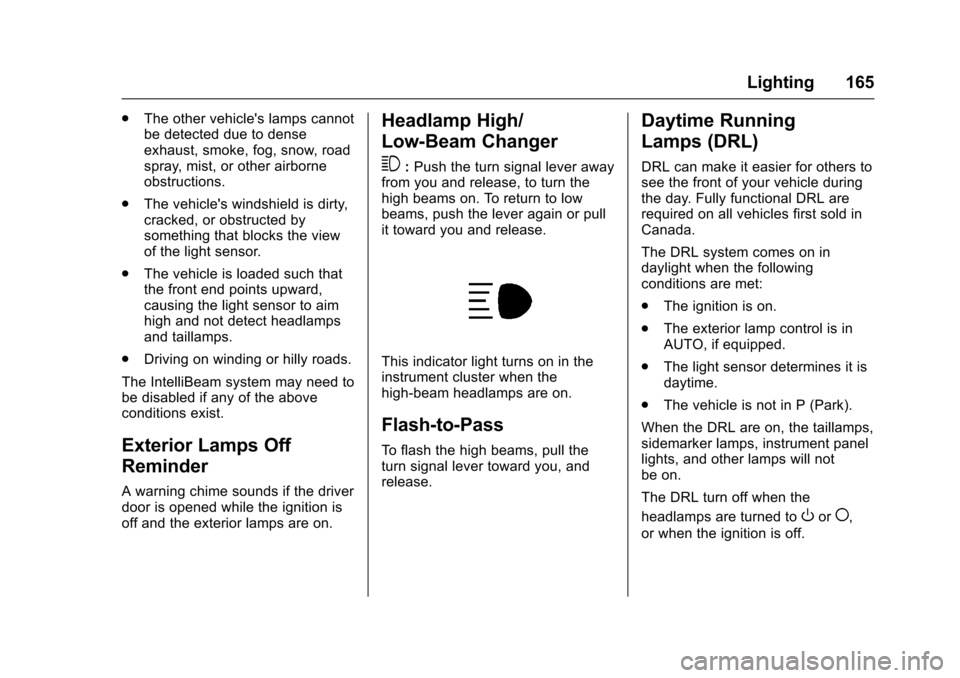
3:Push the turn signal lever awayfrom you and release, to turn thehigh beams on. To return to lowbeams, push the lever again or pullit toward you and release.
This indicator light turns on in theinstrument cluster when thehigh-beam headlamps are on.
Flash-to-Pass
To f l a s h t h e h i g h b e a m s , p u l l t h eturn signal lever toward you, andrelease.
Daytime Running
Lamps (DRL)
DRL can make it easier for others tosee the front of your vehicle duringthe day. Fully functional DRL arerequired on all vehicles first sold inCanada.
The DRL system comes on indaylight when the followingconditions are met:
.The ignition is on.
.The exterior lamp control is inAUTO, if equipped.
.The light sensor determines it isdaytime.
.The vehicle is not in P (Park).
When the DRL are on, the taillamps,sidemarker lamps, instrument panellights, and other lamps will notbe on.
The DRL turn off when the
headlamps are turned toOor(,
or when the ignition is off.
Page 168 of 419
Chevrolet Malibu Owner Manual (GMNA-Localizing-U.S./Canada/Mexico-10122664) - 2017 - crc - 5/23/16
Lighting 167
Turn and Lane-Change
Signals
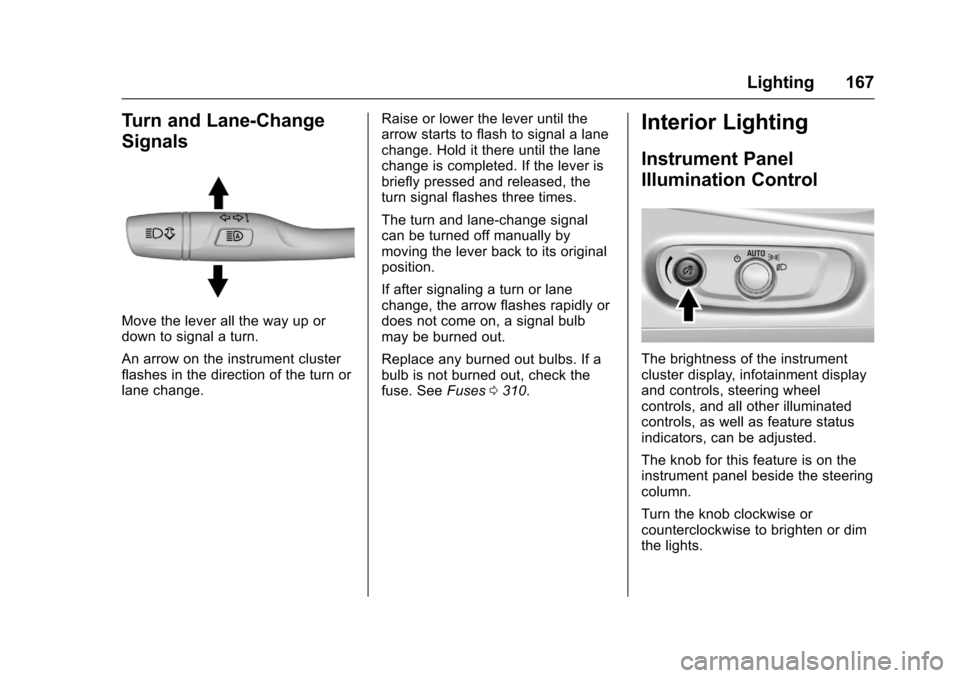
Move the lever all the way up ordown to signal a turn.
An arrow on the instrument clusterflashes in the direction of the turn orlane change.
Raise or lower the lever until thearrow starts to flash to signal a lanechange. Hold it there until the lanechange is completed. If the lever isbriefly pressed and released, theturn signal flashes three times.
The turn and lane-change signalcan be turned off manually bymoving the lever back to its originalposition.
If after signaling a turn or lanechange, the arrow flashes rapidly ordoes not come on, a signal bulbmay be burned out.
Replace any burned out bulbs. If abulb is not burned out, check thefuse. SeeFuses0310.
Interior Lighting
Instrument Panel
Illumination Control
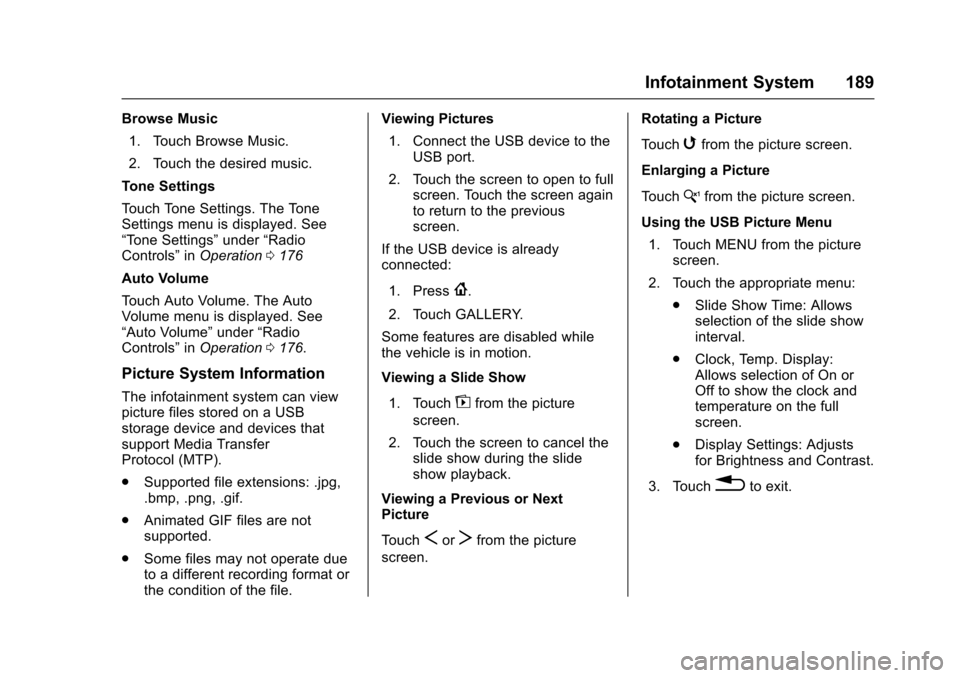
The brightness of the instrumentcluster display, infotainment displayand controls, steering wheelcontrols, and all other illuminatedcontrols, as well as feature statusindicators, can be adjusted.
The knob for this feature is on theinstrument panel beside the steeringcolumn.
Turn the knob clockwise orcounterclockwise to brighten or dimthe lights.
Page 190 of 419
Chevrolet Malibu Owner Manual (GMNA-Localizing-U.S./Canada/Mexico-10122664) - 2017 - crc - 5/23/16
Infotainment System 189
Browse Music
1. Touch Browse Music.
2. Touch the desired music.
To n e S e t t i n g s
To u c h To n e S e t t i n g s . T h e To n eSettings menu is displayed. See“To n e S e t t i n g s”under“RadioControls”inOperation0176
Auto Volume
To u c h A u t o V o l u m e . T h e A u t oVolume menu is displayed. See“Auto Volume”under“RadioControls”inOperation0176.
Picture System Information
The infotainment system can viewpicture files stored on a USBstorage device and devices thatsupport Media TransferProtocol (MTP).
.Supported file extensions: .jpg,.bmp, .png, .gif.
.Animated GIF files are notsupported.
.Some files may not operate dueto a different recording format orthe condition of the file.
Viewing Pictures
1. Connect the USB device to theUSB port.
2. Touch the screen to open to fullscreen. Touch the screen againto return to the previousscreen.
If the USB device is alreadyconnected:
1. Press{.
2. Touch GALLERY.
Some features are disabled whilethe vehicle is in motion.
Viewing a Slide Show
1. Touchzfrom the picture
screen.
2. Touch the screen to cancel theslide show during the slideshow playback.
Viewing a Previous or NextPicture
To u c hSorTfrom the picture
screen.
Rotating a Picture
To u c hwfrom the picture screen.
Enlarging a Picture
To u c hxfrom the picture screen.
Using the USB Picture Menu
1. Touch MENU from the picturescreen.
2. Touch the appropriate menu:
.Slide Show Time: Allowsselection of the slide showinterval.
.Clock, Temp. Display:Allows selection of On orOff to show the clock andtemperature on the fullscreen.
.Display Settings: Adjustsfor Brightness and Contrast.
3. Touch0to exit.
Page 206 of 419
Chevrolet Malibu Owner Manual (GMNA-Localizing-U.S./Canada/Mexico-10122664) - 2017 - crc - 5/23/16
Climate Controls 205
Climate Controls
Climate Control Systems
Climate Control Systems . . . . . 205Dual Automatic ClimateControl System . . . . . . . . . . . . . 208
Air Vents
Air Vents . . . . . . . . . . . . . . . . . . . . . . 211
Maintenance
Passenger Compartment AirFilter . . . . . . . . . . . . . . . . . . . . . . . . 212Service . . . . . . . . . . . . . . . . . . . . . . . 213
Climate Control Systems
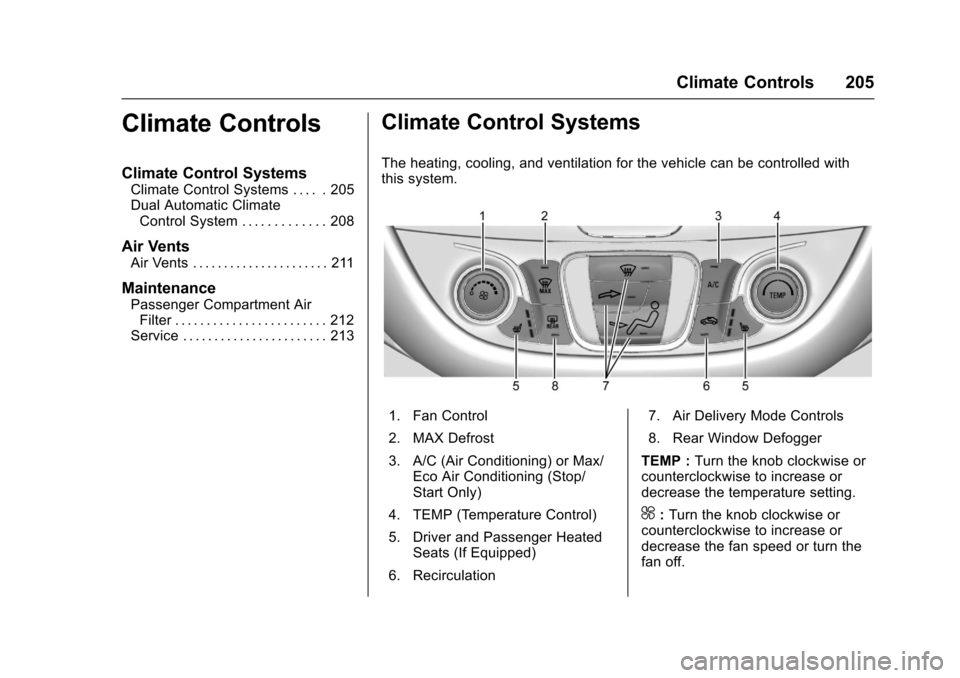
The heating, cooling, and ventilation for the vehicle can be controlled withthis system.
1. Fan Control
2. MAX Defrost
3. A/C (Air Conditioning) or Max/Eco Air Conditioning (Stop/Start Only)
4. TEMP (Temperature Control)
5. Driver and Passenger HeatedSeats (If Equipped)
6. Recirculation
7. Air Delivery Mode Controls
8. Rear Window Defogger
TEMP :Turn the knob clockwise orcounterclockwise to increase ordecrease the temperature setting.
^:Turn the knob clockwise orcounterclockwise to increase ordecrease the fan speed or turn thefan off.
Page 208 of 419
Chevrolet Malibu Owner Manual (GMNA-Localizing-U.S./Canada/Mexico-10122664) - 2017 - crc - 5/23/16
Climate Controls 207
Rear Window Defogger
K:Press to turn the rear windowdefogger on or off. An indicator lighton the button comes on to show thatthe rear window defogger is on. Thedefogger turns off when the ignitionis placed in the ACC/ACCESSORYor LOCK/OFF position.
The upper lines on the rear windoware antenna grids and are notintended to defrost the glass.
The rear window defogger can beset to automatic operation. See“Climate and Air Quality”underVehicle Personalization0147.When Auto Rear Defog is selected,the rear window defogger turns onautomatically when the interiortemperature is cold and the outsidetemperature is about 7 °C (44 °F)and below. The auto rear defoggerturns off automatically.
If the vehicle is equipped withheated outside mirrors, they turn onwhen the rear window defoggerbutton is on and help to clear fog orfrost from the surface of the mirror.SeeHeated Mirrors049.
Caution
Do not try to clear frost or other
material from the inside of the
front windshield and rear window
with a razor blade or anything
else that is sharp. This may
damage the rear window
defogger grid and affect the
radio's ability to pick up stations
clearly. The repairs would not be
covered by the vehicle warranty.
LorM:If equipped, pressLorMto heat the driver or passenger seat.SeeHeated and Ventilated FrontSeats060.
Remote Start Climate ControlOperation :If equipped with remotestart, the climate control systemmay run when the vehicle is startedremotely. The system uses thedriver’sprevioussettingstoheatorcool the inside of the vehicle. Therear defog may come on duringremote start based on cold ambientconditions. The rear defog indicatorlight does not come on during aremote start. The front heated seatswill turn on if it is cold outside. Theheated seat indicator lights do notcome on during a remote start.
Page 210 of 419
Chevrolet Malibu Owner Manual (GMNA-Localizing-U.S./Canada/Mexico-10122664) - 2017 - crc - 5/23/16
Climate Controls 209
Press@to manually select
recirculation and the indicator lightwill turn on. Press it again to selectoutside air and the indicator light willturn off.
Driver and PassengerTe m p e r a t u r e C o n t r o l s :Thetemperature can be adjustedseparately for the driver and thepassenger. Turn the knob clockwiseor counterclockwise to increase ordecrease the driver or passengertemperature setting.
SYNC :Press to link the passengertemperature settings to the driversetting. The SYNC indicator light willturn on. When the passengersettings are adjusted, the SYNCindicator light turns off.
Manual Operation
O:Press to turn the fan off or on.
^Qor^R:Press to increase ordecrease the fan speed. The fanspeed setting appears on the maindisplay. When the fan speed isdecreased completely, the fan turnsoff. Pressing either button cancels
automatic fan control and the fan iscontrolled manually. Press AUTO toreturn to automatic operation.
Air Delivery Mode Controls :
Press0,d,orcto change
the direction of the airflow. Anycombination of the three buttonscan be selected. The indicator lightin the button will turn on. Thecurrent mode appears in the displayscreen. Pressing any button cancelsautomatic air delivery control andthe direction of the airflow iscontrolled manually. Press AUTO toreturn to automatic operation.
To c h a n g e t h e c u r r e n t m o d e , s e l e c tone or more of the following modes:
0:Clears the windows of fog ormoisture. Air is directed to thewindshield.
d:Air is directed to the instrumentpanel outlets.
c:Air is directed to the flooroutlets.
0MAX :Air is directed to thewindshield, the fan runs at a higherspeed, and the temperature of theair is increased if not already at
maximum. This mode overrides theprevious mode selected and clearsfog or frost from the windshieldmore quickly. When the button ispressed again, the system returnsto the previous mode setting andfan speed.
For best results, clear all snow andice from the windshield beforedefrosting.
A/C :Press to turn the airconditioning system on or off. If thefan control is turned off or theoutside temperature falls belowfreezing, the air conditioner willnot run.
Pressing this button cancelsautomatic air conditioning and turnsoff the air conditioner. Press AUTOto return to automatic operation andthe air conditioner runsautomatically as needed. When theindicator light is on, the airconditioner runs automatically tocool the air inside the vehicle or todry the air needed to defog thewindshield faster.
Page 211 of 419
Chevrolet Malibu Owner Manual (GMNA-Localizing-U.S./Canada/Mexico-10122664) - 2017 - crc - 5/23/16
210 Climate Controls
A/C (Max/Eco A/C For Stop/StartVehicles) :Press to cycle betweenthe max, eco, and off airconditioning modes. The indicatorwill be lit in max and eco modes andturns off when there is no A/Cfunction. If the fan is turned off, theair conditioner will not run and theindicator light will turn off.
Press AUTO to return to automaticoperation and the air conditionerruns automatically as needed. WithStop/Start vehicles, the A/C willreturn to eco a/c operation.
For max a/c, press A/C. Theindicator will turn amber. Auto stopswill occur less frequently, be shorter,and will not occur in extremely warmweather.
For eco a/c, press A/C again. Theindicator will turn green. This settingbalances fuel economy and airconditioning comfort. In warmweather conditions, auto stops mayoccur more frequently, last longer,and the vehicle interior may bewarmer during auto stops ascompared to the max a/c setting.This setting allows higher humidity
inside the vehicle and windowfogging may occur before theengine restarts.
@:Press to turn on recirculation.An indicator light comes on. Air isrecirculated to quickly cool theinside of the vehicle or to reduce theentry of outside air and odors.
If selected during cool or coldweather, the windshield andwindows may fog. Turn offrecirculation to help clear thewindshield and windows.
Auto Defog :The climate controlsystem may have a sensor toautomatically detect high humidityinside the vehicle. When highhumidity is detected, the climatecontrol system may adjust tooutside air supply and turn on theair conditioner. The fan speed mayslightly increase to help preventfogging. If the climate controlsystem does not detect possiblewindow fogging, it returns to normaloperation.
To t u r n A u t o D e f o g o f f o r o n , s e e“Climate and Air Quality”underVehicle Personalization0147.
Rear Window Defogger
K:Press to turn the rear windowdefogger on or off. An indicator lighton the button comes on to show thatthe rear window defogger is on. Therear window defogger only workswhen the ignition is in ON/RUN. Thedefogger turns off when the ignitionis placed in the ACC/ACCESSORYor LOCK/OFF position.
The upper lines on the rear windoware antenna grids and are notintended to defrost the glass.
The rear window defogger can beset to automatic operation. See“Climate and Air Quality”underVehicle Personalization0147.When Auto Rear Defog is selected,the rear window defogger turns onautomatically when the interiortemperature is cold and the outsidetemperature is about 7 °C (44 °F)and below. The auto rear defoggerturns off automatically.
If the vehicle is equipped withheated outside rearview mirrors,they turn on when the rear window