time CHEVROLET OPTRA 5 2007 1.G Owner's Manual
[x] Cancel search | Manufacturer: CHEVROLET, Model Year: 2007, Model line: OPTRA 5, Model: CHEVROLET OPTRA 5 2007 1.GPages: 422, PDF Size: 2.39 MB
Page 133 of 422
Instrument Panel Overview........................ 136
Hazard Warning Flashers.......................... 140
Other Warning Devices............................. 140
Horn.......................................................... 140
Tilt Wheel.................................................. 141
Turn Signal/Multifunction Lever.................. 141
Turn and Lane-Change Signals................. 142
Headlamp High/Low-Beam Changer.......... 142
Flash-to-Pass............................................ 143
Windshield Wipers..................................... 143
Windshield Washer.................................... 144
Rear Window Wiper/Washer
(Hatchback and Wagon Only)................ 145
Cruise Control........................................... 145
Exterior Lamps.......................................... 148
Headlamps on Reminder........................... 149
Daytime Running Lamps (DRL)................. 149
Fog Lamps................................................ 150
Instrument Panel Brightness...................... 150
Dome Lamp.............................................. 151
Map Lamps............................................... 151
Inadvertent Power Battery Saver............... 152Accessory Power Outlet(s)........................ 152
Ashtray(s) and Cigarette Lighter................ 153
Clock......................................................... 154
Climate Controls......................................... 155
Climate Control System............................. 155
Outlet Adjustment...................................... 159
Passenger Compartment Air Filter............. 159
Warning Lights, Gages, and Indicators........ 161
Instrument Panel Cluster........................... 161
Speedometer and Odometer...................... 163
Trip Odometer........................................... 163
Tachometer............................................... 163
Safety Belt Reminder Light........................ 164
Safety Belt Reminder Tone....................... 164
Airbag Readiness Light............................. 164
Passenger Airbag Status Indicator............. 165
Charging System Light.............................. 167
Brake System Warning Light..................... 168
Anti-Lock Brake System Warning Light........ 169
Speed Sensitive Power Steering (SSPS)
Warning Light......................................... 170
Section 3 Instrument Panel
133
Page 134 of 422
Hold Mode Light........................................ 170
Engine Coolant Temperature Gage............ 171
Tire Pressure Light.................................... 171
Malfunction Indicator Lamp........................ 172
Oil Pressure Light..................................... 175
Fog Lamp Light......................................... 176
Cruise Control Light.................................. 176
Highbeam On Light................................... 176
Daytime Running Lamps (DRL)
Indicator Light........................................ 176
Door Ajar Light.......................................... 177
Trunk Ajar Light (Hatchback Only)............. 177
Fuel Gage................................................. 177
Low Fuel Warning Light............................ 178Audio System(s)......................................... 178
Radio with CD (MP3/WMA)....................... 180
Radio with Six-Disc CD (MP3/WMA)......... 186
Using an MP3 (Radio with CD Player)...... 194
Using an MP3 (Radio with Six-Disc
Player)................................................... 198
Audio Steering Wheel Controls.................. 202
Radio Reception........................................ 203
Care of Your CDs..................................... 203
Care of the CD Player.............................. 204
Integrated Windshield Antenna.................. 204
Section 3 Instrument Panel
134
Page 147 of 422
Increasing Speed While Using Cruise
Control
There are two ways to go to a higher speed.
•Use the accelerator pedal to get to a higher
speed. Press the SET button, then release
the button and the accelerator pedal. You will
now cruise at the higher speed.
•Press the RESUME button. Hold it there until
your desired speed is reached, and then
release the button. To increase your speed
in very small amounts, briefly press the
RESUME button and then release it.
Each time you do this, your vehicle will go
about 1 mph (1.6 km/h) faster.
The accelerate feature will only work after the
cruise control is turned on by pressing the
SET button.
Reducing Speed While Using Cruise
Control
There are two ways to reduce your speed while
using cruise control:
•Press the SET button until you reach the
lower speed you want, then release it.
•To slow down in very small amounts, briefly
press the SET button. Each time you do
this, you will go about 1 mph (1.6 km/h)
slower.
Passing Another Vehicle While Using
Cruise Control
Use the accelerator pedal to increase the vehicle’s
speed. When you take your foot off the pedal,
the vehicle will slow down to the cruise control
speed set earlier.
147
Page 149 of 422
;(Parking Lamps):Turn the band to this
position to turn on the parking lamps, together
instrument panel lights, taillamps, and license
plate lamp.
OFF:Turn the band to this position to turn
all lamps off except the Daytime Running
Lamps (DRL).
Headlamps on Reminder
If you open the driver’s door with the ignition
turned to LOCK or ACC while leaving the lamps
on, you will hear a warning chime.
Daytime Running Lamps (DRL)
Daytime Running Lamps (DRL) can make it easier
for others to see the front of your vehicle during the
day. DRL can be helpful in many different driving
conditions, but they can be especially helpful in the
short periods after dawn and before sunset.The DRL system will make your low-beam
headlamps come on in daylight when the following
conditions are met:
•The ignition is on.
•The exterior lamp band is in OFF or in the
parking lamp position.
•The parking brake is released.
An indicator light will come on when the DRL are
on. SeeDaytime Running Lamps (DRL)
Indicator Light on page 176.
When the DRL system is on, the taillamps,
sidemarker lamps, parking lamps and instrument
panel lights will not be illuminated unless you
have turned the exterior lamps control to
the parking lamp or headlamp position.
The DRL system will turn off when one of the
following conditions are met:
•The ignition is off.
•The parking brakes are on.
•The high-beam headlamps are on.
•The low-beam headlamps are on.
•The flash-to-pass feature is used.
As with any vehicle, you should turn on the
regular headlamp system when you need it.
149
Page 154 of 422
Clock
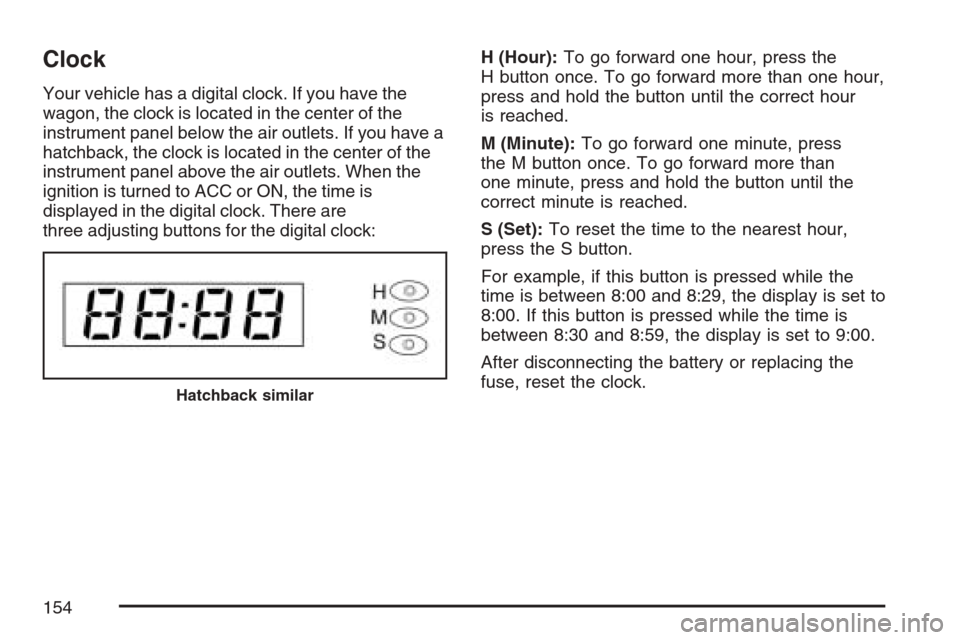
Your vehicle has a digital clock. If you have the
wagon, the clock is located in the center of the
instrument panel below the air outlets. If you have a
hatchback, the clock is located in the center of the
instrument panel above the air outlets. When the
ignition is turned to ACC or ON, the time is
displayed in the digital clock. There are
three adjusting buttons for the digital clock:H (Hour):To go forward one hour, press the
H button once. To go forward more than one hour,
press and hold the button until the correct hour
is reached.
M (Minute):To go forward one minute, press
the M button once. To go forward more than
one minute, press and hold the button until the
correct minute is reached.
S (Set):To reset the time to the nearest hour,
press the S button.
For example, if this button is pressed while the
time is between 8:00 and 8:29, the display is set to
8:00. If this button is pressed while the time is
between 8:30 and 8:59, the display is set to 9:00.
After disconnecting the battery or replacing the
fuse, reset the clock.
Hatchback similar
154
Page 156 of 422
A/C (Air Conditioning):If your vehicle has air
conditioning, follow these steps to use the system.
Start the engine and set the fan control knob to
the desired fan speed. The air conditioning
compressor does not operate when the fan control
knob is in the OFF position. Press the A/C
button to turn the air conditioning system on and
off. When A/C is pressed, an indicator light in
the button will come on to let you know that air
conditioning is activated.
On hot days, open the windows to let hot inside
air escape; then close them. This helps to reduce
the time it takes for your vehicle to cool down.
It also helps the system to operate more efficiently.
For quick cool down on hot days, do the
following:
1. Select the vent mode.
2. Select the highest fan speed.
3. Press the A/C button.
4. Press the recirculation button.
5. Select the coolest temperature.Using these settings together for long periods of
time may cause the air inside of your vehicle
to become too dry. To prevent this from
happening, after the air in your vehicle has cooled,
turn the recirculation mode off.
The air conditioning system removes moisture
from the air, so you may sometimes notice a small
amount of water dripping underneath your
vehicle while idling or after turning off the engine.
This is normal.
?(Recirculation):This mode keeps outside air
from coming into the vehicle. It can be used to
prevent outside air and odors from entering your
vehicle or to help heat or cool the air inside
your vehicle more quickly.
Press this button to turn the recirculation mode on.
When the button is pressed, an indicator light in
the button will come on. Press this button again to
return to outside air mode.
Using the recirculation mode for extended periods
may cause your windows to fog. If this happens,
select the defrost mode.
156
Page 176 of 422
Fog Lamp Light
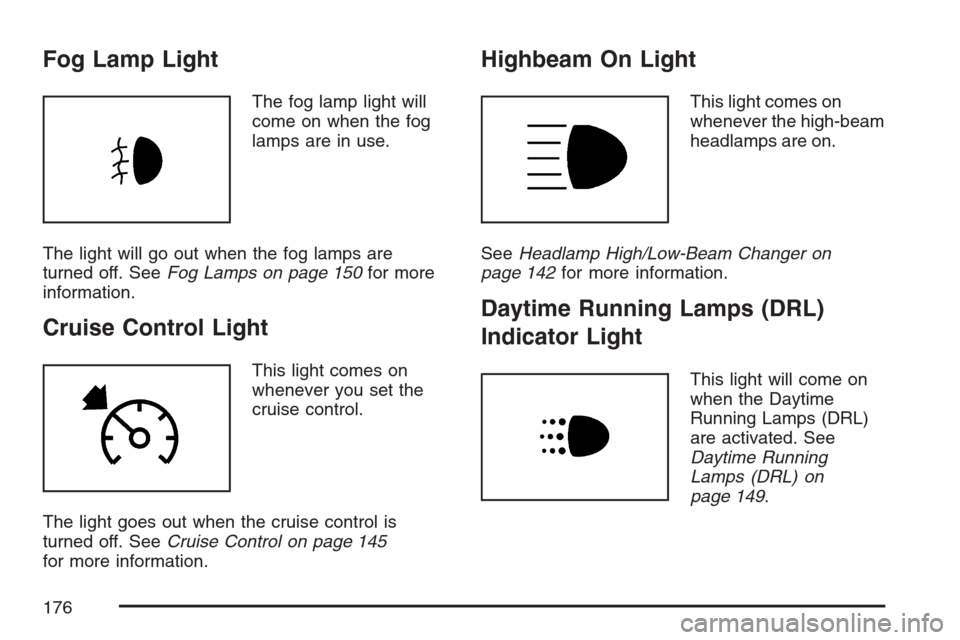
The fog lamp light will
come on when the fog
lamps are in use.
The light will go out when the fog lamps are
turned off. SeeFog Lamps on page 150for more
information.
Cruise Control Light
This light comes on
whenever you set the
cruise control.
The light goes out when the cruise control is
turned off. SeeCruise Control on page 145
for more information.
Highbeam On Light
This light comes on
whenever the high-beam
headlamps are on.
SeeHeadlamp High/Low-Beam Changer on
page 142for more information.
Daytime Running Lamps (DRL)
Indicator Light
This light will come on
when the Daytime
Running Lamps (DRL)
are activated. See
Daytime Running
Lamps (DRL) on
page 149.
176
Page 183 of 422
Playing a CD
Insert a CD partway into the slot, label side up.
The player pulls it in and the CD should begin
playing. Insert a CD with the ignition off.
When a CD is inserted, CDP displays. As the CD is
loading, Filecheck displays. As each new track
starts to play, Track and the track number displays.
If the ignition or radio is turned off with a CD in
the player, it stays in the player. When a CD is in
the player and the ignition is turned on, the
radio must be turned on before the CD starts
playback. When the ignition and radio are turned
on, the CD starts playing where it stopped, if it
was the last selected audio source.
The CD player can play the smaller 3 inch (8 cm)
single CDs with an adapter ring. Full-size CDs
and the smaller CDs are loaded in the same
manner.
If playing a CD-R, the sound quality can be
reduced due to CD-R quality, the method of
recording, the quality of the music that has been
recorded, and the way the CD-R has been
handled. There can be an increase in skipping,
difficulty in finding tracks, and/or difficulty in loadingand ejecting. If these problems occur, check the
bottom surface of the CD. If the surface of the CD
is damaged, such as cracked, broken, or
scratched, the CD will not play properly. If the
surface of the CD is soiled, seeCare of Your CDs
on page 203for more information.
If there is no apparent damage, try a known
good CD.
Do not add any label to a CD, it could get caught
in the CD player. If a CD is recorded on a
personal computer and a description label is
needed, try labeling the top of the recorded CD
with a marking pen.
Notice:If a label is added to a CD, or more
than one CD is inserted into the slot at a time,
or an attempt is made to play scratched or
damaged CDs, the CD player could be
damaged. While using the CD player, use only
CDs in good condition without any label,
load one CD at a time, and keep the CD player
and the loading slot free of foreign materials,
liquids, and debris.
If an error displays, see “CD Messages” later in
this section.
183
Page 186 of 422
Drivers are encouraged to set up any auxiliary
device while the vehicle is in PARK (P). See
Defensive Driving on page 206for more
information on driver distraction.
To use a portable audio player, connect a 3.5 mm
(1/8 inch) cable to the radio’s front auxiliary
input jack. While a device is connected, turn the
portable audio player on and press the radio
CD/AUX button to hear audio from the device over
the vehicle speakers.
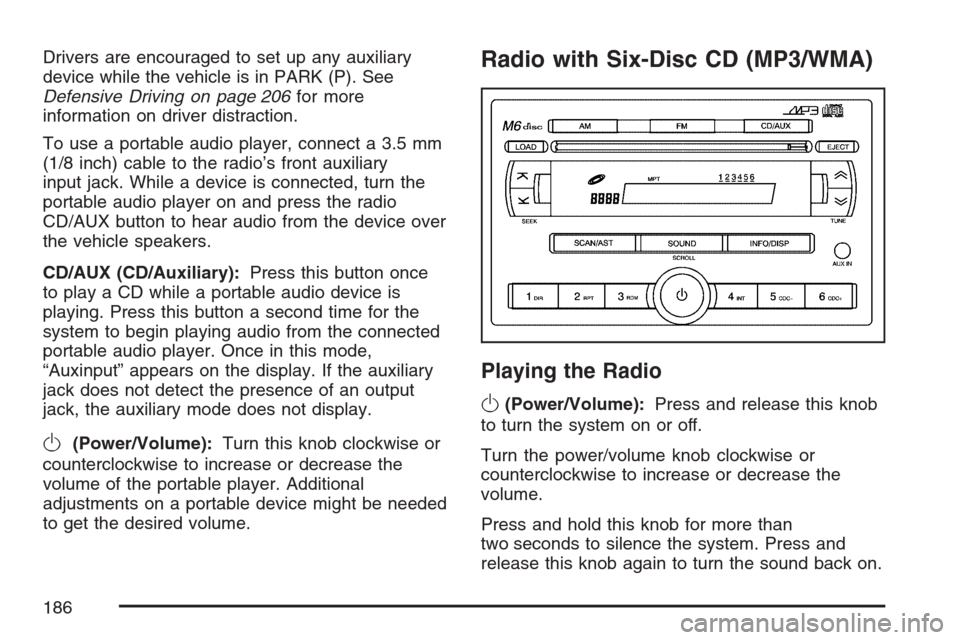
CD/AUX (CD/Auxiliary):Press this button once
to play a CD while a portable audio device is
playing. Press this button a second time for the
system to begin playing audio from the connected
portable audio player. Once in this mode,
“Auxinput” appears on the display. If the auxiliary
jack does not detect the presence of an output
jack, the auxiliary mode does not display.
O(Power/Volume):Turn this knob clockwise or
counterclockwise to increase or decrease the
volume of the portable player. Additional
adjustments on a portable device might be needed
to get the desired volume.
Radio with Six-Disc CD (MP3/WMA)
Playing the Radio
O
(Power/Volume):Press and release this knob
to turn the system on or off.
Turn the power/volume knob clockwise or
counterclockwise to increase or decrease the
volume.
Press and hold this knob for more than
two seconds to silence the system. Press and
release this knob again to turn the sound back on.
186
Page 191 of 422
Do not add any label to a CD, it could get caught
in the CD player. If a CD is recorded on a
personal computer and a description label is
needed, try labeling the top of the recorded CD
with a marking pen.
Notice:If a label is added to a CD, or more
than one CD is inserted into the slot at a time,
or an attempt is made to play scratched or
damaged CDs, the CD player could be
damaged. While using the CD player, use only
CDs in good condition without any label,
load one CD at a time, and keep the CD player
and the loading slot free of foreign materials,
liquids, and debris.
If an error displays, see “CD Messages” later in
this section.
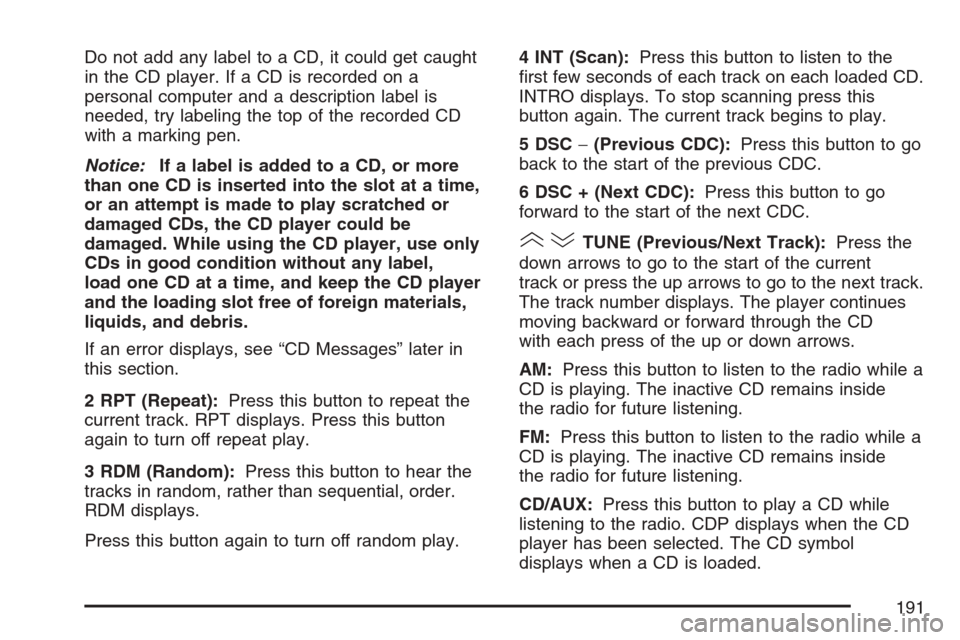
2 RPT (Repeat):Press this button to repeat the
current track. RPT displays. Press this button
again to turn off repeat play.
3 RDM (Random):Press this button to hear the
tracks in random, rather than sequential, order.
RDM displays.
Press this button again to turn off random play.4 INT (Scan):Press this button to listen to the
first few seconds of each track on each loaded CD.
INTRO displays. To stop scanning press this
button again. The current track begins to play.
5 DSC−(Previous CDC):Press this button to go
back to the start of the previous CDC.
6 DSC + (Next CDC):Press this button to go
forward to the start of the next CDC.
()TUNE (Previous/Next Track):Press the
down arrows to go to the start of the current
track or press the up arrows to go to the next track.
The track number displays. The player continues
moving backward or forward through the CD
with each press of the up or down arrows.
AM:Press this button to listen to the radio while a
CD is playing. The inactive CD remains inside
the radio for future listening.
FM:Press this button to listen to the radio while a
CD is playing. The inactive CD remains inside
the radio for future listening.
CD/AUX:Press this button to play a CD while
listening to the radio. CDP displays when the CD
player has been selected. The CD symbol
displays when a CD is loaded.
191