wheel CHEVROLET SILVERADO 2003 1.G Owners Manual
[x] Cancel search | Manufacturer: CHEVROLET, Model Year: 2003, Model line: SILVERADO, Model: CHEVROLET SILVERADO 2003 1.GPages: 556, PDF Size: 3.56 MB
Page 389 of 556
Hood Release
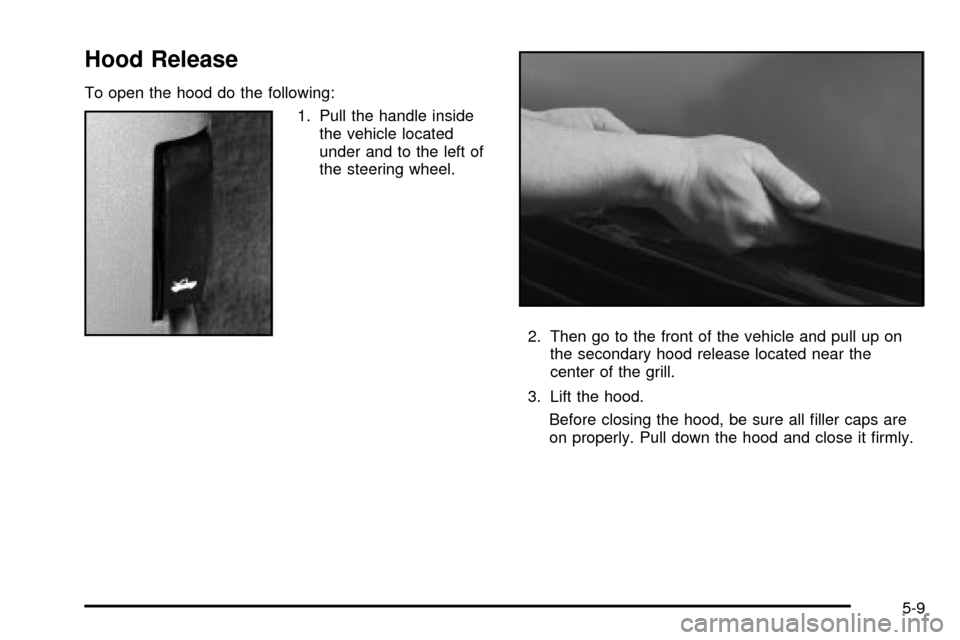
To open the hood do the following:
1. Pull the handle inside
the vehicle located
under and to the left of
the steering wheel.
2. Then go to the front of the vehicle and pull up on
the secondary hood release located near the
center of the grill.
3. Lift the hood.
Before closing the hood, be sure all ®ller caps are
on properly. Pull down the hood and close it ®rmly.
5-9
Page 426 of 556
What to Add
When you do need brake ¯uid, use only DOT-3 brake
¯uid. Use new brake ¯uid from a sealed container
only. See
Part D: Recommended Fluids and Lubricants
on page 6-19.
Always clean the brake ¯uid reservoir cap and the area
around the cap before removing it. This will help
keep dirt from entering the reservoir.
{CAUTION:
With the wrong kind of ¯uid in your brake
system, your brakes may not work well, or they
may not even work at all. This could cause a
crash. Always use the proper brake ¯uid.
Notice:
·Using the wrong ¯uid can badly damage brake
system parts. For example, just a few drops of
mineral-based oil, such as engine oil, in your
brake system can damage brake system
parts so badly that they will have to be replaced.
Do not let someone put in the wrong kind of
¯uid.
·If you spill brake ¯uid on your vehicle's painted
surfaces, the paint ®nish can be damaged. Be
careful not to spill brake ¯uid on your vehicle. If
you do, wash it off immediately. See
Appearance
Care on page 5-100.
Brake Wear
Your vehicle has four-wheel disc brakes.
Disc brake pads have built-in wear indicators that make a
high-pitched warning sound when the brake pads are
worn and new pads are needed. The sound may come
and go or be heard all the time your vehicle is moving
(except when you are pushing on the brake pedal ®rmly).
{CAUTION:
The brake wear warning sound means that
soon your brakes will not work well. That
could lead to an accident. When you hear the
brake wear warning sound, have your vehicle
serviced.
Notice:Continuing to drive with worn-out brake
pads could result in costly brake repair.
5-46
Page 427 of 556

Some driving conditions or climates may cause a brake
squeal when the brakes are ®rst applied or lightly
applied. This does not mean something is wrong with
your brakes.
Properly torqued wheel nuts are necessary to help
prevent brake pulsation. When tires are rotated, inspect
brake pads for wear and evenly tighten wheel nuts in
the proper sequence to GM torque speci®cations.
Brake linings should always be replaced as complete
axle sets.
See
Brake System Inspection on page 6-18.
Brake Pedal Travel
See your dealer if the brake pedal does not return to
normal height, or if there is a rapid increase in
pedal travel. This could be a sign of brake trouble.
Brake Adjustment
Every time you make a brake stop, your disc brakes
adjust for wear.
Replacing Brake System Parts
The braking system on a vehicle is complex. Its many
parts have to be of top quality and work well together if
the vehicle is to have really good braking. Your
vehicle was designed and tested with top-quality GM
brake parts. When you replace parts of your brakingsystem Ð for example, when your brake linings wear
down and you need new ones put in Ð be sure you get
new approved GM replacement parts. If you do not,
your brakes may no longer work properly. For example,
if someone puts in brake linings that are wrong for
your vehicle, the balance between your front and rear
brakes can change Ð for the worse. The braking
performance you have come to expect can change in
many other ways if someone puts in the wrong
replacement brake parts.
Battery
Your new vehicle comes with a maintenance free
ACDelcožbattery. When it's time for a new battery, get
one that has the replacement number shown on the
original battery's label. We recommend an ACDelco
ž
battery. SeeEngine Compartment Overview on
page 5-10for battery location.
Warning:Battery posts, terminals and related
accessories contain lead and lead compounds,
chemicals known to the State of California to cause
cancer and reproductive harm. Wash hands after
handling.
5-47
Page 429 of 556

Notice:If the other system isn't a 12-volt system
with a negative ground, both vehicles can be
damaged.
2. If you have a vehicle with a diesel engine with two
batteries (or more), you should know before you
begin that, especially in cold weather, you may not
be able to get enough power from a single
battery in another vehicle to start your diesel engine.
If your vehicle has more than one battery, use
the battery that's closer to the starter ± this
will reduce electrical resistance.
3. Get the vehicles close enough so the jumper cables
can reach, but be sure the vehicles aren't touching
each other. If they are, it could cause a ground
connection you don't want. You wouldn't be able to
start your vehicle, and the bad grounding could
damage the electrical systems.
To avoid the possibility of the vehicles rolling, set
the parking brake ®rmly on both vehicles involved in
the jump start procedure. Put an automatic
transmission in PARK (P) or a manual transmission
in NEUTRAL before setting the parking brake. If
you have a four-wheel-drive vehicle, be sure
the transfer case is in a drive gear not in NEUTRAL.Notice:If you leave your radio on, it could be badly
damaged. The repairs wouldn't be covered by
your warranty.
4. Turn off the ignition on both vehicles. Unplug
unnecessary accessories plugged into the cigarette
lighter or accessory power outlets. Turn off the
radio and all lamps that aren't needed. This
will avoid sparks and help save both batteries. And
it could save your radio!
5. Open the hoods and locate the positive (+) and
negative (-) terminal locations of the other vehicle.
Your vehicle has a remote positive (+) jump
starting terminal and a remote negative (-) jump
starting terminal. You should always use these
remote terminals instead of the terminals on the
battery.
The remote positive (+) terminal is located behind a
red plastic cover near the engine accessory drive
bracket. To uncover the remote positive (+) terminal,
open the red plastic cover.
The remote negative (-) terminal is located on the
engine drive bracket on all V8 and diesel engines,
and on the thermostat housing on the 8.1L engine.
On V8 engines it is marked ªGND.²
5-49
Page 434 of 556
All-Wheel Drive
Lubricant checks in this section also apply to these
vehicles. However, there are two additional systems that
need lubrication.
Transfer Case
When to Check Lubricant
Refer to the Maintenance Schedule to determine how
often to check the lubricant. SeePart C: Periodic
MaintenanceInspections on page 6-17.
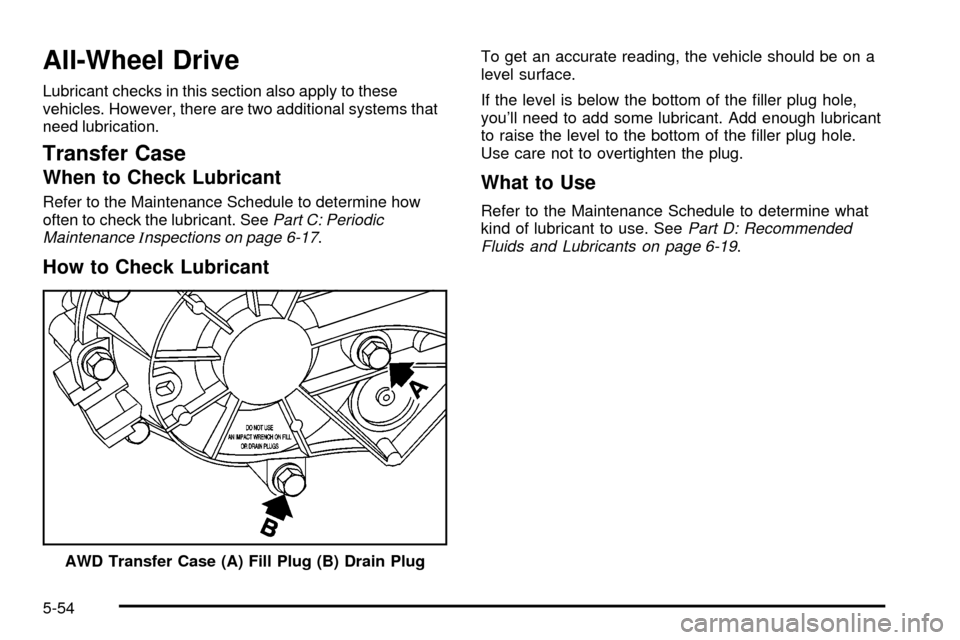
How to Check Lubricant
To get an accurate reading, the vehicle should be on a
level surface.
If the level is below the bottom of the ®ller plug hole,
you'll need to add some lubricant. Add enough lubricant
to raise the level to the bottom of the ®ller plug hole.
Use care not to overtighten the plug.
What to Use
Refer to the Maintenance Schedule to determine what
kind of lubricant to use. SeePart D: Recommended
Fluids and Lubricants on page 6-19.
AWD Transfer Case (A) Fill Plug (B) Drain Plug
5-54
Page 435 of 556

Rear Axle
When to Check Lubricant
Refer to the Maintenance Schedule to determine how
often to check the lubricant. SeePart A: Scheduled
Maintenance Services on page 6-4.
How to Check Lubricant
To get an accurate reading, the vehicle should be on a
level surface.The proper level for the 1500 Series is from 5/8 inch to
1 5/8 inch (15 mm to 40 mm) below the bottom of
the ®ller plug hole. The proper level for the 1500 HD
Series, 2500 Series, 2500 HD, and 3500 Series is from
0 to 1/2 inch (0 to 13 mm) below the bottom of the
®ller plug hole. The proper level for the 1500 and
2500 Series vehicles with QUADRASTEERŸ (4 Wheel
Steer) is from 0 to 1/4 inch (0 to 6 mm) below the
®ller plug hole. Add only enough ¯uid to reach the proper
level.
What to Use
Refer to the Maintenance Schedule to determine what
kind of lubricant to use. SeePart D: Recommended
Fluids and Lubricants on page 6-19.
1500 Series Shown, 2500 Series Similar
5-55
Page 436 of 556
Four-Wheel Drive
Lubricant checks in this section also apply to these
vehicles. However, there are two additional systems that
need lubrication.
Transfer Case
When to Check Lubricant
Refer to the Maintenance Schedule to determine how
often to check the lubricant. SeePart C: Periodic
MaintenanceInspections on page 6-17.
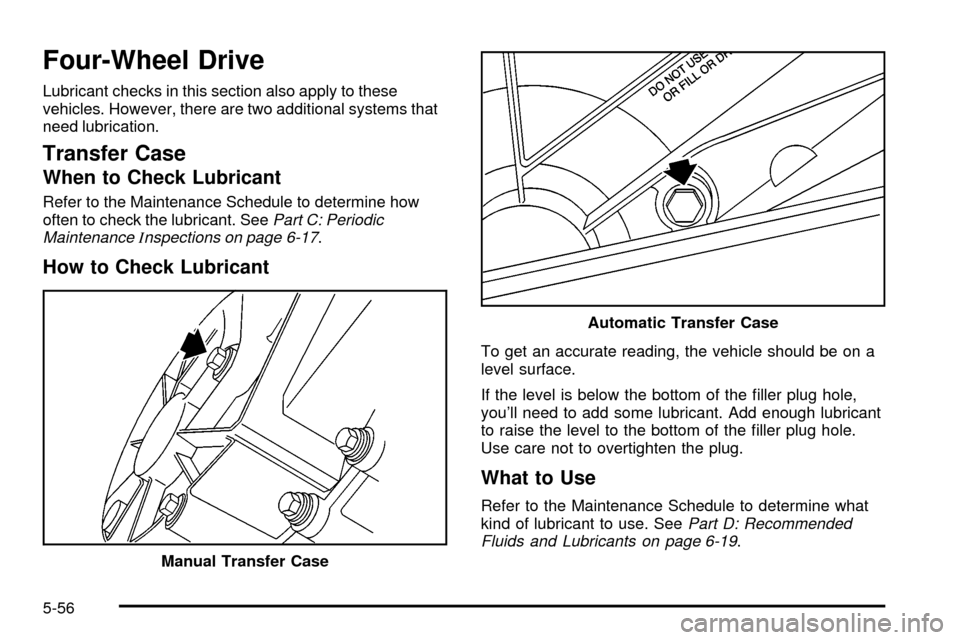
How to Check Lubricant
To get an accurate reading, the vehicle should be on a
level surface.
If the level is below the bottom of the ®ller plug hole,
you'll need to add some lubricant. Add enough lubricant
to raise the level to the bottom of the ®ller plug hole.
Use care not to overtighten the plug.
What to Use
Refer to the Maintenance Schedule to determine what
kind of lubricant to use. SeePart D: Recommended
Fluids and Lubricants on page 6-19.
Manual Transfer Case
Automatic Transfer Case
5-56
Page 450 of 556

·Tire overloading
·Bad wear
·Bad handling
·Bad fuel economy
If your tires have too much air (overin¯ation), you
can get the following:
·Unusual wear
·Bad handling
·Rough ride
·Needless damage from road hazards
When to Check
Check your tires once a month or more.
Also, check the tire pressure of the spare tire.
How to Check
Use a good quality pocket-type gage to check tire
pressure. You can't tell if your tires are properly in¯ated
simply by looking at them. Radial tires may look
properly in¯ated even when they're underin¯ated.Remove the valve cap from the tire valve stem. Press
the tire gage ®rmly onto the valve to get a pressure
measurement. If the cold tire in¯ation pressure is low,
add air until you reach the recommended amount.
If you over®ll the tire, release air by pushing on the metal
stem in the center of the tire valve. Recheck the tire
pressure with the tire gage.
Be sure to put the valve caps back on the valve stems.
They help prevent leaks by keeping out dirt and
moisture.
Dual Tire Operation
When the vehicle is new, or whenever a wheel, wheel
bolt or wheel nut is replaced, check the wheel nut torque
after 100, 1,000 and 6,000 miles (160, 1 600 and
10 000 km) of driving. For proper torque and wheel nut
tightening information, see ªRemoving the Flat Tire
and Installing the Spare Tireº in the index.
The outer tire on a dual wheel setup generally wears
faster than the inner tire. Your tires will wear more
evenly and last longer if you rotate the tires periodically.
See ªTire Inspection and Rotationº earlier in this
section. Also see ªScheduled Maintenance Servicesº in
the Index for scheduled rotation intervals
5-70
Page 451 of 556

{CAUTION:
If you operate your vehicle with a tire that is
badly underin¯ated, the tire can overheat. An
overheated tire can lose air suddenly or catch
®re. You or others could be injured. Be sure all
tires (including the spare) are properly in¯ated.
See ªTiresº and ªIn¯ation ± Tire Pressureº in the Index
for more information on proper tire in¯ation.
Tire Inspection and Rotation
Tires should be rotated every 7,500 miles (12 500 km).
Any time you notice unusual wear, rotate your tires
as soon as possible and check wheel alignment. Also
check for damaged tires or wheels. See
When It Is Time
for New Tires on page 5-73andWheel Replacement
on page 5-76for more information.
Make sure the spare tire is stored securely. Push, pull,
and then try to rotate or turn the tire. If it moves,
use the wheel wrench/hoist shaft to tighten the cable.
See
Changing a Flat Tire on page 5-80.
If your vehicle has dual rear wheels, also see
Dual Tire
Operation on page 5-70.The purpose of regular rotation is to achieve more
uniform wear for all tires on the vehicle. The ®rst rotation
is the most important. See ªPart A: Scheduled
Maintenance Services,º in Section 6, for scheduled
rotation intervals.
If your vehicle has single rear wheels and the tread
design for your front tires is the same as your rear tires,
always use one of the correct rotation patterns shown
here when rotating your tires. If your vehicle is an
SS model, the spare tire is not designed to be used in
the tire rotation.
If your vehicle has front tires with different tread designs
(such as all season vs. on/off road) than the rear
tires, don't rotate your tires front to rear.
5-71
Page 452 of 556

If your vehicle has dual rear wheels and the tread
design for your front tires is the same as your rear tires,
always use one of the correct rotation patterns shown
here when rotating your tires.If your vehicle has dual rear
wheels and the tread
design for the front tires is
different from the dual rear
tires, always use the
correct rotation pattern
shown here when rotating
your tires. The dual tires
are rotated as a pair, and
the inside rear tires became
the outside rear tires.
When you install dual wheels, be sure the vent holes in
the inner and outer wheels on each side are lined up.
After the tires have been rotated, adjust the front and
rear in¯ation pressures as shown on the
Certi®cation/Tire label. Make certain that all wheel nuts
are properly tightened. See ªWheel Nut Torqueº
under
Capacities and Speci®cations on page 5-118.
5-72