key CHEVROLET SILVERADO 2011 2.G Owner's Guide
[x] Cancel search | Manufacturer: CHEVROLET, Model Year: 2011, Model line: SILVERADO, Model: CHEVROLET SILVERADO 2011 2.GPages: 588, PDF Size: 7.99 MB
Page 75 of 588
Black plate (7,1)Chevrolet Silverado Owner Manual - 2011
Seats and Restraints 3-7
If something has blocked the driver
seat and/or the adjustable pedals
while recalling a memory position,
the recall may stop. Remove the
obstruction; then press and hold the
appropriate manual control for the
memory item that is not recalling
for two seconds. Try recalling the
memory position again by pressing
the appropriate memory button.
If the memory position is still not
recalling, see your dealer for
service.
Easy Exit Driver Seat
The easy exit driver seat feature
can move the seat rearward to allow
extra room to exit the vehicle.
B(Easy Exit Driver Seat):Press
to recall the easy exit seat position.
The vehicle must be in P (Park).
If the easy exit seat feature is
programmed on in the vehicle
personalization menu, automatic
seat movement occurs when the
ignition key is removed. A single beep sounds. The driver
seat moves back approximately
8 cm (3 in). To move the seat back
farther, press the easy exit seat
button again until the seat is all the
way back.
If something has blocked the driver
seat while recalling the exit position,
the recall may stop. Remove the
obstruction; then press and hold
the power seat control rearward for
two seconds. Try recalling the exit
position again. If the exit position is
still not recalling, see your dealer for
service.
See
“Easy Exit Recall” and
“Easy Exit Setup” underVehicle
Personalization (with DIC Buttons)on page 5‑53for more information.
Lumbar Adjustment
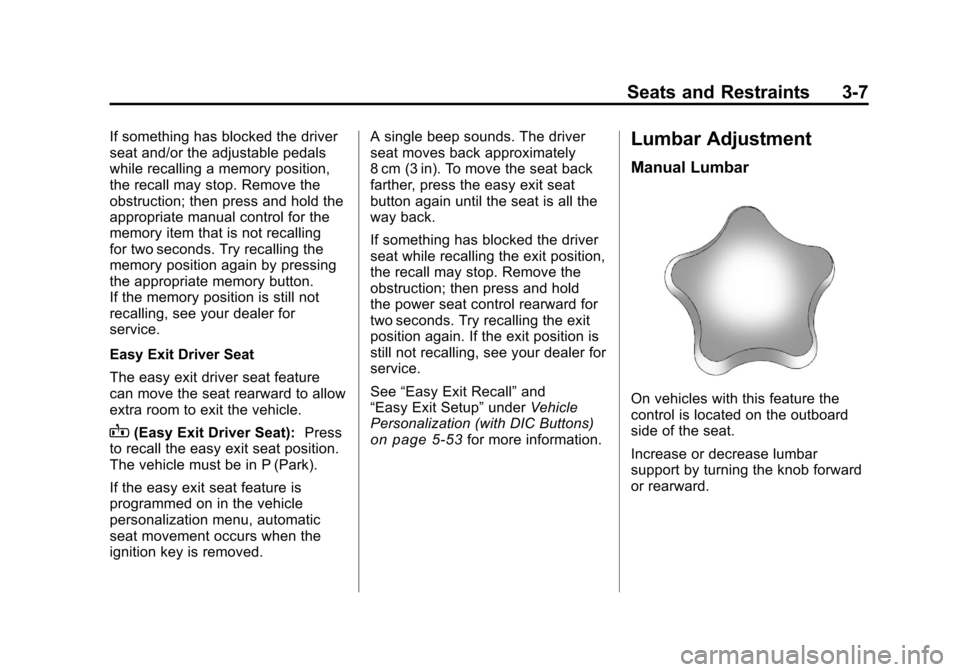
Manual Lumbar
On vehicles with this feature the
control is located on the outboard
side of the seat.
Increase or decrease lumbar
support by turning the knob forward
or rearward.
Page 96 of 588
Black plate (28,1)Chevrolet Silverado Owner Manual - 2011
3-28 Seats and Restraints
To remove and store the comfort
guide, squeeze the belt edges
together so that the safety belt can
be removed from the guide. Slide
the guide onto the storage clip.
Safety Belt Use During
Pregnancy
Safety belts work for everyone,
including pregnant women. Like all
occupants, they are more likely to
be seriously injured if they do not
wear safety belts.
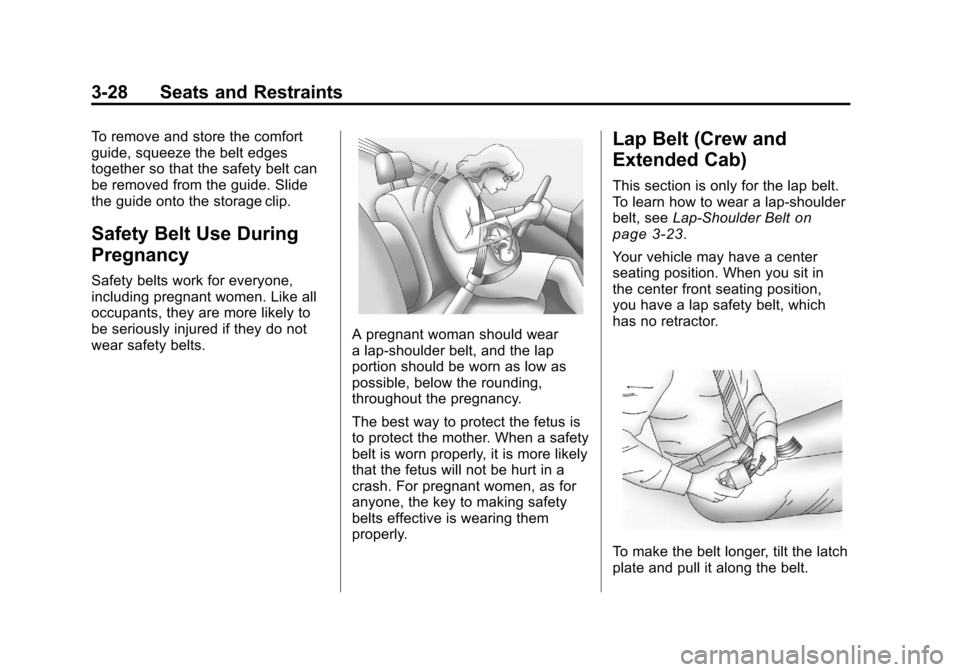
A pregnant woman should wear
a lap-shoulder belt, and the lap
portion should be worn as low as
possible, below the rounding,
throughout the pregnancy.
The best way to protect the fetus is
to protect the mother. When a safety
belt is worn properly, it is more likely
that the fetus will not be hurt in a
crash. For pregnant women, as for
anyone, the key to making safety
belts effective is wearing them
properly.
Lap Belt (Crew and
Extended Cab)
This section is only for the lap belt.
To learn how to wear a lap-shoulder
belt, seeLap-Shoulder Belt
on
page 3‑23.
Your vehicle may have a center
seating position. When you sit in
the center front seating position,
you have a lap safety belt, which
has no retractor.
To make the belt longer, tilt the latch
plate and pull it along the belt.
Page 109 of 588
Black plate (41,1)Chevrolet Silverado Owner Manual - 2011
Seats and Restraints 3-41
WARNING (Continued)
and help protect the person
sitting there. Do not turn off the
passenger's airbag unless the
person sitting there is in a risk
group.
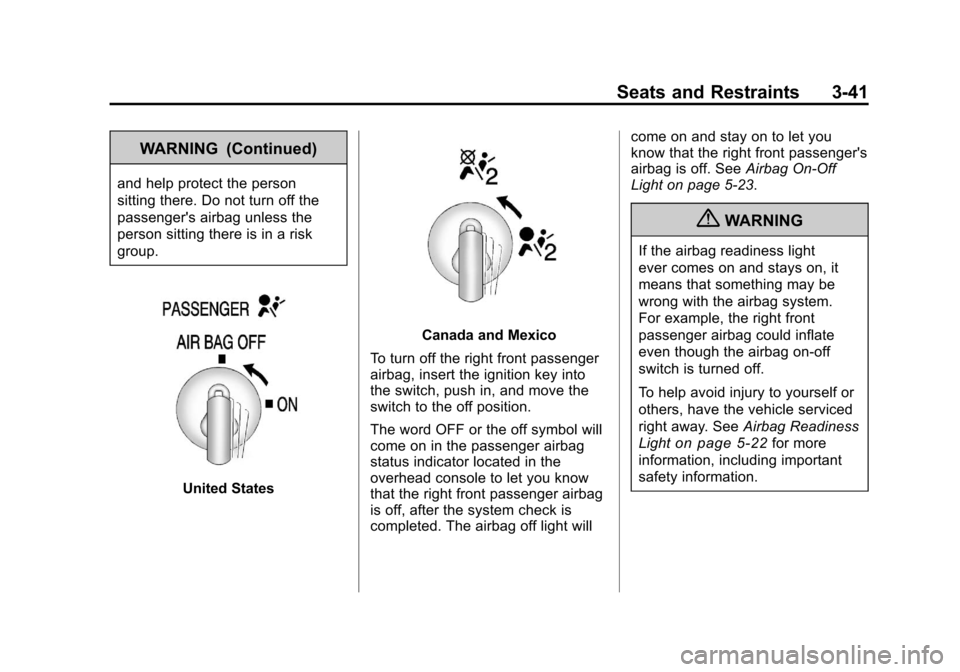
United States
Canada and Mexico
To turn off the right front passenger
airbag, insert the ignition key into
the switch, push in, and move the
switch to the off position.
The word OFF or the off symbol will
come on in the passenger airbag
status indicator located in the
overhead console to let you know
that the right front passenger airbag
is off, after the system check is
completed. The airbag off light will come on and stay on to let you
know that the right front passenger's
airbag is off. See
Airbag On-Off
Light on page 5‑23.
{WARNING
If the airbag readiness light
ever comes on and stays on, it
means that something may be
wrong with the airbag system.
For example, the right front
passenger airbag could inflate
even though the airbag on-off
switch is turned off.
To help avoid injury to yourself or
others, have the vehicle serviced
right away. See Airbag Readiness
Light
on page 5‑22for more
information, including important
safety information.
Page 110 of 588
Black plate (42,1)Chevrolet Silverado Owner Manual - 2011
3-42 Seats and Restraints
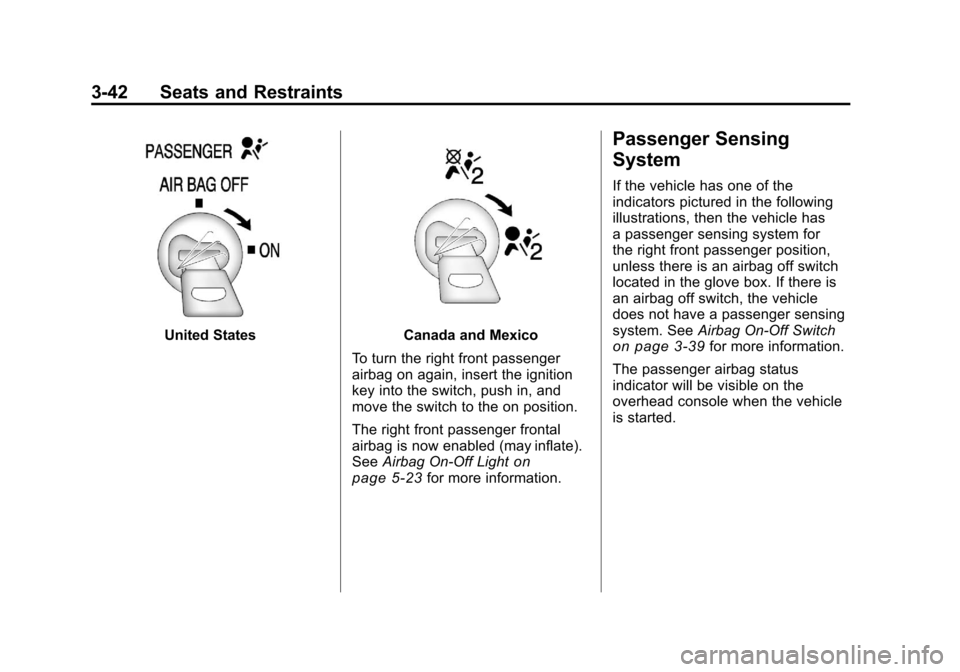
United StatesCanada and Mexico
To turn the right front passenger
airbag on again, insert the ignition
key into the switch, push in, and
move the switch to the on position.
The right front passenger frontal
airbag is now enabled (may inflate).
See Airbag On-Off Light
on
page 5‑23for more information.
Passenger Sensing
System
If the vehicle has one of the
indicators pictured in the following
illustrations, then the vehicle has
a passenger sensing system for
the right front passenger position,
unless there is an airbag off switch
located in the glove box. If there is
an airbag off switch, the vehicle
does not have a passenger sensing
system. See Airbag On-Off Switch
on page 3‑39for more information.
The passenger airbag status
indicator will be visible on the
overhead console when the vehicle
is started.
Page 150 of 588
Black plate (2,1)Chevrolet Silverado Owner Manual - 2011
4-2 Storage
Center Console Storage
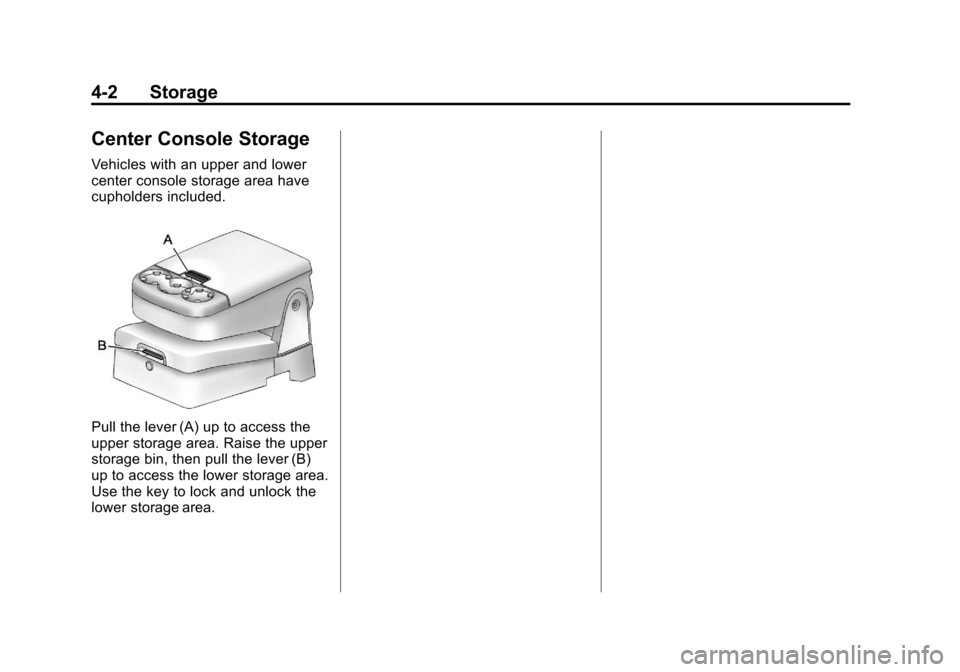
Vehicles with an upper and lower
center console storage area have
cupholders included.
Pull the lever (A) up to access the
upper storage area. Raise the upper
storage bin, then pull the lever (B)
up to access the lower storage area.
Use the key to lock and unlock the
lower storage area.
Page 151 of 588
Black plate (1,1)Chevrolet Silverado Owner Manual - 2011
Instruments and Controls 5-1
Instruments and
Controls
Controls
Steering Wheel Adjustment . . . 5-2
Steering Wheel Controls . . . . . . 5-3
Horn . . . . . . . . . . . . . . . . . . . . . . . . . . 5-5
Windshield Wiper/Washer . . . . . 5-5
Compass . . . . . . . . . . . . . . . . . . . . . 5-6
Clock . . . . . . . . . . . . . . . . . . . . . . . . . 5-8
Power Outlets . . . . . . . . . . . . . . . 5-10
Cigarette Lighter . . . . . . . . . . . . . 5-11
Ashtrays . . . . . . . . . . . . . . . . . . . . . 5-12
Warning Lights, Gauges, and
Indicators
Warning Lights, Gauges, andIndicators . . . . . . . . . . . . . . . . . . 5-12
Instrument Cluster . . . . . . . . . . . 5-13
Speedometer . . . . . . . . . . . . . . . . 5-16
Odometer . . . . . . . . . . . . . . . . . . . . 5-16
Trip Odometer . . . . . . . . . . . . . . . 5-16
Tachometer . . . . . . . . . . . . . . . . . . 5-17
Fuel Gauge . . . . . . . . . . . . . . . . . . 5-17
Engine Oil Pressure Gauge . . . . . . . . . . . . . . . . . . . . . . 5-18 Engine Coolant Temperature
Gauge . . . . . . . . . . . . . . . . . . . . . . 5-19
Voltmeter Gauge . . . . . . . . . . . . . 5-20
Safety Belt Reminders . . . . . . . 5-21
Airbag Readiness Light . . . . . . 5-22
Airbag On-Off Light . . . . . . . . . . 5-23
Passenger Airbag Status Indicator . . . . . . . . . . . . . . . . . . . . 5-25
Charging System Light . . . . . . 5-26
Malfunction Indicator Lamp . . . . . . . . . . . . . 5-27
Brake System Warning Light . . . . . . . . . . . . . . . . . . . . . . . 5-29
Antilock Brake System (ABS) Warning Light . . . . . . . . . . . . . . 5-30
Four-Wheel-Drive Light . . . . . . 5-31
Tow/Haul Mode Light . . . . . . . . 5-31
StabiliTrak
®Indicator Light . . . 5-31
Tire Pressure Light . . . . . . . . . . 5-32
Engine Oil Pressure Light . . . . 5-32
Low Fuel Warning Light . . . . . . 5-33
Security Light . . . . . . . . . . . . . . . . 5-33
High-Beam on Light . . . . . . . . . 5-33
Front Fog Lamp Light . . . . . . . . 5-33
Cruise Control Light . . . . . . . . . 5-34
Information Displays
Driver Information Center (DIC) . . . . . . . . . . . . . . . 5-34
Vehicle Messages
Vehicle Messages . . . . . . . . . . . 5-43
Battery Voltage and ChargingMessages . . . . . . . . . . . . . . . . . . 5-43
Brake System Messages . . . . 5-44
Door Ajar Messages . . . . . . . . . 5-45
Engine Cooling System Messages . . . . . . . . . . . . . . . . . . 5-46
Engine Oil Messages . . . . . . . . 5-47
Engine Power Messages . . . . 5-47
Fuel System Messages . . . . . . 5-48
Key and Lock Messages . . . . . 5-48
Lamp Messages . . . . . . . . . . . . . 5-48
Object Detection System Messages . . . . . . . . . . . . . . . . . . 5-48
Ride Control System Messages . . . . . . . . . . . . . . . . . . 5-49
Airbag System Messages . . . . 5-50
Anti-Theft Alarm System Messages . . . . . . . . . . . . . . . . . . 5-50
Starting the Vehicle Messages . . . . . . . . . . . . . . . . . . 5-50
Tire Messages . . . . . . . . . . . . . . . 5-51
Transmission Messages . . . . . 5-52
Vehicle Reminder Messages . . . . . . . . . . . . . . . . . . 5-52
Washer Fluid Messages . . . . . 5-53
Page 158 of 588
Black plate (8,1)Chevrolet Silverado Owner Manual - 2011
5-8 Instruments and Controls
To calibrate the compass, use the
following procedure:
Compass Calibration Procedure
1. Before calibrating the compass,make sure the compass zone
is set to the variance zone in
which the vehicle is located.
See “Compass Variance (Zone)
Procedure” earlier in this
section.
Do not operate any switches
such as window, sunroof,
climate controls, or seats during
the calibration procedure.
2. Press the vehicle information button until PRESS
VTO
CALIBRATE COMPASS
displays. Or, if the vehicle
does not have DIC buttons,
press the trip odometer reset
stem until CALIBRATE
COMPASS displays. 3. Press the set/reset button to
start the compass calibration.
Or, if the vehicle does not have
DIC buttons, press and hold
the trip odometer reset stem
for two seconds to start the
compass calibration.
4. The DIC will display CALIBRATING: DRIVE IN
CIRCLES. Drive the vehicle
in tight circles at less than
8 km/h (5 mph) to complete the
calibration. The DIC will display
CALIBRATION COMPLETE
for a few seconds when the
calibration is complete. The DIC
display will then return to the
previous menu.
Clock
AM-FM Radio and AM‐FM
Radio with CD Player
To set the clock:
1. Turn the ignition key to
ACC/ACCESSORY or ON/RUN,
then press the
Obutton to turn
the radio on.
2. Press the
Hbutton until the hour
numbers begin to flash, then
turn the
fknob to increase or
decrease the hour.
3. Press the
Hbutton until the
minute numbers begin to flash,
then turn the
fknob to increase
or decrease the minutes.
Page 159 of 588
Black plate (9,1)Chevrolet Silverado Owner Manual - 2011
Instruments and Controls 5-9
4. Press theHbutton until the
12HR or 24HR time format
begins to flash, then turn
the
fknob to change the
time format.
5. Press the
Hbutton again until
the clock display stops flashing
to set the currently displayed
time, or wait until the flashing
stops after five seconds and
the current time displayed
automatically sets.
MP3 Radios with a Single CD
or a Single CD and DVD Player
To adjust the time and date:
1. Turn the ignition key to ACC/ACCESSORY or ON/RUN,
then press the
Obutton to turn
the radio on.
2. Press the
Hbutton to display
HR, MIN, MM, DD, YYYY (hour,
minute, month, day, and year). 3. Press the softkey located under
any one of the tabs to change
that setting.
4. To increase the time or date, do one of the following:
.Press the softkey below the
selected tab.
.Press the¨SEEK button.
.Press the\FWD button.
.Turn thefknob clockwise.
5. To decrease the time or date, do one of the following:
.Press the©SEEK button.
.Press thesREV button.
.Turn thefknob
counterclockwise. To change the time default setting
from 12 hour to 24 hour or to
change the date default setting from
month/day/year to day/month/year:
1. Press the
Hbutton and then
the softkey located below the
forward arrow tab. 12H, 24H, the
date MM/DD (month and day),
and DD/MM (day and month)
displays.
2. Press the softkey located below the desired option.
3. Press the
Hbutton again to
apply the desired option, or let
the screen time out.
Page 160 of 588
Black plate (10,1)Chevrolet Silverado Owner Manual - 2011
5-10 Instruments and Controls
MP3 Radio with a Six-Disc CD
Player
To set the time and date:
1. Turn the ignition key toACC/ACCESSORY or ON/RUN,
then press the
Obutton to turn
the radio on.
2. Press the MENU button and then the softkey under the
Htab
to display HR, MIN, MM, DD,
YYYY (hour, minute, month, day,
and year).
3. Press the softkey located under any one of the tabs to change
that setting.
4. To increase the time or date, do one of the following:
.Press the softkey below the
selected tab.
.Press the¨SEEK button.
.Press the\FWD button.
.Turn thefknob clockwise. 5. To decrease the time or date, do
one of the following:
.Press the©SEEK button.
.Press thesREV button.
.Turn thefknob
counterclockwise.
To change the time default setting
from 12 hour to 24 hour or to
change the date default setting
from month/day to day/month:
1. Press the MENU button and then the softkey under
the
Htab.
2. Press the softkey located below the forward arrow tab. 12H, 24H,
the date MM/DD (month and
day), and DD/MM (day and
month) displays.
3. Press the softkey located below the desired option.
4. Press the MENU button again to apply the desired option, or let
the screen time out.
Power Outlets
Accessory power outlets can be
used to plug in electrical equipment,
such as a cell phone, MP3
player, etc.
The vehicle may have two
accessory power outlets located
below the climate control system,
or may have one accessory power
outlet and one cigarette lighter.
The cigarette lighter is designed to
fit only in the receptacle closest to
the driver.
There may be another accessory
power outlet in the rear cargo area.
If the vehicle has a floor console,
there is an accessory power outlet
inside the storage bin and one on
the rear of the floor console.
Remove the cover to access and
replace when not in use.
Page 176 of 588
Black plate (26,1)Chevrolet Silverado Owner Manual - 2011
5-26 Instruments and Controls
If, after several seconds, both
status indicator lights remain on,
or if there are no lights at all, there
may be a problem with the lights
or the passenger sensing system.
See your dealer for service.
{WARNING
If the airbag readiness light ever
comes on and stays on, it means
that something may be wrong
with the airbag system. To help
avoid injury to yourself or others,
have the vehicle serviced right
away. SeeAirbag Readiness
Light
on page 5‑22for more
information, including important
safety information.
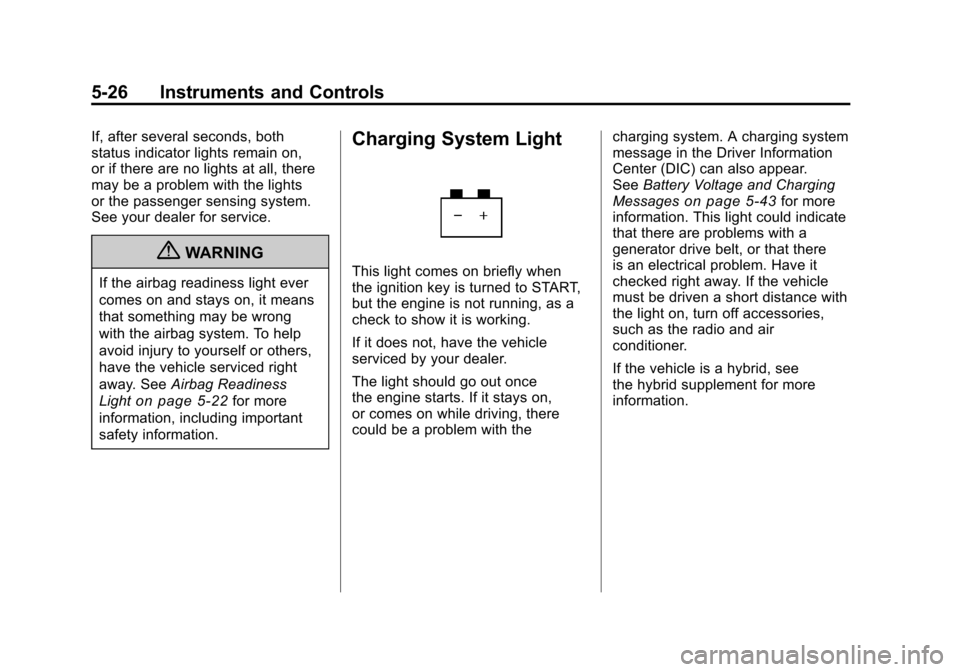
Charging System Light
This light comes on briefly when
the ignition key is turned to START,
but the engine is not running, as a
check to show it is working.
If it does not, have the vehicle
serviced by your dealer.
The light should go out once
the engine starts. If it stays on,
or comes on while driving, there
could be a problem with the charging system. A charging system
message in the Driver Information
Center (DIC) can also appear.
See
Battery Voltage and Charging
Messages
on page 5‑43for more
information. This light could indicate
that there are problems with a
generator drive belt, or that there
is an electrical problem. Have it
checked right away. If the vehicle
must be driven a short distance with
the light on, turn off accessories,
such as the radio and air
conditioner.
If the vehicle is a hybrid, see
the hybrid supplement for more
information.