cruise control CHEVROLET SILVERADO 2015 3.G Owner's Manual
[x] Cancel search | Manufacturer: CHEVROLET, Model Year: 2015, Model line: SILVERADO, Model: CHEVROLET SILVERADO 2015 3.GPages: 543, PDF Size: 7.01 MB
Page 324 of 543
Black plate (57,1)Chevrolet 2015i Silverado Owner Manual (GMNA-Localizing-U.S./Canada/
Mexico-8425172) - 2015 - crc - 2/9/15
Driving and Operating 9-57
Cruise Control
{Warning
Cruise control can be dangerous
where you cannot drive safely at
a steady speed. Do not use
cruise control on winding roads or
in heavy traffic.
Cruise control can be dangerous
on slippery roads. On such roads,
fast changes in tire traction can
cause excessive wheel slip, and
you could lose control. Do not use
cruise control on slippery roads.
With cruise control a speed of about
40 km/h (25 mph) or more can be
maintained without keeping your
foot on the accelerator. Cruise
control does not work at speeds
below about 40 km/h (25 mph). If equipped with an Allison or
Hydra-Matic 6-speed automatic
transmission, see
“Tow/Haul Mode
Grade Braking” underTow/Haul
Mode on page 9-40 for an
explanation of how cruise control
interacts with the Range Selection
Mode, Tow/Haul Mode, and Grade
Braking systems.
If the cruise control is being used
and the Traction Control system
(TCS) or StabiliTrak begins to limit
wheel spin, the cruise control will
automatically disengage. See
Traction Control/Electronic Stability
Control on page 9-54. When road
conditions allow you to safely use it
again, cruise control can be turned
back on.
If the brakes are applied, cruise
control disengages.
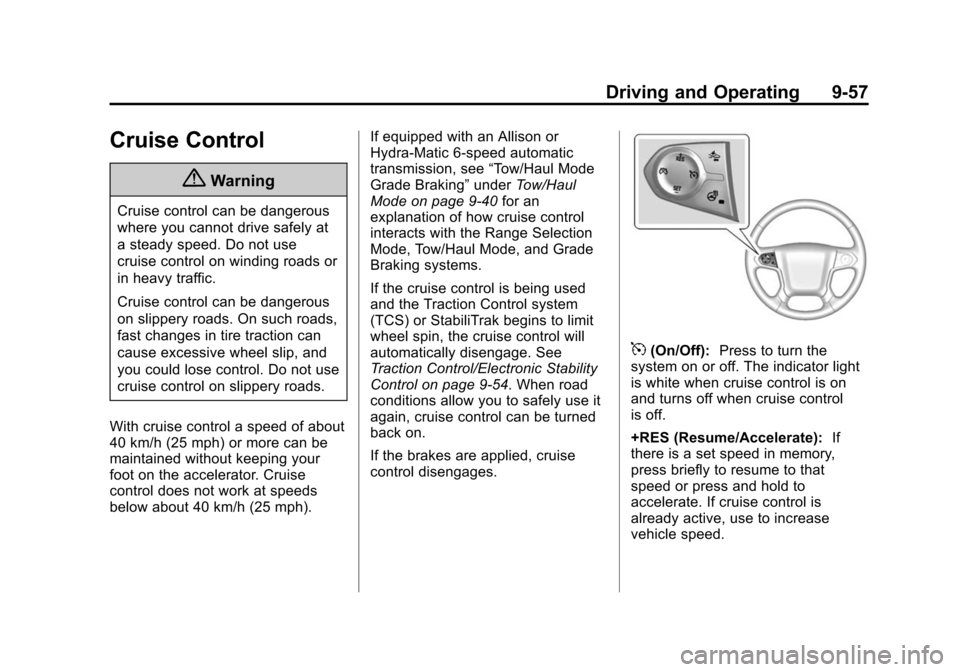
5(On/Off): Press to turn the
system on or off. The indicator light
is white when cruise control is on
and turns off when cruise control
is off.
+RES (Resume/Accelerate): If
there is a set speed in memory,
press briefly to resume to that
speed or press and hold to
accelerate. If cruise control is
already active, use to increase
vehicle speed.
Page 325 of 543
Black plate (58,1)Chevrolet 2015i Silverado Owner Manual (GMNA-Localizing-U.S./Canada/
Mexico-8425172) - 2015 - crc - 2/9/15
9-58 Driving and Operating
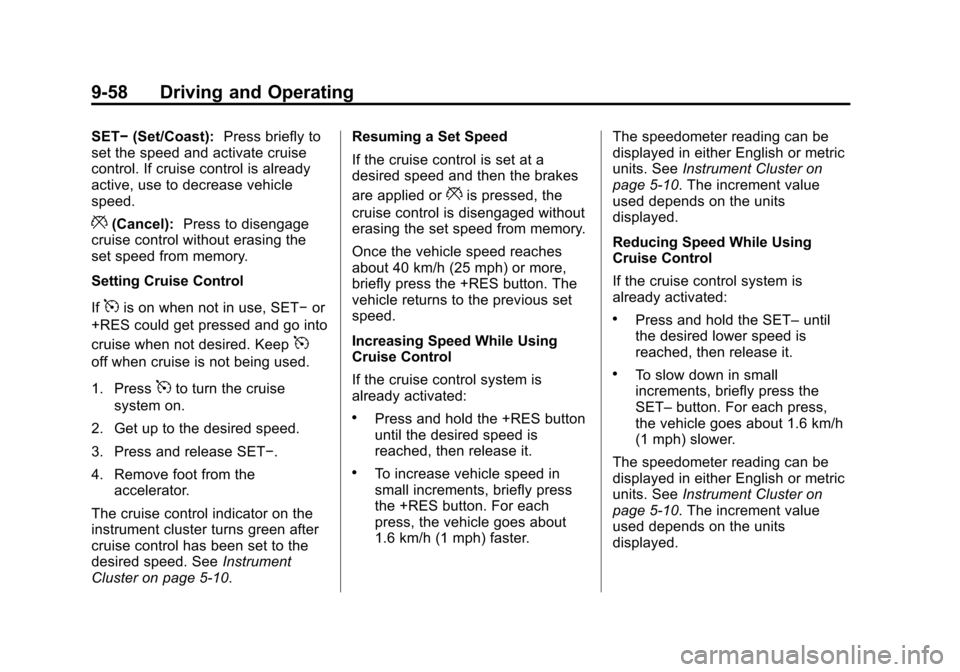
SET−(Set/Coast): Press briefly to
set the speed and activate cruise
control. If cruise control is already
active, use to decrease vehicle
speed.
*(Cancel): Press to disengage
cruise control without erasing the
set speed from memory.
Setting Cruise Control
If
5is on when not in use, SET− or
+RES could get pressed and go into
cruise when not desired. Keep
5
off when cruise is not being used.
1. Press
5to turn the cruise
system on.
2. Get up to the desired speed.
3. Press and release SET−.
4. Remove foot from the accelerator.
The cruise control indicator on the
instrument cluster turns green after
cruise control has been set to the
desired speed. See Instrument
Cluster on page 5-10. Resuming a Set Speed
If the cruise control is set at a
desired speed and then the brakes
are applied or
*is pressed, the
cruise control is disengaged without
erasing the set speed from memory.
Once the vehicle speed reaches
about 40 km/h (25 mph) or more,
briefly press the +RES button. The
vehicle returns to the previous set
speed.
Increasing Speed While Using
Cruise Control
If the cruise control system is
already activated:
.Press and hold the +RES button
until the desired speed is
reached, then release it.
.To increase vehicle speed in
small increments, briefly press
the +RES button. For each
press, the vehicle goes about
1.6 km/h (1 mph) faster. The speedometer reading can be
displayed in either English or metric
units. See
Instrument Cluster on
page 5-10. The increment value
used depends on the units
displayed.
Reducing Speed While Using
Cruise Control
If the cruise control system is
already activated:
.Press and hold the SET– until
the desired lower speed is
reached, then release it.
.To slow down in small
increments, briefly press the
SET– button. For each press,
the vehicle goes about 1.6 km/h
(1 mph) slower.
The speedometer reading can be
displayed in either English or metric
units. See Instrument Cluster on
page 5-10. The increment value
used depends on the units
displayed.
Page 326 of 543
Black plate (59,1)Chevrolet 2015i Silverado Owner Manual (GMNA-Localizing-U.S./Canada/
Mexico-8425172) - 2015 - crc - 2/9/15
Driving and Operating 9-59
Passing Another Vehicle While
Using Cruise Control
Use the accelerator pedal to
increase the vehicle speed. When
you take your foot off the pedal, the
vehicle will slow down to the
previous set cruise speed. While
pressing the accelerator pedal or
shortly following the release to
override cruise control, briefly
pressing the SET–button will result
in cruise control set to the current
vehicle speed.
Using Cruise Control on Hills
How well the cruise control works
on hills depends on the vehicle
speed, the load, and the steepness
of the hills. When going up steep
hills, pressing the accelerator pedal
may be necessary to maintain
vehicle speed. While going downhill:
.Vehicles with a 6-speed
automatic transmission and a
gasoline engine have Cruise
Grade Braking to help maintain
driver selected speed.
Cruise Grade Braking is enabled
when the vehicle is started and
cruise control is active. It is not
enabled in Range Selection
Mode. It assists in maintaining
driver selected speed when
driving on downhill grades by
using the engine and
transmission to slow the vehicle.
To disable and enable Cruise
Grade Braking for the current
ignition key cycle, press and
hold the Tow/Haul button for
five seconds. A DIC message
displays. See
Transmission
Messages on page 5-42.
.Vehicles with a diesel engine
have Cruise Grade Braking
enabled when Tow/Haul Mode is
on, the exhaust brake is on,
or both are on.
.If equipped, Hill Descent Control
(HDC) can help maintain vehicle
speed on a steep incline. See
Hill Descent Control (HDC) on
page 9-56.
For other forms of Grade Braking,
see Automatic Transmission on
page 9-34 andTow/Haul Mode on
page 9-40.
Ending Cruise Control
There are four ways to end cruise
control:
.Step lightly on the brake pedal.
.Press*.
.Shift the transmission to
N (Neutral).
.To turn off cruise control,
press
5.
Erasing Speed Memory
The cruise control set speed is
erased from memory if
5is pressed
or the ignition is turned off.
Page 332 of 543
Black plate (65,1)Chevrolet 2015i Silverado Owner Manual (GMNA-Localizing-U.S./Canada/
Mexico-8425172) - 2015 - crc - 2/9/15
Driving and Operating 9-65
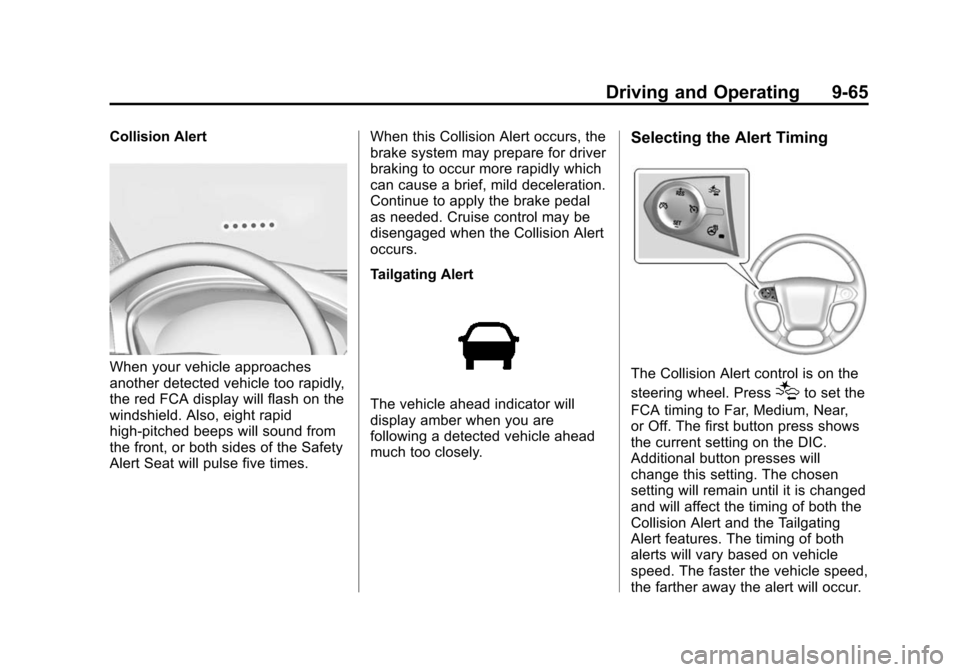
Collision Alert
When your vehicle approaches
another detected vehicle too rapidly,
the red FCA display will flash on the
windshield. Also, eight rapid
high-pitched beeps will sound from
the front, or both sides of the Safety
Alert Seat will pulse five times.When this Collision Alert occurs, the
brake system may prepare for driver
braking to occur more rapidly which
can cause a brief, mild deceleration.
Continue to apply the brake pedal
as needed. Cruise control may be
disengaged when the Collision Alert
occurs.
Tailgating Alert
The vehicle ahead indicator will
display amber when you are
following a detected vehicle ahead
much too closely.
Selecting the Alert Timing
The Collision Alert control is on the
steering wheel. Press
[to set the
FCA timing to Far, Medium, Near,
or Off. The first button press shows
the current setting on the DIC.
Additional button presses will
change this setting. The chosen
setting will remain until it is changed
and will affect the timing of both the
Collision Alert and the Tailgating
Alert features. The timing of both
alerts will vary based on vehicle
speed. The faster the vehicle speed,
the farther away the alert will occur.
Page 532 of 543

Black plate (3,1)Chevrolet 2015i Silverado Owner Manual (GMNA-Localizing-U.S./Canada/
Mexico-8425172) - 2015 - crc - 2/9/15
INDEX i-3
Carbon MonoxideEngine Exhaust . . . . . . . . . . . . . . . 9-33
Tailgate . . . . . . . . . . . . . . . . . . . . . . . 2-10
Winter Driving . . . . . . . . . . . . . . . . 9-12
Card Reader SD . . . . . . . . . . . . . . . . . . . . . . . . . . . . 7-20
Cargo
Tie-Downs . . . . . . . . . . . . . . . . . . . . . 4-4
Cargo Lamp . . . . . . . . . . . . . . . . . . . . 6-7
Cautions, Danger, and Warnings . . . . . . . . . . . . . . . . . . . . . . . . iv
CD Player . . . . . . . . . . . . . . . . . . . . . 7-15
Center Console Storage . . . . . . . . 4-3
Center High-Mounted Stoplamp (CHMSL) and
Cargo Lamp . . . . . . . . . . . . . . . . . 10-42
Center Seat . . . . . . . . . . . . . . . . . . . . 3-3
Chains, Tire . . . . . . . . . . . . . . . . . . 10-77
Charging System Light . . . . . . . . 5-21
Check Engine Light . . . . . . . . . . . . . . . . . . 5-21
Ignition
Transmission Lock . . . . . . . . 10-37 Child Restraints
Infants and Young
Children . . . . . . . . . . . . . . . . . . . . . 3-38
Lower Anchors and Tethers for Children . . . . . . . . . 3-44
Older Children . . . . . . . . . . . . . . . . 3-36
Securing . . . . . . . . . . . . . . . . 3-56, 3-60
Systems . . . . . . . . . . . . . . . . . . . . . . 3-41
Cleaning Exterior Care . . . . . . . . . . . . . . 10-101
Interior Care . . . . . . . . . . . . . . . 10-106
Climate Control Systems . . . 8-1, 8-3 Air Conditioning . . . . . . . . . . 8-1, 8-3
Dual Automatic . . . . . . . . . . . . . . . . 8-5
Heating . . . . . . . . . . . . . . . . . . . 8-1, 8-3
Clock . . . . . . . . . . . . . . . . . . . . . . . . . . . 5-5
Cluster, Instrument . . . . . . . . . . . . 5-10
Clutch, Hydraulic . . . . . . . . . . . . . 10-19
Collision Damage Repair . . . . . . 13-9
Compartments Storage . . . . . . . . . . . . . . . . . . . . . . . . 4-1
Compass . . . . . . . . . . . . . . . . . . . . . . . 5-5 Messages . . . . . . . . . . . . . . . . . . . . 5-35
Connections OnStar
®. . . . . . . . . . . . . . . . . . . . . . 14-4 Control . . . . . . . . . . . . . . . . . . . . . . . . 9-56
Traction and Electronic
Stability . . . . . . . . . . . . . . . . . . . . . 9-54
Control Light Hill Descent . . . . . . . . . . . . . . . . . . 5-25
Control of a Vehicle . . . . . . . . . . . . . 9-3
Convex Mirrors . . . . . . . . . . . . . . . . 2-14
Coolant Engine . . . . . . . . . . . . . . . . . . . . . . 10-22
Engine TemperatureGauge . . . . . . . . . . . . . . . . . . . . . . 5-15
Cooling System . . . . . . . . . . . . . . . 10-20 Engine Messages . . . . . . . . . . . . 5-36
Courtesy Transportation Program . . . . . . . . . . . . . . . . . . . . . . 13-7
Cruise Control . . . . . . . . . . . . . . . . . 9-57
Light . . . . . . . . . . . . . . . . . . . . . . . . . . 5-29
Cupholders . . . . . . . . . . . . . . . . . . . . . 4-2
Customer Assistance . . . . . . . . . . 13-4 Offices . . . . . . . . . . . . . . . . . . . . . . . . 13-3
Text Telephone (TTY)Users . . . . . . . . . . . . . . . . . . . . . . . 13-4
Customer Information Service PublicationsOrdering Information . . . . . . .13-11
Page 536 of 543

Black plate (7,1)Chevrolet 2015i Silverado Owner Manual (GMNA-Localizing-U.S./Canada/
Mexico-8425172) - 2015 - crc - 2/9/15
INDEX i-7
Infotainment . . . . . . . . . . . . . . . . . . . . 7-1
Infotainment System . . . . . . . . . . 13-15
Instrument Cluster . . . . . . . . . . . . . 5-10
Instrument PanelStorage Area . . . . . . . . . . . . . . . . . . 4-1
Interior Rearview Mirrors . . . . . . . 2-19
Internet Radio Pandora . . . . . . . . . . . . . . . . . . . . . . 7-11
Introduction . . . . . . . . . . . . . . . . . . . . . . . iii
J
Jack Auxiliary . . . . . . . . . . . . . . . . . . . . . . 7-20
Jump Starting - North America . . . . . . . . . . . . . . . . . . . . . 10-91
K
Key and Lock Messages . . . . . . . 5-38
Keyless EntryRemote (RKE) System . . . . . . . . 2-4
Keys . . . . . . . . . . . . . . . . . . . . . . . . . . . . 2-1
L
Labeling, Tire Sidewall . . . . . . . . 10-56
Lamps Auxiliary RoofMounted Lamp . . . . . . . . . . . . . . . 6-5
Cargo . . . . . . . . . . . . . . . . . . . . . . . . . . 6-7
Daytime Running (DRL) . . . . . . . 6-3
Dome . . . . . . . . . . . . . . . . . . . . . . . . . . 6-7
Exterior Controls . . . . . . . . . . . . . . . 6-1
Exterior Lamps Off Reminder . . . . . . . . . . . . . . . . . . . . 6-2
Fog . . . . . . . . . . . . . . . . . . . . . . . . . . . . 6-5
Malfunction Indicator . . . . . . . . . 5-21
Messages . . . . . . . . . . . . . . . . . . . . 5-38
On Reminder . . . . . . . . . . . . . . . . . 5-28
Reading . . . . . . . . . . . . . . . . . . . . . . . 6-7
Taillamps . . . . . . . . . . . . . . . . . . . 10-41
Lane Departure Warning (LDW) . . . . . . . . . . . . . . . 9-66
Lane Departure Warning
Light . . . . . . . . . . . . . . . . . . . . . . . . . 5-25
Lap Belt . . . . . . . . . . . . . . . . . . . . . . . 3-18
Lap-Shoulder Belt . . . . . . . . . . . . . 3-14
LATCH System Replacing Parts after a
Crash . . . . . . . . . . . . . . . . . . . . . . . 3-56 LATCH, Lower Anchors and
Tethers for Children . . . . . . . . . . 3-44
Light Hill Decent Control . . . . . . . . . . . 5-25
Lighting Entry . . . . . . . . . . . . . . . . . . . . . . . . . . 6-8
Exit . . . . . . . . . . . . . . . . . . . . . . . . . . . . 6-8
Illumination Control . . . . . . . . . . . . 6-6
Lights Airbag On-Off . . . . . . . . . . . . . . . . . 5-18
Airbag Readiness . . . . . . . . . . . . . 5-17
Antilock Brake System(ABS) Warning . . . . . . . . . . . . . . 5-24
Brake System Warning . . . . . . . 5-24
Charging System . . . . . . . . . . . . . 5-21
Cruise Control . . . . . . . . . . . . . . . . 5-29
Flash-to-Pass . . . . . . . . . . . . . . . . . . 6-2
Four-Wheel-Drive . . . . . . . . . . . . . 5-25
Front Fog Lamp . . . . . . . . . . . . . . 5-28
High-Beam On . . . . . . . . . . . . . . . . 5-28
High/Low Beam Changer . . . . . . 6-2
Lane Departure Warning . . . . . . 5-25
Low Fuel Warning . . . . . . . . . . . . 5-27
Safety Belt Reminders . . . . . . . . 5-17
Security . . . . . . . . . . . . . . . . . . . . . . 5-28
StabiliTrak
®OFF . . . . . . . . . . . . . 5-26