brake CHEVROLET SILVERADO 2017 3.G User Guide
[x] Cancel search | Manufacturer: CHEVROLET, Model Year: 2017, Model line: SILVERADO, Model: CHEVROLET SILVERADO 2017 3.GPages: 509, PDF Size: 8.87 MB
Page 148 of 509
Chevrolet Silverado Owner Manual (GMNA-Localizing-U.S./Canada/Mexico-9956065) - 2017 - CRC - 4/29/16
Instruments and Controls 147
Transmission Fluid Temperature
The temperature of the automatictransmission fluid displays in eitherdegrees Celsius (°C) or degreesFahrenheit (°F).
Trailer Brake
On vehicles with the IntegratedTrailer Brake Control (ITBC) system,turn the trip odometer reset stemuntil TRAILER GAIN and TRAILEROUTPUT displays.
TRAILER GAIN shows the TrailerGain setting. This setting can beadjusted from 0.0 to 10.0 with eitheratrailerconnectedordisconnected.
TRAILER OUTPUT shows thepower output to the trailer anytime atrailer with electric brakes isconnected. Output is displayed as abar graph. Dashes may appear inthe TRAILER OUTPUT display if atrailer is not connected.
Hourmeter
This display shows the total numberof hours the engine has run.
Unit
This will change the displays on theinstrument cluster and DIC to eithermetric or English (US)measurements. To change the units,press the trip odometer reset stemwhen UNITS is displayed to enterthe Unit menu. Turn the tripodometer reset stem to switchbetween English and metric. Pressthe trip odometer reset stem whenthe desired setting is displayed.
Compass
The vehicle may have a compass inthe Driver Information Center (DIC).SeeCompass0122.
Driver Information Center
(DIC) (Uplevel)
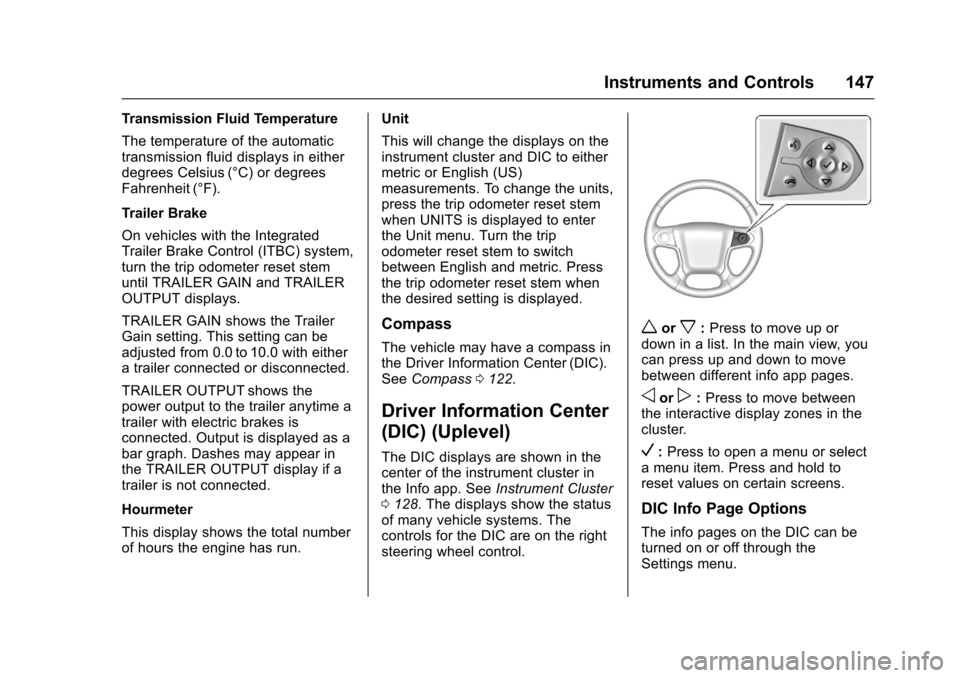
The DIC displays are shown in thecenter of the instrument cluster inthe Info app. SeeInstrument Cluster0128.Thedisplaysshowthestatusof many vehicle systems. Thecontrols for the DIC are on the rightsteering wheel control.
worx:Press to move up ordown in a list. In the main view, youcan press up and down to movebetween different info app pages.
oorp:Press to move betweenthe interactive display zones in thecluster.
V:Press to open a menu or selectamenuitem.Pressandholdtoreset values on certain screens.
DIC Info Page Options
The info pages on the DIC can beturned on or off through theSettings menu.
Page 150 of 509
Chevrolet Silverado Owner Manual (GMNA-Localizing-U.S./Canada/Mexico-9956065) - 2017 - CRC - 4/29/16
Instruments and Controls 149
the next oil change. To reset theengine oil life system, press and
holdVfor several seconds while
the Oil Life display is active. SeeEngine Oil Life System0362.
Tire Pressure :Shows theapproximate pressures of all fourtires. Tire pressure is displayed ineither kilopascal (kPa) or in poundsper square inch (psi). If the pressureis low, the value for that tire isshown in amber. SeeTire PressureMonitor System0407andTirePressure Monitor Operation0408.
Fuel Economy :The centerdisplays the approximateinstantaneous fuel economy as anumber and bar graph. Displayedabove the bar graph is a runningaverage of fuel economy for themost recently traveled selecteddistance. Displayed below the bargraph is the best average fueleconomy that has been achieved forthe selected distance. The selecteddistance is displayed at the top ofthe page as“last xxx mi/km.”Nextto the odometer, the Active FuelManagement displays the number of
cylinders the vehicle is runningon. SeeActive FuelManagement®0275.
Presspto select the distance or
reset best value. Usewandxto
choose the distance and pressV.
Presswandxto select“Reset
Best Score.”PressVto reset the
best average fuel economy. Afterreset, the momentary average fueleconomy will display.
The display provides information onhow current driving behavior affectsthe running average and how wellrecent driving compares to the bestthat has been achieved for theselected distance.
Timer :This display can be used as
atimer.Tostartthetimer,pressV
while this display is active. Thedisplay will show the amount of timethat has passed since the timer was
last reset. To stop the timer, pressV
briefly while this display is activeand the timer is running. To reset
the timer to zero, press and holdV
while this display is active, or presspand select reset.
Speed Limit (If Equipped) :Showssign information, which comes fromaroadwaydatabaseintheonboardnavigation.
Engine Hours :Shows the totalnumber of hours the engine has run.
Tr a n s m i s s i o n F l u i dTe m p e r a t u r e :Shows thetemperature of the automatictransmission fluid in either degreesCelsius (°C) or degreesFahrenheit (°F).
Tr a i l e r B r a k e ( I f E q u i p p e d ) :Onvehicles with the Integrated TrailerBrake Control (ITBC) system, thetrailer brake display appears inthe DIC.
TRAILER GAIN shows the trailergain setting. This setting can beadjusted from 0.0 to 10.0 with eitheratrailerconnectedordisconnected.
Page 151 of 509
Chevrolet Silverado Owner Manual (GMNA-Localizing-U.S./Canada/Mexico-9956065) - 2017 - CRC - 4/29/16
150 Instruments and Controls
OUTPUT shows the power output tothe trailer anytime a trailer withelectric brakes is connected. Outputis displayed as a bar graph. Dashesmay appear in the OUTPUT displayif a trailer is not connected.
Off Road :Displays vehicle pitchand roll information, road wheelangle, and four-wheel drive (4WD)status.
Blank Page :Shows noinformation.
Vehicle Messages
Messages displayed on the DICindicate the status of the vehicle orsome action that may be needed tocorrect a condition. Multiplemessages may appear one afteranother.
The messages that do not requireimmediate action can beacknowledged and cleared by
pressingVor the trip odometer
reset stem on the base cluster.
The messages that requireimmediate action cannot be cleareduntil that action is performed.
All messages should be takenseriously and clearing the messagedoes not correct the problem.
The following are the possiblemessages and some informationabout them.
If the vehicle has a diesel engine,see the Duramax dieselsupplement.
Battery Voltage and
Charging Messages
BATTERY LOW START
VEHICLE
When the vehicle’sbatteryisseverely discharged, this messagewill display and four chimes willsound. Start the vehicleimmediately. If the vehicle is notstarted and the battery continues todischarge, the climate controls,heated seats, and audio systemswill shut off and the vehicle mayrequire a jump start. These systemswill function again after the vehicleis started.
BATTERY SAVER ACTIVE
This message displays when thebattery voltage drops belowexpected levels and features aredisabled. Turn off all unnecessaryaccessory features.
Page 152 of 509
Chevrolet Silverado Owner Manual (GMNA-Localizing-U.S./Canada/Mexico-9956065) - 2017 - CRC - 4/29/16
Instruments and Controls 151
SERVICE BATTERY
CHARGING SYSTEM
On some vehicles, this messagedisplays if there is a problem withthe battery charging system. Undercertain conditions, the chargingsystem light may also turn on in theinstrument cluster. SeeChargingSystem Light0138.Drivingwiththisproblem could drain the battery.Turn off all unnecessaryaccessories. Have the electricalsystem checked as soon aspossible. See your dealer.
TRANSPORT MODE ON
This message is displayed when thevehicle is in transport mode. Somefeatures can be disabled while inthis mode, including RemoteKeyless Entry (RKE), remote start,and the vehicle alarm system. Takethe vehicle to your dealer for serviceto turn transport mode off.
Brake System Messages
BRAKE FLUID LOW
This message is displayed when thebrake fluid level is low. SeeBrakeFluid0377.
SERVICE BRAKE ASSIST
This message may be displayedwhen there is a problem with thebrake boost assist system. Whenthis message is displayed, the brakeboost assist motor might be heardoperating and you might noticepulsation in the brake pedal. This isnormal under these conditions. Takethe vehicle to your dealer forservice.
SERVICE TRAILER BRAKE
SYSTEM
On vehicles with the IntegratedTrailer Brake Control (ITBC) system,this message displays and a chimemay sound when there is a problemwith the ITBC system.
When this message displays, poweris no longer available to the trailerbrakes.
As soon as it is safe to do so,carefully pull your vehicle over tothe side of the road and turn theignition off. Check the wiringconnection to the trailer and turn theignition back on. If this message stilldisplays, either your vehicle or thetrailer needs service. See yourdealer.
See“Integrated Trailer BrakeControl System”underTo w i n gEquipment0335for moreinformation.
Compass Messages
Dashes may be displayed if thevehicle temporarily losescommunication with the GlobalPositioning System (GPS).
Door Ajar Messages
DOOR OPEN
This message displays and a chimemay sound if a door is not fullyclosed. Stop and turn off thevehicle, check the door for
Page 156 of 509
Chevrolet Silverado Owner Manual (GMNA-Localizing-U.S./Canada/Mexico-9956065) - 2017 - CRC - 4/29/16
Instruments and Controls 155
STABILITRAK INITIALIZING
This message may come on if theStabiliTrak system has not fullyinitialized because of roadconditions or the incorrect tire size.When the StabiliTrak system is fullyinitialized, the message will turn off.SeeTr a c t i o n C o n t r o l / E l e c t r o n i cStability Control0295.Ifthismessage continues to be displayedfor multiple ignition cycles and ondifferent road surfaces, see yourdealer for service.
TRACTION CONTROL OFF
This message displays when thetraction control has been turned off.SeeTr a c t i o n C o n t r o l / E l e c t r o n i cStability Control0295.
TRACTION CONTROL ON
This message displays when thetraction control is active. SeeTr a c t i o n C o n t r o l / E l e c t r o n i c S t a b i l i t yControl0295.
STABILITRAK OFF
This message displays when theStabiliTrak system has been turnedoff. Adjust your driving accordingly.
To l i m i t w h e e l s p i n a n d r e a l i z e t h efull benefits of the stabilityenhancement system, you shouldnormally leave StabiliTrak on. SeeTr a c t i o n C o n t r o l / E l e c t r o n i c S t a b i l i t yControl0295.
STABILITRAK OFF may alsodisplay when the stability controlhas been automatically disabled.The following conditions can causethis message to appear:
.The system is overheating,which could occur if StabiliTrakactivates continuously for anextended period of time.
.The brake system warning lightis on. SeeBrake SystemWarning Light0140.
.The stability system takes longerthan usual to complete itsdiagnostic checks due to drivingconditions.
.An engine or vehicle-relatedproblem has been detected andthe vehicle needs service. Seeyour dealer.
.The transfer case is inFour-Wheel Drive Low.
The message turns off as soon asthe conditions that caused themessage to be displayed are nolonger present.
Airbag System Messages
SERVICE AIRBAG
This message displays if there is aproblem with the airbag system.Ta k e t h e v e h i c l e t o y o u r d e a l e r f o rservice.
Safety Belt Messages
SHIFTER LOCKED. BUCKLE
SEATBELT
This message displays if the vehicleis equipped with the Safety BeltAssurance System and the driverand front outboard passenger,if present, safety belts are notbuckled. The vehicle will not shiftout of P (Park). Buckle the safetybelt(s) to unlock the shift lever.
This system may not allow thevehicle to shift out of P (Park) if anobject—such as a briefcase,handbag, grocery bag, laptop,
Page 157 of 509
Chevrolet Silverado Owner Manual (GMNA-Localizing-U.S./Canada/Mexico-9956065) - 2017 - CRC - 4/29/16
156 Instruments and Controls
or other electronic device—is onthe front outboard passenger seat.If this happens, remove the objectfrom the seat or buckle thesafety belt.
If the driver or front outboardpassenger unbuckles their safetybelt while driving, the safety beltreminder chime and light(s) willcome on. SeeSafety BeltReminders0134.
SHIFTER UNLOCKED. BRAKE
TO SHIFT
This message displays when theSafety Belt Assurance System timesout and allows the vehicle to beshifted out of P (Park) after30 seconds following brake apply.See“Safety Belts”and“ChildRestraints”in the Index forinformation about the importance ofproper restraint use.
This system may not functionproperly if the airbag readiness lightis on. SeeAirbag ReadinessLight0135.
Security Messages
SERVICE THEFT DETERRENT
SYSTEM
This message displays when thereis a problem with the theft-deterrentsystem. The vehicle may or may notrestart, so you may want to take thevehicle to your dealer before turningoff the engine. SeeImmobilizerOperation045.
Steering System
Messages
STEERING ASSIST IS
REDUCED DRIVE WITH CARE
This message may display if aproblem occurs with the electricpower steering system. If thismessage appears, steering effortmay be slightly higher than normal.The vehicle is still safe to drive. Usecaution while in reduced assistmode. If this message is persistentor appears repeatedly, take thevehicle to your dealer for service.SeeSteering0249.
SERVICE POWER STEERING
(1500 Series)
This message displays when thereis a problem with electric powersteering. If this message displaysand a reduction in steeringperformance or loss of powersteering assistance is noticed. Seeyour dealer. SeeSteering0249.
SERVICE POWER STEERING
(2500/3500 Series)
This message displays when thereis a problem with the power steeringassist system. If this messagedisplays the vehicle can be drivenbut should be repaired as soon aspossible. See your dealer. SeeSteering0249.
Page 160 of 509
Chevrolet Silverado Owner Manual (GMNA-Localizing-U.S./Canada/Mexico-9956065) - 2017 - CRC - 4/29/16
Instruments and Controls 159
TRANSMISSION HOT IDLE
ENGINE
This message displays and a chimemay sound if the transmission fluidin the vehicle gets hot. Driving withthe transmission fluid temperaturehigh can cause damage to thevehicle. Stop the vehicle and let itidle to allow the transmission tocool. This message clears and thechime stops when the fluidtemperature reaches a safe level.
When towing, use Tow/Haul Modeto prevent damage to the engine ortransmission. SeeTo w / H a u lMode0282.
VEHICLE IN 4WD LOW
This message will display if the
vehicle is driven in 4nfor about
10 minutes above 72 km/h (45 mph).
Vehicle Reminder
Messages
CHECK TRAILER WIRING
On vehicles with the IntegratedTrailer Brake Control (ITBC) system,this message may display and achime may sound when one of thefollowing conditions exists:
.Atrailerwithelectricbrakesbecomes disconnected from thevehicle.
⇣If the disconnect occurs whilethe vehicle is stopped, thismessage clears itself after ashort time.
⇣If the disconnect occurs whilethe vehicle is moving, thismessage stays on until theignition is turned off.
.There is a short in the wiring tothe electric trailer brakes.
When this message displays, poweris no longer available to the trailerbrakes.
As soon as it is safe to do so,carefully pull the vehicle over to theside of the road and turn the ignitionoff. Check the wiring connection tothe trailer and turn the ignition backon. This message clears if the traileris reconnected. This message alsoclears if you acknowledge it. If thismessage still displays, either thevehicle or the trailer needs service.See your dealer.
See“Integrated Trailer BrakeControl System”underTo w i n gEquipment0335.
ICE POSSIBLE DRIVE
WITH CARE
This message displays when iceconditions are possible.
TRAILER CONNECTED
On vehicles with the IntegratedTrailer Brake Control (ITBC) system,this message displays briefly whenatrailerwithelectricorelectricoverhydraulic brakes is first connectedto the vehicle.
Page 161 of 509
Chevrolet Silverado Owner Manual (GMNA-Localizing-U.S./Canada/Mexico-9956065) - 2017 - CRC - 4/29/16
160 Instruments and Controls
This message clears itself afterseveral seconds. This message alsoclears if you acknowledge it. Afterthis message clears, the TRAILERGAIN and OUTPUT displays appearin the DIC.
SeeDriver Information Center (DIC)(Base Level)0145orDriverInformation Center (DIC) (Uplevel)0147and“Integrated Trailer BrakeControl System”underTo w i n gEquipment0335.
Vehicle Speed Messages
REDUCE SPEED FOR HILL
DESCENT CONTROL
This message displays whenattempting to enable Hill DescentControl (HDC) when the vehiclespeed is too high. SeeHill DescentControl (HDC)0297.
Washer Fluid Messages
WASHER FLUID LOW ADD
FLUID
This message displays when thewindshield washer fluid is low. Fillthe windshield washer fluid reservoiras soon as possible. SeeEngineCompartment Overview0354forthe location of the windshieldwasher fluid reservoir. Also, seeWasher Fluid0375for moreinformation.
Vehicle
Personalization
Use the audio system controls toaccess the personalization menusfor customizing vehicle features.
The following are all possiblepersonalization features. Dependingon the vehicle, some may not beavailable.
Base Radio Audio SystemControls
MENU :Press to enter menus andselect menu items. Turn to scrollthrough the menus.
oBACK :Press to return to theprevious menu or exit.
Base Radio with TouchscreenAudio System Controls
{:Press to access the HomePage Menu.
QorR:To u c h t o s c r o l l t h r o u g h t h emenus or setup items.
0:To u c h t o e x i t o r r e t u r n t o t h eprevious screen or menu.
Page 247 of 509
Chevrolet Silverado Owner Manual (GMNA-Localizing-U.S./Canada/Mexico-9956065) - 2017 - CRC - 4/29/16
246 Driving and Operating
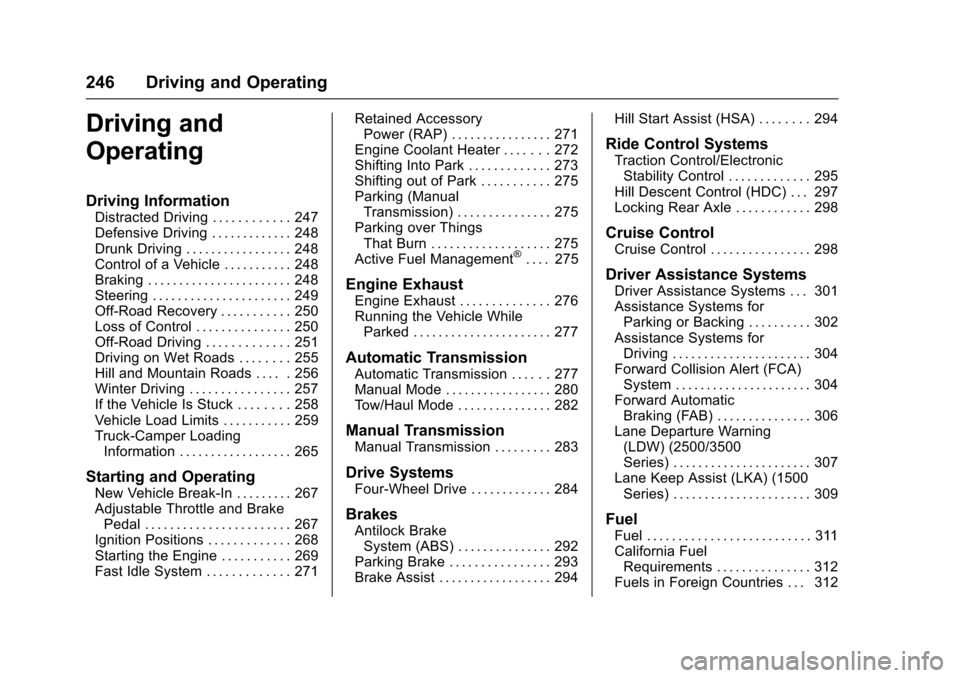
Driving and
Operating
Driving Information
Distracted Driving . . . . . . . . . . . . 247Defensive Driving . . . . . . . . . . . . . 248Drunk Driving . . . . . . . . . . . . . . . . . 248Control of a Vehicle . . . . . . . . . . . 248Braking . . . . . . . . . . . . . . . . . . . . . . . 248Steering . . . . . . . . . . . . . . . . . . . . . . 249Off-Road Recovery . . . . . . . . . . . 250Loss of Control . . . . . . . . . . . . . . . 250Off-Road Driving . . . . . . . . . . . . . 251Driving on Wet Roads . . . . . . . . 255Hill and Mountain Roads . . . . . 256Winter Driving . . . . . . . . . . . . . . . . 257If the Vehicle Is Stuck . . . . . . . . 258Vehicle Load Limits . . . . . . . . . . . 259Truck-Camper LoadingInformation . . . . . . . . . . . . . . . . . . 265
Starting and Operating
New Vehicle Break-In . . . . . . . . . 267Adjustable Throttle and BrakePedal . . . . . . . . . . . . . . . . . . . . . . . 267Ignition Positions . . . . . . . . . . . . . 268Starting the Engine . . . . . . . . . . . 269Fast Idle System . . . . . . . . . . . . . 271
Retained AccessoryPower (RAP) . . . . . . . . . . . . . . . . 271Engine Coolant Heater . . . . . . . 272Shifting Into Park . . . . . . . . . . . . . 273Shifting out of Park . . . . . . . . . . . 275Parking (ManualTransmission) . . . . . . . . . . . . . . . 275Parking over ThingsThat Burn . . . . . . . . . . . . . . . . . . . 275Active Fuel Management®.... 275
Engine Exhaust
Engine Exhaust . . . . . . . . . . . . . . 276Running the Vehicle WhileParked . . . . . . . . . . . . . . . . . . . . . . 277
Automatic Transmission
Automatic Transmission . . . . . . 277Manual Mode . . . . . . . . . . . . . . . . . 280To w / H a u l M o d e . . . . . . . . . . . . . . . 2 8 2
Manual Transmission
Manual Transmission . . . . . . . . . 283
Drive Systems
Four-Wheel Drive . . . . . . . . . . . . . 284
Brakes
Antilock BrakeSystem (ABS) . . . . . . . . . . . . . . . 292Parking Brake . . . . . . . . . . . . . . . . 293Brake Assist . . . . . . . . . . . . . . . . . . 294
Hill Start Assist (HSA) . . . . . . . . 294
Ride Control Systems
Traction Control/ElectronicStability Control . . . . . . . . . . . . . 295Hill Descent Control (HDC) . . . 297Locking Rear Axle . . . . . . . . . . . . 298
Cruise Control
Cruise Control . . . . . . . . . . . . . . . . 298
Driver Assistance Systems
Driver Assistance Systems . . . 301Assistance Systems forParking or Backing . . . . . . . . . . 302Assistance Systems forDriving . . . . . . . . . . . . . . . . . . . . . . 304Forward Collision Alert (FCA)System . . . . . . . . . . . . . . . . . . . . . . 304Forward AutomaticBraking (FAB) . . . . . . . . . . . . . . . 306Lane Departure Warning(LDW) (2500/3500Series) . . . . . . . . . . . . . . . . . . . . . . 307Lane Keep Assist (LKA) (1500Series) . . . . . . . . . . . . . . . . . . . . . . 309
Fuel
Fuel . . . . . . . . . . . . . . . . . . . . . . . . . . 311California FuelRequirements . . . . . . . . . . . . . . . 312Fuels in Foreign Countries . . . 312
Page 249 of 509
Chevrolet Silverado Owner Manual (GMNA-Localizing-U.S./Canada/Mexico-9956065) - 2017 - CRC - 4/29/16
248 Driving and Operating
Refer to the infotainment section formore information on using thatsystem and the navigation system,if equipped, including pairing andusing a cell phone.
Defensive Driving
Defensive driving means“alwaysexpect the unexpected.”The firststep in driving defensively is to wearthe safety belt. SeeSafetyBelts066.
.Assume that other road users(pedestrians, bicyclists, andother drivers) are going to becareless and make mistakes.Anticipate what they might doand be ready.
.Allow enough following distancebetween you and the driver infront of you.
.Focus on the task of driving.
Drunk Driving
Death and injury associated withdrinking and driving is a globaltragedy.
{Warning
Drinking and then driving is very
dangerous. Your reflexes,
perceptions, attentiveness, and
judgment can be affected by even
asmallamountofalcohol.You
can have a serious—or even
fatal—collision if you drive after
drinking.
Do not drink and drive or ride with
adriverwhohasbeendrinking.
Ride home in a cab; or if you are
with a group, designate a driver
who will not drink.
Control of a Vehicle
Braking, steering, and acceleratingare important factors in helping tocontrol a vehicle while driving.
Braking
Braking action involves perceptiontime and reaction time. Deciding topush the brake pedal is perceptiontime. Actually doing it isreaction time.
Average driver reaction time isabout three-quarters of a second. Inthat time, a vehicle moving at100 km/h (60 mph) travels 20 m(66 ft), which could be a lot ofdistance in an emergency.
Helpful braking tips to keep in mindinclude:
.Keep enough distance betweenyou and the vehicle in frontof you.
.Avoid needless heavy braking.
.Keep pace with traffic.
If the engine ever stops while thevehicle is being driven, brakenormally but do not pump thebrakes. Doing so could make thepedal harder to push down. If theengine stops, there will be somepower brake assist but it will beused when the brake is applied.Once the power assist is used up, itcan take longer to stop and thebrake pedal will be harder to push.