ignition CHEVROLET SILVERADO 2017 3.G User Guide
[x] Cancel search | Manufacturer: CHEVROLET, Model Year: 2017, Model line: SILVERADO, Model: CHEVROLET SILVERADO 2017 3.GPages: 509, PDF Size: 8.87 MB
Page 40 of 509
Chevrolet Silverado Owner Manual (GMNA-Localizing-U.S./Canada/Mexico-9956065) - 2017 - CRC - 4/29/16
Keys, Doors, and Windows 39
The engine will turn off during aremote vehicle start if:
.The coolant temperature getstoo high.
.The oil pressure gets low.
The RKE transmitter range may bereduced while the vehicle is running.
Other conditions can affect theperformance of the transmitter. SeeRemote Keyless Entry (RKE)System036orVehiclePersonalization0160.
Starting the Engine Using RemoteStart
1. Press and releaseQ.
2. Immediately press and hold/
until the turn signal lamps flashor for at least four seconds.
When the vehicle starts, theparking lamps will turn on. Thedoors will be locked and theclimate control system maycome on.
The engine will continue to runfor 10 minutes. After30 seconds, repeatSteps 1 and 2 for a 10-minutetime extension.
Place the ignition in ON/RUN tooperate the vehicle.
Extending Engine Run Time
The engine run time can beextended by 10 minutes, for a totalof 20 minutes, if during the first10 minutes Steps 1 and 2 arerepeated while the engine is stillrunning. An extension can berequested 30 seconds after starting.
Amaximumoftworemotestarts,or a single start with an extension,is allowed between ignition cycles.
The vehicle's ignition must beturned on and then back off to useremote start again.
Canceling a Remote Start
To c a n c e l a r e m o t e s t a r t , d o o n e o fthe following:
.Press and hold/until the
parking lamps turn off.
.Turn on the hazard warningflashers.
.Turn the ignition on and then off.
Door Locks
{Warning
Unlocked doors can be
dangerous.
.Passengers, especiallychildren, can easily openthe doors and fall out of amoving vehicle. When adoor is locked, the handlewill not open it. The chanceof being thrown out of thevehicle in a crash isincreased if the doors arenot locked. So, allpassengers should wearsafety belts properly and thedoors should be lockedwhenever the vehicle isdriven.
(Continued)
Page 42 of 509
Chevrolet Silverado Owner Manual (GMNA-Localizing-U.S./Canada/Mexico-9956065) - 2017 - CRC - 4/29/16
Keys, Doors, and Windows 41
This feature will not operate if thekey is in the ignition.
Turn delayed locking on or off usingvehicle personalization. SeeVehiclePersonalization0160.
Automatic Door Locks
If equipped, the doors will lockautomatically when all doors areclosed, the ignition is on, and theshift lever is moved out of P (Park)for automatic transmissions orvehicle speed is above 13 km/h(8 mph) for manual transmissions.
To u n l o c k t h e d o o r s :
.PressKon a power door lock
switch.
.If equipped with an automatictransmission, shift thetransmission into P (Park)
.If equipped with manualtransmission, remove the keyfrom the ignition when parked.
Automatic Door locking cannot bedisabled. Automatic door unlockingcan be programmed. SeeVehiclePersonalization0160.
Lockout Protection
When locking is requested with thedriver door open and the key in theignition, all the doors will lock andthen the driver door will unlock.
This can be manually overridden by
pressing and holdingQon the
power door lock switch.
Safety Locks
The rear door safety locks preventpassengers from opening the reardoors from inside the vehicle.
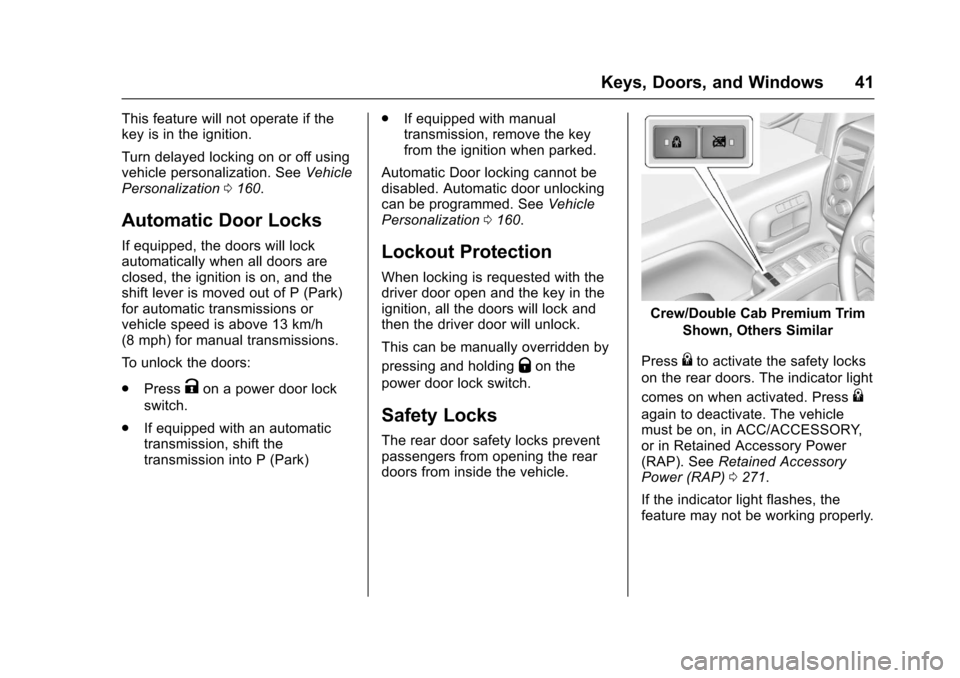
Crew/Double Cab Premium Trim
Shown, Others Similar
Press{to activate the safety locks
on the rear doors. The indicator light
comes on when activated. Press{
again to deactivate. The vehiclemust be on, in ACC/ACCESSORY,or in Retained Accessory Power(RAP). SeeRetained AccessoryPower (RAP)0271.
If the indicator light flashes, thefeature may not be working properly.
Page 47 of 509
Chevrolet Silverado Owner Manual (GMNA-Localizing-U.S./Canada/Mexico-9956065) - 2017 - CRC - 4/29/16
46 Keys, Doors, and Windows
The security light, in the instrumentcluster, comes on if there is aproblem with arming or disarmingthe theft-deterrent system.
When trying to start the vehicle, thesecurity light comes on briefly whenthe ignition is turned on.
If the engine does not start and thesecurity light stays on, there is aproblem with the system. Turn theignition off and try again.
If the engine still does not start, andthe key appears to be undamaged,try another ignition key. It may benecessary to check the fuse. SeeFuses0390.Iftheenginestilldoesnot start with the other key, thevehicle needs service. If the vehicledoes start, the first key may befaulty. See your dealer.
It is possible for the immobilizersystem to learn new or replacementkeys. Up to eight keys can beprogrammed for the vehicle. Toprogram additional keys, seeKeys033.Toprogramadditionaltransmitters, seeRemote KeylessEntry (RKE) System Operation036.
Do not leave the key or device thatdisarms or deactivates the vehicletheft system in the vehicle.
See your dealer to get a new keyblank cut exactly as the ignition keythat operates the system.
Exterior Mirrors
Convex Mirrors
{Warning
Aconvexmirrorcanmakethings,
like other vehicles, look farther
away than they really are. If you
cut too sharply into the right lane,
you could hit a vehicle on the
right. Check the inside mirror or
glance over your shoulder before
changing lanes.
The passenger side mirror is convexshaped. A convex mirror's surface iscurved so more can be seen fromthe driver seat.
Manual Mirrors
If equipped, adjust manual mirrorsby moving the mirror up and downor left to right to see a little of theside of the vehicle and to have aclear view behind the vehicle.
Page 50 of 509
Chevrolet Silverado Owner Manual (GMNA-Localizing-U.S./Canada/Mexico-9956065) - 2017 - CRC - 4/29/16
Keys, Doors, and Windows 49
Auto Mirror Folding
If equipped, with the ignition off,
press and holdQon the RKE
transmitter for approximatelyone second to automatically fold the
exterior mirrors. Press and holdK
on the RKE transmitter forapproximately one second to unfold.SeeRemote Keyless Entry (RKE)System Operation036.
This feature is turned on or offthrough vehicle personalization. SeeVehicle Personalization0160.
Turn Signal Indicator
If equipped, indicator lights on themirror flash in the direction of theturn or lane change.
Heated Mirrors
1:If equipped, the rear windowdefogger also heats the sidemirrors.
W:If equipped, press to turn theheated side mirrors on or off.
If the vehicle has trailer-tow mirrors,only the upper glass of the mirror isheated. The lower convex part ofthe towing mirrors is not heated.
See“Rear Window Defogger”underClimate Control Systems (withHeater Only)0237orClimateControl Systems (with AirConditioning)0238orDualAutomatic Climate ControlSystem0240.
Automatic Dimming
Mirror
If equipped, the driver outside mirrorautomatically adjusts for the glare ofthe headlamps from behind. Thisfeature comes on when the vehicleis started.
Blind Spot Mirrors
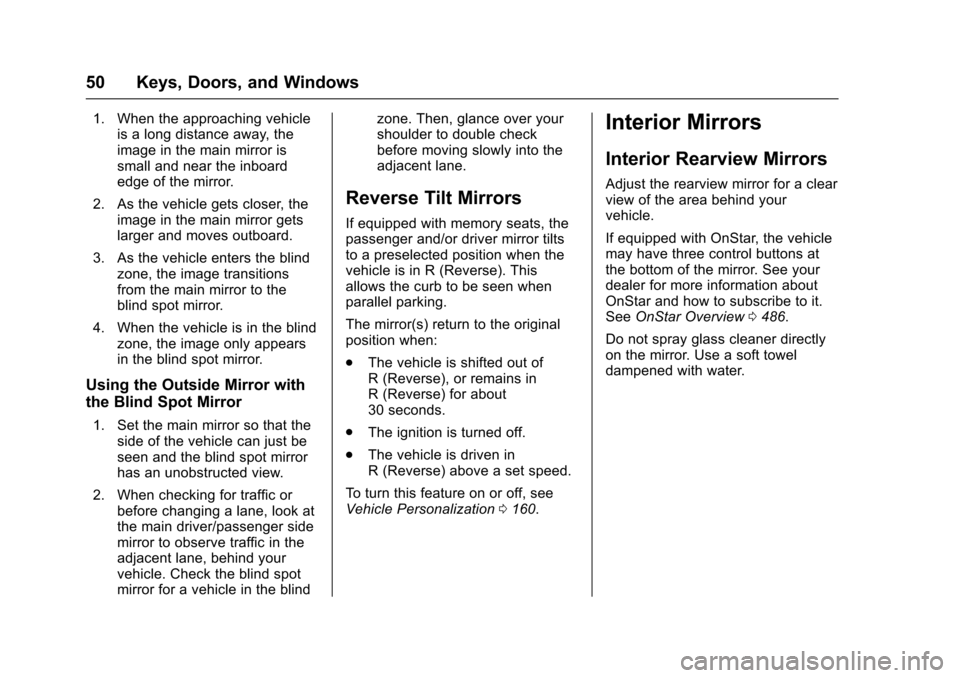
If equipped, there is a small convexmirror built into the upper and outercorner of the driver outside rearviewmirror. It can show objects that maybe in the vehicle's blind zone.
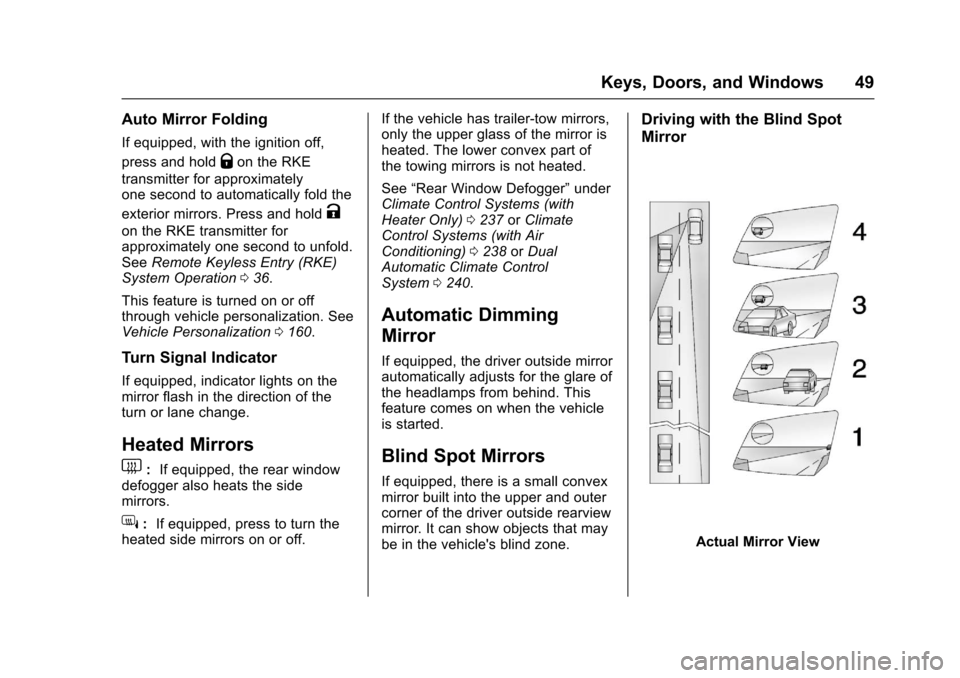
Driving with the Blind Spot
Mirror
Actual Mirror View
Page 51 of 509
Chevrolet Silverado Owner Manual (GMNA-Localizing-U.S./Canada/Mexico-9956065) - 2017 - CRC - 4/29/16
50 Keys, Doors, and Windows
1. When the approaching vehicleis a long distance away, theimage in the main mirror issmall and near the inboardedge of the mirror.
2. As the vehicle gets closer, theimage in the main mirror getslarger and moves outboard.
3. As the vehicle enters the blindzone, the image transitionsfrom the main mirror to theblind spot mirror.
4. When the vehicle is in the blindzone, the image only appearsin the blind spot mirror.
Using the Outside Mirror with
the Blind Spot Mirror
1. Set the main mirror so that theside of the vehicle can just beseen and the blind spot mirrorhas an unobstructed view.
2. When checking for traffic orbefore changing a lane, look atthe main driver/passenger sidemirror to observe traffic in theadjacent lane, behind yourvehicle. Check the blind spotmirror for a vehicle in the blind
zone. Then, glance over yourshoulder to double checkbefore moving slowly into theadjacent lane.
Reverse Tilt Mirrors
If equipped with memory seats, thepassenger and/or driver mirror tiltsto a preselected position when thevehicle is in R (Reverse). Thisallows the curb to be seen whenparallel parking.
The mirror(s) return to the originalposition when:
.The vehicle is shifted out ofR(Reverse),orremainsinR(Reverse)forabout30 seconds.
.The ignition is turned off.
.The vehicle is driven inR(Reverse)aboveasetspeed.
To t u r n t h i s f e a t u r e o n o r o f f , s e eVehicle Personalization0160.
Interior Mirrors
Interior Rearview Mirrors
Adjust the rearview mirror for a clearview of the area behind yourvehicle.
If equipped with OnStar, the vehiclemay have three control buttons atthe bottom of the mirror. See yourdealer for more information aboutOnStar and how to subscribe to it.SeeOnStar Overview0486.
Do not spray glass cleaner directlyon the mirror. Use a soft toweldampened with water.
Page 54 of 509
Chevrolet Silverado Owner Manual (GMNA-Localizing-U.S./Canada/Mexico-9956065) - 2017 - CRC - 4/29/16
Keys, Doors, and Windows 53
Obstacle Detection Override
{Warning
If obstacle detection override is
activated, the window will not
reverse automatically. You or
others could be injured and the
window could be damaged.
Before you use obstacle detection
override, make sure that all
people and obstructions are clear
of the window path.
The window can be closed byholding the window switch in the upposition if conditions prevent it fromexpress closing.
Programming the Power
Windows
Programming may be necessary ifthe vehicle's battery has beendisconnected or discharged. If thewindow is unable to express-up,program the window:
1. Close all doors.
2. Place the ignition in ACC/ACCESSORY or ON/RUN.
3. Partially open the window to beprogrammed, then close it andcontinue to pull the switchbriefly after the window hasfully closed.
4. Press the power window switchuntil the window is fully openand briefly hold.
Rear Windows
Power Sliding Rear Window
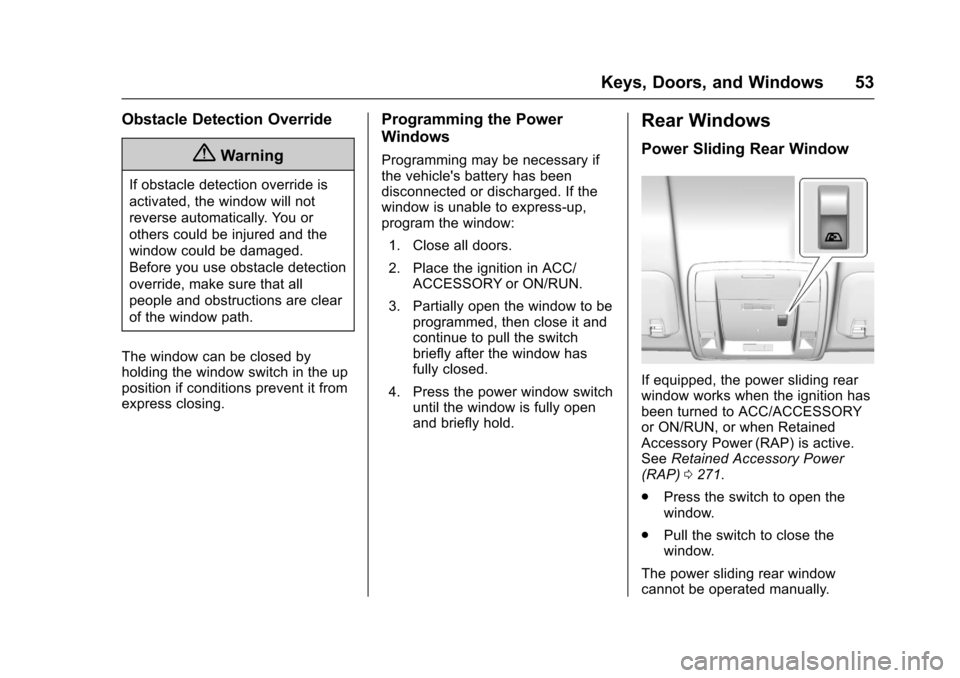
If equipped, the power sliding rearwindow works when the ignition hasbeen turned to ACC/ACCESSORYor ON/RUN, or when RetainedAccessory Power (RAP) is active.SeeRetained Accessory Power(RAP)0271.
.Press the switch to open thewindow.
.Pull the switch to close thewindow.
The power sliding rear windowcannot be operated manually.
Page 55 of 509
Chevrolet Silverado Owner Manual (GMNA-Localizing-U.S./Canada/Mexico-9956065) - 2017 - CRC - 4/29/16
54 Keys, Doors, and Windows
Sun Visors
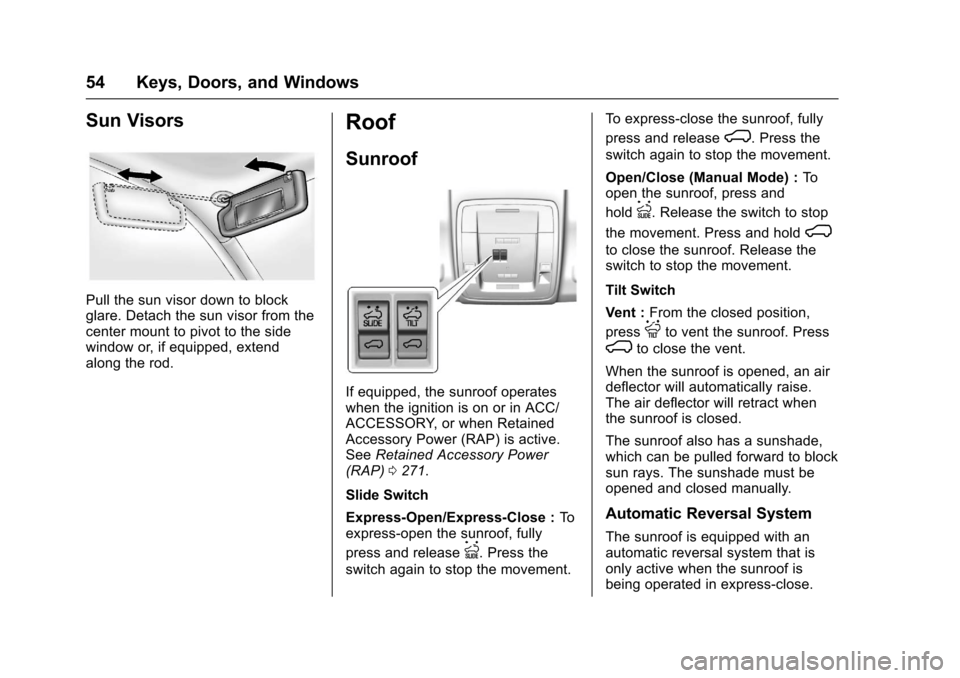
Pull the sun visor down to blockglare. Detach the sun visor from thecenter mount to pivot to the sidewindow or, if equipped, extendalong the rod.
Roof
Sunroof
If equipped, the sunroof operateswhen the ignition is on or in ACC/ACCESSORY, or when RetainedAccessory Power (RAP) is active.SeeRetained Accessory Power(RAP)0271.
Slide Switch
Express-Open/Express-Close :Toexpress-open the sunroof, fully
press and releaseI.Pressthe
switch again to stop the movement.
To e x p r e s s - c l o s e t h e s u n r o o f , f u l l y
press and releaseK.Pressthe
switch again to stop the movement.
Open/Close (Manual Mode) :Toopen the sunroof, press and
holdI.Releasetheswitchtostop
the movement. Press and holdK
to close the sunroof. Release theswitch to stop the movement.
Tilt Switch
Vent :From the closed position,
pressJto vent the sunroof. Press
Kto close the vent.
When the sunroof is opened, an airdeflector will automatically raise.The air deflector will retract whenthe sunroof is closed.
The sunroof also has a sunshade,which can be pulled forward to blocksun rays. The sunshade must beopened and closed manually.
Automatic Reversal System
The sunroof is equipped with anautomatic reversal system that isonly active when the sunroof isbeing operated in express-close.
Page 62 of 509
Chevrolet Silverado Owner Manual (GMNA-Localizing-U.S./Canada/Mexico-9956065) - 2017 - CRC - 4/29/16
Seats and Restraints 61
To r e t u r n t h e s e a t b a c k t o t h e u p r i g h tposition:
1. Lift the lever fully withoutapplying pressure to theseatback, and the seatback willreturn to the upright position.
2. Push and pull on the seatbackto make sure it is locked.
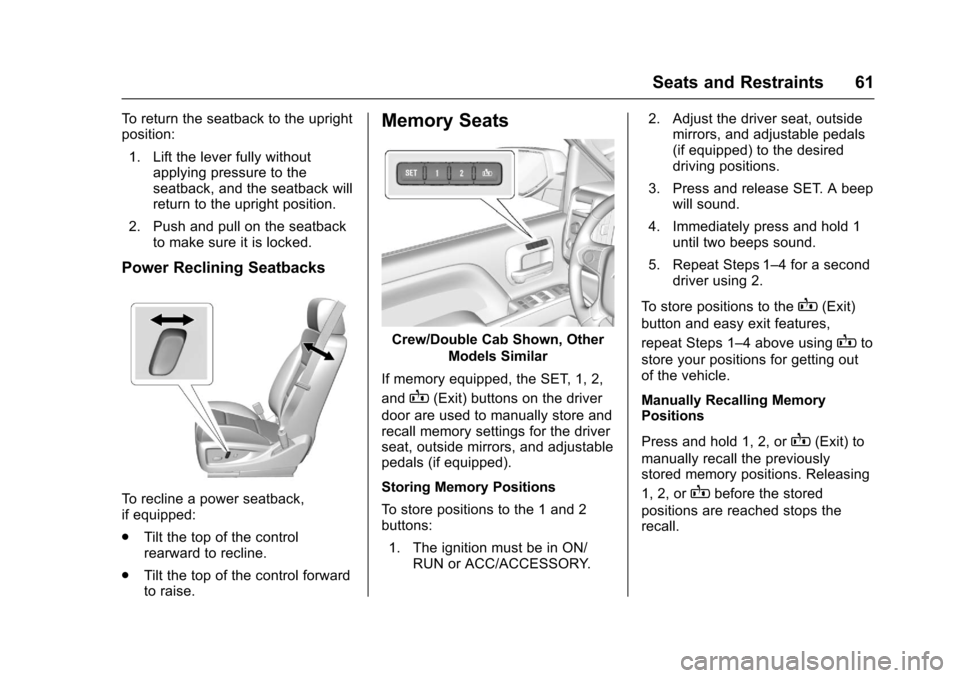
Power Reclining Seatbacks
To r e c l i n e a p o w e r s e a t b a c k ,if equipped:
.Tilt the top of the controlrearward to recline.
.Tilt the top of the control forwardto raise.
Memory Seats
Crew/Double Cab Shown, Other
Models Similar
If memory equipped, the SET, 1, 2,
andB(Exit) buttons on the driver
door are used to manually store andrecall memory settings for the driverseat, outside mirrors, and adjustablepedals (if equipped).
Storing Memory Positions
To s t o r e p o s i t i o n s t o t h e 1 a n d 2buttons:
1. The ignition must be in ON/RUN or ACC/ACCESSORY.
2. Adjust the driver seat, outsidemirrors, and adjustable pedals(if equipped) to the desireddriving positions.
3. Press and release SET. A beepwill sound.
4. Immediately press and hold 1until two beeps sound.
5. Repeat Steps 1–4foraseconddriver using 2.
To s t o r e p o s i t i o n s t o t h eB(Exit)
button and easy exit features,
repeat Steps 1–4aboveusingBto
store your positions for getting outof the vehicle.
Manually Recalling MemoryPositions
Press and hold 1, 2, orB(Exit) to
manually recall the previouslystored memory positions. Releasing
1, 2, orBbefore the stored
positions are reached stops therecall.
Page 63 of 509
Chevrolet Silverado Owner Manual (GMNA-Localizing-U.S./Canada/Mexico-9956065) - 2017 - CRC - 4/29/16
62 Seats and Restraints
Automatically Recalling MemoryPositions (Auto Recall)
If programmed on in the vehiclepersonalization menu, the Auto(Automatic) Memory Recall featureautomatically recalls the currentdriver’spreviouslystored1or2position when the ignition ischanged from OFF to ON/RUN orACC/ACCESSORY.
See“Auto Memory Recall”under“Comfort and Convenience”inVehicle Personalization0160.
To s t o p r e c a l l m o v e m e n t , p r e s s o n eof the memory, power mirror orpower seat controls; or press theadjustable pedal control (ifequipped).
RKE transmitters are not labeledwith a number. If your memory seatposition is stored to 1 or 2 but thisposition is not automaticallyrecalling, then store your positionsto the other button or switch RKEtransmitters with the other driver.
Easy Exit Recall
If programmed on in the vehiclepersonalization menu, the easy exitfeature automatically recalls the
previously storedB(Exit) position.
See“Storing Memory Positions”listed previously. See alsoVehiclePersonalization0160.
Easy exit recall automaticallyactivates when one of the followingoccurs:
.The vehicle is turned off and thedriver door is opened within ashort time.
.The vehicle is turned off with thedriver door open.
To s t o p r e c a l l m o v e m e n t , p r e s s o n eof the memory, power mirror orpower seat controls; or press theadjustable pedal control (ifequipped).
Obstructions
If something has blocked the driverseat and/or adjustable pedals whilerecalling a memory position, therecall may stop. Remove theobstruction. Then do one of thefollowing:
.For manual or automatic recallpositions, press and hold theappropriate manual control fortwo seconds. Try recalling againby pressing the appropriatememory button.
.For exit recall position, pressand hold the appropriate manualcontrol for the exit feature notrecalling for two seconds. Thentry recalling the exit positionagain.
If the memory position is still notrecalling, see your dealer forservice.
Page 64 of 509
Chevrolet Silverado Owner Manual (GMNA-Localizing-U.S./Canada/Mexico-9956065) - 2017 - CRC - 4/29/16
Seats and Restraints 63
Heated and Ventilated
Front Seats
{Warning
If you cannot feel temperature
change or pain to the skin, the
seat heater may cause burns. To
reduce the risk of burns, people
with such a condition should use
care when using the seat heater,
especially for long periods of
time. Do not place anything on
the seat that insulates against
heat, such as a blanket, cushion,
cover, or similar item. This may
cause the seat heater to
overheat. An overheated seat
heater may cause a burn or may
damage the seat.
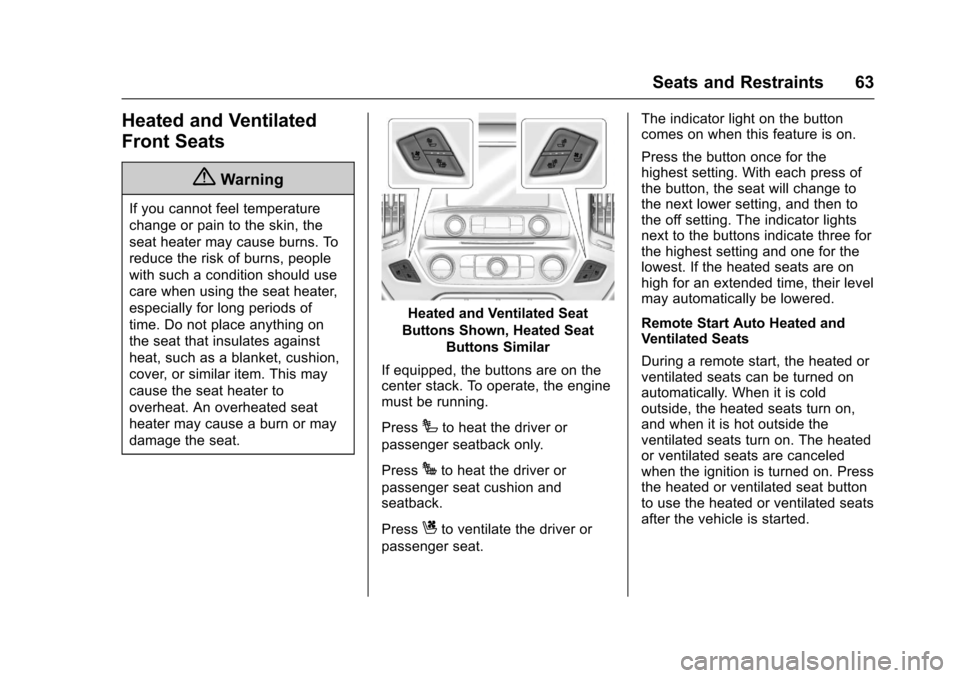
Heated and Ventilated Seat
Buttons Shown, Heated Seat
Buttons Similar
If equipped, the buttons are on thecenter stack. To operate, the enginemust be running.
PressIto heat the driver or
passenger seatback only.
PressJto heat the driver or
passenger seat cushion andseatback.
PressCto ventilate the driver or
passenger seat.
The indicator light on the buttoncomes on when this feature is on.
Press the button once for thehighest setting. With each press ofthe button, the seat will change tothe next lower setting, and then tothe off setting. The indicator lightsnext to the buttons indicate three forthe highest setting and one for thelowest. If the heated seats are onhigh for an extended time, their levelmay automatically be lowered.
Remote Start Auto Heated andVentilated Seats
During a remote start, the heated orventilated seats can be turned onautomatically. When it is coldoutside, the heated seats turn on,and when it is hot outside theventilated seats turn on. The heatedor ventilated seats are canceledwhen the ignition is turned on. Pressthe heated or ventilated seat buttonto use the heated or ventilated seatsafter the vehicle is started.