radio CHEVROLET SILVERADO 2017 3.G Workshop Manual
[x] Cancel search | Manufacturer: CHEVROLET, Model Year: 2017, Model line: SILVERADO, Model: CHEVROLET SILVERADO 2017 3.GPages: 509, PDF Size: 8.87 MB
Page 218 of 509
Chevrolet Silverado Owner Manual (GMNA-Localizing-U.S./Canada/Mexico-9956065) - 2017 - CRC - 4/29/16
Infotainment System 217
i:Press to end a call, reject acall, or cancel an operation. Pressto mute or unmute the infotainmentsystem.
Infotainment System Controls
For information about how tonavigate the menu system using theinfotainment controls, seeOverview(Base Radio with Touchscreen)0183orOverview (BaseRadio)0184.
MENU :Turn to scroll through a list.Press to select the highlighted listoption.
{:Press to go to the Home Page.SeeHome Page (Base Radio)0186orHome Page (Base Radiowith Touchscreen)0188.
PHONE or#:Select to enter the
phone main menu. SeeBluetooth(Voice Recognition - Base Radio)0221orBluetooth (InfotainmentControls - Base Radio)0217orBluetooth (Overview)0216orBluetooth (Infotainment Controls -Base Radio withTo u c h s c r e e n )0226.
Voice Recognition
If equipped, the voice recognitionsystem uses commands to controlthe system and dial phone numbers.
Noise :The system may notrecognize voice commands if thereis too much background noise, suchas noise from open windows or loudtalking inside the vehicle.
When to Speak :Atonesoundstoindicate that the system is ready foravoicecommand.Waitforthetoneand then speak.
How to Speak :Speak clearly in acalm and natural voice.
Audio System
When using the Bluetooth system,sound comes through the vehicle'sfront audio system speakers andoverrides the audio system. Use theOknob during a call to change thevolume level. The system maintainsaminimumvolumelevel.
Bluetooth Audio Quality
Turn off the Echo and Noisecancellation feature on your phone,if supported, for the best hands-freeperformance.
See www.gm.com/bluetooth for U.S.and Canada only.
Bluetooth (Infotainment
Controls - Base Radio)
For information about how tonavigate the menu system using theinfotainment controls, seeOverview(Base Radio with Touchscreen)0183orOverview (BaseRadio)0184.
Switching to Handset or
Hands-Free Mode
To s w i t c h b e t w e e n h a n d s e t m o d eand hands-free mode, use theOnStar command,“transfer call.”
Pairing
ABluetooth-enabledcellphonemust be paired to the Bluetoothsystem and then connected to thevehicle before it can be used. See
Page 222 of 509
Chevrolet Silverado Owner Manual (GMNA-Localizing-U.S./Canada/Mexico-9956065) - 2017 - CRC - 4/29/16
Infotainment System 221
.Pression the steering wheel
controls.
.Do nothing.
Call Waiting
Call waiting must be supported onthe Bluetooth phone and enabled bythe wireless service carrier to work.
Accepting a Call Waiting Call
To a c c e p t a c a l l w a i t i n g c a l l , d o o n eof the following:
.Press the button just below theSWITCH screen button.
.Pressgon the steering wheel
controls.
Declining a Call Waiting Call
To d e c l i n e a c a l l w a i t i n g c a l l , d o o n eof the following:
.Press the button just below theIGNORE screen button.
.Pression the steering wheel
controls.
.Do nothing.
Ending a Call
To e n d a c a l l , d o o n e o f t h efollowing:
.Press the button just below theEND screen button.
.Pression the steering wheel
controls.
Dual Tone Multi-Frequency
(DTMF) Tones
The in-vehicle Bluetooth system cansend numbers during a call. This isused when calling a menu-drivenphone system.
1. When a call is active, press thebutton just below the KEYPADscreen button.
2. Turn the MENU knob tohighlight the first digit andpress to select.
If not initially in the phoneapplication, from the Home Page,turn the MENU knob, then press toselect the PHONE screen button.From the PHONE main menu, turnthe MENU knob to highlight ActiveCall and press to select.
Bluetooth (Voice
Recognition - Base
Radio)
Using Voice Recognition
To u s e v o i c e r e c o g n i t i o n , p r e s sg
on the steering wheel. Use thecommands below for the variousvoice features. For additionalinformation, say“Help”while youare in a voice recognition menu.
Pairing
Pairing a Phone
1. Pressg.Thesystemresponds
“Ready,”followed by a tone.
2. Say“Bluetooth.”
3. Say“Pair.”The systemresponds with instructions andafour-digitPersonalIdentification Number (PIN).The PIN is used in Step 5.
4. Start the pairing process on thecell phone that you want topair. For help with this process,see your cell phonemanufacturer's user guide.
Page 227 of 509
Chevrolet Silverado Owner Manual (GMNA-Localizing-U.S./Canada/Mexico-9956065) - 2017 - CRC - 4/29/16
226 Infotainment System
The cell phone's normal promptmessages will go through their cycleaccording to the phone's operatinginstructions.
Dual Tone Multi-Frequency
(DTMF) Tones
The Bluetooth system can sendnumbers and the numbers stored asname tags during a call. You canuse this feature when calling amenu-driven phone system.Account numbers can also bestored for use.
Sending a Number or Name TagDuring a Call
1. Pressg.Thesystemresponds
“Ready,”followed by a tone.
2. Say“Dial.”
3. Say the number or name tagto send.
Clearing the System
Unless information is deleted out ofthe in-vehicle Bluetooth system, itwill be retained indefinitely. Thisincludes all phone pairing
information. For information on howto delete this information, see“Deleting a Paired Phone.”
Bluetooth (Infotainment
Controls - Base Radio
with Touchscreen)
To u s e i n f o t a i n m e n t c o n t r o l s t oaccess the menu system, seeOverview (Base Radio withTo u c h s c r e e n )0183orOverview(Base Radio)0184.
Pairing
ABluetooth-enabledcellphonemust be paired to the Bluetoothsystem and then connected to thevehicle before it can be used. Seeyour cell phone manufacturer's userguide for Bluetooth functions beforepairing the cell phone. If a Bluetoothphone is not connected, calls will bemade using OnStar Hands-FreeCalling, if available. SeeOnStarOverview0486.
Pairing Information
.ABluetoothphonewithMP3capability cannot be paired tothe vehicle as a phone and anMP3 player at the same time.
.Up to 10 cell phones can bepaired to the Bluetooth system.
.The pairing process is disabledwhen the vehicle is moving.
.Pairing only needs to becompleted once, unless thepairing information on the cellphone changes or the cell phoneis deleted from the system.
.Only one paired cell phone canbe connected to the Bluetoothsystem at a time.
.If multiple paired cell phones arewithin range of the system, thesystem connects to the firstavailable paired cell phone in theorder that they were first pairedto the system.
When the Bluetooth device andinfotainment system aresuccessfully paired, the phone bookis downloaded automatically. This isdependent on the type of the phone
Page 232 of 509
Chevrolet Silverado Owner Manual (GMNA-Localizing-U.S./Canada/Mexico-9956065) - 2017 - CRC - 4/29/16
Infotainment System 231
Android Auto is provided by Googleand is subject to Google’stermsand privacy policy. CarPlay isprovided by Apple and is subject toApple’stermsandprivacypolicy.For Android Auto support seehttps://support.google.com/androidauto or Apple CarPlaysupport at https://www.apple.com/ios/carplay/. Apple or Google maychange or suspend availability atany time. Android Auto is atrademark of Google Inc.; AppleCarPlay is a trademark of Apple Inc.
Trademarks and
License Agreements
FCC Information
SeeRadio FrequencyStatement0482.
"Made for iPod" and "Made foriPhone" mean that an electronicaccessory has been designed toconnect specifically to iPod oriPhone and has been certified bythe developer to meet Appleperformance standards. Apple is notresponsible for the operation of thisdevice or its compliance with safetyand regulatory standards. Pleasenote that the use of this accessorywith iPod or iPhone may affectwireless performance. iPhone®,iPod®,iPodclassic®,iPodnano®,
iPod shuffle®,andiPodtouch®aretrademarks of Apple Inc., registeredin the U.S. and other countries.
Fees and Taxes: Subscription fee,taxes, one time activation fee, andother fees may apply. Subscriptionfee is consumer only. All fees andprogramming subject to change.Subscriptions subject to CustomerAgreement available atwww.siriusxm.com. SiriusXM®
service only available in the48 contiguous United States andCanada.
In Canada: Some deterioration ofservice may occur in extremenorthern latitudes. This is beyondthe control of SiriusXM®SatelliteRadio.
Explicit Language Notice: Channelswith frequent explicit language areindicated with an“XL”preceding the
Page 233 of 509
Chevrolet Silverado Owner Manual (GMNA-Localizing-U.S./Canada/Mexico-9956065) - 2017 - CRC - 4/29/16
232 Infotainment System
channel name. Channel blocking isavailable for SiriusXM SatelliteRadio receivers by notifyingSiriusXM:
.USA Customers—Seewww.siriusxm.com or call1-866-635–2349.
.Canadian Customers—Seewww.xmradio.ca or call1-877-209-0079.
It is prohibited to copy, decompile,disassemble, reverse engineer,hack, manipulate, or otherwisemake available any technology orsoftware incorporated in receiverscompatible with the SiriusXM®
Satellite Radio System or thatsupport the SiriusXM website, theOnline Service or any of its content.Furthermore, the AMBER voicecompression software included inthis product is protected byintellectual property rights includingpatent rights, copyrights, and tradesecrets of Digital VoiceSystems, Inc.
General Requirements:
1. A License Agreement fromSiriusXM®is required for anyproduct that incorporatesSiriusXM Technology and/or foruse of any of the SiriusXMmarks to be manufactured,distributed, or marketed in theSiriusXM Service Area.
2. For products to be distributed,marketed, and/or sold inCanada, a separate agreementis required with CanadianSatellite Radio Inc. (operatingas SiriusXM Canada).
Other Information
The Bluetooth®word mark andlogos are owned by the Bluetooth®
SIG, Inc. and any use of such marksby General Motors is under license.Other trademarks and trade namesare those of their respective owners.
Schedule I: Gracenote EULA
Music recognition technology andrelated data are provided byGracenote®.Gracenoteistheindustry standard in musicrecognition technology and relatedcontent delivery. For moreinformation visitwww.gracenote.com.
Music-related data from Gracenote,Inc., copyright © 2000 to presentGracenote. Gracenote Software,copyright © 2000 to presentGracenote. One or more patentsowned by Gracenote may apply tothis product and service. See theGracenote website for anon-exhaustive list of applicableGracenote patents. Gracenote,CDDB, MusicID, MediaVOCS, theGracenote logo and logotype, andthe "Powered by Gracenote" logo
Page 248 of 509
Chevrolet Silverado Owner Manual (GMNA-Localizing-U.S./Canada/Mexico-9956065) - 2017 - CRC - 4/29/16
Driving and Operating 247
Fuel Additives . . . . . . . . . . . . . . . . 312E85 or FlexFuel . . . . . . . . . . . . . . 312Filling the Tank . . . . . . . . . . . . . . . 313Filling a Portable FuelContainer . . . . . . . . . . . . . . . . . . . 315
Trailer Towing
General TowingInformation . . . . . . . . . . . . . . . . . . 315Driving Characteristics andTo w i n g T i p s . . . . . . . . . . . . . . . . . 3 1 5Trailer Towing . . . . . . . . . . . . . . . . 318To w i n g E q u i p m e n t . . . . . . . . . . . . 3 3 5Trailer Sway Control (TSC) . . . 344
Conversions and Add-Ons
Add-On ElectricalEquipment . . . . . . . . . . . . . . . . . . 345Adding a Snow Plow or SimilarEquipment . . . . . . . . . . . . . . . . . . 345Pickup Conversion toChassis Cab . . . . . . . . . . . . . . . . 349
Driving Information
Distracted Driving
Distraction comes in many formsand can take your focus from thetask of driving. Exercise goodjudgment and do not let otheractivities divert your attention awayfrom the road. Many localgovernments have enacted lawsregarding driver distraction. Becomefamiliar with the local laws inyour area.
To a v o i d d i s t r a c t e d d r i v i n g , k e e pyour eyes on the road, keep yourhands on the steering wheel, andfocus your attention on driving.
.Do not use a phone indemanding driving situations.Use a hands-free method toplace or receive necessaryphone calls.
.Watch the road. Do not read,take notes, or look upinformation on phones or otherelectronic devices.
.Designate a front seatpassenger to handle potentialdistractions.
.Become familiar with vehiclefeatures before driving, such asprogramming favorite radiostations and adjusting climatecontrol and seat settings.Program all trip information intoany navigation device prior todriving.
.Wait until the vehicle is parkedto retrieve items that have fallento the floor.
.Stop or park the vehicle to tendto children.
.Keep pets in an appropriatecarrier or restraint.
.Avoid stressful conversationswhile driving, whether with apassenger or on a cell phone.
{Warning
Ta k i n g y o u r e y e s o f f t h e r o a d t o o
long or too often could cause a
crash resulting in injury or death.
Focus your attention on driving.
Page 270 of 509
Chevrolet Silverado Owner Manual (GMNA-Localizing-U.S./Canada/Mexico-9956065) - 2017 - CRC - 4/29/16
Driving and Operating 269
firmly apply the brakes andsteer the vehicle to a safelocation.
3. Come to a complete stop. Shiftto P (Park) with an automatictransmission, or Neutral with amanual transmission. Turn theignition to LOCK/OFF.
4. Set the parking brake. SeeParking Brake0293.
{Warning
Turning off the vehicle while
moving may cause loss of power
assist in the brake and steering
systems and disable the airbags.
While driving, only shut the
vehicle off in an emergency.
If the vehicle cannot be pulled over,and must be shut off while driving,turn the ignition to ACC/ACCESSORY.
On vehicles with an automatictransmission, the shift lever must bein P (Park) to turn the ignition switchto LOCK/OFF.
Caution
Using a tool to force the key to
turn in the ignition could cause
damage to the switch or break the
key. Use the correct key, make
sure it is all the way in, and turn it
only with your hand. If the key
cannot be turned by hand, see
your dealer.
1(ACC/ACCESSORY):Thisposition lets things like the radioand the windshield wipers operatewhile the engine is off. It alsounlocks the steering wheel. Use thisposition if the vehicle must bepushed or towed.
2(ON/RUN):This position can beused to operate the electricalaccessories and to display someinstrument cluster warning andindicator lights. This position canalso be used for service anddiagnostics, and to verify the properoperation of the malfunctionindicator lamp as may be requiredfor emission inspection purposes.The switch stays in this position
when the engine is running. Thetransmission is also unlocked in thisposition on automatic transmissionvehicles.
If the key is left in the ACC/ACCESSORY or ON/RUN positionwith the engine off, the battery couldbe drained. The vehicle may notstart if the battery is allowed to drainfor an extended period of time.
3(START):This is the position thatstarts the engine. When the enginestarts, release the key. The ignitionswitch returns to ON/RUN fordriving.
Awarningtonewillsoundwhenthedriver door is opened, the ignition isin ACC/ACCESSORY or LOCK/OFF, and the key is in the ignition.
Starting the Engine
If the vehicle has a diesel engine,see the Duramax dieselsupplement.
For an eAssist vehicle, see theSilverado/Sierra eAssistsupplement.
Page 273 of 509
Chevrolet Silverado Owner Manual (GMNA-Localizing-U.S./Canada/Mexico-9956065) - 2017 - CRC - 4/29/16
272 Driving and Operating
turned from ON/RUN to LOCK/OFF,the windows and sunroof continueto work up to 10 minutes or until anydoor is opened. The radio continuesto work for up to 10 minutes or untilthe driver door is opened.
Accessory Power Outlets (APOs)
The vehicle may have AccessoryPower Outlets (APOs) in severallocations. SeePower Outlets0124.
The APOs in the console or centerseat position are powered byRetained Accessory Power (RAP).They will continue to work for up to10 minutes after the key is turnedfrom ON/RUN to LOCK/OFF, or untilthe driver door is opened.
The APOs on the center stack comefrom the factory powered directlyfrom the vehicle battery, and supplyaccessory power at all times,regardless of ignition key position.
If electronic items are left pluggedinto these APOs for long periods oftime with the vehicle off, the vehiclebattery could be drained. Thevehicle may not start if the battery isallowed to drain for an extendedperiod of time.
Engine Coolant Heater
The engine heater can provideeasier starting and better fueleconomy during engine warm-up incold weather conditions at or below✓18 °C (0 °F). Vehicles with anengine heater should be plugged inat least four hours before starting.An internal thermostat in theplug-end of the cord may exist,which will prevent engine coolantheater operation at temperaturesabove✓18 °C (0 °F).
If the vehicle has a diesel engine,see the Duramax dieselsupplement.
To Use the Engine Coolant
Heater
1. Turn off the engine.
2. Open the hood and unwrap theelectrical cord. The cord issecured to the driver sidefender with a clip, next to theengine compartment fuseblock. Carefully remove thewire tie that bundles theelectrical plug. Do not cut theelectrical cord.
Check the heater cord fordamage. If it is damaged, donot use it. See your dealer forareplacement.Inspectthecord for damage yearly.
3. Plug the cord into a normal,grounded 110-volt AC outlet.
Page 395 of 509
Chevrolet Silverado Owner Manual (GMNA-Localizing-U.S./Canada/Mexico-9956065) - 2017 - CRC - 4/29/16
394 Vehicle Care
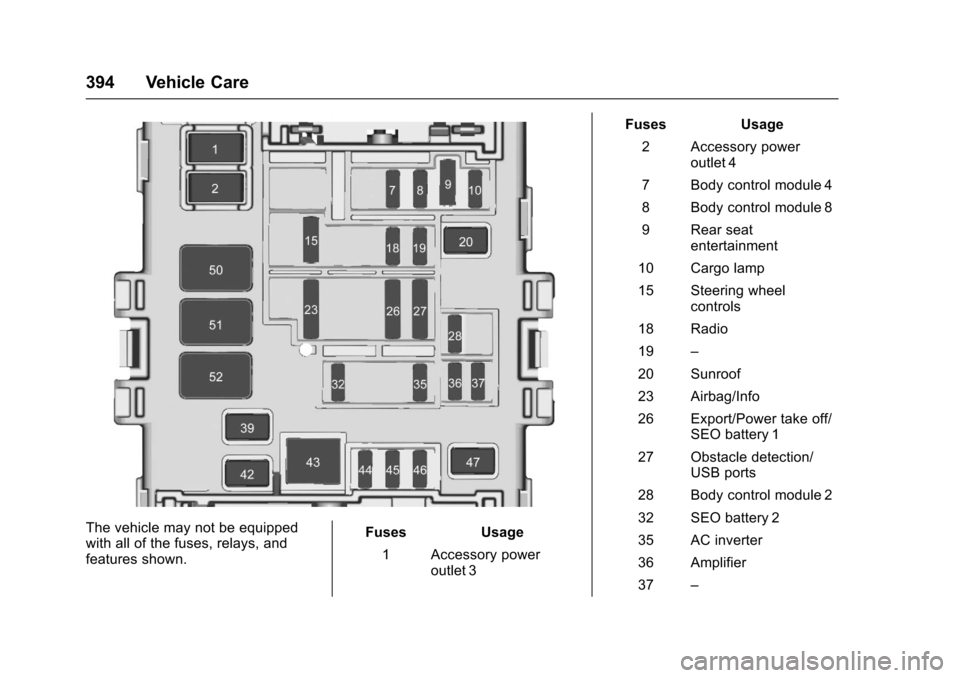
The vehicle may not be equippedwith all of the fuses, relays, andfeatures shown.
Fuses Usage
1Accessorypoweroutlet 3
Fuses Usage
2Accessorypoweroutlet 4
7Bodycontrolmodule4
8Bodycontrolmodule8
9Rearseatentertainment
10 Cargo lamp
15 Steering wheelcontrols
18 Radio
19–
20 Sunroof
23 Airbag/Info
26 Export/Power take off/SEO battery 1
27 Obstacle detection/USB ports
28 Body control module 2
32 SEO battery 2
35 AC inverter
36 Amplifier
37–
Page 408 of 509
Chevrolet Silverado Owner Manual (GMNA-Localizing-U.S./Canada/Mexico-9956065) - 2017 - CRC - 4/29/16
Vehicle Care 407
inflation pressure is high, press
on the metal stem in the center
of the tire valve to release air.
Re-check the tire pressure with
the tire gauge.
Put the valve caps back on the
valve stems to keep out dirt and
moisture and prevent leaks. Use
only valve caps designed for the
vehicle by GM. TPMS sensors
could be damaged and would
not be covered by the vehicle
warranty.
Tire Pressure for
High-Speed Operation
{Warning
Driving at high speeds, 160 km/h
(100 mph) or higher, puts
additional strain on tires.
Sustained high-speed driving
causes excessive heat buildup
and can cause sudden tire failure.
This could cause a crash, and
(Continued)
Warning (Continued)
you or others could be killed.
Some high-speed rated tires
require inflation pressure
adjustment for high-speed
operation. When speed limits and
road conditions allow the vehicle
to be driven at high speeds, make
sure the tires are rated for
high-speed operation, are in
excellent condition, and are set to
the correct cold tire inflation
pressure for the vehicle load.
Vehicles with P275/55R20 orP285/50R20 size tires requireinflation pressure adjustment whendriving the vehicle at speeds of160 km/h (100 mph) or higher. Setthe cold tire inflation pressure to20 kPa (3 psi) above therecommended cold tire pressureshown on the Tire and LoadingInformation label.
Return the tires to therecommended cold tire inflationpressure when high-speed drivinghas ended. SeeVehicle Load Limits0259andTire Pressure0405.
Tire Pressure Monitor
System
The Tire Pressure Monitor System(TPMS) uses radio and sensortechnology to check tire pressurelevels. The TPMS sensors monitorthe air pressure in your tires andtransmit tire pressure readings to areceiver located in the vehicle.
Each tire, including the spare (ifprovided), should be checkedmonthly when cold and inflated tothe inflation pressure recommendedby the vehicle manufacturer on thevehicle placard or tire inflationpressure label. (If your vehicle hastires of a different size than the sizeindicated on the vehicle placard ortire inflation pressure label, youshould determine the proper tireinflation pressure for those tires.)