ignition CHEVROLET SILVERADO 2017 3.G Repair Manual
[x] Cancel search | Manufacturer: CHEVROLET, Model Year: 2017, Model line: SILVERADO, Model: CHEVROLET SILVERADO 2017 3.GPages: 509, PDF Size: 8.87 MB
Page 278 of 509
Chevrolet Silverado Owner Manual (GMNA-Localizing-U.S./Canada/Mexico-9956065) - 2017 - CRC - 4/29/16
Driving and Operating 277
Running the Vehicle
While Parked
It is better not to park with theengine running.
If the vehicle is left with the enginerunning, follow the proper steps tobe sure the vehicle will not move.SeeShifting Into Park0273andEngine Exhaust0276.Ifthevehiclehas a manual transmission, seeParking (ManualTr a n s m i s s i o n )0275.
If parking on a hill and pulling atrailer, seeDriving Characteristicsand Towing Tips0315.
Automatic
Transmission
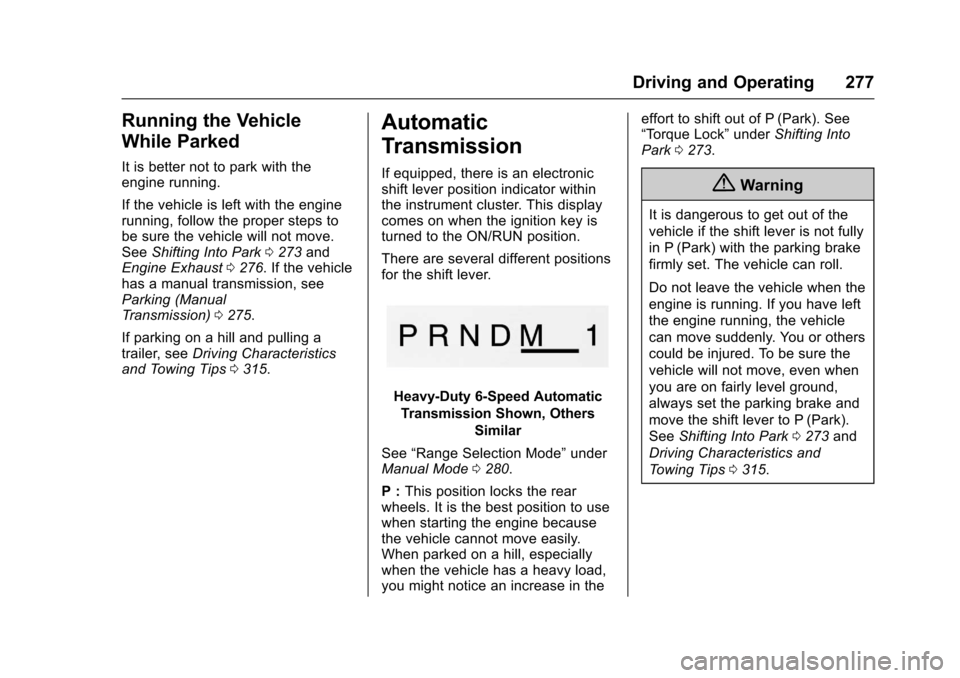
If equipped, there is an electronicshift lever position indicator withinthe instrument cluster. This displaycomes on when the ignition key isturned to the ON/RUN position.
There are several different positionsfor the shift lever.
Heavy-Duty 6-Speed Automatic
Transmission Shown, Others
Similar
See“Range Selection Mode”underManual Mode0280.
P:This position locks the rearwheels. It is the best position to usewhen starting the engine becausethe vehicle cannot move easily.When parked on a hill, especiallywhen the vehicle has a heavy load,you might notice an increase in the
effort to shift out of P (Park). See“To r q u e L o c k”underShifting IntoPark0273.
{Warning
It is dangerous to get out of the
vehicle if the shift lever is not fully
in P (Park) with the parking brake
firmly set. The vehicle can roll.
Do not leave the vehicle when the
engine is running. If you have left
the engine running, the vehicle
can move suddenly. You or others
could be injured. To be sure the
vehicle will not move, even when
you are on fairly level ground,
always set the parking brake and
move the shift lever to P (Park).
SeeShifting Into Park0273and
Driving Characteristics and
To w i n g T i p s0315.
Page 280 of 509
Chevrolet Silverado Owner Manual (GMNA-Localizing-U.S./Canada/Mexico-9956065) - 2017 - CRC - 4/29/16
Driving and Operating 279
or driving off-road. Shift thetransmission to a lower gearselection if the transmission shiftstoo often.
Downshifting the transmission inslippery road conditions could resultin skidding. See“Skidding”underLoss of Control0250.
The vehicle has a shift stabilizationfeature that adjusts the transmissionshifting to the current drivingconditions in order to reduce rapidupshifts and downshifts. This shiftstabilization feature is designed todetermine, before making anupshift, if the engine is able tomaintain vehicle speed by analyzingthings such as vehicle speed,throttle position, and vehicle load.If the shift stabilization featuredetermines that a current vehiclespeed cannot be maintained, thetransmission does not upshift andinstead holds the current gear.In some cases, this could appear tobe a delayed shift, however thetransmission is operating normally.
The transmission uses adaptiveshift controls. The adaptive shiftcontrol process continuallycompares key shift parameters topre-programmed ideal shifts storedin the transmission’scomputer.Thetransmission constantly makesadjustments to improve vehicleperformance according to how thevehicle is being used, such as withaheavyloadorwhenthetemperature changes. During thisadaptive shift control process,shifting might feel different as thetransmission determines the bestsettings.
When temperatures are very cold,the transmission's gear shiftingcould be delayed providing morestable shifts until the engine warmsup. Shifts could be more noticeablewith a cold transmission. Thisdifference in shifting is normal.
M:This position allows selection ofarangeofgearsappropriateforcurrent driving conditions.If equipped, see“Range SelectionMode”underManual Mode0280.
Caution
Spinning the tires or holding the
vehicle in one place on a hill
using only the accelerator pedal
may damage the transmission.
The repair will not be covered by
the vehicle warranty. If you are
stuck, do not spin the tires. When
stopping on a hill, use the brakes
to hold the vehicle in place.
Normal Mode Grade Braking
If equipped with a gasoline engineand an automatic transmission,Normal Mode Grade Braking isenabled when the vehicle is started,but is not enabled in RangeSelection Mode. It assists inmaintaining desired vehicle speedswhen driving on downhill grades byusing the engine and transmissionto slow the vehicle. The first timethe system engages for eachignition key cycle, a DIC messagewill be displayed. SeeTr a n s m i s s i o nMessages0157.
Page 281 of 509
Chevrolet Silverado Owner Manual (GMNA-Localizing-U.S./Canada/Mexico-9956065) - 2017 - CRC - 4/29/16
280 Driving and Operating
To d i s a b l e o r e n a b l e N o r m a l M o d eGrade Braking within the currentignition key cycle, press and holdthe Tow/Haul button forfive seconds. When the button isreleased, the requested modechange is made. A DIC messagedisplays. SeeTr a n s m i s s i o nMessages0157.
For other forms of grade braking,seeTo w / H a u l M o d e0282andCruise Control0298.
Kickdown Mode
If equipped, the accelerator pedalprovides an additional downshiftafter pressing through the kickdownfeature.
It requires extra pedal pressure nearthe end of its travel to engage.
Manual Mode
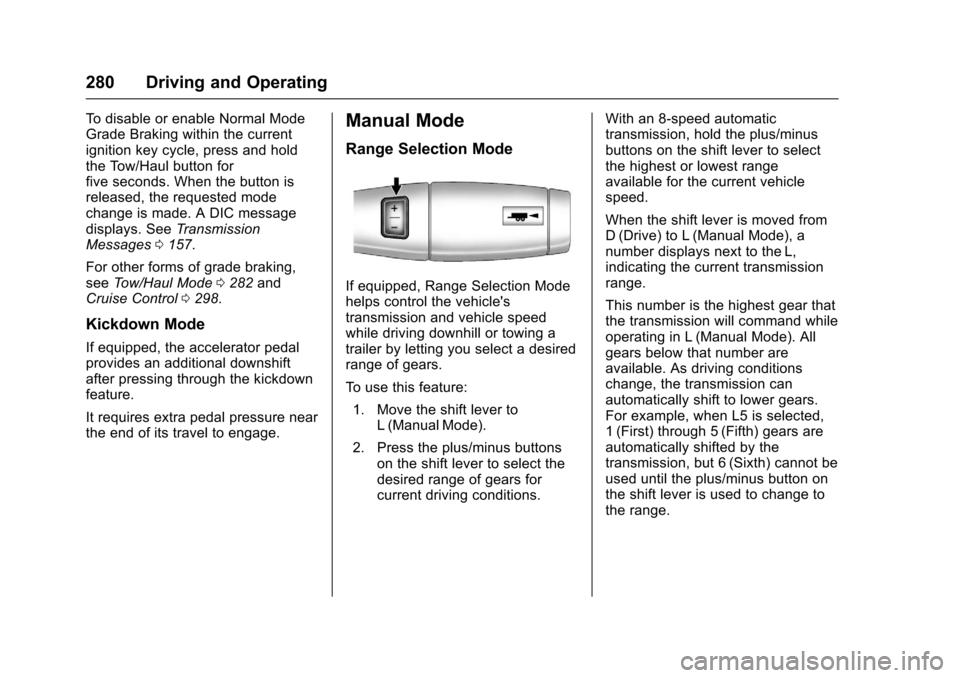
Range Selection Mode
If equipped, Range Selection Modehelps control the vehicle'stransmission and vehicle speedwhile driving downhill or towing atrailer by letting you select a desiredrange of gears.
To u s e t h i s f e a t u r e :
1. Move the shift lever toL(ManualMode).
2. Press the plus/minus buttonson the shift lever to select thedesired range of gears forcurrent driving conditions.
With an 8-speed automatictransmission, hold the plus/minusbuttons on the shift lever to selectthe highest or lowest rangeavailable for the current vehiclespeed.
When the shift lever is moved fromD(Drive) to L(Manual Mode), anumber displays next to the L,indicating the current transmissionrange.
This number is the highest gear thatthe transmission will command whileoperating in L (Manual Mode). Allgears below that number areavailable. As driving conditionschange, the transmission canautomatically shift to lower gears.For example, when L5 is selected,1(First) through 5(Fifth) gears areautomatically shifted by thetransmission, but 6 (Sixth) cannot beused until the plus/minus button onthe shift lever is used to change tothe range.
Page 284 of 509
Chevrolet Silverado Owner Manual (GMNA-Localizing-U.S./Canada/Mexico-9956065) - 2017 - CRC - 4/29/16
Driving and Operating 283
If equipped, on vehicles with agasoline engine, to disable orenable Tow/Haul Grade Brakingwithin the current ignition key cycle,press and hold the Tow/Haul buttonfor five seconds. When the button isreleased, the requested modechange is made. A DIC message isdisplayed. SeeTr a n s m i s s i o nMessages0157.
On vehicles with a diesel engine,To w / H a u l M o d e G r a d e B r a k i n g c a nbe enabled or disabled by pressingthe Tow/Haul Mode button. Use theexhaust brake and Tow/Haul Modefor maximum grade braking.
SeeTo w i n g E q u i p m e n t0335.
For other forms of grade braking,seeAutomatic Transmission0277andCruise Control0298.
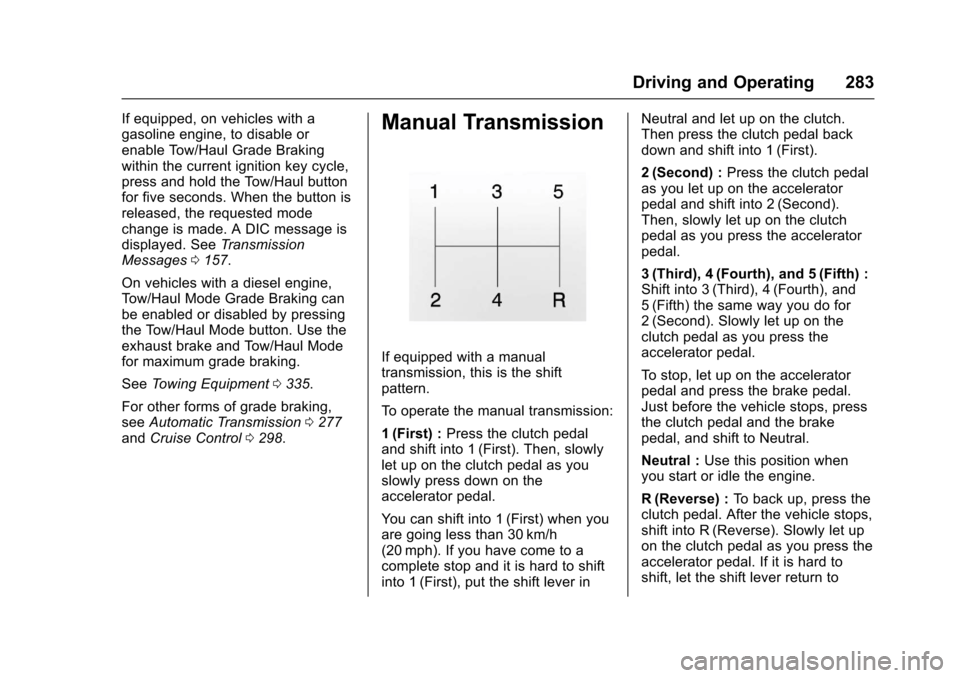
Manual Transmission
If equipped with a manualtransmission, this is the shiftpattern.
To o p e r a t e t h e m a n u a l t r a n s m i s s i o n :
1(First) :Press the clutch pedaland shift into 1 (First). Then, slowlylet up on the clutch pedal as youslowly press down on theaccelerator pedal.
Yo u c a n s h i f t i n t o 1 ( F i r s t ) w h e n y o uare going less than 30 km/h(20 mph). If you have come to acomplete stop and it is hard to shiftinto 1 (First), put the shift lever in
Neutral and let up on the clutch.Then press the clutch pedal backdown and shift into 1 (First).
2(Second) :Press the clutch pedalas you let up on the acceleratorpedal and shift into 2 (Second).Then, slowly let up on the clutchpedal as you press the acceleratorpedal.
3(Third), 4(Fourth), and 5(Fifth) :Shift into 3 (Third), 4 (Fourth), and5(Fifth) the same way you do for2(Second). Slowly let up on theclutch pedal as you press theaccelerator pedal.
To s t o p , l e t u p o n t h e a c c e l e r a t o rpedal and press the brake pedal.Just before the vehicle stops, pressthe clutch pedal and the brakepedal, and shift to Neutral.
Neutral :Use this position whenyou start or idle the engine.
R(Reverse) :To b a c k u p , p r e s s t h eclutch pedal. After the vehicle stops,shift into R (Reverse). Slowly let upon the clutch pedal as you press theaccelerator pedal. If it is hard toshift, let the shift lever return to
Page 288 of 509
Chevrolet Silverado Owner Manual (GMNA-Localizing-U.S./Canada/Mexico-9956065) - 2017 - CRC - 4/29/16
Driving and Operating 287
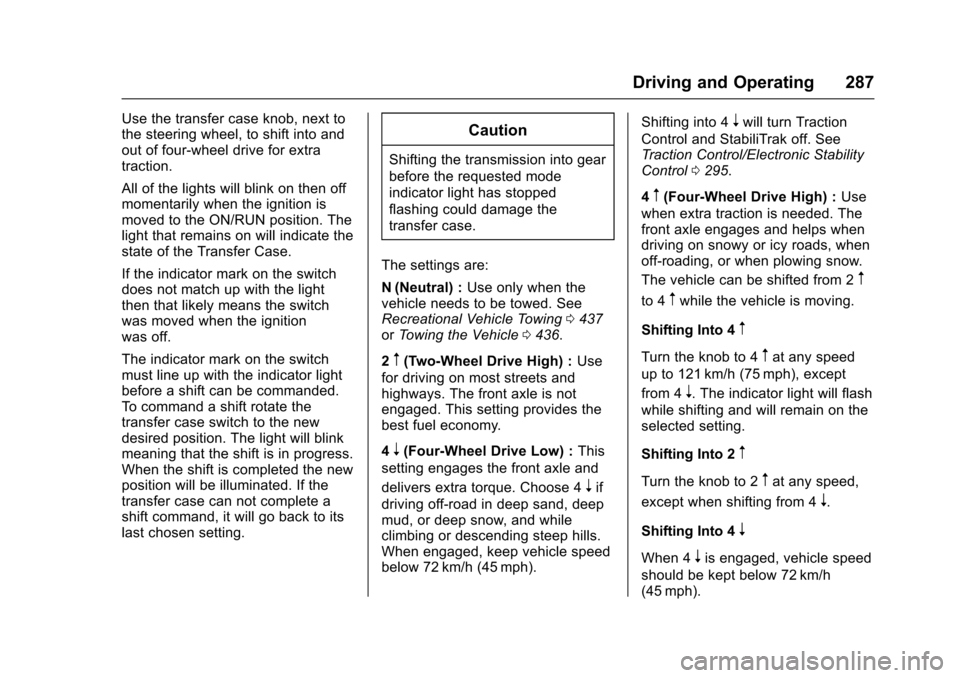
Use the transfer case knob, next tothe steering wheel, to shift into andout of four-wheel drive for extratraction.
All of the lights will blink on then offmomentarily when the ignition ismoved to the ON/RUN position. Thelight that remains on will indicate thestate of the Transfer Case.
If the indicator mark on the switchdoes not match up with the lightthen that likely means the switchwas moved when the ignitionwas off.
The indicator mark on the switchmust line up with the indicator lightbefore a shift can be commanded.To c o m m a n d a s h i f t r o t a t e t h etransfer case switch to the newdesired position. The light will blinkmeaning that the shift is in progress.When the shift is completed the newposition will be illuminated. If thetransfer case can not complete ashift command, it will go back to itslast chosen setting.
Caution
Shifting the transmission into gear
before the requested mode
indicator light has stopped
flashing could damage the
transfer case.
The settings are:
N(Neutral) :Use only when thevehicle needs to be towed. SeeRecreational Vehicle Towing0437orTo w i n g t h e V e h i c l e0436.
2m(Two-Wheel Drive High) :Use
for driving on most streets andhighways. The front axle is notengaged. This setting provides thebest fuel economy.
4n(Four-Wheel Drive Low) :This
setting engages the front axle and
delivers extra torque. Choose 4nif
driving off-road in deep sand, deepmud, or deep snow, and whileclimbing or descending steep hills.When engaged, keep vehicle speedbelow 72 km/h (45 mph).
Shifting into 4nwill turn Traction
Control and StabiliTrak off. SeeTr a c t i o n C o n t r o l / E l e c t r o n i c S t a b i l i t yControl0295.
4m(Four-Wheel Drive High) :Use
when extra traction is needed. Thefront axle engages and helps whendriving on snowy or icy roads, whenoff-roading, or when plowing snow.
The vehicle can be shifted from 2m
to 4mwhile the vehicle is moving.
Shifting Into 4m
Turn the knob to 4mat any speed
up to 121 km/h (75 mph), except
from 4n.Theindicatorlightwillflash
while shifting and will remain on theselected setting.
Shifting Into 2m
Turn the knob to 2mat any speed,
except when shifting from 4n.
Shifting Into 4n
When 4nis engaged, vehicle speed
should be kept below 72 km/h(45 mph).
Page 289 of 509
Chevrolet Silverado Owner Manual (GMNA-Localizing-U.S./Canada/Mexico-9956065) - 2017 - CRC - 4/29/16
288 Driving and Operating
1. The ignition must be in ON/RUN and the vehicle must bestopped or moving less than5km/h (3mph) with thetransmission in N (Neutral). It isbest for the vehicle to bemoving 1.6 to 3.2 km/h(1 to 2 mph).
2. Turn the knob to 4n.Waitfor
the 4nindicator light to stop
flashing before shifting thetransmission into gear.
If the transmission is in gear and/ormoving more than 5 km/h (3 mph),
the 4nindicator light will flash for
30 seconds and not complete theshift. After 30 seconds the transfer
case will shift to 4m.Turntheknob
to 4mto see the indicator. With the
vehicle moving less than 5 km/h(3 mph), and the transmission inN(Neutral), attempt the shift again.
Shifting Out of 4n
1. To shift out of 4nthe vehicle
must be stopped or movingless than 5 km/h (3 mph) withthe transmission in N (Neutral)
and the ignition in ON/RUN.It is best for the vehicle to bemoving 1.6 to 3.2 km/h(1 to 2 mph).
2. Turn the knob to 4mor 2m.
Wait for the 4mor 2mindicator
light to stop flashing beforeshifting the transmissioninto gear.
If the transmission is in gear and/ormoving more than 5 km/h (3 mph),
the 4mor 2mindicator light will flash
for 30 seconds, but will not completethe shift. With the vehicle movingless than 5 km/h (3 mph), and thetransmission in N (Neutral), attemptthe shift again.
Shifting Into N (Neutral)
To s h i f t :
1. Park the vehicle on a levelsurface.
2. Set the parking brake andpress and hold the brakepedal. SeeParkingBrake0293.
3. Start the vehicle or turn theignition to ON/RUN.
4. Shift the transmission toN(Neutral).
5. Shift the transfer case to 2m.
6. Turn the transfer case knobclockwise to N (Neutral) until itstops and hold it there until theN(Neutral) light starts blinking.This will take at least10 seconds. Then slowly
release the dial to the 4n
position. The N (Neutral) lightwill come on when the transfercase shift to N (Neutral) iscomplete.
7. With the engine running, verifythat the transfer case is inN(Neutral) by shifting thetransmission to R (Reverse),then to D (Drive). There shouldbe no movement of the vehiclewhile shifting the transmission.
8. Turn the engine off, and theignition to ACC/ACCESSORY.
9. Place the transmission shiftlever in P (Park). SeeRecreational VehicleTo w i n g0437.
Page 290 of 509
Chevrolet Silverado Owner Manual (GMNA-Localizing-U.S./Canada/Mexico-9956065) - 2017 - CRC - 4/29/16
Driving and Operating 289
10. Turn the ignition to LOCK/OFF.
Shifting Out of N (Neutral)
To s h i f t :
1. Set the parking brake andapply the brake pedal.
2. Turn the ignition to ON/RUNwith the engine off.
3. Shift the transmission toN(Neutral).
4. Turn the transfer case knob to
2m.
After the transfer case hasshifted out of N (Neutral), theN(Neutral) light will goout.
5. Release the parking brake.
Caution
Shifting the transmission into gear
before the requested mode
indicator light has stopped
flashing could damage the
transfer case.
6. Start the engine and shift thetransmission to thedesired gear.
Automatic Transfer Case
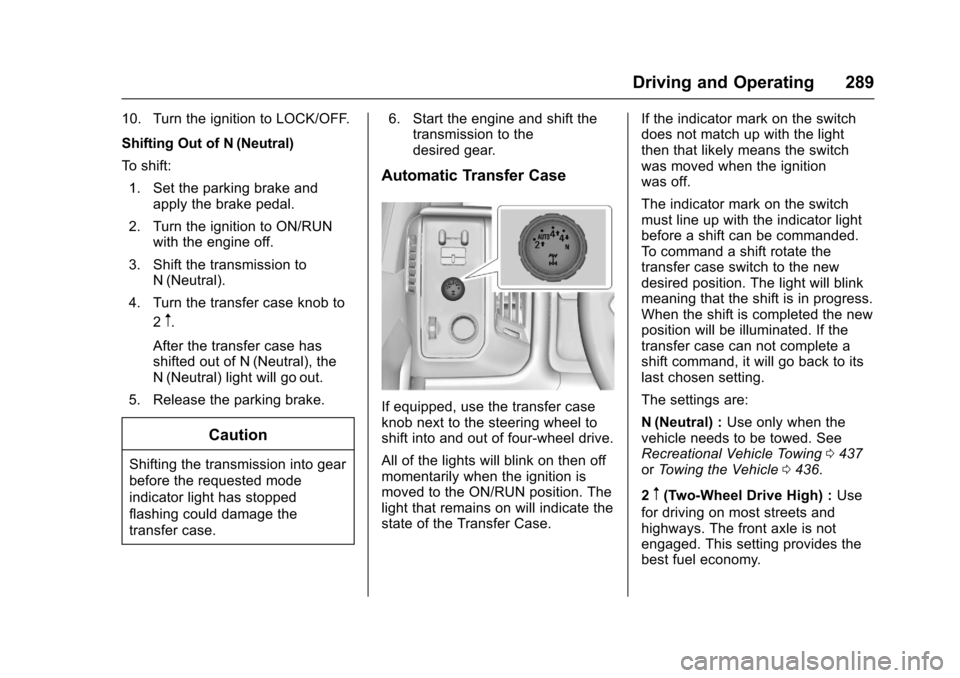
If equipped, use the transfer caseknob next to the steering wheel toshift into and out of four-wheel drive.
All of the lights will blink on then offmomentarily when the ignition ismoved to the ON/RUN position. Thelight that remains on will indicate thestate of the Transfer Case.
If the indicator mark on the switchdoes not match up with the lightthen that likely means the switchwas moved when the ignitionwas off.
The indicator mark on the switchmust line up with the indicator lightbefore a shift can be commanded.To c o m m a n d a s h i f t r o t a t e t h etransfer case switch to the newdesired position. The light will blinkmeaning that the shift is in progress.When the shift is completed the newposition will be illuminated. If thetransfer case can not complete ashift command, it will go back to itslast chosen setting.
The settings are:
N(Neutral) :Use only when thevehicle needs to be towed. SeeRecreational Vehicle Towing0437orTo w i n g t h e V e h i c l e0436.
2m(Two-Wheel Drive High) :Use
for driving on most streets andhighways. The front axle is notengaged. This setting provides thebest fuel economy.
Page 291 of 509
Chevrolet Silverado Owner Manual (GMNA-Localizing-U.S./Canada/Mexico-9956065) - 2017 - CRC - 4/29/16
290 Driving and Operating
AUTO (Automatic Four-WheelDrive) :Use when road surfacetraction conditions are variable.When driving in AUTO, the frontaxle is engaged, and the vehicle'spower is sent to the front and rearwheels automatically based ondriving conditions. This settingprovides slightly lower fuel economy
than 2m.
Do not use AUTO mode,if equipped, to park on a steepgrade with poor traction such as ice,snow, mud, or gravel. In AUTOmode only the rear wheels will holdthe vehicle from sliding whenparked. If parking on a steep grade,
use 4mto keep all four wheels
engaged.
4m(Four-Wheel Drive High) :Use
this position when extra traction isneeded, such as when driving onsnowy or icy roads, whenoff-roading, or when plowing snow.
4n(Four-Wheel Drive Low) :This
setting engages the front axle and
delivers extra torque. Choose 4n
when driving off-road in deep sand,deep mud, or deep snow, and whileclimbing or descending steep hills.
Shifting into 4nwill turn Traction
Control and StabiliTrak off. SeeTr a c t i o n C o n t r o l / E l e c t r o n i c S t a b i l i t yControl0295.
Shifting Into 4mor AUTO
Turn the knob to the 4mor AUTO
position at any speed, except from
4n.Theindicatorlightwillflash
while shifting and will remain onwhen the shift is completed.
Shifting Into 2m
Turn the knob to 2mat any speed,
except when shifting from 4n.The
indicator light will flash while shiftingand will remain on when the shift iscompleted.
Shifting Into 4n
When 4nis engaged, keep vehicle
speed below 72 km/h (45 mph).
To s h i f t :
1. The ignition must be in ON/RUN and the vehicle must bestopped or moving less than5km/h (3mph) with thetransmission in N (Neutral). It isbest for the vehicle to bemoving 1.6 to 3.2 km/h(1 to 2 mph).
2. Turn the knob to 4n.Waitfor
the 4nindicator light to stop
flashing before shifting thetransmission into gear.
Caution
Shifting the transmission into gear
before the requested mode
indicator light has stopped
flashing could damage the
transfer case.
Page 292 of 509
Chevrolet Silverado Owner Manual (GMNA-Localizing-U.S./Canada/Mexico-9956065) - 2017 - CRC - 4/29/16
Driving and Operating 291
If the transmission is in gear and/ormoving more than 5 km/h (3 mph),
the 4nindicator light will flash for
30 seconds and not complete theshift. After 30 seconds the transfer
case will shift to 4m.Turntheknob
to 4mto display the indicator. With
the vehicle moving less than 5 km/h(3 mph), and the transmission inN(Neutral), attempt the shift again.
Shifting Out of 4n
To s h i f t :
1. The vehicle must be stopped ormoving less than 5 km/h(3 mph) with the transmissionin N (Neutral) and the ignition inON/RUN. It is best for thevehicle to be moving1.6 to 3.2 km/h (1 to 2 mph).
2. Turn the knob to 4m,AUTO,
or 2m.Waitforthe4m,AUTO,
or 2mindicator light to stop
flashing before shifting thetransmission into gear.
Caution
Shifting the transmission into gear
before the requested mode
indicator light has stopped
flashing could damage the
transfer case.
If the transmission is in gear and/ormoving more than 5 km/h (3 mph),
the 4m,AUTO,or2mindicator light
will flash for 30 seconds but will notcomplete the shift. With the vehiclemoving less than 5 km/h (3 mph),and the transmission in N (Neutral),attempt the shift again.
Shifting Into N (Neutral)
To s h i f t i n t o N ( N e u t r a l ) :
1. Park the vehicle on a levelsurface.
2. Set the parking brake andpress and hold the brakepedal. SeeParkingBrake0293.
3. Start the vehicle or turn theignition to ON/RUN.
4. Shift the transmission toN(Neutral).
5. Shift the transfer case to 2m.
6. Turn the transfer case knobclockwise to N (Neutral) until itstops and hold it there until theN(Neutral) light starts blinking.This will take at least10 seconds. Then slowly
release the dial to the 4n
position. The N (Neutral) lightwill come on when the transfercase shift to N (Neutral) iscomplete.
7. With the engine running, verifythat the transfer case is inN(Neutral) by shifting thetransmission to R (Reverse),then shift the transmission toD(Drive). There should be nomovement of the vehicle whileshifting the transmission.
8. Turn the engine off, and theignition to ACC/ACCESSORY.
9. Place the transmission shiftlever in P (Park). SeeRecreational VehicleTo w i n g0437.
Page 293 of 509
Chevrolet Silverado Owner Manual (GMNA-Localizing-U.S./Canada/Mexico-9956065) - 2017 - CRC - 4/29/16
292 Driving and Operating
10. Turn the ignition to LOCK/OFF.
Shifting Out of N (Neutral)
To s h i f t o u t o f N ( N e u t r a l ) :
1. Set the parking brake andapply the brake pedal.
2. Turn the ignition to ON/RUNwith the engine off.
3. Shift the transmission toN(Neutral).
4. Turn the transfer case knob tothe desired setting.
After the transfer case hasshifted out of N (Neutral), theN(Neutral) light will goout.
5. Release the parking brake.
6. Start the engine and shift thetransmission to thedesired gear.
Brakes
Antilock Brake
System (ABS)
This vehicle has an Antilock BrakeSystem (ABS), an advancedelectronic braking system that helpsprevent a braking skid.
When the vehicle begins to driveaway, ABS checks itself.Amomentarymotororclickingnoisemay be heard while this test is goingon, and it may even be noticed thatthe brake pedal moves a little. Thisis normal.
If there is a problem with ABS, thiswarning light stays on. SeeAntilockBrake System (ABS) WarningLight0141.
If driving safely on a wet road and itbecomes necessary to slam on thebrakes and continue braking toavoid a sudden obstacle, acomputer senses the wheels areslowing down. If one of the wheelsis about to stop rolling, the computerwill separately work the brakes ateach wheel.
ABS can change the brake pressureto each wheel, as required, fasterthan any driver could. This can helpyou steer around the obstacle whilebraking hard.
As the brakes are applied, thecomputer keeps receiving updateson wheel speed and controlsbraking pressure accordingly.
Remember: ABS does not changethe time needed to get a foot up tothe brake pedal or always decreasestopping distance. If you get tooclose to the vehicle in front of you,there will not be enough time toapply the brakes if that vehiclesuddenly slows or stops. Alwaysleave enough room up ahead tostop, even with ABS.