ECU CHEVROLET SILVERADO 2020 Workshop Manual
[x] Cancel search | Manufacturer: CHEVROLET, Model Year: 2020, Model line: SILVERADO, Model: CHEVROLET SILVERADO 2020Pages: 495, PDF Size: 8.09 MB
Page 395 of 495
Chevrolet Silverado Owner Manual (GMNA-Localizing-U.S./Canada/Mexico-
13337620) - 2020 - CTC - 1/27/20
394 Vehicle Care
must be replaced by the correct
wheel in the front or rear outer
positions.
When installing dual wheels,
check that the vent holes in the
inner and outer wheels on each
side are lined up.
Adjust the front and rear tires to
the recommended inflation
pressure on the Tire and
Loading Information label after
the tires have been rotated. See
Tire Pressure0383 and
Vehicle Load Limits 0197.
Check that all wheel nuts are
properly tightened. See “Wheel
Nut Torque” underCapacities
and Specifications 0454, and
“Removing the Flat Tire and
Installing the Spare Tire” under
Tire Changing 0402.
{Warning
Rust or dirt on a wheel, or on
the parts to which it is
fastened, can make wheel
nuts become loose after time.
The wheel could come off and
cause a crash. When
changing a wheel, remove any
rust or dirt from places where
the wheel attaches to the
vehicle. In an emergency, a
cloth or a paper towel can be
used; however, use a scraper
or wire brush later to remove
all rust or dirt.
Lightly coat the inner diameter of
the wheel hub opening with
wheel bearing grease after a
wheel change or tire rotation to
prevent corrosion or rust
build-up. Do not get grease on
the flat wheel mounting surface
or on the wheel nuts or bolts. Reset the Tire Pressure Monitor
System (TPMS), if the vehicle
has one. See
Tire Pressure
Monitor Operation 0386.
If the full-size tire is part of the
tire rotation, make sure the tire
rotated into the spare position is
stored securely. Push, pull, and
then try to rotate or turn the tire.
If it moves, use the wheel
wrench/hoist shaft to tighten the
cable. See Tire Changing 0402.
When It Is Time for New
Tires
Factors, such as maintenance,
temperatures, driving speeds,
vehicle loading, and road conditions
affect the wear rate of the tires.
Page 402 of 495
Chevrolet Silverado Owner Manual (GMNA-Localizing-U.S./Canada/Mexico-
13337620) - 2020 - CTC - 1/27/20
Vehicle Care 401
Caution (Continued)
vehicle has 255/70R17,
LT245/75R17, or LT275/70R18
size tires, they may be installed
on the tires of the front and rear
axle. If the vehicle is a 2500
Series with LT265/70R17 size
tires, chains may be installed on
the tires of both the front and rear
axle. Tighten them as tightly as
possible with the ends securely
fastened. Drive slowly and follow
the chain manufacturer's
instructions. If you can hear the
chains contacting the vehicle,
stop and retighten them. If the
contact continues, slow down
until it stops. Driving too fast or
spinning the wheels with chains
on will damage the vehicle.
If a Tire Goes Flat
It is unusual for a tire to blowout
while driving, especially if the tires
are maintained properly. If air goes
out of a tire, it is much more likely toleak out slowly. But if there ever is a
blowout, here are a few tips about
what to expect and what to do:
If a front tire fails, the flat tire
creates a drag that pulls the vehicle
toward that side. Take your foot off
the accelerator pedal and grip the
steering wheel firmly. Steer to
maintain lane position, and then
gently brake to a stop, well off the
road, if possible.
A rear blowout, particularly on a
curve, acts much like a skid and
may require the same correction as
used in a skid. Stop pressing the
accelerator pedal and steer to
straighten the vehicle. It may be
very bumpy and noisy. Gently brake
to a stop, well off the road,
if possible.
{Warning
Driving on a flat tire will cause
permanent damage to the tire.
Re-inflating a tire after it has been
driven on while severely
(Continued)
Warning (Continued)
underinflated or flat may cause a
blowout and a serious crash.
Never attempt to re-inflate a tire
that has been driven on while
severely underinflated or flat.
Have your dealer or an authorized
tire service center repair or
replace the flat tire as soon as
possible.
{Warning
Lifting a vehicle and getting under
it to do maintenance or repairs is
dangerous without the
appropriate safety equipment and
training. If a jack is provided with
the vehicle, it is designed only for
changing a flat tire. If it is used for
anything else, you or others could
be badly injured or killed if the
vehicle slips off the jack. If a jack
is provided with the vehicle, only
use it for changing a flat tire.
Page 408 of 495
Chevrolet Silverado Owner Manual (GMNA-Localizing-U.S./Canada/Mexico-
13337620) - 2020 - CTC - 1/27/20
Vehicle Care 407
Front Position—1500 Models
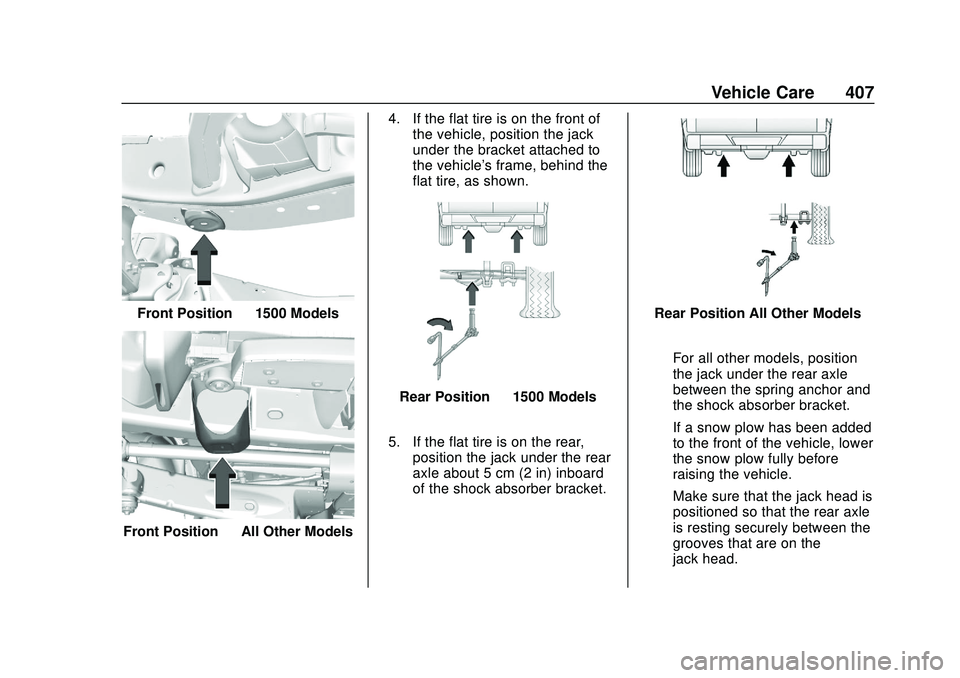
Front Position —All Other Models 4. If the flat tire is on the front of
the vehicle, position the jack
under the bracket attached to
the vehicle's frame, behind the
flat tire, as shown.
Rear Position —1500 Models
5. If the flat tire is on the rear, position the jack under the rear
axle about 5 cm (2 in) inboard
of the shock absorber bracket.
Rear Position All Other Models
For all other models, position
the jack under the rear axle
between the spring anchor and
the shock absorber bracket.
If a snow plow has been added
to the front of the vehicle, lower
the snow plow fully before
raising the vehicle.
Make sure that the jack head is
positioned so that the rear axle
is resting securely between the
grooves that are on the
jack head.
Page 411 of 495
Chevrolet Silverado Owner Manual (GMNA-Localizing-U.S./Canada/Mexico-
13337620) - 2020 - CTC - 1/27/20
410 Vehicle Care
Caution (Continued)
torque specification. See
Capacities and Specifications
0454 for the wheel nut torque
specification.
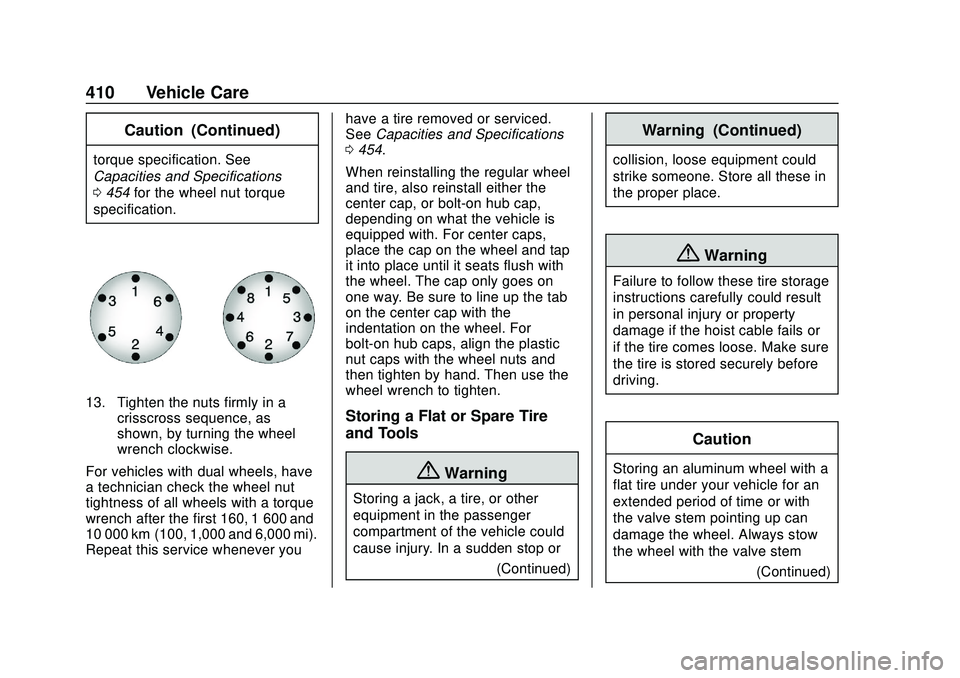
13. Tighten the nuts firmly in a crisscross sequence, as
shown, by turning the wheel
wrench clockwise.
For vehicles with dual wheels, have
a technician check the wheel nut
tightness of all wheels with a torque
wrench after the first 160, 1 600 and
10 000 km (100, 1,000 and 6,000 mi).
Repeat this service whenever you have a tire removed or serviced.
See
Capacities and Specifications
0 454.
When reinstalling the regular wheel
and tire, also reinstall either the
center cap, or bolt-on hub cap,
depending on what the vehicle is
equipped with. For center caps,
place the cap on the wheel and tap
it into place until it seats flush with
the wheel. The cap only goes on
one way. Be sure to line up the tab
on the center cap with the
indentation on the wheel. For
bolt-on hub caps, align the plastic
nut caps with the wheel nuts and
then tighten by hand. Then use the
wheel wrench to tighten.Storing a Flat or Spare Tire
and Tools
{Warning
Storing a jack, a tire, or other
equipment in the passenger
compartment of the vehicle could
cause injury. In a sudden stop or (Continued)
Warning (Continued)
collision, loose equipment could
strike someone. Store all these in
the proper place.
{Warning
Failure to follow these tire storage
instructions carefully could result
in personal injury or property
damage if the hoist cable fails or
if the tire comes loose. Make sure
the tire is stored securely before
driving.
Caution
Storing an aluminum wheel with a
flat tire under your vehicle for an
extended period of time or with
the valve stem pointing up can
damage the wheel. Always stow
the wheel with the valve stem(Continued)
Page 414 of 495
Chevrolet Silverado Owner Manual (GMNA-Localizing-U.S./Canada/Mexico-
13337620) - 2020 - CTC - 1/27/20
Vehicle Care 413
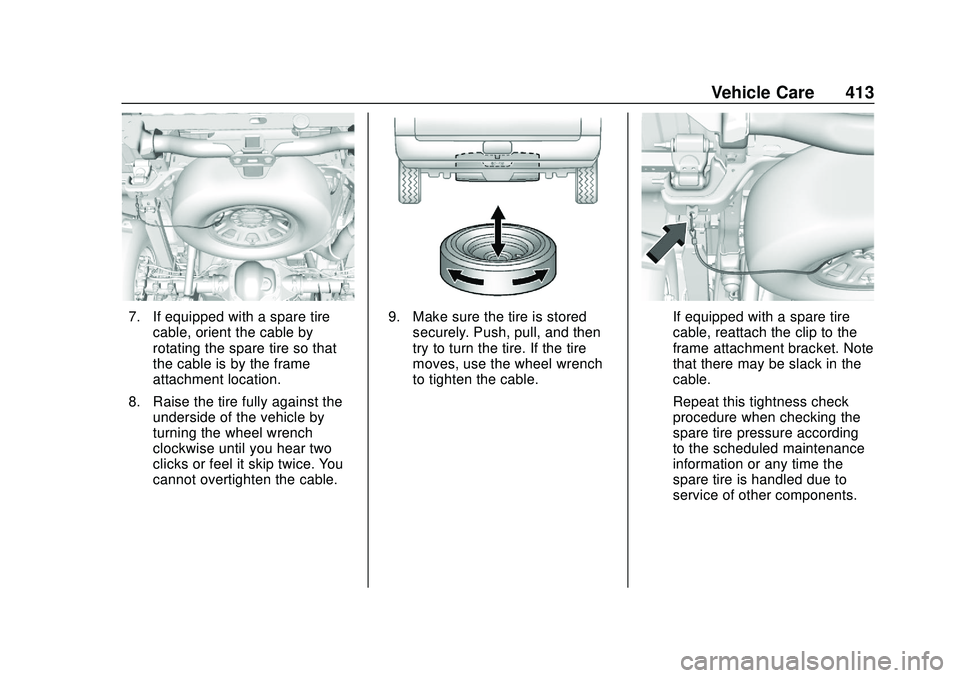
7. If equipped with a spare tirecable, orient the cable by
rotating the spare tire so that
the cable is by the frame
attachment location.
8. Raise the tire fully against the underside of the vehicle by
turning the wheel wrench
clockwise until you hear two
clicks or feel it skip twice. You
cannot overtighten the cable.9. Make sure the tire is storedsecurely. Push, pull, and then
try to turn the tire. If the tire
moves, use the wheel wrench
to tighten the cable.If equipped with a spare tire
cable, reattach the clip to the
frame attachment bracket. Note
that there may be slack in the
cable.
Repeat this tightness check
procedure when checking the
spare tire pressure according
to the scheduled maintenance
information or any time the
spare tire is handled due to
service of other components.
Page 420 of 495
Chevrolet Silverado Owner Manual (GMNA-Localizing-U.S./Canada/Mexico-
13337620) - 2020 - CTC - 1/27/20
Vehicle Care 419
good battery. Use a remote
positive (+) terminal if the
vehicle has one.
9. Connect one end of the black negative (−) cable to the
negative (−) terminal of the
good battery. Use a remote
negative (−) terminal if the
vehicle has one.
Do not let the other end touch
anything until the next step.
10. Connect the other end of the negative (−) cable to the
remote negative (−) terminal to
the discharged battery.
11. Start the vehicle with the good battery and run the engine for a
while.
12. Try to start the vehicle that had the dead battery. If it will not
start after a few tries, it
probably needs service.Caution
If the jumper cables are
connected or removed in the
wrong order, electrical shorting
may occur and damage the
vehicle. The repairs would not be
covered by the vehicle warranty.
Always connect and remove the
jumper cables in the correct order,
making sure that the cables do
not touch each other or other
metal.
Jumper Cable Removal
Reverse the sequence exactly when
removing the jumper cables.
After starting the disabled vehicle
and removing the jumper cables,
allow it to idle for several minutes.
Towing the Vehicle
Caution
Incorrectly towing a disabled
vehicle may cause damage. The
damage would not be covered by
the vehicle warranty. Do not lash
or hook to suspension
components. Use the proper
straps around the tires to secure
the vehicle. Do not drag a locked
wheel/tire. Use tire skates or
dollies under any locked wheel/
tire while loading the vehicle. Do
not use a sling type lift to tow the
vehicle. This could damage the
vehicle.
Caution
If the vehicle cannot be shifted
into Neutral (N), do not use the
tow eye to tow the vehicle.
Vehicle damage may occur.
Page 423 of 495
Chevrolet Silverado Owner Manual (GMNA-Localizing-U.S./Canada/Mexico-
13337620) - 2020 - CTC - 1/27/20
422 Vehicle Care
{Warning
Shifting a four-wheel-drive
vehicle's transfer case into
N (Neutral) can allow the vehicle
to move even if the transmission
is in P (Park). You or others could
be injured. Set the parking brake
and use wheel blocks before
shifting the transfer case to
N (Neutral).
To dinghy tow: 1. Position the vehicle being towed behind the tow vehicle,
facing forward and on a level
surface.
2. Securely attach the vehicle being towed to the tow vehicle.
3. Start the engine.
4. Shift the transfer case to N (Neutral). See “Shifting into
N (Neutral)” underFour-Wheel
Drive 0223. 5. With the engine running,
release the parking brake and
verify that the transfer case is
in N (Neutral) by shifting the
transmission to D (Drive) and
then to R (Reverse). There
should be no movement while
shifting the transmission.
6. Shift the transmission to D (Drive).
7. If equipped with an ignition key, turn the ignition to ACC/
ACCESSORY. If equipped with
Keyless Access, turn the
engine off. Disregard the Shift
to P (Park) DIC message. See
Ignition Positions (Keyless
Access) 0205 or
Ignition Positions (Key Access)
0 207.
{Warning
To avoid death, serious injury,
or property damage, before
dinghy towing the vehicle, always
disconnect and secure the
(Continued)
Warning (Continued)
negative battery cable and cover
the negative battery post and
cable with a non-conductive
material. If the battery is left
connected or the battery cable
contacts the post, the Electric
Parking Brake may activate
during towing, which could cause
a crash.
8. Disconnect the negative (–) battery cable. See “Negative
Battery Cable Disconnection”
in Battery - North America
0 354.
9. Shift the transmission to P (Park).
Caution
If the steering column is locked,
vehicle damage may occur.
10. Move the steering wheel to make sure the steering column
is unlocked.
Page 424 of 495
Chevrolet Silverado Owner Manual (GMNA-Localizing-U.S./Canada/Mexico-
13337620) - 2020 - CTC - 1/27/20
Vehicle Care 423
11. If the vehicle has an ignitionkey, keep it in the towed
vehicle in ACC/ACCESSORY
to prevent the steering column
from locking. If the vehicle is
equipped with Keyless Access,
keep the RKE transmitter
outside of the vehicle and
manually lock the doors.
Access the vehicle by using
the key in the door lock. See
Door Locks 026.
Disconnecting the Towed Vehicle
Before disconnecting from the tow
vehicle: 1. Park on a level surface. Secure the vehicle with wheel blocks.
2. Re-connect the negative (–) battery. See Battery - North
America 0354.
3. Turn on the ignition with the engine off. For vehicles with a
key, turn the ignition to ON/
RUN with the engine off. If the
vehicle is equipped with
Keyless Access, with your foot
off the brake pedal, press and
hold ENGINE START/STOP for five seconds until the green
light comes on in the button.
See
Ignition Positions (Keyless
Access) 0205 or
Ignition Positions (Key Access)
0 207.
4. Set the parking brake. See Electric Parking Brake 0229.
5. Disconnect from the tow vehicle.
6. Shift the transmission to N (Neutral).
7. Shift the transfer case to 2
m
(Two-Wheel Drive High). When
the shift to 2
m(Two-Wheel
Drive High) is complete, the
light in the instrument cluster
will stop flashing and stay lit.
See Four-Wheel-Drive Light
0 138.
8. Start the engine. Check that the vehicle is in 2
m(Two-Wheel
Drive High) by starting the
engine and shifting the
transmission to D (Drive) and
then to R (Reverse). There
should be movement of the
vehicle while shifting. 9. Shift the transmission to
P (Park) and turn off the
ignition.
10. Release the parking brake and remove the wheel blocks.
11. Reset any lost presets. The outside temperature
display will default to 0 °C
(32 °F) but will reset with
normal usage.
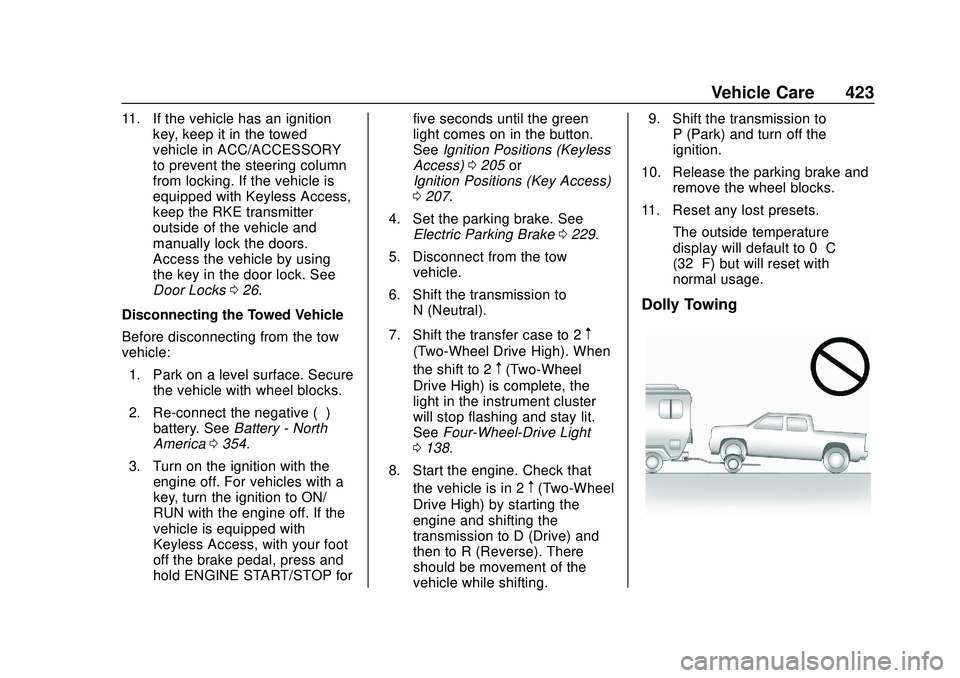
Dolly Towing
Page 435 of 495
Chevrolet Silverado Owner Manual (GMNA-Localizing-U.S./Canada/Mexico-
13337620) - 2020 - CTC - 1/27/20
434 Vehicle Care
Reinstall by lining up the floor mat
retainer openings over the carpet
retainers and snapping into position.
Make sure the floor mat is properly
secured in place.
Verify the floor mat does not
interfere with the pedals.
Page 459 of 495
Chevrolet Silverado Owner Manual (GMNA-Localizing-U.S./Canada/Mexico-
13337620) - 2020 - CTC - 1/27/20
458 Customer Information
Customer
Information
Customer Information
Customer SatisfactionProcedure . . . . . . . . . . . . . . . . . . . 458
Customer Assistance Offices . . . . . . . . . . . . . . . . . . . . . . 460
Customer Assistance for Text Telephone (TTY) Users . . . . . 461
Online Owner Center . . . . . . . . . 461
GM Mobility Reimbursement Program . . . . . . . . . . . . . . . . . . . . 462
Roadside Assistance Program . . . . . . . . . . . . . . . . . . . . 462
Scheduling Service Appointments . . . . . . . . . . . . . . . 464
Courtesy Transportation Program . . . . . . . . . . . . . . . . . . . . 464
Collision Damage Repair . . . . . 465
Publication Ordering Information . . . . . . . . . . . . . . . . . . 467
Radio Frequency Statement . . . . . . . . . . . . . . . . . . . 468
Reporting Safety Defects
Reporting Safety Defects tothe United States
Government . . . . . . . . . . . . . . . . . 468
Reporting Safety Defects to the Canadian
Government . . . . . . . . . . . . . . . . . 469
Reporting Safety Defects to General Motors . . . . . . . . . . . . . 469
Vehicle Data Recording and
Privacy
Vehicle Data Recording andPrivacy . . . . . . . . . . . . . . . . . . . . . . 470
Cybersecurity . . . . . . . . . . . . . . . . . 470
Event Data Recorders . . . . . . . . 470
OnStar . . . . . . . . . . . . . . . . . . . . . . . 471
Infotainment System . . . . . . . . . . 471
Customer Information
Customer Satisfaction
Procedure
Your satisfaction and goodwill are
important to your dealer and to
Chevrolet. Normally, any concerns
with the sales transaction or the
operation of the vehicle will be
resolved by your dealer's sales or
service departments. Sometimes,
however, despite the best intentions
of all concerned, misunderstandings
can occur. If your concern has not
been resolved to your satisfaction,
the following steps should be taken:
STEP ONE : Discuss your concern
with a member of dealership
management. Normally, concerns
can be quickly resolved at that level.
If the matter has already been
reviewed with the sales, service,
or parts manager, contact the owner
of your dealership or the general
manager.
STEP TWO : If after contacting a
member of dealership management,
it appears your concern cannot be