infotainment CHEVROLET SILVERADO EV 2024 Owners Manual
[x] Cancel search | Manufacturer: CHEVROLET, Model Year: 2024, Model line: SILVERADO EV, Model: CHEVROLET SILVERADO EV 2024Pages: 429, PDF Size: 8.98 MB
Page 2 of 429
Chevrolet Silverado EV Owner Manual (GMNA-Localizing-U.S./Canada-
16702912) - 2024 - CRC - 1/17/23
Contents
Introduction . . . . . . . . . . . . . . . . . . . . . . . . . . . . . . 1
Keys, Doors, and Windows . . . . . . . . . . . . . . . 8
Seats and Restraints . . . . . . . . . . . . . . . . . . . . . 41
Storage . . . . . . . . . . . . . . . . . . . . . . . . . . . . . . . . . . 91
Instruments and Controls . . . . . . . . . . . . . . . 96
Lighting . . . . . . . . . . . . . . . . . . . . . . . . . . . . . . . . 140
Infotainment System . . . . . . . . . . . . . . . . . . . 147
Climate Controls . . . . . . . . . . . . . . . . . . . . . . . . 174
Driving and Operating . . . . . . . . . . . . . . . . . . 180
Vehicle Care . . . . . . . . . . . . . . . . . . . . . . . . . . . . 323
Service and Maintenance . . . . . . . . . . . . . . . 388
Technical Data . . . . . . . . . . . . . . . . . . . . . . . . . 394
Customer Information . . . . . . . . . . . . . . . . . . 396
Reporting Safety Defects . . . . . . . . . . . . . . . 404
OnStar . . . . . . . . . . . . . . . . . . . . . . . . . . . . . . . . . 408
Connected Services . . . . . . . . . . . . . . . . . . . . . 413
Index . . . . . . . . . . . . . . . . . . . . . . . . . . 416
Introduction
California Proposition 65 Warning
Litho in U.S.A.
Part No. 24SilveradoEV_enUS_16702912A_2023FEB27©2023 General Motors LLC. All Rights Reserved.
Page 6 of 429

Chevrolet Silverado EV Owner Manual (GMNA-Localizing-U.S./Canada-
16702912) - 2024 - CRC - 1/17/23
Introduction 5
1.Air Vents 0177.
2. Windshield Wiper/Washer 098.
Turn and Lane-Change Signals 0143.
3. Instrument Cluster (Base Level) 0107 or
Instrument Cluster (Uplevel) 0109.
4. Shift Switches. See Electric Drive Unit
0 200.
5. Infotainment Controls. See Overview
0 148.
6. Infotainment Display. See AM-FM Radio
0 152.
7. Light Sensor. See Automatic Headlamp
System 0142.
Vehicle Alarm System. See Vehicle
Security 032.
8. Dual Automatic Climate Control System
0174.
9. Power Outlets 099.
10. USB Port 0154.
11. Steering Wheel Controls 0149.
Driver Information Center (DIC) Controls.
See Driver Information Center (DIC) (Base
Level) 0129 or
Driver Information Center (DIC) (Uplevel)
0 130.
12. Horn 098. 13.
Steering Wheel Adjustment 097 (Out
of View).
14. Trailer Brake Control Panel. See “Integrated Trailer Brake Control System”
under Towing Equipment 0301.
15. Adaptive Cruise Control (Advanced) 0217.
Forward Collision Alert (FCA) System
0 261.
16. Data Link Connector (DLC) (Out of View). SeeService Vehicle Soon Light (Propulsion
System Failure) 0115.
17. Manual Hood Release.
18. Fuse Block Cover.
19. Electric Parking Brake 0205
Tow/Haul Mode. See Driver Mode Control
0 209.
Lane Keep Assist (LKA) 0274.
Power Hood Release. See Hood019.
Instrument Panel Illumination Control
0 143.
Page 8 of 429

Chevrolet Silverado EV Owner Manual (GMNA-Localizing-U.S./Canada-
16702912) - 2024 - CRC - 1/17/23
Introduction 7
1.Air Vents 0177.
2. Windshield Wiper/Washer 098.
Turn and Lane-Change Signals 0143.
3. Regenerative Braking 0206.
4. Instrument Cluster (Base Level) 0107 or
Instrument Cluster (Uplevel) 0109.
5. Driver Monitoring System.
6. Shift Switches. See Electric Drive Unit
0 200.
7. Infotainment Controls. See Overview
0 148.
8. Infotainment Display. See AM-FM Radio
0 152.
9. Light Sensor. See Automatic Headlamp
System 0142.
Vehicle Alarm System. See Vehicle
Security 032.
10. Dual Automatic Climate Control System
0174.
11. USB Port 0154.
12. Power Outlets 099.
13. Wireless Charging 0104. 14.
Steering Wheel Controls 0149.
Driver Information Center (DIC) Controls.
See Driver Information Center (DIC) (Base
Level) 0129 or
Driver Information Center (DIC) (Uplevel)
0 130.
15. Horn 098.
16. Steering Wheel Adjustment 097 (Out
of View).
17. Trailer Brake Control Panel. See “Integrated Trailer Brake Control System”
under Towing Equipment 0301.
18. Adaptive Cruise Control (Advanced) 0217.
Forward Collision Alert (FCA) System
0 261.
Heated Steering Wheel 097 (If
Equipped).
19. Data Link Connector (DLC) (Out of View). SeeService Vehicle Soon Light (Propulsion
System Failure) 0115.
20. Manual Hood Release.
21. Fuse Block Cover. 22.
Electric Parking Brake 0205.
Air Suspension 0211.
Lane Keep Assist (LKA) 0274.
Power Hood Release. See Hood019.
Power Tailgate Release. See Tailgate
0 28.
Instrument Panel Illumination Control
0 143.
Page 11 of 429
Chevrolet Silverado EV Owner Manual (GMNA-Localizing-U.S./Canada-
16702912) - 2024 - CRC - 1/23/23
10 Keys, Doors, and Windows
view available settings from the
infotainment screen, touch Settings >
Vehicle > Remote Lock, Unlock, Start.
Pressing
Qarms the alarm system. See
Vehicle Alarm System 033.
With power folding mirrors, double pressing
and holding
Qfor one second will fold the
mirrors, if enabled. Double press and hold
Kfor one second to unfold the mirrors. To
view available settings from the
infotainment screen, touch Settings >
Vehicle > Comfort and Convenience.
K: Press once to unlock only the driver
door. If
Kis pressed again within
three seconds, all remaining doors unlock.
The interior lamps may come on and stay
on for 20 seconds or until the vehicle is
started.
If enabled, the turn signal lamps flash twice
to indicate unlocking has occurred.
If enabled, the exterior lamps may turn on.
To view available settings from the
infotainment screen, touch Settings >
Vehicle > Remote Lock, Unlock, Start.
Pressing
Kon the remote key disarms the
alarm system. See Vehicle Alarm System
0 33. Double press and hold
Kuntil the windows
fully open, if remote window operation is
enabled. To view available settings from the
infotainment screen, touch Settings >
Vehicle > Remote Lock, Unlock, Start.
x: Press twice to open the tailgate. The
vehicle must be in P (park).
m: Press twice to open the hood. Press
twice and hold to close the hood. In order
to open or close remote key must be within
30m (100ft). The vehicle must be in P (park).
7: Press and release to initiate vehicle
locate. The turn signal lamps flash and the
horn sounds three times.
Press and hold
7for more than
three seconds to activate the panic alarm.
The turn signal lamps flash and the horn
sounds repeatedly for 30 seconds. The alarm
turns off when the vehicle is turned on or
7is pressed again. The vehicle must be off
for the panic alarm to work.
S: PressStwice from outside the
vehicle to remote start the vehicle. The
vehicle cannot be started if a remote key is
left inside the vehicle. See Remote Vehicle
Start 014.
Keyless Access Operation
The Keyless Access system allows for doors,
tailgate, and hood to be accessed without
removing the remote key or digital key
from your pocket, purse, briefcase, etc. The
remote key or digital key must be within
1 m (3 ft) of the tailgate, hood, or door
being opened. If the vehicle has this feature,
there will be a button on the outside door
handles.
Keyless Access can be programmed to
unlock all doors on the first lock/unlock
press from the driver door. To view available
settings from the infotainment screen, touch
Settings > Vehicle > Remote Lock, Unlock,
Start.
Remote keys 1 and 2 are linked to seating
positions of memory 1 or 2. See Memory
Seats 045.
Keyless Unlocking/Locking from the
Driver Door
When the doors are locked and the remote
key or digital key is within 1 m (3 ft) of the
door handle, pressing the lock/unlock button
on the driver door handle will unlock the
driver door. If the lock/unlock button is
pressed again within five seconds, the doors,
tailgate, and hood will unlock.
Page 12 of 429
Chevrolet Silverado EV Owner Manual (GMNA-Localizing-U.S./Canada-
16702912) - 2024 - CRC - 1/23/23
Keys, Doors, and Windows 11
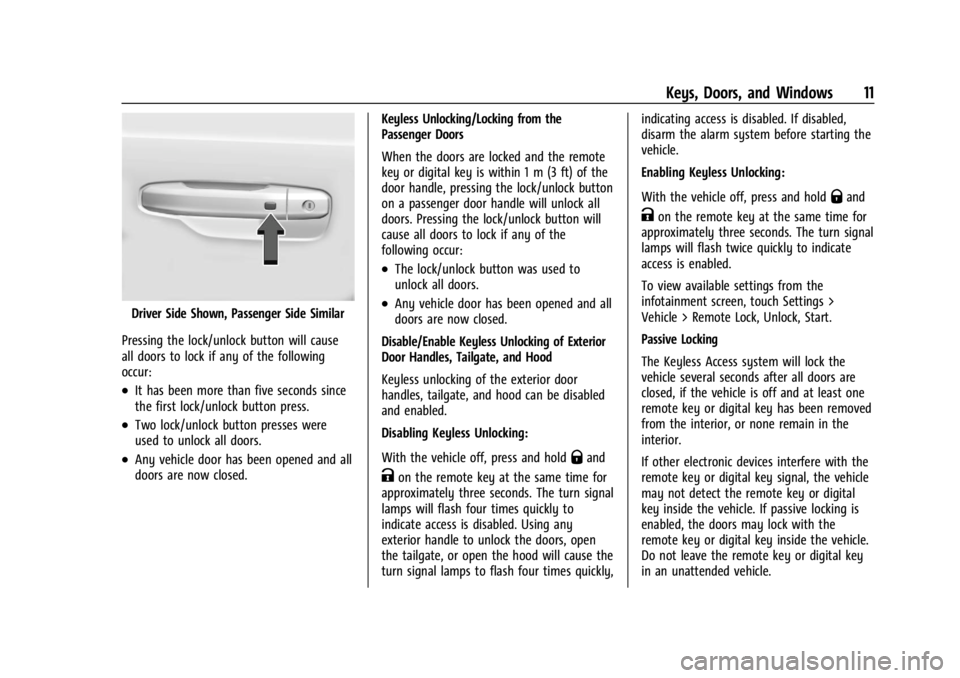
Driver Side Shown, Passenger Side Similar
Pressing the lock/unlock button will cause
all doors to lock if any of the following
occur:
.It has been more than five seconds since
the first lock/unlock button press.
.Two lock/unlock button presses were
used to unlock all doors.
.Any vehicle door has been opened and all
doors are now closed. Keyless Unlocking/Locking from the
Passenger Doors
When the doors are locked and the remote
key or digital key is within 1 m (3 ft) of the
door handle, pressing the lock/unlock button
on a passenger door handle will unlock all
doors. Pressing the lock/unlock button will
cause all doors to lock if any of the
following occur:
.The lock/unlock button was used to
unlock all doors.
.Any vehicle door has been opened and all
doors are now closed.
Disable/Enable Keyless Unlocking of Exterior
Door Handles, Tailgate, and Hood
Keyless unlocking of the exterior door
handles, tailgate, and hood can be disabled
and enabled.
Disabling Keyless Unlocking:
With the vehicle off, press and hold
Qand
Kon the remote key at the same time for
approximately three seconds. The turn signal
lamps will flash four times quickly to
indicate access is disabled. Using any
exterior handle to unlock the doors, open
the tailgate, or open the hood will cause the
turn signal lamps to flash four times quickly, indicating access is disabled. If disabled,
disarm the alarm system before starting the
vehicle.
Enabling Keyless Unlocking:
With the vehicle off, press and hold
Qand
Kon the remote key at the same time for
approximately three seconds. The turn signal
lamps will flash twice quickly to indicate
access is enabled.
To view available settings from the
infotainment screen, touch Settings >
Vehicle > Remote Lock, Unlock, Start.
Passive Locking
The Keyless Access system will lock the
vehicle several seconds after all doors are
closed, if the vehicle is off and at least one
remote key or digital key has been removed
from the interior, or none remain in the
interior.
If other electronic devices interfere with the
remote key or digital key signal, the vehicle
may not detect the remote key or digital
key inside the vehicle. If passive locking is
enabled, the doors may lock with the
remote key or digital key inside the vehicle.
Do not leave the remote key or digital key
in an unattended vehicle.
Page 13 of 429
Chevrolet Silverado EV Owner Manual (GMNA-Localizing-U.S./Canada-
16702912) - 2024 - CRC - 1/23/23
12 Keys, Doors, and Windows
To view available settings from the
infotainment screen, touch Settings >
Vehicle > Remote Lock, Unlock, Start.
Temporary Disable of Passive Locking
Temporarily disable passive locking by
pressing and holding
Kon the interior door
switch with a door open for at least
four seconds, or until three chimes are
heard. Passive locking will then remain
disabled until
Qon the interior door is
pressed, or until the vehicle is turned on.
Remote Left In Vehicle Alert
When the vehicle is turned off and a remote
key or digital key is left in the vehicle, the
horn will chirp three times after all doors
are closed. To view available settings from
the infotainment screen, touch Settings >
Vehicle > Remote Lock, Unlock, Start.
Remote Removed From Vehicle Alert
If the vehicle is on with a door open, and
then all doors are closed, the vehicle will
check for remote keys and digital keys
inside. If a remote key or digital key is not
detected, the Driver Information Center (DIC)
will display NO KEY FOUND and the horn
will chirp three times. This occurs only once
each time the vehicle is driven. To view available settings from the infotainment
screen, touch Settings > Vehicle > Remote
Lock, Unlock, Start.
Keyless Tailgate Opening
Press the touchpad on the tailgate to open
the tailgate when all doors are unlocked,
or when the remote key or digital key is
within 1m (3 ft).
See
Tailgate 028.
Keyless Hood Opening
Press the touchpad in the center of the front
fascia once to open the hood when all doors
are unlocked, or when the remote key or
digital key is within 1m (3 ft).
See Hood 019.
Key Access
To access a vehicle with a weak remote key
battery, see Door Locks015.
Programming Remote Keys to the
Vehicle
Only remote keys programmed to the
vehicle will work. If a remote key is lost or
stolen, a replacement can be purchased and
programmed through your dealer. The
vehicle can be reprogrammed so that lost or
stolen remote keys no longer work. Each
vehicle can have up to eight remote keys
programmed to it.
Starting the Vehicle with a Low Remote
Key Battery
For improved vehicle security, the remote
key is equipped with a motion sensor. When
starting the vehicle, if the remote key has
been idle for an extended period of time,
the DIC may display KEY IN SLEEP MODE,
MOVE KEY, THEN START. Move the remote
key slightly and try starting the vehicle.
If the remote key battery is weak or if there
is interference with the signal, the DIC may
display NO KEY FOUND, REPLACE BATTERY IN
KEY or NO REMOTE KEY WAS DETECTED
PLACE KEY IN KEY POCKET THEN START YOUR
VEHICLE when starting the vehicle.
Page 18 of 429
Chevrolet Silverado EV Owner Manual (GMNA-Localizing-U.S./Canada-
16702912) - 2024 - CRC - 1/23/23
Keys, Doors, and Windows 17
The doors will lock automatically
five seconds after all doors are closed. If a
door is reopened before that time, the
five-second timer will reset when all doors
are closed again.
Press
Qon the door lock switch again or
press
Qon the remote key to lock the
doors immediately.
This feature can be programmed. To view
available settings from the infotainment
screen, touch Settings > Vehicle > Power
Door Locks.
Automatic Door Locks
The doors will lock automatically when all
doors are closed, the vehicle is on, and the
vehicle is shifted out of P (Park).
If a vehicle door is unlocked, and then
opened and closed, the doors will lock either
when your foot is removed from the brake
or the vehicle speed becomes faster than
13 km/h (8 mph).
To unlock the doors:
.PressKon the power door lock switch.
.Shift the vehicle into P (Park). Automatic door locking cannot be disabled.
Automatic door unlocking can be
programmed. To view available settings
from the infotainment screen, touch
Settings > Vehicle > Power Door Locks.
Lockout Protection
This feature protects you from locking
remote keys in the vehicle.
When the lock button is pressed and the
vehicle is on, all of the doors will lock and
then the driver door will unlock.
If the vehicle is off and locking is requested
while a door is open, when all doors are
closed the vehicle will check for remote keys
inside. If a remote key is detected and the
number of remote keys inside has not
reduced, the driver door will unlock and the
horn will sound three times.
This can be manually overridden by pressing
and holding
Qon the power door lock
switch.
Safety Locks
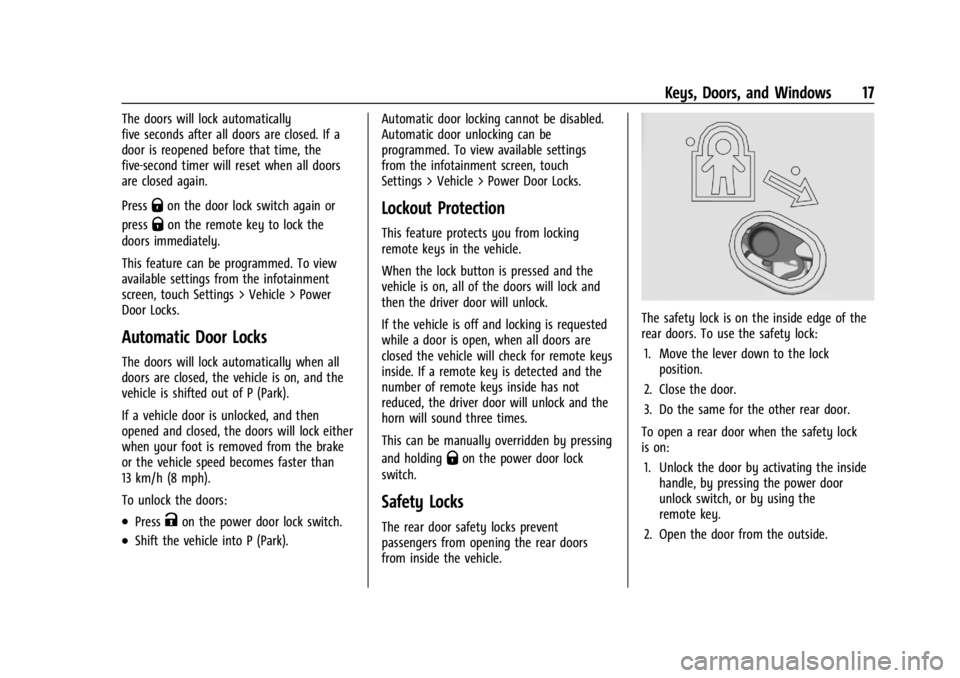
The rear door safety locks prevent
passengers from opening the rear doors
from inside the vehicle.
The safety lock is on the inside edge of the
rear doors. To use the safety lock:
1. Move the lever down to the lock position.
2. Close the door.
3. Do the same for the other rear door.
To open a rear door when the safety lock
is on: 1. Unlock the door by activating the inside handle, by pressing the power door
unlock switch, or by using the
remote key.
2. Open the door from the outside.
Page 19 of 429
Chevrolet Silverado EV Owner Manual (GMNA-Localizing-U.S./Canada-
16702912) - 2024 - CRC - 1/23/23
18 Keys, Doors, and Windows
When the safety lock is enabled, adults and
older children will not be able to open the
rear door from the inside. Cancel the safety
locks to enable the doors to open from the
inside.
To cancel the safety lock:1. Unlock the door and open it from the outside.
2. Move the lever up to unlock. Do the same for the other door.
Digital Key
If equipped and enabled, the Digital Key
feature allows you to access and operate
the vehicle using a smartphone. Many of
the functions performed by a remote key
can also be done using a Digital Key. See
Remote Key Operation 09.
Only certain smartphones support Digital
Key. Please see the myChevrolet app to see
if your device is compatible.
If the smartphone battery is weak or if
there is interference with the signal, the
Driver Information Center (DIC) may display
NO KEY FOUND or NO REMOTE KEY WAS
DETECTED, PLACE KEY IN KEY POCKET THEN START YOUR VEHICLE when starting the
vehicle. Charge the smartphone battery as
soon as possible.
You can use the myChevrolet mobile app to
pair, manage, or delete your Digital Key.
If the Digital Key is not working:
.Check the distance. The smartphone may
be too far from the vehicle.
.Check the location. Other vehicles or
objects may be blocking the signal. Your
body could also impact the signal. Hold
the smartphone in your hand, away from
your body, and toward the vehicle for
best results.
.Check that the smartphone is turned on
and has sufficient battery power.
.Check the connection. Your smartphone’s
bluetooth connection must be enabled.
.Check the myChevrolet app. Ensure that it
is open. Try relaunching the app if it is
open but is still not working.
Setting up Digital Key
Digital Key is only available with an OnStar
account associated with the vehicle. 1. Log in to your OnStar account in the MyChevrolet mobile app. 2. Select the Digital Key menu option, and
follow the steps on your screen to pair
your phone.
Using Your Digital Key
Digital Key allows you to:
.Use keyless access features to lock and
unlock the vehicle’s doors, and access the
rear compartments without a remote key.
See “Keyless Access Operation” under
Remote Key Operation 09.
.Start the vehicle with just your phone
present.
.Use remote commands in the
myChevrolet app to lock, unlock, and
remote start the vehicle.
Digital Key Personal Identification
Number (PIN)
As an added security measure, you will have
the option to set up a PIN to be used with
the Digital Key. When a PIN is enabled, you
will be prompted to enter the PIN on your
infotainment screen before starting your
vehicle. After entering your PIN successfully,
the vehicle can be started for a short period
of time. If you do not start your vehicle
within that time, you will be prompted for
your PIN again.
Page 22 of 429
Chevrolet Silverado EV Owner Manual (GMNA-Localizing-U.S./Canada-
16702912) - 2024 - CRC - 1/23/23
Keys, Doors, and Windows 21
.To open the hood, pressdon the
instrument panel to the left of the
steering wheel.
To close the hood, press and hold
d
until the hood closes.
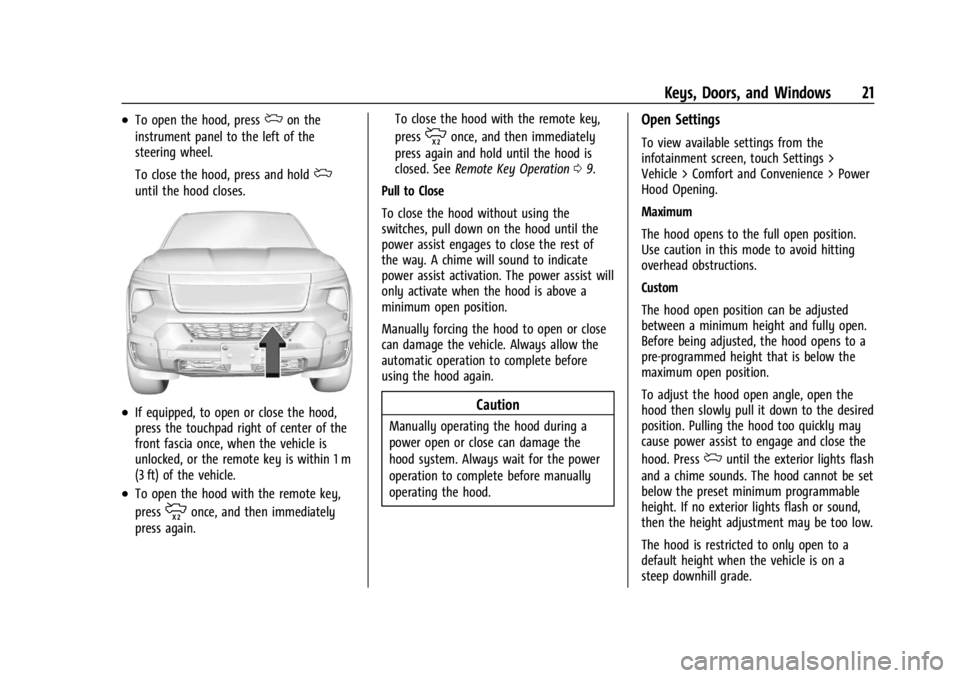
.If equipped, to open or close the hood,
press the touchpad right of center of the
front fascia once, when the vehicle is
unlocked, or the remote key is within 1 m
(3 ft) of the vehicle.
.To open the hood with the remote key,
press
monce, and then immediately
press again. To close the hood with the remote key,
press
monce, and then immediately
press again and hold until the hood is
closed. See Remote Key Operation 09.
Pull to Close
To close the hood without using the
switches, pull down on the hood until the
power assist engages to close the rest of
the way. A chime will sound to indicate
power assist activation. The power assist will
only activate when the hood is above a
minimum open position.
Manually forcing the hood to open or close
can damage the vehicle. Always allow the
automatic operation to complete before
using the hood again.
Caution
Manually operating the hood during a
power open or close can damage the
hood system. Always wait for the power
operation to complete before manually
operating the hood.
Open Settings
To view available settings from the
infotainment screen, touch Settings >
Vehicle > Comfort and Convenience > Power
Hood Opening.
Maximum
The hood opens to the full open position.
Use caution in this mode to avoid hitting
overhead obstructions.
Custom
The hood open position can be adjusted
between a minimum height and fully open.
Before being adjusted, the hood opens to a
pre-programmed height that is below the
maximum open position.
To adjust the hood open angle, open the
hood then slowly pull it down to the desired
position. Pulling the hood too quickly may
cause power assist to engage and close the
hood. Press
duntil the exterior lights flash
and a chime sounds. The hood cannot be set
below the preset minimum programmable
height. If no exterior lights flash or sound,
then the height adjustment may be too low.
The hood is restricted to only open to a
default height when the vehicle is on a
steep downhill grade.
Page 37 of 429
Chevrolet Silverado EV Owner Manual (GMNA-Localizing-U.S./Canada-
16702912) - 2024 - CRC - 1/23/23
36 Keys, Doors, and Windows
Heated Mirrors
To heat the mirrors, pressKon the
infotainment display.
See “Rear Window Defogger” underDual
Automatic Climate Control System 0174.
Automatic Dimming Mirror
The driver outside mirror automatically
adjusts for the glare of the headlamps from
behind. This feature comes on when the
vehicle is started.
Reverse Tilt Mirrors
If equipped with reverse tilt mirrors and
memory seats, the passenger and/or driver
mirror tilts to a preselected position when
the vehicle is in R (Reverse). This allows the
curb to be seen when parallel parking.
The mirror(s) may move from their tilted
position when:
.The vehicle is shifted out of R (Reverse) or
remains in R (Reverse) for about
30 seconds.
.The vehicle is turned off.
.The vehicle is driven in R (Reverse) above
a set speed. To view available settings from the
infotainment screen, touch Settings >
Vehicle > Comfort and Convenience.
Interior Mirrors
Interior Rearview Mirrors
Adjust the rearview mirror for a clear view
of the area behind the vehicle.
Do not spray glass cleaner directly on the
mirror. Use a soft towel dampened with
water.
Manual Rearview Mirror
If equipped, push the tab forward for
daytime use and pull it rearward for
nighttime use to avoid glare of the
headlamps from behind.
Automatic Dimming Rearview
Mirror
If equipped, automatic dimming reduces the
glare of headlamps from behind. The
dimming feature comes on when the vehicle
is started.
Rear Camera Mirror
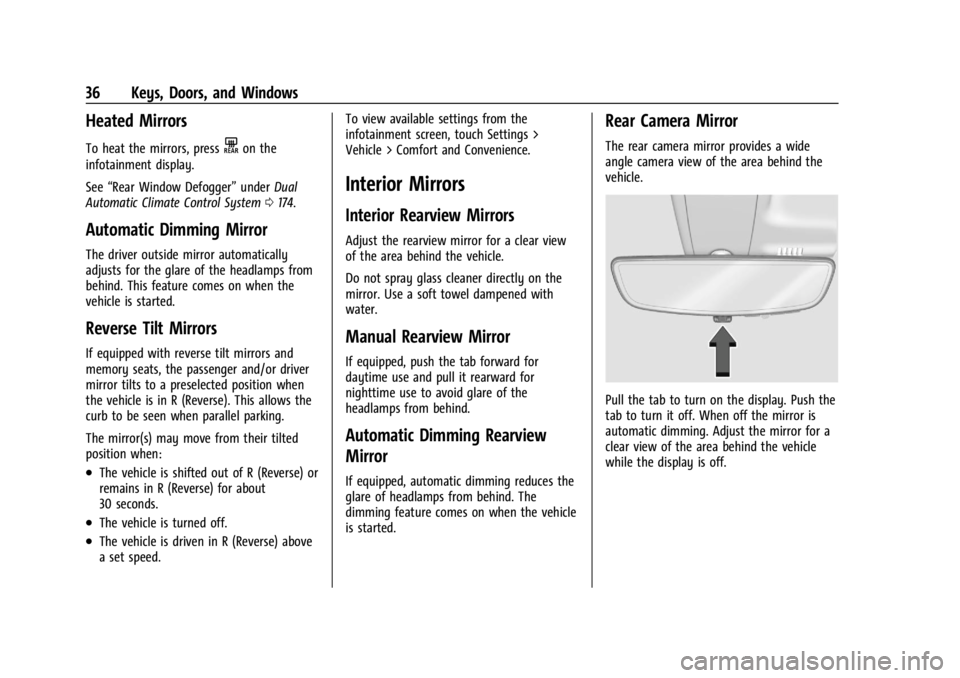
The rear camera mirror provides a wide
angle camera view of the area behind the
vehicle.
Pull the tab to turn on the display. Push the
tab to turn it off. When off the mirror is
automatic dimming. Adjust the mirror for a
clear view of the area behind the vehicle
while the display is off.