instrument panel CHEVROLET SILVERADO EV 2024 Owners Manual
[x] Cancel search | Manufacturer: CHEVROLET, Model Year: 2024, Model line: SILVERADO EV, Model: CHEVROLET SILVERADO EV 2024Pages: 429, PDF Size: 8.98 MB
Page 5 of 429
Chevrolet Silverado EV Owner Manual (GMNA-Localizing-U.S./Canada-
16702912) - 2024 - CRC - 1/17/23
4 Introduction
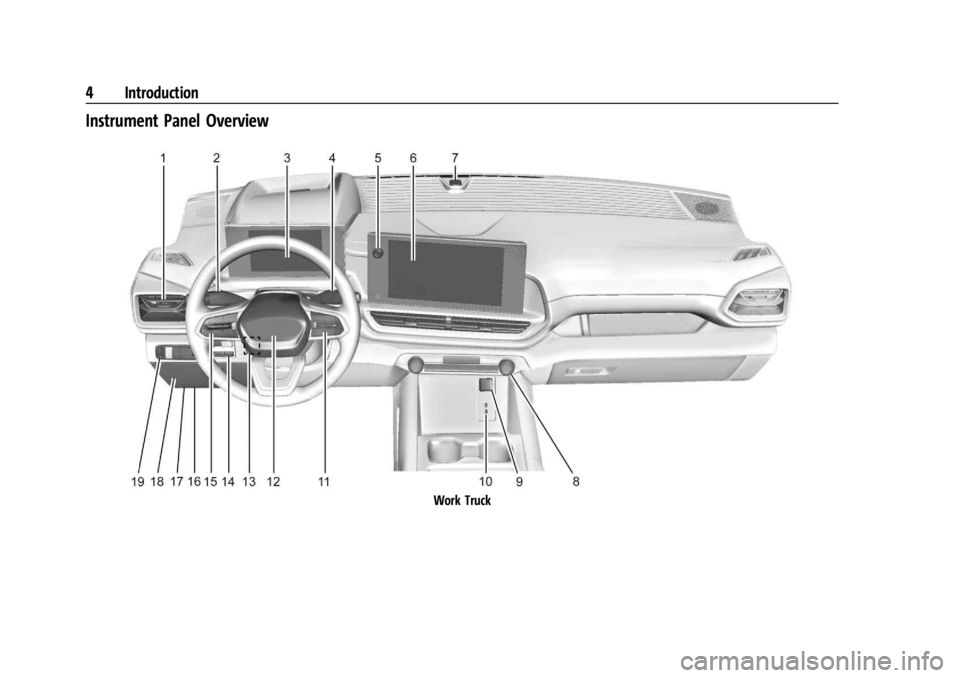
Instrument Panel Overview
Work Truck
Page 6 of 429

Chevrolet Silverado EV Owner Manual (GMNA-Localizing-U.S./Canada-
16702912) - 2024 - CRC - 1/17/23
Introduction 5
1.Air Vents 0177.
2. Windshield Wiper/Washer 098.
Turn and Lane-Change Signals 0143.
3. Instrument Cluster (Base Level) 0107 or
Instrument Cluster (Uplevel) 0109.
4. Shift Switches. See Electric Drive Unit
0 200.
5. Infotainment Controls. See Overview
0 148.
6. Infotainment Display. See AM-FM Radio
0 152.
7. Light Sensor. See Automatic Headlamp
System 0142.
Vehicle Alarm System. See Vehicle
Security 032.
8. Dual Automatic Climate Control System
0174.
9. Power Outlets 099.
10. USB Port 0154.
11. Steering Wheel Controls 0149.
Driver Information Center (DIC) Controls.
See Driver Information Center (DIC) (Base
Level) 0129 or
Driver Information Center (DIC) (Uplevel)
0 130.
12. Horn 098. 13.
Steering Wheel Adjustment 097 (Out
of View).
14. Trailer Brake Control Panel. See “Integrated Trailer Brake Control System”
under Towing Equipment 0301.
15. Adaptive Cruise Control (Advanced) 0217.
Forward Collision Alert (FCA) System
0 261.
16. Data Link Connector (DLC) (Out of View). SeeService Vehicle Soon Light (Propulsion
System Failure) 0115.
17. Manual Hood Release.
18. Fuse Block Cover.
19. Electric Parking Brake 0205
Tow/Haul Mode. See Driver Mode Control
0 209.
Lane Keep Assist (LKA) 0274.
Power Hood Release. See Hood019.
Instrument Panel Illumination Control
0 143.
Page 8 of 429

Chevrolet Silverado EV Owner Manual (GMNA-Localizing-U.S./Canada-
16702912) - 2024 - CRC - 1/17/23
Introduction 7
1.Air Vents 0177.
2. Windshield Wiper/Washer 098.
Turn and Lane-Change Signals 0143.
3. Regenerative Braking 0206.
4. Instrument Cluster (Base Level) 0107 or
Instrument Cluster (Uplevel) 0109.
5. Driver Monitoring System.
6. Shift Switches. See Electric Drive Unit
0 200.
7. Infotainment Controls. See Overview
0 148.
8. Infotainment Display. See AM-FM Radio
0 152.
9. Light Sensor. See Automatic Headlamp
System 0142.
Vehicle Alarm System. See Vehicle
Security 032.
10. Dual Automatic Climate Control System
0174.
11. USB Port 0154.
12. Power Outlets 099.
13. Wireless Charging 0104. 14.
Steering Wheel Controls 0149.
Driver Information Center (DIC) Controls.
See Driver Information Center (DIC) (Base
Level) 0129 or
Driver Information Center (DIC) (Uplevel)
0 130.
15. Horn 098.
16. Steering Wheel Adjustment 097 (Out
of View).
17. Trailer Brake Control Panel. See “Integrated Trailer Brake Control System”
under Towing Equipment 0301.
18. Adaptive Cruise Control (Advanced) 0217.
Forward Collision Alert (FCA) System
0 261.
Heated Steering Wheel 097 (If
Equipped).
19. Data Link Connector (DLC) (Out of View). SeeService Vehicle Soon Light (Propulsion
System Failure) 0115.
20. Manual Hood Release.
21. Fuse Block Cover. 22.
Electric Parking Brake 0205.
Air Suspension 0211.
Lane Keep Assist (LKA) 0274.
Power Hood Release. See Hood019.
Power Tailgate Release. See Tailgate
0 28.
Instrument Panel Illumination Control
0 143.
Page 21 of 429
Chevrolet Silverado EV Owner Manual (GMNA-Localizing-U.S./Canada-
16702912) - 2024 - CRC - 1/23/23
20 Keys, Doors, and Windows
If the hood is not closed, the electronic drive
unit lockout prevents the vehicle from
shifting out of P (Park). Close the hood to
shift out of P (Park). Confirm the hood is
closed by checking that the hood is flush
with the surrounding components.
If the hood is closed but the ajar message is
present, the electronic drive unit lockout can
be overridden. Hold the brake for
20 seconds and then shift into D (Drive). The
vehicle will not exceed 42 km/h (26 mph).
See your dealer for service.
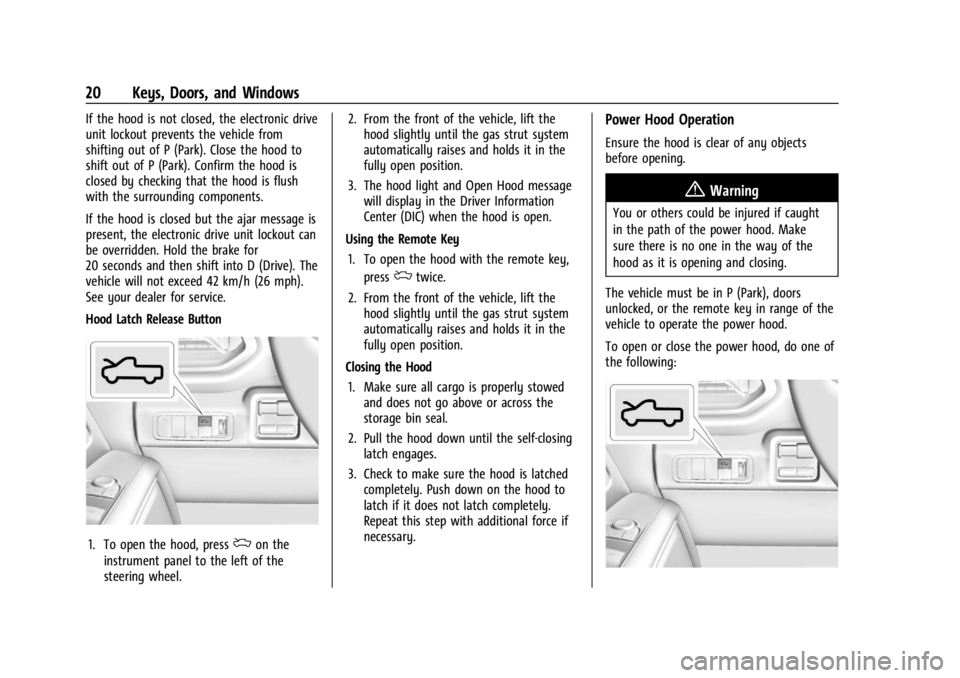
Hood Latch Release Button
1. To open the hood, pressdon the
instrument panel to the left of the
steering wheel. 2. From the front of the vehicle, lift the
hood slightly until the gas strut system
automatically raises and holds it in the
fully open position.
3. The hood light and Open Hood message will display in the Driver Information
Center (DIC) when the hood is open.
Using the Remote Key 1. To open the hood with the remote key, press
dtwice.
2. From the front of the vehicle, lift the hood slightly until the gas strut system
automatically raises and holds it in the
fully open position.
Closing the Hood 1. Make sure all cargo is properly stowed and does not go above or across the
storage bin seal.
2. Pull the hood down until the self-closing latch engages.
3. Check to make sure the hood is latched completely. Push down on the hood to
latch if it does not latch completely.
Repeat this step with additional force if
necessary.
Power Hood Operation
Ensure the hood is clear of any objects
before opening.
{Warning
You or others could be injured if caught
in the path of the power hood. Make
sure there is no one in the way of the
hood as it is opening and closing.
The vehicle must be in P (Park), doors
unlocked, or the remote key in range of the
vehicle to operate the power hood.
To open or close the power hood, do one of
the following:
Page 22 of 429
Chevrolet Silverado EV Owner Manual (GMNA-Localizing-U.S./Canada-
16702912) - 2024 - CRC - 1/23/23
Keys, Doors, and Windows 21
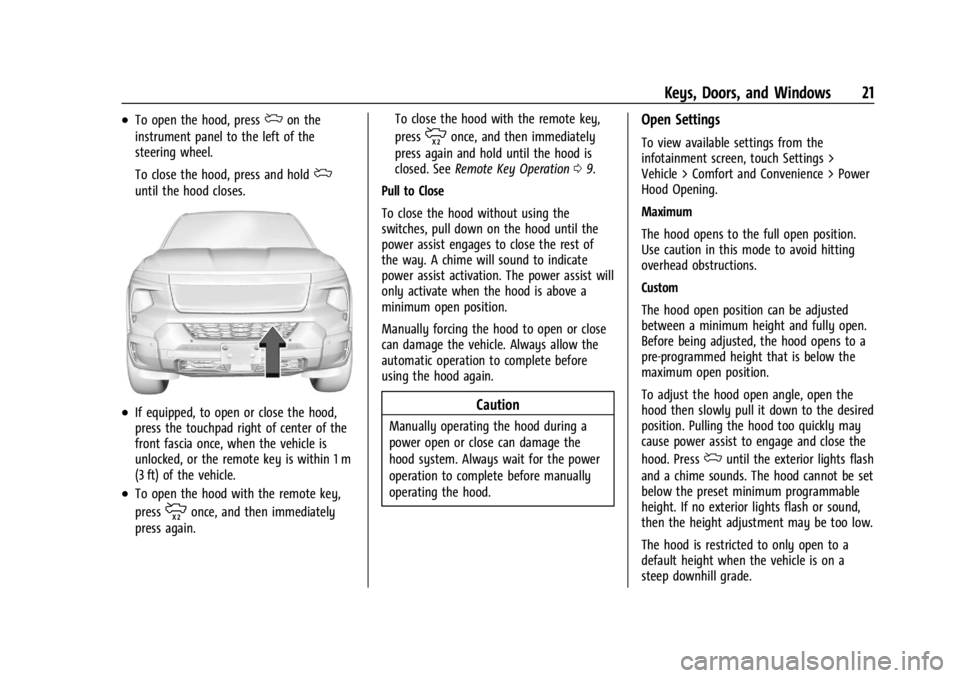
.To open the hood, pressdon the
instrument panel to the left of the
steering wheel.
To close the hood, press and hold
d
until the hood closes.
.If equipped, to open or close the hood,
press the touchpad right of center of the
front fascia once, when the vehicle is
unlocked, or the remote key is within 1 m
(3 ft) of the vehicle.
.To open the hood with the remote key,
press
monce, and then immediately
press again. To close the hood with the remote key,
press
monce, and then immediately
press again and hold until the hood is
closed. See Remote Key Operation 09.
Pull to Close
To close the hood without using the
switches, pull down on the hood until the
power assist engages to close the rest of
the way. A chime will sound to indicate
power assist activation. The power assist will
only activate when the hood is above a
minimum open position.
Manually forcing the hood to open or close
can damage the vehicle. Always allow the
automatic operation to complete before
using the hood again.
Caution
Manually operating the hood during a
power open or close can damage the
hood system. Always wait for the power
operation to complete before manually
operating the hood.
Open Settings
To view available settings from the
infotainment screen, touch Settings >
Vehicle > Comfort and Convenience > Power
Hood Opening.
Maximum
The hood opens to the full open position.
Use caution in this mode to avoid hitting
overhead obstructions.
Custom
The hood open position can be adjusted
between a minimum height and fully open.
Before being adjusted, the hood opens to a
pre-programmed height that is below the
maximum open position.
To adjust the hood open angle, open the
hood then slowly pull it down to the desired
position. Pulling the hood too quickly may
cause power assist to engage and close the
hood. Press
duntil the exterior lights flash
and a chime sounds. The hood cannot be set
below the preset minimum programmable
height. If no exterior lights flash or sound,
then the height adjustment may be too low.
The hood is restricted to only open to a
default height when the vehicle is on a
steep downhill grade.
Page 23 of 429
Chevrolet Silverado EV Owner Manual (GMNA-Localizing-U.S./Canada-
16702912) - 2024 - CRC - 1/23/23
22 Keys, Doors, and Windows
Off (Manual Operation)
Press and release the touch pad on the front
fascia. Lift the hood to open to a desired
height.
Pull down on the hood until the power
assist engages to close. A chime will sound
to indicate power activation. The power
assist will only activate when the hood is
above a minimum open position.
To prevent damage to the vehicle, do not
move the hood too quickly or use excessive
force.
Obstacle Detection Features
If the hood encounters an obstacle during a
power open or close cycle, the hood will
automatically reverse direction and move
away from the obstacle. After removing the
obstruction, the power hood operation can
be used again.
If the vehicle is locked while the hood is
closing and an obstacle is encountered that
prevents the hood from completely closing,
the horn will sound an alert that the hood
did not close.
Falling Hood Detection
If the power hood encounters excess weight
or a possible mechanical failure, a repetitive
chime will sound and the hood will
automatically lower to a stable position.
If the hood stops before fulling closing,
carefully push the hood closed while
keeping hands away from the edges of
the hood.
If the hood continues to automatically close
after opening, see your dealer for service
before using the power hood.
Interfering with the power hood motion or
manually closing the hood too quickly may
activate the falling hood detection feature.
Allow the hood to complete its operation
and wait a few seconds before manually
closing the hood.
Operating the Hood When There is No
Electrical Power
The manual release cable should only be
used for service and/or emergency use, such
as loss of vehicle electrical power. Do not
store any cargo in the area near the hood
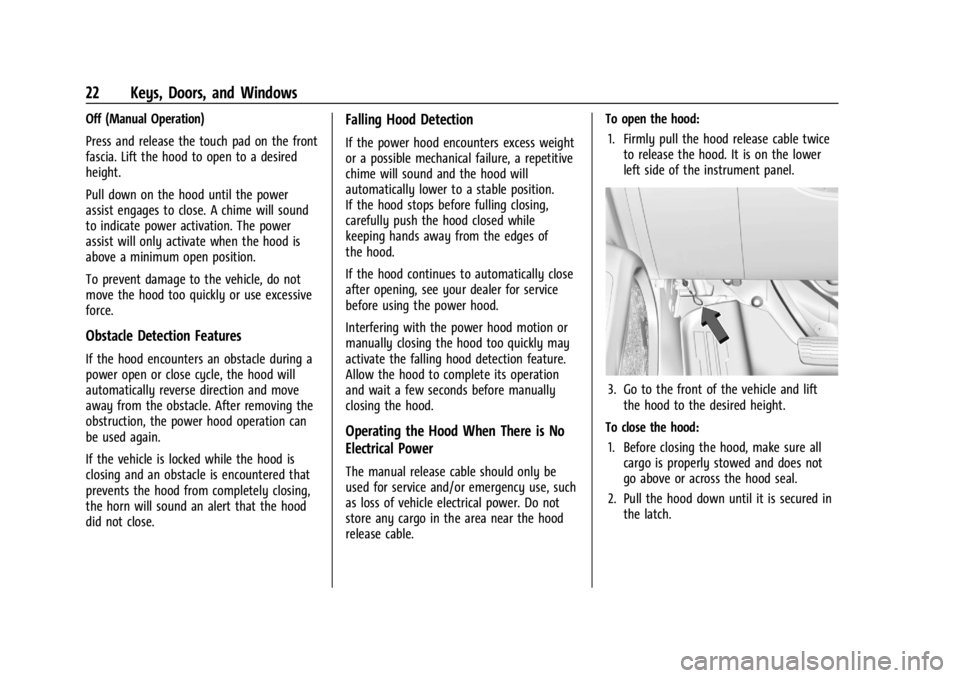
release cable.To open the hood:
1. Firmly pull the hood release cable twice to release the hood. It is on the lower
left side of the instrument panel.
3. Go to the front of the vehicle and liftthe hood to the desired height.
To close the hood: 1. Before closing the hood, make sure all cargo is properly stowed and does not
go above or across the hood seal.
2. Pull the hood down until it is secured in the latch.
Page 31 of 429
Chevrolet Silverado EV Owner Manual (GMNA-Localizing-U.S./Canada-
16702912) - 2024 - CRC - 1/23/23
30 Keys, Doors, and Windows
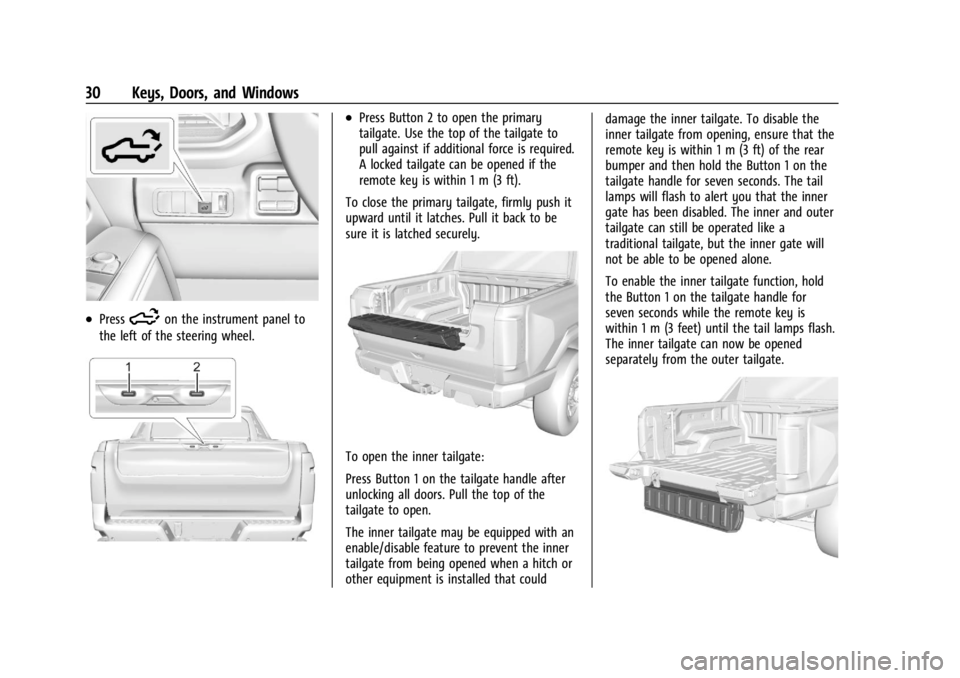
.Press5on the instrument panel to
the left of the steering wheel.
.Press Button 2 to open the primary
tailgate. Use the top of the tailgate to
pull against if additional force is required.
A locked tailgate can be opened if the
remote key is within 1 m (3 ft).
To close the primary tailgate, firmly push it
upward until it latches. Pull it back to be
sure it is latched securely.
To open the inner tailgate:
Press Button 1 on the tailgate handle after
unlocking all doors. Pull the top of the
tailgate to open.
The inner tailgate may be equipped with an
enable/disable feature to prevent the inner
tailgate from being opened when a hitch or
other equipment is installed that could damage the inner tailgate. To disable the
inner tailgate from opening, ensure that the
remote key is within 1 m (3 ft) of the rear
bumper and then hold the Button 1 on the
tailgate handle for seven seconds. The tail
lamps will flash to alert you that the inner
gate has been disabled. The inner and outer
tailgate can still be operated like a
traditional tailgate, but the inner gate will
not be able to be opened alone.
To enable the inner tailgate function, hold
the Button 1 on the tailgate handle for
seven seconds while the remote key is
within 1 m (3 feet) until the tail lamps flash.
The inner tailgate can now be opened
separately from the outer tailgate.
Page 54 of 429
Chevrolet Silverado EV Owner Manual (GMNA-Localizing-U.S./Canada-
16702912) - 2024 - CRC - 1/13/23
Seats and Restraints 53
Why Seat Belts Work
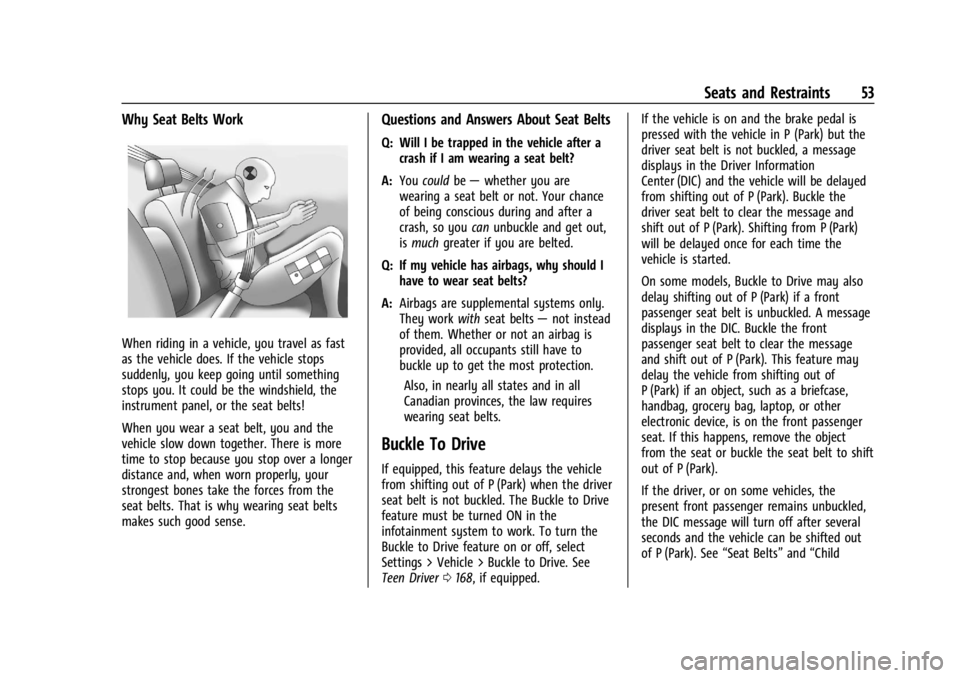
When riding in a vehicle, you travel as fast
as the vehicle does. If the vehicle stops
suddenly, you keep going until something
stops you. It could be the windshield, the
instrument panel, or the seat belts!
When you wear a seat belt, you and the
vehicle slow down together. There is more
time to stop because you stop over a longer
distance and, when worn properly, your
strongest bones take the forces from the
seat belts. That is why wearing seat belts
makes such good sense.
Questions and Answers About Seat Belts
Q: Will I be trapped in the vehicle after acrash if I am wearing a seat belt?
A: You could be— whether you are
wearing a seat belt or not. Your chance
of being conscious during and after a
crash, so you canunbuckle and get out,
is much greater if you are belted.
Q: If my vehicle has airbags, why should I have to wear seat belts?
A: Airbags are supplemental systems only.
They work withseat belts —not instead
of them. Whether or not an airbag is
provided, all occupants still have to
buckle up to get the most protection.
Also, in nearly all states and in all
Canadian provinces, the law requires
wearing seat belts.
Buckle To Drive
If equipped, this feature delays the vehicle
from shifting out of P (Park) when the driver
seat belt is not buckled. The Buckle to Drive
feature must be turned ON in the
infotainment system to work. To turn the
Buckle to Drive feature on or off, select
Settings > Vehicle > Buckle to Drive. See
Teen Driver 0168, if equipped. If the vehicle is on and the brake pedal is
pressed with the vehicle in P (Park) but the
driver seat belt is not buckled, a message
displays in the Driver Information
Center (DIC) and the vehicle will be delayed
from shifting out of P (Park). Buckle the
driver seat belt to clear the message and
shift out of P (Park). Shifting from P (Park)
will be delayed once for each time the
vehicle is started.
On some models, Buckle to Drive may also
delay shifting out of P (Park) if a front
passenger seat belt is unbuckled. A message
displays in the DIC. Buckle the front
passenger seat belt to clear the message
and shift out of P (Park). This feature may
delay the vehicle from shifting out of
P (Park) if an object, such as a briefcase,
handbag, grocery bag, laptop, or other
electronic device, is on the front passenger
seat. If this happens, remove the object
from the seat or buckle the seat belt to shift
out of P (Park).
If the driver, or on some vehicles, the
present front passenger remains unbuckled,
the DIC message will turn off after several
seconds and the vehicle can be shifted out
of P (Park). See
“Seat Belts”and“Child
Page 61 of 429
Chevrolet Silverado EV Owner Manual (GMNA-Localizing-U.S./Canada-
16702912) - 2024 - CRC - 1/13/23
60 Seats and Restraints
crash may have been stressed or damaged.
See your dealer to have the seat belt
assemblies inspected or replaced.
New parts and repairs may be necessary
even if the seat belt system was not being
used at the time of the crash.
Have the seat belt pretensioners checked if
the vehicle has been in a crash, or if the
airbag readiness light stays on after you
start the vehicle or while you are driving.
SeeAirbag Readiness Light 0113.
Airbag System
The vehicle has the following airbags:
.A frontal airbag for the driver
.A frontal airbag for the front outboard
passenger
.A seat-mounted side impact airbag for the
driver
.A seat-mounted side impact airbag for the
front outboard passenger
.A roof-rail airbag for the driver and the
passenger seated directly behind the
driver
.A roof-rail airbag for the front outboard
passenger and the passenger seated
directly behind the front outboard
passenger
All vehicle airbags have the word AIRBAG on
the trim or on a label near the deployment
opening.
For frontal airbags, the word AIRBAG is on
the center of the steering wheel for the
driver and on the instrument panel for the
front outboard passenger.
For seat-mounted side impact airbags, the
word AIRBAG is on the side of the seatback
or side of the seat closest to the door.
For roof-rail airbags, the word AIRBAG is on
the ceiling or trim.
Airbags are designed to supplement the
protection provided by seat belts. Even
though today's airbags are also designed to
help reduce the risk of injury from the force
of an inflating bag, all airbags must inflate
very quickly to do their job. Here are the most important things to know
about the airbag system:
{Warning
You can be severely injured or killed in a
crash if you are not wearing your seat
belt, even with airbags. Airbags are
designed to work with seat belts, not
replace them. Also, airbags are not
designed to inflate in every crash. In
some crashes seat belts are the only
restraint. See
When Should an Airbag
Inflate? 062.
Wearing your seat belt during a crash
helps reduce your chance of hitting
things inside the vehicle or being ejected
from it. Airbags are “supplemental
restraints” to the seat belts. Everyone in
the vehicle should wear a seat belt
properly, whether or not there is an
airbag for that person.
Page 63 of 429
Chevrolet Silverado EV Owner Manual (GMNA-Localizing-U.S./Canada-
16702912) - 2024 - CRC - 1/13/23
62 Seats and Restraints
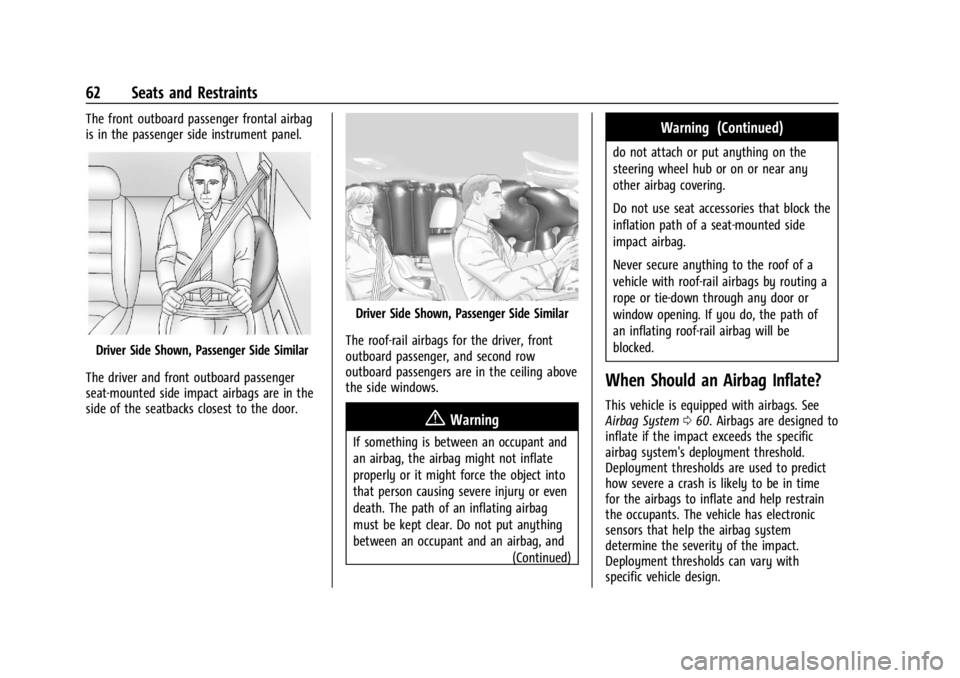
The front outboard passenger frontal airbag
is in the passenger side instrument panel.
Driver Side Shown, Passenger Side Similar
The driver and front outboard passenger
seat-mounted side impact airbags are in the
side of the seatbacks closest to the door.
Driver Side Shown, Passenger Side Similar
The roof-rail airbags for the driver, front
outboard passenger, and second row
outboard passengers are in the ceiling above
the side windows.
{Warning
If something is between an occupant and
an airbag, the airbag might not inflate
properly or it might force the object into
that person causing severe injury or even
death. The path of an inflating airbag
must be kept clear. Do not put anything
between an occupant and an airbag, and (Continued)
Warning (Continued)
do not attach or put anything on the
steering wheel hub or on or near any
other airbag covering.
Do not use seat accessories that block the
inflation path of a seat-mounted side
impact airbag.
Never secure anything to the roof of a
vehicle with roof-rail airbags by routing a
rope or tie‐down through any door or
window opening. If you do, the path of
an inflating roof-rail airbag will be
blocked.
When Should an Airbag Inflate?
This vehicle is equipped with airbags. See
Airbag System060. Airbags are designed to
inflate if the impact exceeds the specific
airbag system's deployment threshold.
Deployment thresholds are used to predict
how severe a crash is likely to be in time
for the airbags to inflate and help restrain
the occupants. The vehicle has electronic
sensors that help the airbag system
determine the severity of the impact.
Deployment thresholds can vary with
specific vehicle design.