lock CHEVROLET SS 2017 1.G User Guide
[x] Cancel search | Manufacturer: CHEVROLET, Model Year: 2017, Model line: SS, Model: CHEVROLET SS 2017 1.GPages: 400, PDF Size: 7.31 MB
Page 29 of 400
Chevrolet SS Sedan Owner Manual (GMNA-Localizing-U.S.-10122752) -2017 - crc - 8/31/16
28 Keys, Doors, and Windows
To c u s t o m i z e t h e d o o r s t oautomatically lock when exiting thevehicle, see“Remote Lock/Unlock/Start”underVehicle Personalization0120.
Keyed Access
To a c c e s s a v e h i c l e w i t h a d e a dtransmitter battery, seeDoor Locks032.
Programming Transmitters to
the Vehicle
Only RKE transmitters programmedto the vehicle will work. If atransmitter is lost or stolen, areplacement can be purchased andprogrammed through your dealer.The vehicle can be reprogrammedso that lost or stolen transmitters nolonger work. Any remainingtransmitters will need to bereprogrammed. Each vehicle canhave up to eight transmittersmatched to it.
Programming with a RecognizedTransmitter
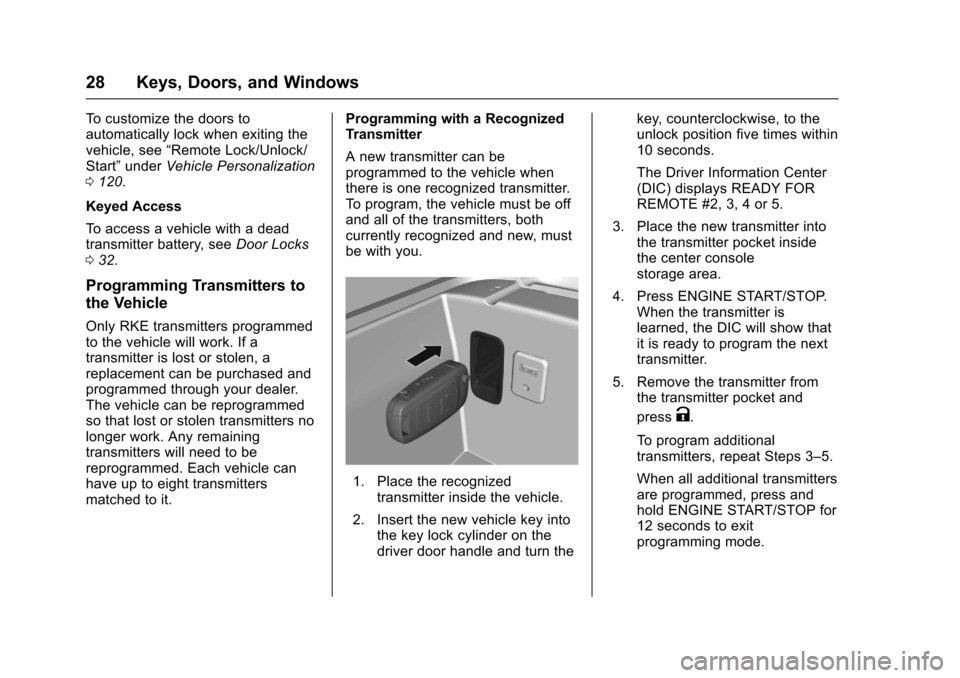
Anewtransmittercanbeprogrammed to the vehicle whenthere is one recognized transmitter.To p r o g r a m , t h e v e h i c l e m u s t b e o f fand all of the transmitters, bothcurrently recognized and new, mustbe with you.
1. Place the recognizedtransmitter inside the vehicle.
2. Insert the new vehicle key intothe key lock cylinder on thedriver door handle and turn the
key, counterclockwise, to theunlock position five times within10 seconds.
The Driver Information Center(DIC) displays READY FORREMOTE #2, 3, 4 or 5.
3. Place the new transmitter intothe transmitter pocket insidethe center consolestorage area.
4. Press ENGINE START/STOP.When the transmitter islearned, the DIC will show thatit is ready to program the nexttransmitter.
5. Remove the transmitter fromthe transmitter pocket and
pressK.
To p r o g r a m a d d i t i o n a ltransmitters, repeat Steps 3–5.
When all additional transmittersare programmed, press andhold ENGINE START/STOP for12 seconds to exitprogramming mode.
Page 30 of 400
Chevrolet SS Sedan Owner Manual (GMNA-Localizing-U.S.-10122752) -2017 - crc - 8/31/16
Keys, Doors, and Windows 29
Programming without aRecognized Transmitter
If there are no currently recognizedtransmitters available, follow thisprocedure to program up to eighttransmitters. This procedure willtake approximately 30 minutes tocomplete. The vehicle must be offand all of the transmitters you wishto program must be with you.
1. Insert the vehicle key into thekey lock cylinder on the driverdoor handle and turn the key,counterclockwise, to the unlockposition five times within10 seconds.
The Driver Information Center(DIC) displays REMOTELEARN PENDING,PLEASE WAIT.
2. Wait for 10 minutes until theDIC displays PRESS ENGINESTART BUTTON TO LEARNand then press ENGINESTART/STOP.
The DIC displays will againshow REMOTE LEARNPENDING, PLEASE WAIT.
3. Repeat Step 2 two additionaltimes. After the third time, allpreviously known transmitterswill no longer work with thevehicle. Remaining transmitterscan be relearned during thenext steps.
The DIC display should nowshow READY FOR REMOTE#1.
4. Place the new transmitter intothe transmitter pocket. Thetransmitter pocket is inside thecenter console storage area.
5. Press ENGINE START/STOP.When the transmitter is learnedthe DIC will show that it isready to program the nexttransmitter.
6. Remove the transmitter fromthe transmitter pocket and
pressK.
To p r o g r a m a d d i t i o n a ltransmitters, repeat Steps 4–6.
When all additional transmittersare programmed, press andhold ENGINE START/STOP for12 seconds to exitprogramming mode.
Starting the Vehicle with a Low
Transmitter Battery
If the transmitter battery is weak, theDIC may display NO REMOTEDETECTED when you try to startthe vehicle. The REPLACEBATTERY IN REMOTE KEYmessage may also be displayed atthis time.
Page 31 of 400
Chevrolet SS Sedan Owner Manual (GMNA-Localizing-U.S.-10122752) -2017 - crc - 8/31/16
30 Keys, Doors, and Windows
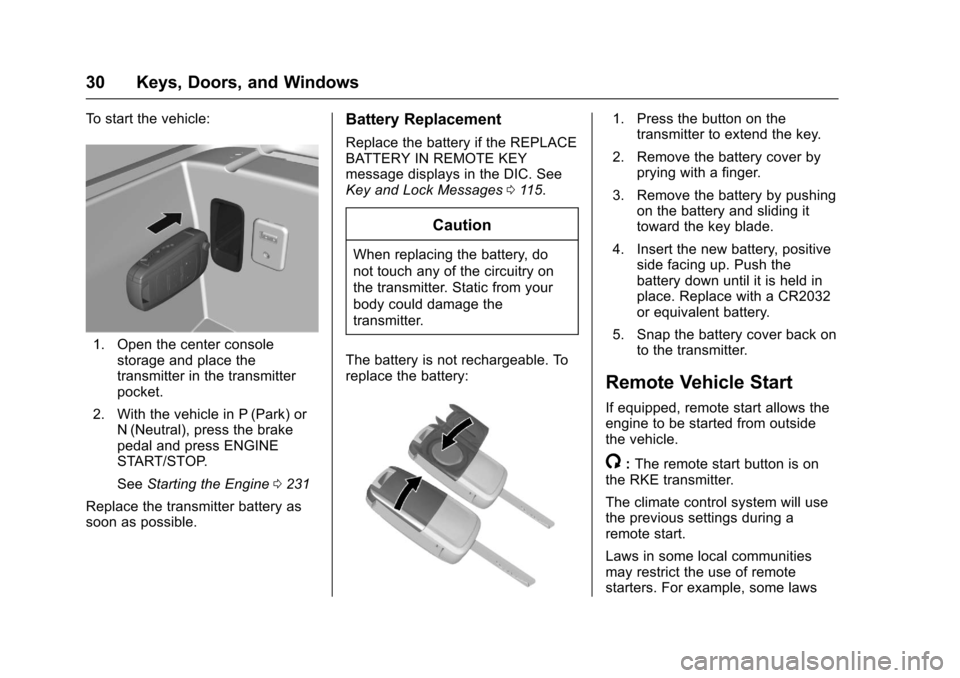
To s t a r t t h e v e h i c l e :
1. Open the center consolestorage and place thetransmitter in the transmitterpocket.
2. With the vehicle in P (Park) orN(Neutral), press the brakepedal and press ENGINESTART/STOP.
SeeStarting the Engine0231
Replace the transmitter battery assoon as possible.
Battery Replacement
Replace the battery if the REPLACEBATTERY IN REMOTE KEYmessage displays in the DIC. SeeKey and Lock Messages011 5.
Caution
When replacing the battery, do
not touch any of the circuitry on
the transmitter. Static from your
body could damage the
transmitter.
The battery is not rechargeable. Toreplace the battery:
1. Press the button on thetransmitter to extend the key.
2. Remove the battery cover byprying with a finger.
3. Remove the battery by pushingon the battery and sliding ittoward the key blade.
4. Insert the new battery, positiveside facing up. Push thebattery down until it is held inplace. Replace with a CR2032or equivalent battery.
5. Snap the battery cover back onto the transmitter.
Remote Vehicle Start
If equipped, remote start allows theengine to be started from outsidethe vehicle.
/:The remote start button is onthe RKE transmitter.
The climate control system will usethe previous settings during aremote start.
Laws in some local communitiesmay restrict the use of remotestarters. For example, some laws
Page 32 of 400
Chevrolet SS Sedan Owner Manual (GMNA-Localizing-U.S.-10122752) -2017 - crc - 8/31/16
Keys, Doors, and Windows 31
require a person using remote startto have the vehicle in view. Checklocal regulations for anyrequirements.
Other conditions can affect theperformance of the transmitter. SeeRemote Keyless Entry (RKE)System025.
Starting the Vehicle
To s t a r t t h e e n g i n e u s i n g t h e r e m o t estart feature:
1. Aim the RKE transmitter at thevehicle.
2. Press and releaseQ.
3. Immediately after completing
Step 2, press and hold/for at
least four seconds or until theturn signal lamps flash. Theturn signal lamps flashingconfirms the request to remotestart the vehicle has beenreceived.
When the engine starts, the parkinglamps will turn on and remain on aslong as the engine is running. Thedoors will be locked and the climatecontrol system may come on.
The engine will continue to run for10 minutes. After 30 seconds,repeat the steps to extend to20 minutes. Remote start can beextended only once.
Start the vehicle before driving.
Extending Engine Run Time
To e x t e n d t o 2 0 m i n u t e s , r e p e a tSteps 1–3whiletheengineisstillrunning. An extension can berequested 30 seconds after starting.The remote start can beextended once.
For example, if the engine has beenrunning for five minutes, and theremote start is extended, the enginewill run for a total of 20 minutes.
Amaximumoftworemotestarts,or a single start with an extension,is allowed between ignition cycles.
The vehicle's ignition must beturned on and then back off beforethe remote start procedure can beused again.
Canceling a Remote Start
To c a n c e l a r e m o t e s t a r t , d o o n e o fthe following:
.Aim the RKE transmitter at the
vehicle and press and hold/
until the parking lamps turn off.
.Turn on the hazard warningflashers.
.Turn the vehicle on and then off.
Conditions in Which Remote StartWill Not Work
The remote vehicle start feature willnot operate if:
.The transmitter is in the vehicle.
.The hood is not closed.
.The hazard warning flashersare on.
.The malfunction indicator lampis on.
.The engine coolant temperatureis too high.
.The oil pressure is low.
Page 33 of 400

Chevrolet SS Sedan Owner Manual (GMNA-Localizing-U.S.-10122752) -2017 - crc - 8/31/16
32 Keys, Doors, and Windows
.Tw o r e m o t e v e h i c l e s t a r t s , o r asingle remote start with anextension, have alreadybeen used.
.The vehicle is not in P (Park).
Door Locks
{Warning
Unlocked doors can be
dangerous.
.Passengers, especiallychildren, can easily openthe doors and fall out of amoving vehicle. When adoor is locked, the handlewill not open it. The chanceof being thrown out of thevehicle in a crash isincreased if the doors arenot locked. So, allpassengers should wearsafety belts properly and thedoors should be lockedwhenever the vehicle isdriven.
(Continued)
Warning (Continued)
.Yo u n g c h i l d r e n w h o g e t i n t ounlocked vehicles may beunable to get out. A childcan be overcome byextreme heat and can sufferpermanent injuries or evendeath from heat stroke.Always lock the vehiclewhenever leaving it.
.Outsiders can easily enterthrough an unlocked doorwhen you slow down or stopthe vehicle. Locking thedoors can help prevent thisfrom happening.
To l o c k o r u n l o c k t h e d o o r s f r o m t h eoutside:
.PressQorKon the Remote
Keyless Entry (RKE) transmitter.SeeRemote Keyless Entry(RKE) System Operation025.
.Use the key in the driver door.Turn the key toward the rear tolock all doors. Turn the keytoward the front to unlock the
driver door. Turn the key againtoward the front to unlock alldoors.
To l o c k o r u n l o c k t h e d o o r s f r o m t h einside:
.Pushing down the manual lockknob on the driver door will lockall doors. Pushing down themanual lock knob on apassenger door will lock thatdoor only.
.Pull the door handle once tounlock the door. Pulling thehandle again unlatches the door.
.PressQorKon the power door
lock switch.
Keyless Access
The RKE transmitter must be within1m (3ft) of the door or trunk beingopened. Press the button on thedoor handle to open. See“KeylessAccess Operation”inRemoteKeyless Entry (RKE) SystemOperation025.
Page 34 of 400
Chevrolet SS Sedan Owner Manual (GMNA-Localizing-U.S.-10122752) -2017 - crc - 8/31/16
Keys, Doors, and Windows 33
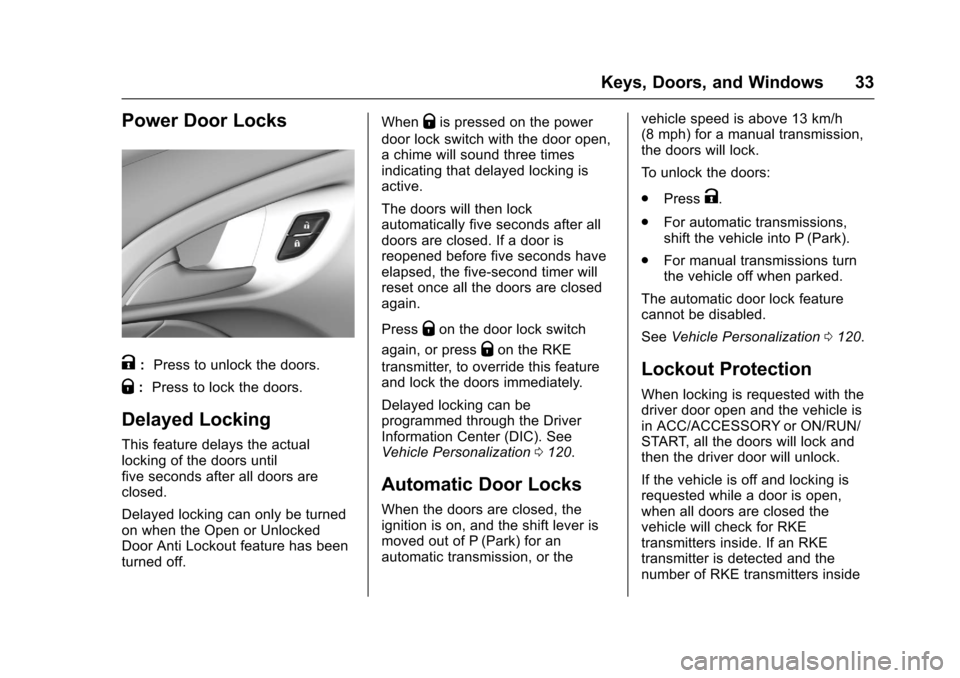
Power Door Locks
K:Press to unlock the doors.
Q:Press to lock the doors.
Delayed Locking
This feature delays the actuallocking of the doors untilfive seconds after all doors areclosed.
Delayed locking can only be turnedon when the Open or UnlockedDoor Anti Lockout feature has beenturned off.
WhenQis pressed on the power
door lock switch with the door open,achimewillsoundthreetimesindicating that delayed locking isactive.
The doors will then lockautomatically five seconds after alldoors are closed. If a door isreopened before five seconds haveelapsed, the five-second timer willreset once all the doors are closedagain.
PressQon the door lock switch
again, or pressQon the RKE
transmitter, to override this featureand lock the doors immediately.
Delayed locking can beprogrammed through the DriverInformation Center (DIC). SeeVehicle Personalization0120.
Automatic Door Locks
When the doors are closed, theignition is on, and the shift lever ismoved out of P (Park) for anautomatic transmission, or the
vehicle speed is above 13 km/h(8 mph) for a manual transmission,the doors will lock.
To u n l o c k t h e d o o r s :
.PressK.
.For automatic transmissions,shift the vehicle into P (Park).
.For manual transmissions turnthe vehicle off when parked.
The automatic door lock featurecannot be disabled.
SeeVehicle Personalization0120.
Lockout Protection
When locking is requested with thedriver door open and the vehicle isin ACC/ACCESSORY or ON/RUN/START, all the doors will lock andthen the driver door will unlock.
If the vehicle is off and locking isrequested while a door is open,when all doors are closed thevehicle will check for RKEtransmitters inside. If an RKEtransmitter is detected and thenumber of RKE transmitters inside
Page 35 of 400

Chevrolet SS Sedan Owner Manual (GMNA-Localizing-U.S.-10122752) -2017 - crc - 8/31/16
34 Keys, Doors, and Windows
has not reduced, the driver door willunlock and the horn will sound threetimes.
This can be manually overridden by
pressing and holdingQon the
power door lock switch.
Open Door Anti Lockout
Open Door Anti Lockout, when on,will unlock the driver door if lockingis requested while the driver door isopen. This feature can be turned onor off using the vehiclepersonalization menus. SeeVehiclePersonalization0120.
Safety Locks
The rear door safety locks preventpassengers from opening the reardoors from inside the vehicle.
Manual Safety Locks
If equipped, the safety lock islocated on the inside edge of therear doors. To use the safety lock:
1. Insert the key into the safetylock slot and turn it so the slotis in the horizontal position.
2. Close the door.
3. Do the same for the otherrear door.
To o p e n a r e a r d o o r w h e n t h e s a f e t ylock is on:
1. Unlock the door by activatingthe inside handle, by using thepower door lock switch, or byusing the Remote KeylessEntry (RKE) transmitter.
2. Open the door from theoutside.
To c a n c e l t h e s a f e t y l o c k :
1. Unlock the door and open itfrom the outside.
2. Insert the key into the safetylock slot and turn it so the slotis in the vertical position. Dothe same for the other door.
Page 37 of 400

Chevrolet SS Sedan Owner Manual (GMNA-Localizing-U.S.-10122752) -2017 - crc - 8/31/16
36 Keys, Doors, and Windows
Emergency Trunk Release
Handle
Caution
Do not use the emergency trunk
release handle as a tie-down or
anchor point when securing items
in the trunk as it could damage
the handle.
The emergency trunk releasehandle is behind the center rearseat. To access, press the button atthe top of the center seat to unlockthe seatback and fold down. Pull therelease handle sideways to openthe trunk from the inside.
Vehicle Security
This vehicle has theft-deterrentfeatures; however, they do not makethe vehicle impossible to steal.
Vehicle Alarm System
This vehicle has an anti-theft alarmsystem.
The security light, on the instrumentpanel near the windshield, indicatesthe status of the system:
Off :Alarm system is disarmed.
On Solid :Ve h i c l e i s s e c u r e dduring the delay to arm the system.
Page 38 of 400

Chevrolet SS Sedan Owner Manual (GMNA-Localizing-U.S.-10122752) -2017 - crc - 8/31/16
Keys, Doors, and Windows 37
Fast Flash :Vehicle is unsecured.Adoor,thehood,orthetrunkis open.
Slow Flash :Alarm system isarmed.
Arming the Alarm System
1. Turn off the vehicle.
2. Lock the vehicle with one ofthe following:
.Use the RKE transmitter.
.With a door open, press the
insideQ.
3. After 30 seconds the alarmsystem will arm, and theindicator light will begin toslowly flash indicating thealarm system is operating.
PressingQon the RKE
transmitter a second time willbypass the 30-second delayand immediately arm the alarmsystem.
The vehicle alarm system will notarm if the doors are locked withthe key.
If the driver door is opened withoutfirst unlocking with the RKEtransmitter, the horn will chirp andthe lights will flash to indicate apre-alarm. If the vehicle is notstarted, or the door is not unlocked
by pressingKon the RKE
transmitter during the 10-secondpre-alarm, the alarm will beactivated.
The alarm will also be activated ifthe passenger door, the trunk, or thehood is opened without firstdisarming the system. When thealarm is activated, the turn signalsflash and the horn sounds for about30 seconds. The alarm system willthen re-arm to monitor for the nextunauthorized event.
Disarming the System
To d i s a r m t h e s y s t e m , d o o n e o f t h efollowing:
.PressKon the RKE transmitter.
.Start the engine.
To avoid setting off the alarm byaccident:
.Lock the vehicle with the RKEtransmitter after all occupantshave exited.
.Always unlock the vehicle withthe RKE transmitter, or use theKeyless Access system.Unlocking the driver door withthe key will not disarm thesystem or turn off the alarm.
Immobilizer
SeeRadio Frequency Statement0374.
Immobilizer Operation
This vehicle has a passivetheft-deterrent system.
The system does not have to bemanually armed or disarmed.
The immobilizer activates itselfautomatically when the engine isswitched off by pressing ENGINESTART/STOP.
Page 41 of 400
Chevrolet SS Sedan Owner Manual (GMNA-Localizing-U.S.-10122752) -2017 - crc - 8/31/16
40 Keys, Doors, and Windows
Interior Mirrors
Interior Rearview Mirrors
Adjust the rearview mirror for a clearview of the area behind yourvehicle.
If equipped with OnStar, there arethree buttons at the bottom of themirror. See your dealer for moreinformation on the system and howto subscribe to OnStar. SeeOnStarOverview0378.
To a v o i d a c c i d e n t a l O n S t a r c a l l s ,clean the mirror with the ignition off.Do not spray glass cleaner directlyon the mirror. Use a soft toweldampened with water.
Automatic Dimming
Rearview Mirror
The rearview mirror automaticallydims to reduce the glare of theheadlamps from behind. Thisfeature comes on when the vehicleis started.
Windows
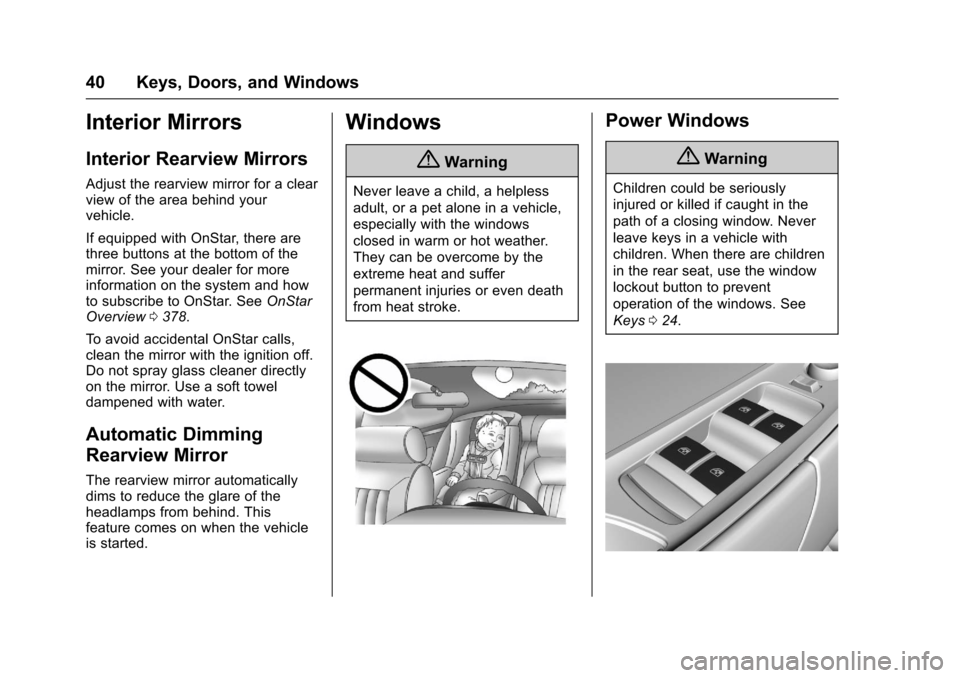
{Warning
Never leave a child, a helpless
adult, or a pet alone in a vehicle,
especially with the windows
closed in warm or hot weather.
They can be overcome by the
extreme heat and suffer
permanent injuries or even death
from heat stroke.
Power Windows
{Warning
Children could be seriously
injured or killed if caught in the
path of a closing window. Never
leave keys in a vehicle with
children. When there are children
in the rear seat, use the window
lockout button to prevent
operation of the windows. See
Keys024.