instrument panel CHEVROLET SS 2017 1.G Owner's Manual
[x] Cancel search | Manufacturer: CHEVROLET, Model Year: 2017, Model line: SS, Model: CHEVROLET SS 2017 1.GPages: 400, PDF Size: 7.31 MB
Page 213 of 400
Chevrolet SS Sedan Owner Manual (GMNA-Localizing-U.S.-10122752) -2017 - crc - 8/31/16
212 Climate Controls
Dual-Zone Mode :Allows differenttemperatures to be set for the driverand passenger sides.
Enter Dual-Zone mode by adjustingthe passenger side temperaturewhen in Single-Zone mode.
Air Delivery Mode Controls :
PressY,),-,or[to change
the current airflow mode. Thecurrent mode selection appears inthe infotainment display. Changingthe mode cancels the automaticoperation and the system goes intosemi-automatic operation. PressAUTO to return to full automaticoperation.
Select from the following:
Y:Air is directed to the instrumentpanel outlets and console outlet.
):Air is divided between theinstrument panel outlets, consoleoutlet and the floor outlets. Coolerair is directed to the upper outletsand warmer air to the floor outlets.
[:Air is directed to the flooroutlets with some air directed to theouter instrument panel, windshield,and side window outlets.
-:Air is directed to the windshield,floor and side window outlets. Usethis mode to clear the windows offog or moisture and warm thepassengers.
5FRONT :Press to turn the
defrost on or off. The5FRONT
indicator appears in the display.Aportionoftheairisdirectedtothewindshield and side window outlets,with some air directed to the outerinstrument panel outlets.
For best results, clear all snow andice from the windshield beforedefrosting.
Air Conditioning
#:Press to turn the airconditioning system on or off. The#appears on the infotainmentdisplay when the air conditioning ison. When the air conditioning is
turned off,#OFF appears on the
infotainment display.
The air conditioning systemremoves moisture and heat fromthe air.
The air conditioning mightautomatically turn off during heavyacceleration, abnormal systempressure or very cold outsidetemperatures.
When-,h,or5FRONTis
selected, the air conditioning isautomatically switched on toimprove defogging performance andremove moisture from the air.
Recirculation
h:Press to change the air intakebetween recirculated air and outside
air.happears on the
infotainment display whenrecirculation is activated.
The recirculation mode recyclesinterior air and is not recommendedfor extended use. If it is used for along period of time, the systemautomatically lets some outside airinto the vehicle for ventilation.
Do not use the recirculation mode ifoccupants are smoking.
The recirculation mode cannot beturned on in defrost mode.
Page 214 of 400
Chevrolet SS Sedan Owner Manual (GMNA-Localizing-U.S.-10122752) -2017 - crc - 8/31/16
Climate Controls 213
AUTOhis displayed when the
system is automatically controllingthe combination of outside andrecirculated air for bestperformance.
Rear Window Defogger
The rear window defogger uses awarming grid to remove fog or frostfrom the rear window. It only workswhen the ignition is on.
K:Press to turn the rear windowdefogger on or off. The indicator onthe button turns on. The rearwindow defogger turns offautomatically if it is left on.
Caution
Using a razor blade or sharp
object on the inside rear window
can damage the antenna or
defogger. Repairs would not be
covered by the vehicle warranty.
Do not stick anything to the rear
window.
Heated Mirrors :If equipped withheated outside mirrors, the mirrorsheat to help clear fog or frost fromthe surface of the mirror when therear window defog button ispressed. SeeHeated Mirrors039.
Sensors
The automatic climate controlsystem uses sensors to maintaintemperatures. The solar sensor ison the instrument panel near thewindshield, and the outsidetemperature sensor is in front of theradiator.
The solar sensor monitors the solarradiation when operating in AUTOmode, adjusting the temperature,fan speed and air delivery.
The system may also supply coolerair to the side of the vehicle facingthe sun. The recirculation mode willalso be activated, as necessary.
The outside temperature sensor canbe affected by radiant heat whenthe vehicle is not moving.
To p r e v e n t f a l s e t e m p e r a t u r ereadings, the displayed temperaturewill not update at low vehiclespeeds.
If the vehicle has been turned off forless than four hours, thetemperature at start up will berecalled from previous operation.
Do not cover the sensors; otherwisethe automatic climate control systemwill not work properly.
Remote Start Climate Control
Operation
If equipped with the remote startfeature, when it is activated, theclimate control system will use theprevious settings. SeeRemoteVehicle Start030.
Regular Operation
Adjusting the Temperature
When the climate control systemhas stabilized, adjust thetemperature to a comfortablesetting.
Page 215 of 400
Chevrolet SS Sedan Owner Manual (GMNA-Localizing-U.S.-10122752) -2017 - crc - 8/31/16
214 Climate Controls
Quick Cool Down
When entering the vehicle on a hotday, open the windows for a shorttime to allow the hot air to escape.
Automatic Transmission
If the vehicle is stopped for a longtime in hot weather and the engineis running and the air conditioning isoperating, move the shift lever toN(Neutral)orP(Park).
A/C Sound
Aslighthissingsoundwhentheairconditioning is turned off is normal.
Water Condensation
Water may drip from underneath thevehicle; this is normal.
Unsealed Dusty Roads
To h e l p p r e v e n t d u s t f r o m e n t e r i n gyour vehicle:
.When following other vehicleson dusty roads and the dust is
airborne, selecth.
.If the dust is not airborne, selectoutside air and set the fancontrol to high speed.
.Close all windows.
.Do not use recirculation for longperiods of time.
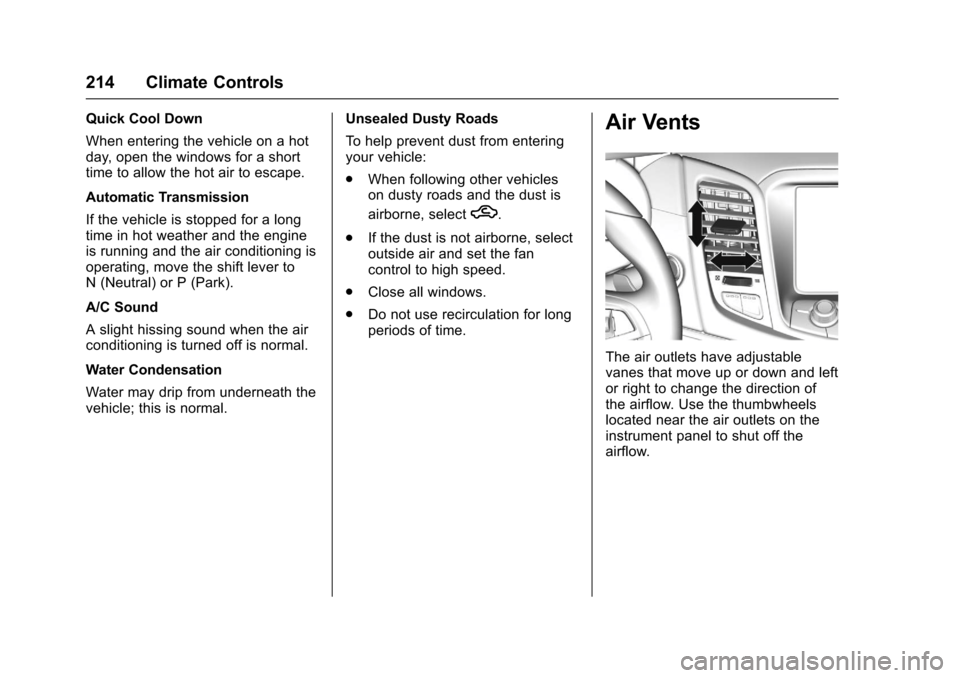
Air Vents
The air outlets have adjustablevanes that move up or down and leftor right to change the direction ofthe airflow. Use the thumbwheelslocated near the air outlets on theinstrument panel to shut off theairflow.
Page 225 of 400
Chevrolet SS Sedan Owner Manual (GMNA-Localizing-U.S.-10122752) -2017 - crc - 8/31/16
224 Driving and Operating
.Pay attention to special roadsigns (e.g., falling rocks area,winding roads, long grades,passing or no-passing zones)and take appropriate action.
Winter Driving
Driving on Snow or Ice
Snow or ice between the tires andthe road creates less traction orgrip, so drive carefully. Wet ice canoccur at about 0 °C (32 °F) whenfreezing rain begins to fall. Avoiddriving on wet ice or in freezing rainuntil roads can be treated.
For Slippery Road Driving:
.Accelerate gently. Acceleratingtoo quickly causes the wheels tospin and makes the surfaceunder the tires slick.
.Turn on Traction Control. SeeTr a c t i o n C o n t r o l / E l e c t r o n i cStability Control0245.
.The Antilock Brake System(ABS) improves vehicle stabilityduring hard stops, but thebrakes should be applied sooner
than when on dry pavement.SeeAntilock Brake System(ABS)0241.
.Allow greater following distanceand watch for slippery spots. Icypatches can occur on otherwiseclear roads in shaded areas.The surface of a curve or anoverpass can remain icy whenthe surrounding roads are clear.Avoid sudden steeringmaneuvers and braking whileon ice.
.Turn off cruise control.
Blizzard Conditions
Stop the vehicle in a safe place andsignal for help. Stay with the vehicleunless there is help nearby.If possible, use RoadsideAssistance. SeeRoadsideAssistance Program0368.Togethelp and keep everyone in thevehicle safe:
.Turn on the hazard warningflashers.
.Tie a red cloth to an outsidemirror.
{Warning
Snow can trap engine exhaust
under the vehicle. This may
cause exhaust gases to get
inside. Engine exhaust contains
carbon monoxide (CO), which
cannot be seen or smelled. It can
cause unconsciousness and even
death.
If the vehicle is stuck in snow:
.Clear snow from the base ofthe vehicle, especially anyblocking the exhaust pipe.
.Open a window about 5 cm(2 in) on the vehicle sidethat is away from the wind,to bring in fresh air.
.Fully open the air outlets onor under the instrumentpanel.
.Adjust the climate controlsystem to circulate the airinside the vehicle and set
(Continued)
Page 271 of 400
Chevrolet SS Sedan Owner Manual (GMNA-Localizing-U.S.-10122752) -2017 - crc - 8/31/16
270 Vehicle Care
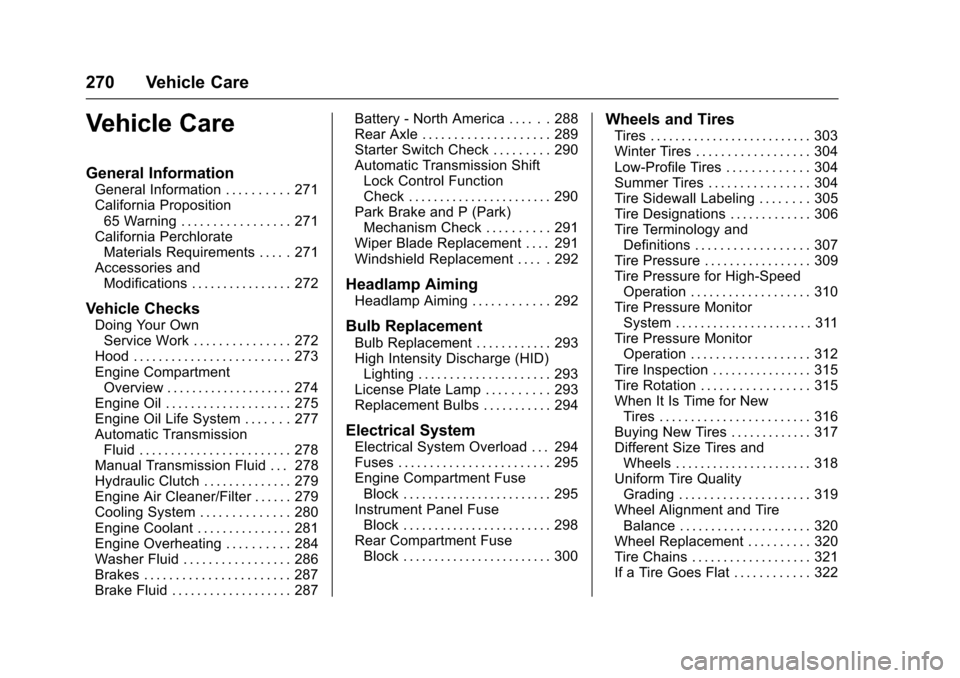
Vehicle Care
General Information
General Information . . . . . . . . . . 271California Proposition65 Warning . . . . . . . . . . . . . . . . . 271California PerchlorateMaterials Requirements . . . . . 271Accessories andModifications . . . . . . . . . . . . . . . . 272
Vehicle Checks
Doing Your OwnService Work . . . . . . . . . . . . . . . 272Hood . . . . . . . . . . . . . . . . . . . . . . . . . 273Engine CompartmentOverview . . . . . . . . . . . . . . . . . . . . 274Engine Oil . . . . . . . . . . . . . . . . . . . . 275Engine Oil Life System . . . . . . . 277Automatic TransmissionFluid . . . . . . . . . . . . . . . . . . . . . . . . 278Manual Transmission Fluid . . . 278Hydraulic Clutch . . . . . . . . . . . . . . 279Engine Air Cleaner/Filter . . . . . . 279Cooling System . . . . . . . . . . . . . . 280Engine Coolant . . . . . . . . . . . . . . . 281Engine Overheating . . . . . . . . . . 284Washer Fluid . . . . . . . . . . . . . . . . . 286Brakes . . . . . . . . . . . . . . . . . . . . . . . 287Brake Fluid . . . . . . . . . . . . . . . . . . . 287
Battery - North America . . . . . . 288Rear Axle . . . . . . . . . . . . . . . . . . . . 289Starter Switch Check . . . . . . . . . 290Automatic Transmission ShiftLock Control FunctionCheck . . . . . . . . . . . . . . . . . . . . . . . 290Park Brake and P (Park)Mechanism Check . . . . . . . . . . 291Wiper Blade Replacement . . . . 291Windshield Replacement . . . . . 292
Headlamp Aiming
Headlamp Aiming . . . . . . . . . . . . 292
Bulb Replacement
Bulb Replacement . . . . . . . . . . . . 293High Intensity Discharge (HID)Lighting . . . . . . . . . . . . . . . . . . . . . 293License Plate Lamp . . . . . . . . . . 293Replacement Bulbs . . . . . . . . . . . 294
Electrical System
Electrical System Overload . . . 294Fuses . . . . . . . . . . . . . . . . . . . . . . . . 295Engine Compartment FuseBlock . . . . . . . . . . . . . . . . . . . . . . . . 295Instrument Panel FuseBlock . . . . . . . . . . . . . . . . . . . . . . . . 298Rear Compartment FuseBlock . . . . . . . . . . . . . . . . . . . . . . . . 300
Wheels and Tires
Tires . . . . . . . . . . . . . . . . . . . . . . . . . . 303Winter Tires . . . . . . . . . . . . . . . . . . 304Low-Profile Tires . . . . . . . . . . . . . 304Summer Tires . . . . . . . . . . . . . . . . 304Tire Sidewall Labeling . . . . . . . . 305Tire Designations . . . . . . . . . . . . . 306Tire Terminology andDefinitions . . . . . . . . . . . . . . . . . . 307Tire Pressure . . . . . . . . . . . . . . . . . 309Tire Pressure for High-SpeedOperation . . . . . . . . . . . . . . . . . . . 310Tire Pressure MonitorSystem . . . . . . . . . . . . . . . . . . . . . . 311Tire Pressure MonitorOperation . . . . . . . . . . . . . . . . . . . 312Tire Inspection . . . . . . . . . . . . . . . . 315Tire Rotation . . . . . . . . . . . . . . . . . 315When It Is Time for NewTires . . . . . . . . . . . . . . . . . . . . . . . . 316Buying New Tires . . . . . . . . . . . . . 317Different Size Tires andWheels . . . . . . . . . . . . . . . . . . . . . . 318Uniform Tire QualityGrading . . . . . . . . . . . . . . . . . . . . . 319Wheel Alignment and TireBalance . . . . . . . . . . . . . . . . . . . . . 320Wheel Replacement . . . . . . . . . . 320Tire Chains . . . . . . . . . . . . . . . . . . . 321If a Tire Goes Flat . . . . . . . . . . . . 322
Page 274 of 400
Chevrolet SS Sedan Owner Manual (GMNA-Localizing-U.S.-10122752) -2017 - crc - 8/31/16
Vehicle Care 273
Keep a record with all parts receiptsand list the mileage and the date ofany service work performed. SeeMaintenance Records0360.
Caution
Even small amounts of
contamination can cause damage
to vehicle systems. Do not allow
contaminants to contact the fluids,
reservoir caps, or dipsticks.
Hood
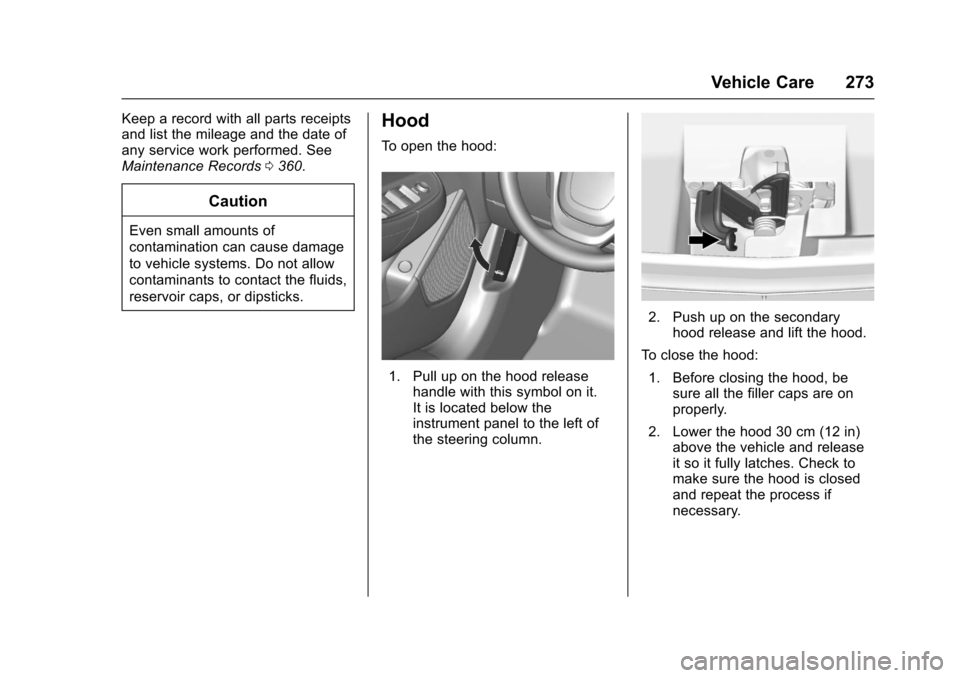
To o p e n t h e h o o d :
1. Pull up on the hood releasehandle with this symbol on it.It is located below theinstrument panel to the left ofthe steering column.
2. Push up on the secondaryhood release and lift the hood.
To c l o s e t h e h o o d :
1. Before closing the hood, besure all the filler caps are onproperly.
2. Lower the hood 30 cm (12 in)above the vehicle and releaseit so it fully latches. Check tomake sure the hood is closedand repeat the process ifnecessary.
Page 285 of 400
Chevrolet SS Sedan Owner Manual (GMNA-Localizing-U.S.-10122752) -2017 - crc - 8/31/16
284 Vehicle Care
If no coolant is visible in the enginecoolant recovery reservoir, addcoolant as follows:
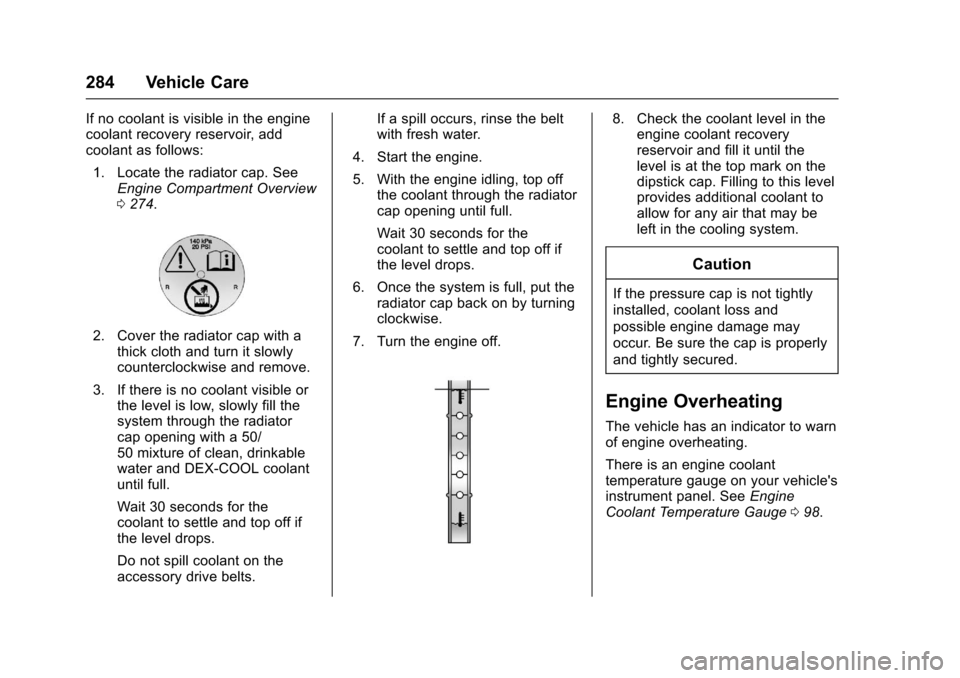
1. Locate the radiator cap. SeeEngine Compartment Overview0274.
2. Cover the radiator cap with athick cloth and turn it slowlycounterclockwise and remove.
3. If there is no coolant visible orthe level is low, slowly fill thesystem through the radiatorcap opening with a 50/50 mixture of clean, drinkablewater and DEX-COOL coolantuntil full.
Wait 30 seconds for thecoolant to settle and top off ifthe level drops.
Do not spill coolant on theaccessory drive belts.
If a spill occurs, rinse the beltwith fresh water.
4. Start the engine.
5. With the engine idling, top offthe coolant through the radiatorcap opening until full.
Wait 30 seconds for thecoolant to settle and top off ifthe level drops.
6. Once the system is full, put theradiator cap back on by turningclockwise.
7. Turn the engine off.
8. Check the coolant level in theengine coolant recoveryreservoir and fill it until thelevel is at the top mark on thedipstick cap. Filling to this levelprovides additional coolant toallow for any air that may beleft in the cooling system.
Caution
If the pressure cap is not tightly
installed, coolant loss and
possible engine damage may
occur. Be sure the cap is properly
and tightly secured.
Engine Overheating
The vehicle has an indicator to warnof engine overheating.
There is an engine coolanttemperature gauge on your vehicle'sinstrument panel. SeeEngineCoolant Temperature Gauge098.
Page 298 of 400
Chevrolet SS Sedan Owner Manual (GMNA-Localizing-U.S.-10122752) -2017 - crc - 8/31/16
Vehicle Care 297
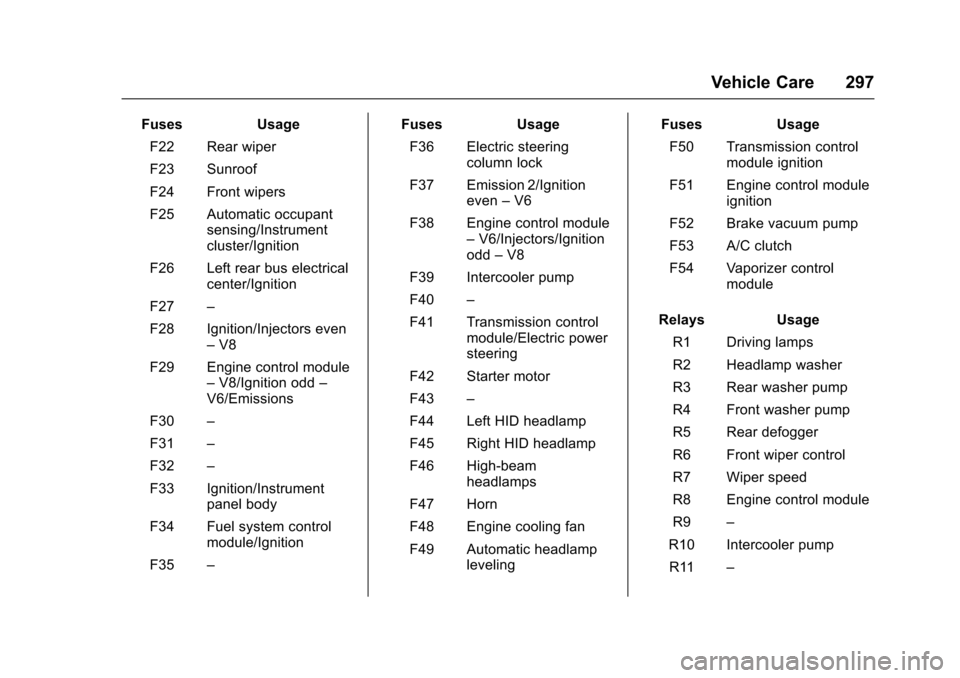
FusesUsage
F22 Rear wiper
F23 Sunroof
F24 Front wipers
F25 Automatic occupantsensing/Instrumentcluster/Ignition
F26 Left rear bus electricalcenter/Ignition
F27–
F28 Ignition/Injectors even–V8
F29 Engine control module–V8/Ignition odd–V6/Emissions
F30–
F31–
F32–
F33 Ignition/Instrumentpanel body
F34 Fuel system controlmodule/Ignition
F35–
FusesUsage
F36 Electric steeringcolumn lock
F37 Emission 2/Ignitioneven–V6
F38 Engine control module–V6/Injectors/Ignitionodd–V8
F39 Intercooler pump
F40–
F41 Transmission controlmodule/Electric powersteering
F42 Starter motor
F43–
F44 Left HID headlamp
F45 Right HID headlamp
F46 High-beamheadlamps
F47 Horn
F48 Engine cooling fan
F49 Automatic headlampleveling
FusesUsage
F50 Transmission controlmodule ignition
F51 Engine control moduleignition
F52 Brake vacuum pump
F53 A/C clutch
F54 Vaporizer controlmodule
RelaysUsage
R1 Driving lamps
R2 Headlamp washer
R3 Rear washer pump
R4 Front washer pump
R5 Rear defogger
R6 Front wiper control
R7 Wiper speed
R8 Engine control module
R9–
R10 Intercooler pump
R11–
Page 299 of 400
Chevrolet SS Sedan Owner Manual (GMNA-Localizing-U.S.-10122752) -2017 - crc - 8/31/16
298 Vehicle Care
RelaysUsage
R12 Rear wiper control
R13 Fog lamps
R14 Low-beam headlamps
R15 High-beamheadlamps
R16 Starter
R17 Run/Crank
R18 Brake vacuum pump
R19 A/C control
R20 Horn
Relays R3, R4, R12, R13, and R20are PCB mounted relays.
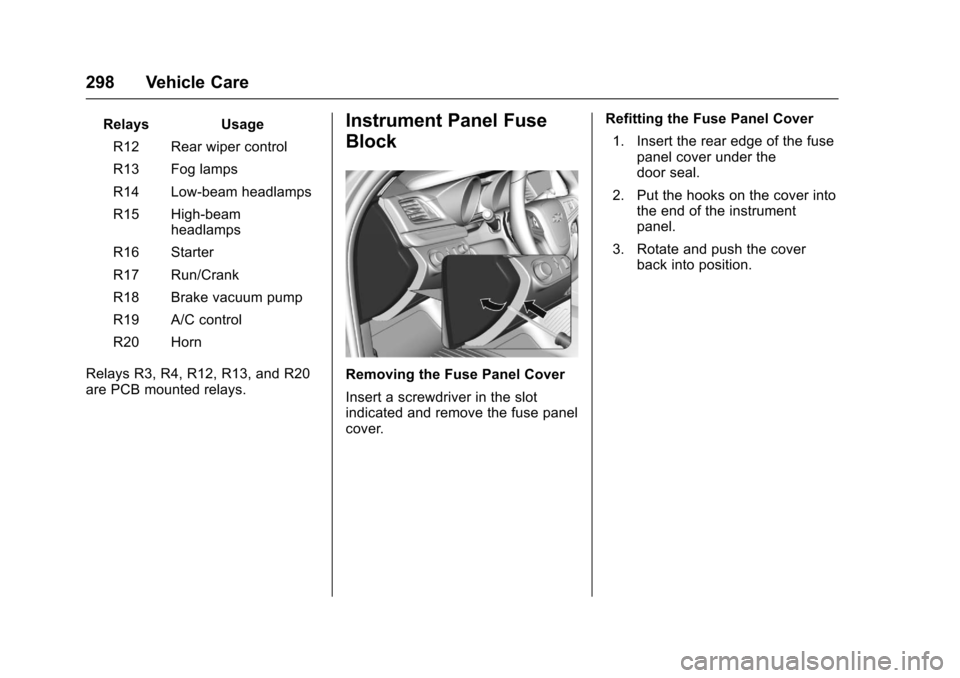
Instrument Panel Fuse
Block
Removing the Fuse Panel Cover
Insert a screwdriver in the slotindicated and remove the fuse panelcover.
Refitting the Fuse Panel Cover
1. Insert the rear edge of the fusepanel cover under thedoor seal.
2. Put the hooks on the cover intothe end of the instrumentpanel.
3. Rotate and push the coverback into position.
Page 346 of 400
Chevrolet SS Sedan Owner Manual (GMNA-Localizing-U.S.-10122752) -2017 - crc - 8/31/16
Vehicle Care 345
Cleaning High Gloss Surfaces
and Vehicle Information and
Radio Displays
Use a microfiber cloth on high glosssurfaces or vehicle displays. First,use a soft bristle brush to removedirt that can scratch the surface.Then gently clean by rubbing with amicrofiber cloth. Never use windowcleaners or solvents. Periodicallyhand wash the microfiber clothseparately, using mild soap. Do notuse bleach or fabric softener. Rinsethoroughly and air dry beforenext use.
Caution
Do not attach a device with a
suction cup to the display. This
may cause damage and would
not be covered by the vehicle
warranty.
Instrument Panel, Leather,
Vinyl, Other Plastic Surfaces,
Low Gloss Paint Surfaces and
Natural Open Pore Wood
Surfaces
Use a soft microfiber clothdampened with water to removedust and loose dirt. For a morethorough cleaning, use a softmicrofiber cloth dampened with amild soap solution.
Caution
Soaking or saturating leather,
especially perforated leather, as
well as other interior surfaces,
may cause permanent damage.
Wipe excess moisture from these
surfaces after cleaning and allow
them to dry naturally. Never use
heat, steam, or spot removers. Do
not use cleaners that contain
silicone or wax-based products.
Cleaners containing these
solvents can permanently change
(Continued)
Caution (Continued)
the appearance and feel of
leather or soft trim, and are not
recommended.
Do not use cleaners that increasegloss, especially on the instrumentpanel. Reflected glare can decreasevisibility through the windshieldunder certain conditions.
Caution
Use of air fresheners may cause
permanent damage to plastics
and painted surfaces. If an air
freshener comes in contact with
any plastic or painted surface in
the vehicle, blot immediately and
clean with a soft cloth dampened
with a mild soap solution.
Damage caused by air fresheners
would not be covered by the
vehicle warranty.