engine oil CHEVROLET TAHOE 2018 Owner's Manual
[x] Cancel search | Manufacturer: CHEVROLET, Model Year: 2018, Model line: TAHOE, Model: CHEVROLET TAHOE 2018Pages: 443, PDF Size: 6.05 MB
Page 6 of 443
Chevrolet Tahoe/Suburban Owner Manual (GMNA-Localizing-U.S./Canada/
Mexico-11349385) - 2018 - crc - 11/3/17
In Brief 5
In Brief
Instrument Panel
Instrument Panel Overview . . . . . . 6
Initial Drive Information
Initial Drive Information . . . . . . . . . . 8
Remote Keyless Entry (RKE)System . . . . . . . . . . . . . . . . . . . . . . . . 8
Remote Vehicle Start . . . . . . . . . . . 9
Door Locks . . . . . . . . . . . . . . . . . . . . . 9
Liftgate . . . . . . . . . . . . . . . . . . . . . . . . 10
Windows . . . . . . . . . . . . . . . . . . . . . . . 11
Seat Adjustment . . . . . . . . . . . . . . . 11
Memory Features . . . . . . . . . . . . . . 13
Second Row Seats . . . . . . . . . . . . 13
Third Row Seats . . . . . . . . . . . . . . . 13
Heated and Ventilated Seats . . . 14
Head Restraint Adjustment . . . . 15
Seat Belts . . . . . . . . . . . . . . . . . . . . . 15
Passenger Sensing System . . . 15
Mirror Adjustment . . . . . . . . . . . . . . 16
Steering Wheel Adjustment . . . . 17
Throttle and Brake Pedal Adjustment . . . . . . . . . . . . . . . . . . . 18
Interior Lighting . . . . . . . . . . . . . . . . 18
Exterior Lighting . . . . . . . . . . . . . . . 19
Windshield Wiper/Washer . . . . . . 19
Climate Controls . . . . . . . . . . . . . . . 20 Transmission . . . . . . . . . . . . . . . . . . 21
Four-Wheel Drive . . . . . . . . . . . . . . 21
Vehicle Features
Infotainment System . . . . . . . . . . . 22
Steering Wheel Controls . . . . . . . 22
Cruise Control . . . . . . . . . . . . . . . . . 23
Driver Information
Center (DIC) . . . . . . . . . . . . . . . . . 23
Forward Collision Alert (FCA) System . . . . . . . . . . . . . . . . . . . . . . . 24
Forward Automatic Braking (FAB) . . . . . . . . . . . . . . . . 24
Lane Keep Assist (LKA) (1500 Series) . . . . . . . . . . . . . . . . . . . . . . . 24
Lane Change Alert (LCA) . . . . . . 24
Rear Vision Camera (RVC) . . . . 24
Rear Cross Traffic Alert (RCTA) System . . . . . . . . . . . . . . . . . . . . . . . 25
Parking Assist . . . . . . . . . . . . . . . . . 25
Power Outlets . . . . . . . . . . . . . . . . . 25
Universal Remote System . . . . . 26
Sunroof . . . . . . . . . . . . . . . . . . . . . . . . 26
Performance and Maintenance
Traction Control/Electronic Stability Control . . . . . . . . . . . . . . 27
Tire Pressure Monitor . . . . . . . . . . 27
Fuel . . . . . . . . . . . . . . . . . . . . . . . . . . . 28
E85 or FlexFuel . . . . . . . . . . . . . . . . 28
Engine Oil Life System . . . . . . . . 28 Driving for Better Fuel
Economy . . . . . . . . . . . . . . . . . . . . . 29
Roadside Assistance Program . . . . . . . . . . . . . . . . . . . . . . 29
Page 29 of 443
Chevrolet Tahoe/Suburban Owner Manual (GMNA-Localizing-U.S./Canada/
Mexico-11349385) - 2018 - crc - 11/3/17
28 In Brief
the tires to the recommended
pressure shown on the Tire and
Loading Information label. See
Vehicle Load Limits0212. The
warning light will remain on until the
tire pressure is corrected.
The low tire pressure warning light
may come on in cool weather when
the vehicle is first started, and then
turn off as the vehicle is driven. This
may be an early indicator that the
tire pressures are getting low and
the tires need to be inflated to the
proper pressure.
The TPMS does not replace normal
monthly tire maintenance. Maintain
the correct tire pressures.
See Tire Pressure Monitor System
0 345.
Tire Fill Alert (If Equipped)
This feature provides visual and
audible alerts outside the vehicle to
help when inflating an underinflated
tire to the recommended cold tire
pressure. See “Tire Fill Alert (If
Equipped)” underTire Pressure
Monitor Operation 0346.Fuel
Regular Fuel
Use only unleaded gasoline rated
87 octane or higher in your vehicle.
Do not use gasoline with an octane
rating lower as it may result in
vehicle damage and lower fuel
economy. See Fuel0266.
E85 or FlexFuel
FlexFuel Possible
Certain models are compatible with
E85 fuel. See E85 or FlexFuel
0 268.
Engine Oil Life System
The engine oil life system calculates
engine oil life based on vehicle use
and, on most vehicles, displays a
DIC message when it is necessary
to change the engine oil and filter.
The oil life system should be reset
to 100% only following an oil
change.
Resetting the Oil Life System
To reset the engine oil life system:
1. Display OIL LIFE REMAINING on the DIC.
See Driver Information Center
(DIC) (Base Level) 0161 or
Driver Information Center (DIC)
(Uplevel) 0162. If the vehicle
does not have DIC buttons, the
vehicle must be in P (Park) to
access this display.
2. Press and hold
Von the DIC,
or the trip odometer reset stem
if the vehicle does not have
DIC buttons, for several
seconds. The oil life will
change to 100%.
Page 30 of 443
Chevrolet Tahoe/Suburban Owner Manual (GMNA-Localizing-U.S./Canada/
Mexico-11349385) - 2018 - crc - 11/3/17
In Brief 29
The oil life system can also be reset
as follows:1. Display OIL LIFE REMAINING on the DIC.
See Driver Information Center
(DIC) (Base Level) 0161 or
Driver Information Center (DIC)
(Uplevel) 0162.
2. Fully press the accelerator pedal slowly three times within
five seconds.
3. If the display changes to 100%, the system is reset.
See Engine Oil Life System 0299.
Driving for Better Fuel
Economy
Driving habits can affect fuel
mileage. Here are some driving tips
to get the best fuel economy
possible.
.
Avoid fast starts and accelerate
smoothly.
. Brake gradually and avoid
abrupt stops. .
Avoid idling the engine for long
periods of time.
. When road and weather
conditions are appropriate, use
cruise control.
. Always follow posted speed
limits or drive more slowly when
conditions require.
. Keep vehicle tires properly
inflated.
. Combine several trips into a
single trip.
. Replace the vehicle's tires with
the same TPC Spec number
molded into the tire's sidewall
near the size.
. Follow recommended scheduled
maintenance.
Roadside Assistance
Program
U.S.: 1-800-243-8872
TTY Users (U.S. Only):
1-888-889-2438
Canada: 1-800-268-6800 New Chevrolet owners are
automatically enrolled in the
Roadside Assistance Program.
See
Roadside Assistance Program
0 408.
Page 44 of 443
Chevrolet Tahoe/Suburban Owner Manual (GMNA-Localizing-U.S./Canada/
Mexico-11349385) - 2018 - crc - 11/3/17
Keys, Doors, and Windows 43
1. Separate and remove the backcover of the transmitter with a
flat, thin object, such as a coin.
2. Press and slide the batterydown toward the pocket of the
transmitter in the direction of
the key ring. Do not use a
metal object
3. Remove the battery.
4. Insert the new battery, positive side facing up. Replace with a
CR2032 or equivalent battery.
5. Push together the transmitter back cover top side first, and
then the bottom toward the
key ring.
Remote Vehicle Start
If equipped with the remote start
feature, the climate control system
will come on when the vehicle is
started remotely depending on the
outside temperature.
The rear defog and heated and
ventilated seats, if equipped, may
also come on.
See Heated and Ventilated Front
Seats 072 and Vehicle
Personalization 0170. Laws in some communities may
restrict the use of remote starters.
Check local regulations for any
requirements on remote starting of
vehicles.
Do not use remote start if the
vehicle is low on fuel.
The vehicle cannot be remote
started if:
.
The key is in the ignition (Key
Access) or the transmitter is in
the vehicle (Keyless Access).
. The hood is not closed.
. There is an emission control
system malfunction and the
malfunction indicator lamp is on.
The engine will turn off during a
remote vehicle start if:
. The coolant temperature gets
too high.
. The oil pressure gets low.
The RKE transmitter range may be
reduced while the vehicle is running.
Page 132 of 443
Chevrolet Tahoe/Suburban Owner Manual (GMNA-Localizing-U.S./Canada/
Mexico-11349385) - 2018 - crc - 11/3/17
Instruments and Controls 131
Instruments and
Controls
Controls
Steering Wheel Adjustment . . . 132
Steering Wheel Controls . . . . . . 133
Heated Steering Wheel . . . . . . . 133
Horn . . . . . . . . . . . . . . . . . . . . . . . . . . 133
Windshield Wiper/Washer . . . . 134
Rear Window Wiper/Washer . . . . . . . . . . . . . . . . . . . . . 136
Compass . . . . . . . . . . . . . . . . . . . . . 136
Clock . . . . . . . . . . . . . . . . . . . . . . . . . 137
Power Outlets . . . . . . . . . . . . . . . . 138
Wireless Charging . . . . . . . . . . . . 140
Warning Lights, Gauges, and
Indicators
Warning Lights, Gauges, and Indicators . . . . . . . . . . . . . . . . . . . 142
Instrument Cluster . . . . . . . . . . . . 143
Speedometer . . . . . . . . . . . . . . . . . 147
Odometer . . . . . . . . . . . . . . . . . . . . . 147
Trip Odometer . . . . . . . . . . . . . . . . 147
Tachometer . . . . . . . . . . . . . . . . . . . 147
Fuel Gauge . . . . . . . . . . . . . . . . . . . 147
Engine Oil Pressure
Gauge . . . . . . . . . . . . . . . . . . . . . . 148 Engine Coolant Temperature
Gauge . . . . . . . . . . . . . . . . . . . . . . 149
Voltmeter Gauge . . . . . . . . . . . . . 150
Seat Belt Reminders . . . . . . . . . 151
Airbag Readiness Light . . . . . . . 151
Passenger Airbag Status Indicator . . . . . . . . . . . . . . . . . . . . 152
Charging System Light . . . . . . . 153
Malfunction Indicator Lamp . . . 153
Brake System Warning Light . . . . . . . . . . . . . . . . . . . . . . . . 155
Antilock Brake System (ABS) Warning Light . . . . . . . . . . . . . . . 156
Four-Wheel-Drive Light . . . . . . . 156
Tow/Haul Mode Light . . . . . . . . . 156
Hill Descent Control Light . . . . 157
Lane Keep Assist (LKA) Light (1500 Series) . . . . . . . . . . . . . . . 157
Vehicle Ahead Indicator . . . . . . 157
Traction Off Light . . . . . . . . . . . . . 157
StabiliTrak OFF Light . . . . . . . . . 158
Traction Control System (TCS)/ StabiliTrak Light . . . . . . . . . . . . . 158
Tire Pressure Light . . . . . . . . . . . 158
Low Fuel Warning Light . . . . . . 159
Security Light . . . . . . . . . . . . . . . . . 159
High-Beam On Light . . . . . . . . . . 159
Front Fog Lamp Light . . . . . . . . . 160
Lamps On Reminder . . . . . . . . . 160
Cruise Control Light . . . . . . . . . . 160 Door Ajar Light . . . . . . . . . . . . . . . 160
Information Displays
Driver Information Center (DIC)
(Base Level) . . . . . . . . . . . . . . . . 161
Driver Information Center (DIC) (Uplevel) . . . . . . . . . . . . . . . . . . . . 162
Head-Up Display (HUD) . . . . . . 165
Vehicle Messages
Vehicle Messages . . . . . . . . . . . . 169
Engine Power Messages . . . . . 169
Vehicle Speed Messages . . . . . 169
Vehicle Personalization
Vehicle Personalization . . . . . . . 170
Universal Remote System
Universal Remote System . . . . 178
Universal Remote System Programming . . . . . . . . . . . . . . . 178
Universal Remote System Operation . . . . . . . . . . . . . . . . . . . 180
Page 149 of 443
Chevrolet Tahoe/Suburban Owner Manual (GMNA-Localizing-U.S./Canada/
Mexico-11349385) - 2018 - crc - 11/3/17
148 Instruments and Controls
English
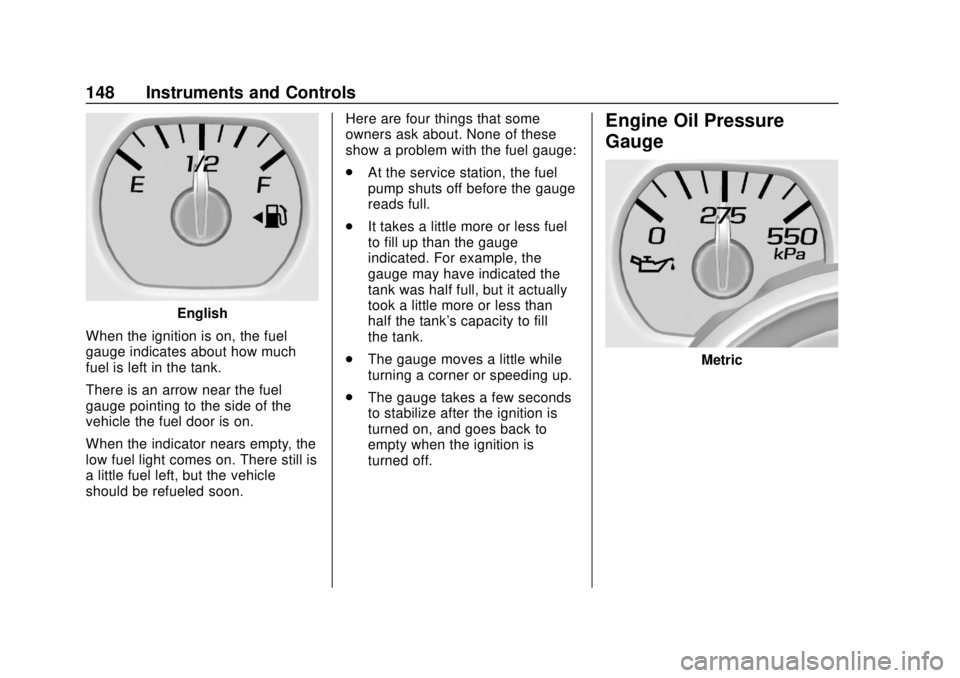
When the ignition is on, the fuel
gauge indicates about how much
fuel is left in the tank.
There is an arrow near the fuel
gauge pointing to the side of the
vehicle the fuel door is on.
When the indicator nears empty, the
low fuel light comes on. There still is
a little fuel left, but the vehicle
should be refueled soon. Here are four things that some
owners ask about. None of these
show a problem with the fuel gauge:
.
At the service station, the fuel
pump shuts off before the gauge
reads full.
. It takes a little more or less fuel
to fill up than the gauge
indicated. For example, the
gauge may have indicated the
tank was half full, but it actually
took a little more or less than
half the tank's capacity to fill
the tank.
. The gauge moves a little while
turning a corner or speeding up.
. The gauge takes a few seconds
to stabilize after the ignition is
turned on, and goes back to
empty when the ignition is
turned off.
Engine Oil Pressure
Gauge
Metric
Page 150 of 443
Chevrolet Tahoe/Suburban Owner Manual (GMNA-Localizing-U.S./Canada/
Mexico-11349385) - 2018 - crc - 11/3/17
Instruments and Controls 149
English
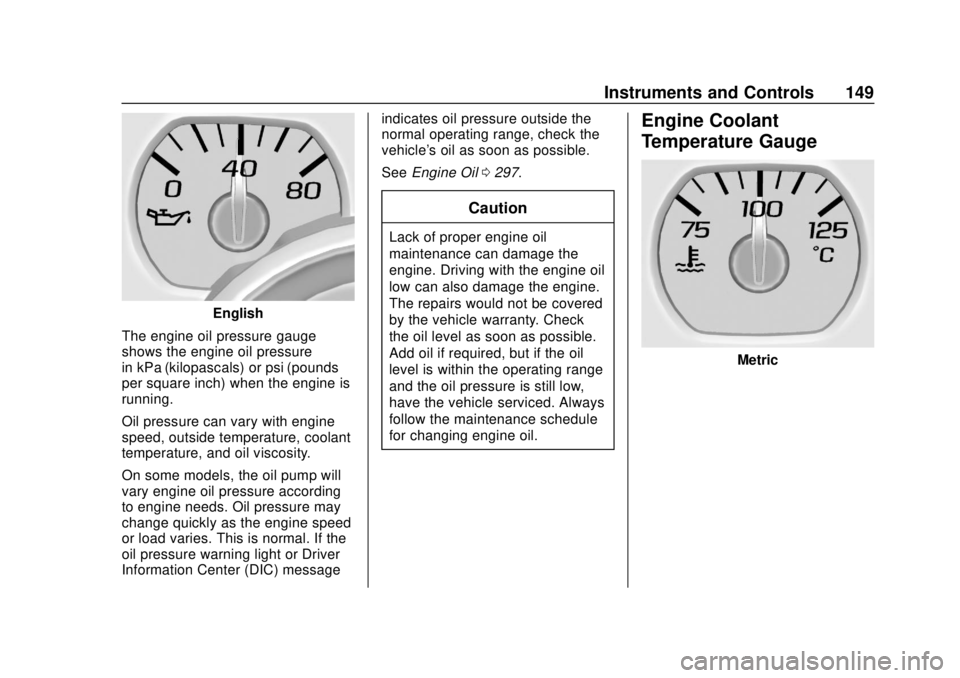
The engine oil pressure gauge
shows the engine oil pressure
in kPa (kilopascals) or psi (pounds
per square inch) when the engine is
running.
Oil pressure can vary with engine
speed, outside temperature, coolant
temperature, and oil viscosity.
On some models, the oil pump will
vary engine oil pressure according
to engine needs. Oil pressure may
change quickly as the engine speed
or load varies. This is normal. If the
oil pressure warning light or Driver
Information Center (DIC) message indicates oil pressure outside the
normal operating range, check the
vehicle's oil as soon as possible.
See
Engine Oil 0297.
Caution
Lack of proper engine oil
maintenance can damage the
engine. Driving with the engine oil
low can also damage the engine.
The repairs would not be covered
by the vehicle warranty. Check
the oil level as soon as possible.
Add oil if required, but if the oil
level is within the operating range
and the oil pressure is still low,
have the vehicle serviced. Always
follow the maintenance schedule
for changing engine oil.
Engine Coolant
Temperature Gauge
Metric
Page 163 of 443
Chevrolet Tahoe/Suburban Owner Manual (GMNA-Localizing-U.S./Canada/
Mexico-11349385) - 2018 - crc - 11/3/17
162 Instruments and Controls
Remaining Oil Life
Turn the trip odometer reset stem
until REMAINING OIL LIFE
displays. An estimate of the oil's
remaining useful life is shown.
REMAINING OIL LIFE 99% means
99% of the current oil life remains.
When the remaining oil life is low,
the CHANGE ENGINE OIL SOON
message will appear on the display.
The oil should be changed as soon
as possible. SeeEngine Oil0297.
In addition to the engine oil life
system monitoring the oil life,
additional maintenance is
recommended in the Maintenance
Schedule. See Maintenance
Schedule 0389.
The Oil Life display must be reset
after each oil change. It will not
reset itself. Do not reset the Oil Life
display at any time other than when
the oil has just been changed.
It cannot be reset accurately until
the next oil change. To reset the
engine oil life system, see Engine
Oil Life System 0299. Transmission Fluid Temperature
The temperature of the automatic
transmission fluid displays in either
degrees Celsius (°C) or degrees
Fahrenheit (°F).
Trailer Brake
On vehicles with the Integrated
Trailer Brake Control (ITBC) system,
turn the trip odometer reset stem
until TRAILER GAIN and TRAILER
OUTPUT displays.
TRAILER GAIN shows the Trailer
Gain setting. This setting can be
adjusted from 0.0 to 10.0 with either
a trailer connected or disconnected.
TRAILER OUTPUT shows the
power output to the trailer anytime a
trailer with electric brakes is
connected. Output is displayed as a
bar graph. Dashes may appear in
the TRAILER OUTPUT display if a
trailer is not connected.
Hourmeter
This display shows the total number
of hours the engine has run.
Unit
This will change the displays on the
instrument cluster and DIC to either
metric or English (US)
measurements. To change the units,
press the trip odometer reset stem
when UNITS is displayed to enter
the Unit menu. Turn the trip
odometer reset stem to switch
between English and metric. Press
the trip odometer reset stem when
the desired setting is displayed.
Compass
The vehicle may have a compass in
the Driver Information Center (DIC).
See
Compass 0136.
Driver Information Center
(DIC) (Uplevel)
The DIC displays are shown in the
center of the instrument cluster in
the Info app. See Instrument Cluster
0 143. The displays show the status
of many vehicle systems. The
controls for the DIC are on the right
steering wheel control.
Page 165 of 443
Chevrolet Tahoe/Suburban Owner Manual (GMNA-Localizing-U.S./Canada/
Mexico-11349385) - 2018 - crc - 11/3/17
164 Instruments and Controls
Fuel Range :Shows the
approximate distance the vehicle
can be driven without refueling.
LOW will be displayed when the
vehicle is low on fuel. The fuel
range estimate is based on an
average of the vehicle's fuel
economy over recent driving history
and the amount of fuel remaining in
the fuel tank.
Oil Life : Shows an estimate of the
oil's remaining useful life.
If REMAINING OIL LIFE 99% is
displayed, that means 99% of the
current oil life remains.
When the remaining oil life is low,
the CHANGE ENGINE OIL SOON
message will appear on the display.
The oil should be changed as soon
as possible. See Engine Oil0297.
In addition to the engine oil life
system monitoring the oil life,
additional maintenance is
recommended in the Maintenance
Schedule. See Maintenance
Schedule 0389.
The Oil Life display must be reset
after each oil change. It will not
reset itself. Do not reset the Oil Life display at any time other than when
the oil has just been changed.
It cannot be reset accurately until
the next oil change. To reset the
engine oil life system, press and
hold
Vfor several seconds while
the Oil Life display is active. See
Engine Oil Life System 0299.
Tire Pressure : Shows the
approximate pressures of all four
tires. Tire pressure is displayed in
either kilopascal (kPa) or in pounds
per square inch (psi). If the pressure
is low, the value for that tire is
shown in amber.
See Tire Pressure Monitor System
0 345 andTire Pressure Monitor
Operation 0346.
Fuel Economy : The center
displays the approximate
instantaneous fuel economy as a
number and bar graph. Displayed
above the bar graph is a running
average of fuel economy for the
most recently traveled selected
distance. Displayed below the bar
graph is the best average fuel
economy that has been achieved for
the selected distance. The selected distance is displayed at the top of
the page as
“last xxx mi/km.” Next
to the odometer, the Active Fuel
Management displays the number of
cylinders the vehicle is running on.
See Active Fuel Management
0 226.
Press
pto select the distance or
reset best value. Use
wandxto
choose the distance and press
V.
Press
wandxto select “Reset
Best Score.” Press
Vto reset the
best average fuel economy. After
reset, the momentary average fuel
economy will display.
The display provides information on
how current driving behavior affects
the running average and how well
recent driving compares to the best
that has been achieved for the
selected distance.
Timer : This display can be used as
a timer. To start the timer, press
V
while this display is active. The
display will show the amount of time
that has passed since the timer was
last reset. To stop the timer, press
V
Page 222 of 443
Chevrolet Tahoe/Suburban Owner Manual (GMNA-Localizing-U.S./Canada/
Mexico-11349385) - 2018 - crc - 11/3/17
Driving and Operating 221
3 (START) :This is the position that
starts the engine. When the engine
starts, release the key. The ignition
switch returns to ON/RUN for
driving.
A warning tone will sound when the
driver door is opened and the
ignition is in ACC/ACCESSORY or
LOCK/OFF, and the key is in the
ignition.
Starting the Engine
For a heavy-duty Suburban, see the
Suburban Heavy-Duty Package
supplement.
Move the shift lever to P (Park) or
N (Neutral). The engine will not start
in any other position. To restart the
engine when the vehicle is already
moving, use N (Neutral) only.
Caution
Do not try to shift to P (Park) if the
vehicle is moving. If you do, you
could damage the transmission.
Shift to P (Park) only when the
vehicle is stopped.
Caution
If you add electrical parts or
accessories, you could change
the way the engine operates. Any
resulting damage would not be
covered by the vehicle warranty.
See Add-On Electrical Equipment
0 288.
Starting Procedure (Key
Access)
1. With your foot off the
accelerator pedal, turn the
ignition key to START. When
the engine starts, let go of the
key. The idle speed will go
down as the engine gets warm.
Do not race the engine
immediately after starting it.
Operate the engine and
transmission gently to allow the
oil to warm up and lubricate all
moving parts.
When the low fuel warning light
is on and the FUEL LEVEL
LOW message is displayed in
the Driver Information Center (DIC), hold the ignition
switch in the START position to
continue engine cranking.
Caution
Cranking the engine for long
periods of time, by returning the
ignition to the START position
immediately after cranking has
ended, can overheat and damage
the cranking motor, and drain the
battery. Wait at least 15 seconds
between each try, to let the
cranking motor cool down.
2. If the engine does not start after five to 10 seconds,
especially in very cold weather
(below −18 °C or 0 °F), it could
be flooded with too much
gasoline. Try pushing the
accelerator pedal all the way to
the floor and holding it there
while holding the key in START
for up to 15 seconds. Wait at
least 15 seconds between each
try, to allow the cranking motor
to cool down. When the engine