four wheel drive CHEVROLET TAHOE 2018 Owner's Manual
[x] Cancel search | Manufacturer: CHEVROLET, Model Year: 2018, Model line: TAHOE, Model: CHEVROLET TAHOE 2018Pages: 443, PDF Size: 6.05 MB
Page 6 of 443
Chevrolet Tahoe/Suburban Owner Manual (GMNA-Localizing-U.S./Canada/
Mexico-11349385) - 2018 - crc - 11/3/17
In Brief 5
In Brief
Instrument Panel
Instrument Panel Overview . . . . . . 6
Initial Drive Information
Initial Drive Information . . . . . . . . . . 8
Remote Keyless Entry (RKE)System . . . . . . . . . . . . . . . . . . . . . . . . 8
Remote Vehicle Start . . . . . . . . . . . 9
Door Locks . . . . . . . . . . . . . . . . . . . . . 9
Liftgate . . . . . . . . . . . . . . . . . . . . . . . . 10
Windows . . . . . . . . . . . . . . . . . . . . . . . 11
Seat Adjustment . . . . . . . . . . . . . . . 11
Memory Features . . . . . . . . . . . . . . 13
Second Row Seats . . . . . . . . . . . . 13
Third Row Seats . . . . . . . . . . . . . . . 13
Heated and Ventilated Seats . . . 14
Head Restraint Adjustment . . . . 15
Seat Belts . . . . . . . . . . . . . . . . . . . . . 15
Passenger Sensing System . . . 15
Mirror Adjustment . . . . . . . . . . . . . . 16
Steering Wheel Adjustment . . . . 17
Throttle and Brake Pedal Adjustment . . . . . . . . . . . . . . . . . . . 18
Interior Lighting . . . . . . . . . . . . . . . . 18
Exterior Lighting . . . . . . . . . . . . . . . 19
Windshield Wiper/Washer . . . . . . 19
Climate Controls . . . . . . . . . . . . . . . 20 Transmission . . . . . . . . . . . . . . . . . . 21
Four-Wheel Drive . . . . . . . . . . . . . . 21
Vehicle Features
Infotainment System . . . . . . . . . . . 22
Steering Wheel Controls . . . . . . . 22
Cruise Control . . . . . . . . . . . . . . . . . 23
Driver Information
Center (DIC) . . . . . . . . . . . . . . . . . 23
Forward Collision Alert (FCA) System . . . . . . . . . . . . . . . . . . . . . . . 24
Forward Automatic Braking (FAB) . . . . . . . . . . . . . . . . 24
Lane Keep Assist (LKA) (1500 Series) . . . . . . . . . . . . . . . . . . . . . . . 24
Lane Change Alert (LCA) . . . . . . 24
Rear Vision Camera (RVC) . . . . 24
Rear Cross Traffic Alert (RCTA) System . . . . . . . . . . . . . . . . . . . . . . . 25
Parking Assist . . . . . . . . . . . . . . . . . 25
Power Outlets . . . . . . . . . . . . . . . . . 25
Universal Remote System . . . . . 26
Sunroof . . . . . . . . . . . . . . . . . . . . . . . . 26
Performance and Maintenance
Traction Control/Electronic Stability Control . . . . . . . . . . . . . . 27
Tire Pressure Monitor . . . . . . . . . . 27
Fuel . . . . . . . . . . . . . . . . . . . . . . . . . . . 28
E85 or FlexFuel . . . . . . . . . . . . . . . . 28
Engine Oil Life System . . . . . . . . 28 Driving for Better Fuel
Economy . . . . . . . . . . . . . . . . . . . . . 29
Roadside Assistance Program . . . . . . . . . . . . . . . . . . . . . . 29
Page 9 of 443
Chevrolet Tahoe/Suburban Owner Manual (GMNA-Localizing-U.S./Canada/
Mexico-11349385) - 2018 - crc - 11/3/17
8 In Brief
22. Data Link Connector (DLC)(Out of View). See Malfunction
Indicator Lamp 0153.
23. Four-Wheel Drive 0234 (If
Equipped).
24. Parking Brake 0240.
25. Exterior Lamp Controls 0181.
Fog Lamps 0186 (If
Equipped).
26. Instrument Panel Illumination
Control 0187.Initial Drive
Information
This section provides a brief
overview about some of the
important features that may or may
not be on your specific vehicle.
For more detailed information, refer
to each of the features which can be
found later in this owner ’s manual.
Remote Keyless Entry
(RKE) System
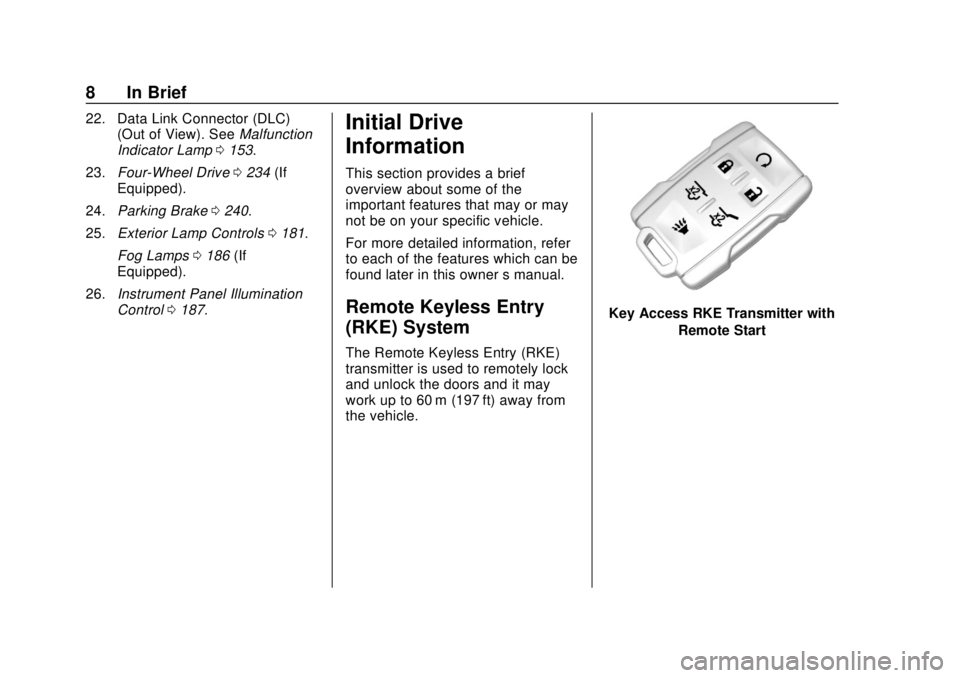
The Remote Keyless Entry (RKE)
transmitter is used to remotely lock
and unlock the doors and it may
work up to 60 m (197 ft) away from
the vehicle.
Key Access RKE Transmitter with
Remote Start
Page 22 of 443
Chevrolet Tahoe/Suburban Owner Manual (GMNA-Localizing-U.S./Canada/
Mexico-11349385) - 2018 - crc - 11/3/17
In Brief 21
10. Rear Temperature Control
11. Rear Air Delivery Mode Control
12. Rear Fan Control
13. Front Climate Control PowerButton
14. Rear AUTO (Automatic Operation)
15. Rear Climate Control Power Button
16. Air Recirculation
17. AUTO (Automatic Operation)
See Dual Automatic Climate Control
System 0192 andRear Climate
Control System 0196 (if equipped).
Transmission
Range Selection Mode
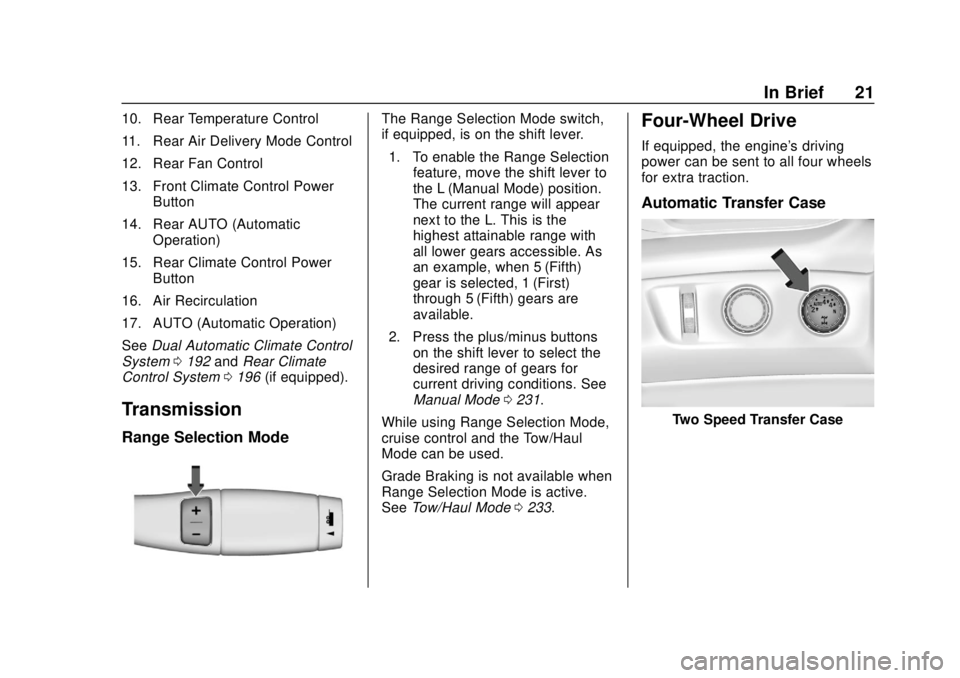
The Range Selection Mode switch,
if equipped, is on the shift lever.
1. To enable the Range Selection feature, move the shift lever to
the L (Manual Mode) position.
The current range will appear
next to the L. This is the
highest attainable range with
all lower gears accessible. As
an example, when 5 (Fifth)
gear is selected, 1 (First)
through 5 (Fifth) gears are
available.
2. Press the plus/minus buttons on the shift lever to select the
desired range of gears for
current driving conditions. See
Manual Mode 0231.
While using Range Selection Mode,
cruise control and the Tow/Haul
Mode can be used.
Grade Braking is not available when
Range Selection Mode is active.
See Tow/Haul Mode 0233.Four-Wheel Drive
If equipped, the engine's driving
power can be sent to all four wheels
for extra traction.
Automatic Transfer Case
Two Speed Transfer Case
Page 23 of 443
Chevrolet Tahoe/Suburban Owner Manual (GMNA-Localizing-U.S./Canada/
Mexico-11349385) - 2018 - crc - 11/3/17
22 In Brief
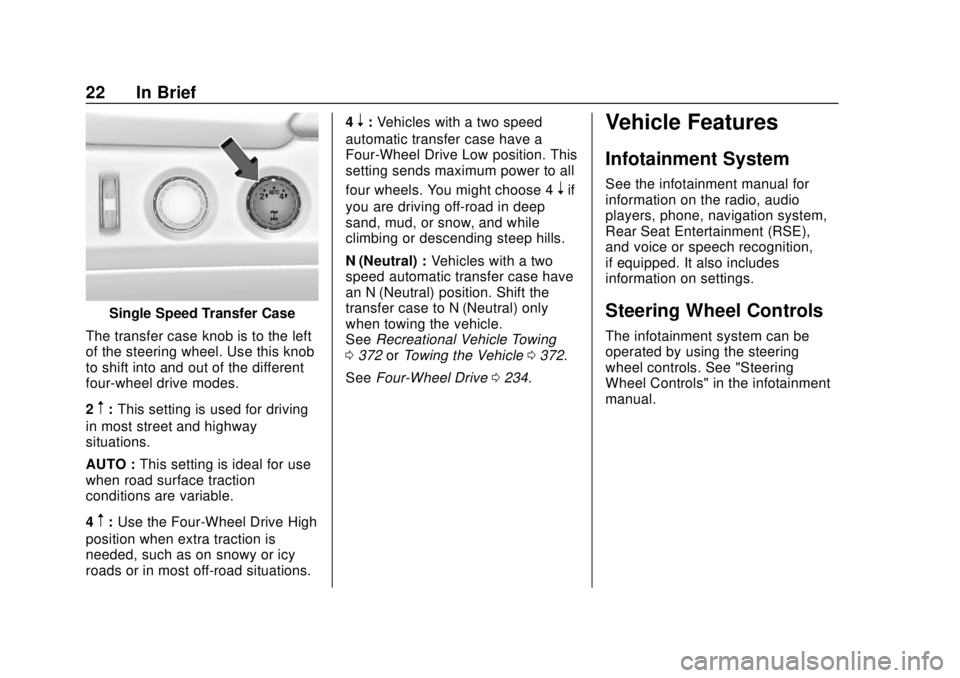
Single Speed Transfer Case
The transfer case knob is to the left
of the steering wheel. Use this knob
to shift into and out of the different
four-wheel drive modes.
2
m: This setting is used for driving
in most street and highway
situations.
AUTO : This setting is ideal for use
when road surface traction
conditions are variable.
4
m: Use the Four-Wheel Drive High
position when extra traction is
needed, such as on snowy or icy
roads or in most off-road situations. 4
n:
Vehicles with a two speed
automatic transfer case have a
Four-Wheel Drive Low position. This
setting sends maximum power to all
four wheels. You might choose 4
nif
you are driving off-road in deep
sand, mud, or snow, and while
climbing or descending steep hills.
N (Neutral) : Vehicles with a two
speed automatic transfer case have
an N (Neutral) position. Shift the
transfer case to N (Neutral) only
when towing the vehicle.
See Recreational Vehicle Towing
0 372 orTowing the Vehicle 0372.
See Four-Wheel Drive 0234.
Vehicle Features
Infotainment System
See the infotainment manual for
information on the radio, audio
players, phone, navigation system,
Rear Seat Entertainment (RSE),
and voice or speech recognition,
if equipped. It also includes
information on settings.
Steering Wheel Controls
The infotainment system can be
operated by using the steering
wheel controls. See "Steering
Wheel Controls" in the infotainment
manual.
Page 132 of 443
Chevrolet Tahoe/Suburban Owner Manual (GMNA-Localizing-U.S./Canada/
Mexico-11349385) - 2018 - crc - 11/3/17
Instruments and Controls 131
Instruments and
Controls
Controls
Steering Wheel Adjustment . . . 132
Steering Wheel Controls . . . . . . 133
Heated Steering Wheel . . . . . . . 133
Horn . . . . . . . . . . . . . . . . . . . . . . . . . . 133
Windshield Wiper/Washer . . . . 134
Rear Window Wiper/Washer . . . . . . . . . . . . . . . . . . . . . 136
Compass . . . . . . . . . . . . . . . . . . . . . 136
Clock . . . . . . . . . . . . . . . . . . . . . . . . . 137
Power Outlets . . . . . . . . . . . . . . . . 138
Wireless Charging . . . . . . . . . . . . 140
Warning Lights, Gauges, and
Indicators
Warning Lights, Gauges, and Indicators . . . . . . . . . . . . . . . . . . . 142
Instrument Cluster . . . . . . . . . . . . 143
Speedometer . . . . . . . . . . . . . . . . . 147
Odometer . . . . . . . . . . . . . . . . . . . . . 147
Trip Odometer . . . . . . . . . . . . . . . . 147
Tachometer . . . . . . . . . . . . . . . . . . . 147
Fuel Gauge . . . . . . . . . . . . . . . . . . . 147
Engine Oil Pressure
Gauge . . . . . . . . . . . . . . . . . . . . . . 148 Engine Coolant Temperature
Gauge . . . . . . . . . . . . . . . . . . . . . . 149
Voltmeter Gauge . . . . . . . . . . . . . 150
Seat Belt Reminders . . . . . . . . . 151
Airbag Readiness Light . . . . . . . 151
Passenger Airbag Status Indicator . . . . . . . . . . . . . . . . . . . . 152
Charging System Light . . . . . . . 153
Malfunction Indicator Lamp . . . 153
Brake System Warning Light . . . . . . . . . . . . . . . . . . . . . . . . 155
Antilock Brake System (ABS) Warning Light . . . . . . . . . . . . . . . 156
Four-Wheel-Drive Light . . . . . . . 156
Tow/Haul Mode Light . . . . . . . . . 156
Hill Descent Control Light . . . . 157
Lane Keep Assist (LKA) Light (1500 Series) . . . . . . . . . . . . . . . 157
Vehicle Ahead Indicator . . . . . . 157
Traction Off Light . . . . . . . . . . . . . 157
StabiliTrak OFF Light . . . . . . . . . 158
Traction Control System (TCS)/ StabiliTrak Light . . . . . . . . . . . . . 158
Tire Pressure Light . . . . . . . . . . . 158
Low Fuel Warning Light . . . . . . 159
Security Light . . . . . . . . . . . . . . . . . 159
High-Beam On Light . . . . . . . . . . 159
Front Fog Lamp Light . . . . . . . . . 160
Lamps On Reminder . . . . . . . . . 160
Cruise Control Light . . . . . . . . . . 160 Door Ajar Light . . . . . . . . . . . . . . . 160
Information Displays
Driver Information Center (DIC)
(Base Level) . . . . . . . . . . . . . . . . 161
Driver Information Center (DIC) (Uplevel) . . . . . . . . . . . . . . . . . . . . 162
Head-Up Display (HUD) . . . . . . 165
Vehicle Messages
Vehicle Messages . . . . . . . . . . . . 169
Engine Power Messages . . . . . 169
Vehicle Speed Messages . . . . . 169
Vehicle Personalization
Vehicle Personalization . . . . . . . 170
Universal Remote System
Universal Remote System . . . . 178
Universal Remote System Programming . . . . . . . . . . . . . . . 178
Universal Remote System Operation . . . . . . . . . . . . . . . . . . . 180
Page 157 of 443
Chevrolet Tahoe/Suburban Owner Manual (GMNA-Localizing-U.S./Canada/
Mexico-11349385) - 2018 - crc - 11/3/17
156 Instruments and Controls
{Warning
The brake system might not be
working properly if the brake
system warning light is on.
Driving with the brake system
warning light on can lead to a
crash. If the light is still on after
the vehicle has been pulled off
the road and carefully stopped,
have the vehicle towed for
service.
Antilock Brake System
(ABS) Warning Light
This light comes on briefly when the
engine is started.
If the light does not come on, have it
fixed so it will be ready to warn if
there is a problem.If the light comes on while driving,
stop as soon as it is safely possible
and turn off the vehicle. Then start
the engine again to reset the
system. If the ABS light stays on,
or comes on again while driving, the
vehicle needs service. A chime may
also sound when the light comes on
steady.
If the ABS light is the only light on,
the vehicle has regular brakes, but
the antilock brakes are not
functioning.
If both the ABS and the brake
system warning light are on, the
vehicle's antilock brakes are not
functioning and there is a problem
with the regular brakes. See your
dealer for service.
See
Brake System Warning Light
0 155.
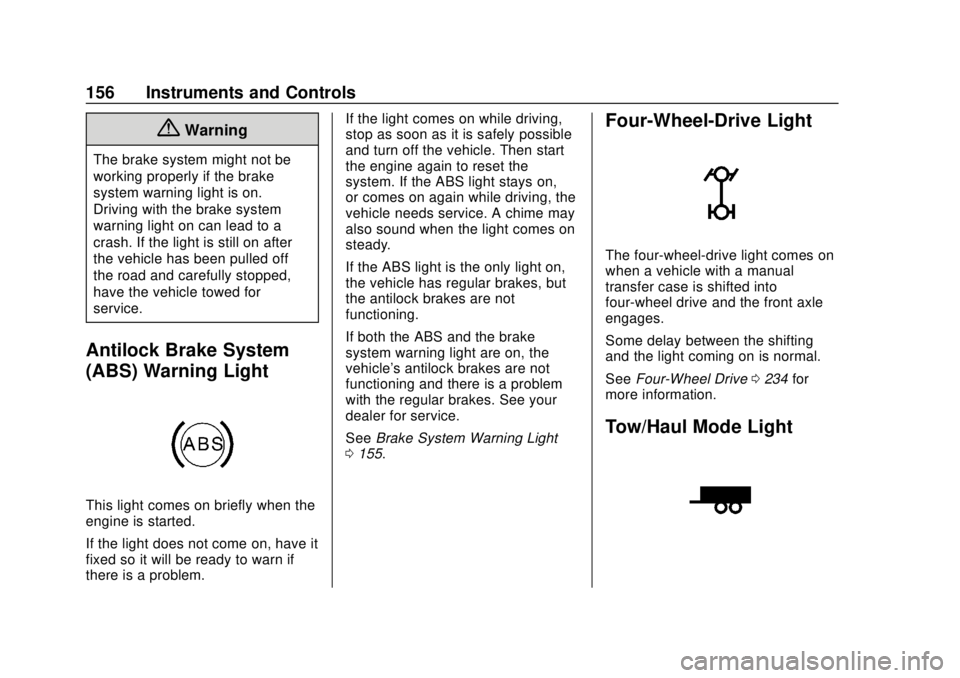
Four-Wheel-Drive Light
The four-wheel-drive light comes on
when a vehicle with a manual
transfer case is shifted into
four-wheel drive and the front axle
engages.
Some delay between the shifting
and the light coming on is normal.
See Four-Wheel Drive 0234 for
more information.
Tow/Haul Mode Light
Page 166 of 443
Chevrolet Tahoe/Suburban Owner Manual (GMNA-Localizing-U.S./Canada/
Mexico-11349385) - 2018 - crc - 11/3/17
Instruments and Controls 165
briefly while this display is active
and the timer is running. To reset
the timer to zero, press and hold
V
while this display is active, or presspand select reset.
Speed Limit (If Equipped) : Shows
sign information, which comes from
a roadway database in the onboard
navigation.
Engine Hours : Shows the total
number of hours the engine has run.
Transmission Fluid
Temperature : Shows the
temperature of the automatic
transmission fluid in either degrees
Celsius (°C) or degrees
Fahrenheit (°F).
Trailer Brake (If Equipped) : On
vehicles with the Integrated Trailer
Brake Control (ITBC) system, the
trailer brake display appears in
the DIC.
TRAILER GAIN shows the trailer
gain setting. This setting can be
adjusted from 0.0 to 10.0 with either
a trailer connected or disconnected. TRAILER OUTPUT shows the
power output to the trailer anytime a
trailer with electric brakes is
connected. Output is displayed as a
bar graph. Dashes may appear in
the OUTPUT display if a trailer is
not connected.
Off Road :
Displays vehicle pitch
and roll information, road wheel
angle, and four-wheel drive (4WD)
status.
Blank Page : Shows no
information.
Head-Up Display (HUD)
{Warning
If the HUD image is too bright or
too high in your field of view, it
may take you more time to see
things you need to see when it is
dark outside. Be sure to keep the
HUD image dim and placed low in
your field of view. If equipped with HUD, some
information concerning the
operation of the vehicle is projected
onto the windshield. The image is
projected through the HUD lens on
top of the instrument panel. The
information appears as an image
focused out toward the front of the
vehicle.
Caution
If you try to use the HUD image
as a parking aid, you may
misjudge the distance and
damage your vehicle. Do not use
the HUD image as a parking aid.
The HUD information can be
displayed in various languages. The
speedometer reading and other
numerical values can be displayed
in either English or metric units.
The language selection is changed
through the radio and the units of
measurement is changed through
Page 168 of 443
Chevrolet Tahoe/Suburban Owner Manual (GMNA-Localizing-U.S./Canada/
Mexico-11349385) - 2018 - crc - 11/3/17
Instruments and Controls 167
Head-Up Display (HUD) Rotation
Option
This feature allows for adjusting the
angle of the HUD image.
Press
@on the steering wheel
controls while Head-up Display
Rotation is highlighted to enter
Adjust Mode. Press
yorzto
adjust the angle of the HUD display.
Press
SorTto highlight OK, then
press
@to save the setting.
CANCEL can also be selected to
cancel the setting. The vehicle must
be in P (Park). See Instrument
Cluster 0143.
Press
@on the steering wheel
controls while Head-up Display
Rotation is highlighted to enter
Adjust Mode. Press
yorzto
adjust the angle of the HUD display.
Press
SorTto highlight OK, then
press
@to save the setting.
CANCEL can also be selected to
cancel the setting. The vehicle must
be in P (Park). See Instrument
Cluster 0143. HUD Views
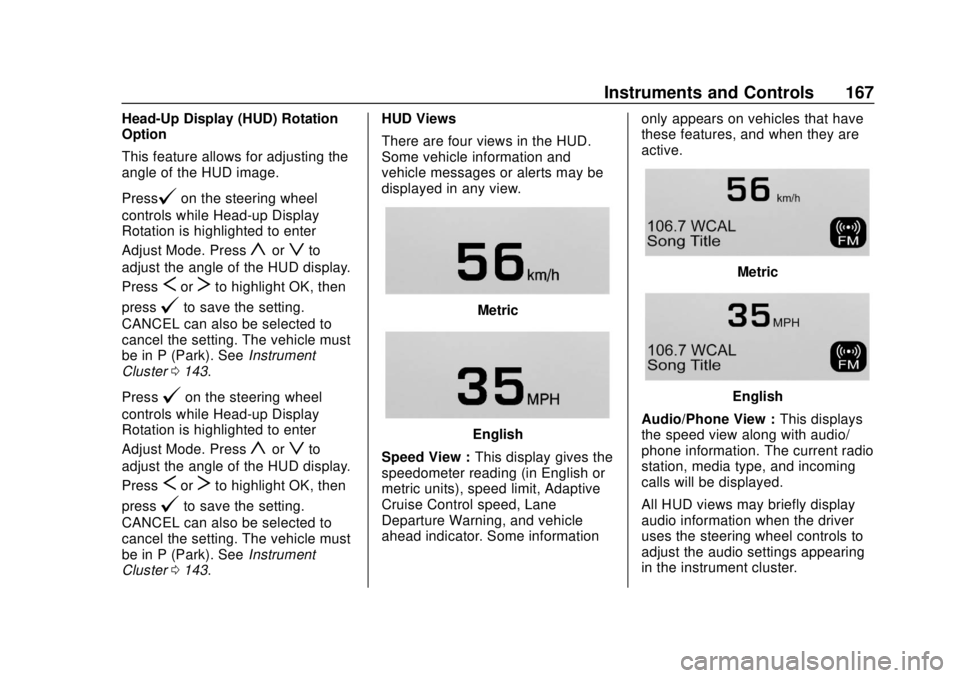
There are four views in the HUD.
Some vehicle information and
vehicle messages or alerts may be
displayed in any view.
Metric
English
Speed View : This display gives the
speedometer reading (in English or
metric units), speed limit, Adaptive
Cruise Control speed, Lane
Departure Warning, and vehicle
ahead indicator. Some information only appears on vehicles that have
these features, and when they are
active.
Metric
English
Audio/Phone View : This displays
the speed view along with audio/
phone information. The current radio
station, media type, and incoming
calls will be displayed.
All HUD views may briefly display
audio information when the driver
uses the steering wheel controls to
adjust the audio settings appearing
in the instrument cluster.
Page 172 of 443
Chevrolet Tahoe/Suburban Owner Manual (GMNA-Localizing-U.S./Canada/
Mexico-11349385) - 2018 - crc - 11/3/17
Instruments and Controls 171
Teen Driver
See“Teen Driver” under“Settings”
in the infotainment manual.
Valet Mode
This will lock the infotainment
system and steering wheel controls.
It may also limit access to vehicle
storage locations, if equipped.
To enable valet mode:
1. Enter a four-digit code on the keypad.
2. Select Enter to go to the confirmation screen.
3. Re-enter the four-digit code.
Select LOCK or UNLOCK to lock or
unlock the system. Touch Back to
go back to the previous menu.
Radio
Select and the following may
display:
. Manage Favorites
. Number of Favorites Shown
. Audible Touch Feedback .
Auto Volume
. Maximum Startup Volume
. Audio Cue Volume
Manage Favorites
This allows favorites to be edited.
See “Manage Favorites” in
“Settings” under“Radio” in the
infotainment manual.
Number of Favorites Shown
Select to set the number of favorites
to display.
Select the desired number or select
Auto and the infotainment system
will automatically adjust the number
of favorites shown.
Audible Touch Feedback
This allows Audible Touch
Feedback to be turned on or off.
Select Off or On.
Auto Volume
This feature adjusts the volume
based on vehicle speed and
ambient noise. Select Off, Low, Medium-Low,
Medium, Medium-High, or High.
Maximum Startup Volume
This feature sets the maximum
startup volume. If the vehicle is
started and the volume is greater
than this level, the volume is
adjusted to this level. To set the
maximum startup volume, touch +
or
−to increase or decrease.
Audio Cue Volume
This feature sets the volume of
audio files played at system startup
and shutdown.
Select On, then touch + or −to
increase or decrease the volume.
Vehicle
Select and the following may
display:
. Climate and Air Quality
. Collision/Detection Systems
. Comfort and Convenience
. Lighting
. Power Door Locks
Page 201 of 443
Chevrolet Tahoe/Suburban Owner Manual (GMNA-Localizing-U.S./Canada/
Mexico-11349385) - 2018 - crc - 11/3/17
200 Driving and Operating
Driving and
Operating
Driving Information
Distracted Driving . . . . . . . . . . . . 201
Defensive Driving . . . . . . . . . . . . . 202
Drunk Driving . . . . . . . . . . . . . . . . . 202
Control of a Vehicle . . . . . . . . . . . 202
Braking . . . . . . . . . . . . . . . . . . . . . . . 202
Steering . . . . . . . . . . . . . . . . . . . . . . 203
Off-Road Recovery . . . . . . . . . . . 203
Loss of Control . . . . . . . . . . . . . . . 204
Off-Road Driving . . . . . . . . . . . . . 204
Driving on Wet Roads . . . . . . . . 209
Hill and Mountain Roads . . . . . 210
Winter Driving . . . . . . . . . . . . . . . . 210
If the Vehicle Is Stuck . . . . . . . . . 211
Vehicle Load Limits . . . . . . . . . . . 212
Starting and Operating
New Vehicle Break-In . . . . . . . . . 216
Adjustable Throttle and BrakePedal . . . . . . . . . . . . . . . . . . . . . . . 217
Ignition Positions (Keyless Access) . . . . . . . . . . . . . . . . . . . . . 217
Ignition Positions (Key Access) . . . . . . . . . . . . . . . . . . . . . 219
Starting the Engine . . . . . . . . . . . 221 Engine Heater . . . . . . . . . . . . . . . . 222
Retained Accessory
Power (RAP) . . . . . . . . . . . . . . . . 224
Shifting Into Park . . . . . . . . . . . . . 224
Shifting out of Park . . . . . . . . . . . 225
Parking over Things That Burn . . . . . . . . . . . . . . . . . . . 226
Active Fuel Management . . . . . 226
Extended Parking . . . . . . . . . . . . 226
Engine Exhaust
Engine Exhaust . . . . . . . . . . . . . . 227
Running the Vehicle While Parked . . . . . . . . . . . . . . . . . . . . . . 227
Automatic Transmission
Automatic Transmission . . . . . . 228
Manual Mode . . . . . . . . . . . . . . . . . 231
Tow/Haul Mode . . . . . . . . . . . . . . . 233
Drive Systems
Four-Wheel Drive . . . . . . . . . . . . . 234
Brakes
Antilock BrakeSystem (ABS) . . . . . . . . . . . . . . . 239
Parking Brake . . . . . . . . . . . . . . . . 240
Brake Assist . . . . . . . . . . . . . . . . . . 241
Hill Start Assist (HSA) . . . . . . . . 241
Ride Control Systems
Traction Control/Electronic Stability Control . . . . . . . . . . . . . 242
Hill Descent Control (HDC) . . . 244
Magnetic Ride Control . . . . . . . . 244
Locking Rear Axle . . . . . . . . . . . . 245
Automatic Level Control . . . . . . 245
Cruise Control
Cruise Control . . . . . . . . . . . . . . . . 245
Adaptive Cruise Control . . . . . . 248
Driver Assistance Systems
Driver Assistance Systems . . . 255
Assistance Systems for Parking or Backing . . . . . . . . . . 256
Assistance Systems for Driving . . . . . . . . . . . . . . . . . . . . . . 258
Forward Collision Alert (FCA) System . . . . . . . . . . . . . . . . . . . . . . 258
Forward Automatic Braking (FAB) . . . . . . . . . . . . . . . 261
Side Blind Zone Alert (SBZA) . . . . . . . . . . . . . . . . 262
Lane Change Alert (LCA) . . . . . 263
Lane Departure Warning (LDW) . . . . . . . . . . . . . 264
Lane Keep Assist (LKA) (1500 Series) . . . . . . . . . . . . . . . . . . . . . . 265