tow CHEVROLET TRACKER 1994 User Guide
[x] Cancel search | Manufacturer: CHEVROLET, Model Year: 1994, Model line: TRACKER, Model: CHEVROLET TRACKER 1994Pages: 258, PDF Size: 14.43 MB
Page 53 of 258
Features and Controls
If you have four-wheel drive and your
transfer case is
in “N’ (Neutral), your
vehicle will be free
to roll, even if your
shift lever
is in “P’ (Park). So, be sure the
transfer case
is in a drive gear - not in
“N’ (Neutral).
Follow the proper steps to be sure your
vehicle won’t move. See “Shifting into
‘P’ (Park)” in the Index.
If you’re parking on a
hill and if you’re
pulling a trailer,
also see “Towing a
Trailer’’ in the Index.
Windows
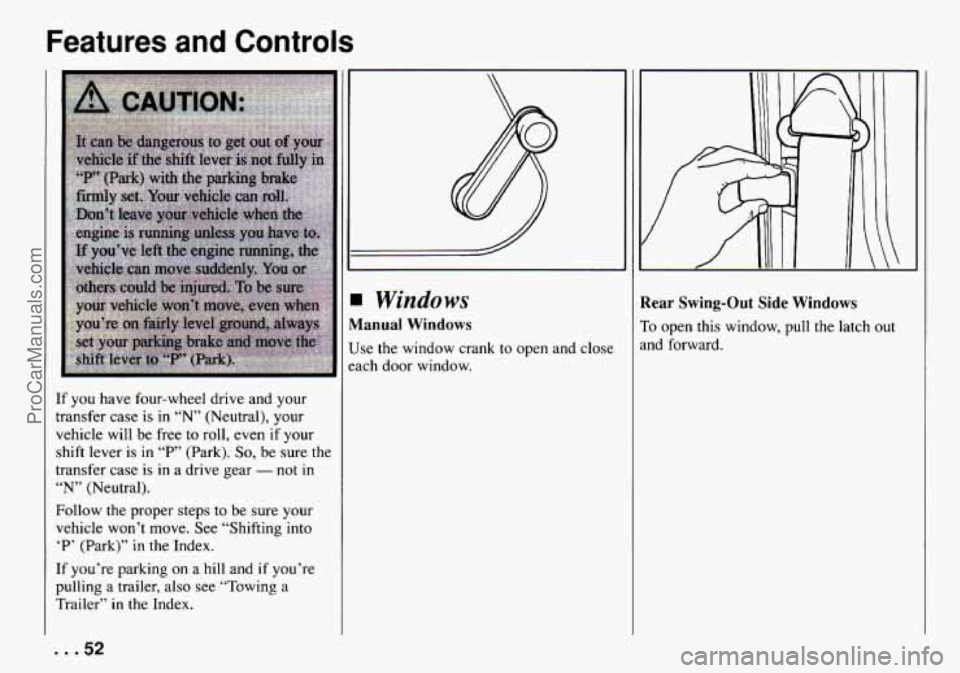
Manual Windows
Use the window crank to open and close
each door window.
Rear Swing-Out Side Windows
To open this window, pull the latch out
and forward.
... 52
ProCarManuals.com
Page 57 of 258
Features and Controls
-- I
-- a1
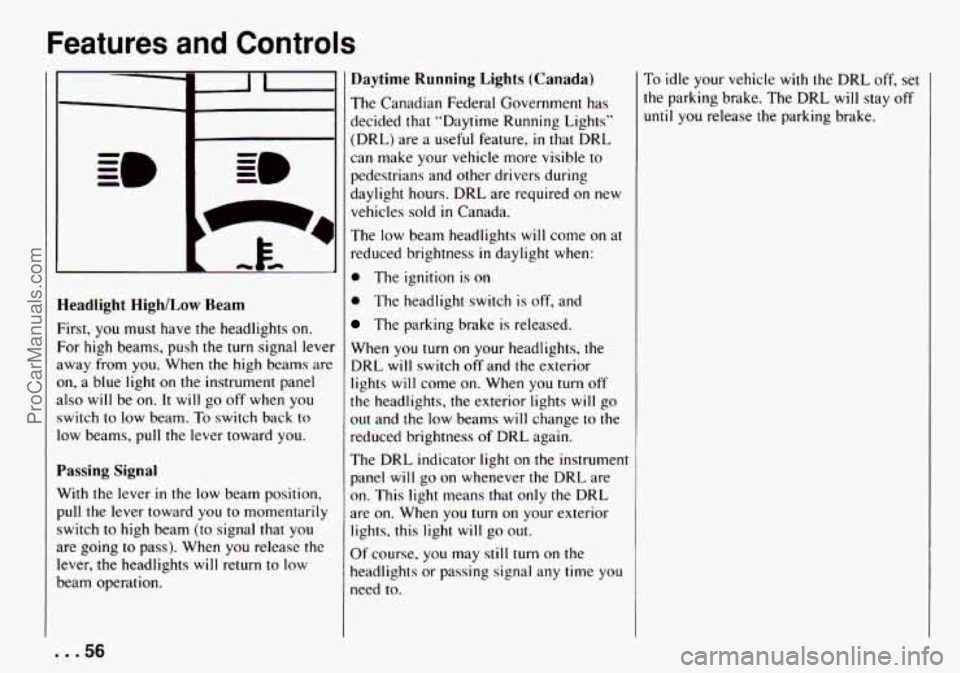
Headlight HighlLow Ream
First, you must have the headlights on.
For high beams, push the turn signal lever
away from you. When
the high beams are
on, a blue light on the instrument panel
also will be
on. It will go off when you
switch to low beam. To switch back
to
low beams, pull the lever toward you.
Passing Signal
With the lever in the low beam position,
pull the lever toward you
to momentarily
switch to high beam (to signal that
you
are going to pass). When you release the
lever, the headlights will return
to low
beam operation.
Daytime Running Lights (Canada)
The Canadian Federal Government has
decided that “Daytime Running Lighls”
(DRL) are
a useful feature, in that DRL
can make your vehicle more visible to
pedestrians and other drivers during
daylight hours. DRL are required
on new
vehicles sold
in Canada.
The low beam headlights will come on at
reduced brightness in daylight when:
0 The ignition is on
0 The headlight switch is off, and
The parking brake is released.
When
you turn on your headlights, the
DRL will switch
off and the exterior
lights will come on. When
you turn off
the headlights, the exterior lights will go
out and the low beams will change
to the
reduced brightness of DRL again.
The DRL indicator light on the instrument
panel will go on whenever the DRL are
on. This light means that only the DRL
are on. When you turn on your exterior
lights, this light will go
out.
Of course, you may still turn on the
headlights
or passing signal any time you
need to.
To idle your vehicle with the DRL off, set
the parking brake. The DRL will stay off
until you release the parking brake.
... 56
ProCarManuals.com
Page 59 of 258

Features and Controls
For a single wiping cycle, push the lever
to “MIST.” Hold it there until the wipers
start, hen let
go. The wipers will stop
after one cycle. If you want more cycles,
hold the lever
on “MIST.” longer.
Washers
Pull the wiper/washer lever toward you to
spray washer fluid’on
the windshield. The
spray will continue
until you release the
lever. This will also turn on the low speed
wipers.
Heavy snow or ice can overload your
wipers.
A circuit breaker will stop them
until the motor cools. Clear away snow or
ice to prevent an overload.
NOTICE:
0
0
0
0
When using concentrated washer
fluid, follow the manufacturer’s
instructions for adding water.
Don’t
mjx water with
ready-to-use washer fluid. Water
can cause the solution
to freeze
and damqge your washer fluid
tank and other parts of the
washer system. Also, water
doesn’t clean as well as washer
fluid.
Fill your washer fluid
tank only
3/4 full when it’s very cold. This
allows
for expansion, which
could damage the tank
if it is
compldtel) full.
Don’t use radiator antifreeze in
your wipdshield washer. It can
damage your paint.
... 58
ProCarManuals.com
Page 61 of 258

Features and Controls
3utside Manual Adjust Mirrors
The mirrors should be adjusted by hand
io that you can just see the side of your
Iehicle, when you are sitting in a
:omfortable position.
Storage and
Compartments
Glove Box
To open the glove box, pull the latch
toward you. Use
your key to lock and
unlock the glove
box.
loor Storage Compartments
lach door has a storage compartment.
... 60
ProCarManuals.com
Page 71 of 258

Features and Controls
If the light comes on while you are
driving,
pull off the road and stop
carefully. You may notice that the pedal is
harder
to push. Or, the pedal may go
closer to the floor. It may take longer to
stop. If the light is still on. have the
vehicle towed for service. (See “Towing
Your Vehicle“
in the Index.)
p CAUTION:
Your brake system may not be work-
ing properly if the brake system
warning light is on, Driving with the
brake system warning light on can
lead
to an accident. If the light is still
on after you’ve pulled off the road
and stopped carefully, have the
vehicle towed
for service.
The brake system warning light will also
come
on when you set your parking
brake, and
it will stay on if your parking
brake doesn’t release
fully. If it stays on
after your parking brake is fully released.
it means you have a brake problem.
‘ngine Coolant Temperature Gage
rhis gage shows the engine coolanl
emperature.
If the gage pointer moves to
he
”H” (red) side. your engine is too hot!
t means that your engine coolant has
)verheatcd and you should
stop your
ehicle and
turn off the engine HS soo~
Iossible.
1 as
HOT COOLANT CAN BURN YOU
BADLY!
In “Problems on the Road.” this manual
shows what to do. See ”Engine
Overheating”
in the Index.
Charging System Light
This light will come on briefly when you
turn on the ignition, but the engine is not
running, as
a check to show you it is
working. Then
it should go out when the
engine starts. If it stays on or comes on
while you are driving, you may have a
problem with the electrical charging
system.
It could indicate that you have a
loose generator drive
belt or another
electrical problem. Have
it checked right
away. Driving while this light is on could
drain
your battery.
If you must drive a short distance with
this light on,
be certain to turn off all your
accessories. such as
the radio and air
conditioner.
. . .70
ProCarManuals.com
Page 85 of 258
Comfort Controls and Audio Systems
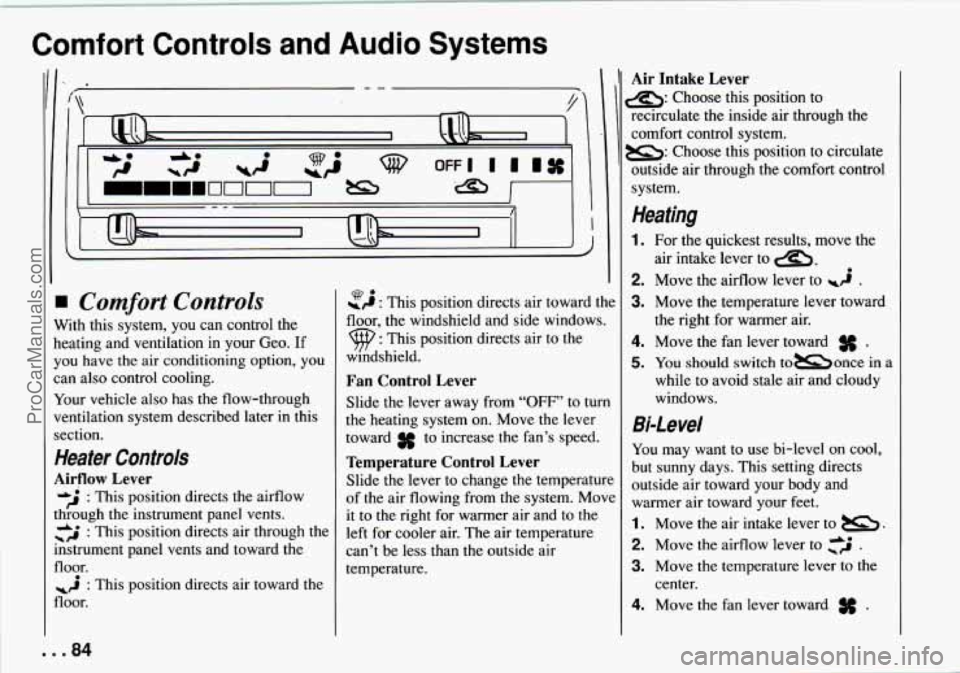
Comfort Controls
With this system, you can control the
heating and ventilation
in your Geo. If
you have the air conditioning option, you
can also control cooling.
Your vehicle also has the flow-through
ventilation system described later
in this
section.
Heater Controls
Airflow Lever
&J : This position directs the airflow
through
the instrument panel vents.
+ &* : This position directs air through the
mstrument panel vents and toward the
floor.
floor.
: This position directs air toward the
-9 : This position directs air toward the Q.
floor, the windshield and side windows.
9 : This position directs air to the
windshield.
Fan Control Lever
Slide the lever away from “OFF’ to turn
the heating system on. Move the lever
toward
3f to increase the fan’s speed.
Temperature Control Lever
Slide the lever to change the temperature
of the air flowing from the system. Move
it to the right for warmer air and to the
left for cooler air. The air temperature
can’t be less than the outside air
temperature.
Air Intake Lever
s: Choose this position to
recirculate the inside air through the
comfort control system.
B: Choose this position to circulate
outside air through the comfort control
system.
Heating
1. For the quickest results, move the
2. Move the airflow lever to wi .
3. Move the temperature lever toward
4. Move the fan lever toward .
5. You should switch tomonce in a
while to avoid stale
air and cloudy
windows.
air
intake lever to
a,.
the right for warmer air.
Bi-Level
You may want to use bi-level on cool,
but sunny days. This setting directs
outside air toward your body and
warmer air toward your feet.
1. Move the air intake lever to B.
2. Move the airflow lever to ,‘j .
3. Move the temperature lever to the
4. Move the fan lever toward .
center.
ProCarManuals.com
Page 86 of 258

Ventilation
For mild outside temperatures, when little
heating or cooling is needed, you can still
direct outside air through your vehicle.
1. Move the air intake lever to .
2. Move the airflow lever to :$ .
3. Adjust the temperature lever to a
4. Move the fan control lever to # .
comfortable setting.
Defogging and Defrosting
Windows
1. Slide the air intake lever to -.
2. Slide the airflow lever to to
direct air to the windshield vents.
3. Slide the temperature lever toward the
4. Slide the fan lever to # .
When the windshield is clear, turn down
the fan speed.
To defog the side windows, slide the
airflow lever to
,?A . For increased
airflow to
the side vents, close the center
vents
.
right.
4ir Conditioner Controls
The air conditioning system uses the Sam
:ontrols as the heating system. The
unction of each lever is explained under
‘Heater Controls”
in this part. The
ncoming air is cooled and dehumidified
nstead of being heated.
UC: Push this button to change your
:omfort control system from heating to
lir conditioning. A light will come on
when the air conditioning is on. The
‘A/C” button can also control the
wmidity
in your vehicle.
Cooling
The air conditioner works best if you keep
your windows closed.
On very hot days,
open the windows just
long enough for
the hot air to escape.
1. Push the “A/,’, button.
2. Move the air intake lever to-for
normal cooling. For faster cooling
move the lever to&
.
3. Move the airflow lever to *> .
4. Move the temperature control lever
5. Move the fan control lever to # .
toward the left.
Dehumidifying
On days when it is raining or the humidity
is
high, follow these dehumidifying steps
instead of the cooling directions. It will
help clean windows that are cloudy with
moisture.
1. Push the “A/,” button.
2. Move the air intake lever tom.
3. Move the airflow lever to 9.
4. Move the fan control lever toward
3s.
5. Adjust the temperature control lever to
a comfortable setting.
85 ...
ProCarManuals.com
Page 88 of 258

Ventilation Tips
0
0
0
Keep the hood and front air inlet free
of ice, snow, or any other obstruction
(such as leaves). The heater and
defroster will work far better, reducing
the chance of fogging the inside of
your windows.
When you enter a vehicle in cold
weather, move the fan lever towards
for a few moments before driving off.
This helps clear the intake ducts of
snow and moisture, and reduces the
chance of fogging the inside of your
windows.
Keep the air path under the front seats
clear of objects. This helps air to
circulate throughout your vehicle.
Audio Systems
Your Delco@ audio system has been
designed to operate easily and give years
of listening pleasure. But you will get the
most enjoyment out of
it if you acquaint
yourself with it first. Find out what your
Delco@ system can do and how to operate
all its controls, to be sure you’re getting
the most out of the advanced engineering
that went into
it.
NOTICE:
Before you add any sound equipment
to your vehicle - like a tape player,
CB radio, mobile telephone or
two-way radio
- be sure you can
add what you want.
If you can, it’s
very important to do it properly.
Added sound equipment may inter-
fere
with the operation of your
vehicle’s engine, Delco8 radio or
other systems, and even damage
them. And, your vehicle’s systems
may interfere with the operation of
sound equipment that has been added
improperly.
So, before adding sound equipment,
check with your dealer and be sure
to
check Federal rules covering mobile
radio and telephone units.
87 ...
ProCarManuals.com
Page 100 of 258
Here YOU'II find information
about driving on different kinds
of roads and in varying weather
conditions
. We've also included
many other useful tips on
driving
.
I
I
I
I
I
Defensive Driving . .
Drunken Driving ...
Part 4
Your Driving and the Road
......................................... 100
........................................... 100 ... .
Control of a Vehicle ............................................... 102
Driving Guidelines ................................................ 107
Off-Road Driving with Your GL'O Four-wheel Drive Vehicle ............... 108
DrivingatNight .................................................. 116
Driving in the Rain ................................................ 117
City Driving ..................................................... 119
Freeway Driving ................................................. 120
Hill and Mountain Roads ........................................... 121
Winter Driving ................................................... 122
Towin~aTrL?iler .................................................. 125
Recreational Vehicle Towing ........................................ 129
1
99 ...
ProCarManuals.com
Page 126 of 258

Towing a Trailer
NOTICE:
Pulling a trailer improperly can dam-
age your vehicle and result in costly
repairs not covered by your warranty,
To pull a trailer correctly, follow the
advice in this section, and see your
Geo dealer for important information
about towing a trailer with your
vehicle. Your
vehicle can tow a trailer. To identify
what the vehicle trailering capacity
is for
your vehicle,
you should read the
information in “Weight
of the Trailer” that
appears later in this section.
But trailering
is different than just driving your vehicle
by itself. Trailering means changes in
handling, durability, and fuel economy.
Successful, safe trailering takes correct
equipment, and it has to be used properly.
That’s the reason for this section.
In it are
many time-tested, important trailering
tips and safety rules. Many of these are
important for your safety and that of your
passengers.
So please read this section
carefully before you pull a trailer.
Load-pulling components such as the
engine, transmission, wheel assemblies,
and tires are forced to work harder against
the drag of the added weight. The engine
is required to operate at relatively higher
speeds and under greater loads,
generating extra heat. What’s more, the
trailer adds considerably to wind
resistance, increasing the pulling
requirements.
If You Do Decide to Pull a Trailer
If you do, here are some important points.
There are many different laws having
to do with trailering. Make sure your
rig will be legal, not only where you
live but also where you’ll be driving.
A good source for this information
can be state or provincial police.
Consider using a sway control. You
can ask a hitch dealer about sway
controls.
Don’t tow a trailer at all during the
first
500 miles (800 km) your new
vehicle is driven. Your engine, axle or
other parts could be damaged.
Then, during the first
500 miles (800
km) that you tow a trailer, don’t drive
over
50 mph (80 km/h) and don’t
make starts at
full throttle. This helps
your engine and other parts
of your
vehicle wear in at the heavier loads.
125 ...
ProCarManuals.com