brake CHEVROLET TRACKER 1994 Owners Manual
[x] Cancel search | Manufacturer: CHEVROLET, Model Year: 1994, Model line: TRACKER, Model: CHEVROLET TRACKER 1994Pages: 258, PDF Size: 14.43 MB
Page 8 of 258
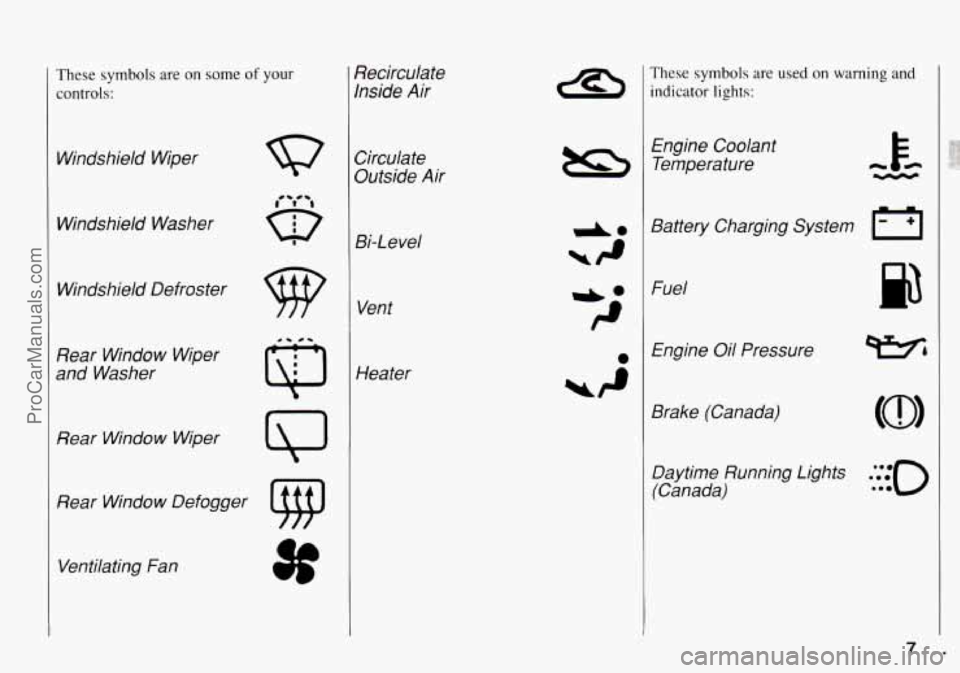
These symbols are on some of your
controls:
Windshield Wiper
Windshield Washer
Windshield Defroster
Rear Window Wiper
and Washer
Rear Window Wiper
Rear Window Defogger Ventilating Fan Recirculate
Inside
Air
Circulate
Outside Air
Bi-Level
Vent
Heater
These symbols are used on warning and
indicator
lights:
Engine Coolant Temperature
Battery Charging System
Fl
Fuel
Engine Oil Pressure
Brake (Canada) Daytime Running Lights
.***to
(Canada) **e
f ...
ProCarManuals.com
Page 40 of 258
Theft
Vehicle theft is big business, especially in
some cities. Although your Geo has a
number of theft deterrent features, we
know that nothing we
put on it can make
it impossible to steal. However, there are
ways you can help.
Key in the Ignition
If you walk away from your vehicle with
the keys inside, it’s an easy target for joy
riders or professional thieves
- so don’t
do
it.
When you park your Geo and open the
driver’s door, you’ll hear a chime
reminding you to remove your key from
the ignition and take
it with you. Always
do this. Your steering wheel will be
locked, and
so will your ignition. If you
have
an automatic transmission, taking
your key out
also locks your transmission.
And remember to lock the doors.
Parking at Night
Park in a lighted spot, close all windows
and lock your vehicle. Remember
to keep
your valuables out
of sight. Put them in a
storage area, or take them with you.
New Vehicle
"Break-in"
NOTICE:
Your modern Geo doesn‘t need an
elaborate “break-in.” But
it will per-
form better
in the long run if you fol-
low these guidelines:
0 Keep your speed at 55 mph
(88 km/h) or less for the first
500 miles (804 km).
0 Don’t drive at any one speed
- fast or slow - for the first
500 miles (804 km). Don’t
make full-throttle starts.
0 Avoid making hard stops for
the first
200 miles (322 km) or
so. During this time your new
brake linings aren’t yet broken
in. Hard stops
with new linings
can mean premature wear and
earlier replacement. Follow this
“breaking-in“ guideline every
time you get new brake linings.
C
I Ignition Switch
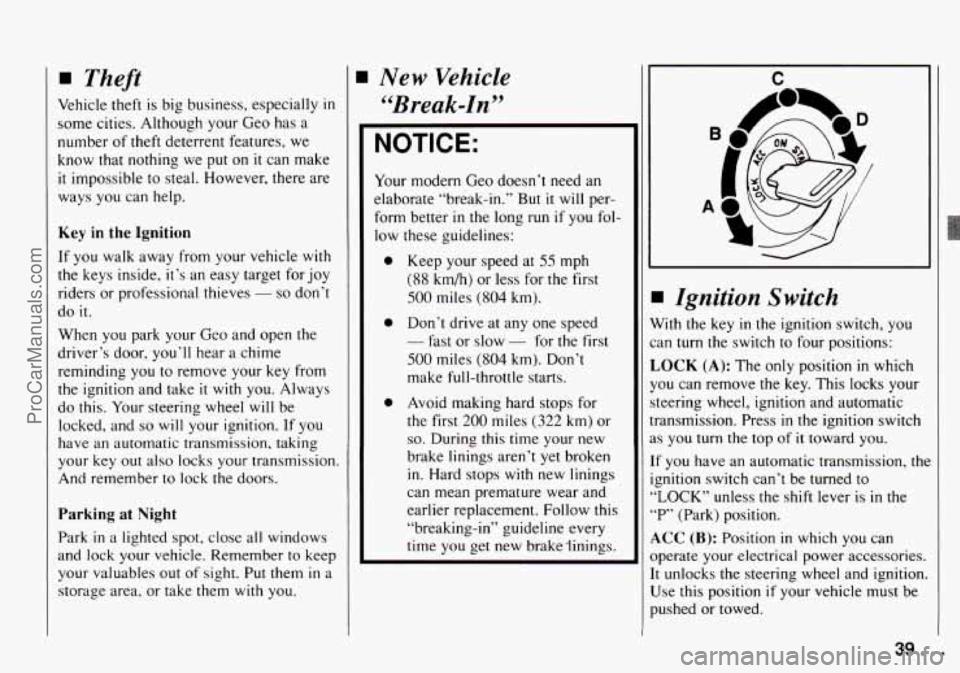
Vith the key in the ignition switch, you
an
turn the switch to four positions:
,OCK (A): The only position in which
‘ou can remove the key. This locks your
teering wheel, ignition and automatic
ransmission. Press
in the ignition switch
s you turn the top of it toward you.
f you have an automatic transmission, the
gnition switch can’t be turned
to
,LOCK” unless the shift lever is in the
‘P’ (Park) position.
LCC (B): Position in which you can
bperate your electrical power accessories.
t unlocks the steering wheel and ignition.
Jse this position
if your vehicle must be
mhed or towed.
39. .
ProCarManuals.com
Page 44 of 258
Ensure the shift lever is fully in “F‘”
(Park) range before starting the engine.
Your Geo has a brake-transmission shift
interlock.
You have to fully apply your
regular brakes before you can shift from
“P” (Park) when the ignition key is in the
“ON’ position. If you cannot shift out of
“P’ (Park), ease pressure on the shift
lever
- push the shift lever all the way
into
“P’ (Park) and release the shift lever
button as you maintain brake application.
Then press the shift lever button and
move the shift lever into the gear you
wish. See “Shifting out of ‘P’ (Park)”
in
the Index.
0 R (Reverse)
Use this gear to back up.
I NOTICE:
Shifting to “R” (Reverse) while your
vehicle is moving forward could
damage your transmission. Shift to
“R” only after your vehicle is
stopped.
~~
To rock your vehicle back and forth to gel
out of snow, ice or sand without
damaging your transmission, see “Stuck:
In Sand,
Mud, Ice or Snow” in the Index.
t
0 N (Neutral)
In this position, your engine doesn’t
connect with the wheels. To restart when
you’re already moving, use
“N’ (Neutral)
only. Also, use “N” when your vehicle is
being towed.
NOTICE:
Damage to your transmission caused
by shifting out of “P” (Park) or
“N’
(Neutral) with the engine racing isn’t
covered by your warranty.
0 D (Drive)
This position is for normal driving. If you
need more power for passing, and you’re:
- Going less than about 15 mph
(25
km/h), push your accelerator peda
about halfway down.
- Going about 15 mph (25 km/h) or
more, push your accelerator pedal all
the way down.
You’ll shift down to the next gear and
have more power.
0 2 (Second Gear)
This position gives you more power but
lower fuel economy. You can use “2” on
hills.
It can help control your speed as
you go down steep mountain roads, but
then you would also want to use your
brakes off and on.
Don’t shift into “2” unless you are
going slower than
65 mph
( 105 km/h) with the transfer case in
“4H’ or 35 mph (55 km/h) with the
transfer case in “4L,” or you can
damage your transmission.
43.
ProCarManuals.com
Page 45 of 258
Features and Controls
L (Low Gear)
This position gives you even more power
(but lower fuel economy) than
“2.” You
can use it on very steep hills, or
in deep
snow
or mud. If the selector lever is put il
“L,” the transmission won’t shift into low
gear until the vehicle is going slowly
enough.
n
NOTICE:
Don’t shift into “L,” (Low) at speeds
above 40 mph
(65 km/h) with the
transfer case
in “4L,” or you can
damage your transmission.
NOTICE:
If your rear wheels can’t rotate, don’t
try to drive. This might happen if you
were stuck in very deep sand or mud
or were up against
a solid object. You
could damage your transmission.
Also, if you stop when going uphill,
don’t hold your vehicle there
with
only the accelerator pedal. This could
overheat and damage the
transmission. Use your brakes to hold
your vehicle
in position on a hill.
F
Manual Transmission
ive-Speed
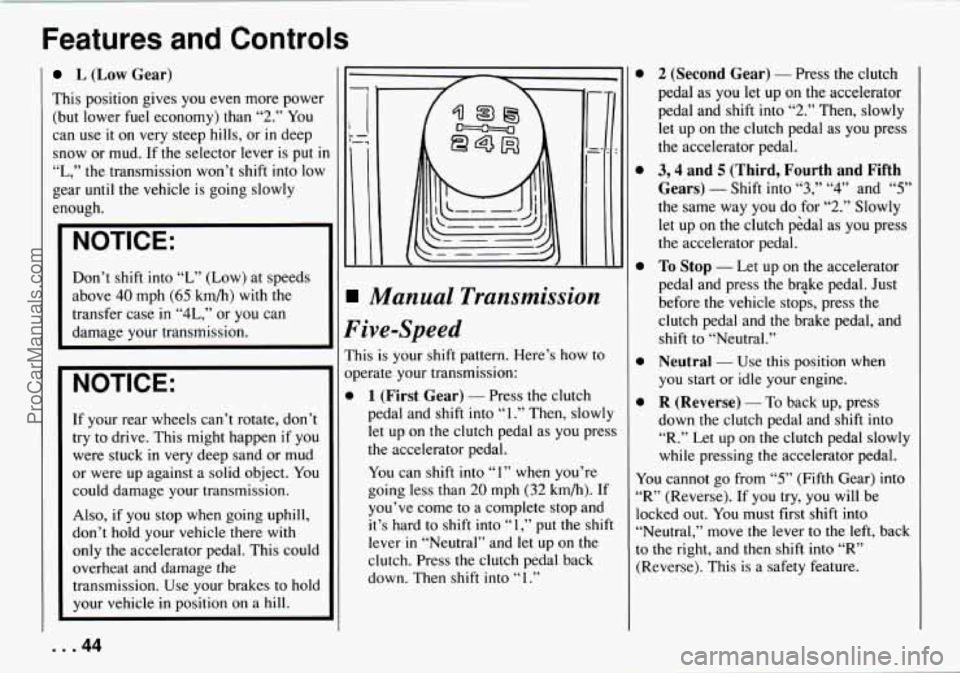
is is your shift pattern. Here’s how to
erate your transmission:
1 (First Gear) - Press the clutch
pedal and shift into
“1.” Then, slowly
let up on
the clutch pedal as you press
the accelerator pedal.
You can shift into
“I” when you’re
going less than
20 mph (32 km/h). If
you’ve come to a complete stop and
it’s hard to shift into
“1,” put the shift
lever
in “Neutral” and let up on the
clutch. Press the clutch pedal back
down. Then shift into
“ 1 .”
0
0
0
0
0
2 (Second Gear) - Press the clutch
pedal as
you let up on the accelerator
pedal and shift into
“2.” Then, slowly
let up on the clutch pedal as you press
the accelerator pedal.
3,4 and 5 (Third, Fourth and Fifth
Gears)
- Shift into “3,” “4” and “5”
the same way you do for “2.” Slowly
let up on the clutch p6dal as you press
the accelerator pedal.
To Stop - Let up on the accelerator
pedal and press the brGke pedal. Just
before
the vehicle stops, press the
clutch pedal and the brake pedal, and
shift to “Neutral.”
Neutral - Use this position when
you start or idle your engine.
R (Reverse) - To back up, press
down the clutch pedal and shift into
“R.” Let up on the clutch pedal slowly
while pressing the accelerator pedal.
You cannot go from
“5” (Fifth Gear) into
“R” (Reverse). If you try, you will be
locked out. You must first shift into
“Neutral,” move the lever to
the left, back
to the right, and then shift into
“R”
(Reverse). This is a safety feature.
... 44
ProCarManuals.com
Page 46 of 258
I NOTICE:
I
Shift to “R” (Reverse) only after your
vehicle is stopped. Shifting
to “R”
(Reverse) while your vehicle is mov-
ing could damage your transmission.
Also, use
“R’ (Reverse) along with the
parking brake for parking your vehicle.
Shiff Speeds (MANUAL TRANSMISSION)
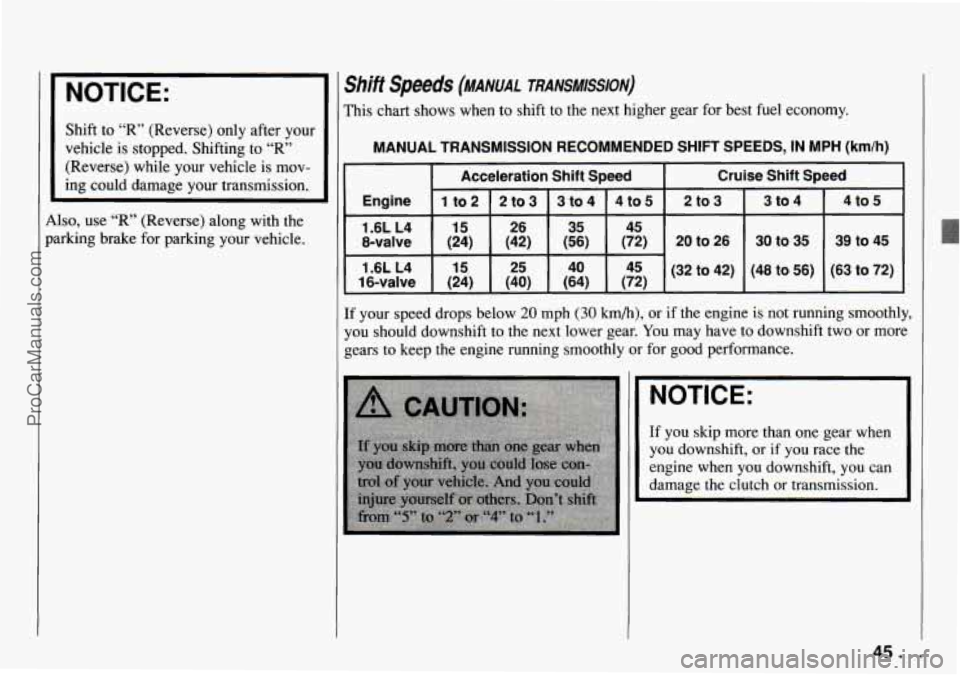
This chart shows when to shift to the next higher gear for best fuel economy.
MANUAL TRANSMISSION RECOMMENDED SHIFT SPEEDS, IN MPH (km/h)
Acceleration Shift Speed Cruise Shift Speed
Engine
1 to2 2 to3 3 to 4 4 to5 2 to3 3 to 4
1.6L L4 15 26 35 45 4
to 5
16-valve (24) (40) (64) (72) (63
to 72) (48
to 56)
1.6L
L4
15 25 40 45 (32 to 42) 39
to 45
30 to 35
8-valve (24) (42) (56) (72) 20 to 26
If your speed drops below 20 mph (30 km/h), or if the engine is not running smoothly,
you should downshift to the next lower gear.
You may have to downshift two or more
gears to keep the engine running smoothly or for good performance.
.NOTICE:
If you skip more than one gear when
you downshift,
or if you race the
engine when you downshift, you can
damage the clutch or transmission.
I
45..
ProCarManuals.com
Page 47 of 258
Features and Controls
Four-wheel Drive
If your vehicle has four-wheel drive, you
can send your engine's driving power
to
all four wheels for extra traction. To shift
out of two-wheel drive and into
four-wheel drive, lock the freewheeling
hubs and move the transfer case shift
lever
to "4H" or "4L" (see the following).
You should use
"2H" for most normal
driving.
Rear wheel anti-lock brakes do
not work
when
you shift into four-wheel drive.
Your regular brakes will still work. When
you shift back into two-wheel drive, your
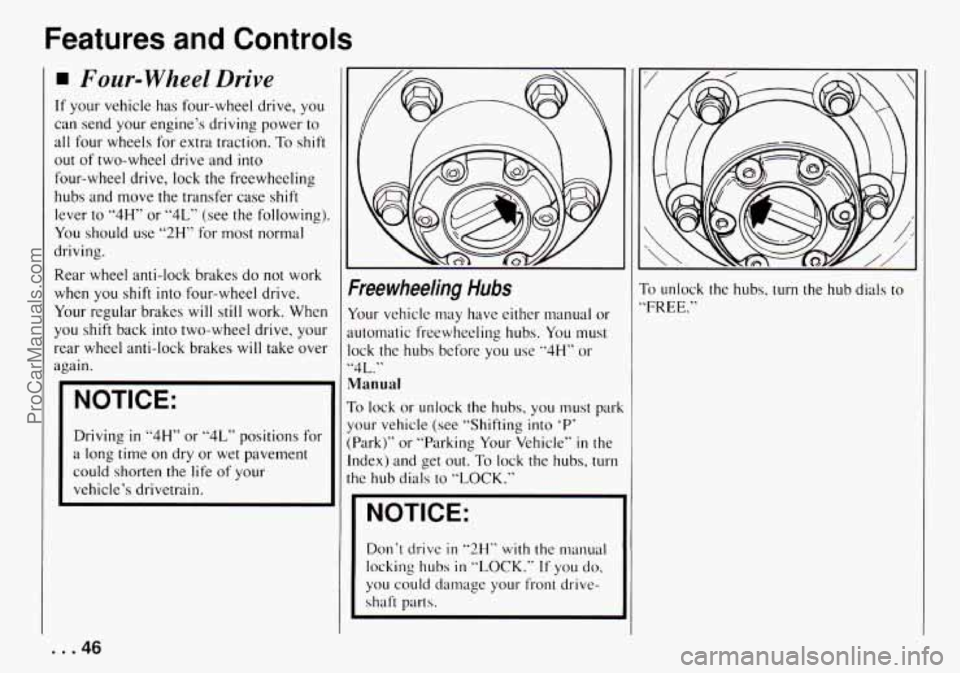
Freewheeling Hubs
Your vehicle may have either manual or
automatic freewheeling hubs. You must
NOTICE:
Manual
To lock or unlock the hubs, you must park
Driving
in "4H" or "4L" positions for
a long time
on dry or wet pavement
could shorten
the life of your
vehicle's drivetrain. your vehicle
(see "Shifting into
'P'
(Park)" or "Parking Your Vehicle" in the
Index) and get
out. To lock the hubs, turn
the hub dials to "LOCK."
I '
I NOTICE:
Don't drive in "2H" with the manual
locking
hubs in "LOCK." If you do.
you could damage your front drive-
shaft parts.
To unlock the hubs, turn the hub dials to
'FREE."
... 46
ProCarManuals.com
Page 49 of 258
Features and Controls
Parking
Parking Brake
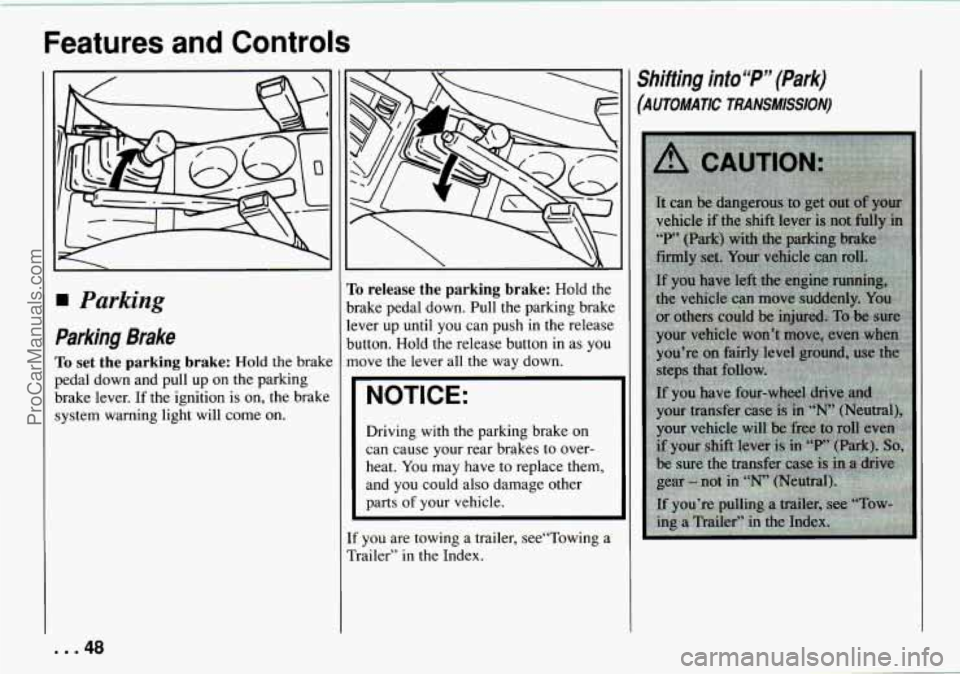
To set the parking brake: Hold the brake
pedal down and pull up
on the parking
brake lever. If the ignition is
on, the brake
system warning light will come
on.
To release the parking brake: Hold the
brake pedal down. Pull the parking brake
lever up until you can push in the release
button. Hold the release button in
as you
move the lever all the way down.
NOTICE:
Driving with the parking brake on
can cause your rear brakes to over-
heat.
You may have to replace them,
and you could also damage other
parts
of your vehicle.
If you are towing a trailer, see“Towing a
Trailer”
in the Index.
Shifting into “P” (Park)
(AUTOMATIC TRANSMlSSlON)
... 48
ProCarManuals.com
Page 50 of 258

1. Hold the brake pedal down with your
right foot and set the parking brake.
2. Move the shift lever into “P” (Park)
position like this:
0 Hold in the button on the lever,
and push the lever all
the way
toward the front of your vehicle.
3. If you have four-wheel drive, be sure
the transfer case is
in a drive gear -
not in “N” (Neutral).
4. Move the key to “LOCK.”
5. Remove the key and take it with you.
If you can walk away from your
vehicle
with the key in your hand,
your vehicle is
in “P” (Park).
Leaving Your Vehicle with the
Engine Running
(AUTOMATIC TRANSMISSION)
A CAUTION:
Xt can be dangerous to leave your
vehicle with the engine running. Your
vehicle could move suddenly if the
shift lever is not fully in “P” (Park)
with the parking brake firmly set.
I€ YOU have four-wheel drive and
your transfer case is in “N” (Neutral),
your vehicle
will be free to roll, even
if your shift lever
is in “F‘” (Park). So
be sure the transfer case is in a drive
gear
- not in “N’ (Neutral).
And, if you leave the vehicle with the
engine running, it
could overheat and
even catch
fie. You or others could
be injured. Don’t leave your vehicle
with the engine running unless
you
have to.
Torque Lock
(AUTOMATIC TRANSMISSION)
If you are parking on a hill and you don’t
shift your transmission into “P” (Park)
properly, the weight
of the vehicle may
put too much force
on the parking pawl in
the transmission. You may find it difficult
to pull the shift lever out of “P” (Park).
This is called ”torque lock.” To prevent
torque lock, set the parking brake and
then shift into “P“ (Park) properly before
you leave the driver‘s seat. To find out
how, see “Shifting into ’P7 (Park)’‘ in the
Index.
When you are ready
to drive, move the
shift lever
out of “P?’ (Park) BEFORE you
release the parking brake.
If “torque lock” does occur, you may
need
to have another vehicle push yours a
little uphill
to take some of the pressure
from
the transmission, so you can pull the
shift lever out of ’bP’’ (Park).
Shifting out of P (Park)
(AUTOMATIC TRANSMISSION)
Your Geo has a brake-transmission shift
interlock. You have
to fully apply your
regular brake before
you can shift from
.‘P’’ (Park) when the ignition is in the
49 ... ProCarManuals.com
Page 51 of 258

Features and Controls
“ON” position. See “Automatic
Transmission”
in the Index.
If you cannot shift out of “P” (Park), ease
pressure on the shift lever
- push the
shift lever all the
way into “P” (Park) and
release the shift lever button as you
maintain brake application. Then press
the shift lever button and move the shift
lever into the gear you wish.
/-
8
If you ever hold the brake pedal down bul
still can’t shift out of “P’ (Park), try this:
1. Apply And hold the brake until the en(
of step
6.
2. If the engine is running, shut it off.
Turn the key to
“ON” or “ACC.”
3. Find the access hole cover (A) on the
driver’s side
of the console, near the
shift lever.
4. Remove the screw (B) and cover (A).
5. Inside you’ll see the return plate (C).
Using your finger, move the return
plate toward the rear of the vehicle
until it stops.
6. Move the shift lever into the gear you
want.
7. Have the vehicle fixed as soon as you
can.
Parking Your Vehitle
(MANUAL TRANSMISSION)
Before you get out of your vehicle,
put your manual transmission in “R”
(Reverse) and firmly apply the parking
brake.
If you have four-wheel drive, be sure
your transfer case is
in a drive gear.
Your vehicle could roll
if it isn’t.
If your vehicle is equipped to tow a
trailer, see “Towing a Trailer” in the
Index.
... 50
ProCarManuals.com
Page 57 of 258
Features and Controls
-- I
-- a1
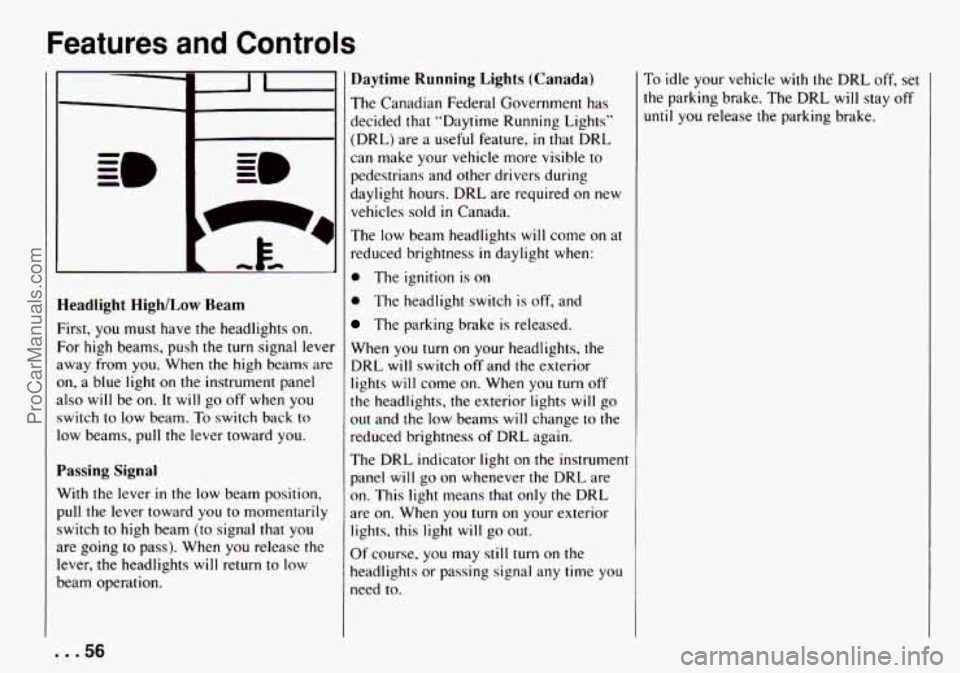
Headlight HighlLow Ream
First, you must have the headlights on.
For high beams, push the turn signal lever
away from you. When
the high beams are
on, a blue light on the instrument panel
also will be
on. It will go off when you
switch to low beam. To switch back
to
low beams, pull the lever toward you.
Passing Signal
With the lever in the low beam position,
pull the lever toward you
to momentarily
switch to high beam (to signal that
you
are going to pass). When you release the
lever, the headlights will return
to low
beam operation.
Daytime Running Lights (Canada)
The Canadian Federal Government has
decided that “Daytime Running Lighls”
(DRL) are
a useful feature, in that DRL
can make your vehicle more visible to
pedestrians and other drivers during
daylight hours. DRL are required
on new
vehicles sold
in Canada.
The low beam headlights will come on at
reduced brightness in daylight when:
0 The ignition is on
0 The headlight switch is off, and
The parking brake is released.
When
you turn on your headlights, the
DRL will switch
off and the exterior
lights will come on. When
you turn off
the headlights, the exterior lights will go
out and the low beams will change
to the
reduced brightness of DRL again.
The DRL indicator light on the instrument
panel will go on whenever the DRL are
on. This light means that only the DRL
are on. When you turn on your exterior
lights, this light will go
out.
Of course, you may still turn on the
headlights
or passing signal any time you
need to.
To idle your vehicle with the DRL off, set
the parking brake. The DRL will stay off
until you release the parking brake.
... 56
ProCarManuals.com