ignition CHEVROLET TRACKER 2004 2.G Owners Manual
[x] Cancel search | Manufacturer: CHEVROLET, Model Year: 2004, Model line: TRACKER, Model: CHEVROLET TRACKER 2004 2.GPages: 374, PDF Size: 2.57 MB
Page 64 of 374

Servicing Your Air Bag-Equipped
Vehicle
Air bags affect how your vehicle should be serviced.
There are parts of the air bag system in several places
around your vehicle. You don't want the system to
in¯ate while someone is working on your vehicle. Your
dealer and the service manual have information
about servicing your vehicle and the air bag system. To
purchase a service manual, see
Service Publications
Ordering Information on page 7-11.
{CAUTION:
For up to 15 seconds after the ignition key is
turned off and the battery is disconnected, an
air bag can still in¯ate during improper
service. You can be injured if you are close to
an air bag when it in¯ates. Avoid wires
wrapped with yellow tape or yellow
connectors. They are probably part of the air
bag system. Be sure to follow proper service
procedures, and make sure the person
performing work for you is quali®ed to do so.
The air bag system does not need regular maintenance.
1-58
Page 67 of 374

Keys...............................................................2-2
Remote Keyless Entry System.........................2-3
Remote Keyless Entry System Operation...........2-4
Doors and Locks.............................................2-6
Door Locks....................................................2-6
Power Door Locks..........................................2-7
Rear Door Security Locks................................2-8
Leaving Your Vehicle......................................2-9
Tailgate........................................................2-9
Windows........................................................2-10
Manual Windows..........................................2-11
Power Windows............................................2-11
Sun Visors...................................................2-11
Starting and Operating Your Vehicle................2-12
New Vehicle Break-In....................................2-12
Ignition Positions..........................................2-12
Starting Your Engine.....................................2-14
Engine Coolant Heater..................................2-15
Automatic Transmission Operation...................2-16
Manual Transmission Operation......................2-20Four-Wheel Drive..........................................2-22
Parking Brake..............................................2-24
Shifting Into Park (P).....................................2-25
Shifting Out of Park (P).................................2-27
Parking Your Vehicle.....................................2-28
Parking Over Things That Burn.......................2-28
Engine Exhaust............................................2-29
Running Your Engine While You Are Parked. . . .2-30
Mirrors...........................................................2-31
Manual Rearview Mirror.................................2-31
Outside Manual Mirrors..................................2-32
Outside Power Mirrors...................................2-32
Outside Convex Mirror...................................2-33
Storage Areas................................................2-33
Glove Box...................................................2-33
Cupholder(s)................................................2-33
Coinholder(s)................................................2-33
Luggage Carrier...........................................2-34
Convenience Net..........................................2-36
Cargo Cover................................................2-36
Section 2 Features and Controls
2-1
Page 68 of 374
Keys
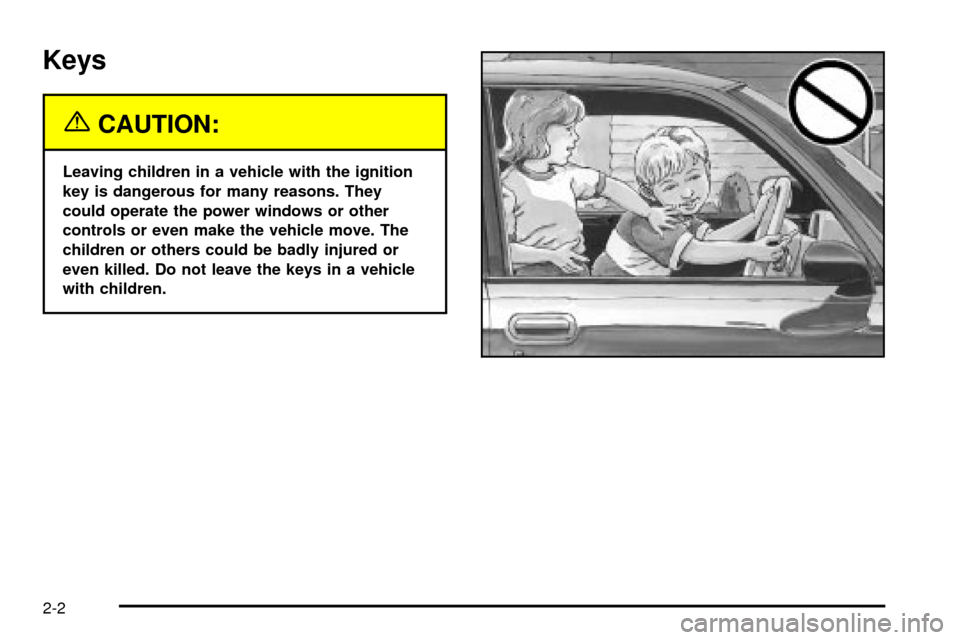
{CAUTION:
Leaving children in a vehicle with the ignition
key is dangerous for many reasons. They
could operate the power windows or other
controls or even make the vehicle move. The
children or others could be badly injured or
even killed. Do not leave the keys in a vehicle
with children.
2-2
Page 69 of 374
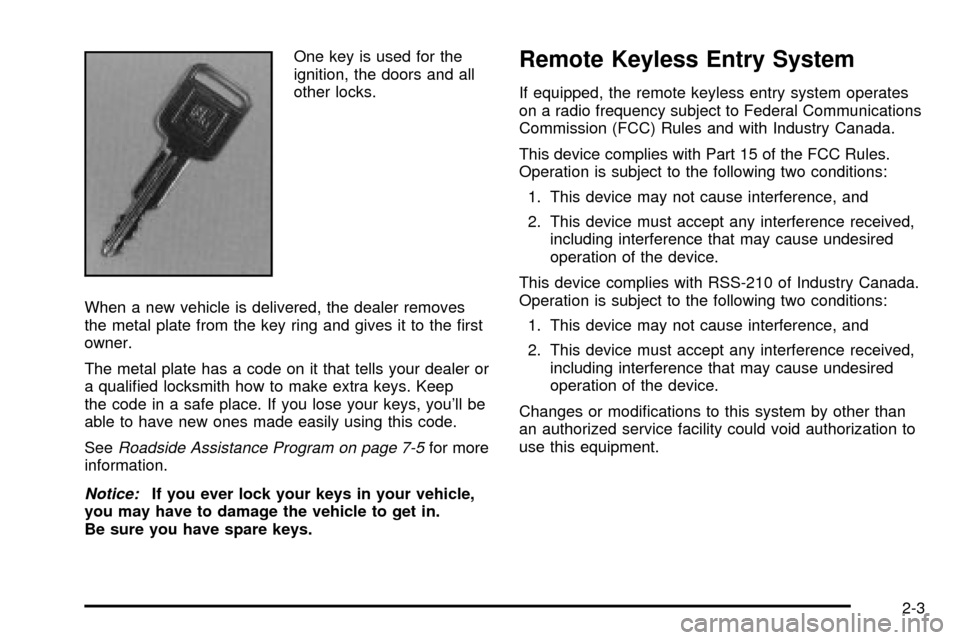
One key is used for the
ignition, the doors and all
other locks.
When a new vehicle is delivered, the dealer removes
the metal plate from the key ring and gives it to the ®rst
owner.
The metal plate has a code on it that tells your dealer or
a quali®ed locksmith how to make extra keys. Keep
the code in a safe place. If you lose your keys, you'll be
able to have new ones made easily using this code.
See
Roadside Assistance Program on page 7-5for more
information.
Notice:If you ever lock your keys in your vehicle,
you may have to damage the vehicle to get in.
Be sure you have spare keys.
Remote Keyless Entry System
If equipped, the remote keyless entry system operates
on a radio frequency subject to Federal Communications
Commission (FCC) Rules and with Industry Canada.
This device complies with Part 15 of the FCC Rules.
Operation is subject to the following two conditions:
1. This device may not cause interference, and
2. This device must accept any interference received,
including interference that may cause undesired
operation of the device.
This device complies with RSS-210 of Industry Canada.
Operation is subject to the following two conditions:
1. This device may not cause interference, and
2. This device must accept any interference received,
including interference that may cause undesired
operation of the device.
Changes or modi®cations to this system by other than
an authorized service facility could void authorization to
use this equipment.
2-3
Page 77 of 374
Manual Windows
Use the window crank to open and close each window.
Power Windows
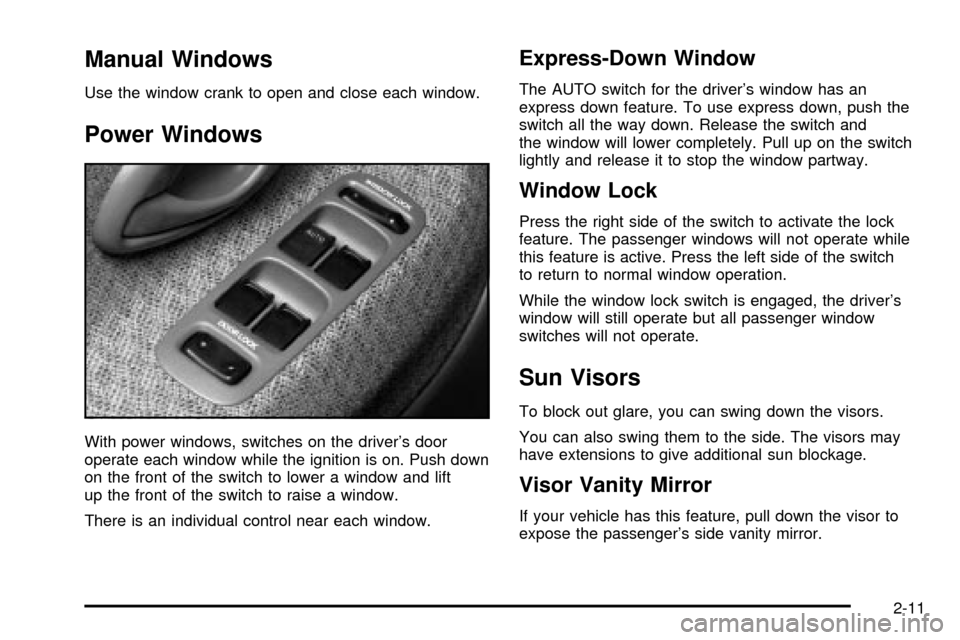
With power windows, switches on the driver's door
operate each window while the ignition is on. Push down
on the front of the switch to lower a window and lift
up the front of the switch to raise a window.
There is an individual control near each window.
Express-Down Window
The AUTO switch for the driver's window has an
express down feature. To use express down, push the
switch all the way down. Release the switch and
the window will lower completely. Pull up on the switch
lightly and release it to stop the window partway.
Window Lock
Press the right side of the switch to activate the lock
feature. The passenger windows will not operate while
this feature is active. Press the left side of the switch
to return to normal window operation.
While the window lock switch is engaged, the driver's
window will still operate but all passenger window
switches will not operate.
Sun Visors
To block out glare, you can swing down the visors.
You can also swing them to the side. The visors may
have extensions to give additional sun blockage.
Visor Vanity Mirror
If your vehicle has this feature, pull down the visor to
expose the passenger's side vanity mirror.
2-11
Page 78 of 374

Starting and Operating Your
Vehicle
New Vehicle Break-In
Notice:Your vehicle does not need an elaborate
ªbreak-in.º But it will perform better in the long run
if you follow these guidelines:
·Keep your speed at 55 mph (88 km/h) or less for
the ®rst 500 miles (805 km).
·Do not drive at any one speed Ð fast or
slow Ð for the ®rst 500 miles (805 km). Do not
make full-throttle starts.
·Avoid making hard stops for the ®rst 200 miles
(322 km) or so. During this time your new
brake linings are not yet broken in. Hard stops
with new linings can mean premature wear
and earlier replacement. Follow this breaking-in
guideline every time you get new brake
linings.
·Do not tow a trailer during break-in. SeeTowing
a Trailer on page 4-57
for more information.
Ignition Positions
With the key in the ignition
switch, you can turn it to
four different positions.
LOCK (A):This is the only position from which you can
remove the key. This position locks your steering
wheel, ignition and automatic transmission.
If you have an automatic transmission, the ignition
switch can't be turned to LOCK unless the shift lever is
in PARK (P).
2-12
Page 79 of 374

{CAUTION:
On manual transmission vehicles, turning the
key to LOCK will lock the steering column and
result in a loss of ability to steer the vehicle.
This could cause a collision. If you need to
turn the engine off while the vehicle is moving,
turn the key only to ACC. Do not push the key
in while the vehicle is moving.
Notice:Using a tool to force the key from the
ignition switch could cause damage or break the
key. Use the correct key and turn the key only with
your hand. Make sure the key is all the way in. If
it is, turn the steering wheel left and right while you
turn the key hard. If none of this works, then
your vehicle needs service.ACC (ACCESSORY) (B):This is the position in which
you can operate your electrical accessories or items
plugged into the accessory power outlets. It also unlocks
the steering wheel and ignition. Use this position if
your vehicle must be pushed or towed.
ON (C):This is the position that the switch returns to
after you start your engine and release the switch.
The switch stays in ON while the engine is running. But
even while the engine is not running, you can use
ON to operate your electrical accessories and to display
some instrument panel cluster warning and indicator
lights.
START (D):This is the position that starts the engine.
When the engine starts, release the key. The ignition
switch will return to ON for normal driving.
When the engine is not running, ACC and ON allow you
to operate your electrical accessories, such as the
radio or items plugged into the accessory power outlets.
A warning tone will sound if you open the driver's
door while the ignition is in ACC or LOCK and the key
is in the ignition.
2-13
Page 80 of 374

Starting Your Engine
Automatic Transmission
Move your shift lever to PARK (P) or NEUTRAL (N).
Your engine won't start in any other position Ð that's a
safety feature. To restart when you're already moving,
use NEUTRAL (N) only.
Notice:Do not try to shift to PARK (P) if your
vehicle is moving. If you do, you could damage the
transmission. Shift to PARK (P) only when your
vehicle is stopped.
Manual Transmission
The shift lever should be in NEUTRAL and the parking
brake engaged. Hold the clutch pedal to the ¯oor
and start the engine. Your vehicle won't start if the clutch
pedal is not all the way down Ð that's a safety
feature.
1. With your foot off the accelerator pedal, turn your
ignition key to START. When the engine starts, let
go of the key.
Notice:Holding your key in START for longer than
15 seconds at a time will cause your battery to
be drained much sooner. And the excessive heat
can damage your starter motor. Wait about
15 seconds between each try to help avoid draining
your battery or damaging your starter.
2. If it doesn't start, push the accelerator pedal
one-third of the way down. Hold it there, for
not more than 15 seconds at a time, while you turn
your key to START. When the engine starts, let
go of the key and release the pedal. Wait about
15 seconds between each try.
3. If your engine still won't start (or starts but then
stops), it could be ¯ooded with too much gasoline.
Try pushing your accelerator pedal all the way to the
¯oor and holding it there as you hold the key in
START for about three seconds. If the vehicle starts
brie¯y but then stops again, do the same thing,
but this time keep the pedal down for ®ve or
six seconds. This clears the extra gasoline from the
engine.
Notice:Your engine is designed to work with the
electronics in your vehicle. If you add electrical
parts or accessories, you could change the way the
engine operates. Before adding electrical equipment,
check with your dealer. If you do not, your engine
might not perform properly.
2-14
Page 83 of 374
{CAUTION:
If you have four-wheel drive, your vehicle will
be free to roll Ð even if your shift lever is in
PARK (P) Ð if your transfer case is in
NEUTRAL. So, be sure the transfer case is in a
drive gear, two-wheel high (2H) or four-wheel
high (4H) or four-wheel low (4L) Ð not in
NEUTRAL. See
Shifting Into Park (P) on
page 2-25
Ensure the shift lever is fully in PARK (P) before starting
the engine. Your vehicle has an automatic transmission
shift lock control system. You have to fully apply
your regular brakes before you can shift from PARK (P)
while the ignition key is in ON. If you cannot shift out
of PARK (P), ease pressure on the shift lever, then push
the shift lever all the way into PARK (P) and release
the shift lever button as you maintain brake application.
Then press the shift lever button and move the shift
lever into the gear you wish. See
Shifting Out of Park (P)
on page 2-27.REVERSE (R):Use this gear to back up.
Notice:Shifting to REVERSE (R) while your vehicle
is moving forward could damage the transmission.
The repairs would not be covered by your warranty.
Shift to REVERSE (R) only after your vehicle is
stopped.
To rock your vehicle back and forth to get out of snow,
ice or sand without damaging your transmission,
see If You Are Stuck: In Sand, Mud, Ice or Snow on
page 4-44.
NEUTRAL (N):In this position, your engine doesn't
connect with the wheels. To restart when you're already
moving, use NEUTRAL (N) only. Also, use
NEUTRAL (N) when your vehicle is being towed.
{CAUTION:
Shifting into a drive gear while your engine is
running at high speed is dangerous. Unless
your foot is ®rmly on the brake pedal, your
vehicle could move very rapidly. You could
lose control and hit people or objects. Do not
shift into a drive gear while your engine is
running at high speed.
2-17
Page 85 of 374

Overdrive Off
If your vehicle has this feature, the overdrive-off button
is located on the left side of the shift lever. When
operating under normal conditions, the vehicle will
automatically default to overdrive when initially started
until it is disengaged. If overdrive is turned off and
the vehicle is turned off, when the vehicle is restarted,
overdrive will automatically turn back on. By operating
the overdrive off button, with the ignition in the ON
position, the four-speed automatic transmission
(three-speed plus overdrive) can be converted to a
three-speed automatic transmission. While in the
three-speed mode, the transmission will not shift into
the overdrive position.To convert the transmission to the three-speed mode,
press in the overdrive-off button and release it. The
OD/OFF indicator light on the instrument panel cluster
will come on. The overdrive-off button is for normal
driving. However, it also offers more power and lower
fuel economy than driving in the overdrive position.
Here are some times you might choose to drive with
the overdrive-off button engaged:
·While driving on hilly, winding roads.
·While going down a steep hill.
To return the transmission to the four-speed mode,
press in the overdrive-off button again. The OD/OFF
indicator light will go off. Disengaging the overdrive-off
button is for normal driving with the four-speed
automatic transmission. If you need more power for
passing, and you are:
·Going less than about 35 mph (55 km/h), push your
accelerator pedal about halfway down.
·Going about 35 mph (55 km/h), push your
accelerator all the way down.
If the transfer case shift lever is in the 4L position, the
four-speed automatic transmission will remain in
the three-speed mode.
2-19