ignition CHEVROLET TRAVERSE 2009 1.G Repair Manual
[x] Cancel search | Manufacturer: CHEVROLET, Model Year: 2009, Model line: TRAVERSE, Model: CHEVROLET TRAVERSE 2009 1.GPages: 422, PDF Size: 2.06 MB
Page 296 of 422
When the system has calculated
that oil life has been diminished,
it indicates that an oil change is
necessary. A CHANGE ENGINE OIL
SOON message comes on. Change
the oil as soon as possible within
the next 600 miles (1 000 km). It is
possible that, if driving under the best
conditions, the oil life system might
not indicate that an oil change is
necessary for over a year. However,
the engine oil and lter must be
changed at least once a year and at
this time the system must be reset.
Your dealer/retailer has trained
service people who will perform this
work using genuine parts and reset
the system. It is also important to
check the oil regularly and keep it at
the proper level.If the system is ever reset
accidentally, the oil must be
changed at 3,000 miles (5 000 km)
since the last oil change. Remember
to reset the oil life system whenever
the oil is changed.
How to Reset the Engine Oil
Life System
The Engine Oil Life System
calculates when to change the
engine oil and lter based on vehicle
use. Whenever the oil is changed,
reset the system so it can calculate
when the next oil change is required.
If a situation occurs where the oil
is changed prior to a CHANGE
ENGINE OIL SOON message being
turned on, reset the system.If the vehicle does not have Driver
Information Center (DIC) buttons:
1. Turn the ignition to ON/RUN, with
the engine off. The vehicle must
be in P (Park) to access this
display. Press the trip odometer
reset stem until OIL LIFE
REMAINING displays.
2. Press and hold the trip
odometer reset stem until OIL
LIFE REMAINING shows 100%.
Three chimes sound and the
CHANGE ENGINE OIL SOON
message goes off.
3. Turn the key to LOCK/OFF.
If the CHANGE ENGINE OIL
SOON message comes back on
when the vehicle is started, the
engine oil life system has not
reset. Repeat the procedure.
5-14 Service and Appearance Care
Page 297 of 422
If the vehicle has Driver Information
Center (DIC) buttons:
1. Turn the ignition to ON/RUN,
with the engine off.
2. Press the vehicle information
button until OIL LIFE
REMAINING displays.
3. Press and hold the set/reset
button until 100% is displayed.
Three chimes sound and
the CHANGE ENGINE OIL
SOON message goes off.
4. Turn the key to LOCK/OFF.
If the CHANGE ENGINE OIL SOON
message comes back on when the
vehicle is started, the engine oil life
system has not reset. Repeat the
procedure.What to Do with Used Oil
Used engine oil contains certain
elements that can be unhealthy for
your skin and could even cause
cancer. Do not let used oil stay on
your skin for very long. Clean your
skin and nails with soap and water,
or a good hand cleaner. Wash or
properly dispose of clothing or rags
containing used engine oil. See the
manufacturer’s warnings about the
use and disposal of oil products.
Used oil can be a threat to the
environment. If you change your own
oil, be sure to drain all the oil from the
lter before disposal. Never dispose
of oil by putting it in the trash, pouring
it on the ground, into sewers, or into
streams or bodies of water. Recycle
it by taking it to a place that collects
used oil.
Engine Air Cleaner/Filter
When to Inspect the Engine
Air Cleaner/Filter
Inspect the air cleaner/lter at the
MaintenanceIIintervals and replace
it at the rst oil change after each
50,000 mile (80 000 km) interval.
SeeScheduled Maintenance on
page 6-3for more information. If you
are driving in dusty/dirty conditions,
inspect the lter at each engine oil
change.
SeeEngine Compartment Overview
on page 5-10for the location of
the engine air cleaner/lter.
How to Inspect the Engine Air
Cleaner/Filter
To inspect the air cleaner/lter,
remove the lter from the vehicle and
lightly shake the lter (away from
vehicle) to release loose dust and
dirt. If the lter remains caked with
dirt, a new lter is required.
Service and Appearance Care 5-15
Page 312 of 422
Notice:If you leave the radio or
other accessories on during the
jump starting procedure, they
could be damaged. The repairs
would not be covered by the
warranty. Always turn off the
radio and other accessories
when jump starting the vehicle.
3. Turn off the ignition on both
vehicles. Unplug unnecessary
accessories plugged into the
cigarette lighter or the accessory
power outlets. Turn off the radio
and all lamps that are not needed.
This will avoid sparks and help
save both batteries. And it could
save the radio!
4. Open the hoods and locate the
positive (+) and negative (−)
terminal locations on the other
vehicle. Your vehicle has a
remote positive (+) and a remote
negative (−) jump starting
terminal. SeeEngine
Compartment Overview on
page 5-10for more information
on the terminal locations.{CAUTION
Using a match near a battery can
cause battery gas to explode.
People have been hurt doing this,
and some have been blinded. Use
a ashlight if you need more light.
Be sure the batteries have
enough water. You do not need to
add water to the ACDelco
®
battery (or batteries) installed in
your new vehicle. But if a battery
has ller caps, be sure the right
amount of uid is there. If it is
low, add water to take care of that
rst. If you do not, explosive gas
could be present.
Battery uid contains acid that
can burn you. Do not get it on
you. If you accidentally get it in
your eyes or on your skin, ush
the place with water and get
medical help immediately.
{CAUTION
Fans or other moving engine
parts can injure you badly. Keep
your hands away from moving
parts once the engine is running.
5. Check that the jumper cables do
not have loose or missing
insulation. If they do, you could
get a shock. The vehicles
could be damaged too.
Before you connect the cables,
here are some basic things you
should know. Positive (+) will go
to positive (+) or to a remote
positive (+) terminal if the vehicle
has one. Negative (−) will go to a
heavy, unpainted metal engine
part or to a remote negative (−)
terminal if the vehicle has one.
5-30 Service and Appearance Care
Page 327 of 422
Vehicles with TPMS operate on a
radio frequency and comply with
RSS-210 of Industry and Science
Canada. Operation is subject to the
following two conditions:
1. This device may not cause
interference.
2. This device must accept any
interference received, including
interference that may cause
undesired operation of the device.
Changes or modications to this
system by other than an authorized
service facility could void
authorization to use this equipment.Tire Pressure Monitor
Operation
This vehicle may have a Tire
Pressure Monitor System (TPMS).
The TPMS is designed to warn
the driver when a low tire pressure
condition exists. TPMS sensors
are mounted onto each tire
and wheel assembly, excluding the
spare tire and wheel assembly,
if the vehicle has one. The TPMS
sensors monitor the air pressure in
the vehicle’s tires and transmits
the tire pressure readings to
a receiver located in the vehicle.
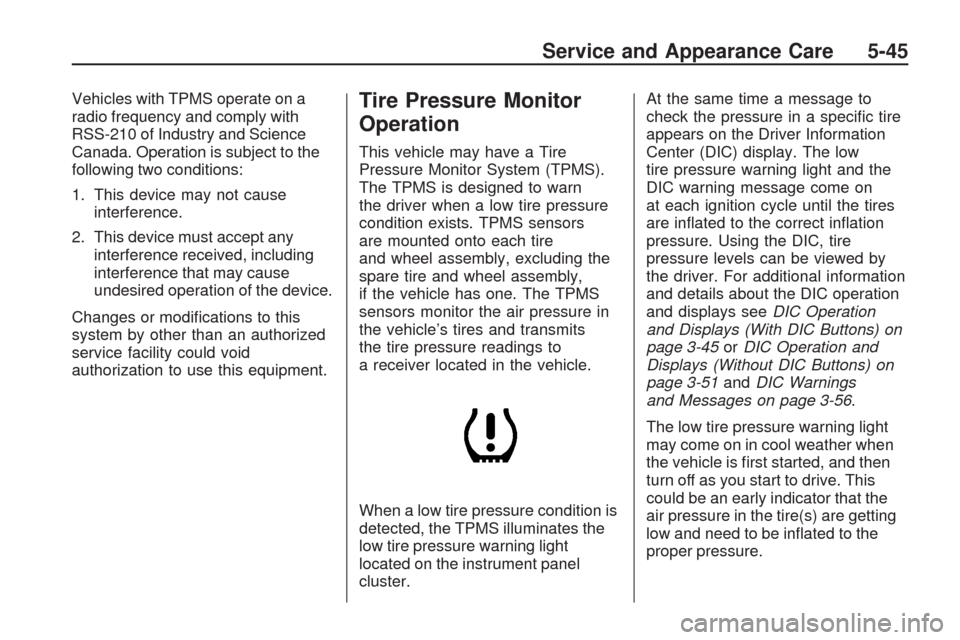
When a low tire pressure condition is
detected, the TPMS illuminates the
low tire pressure warning light
located on the instrument panel
cluster.At the same time a message to
check the pressure in a specic tire
appears on the Driver Information
Center (DIC) display. The low
tire pressure warning light and the
DIC warning message come on
at each ignition cycle until the tires
are inated to the correct ination
pressure. Using the DIC, tire
pressure levels can be viewed by
the driver. For additional information
and details about the DIC operation
and displays seeDIC Operation
and Displays (With DIC Buttons) on
page 3-45orDIC Operation and
Displays (Without DIC Buttons) on
page 3-51andDIC Warnings
and Messages on page 3-56.
The low tire pressure warning light
may come on in cool weather when
the vehicle is rst started, and then
turn off as you start to drive. This
could be an early indicator that the
air pressure in the tire(s) are getting
low and need to be inated to the
proper pressure.
Service and Appearance Care 5-45
Page 328 of 422
A Tire and Loading Information
label, attached to your vehicle,
shows the size of your vehicle’s
original equipment tires and
the correct ination pressure for
your vehicle’s tires when they
are cold. SeeLoading the Vehicle
on page 4-16, for an example of the
Tire and Loading Information
label and its location on your
vehicle. Also seeInflation - Tire
Pressure on page 5-42.
Your vehicle’s TPMS can warn you
about a low tire pressure condition
but it does not replace normal tire
maintenance. SeeTire Inspection
and Rotation on page 5-48andTires
on page 5-36.
Notice:Using non-approved tire
sealants could damage the
Tire Pressure Monitor System
(TPMS) sensors. TPMS sensor
damage caused by using an
incorrect tire sealant is not
covered by the vehicle warranty.Always use the GM approved tire
sealant available through your
dealer/retailer.
Factory-installed Tire Inator Kits
use a GM approved liquid tire
sealant. Using non-approved tire
sealants could damage the TPMS
sensors. SeeTire Sealant and
Compressor Kit on page 5-57for
information regarding the inator kit
materials and instructions.
TPMS Malfunction Light and
Message
The TPMS will not function properly if
one or more of the TPMS sensors
are missing or inoperable. When the
system detects a malfunction, the
low tire warning light ashes for
about one minute and then stays on
for the remainder of the ignition
cycle. A DIC warning message is
also displayed. The low tire warning
light and DIC warning message
come on at each ignition cycle until
the problem is corrected. Some ofthe conditions that can cause the
malfunction light and DIC message
to come on are:
One of the road tires has been
replaced with the spare tire, if
your vehicle has one. The spare
tire does not have a TPMS
sensor. The TPMS malfunction
light and DIC message should go
off once you re-install the road tire
containing the TPMS sensor.
The TPMS sensor matching
process was started but not
completed or not completed
successfully after rotating the
vehicle’s tires. The DIC message
and TPMS malfunction light
should go off once the TPMS
sensor matching process is
performed successfully. See
“TPMS Sensor Matching Process”
later in this section.
5-46 Service and Appearance Care
Page 330 of 422
The TPMS sensor matching process
is outlined below:
1. Set the parking brake.
2. Turn the ignition switch to
ON/RUN with the engine off.
3. Press the Remote Keyless
Entry (RKE) transmitter’s LOCK
and UNLOCK buttons at the
same time for approximately
ve seconds. The horn sounds
twice to signal the receiver
is in relearn mode and TIRE
LEARNING ACTIVE message
displays on the DIC screen.
4. Start with the driver side front tire.
5. Remove the valve cap from the
valve cap stem. Activate the
TPMS sensor by increasing or
decreasing the tire’s air pressure
for ve seconds, or until a horn
chirp sounds. The horn chirp,
which may take up to 30 seconds
to sound, conrms that the sensor
identication code has been
matched to this tire and wheel
position.6. Proceed to the passenger side
front tire, and repeat the
procedure in Step 5.
7. Proceed to the passenger side
rear tire, and repeat the
procedure in Step 5.
8. Proceed to the driver side rear
tire, and repeat the procedure
in Step 5. The horn sounds
two times to indicate the sensor
identication code has been
matched to the driver side rear
tire, and the TPMS sensor
matching process is no longer
active. The TIRE LEARNING
ACTIVE message on the
DIC display screen goes off.
9. Turn the ignition switch to
LOCK/OFF.
10. Set all four tires to the
recommended air pressure level
as indicated on the Tire and
Loading Information label.
11. Put the valve caps back on the
valve stems.Tire Inspection and
Rotation
We recommend that you
regularly inspect the vehicle’s
tires, including the spare tire, if
the vehicle has one, for signs of
wear or damage. SeeWhen It Is
Time for New Tires on page 5-50
for more information.
Tires should be rotated
every 5,000 to 8,000 miles
(8 000 to 13 000 km). See
Scheduled Maintenance on
page 6-3.
The purpose of a regular tire
rotation is to achieve a uniform
wear for all tires on the vehicle.
This will ensure that the vehicle
continues to perform most like it
did when the tires were new.
5-48 Service and Appearance Care
Page 372 of 422
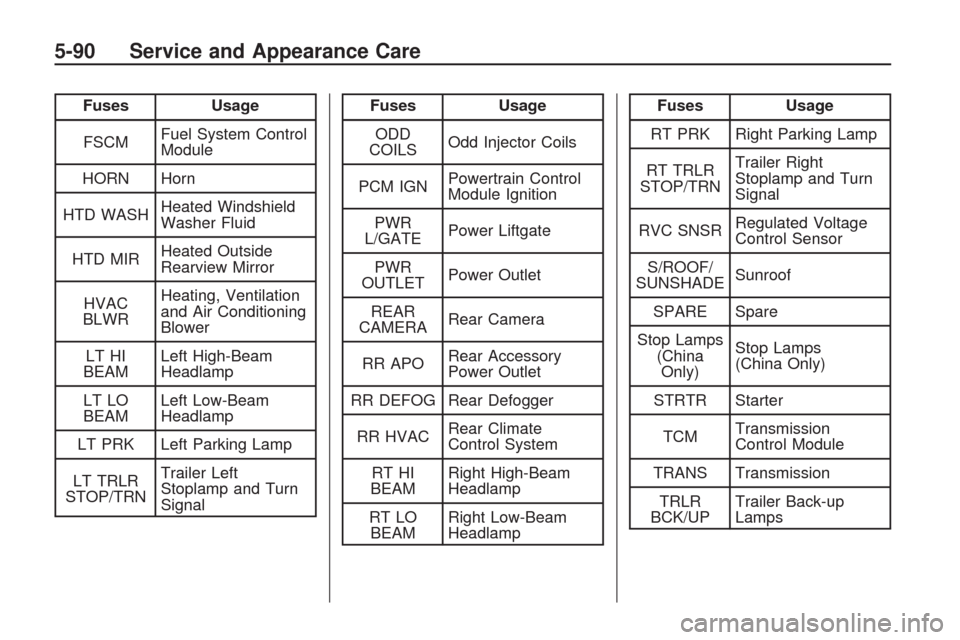
Fuses Usage
FSCMFuel System Control
Module
HORN Horn
HTD WASHHeated Windshield
Washer Fluid
HTD MIRHeated Outside
Rearview Mirror
HVAC
BLWRHeating, Ventilation
and Air Conditioning
Blower
LT HI
BEAMLeft High-Beam
Headlamp
LT LO
BEAMLeft Low-Beam
Headlamp
LT PRK Left Parking Lamp
LT TRLR
STOP/TRNTrailer Left
Stoplamp and Turn
SignalFuses Usage
ODD
COILSOdd Injector Coils
PCM IGNPowertrain Control
Module Ignition
PWR
L/GATEPower Liftgate
PWR
OUTLETPower Outlet
REAR
CAMERARear Camera
RR APORear Accessory
Power Outlet
RR DEFOG Rear Defogger
RR HVACRear Climate
Control System
RT HI
BEAMRight High-Beam
Headlamp
RT LO
BEAMRight Low-Beam
HeadlampFuses Usage
RT PRK Right Parking Lamp
RT TRLR
STOP/TRNTrailer Right
Stoplamp and Turn
Signal
RVC SNSRRegulated Voltage
Control Sensor
S/ROOF/
SUNSHADESunroof
SPARE Spare
Stop Lamps
(China
Only)Stop Lamps
(China Only)
STRTR Starter
TCMTransmission
Control Module
TRANS Transmission
TRLR
BCK/UPTrailer Back-up
Lamps
5-90 Service and Appearance Care
Page 373 of 422
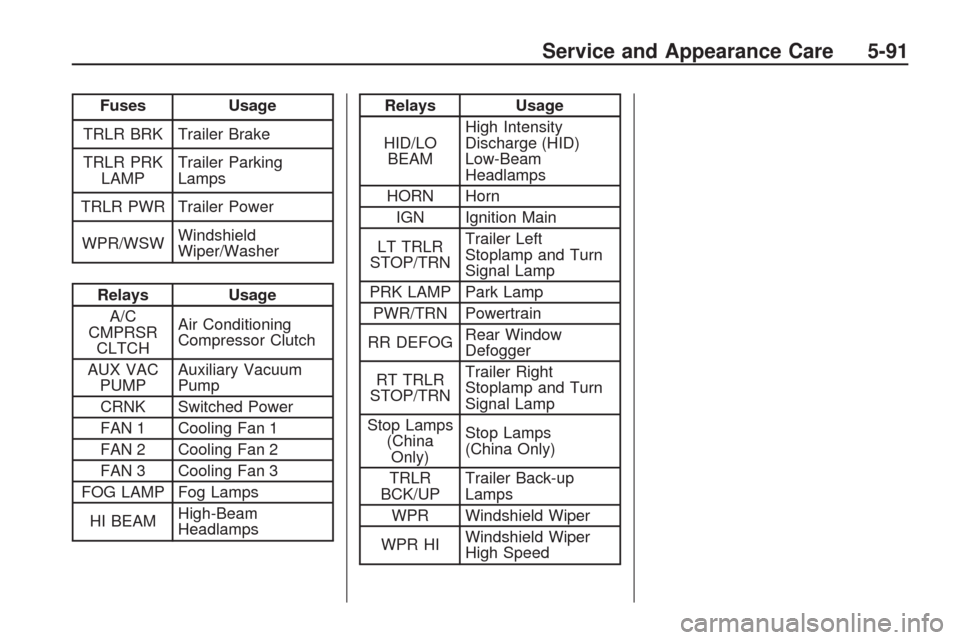
Fuses Usage
TRLR BRK Trailer Brake
TRLR PRK
LAMPTrailer Parking
Lamps
TRLR PWR Trailer Power
WPR/WSWWindshield
Wiper/Washer
Relays Usage
A/C
CMPRSR
CLTCHAir Conditioning
Compressor Clutch
AUX VAC
PUMPAuxiliary Vacuum
Pump
CRNK Switched Power
FAN 1 Cooling Fan 1
FAN 2 Cooling Fan 2
FAN 3 Cooling Fan 3
FOG LAMP Fog Lamps
HI BEAMHigh-Beam
Headlamps
Relays Usage
HID/LO
BEAMHigh Intensity
Discharge (HID)
Low-Beam
Headlamps
HORN Horn
IGN Ignition Main
LT TRLR
STOP/TRNTrailer Left
Stoplamp and Turn
Signal Lamp
PRK LAMP Park Lamp
PWR/TRN Powertrain
RR DEFOGRear Window
Defogger
RT TRLR
STOP/TRNTrailer Right
Stoplamp and Turn
Signal Lamp
Stop Lamps
(China
Only)Stop Lamps
(China Only)
TRLR
BCK/UPTrailer Back-up
Lamps
WPR Windshield Wiper
WPR HIWindshield Wiper
High Speed
Service and Appearance Care 5-91
Page 384 of 422
At Least Once a Year
Starter Switch Check
{CAUTION
When you are doing this
inspection, the vehicle could move
suddenly. If the vehicle moves,
you or others could be injured.
1. Before starting this check, be
sure there is enough room
around the vehicle.
2. Firmly apply both the parking
brake and the regular brake.
SeeParking Brake on page 2-27.
Do not use the accelerator
pedal, and be ready to turn off
the engine immediately if it starts.
3. Try to start the engine in each
gear. The vehicle should start
only in P (Park) or N (Neutral).
If the vehicle starts in any other
position, contact your dealer/
retailer for service.
Automatic Transmission Shift
Lock Control System Check
{CAUTION
When you are doing this
inspection, the vehicle could move
suddenly. If the vehicle moves,
you or others could be injured.
1. Before starting this check, be
sure there is enough room
around the vehicle. It should be
parked on a level surface.
2. Firmly apply the parking brake.
SeeParking Brake on page 2-27.
Be ready to apply the regular
brake immediately if the vehicle
begins to move.
3. With the engine off, turn the
ignition to ON/RUN, but do not
start the engine. Without applying
the regular brake, try to move the
shift lever out of P (Park) with
normal effort. If the shift lever
moves out of P (Park), contact
your dealer/retailer for service.
Ignition Transmission Lock
Check
While parked, and with the parking
brake set, try to turn the ignition
to LOCK/OFF in each shift lever
position.
The ignition should turn to
LOCK/OFF only when the shift
lever is in P (Park).
The ignition key should come out
only in LOCK/OFF.
Contact your dealer/retailer if
service is required.
6-10 Maintenance Schedule
Page 409 of 422
GM will not access this data or
share it with others except: with
the consent of the vehicle owner
or, if the vehicle is leased, with the
consent of the lessee; in response to
an official request of police or similar
government office; as part of GM’s
defense of litigation through the
discovery process; or, as required
by law. Data that GM collects or
receives may also be used for GM
research needs or may be made
available to others for research
purposes, where a need is shown
and the data is not tied to a specic
vehicle or vehicle owner.OnStar®
If your vehicle has OnStar and you
subscribe to the OnStar services,
please refer to the OnStar Terms and
Conditions for information on data
collection and use. See alsoOnStar
®
System on page 2-43in this manual
for more information.
Navigation System
If your vehicle has a navigation
system, use of the system may
result in the storage of destinations,
addresses, telephone numbers, and
other trip information. Refer to the
navigation system operating manual
for information on stored data and for
deletion instructions.
Radio Frequency
Identication (RFID)
RFID technology is used in some
vehicles for functions such as tire
pressure monitoring and ignition
system security, as well as in
connection with conveniences such
as key fobs for remote door locking/
unlocking and starting, and in-vehicle
transmitters for garage door openers.
RFID technology in GM vehicles
does not use or record personal
information or link with any other
GM system containing personal
information.
Customer Assistance Information 7-17