display CHEVROLET TRAX 2013 1.G Owner's Guide
[x] Cancel search | Manufacturer: CHEVROLET, Model Year: 2013, Model line: TRAX, Model: CHEVROLET TRAX 2013 1.GPages: 408, PDF Size: 6.59 MB
Page 165 of 408
Black plate (13,1)Chevrolet TRAX Owner Manual - 2013 - CRC - 3/6/13
Infotainment System 7-13
Some stations change the program
type code depending on the
content. The system stores the RDS
stations sorted by program type in
the FM category list.
To search for a programming type
determined by station:
1. From FM, turn the MENU/TUNEknob to select FM Category List,
then press the MENU/
TUNE knob.
2. Turn the MENU/TUNE knob to move to the desired station, then
press the MENU TUNE knob to
receive the selected
broadcasting channel.
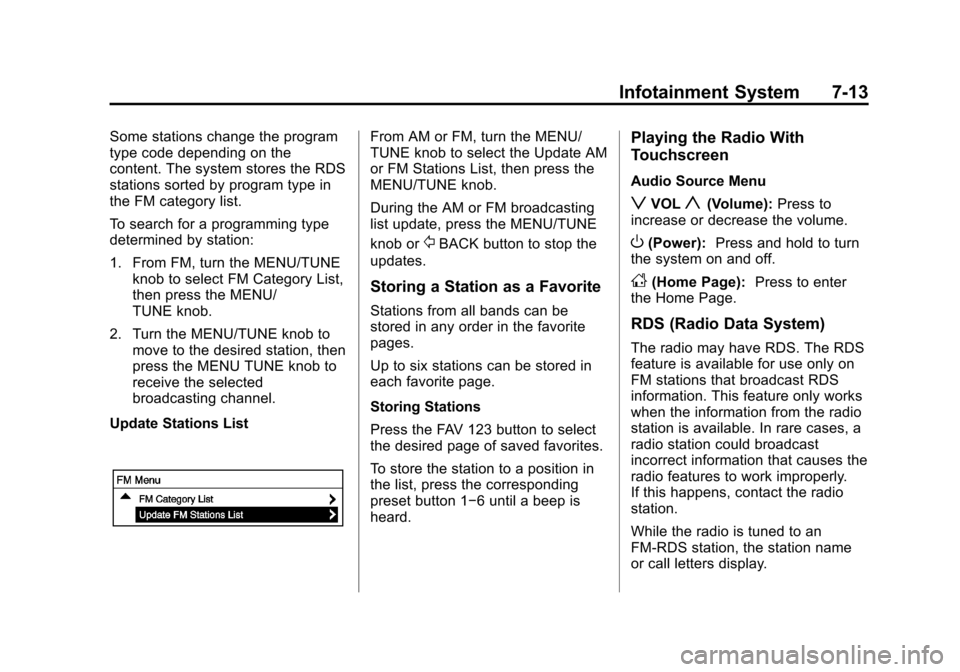
Update Stations ListFrom AM or FM, turn the MENU/
TUNE knob to select the Update AM
or FM Stations List, then press the
MENU/TUNE knob.
During the AM or FM broadcasting
list update, press the MENU/TUNE
knob or
/BACK button to stop the
updates.
Storing a Station as a Favorite
Stations from all bands can be
stored in any order in the favorite
pages.
Up to six stations can be stored in
each favorite page.
Storing Stations
Press the FAV 123 button to select
the desired page of saved favorites.
To store the station to a position in
the list, press the corresponding
preset button 1−6 until a beep is
heard.
Playing the Radio With
Touchscreen
Audio Source Menu
zVOLy(Volume): Press to
increase or decrease the volume.
O(Power): Press and hold to turn
the system on and off.
D(Home Page): Press to enter
the Home Page.
RDS (Radio Data System)
The radio may have RDS. The RDS
feature is available for use only on
FM stations that broadcast RDS
information. This feature only works
when the information from the radio
station is available. In rare cases, a
radio station could broadcast
incorrect information that causes the
radio features to work improperly.
If this happens, contact the radio
station.
While the radio is tuned to an
FM-RDS station, the station name
or call letters display.
Page 168 of 408
Black plate (16,1)Chevrolet TRAX Owner Manual - 2013 - CRC - 3/6/13
7-16 Infotainment System
Listening to SiriusXM Radio
1. PressD.
2. Press audio.
3. Press Source
R.
4. From the drop-down menu, press XM and the most recent
listened to SiriusXM channel will
display.
Press
4to return to the
HOME menu.
Selecting a Category
Continue pressingqCategoryr
and the previous or next category
will be selected.
Selecting a Channel
PressqChannelrand the
previous or next channel will be
selected within the same category. Press and hold
qChannelrto
jump four channels backward or
forward in the same category, then
release the button at the desired
channel.
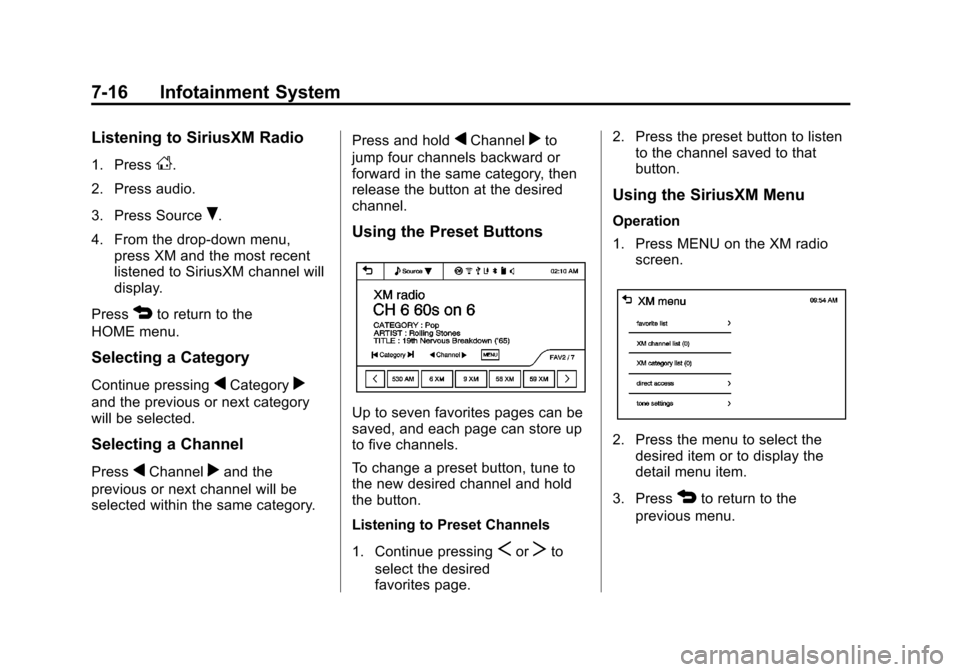
Using the Preset Buttons
Up to seven favorites pages can be
saved, and each page can store up
to five channels.
To change a preset button, tune to
the new desired channel and hold
the button.
Listening to Preset Channels
1. Continue pressing
SorTto
select the desired
favorites page. 2. Press the preset button to listen
to the channel saved to that
button.
Using the SiriusXM Menu
Operation
1. Press MENU on the XM radio
screen.
2. Press the menu to select thedesired item or to display the
detail menu item.
3. Press
4to return to the
previous menu.
Page 169 of 408
Black plate (17,1)Chevrolet TRAX Owner Manual - 2013 - CRC - 3/6/13
Infotainment System 7-17
Favorite List
1. Press favorite list from the XMmenu. The favorite list
information is displayed.
2. Press
QorRto find the desired
station. Tune to the station by
selecting it.
Channel List
1. Press XM channel list from the XM menu. The channel list is
displayed.
2. Press
QorRto find the desired
channel. Tune to the channel by
selecting it.
Category List
1. Press XM category list from the XM menu. The category list is
displayed.
2. Press
QorRto find the desired
category. Tune to the category
by selecting it. Direct Access
1. Press direct access from the XM
menu. The direct access screen
is displayed.
2. Press the channel number to tune to the desired channel.
3. Press OK.
Tone Settings
From the tone settings menu, the
sound features can be set up for
SiriusXM audio and each audio
player ’s functions.
1. Press the tone settings from the XM menu. The tone settings
screen is displayed. See “Tone
Settings” underOperation on
page 7‑8.
2. Press OK.
Radio Reception
Frequency interference and static
can occur during normal radio
reception if items such as mobile
phone chargers, vehicle
convenience accessories, and
external electronic devices are
plugged into the accessory power
outlet. If there is interference or
static, unplug the item from the
accessory power outlet.
FM
FM signals only reach about 16 to
65 km (10 to 40 mi). Although the
radio has a built-in electronic circuit
that automatically works to reduce
interference, some static can occur,
especially around tall buildings or
hills, causing the sound to fade in
and out.
Page 171 of 408
Black plate (19,1)Chevrolet TRAX Owner Manual - 2013 - CRC - 3/6/13
Infotainment System 7-19
If the bottom surface of a disc is
dirty, take a soft, lint-free cloth,
or dampen a clean, soft cloth in a
mild neutral detergent solution
mixed with water, and clean it.
Wipe the disc from the center to the
outer edge.
Care of the CD Player
Do not add a label to a disc, as it
could get caught in the CD player.
If a label is needed, label the top of
the recorded disc with a
marking pen.
Do not use disc lens cleaners
because they could contaminate the
lens of the disc optics and damage
the CD player.
Notice:If a label is added to a
CD, more than one CD is inserted
into the slot at a time, or an
attempt is made to play scratched
or damaged CDs, the CD player
could be damaged. While using
the CD player, use only CDs in good condition without any label,
load one CD at a time, and keep
the CD player and the loading slot
free of foreign materials, liquids,
and debris.
Control Buttons
The buttons used to control the CD
player are:
AUX or CD/AUX:
Press to use the
CD player.
SEEK
¨or©SEEK: Press to
select tracks or to fast forward or
rewind within a track.
INFO: Press to display additional
information about the current track
that may be available.
MENU/TUNE: Turn to select tracks.
Turn to enter the menu. Press to
select the menu.
Z(Eject): Press to eject the disc.
Inserting a CD
With the printed side facing up,
insert a disc into the CD slot until it
is drawn in.
Removing a CD
PressZ.
The disc is pushed out of the
CD slot.
If the disc is not removed after it is
ejected, it is pulled back in after a
few seconds.
Playing a CD or MP3 CD
Press the AUX or CD/AUX button.
If there is a disc in the player, it
begins playing.
Information about the disc and
current track is shown on the
display depending on the data
stored.
Page 172 of 408
Black plate (20,1)Chevrolet TRAX Owner Manual - 2013 - CRC - 3/6/13
7-20 Infotainment System
Selecting a CD Track
Using the control buttons:
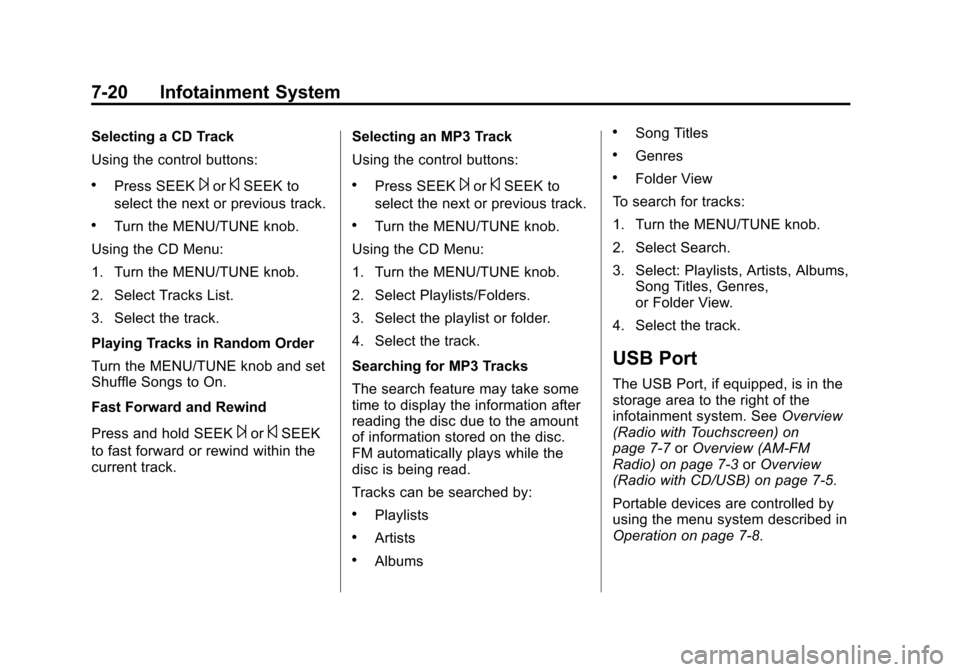
.Press SEEK¨or©SEEK to
select the next or previous track.
.Turn the MENU/TUNE knob.
Using the CD Menu:
1. Turn the MENU/TUNE knob.
2. Select Tracks List.
3. Select the track.
Playing Tracks in Random Order
Turn the MENU/TUNE knob and set
Shuffle Songs to On.
Fast Forward and Rewind
Press and hold SEEK
¨or©SEEK
to fast forward or rewind within the
current track. Selecting an MP3 Track
Using the control buttons:
.Press SEEK¨or©SEEK to
select the next or previous track.
.Turn the MENU/TUNE knob.
Using the CD Menu:
1. Turn the MENU/TUNE knob.
2. Select Playlists/Folders.
3. Select the playlist or folder.
4. Select the track.
Searching for MP3 Tracks
The search feature may take some
time to display the information after
reading the disc due to the amount
of information stored on the disc.
FM automatically plays while the
disc is being read.
Tracks can be searched by:
.Playlists
.Artists
.Albums
.Song Titles
.Genres
.Folder View
To search for tracks:
1. Turn the MENU/TUNE knob.
2. Select Search.
3. Select: Playlists, Artists, Albums, Song Titles, Genres,
or Folder View.
4. Select the track.
USB Port
The USB Port, if equipped, is in the
storage area to the right of the
infotainment system. See Overview
(Radio with Touchscreen) on
page 7‑7 orOverview (AM-FM
Radio) on page 7‑3 orOverview
(Radio with CD/USB) on page 7‑5.
Portable devices are controlled by
using the menu system described in
Operation on page 7‑8.
Page 174 of 408
Black plate (22,1)Chevrolet TRAX Owner Manual - 2013 - CRC - 3/6/13
7-22 Infotainment System
Connecting and Controlling a
PlaysForSure Device (PFD)
or Zune™
Connecting a PFD or Zune
Connect the PFD or Zune to the
USB port.
Searching for a Track
Tracks can be searched for by:
.Playlists
.Artists
.Albums
.Song Titles
.Podcasts
.Genres
To search for tracks:
1. Turn the MENU/TUNE knob.
2. Select Search.
3. Select: Playlists, Artists, Albums, Song Titles, Podcasts,
or Genres.
4. Select the track. Shuffle Functionality
Turn the MENU/TUNE knob and set
Shuffle Songs (Random) to On
or Off.
On:
Plays current tracks in random
order.
Off: Plays current tracks in
sequential order.
Repeat Functionality
Turn the MENU/TUNE knob and set
Repeat to On or Off.
Repeat On: Repeats the current
track.
Repeat Off: Playback starts from
the beginning of the current track
after the last track finishes.
Connecting and Controlling a
USB Drive
The infotainment system can only
play back .mp3 and .wma files from
a USB drive.
Only the first 2,500 songs are
recognized on the device. When a device is not supported, the
message
“No supported data found.
You can safely disconnect the
device” appears.
Connecting a USB Drive
Connect the USB drive to the
USB port.
Searching for a Track
It is normal for the search feature to
take some time to display the
information after reading the device
due to the amount of information
stored.
Files that do not have any meta
data stored in the ID3 tag display as
Unknown.
Tracks can be searched for by:
.Playlists*
.Artists
.Albums
.Song Titles
Page 175 of 408
Black plate (23,1)Chevrolet TRAX Owner Manual - 2013 - CRC - 3/6/13
Infotainment System 7-23
.Genres
.Folder View
*This only displays if a playlist is
found on the device.
To search for tracks:
1. Turn the MENU/TUNE knob.
2. Select Search.
3. Select: Playlists, Artists, Albums, Song Titles, Genres,
or Folder View.
4. Select the track.
Shuffle Functionality
Turn the MENU/TUNE knob and set
Shuffle Songs (Random) to On
or Off.
On: Plays current tracks in random
order.
Off: Plays current tracks in
sequential order.
Repeat Functionality
Turn the MENU/TUNE knob and set
Repeat to On or Off. Repeat On:
Repeats the current
track.
Repeat Off: Playback starts from
the beginning of the current track
after the last track finishes.
Radio With Touchscreen
The infotainment system can play
music or movies by connecting an
auxiliary device to the USB port,
if equipped.
USB Support
USB Supported Devices
.USB Flash Drives
.Portable USB Hard Drives
.2G-5G iPod nano®
.1G-3G iPod touch®
.120GB/160GB iPod classic®
.3G/3GS/4/4S iPhone®
Not all iPods and USB drives are
compatible with the USB port.
Make sure the iPod has the latest
firmware from Apple
®for proper
operation. iPod firmware can be updated using the latest iTunes
®
application. See www.apple.com/
itunes.
For help with identifying your iPod,
go to www.apple.com/support.
The USB port can play both lower
and upper case .mp3, .wma, .ogg,
and .wav files stored on a USB
storage device.
USB Supported File and Folder
Structure
The Infotainment system supports:
.Up to 2,500 folders.
.Up to 10 folders in depth.
.Up to 2,500 music files.
.Up to 2,500 photo files.
.Up to 250 movie files.
.ID3 Tag (versions 1.0/1.1/2.2/
2.3/2.4).
.FAT16.
.FAT32.
.exFAT.
Page 177 of 408
Black plate (25,1)Chevrolet TRAX Owner Manual - 2013 - CRC - 3/6/13
Infotainment System 7-25
Adjusting the Volume
Turn the
O/VOL knob to adjust the
volume of the infotainment system
after the volume level has been set
on the portable audio device.
Radio With Touchscreen
The infotainment system can play
music or movies connected by the
auxiliary device.
Play will begin when the system has
finished reading the information on
the device.
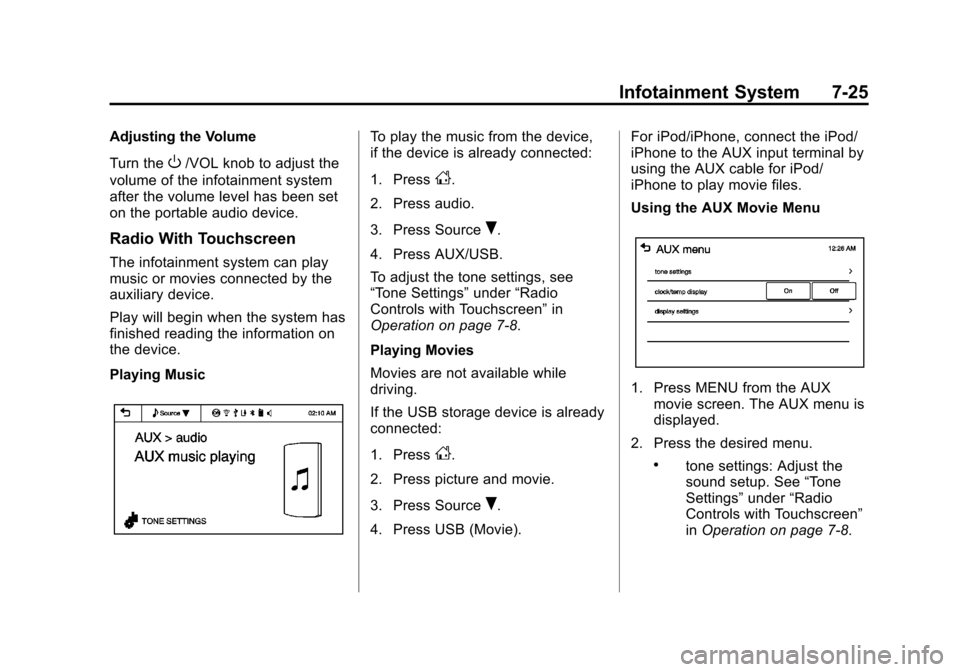
Playing Music
To play the music from the device,
if the device is already connected:
1. Press
D.
2. Press audio.
3. Press Source
R.
4. Press AUX/USB.
To adjust the tone settings, see
“Tone Settings” under“Radio
Controls with Touchscreen” in
Operation on page 7‑8.
Playing Movies
Movies are not available while
driving.
If the USB storage device is already
connected:
1. Press
D.
2. Press picture and movie.
3. Press Source
R.
4. Press USB (Movie). For iPod/iPhone, connect the iPod/
iPhone to the AUX input terminal by
using the AUX cable for iPod/
iPhone to play movie files.
Using the AUX Movie Menu
1. Press MENU from the AUX
movie screen. The AUX menu is
displayed.
2. Press the desired menu.
.tone settings: Adjust the
sound setup. See “Tone
Settings” under“Radio
Controls with Touchscreen”
in Operation on page 7‑8.
Page 178 of 408
Black plate (26,1)Chevrolet TRAX Owner Manual - 2013 - CRC - 3/6/13
7-26 Infotainment System
.clock/temp display: To
display the clock and
temperature on the full
screen, select On or Off.
.display settings: Adjust the
brightness and contrast of
the screen.
3. Press
4.
Bluetooth Audio
Streaming Audio
If equipped, music may be played
from a paired Bluetooth. See
Bluetooth (Overview) on page 7‑28
or Bluetooth (Infotainment Controls)
on page 7‑30 orBluetooth (Voice
Recognition) on page 7‑39 for help
pairing a device.
The music can be controlled by
controls on the device.
To play music via Bluetooth:
1. Power on the device, pair, and connect the device. The device
will displayed “GM Audio
Source.” 2. Once paired, press CD/AUX to
select Bluetooth Audio.
3. Press the play button on the device to begin playback.
When selecting Bluetooth audio, the
radio may not be able to launch the
audio player on the connected
device to start playing. When the
vehicle is not moving, choose the
phone to begin playback.
All devices launch audio differently.
When selecting Bluetooth audio as
a source, the radio may show as
paused on the screen. Press play
on the device to begin playback.
Some phones support sending
Bluetooth music information to
display on the radio. When the radio
receives this information, it will
check to see if any album art is
available and display it. For more
information about your phone and
supported Bluetooth features, see
www.gm.com/bluetooth.
Navigation
OnStar®System
If equipped, this vehicle has a
comprehensive, in-vehicle system
that can connect to a live Advisor
for Emergency, Security, Navigation,
Connection, and Diagnostic
Services.
For safety, some features are
disabled while the vehicle is in
motion.
Control Panel Overview
OnStar Light
The OnStar system status light is
next to the OnStar buttons. If the
status light is:
.Solid Green: System is ready.
.Flashing Green: On a call.
.Red: Indicates a problem.
Page 179 of 408
Black plate (27,1)Chevrolet TRAX Owner Manual - 2013 - CRC - 3/6/13
Infotainment System 7-27
OnStar Buttons
X:Press to speak to an Advisor.
.Make a call, end a call,
or answer an incoming call.
.Give OnStar Hands-Free Calling
voice commands.
.Give OnStar Turn-by-Turn
Navigation voice commands.
Requires the available Directions
and Connections service plan.
Q: Press to connect to an
Advisor.
.Verify account information or
update contact information.
.Get driving directions. Requires
the available Directions and
Connections service plan.
.Receive On-Demand
Diagnostics for a check on the
vehicle’s key operating systems.
.Receive Roadside Assistance.
]: Press to connect to an
Emergency Advisor. Hands-Free Calling
Press
Xto make a call, end a call,
and answer an incoming call.
Press
Xto give OnStar Hands-Free
Calling voice commands.
Press
Xto give OnStar
Turn-by-Turn Navigation voice
commands for automated directions.
.Press1to hide the
Turn-by-Turn Navigation screen.
When the route is changed, the
Turn-by-Turn Navigation screen
is displayed. The Turn-by-Turn
Navigation screen is only
displayed on the AM/FM/XM
radio mode and AUX/USB/
iPod mode.
.Press$to mute the
Turn-by-Turn Navigation voice
guidance.
.Pressqto move to the
navigation settings menu. ‐
Press update route to update
the route, then press Yes.
Press Cancel route to cancel it
or No to not update the route.
‐ Press cancel route to cancel
the route, then press Yes.
The navigation settings menu
disappears and the
Turn-by-Turn Navigation voice
guidance is shut down.
‐ Press my destination to
check the destination.
The destination name and
remaining distance to
destination are displayed on
the screen for about
five seconds. Then the current
Turn-by-Turn Navigation
information is displayed.