DIC CHEVROLET VOLT 2011 Workshop Manual
[x] Cancel search | Manufacturer: CHEVROLET, Model Year: 2011, Model line: VOLT, Model: CHEVROLET VOLT 2011Pages: 516, PDF Size: 6.61 MB
Page 148 of 516

Black plate (28,1)Chevrolet Volt Owner Manual - 2011
5-28 Instruments and Controls
When the Light Flashes First and
Then is On Steady
This indicates that there may be
a problem with the Tire Pressure
Monitor System. The light flashes
for about one minute and stays on
steady until the vehicle is in OFF.
This sequence repeats each time
the vehicle is in ON/RUN. SeeTire
Pressure Monitor System on
page 10‑55 for more information.
Engine Oil Pressure Light
{WARNING
Do not keep driving if the oil
pressure is low. The engine can
become so hot that it catches
fire. Someone could be burned.
Check the oil as soon as possible
and have the vehicle serviced. Notice:
Lack of proper engine
oil maintenance can damage the
engine. The repairs would not be
covered by the vehicle warranty.
Always follow the maintenance
schedule for changing engine oil.
The oil pressure light should come
on briefly as the vehicle is started.
If it does not come on have the
vehicle serviced by your dealer.
If the light comes on and stays on, it
means that oil is not flowing through
the engine properly. The vehicle
could be low on oil and might
have some other system problem.
See your dealer.
Low Fuel Warning Light
The low fuel warning light comes on
briefly when the vehicle is started.
This light also comes on when the
fuel level is low. When fuel is added,
the light should go off. If it does not,
have the vehicle serviced.
Page 150 of 516
Black plate (30,1)Chevrolet Volt Owner Manual - 2011
5-30 Instruments and Controls
Door, Hood, or Hatch
Open Light
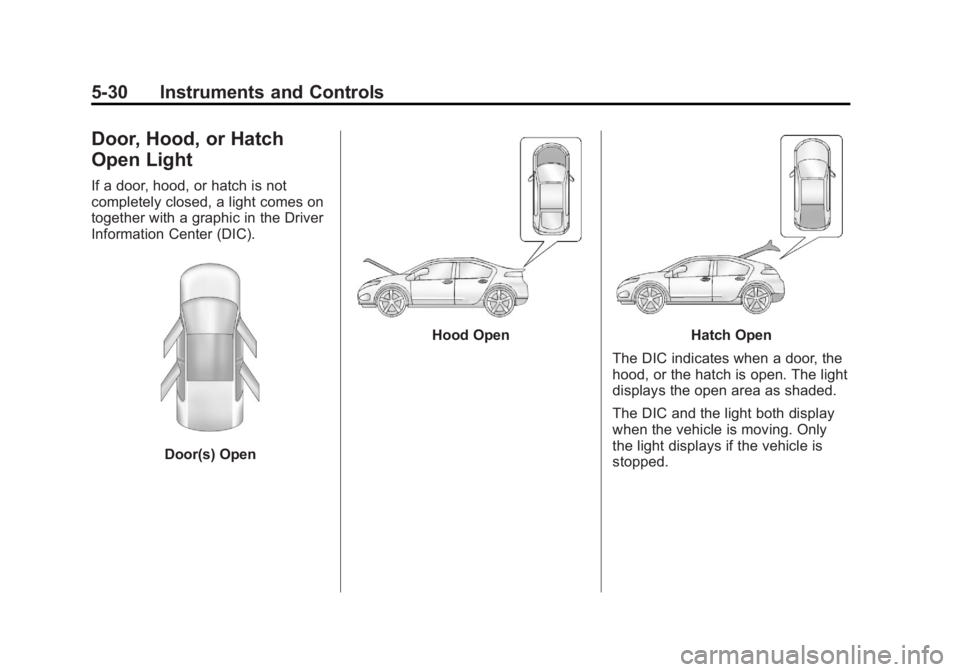
If a door, hood, or hatch is not
completely closed, a light comes on
together with a graphic in the Driver
Information Center (DIC).
Door(s) Open
Hood OpenHatch Open
The DIC indicates when a door, the
hood, or the hatch is open. The light
displays the open area as shaded.
The DIC and the light both display
when the vehicle is moving. Only
the light displays if the vehicle is
stopped.
Page 151 of 516
Black plate (31,1)Chevrolet Volt Owner Manual - 2011
Instruments and Controls 5-31
Information Displays
Center Stack Display
The center stack screen displays
Charging, Power Flow, and Energy
Information. See the information that
follows.
The Climate Control, Infotainment,
and Vehicle Personalization also
display information in this screen.
For more information on these
systems, see:
.Automatic Climate Control
System on page 8‑1.
.Infotainment on page 7‑2.
.Vehicle Personalization on
page 5‑53.
The center stack controls only need
a light touch to operate and work
best with bare hands. The controls
will work with most gloves although
they may take longer to respond. Use the finger pad rather than the
finger tip to minimize response time.
If the controls are not responding,
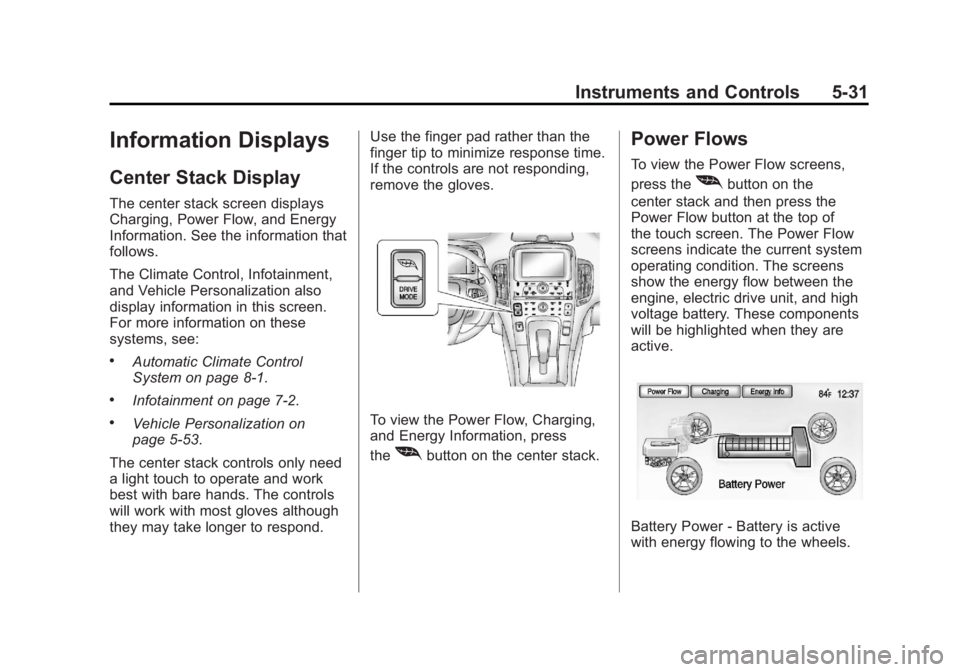
remove the gloves.To view the Power Flow, Charging,
and Energy Information, press
the
[button on the center stack.
Power Flows
To view the Power Flow screens,
press the
[button on the
center stack and then press the
Power Flow button at the top of
the touch screen. The Power Flow
screens indicate the current system
operating condition. The screens
show the energy flow between the
engine, electric drive unit, and high
voltage battery. These components
will be highlighted when they are
active.
Battery Power ‐Battery is active
with energy flowing to the wheels.
Page 163 of 516
Black plate (43,1)Chevrolet Volt Owner Manual - 2011
Instruments and Controls 5-43
Driver Information
Center (DIC)
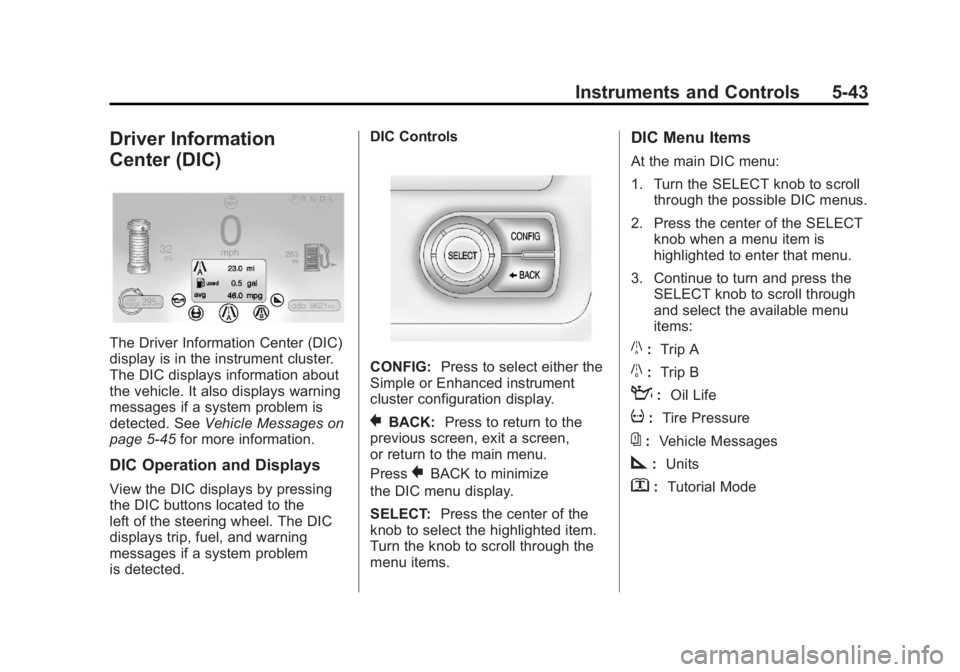
The Driver Information Center (DIC)
display is in the instrument cluster.
The DIC displays information about
the vehicle. It also displays warning
messages if a system problem is
detected. SeeVehicle Messages on
page 5‑45 for more information.
DIC Operation and Displays
View the DIC displays by pressing
the DIC buttons located to the
left of the steering wheel. The DIC
displays trip, fuel, and warning
messages if a system problem
is detected. DIC Controls
CONFIG:
Press to select either the
Simple or Enhanced instrument
cluster configuration display.
}BACK: Press to return to the
previous screen, exit a screen,
or return to the main menu.
Press
}BACK to minimize
the DIC menu display.
SELECT: Press the center of the
knob to select the highlighted item.
Turn the knob to scroll through the
menu items.
DIC Menu Items
At the main DIC menu:
1. Turn the SELECT knob to scroll through the possible DIC menus.
2. Press the center of the SELECT knob when a menu item is
highlighted to enter that menu.
3. Continue to turn and press the SELECT knob to scroll through
and select the available menu
items:
}:Trip A
x:Trip B
:: Oil Life
v:Tire Pressure
{:Vehicle Messages
z:Units
y: Tutorial Mode
Page 164 of 516
Black plate (44,1)Chevrolet Volt Owner Manual - 2011
5-44 Instruments and Controls
Trip A and Trip B
The trip displays show fuel used,
average fuel economy, and distance
traveled since the last trip reset.
Reset the trip data by pressing and
holding the SELECT button when
either Trip A or Trip B is displayed.
Oil Life
This displays the percentage
of remaining oil life. The lower
the percentage, the closer the
vehicle is to needing an oil change.
When the oil life is depleted, the
CHANGE ENGINE OIL SOON
message displays. Change the oil
as soon as possible. Additional
maintenance is also recommended
in the Maintenance Schedule.
SeeScheduled Maintenance on
page 11‑2 andEngine Oil on
page 10‑12. The oil life must be reset after
each oil change. Avoid accidental
resetting of the Engine Oil Life
System. It cannot be reset
accurately until the next oil change.
To reset the Engine Oil Life System,
see
Engine Oil Life System on
page 10‑15. The system is reset
when 100% displays.
Tire Pressure
The display will show a vehicle with
the approximate pressures of all
four tires. Tire pressure is displayed
in either kilopascals (kPa) or in
pounds per square inch (psi).
If a low or high tire pressure is
detected, a message is displayed
advising to check the tire pressure
in the specified tire. See Tire
Pressure on page 10‑54 andTire
Messages on page 5‑52 for more
information.
If the tire pressure display shows
dashes instead of a value, there
may be a problem with the vehicle.
See your dealer for service. Vehicle Messages
Turn the SELECT knob to scroll
through any active warning
messages. Press SELECT
to review the messages.
Units
Turn the SELECT knob to change
the unit display to METRIC or US
when the display is active. Press
SELECT to confirm the setting.
This will change the displays on
the cluster and DIC to either metric
or English (US) measurements.
Tutorial Mode
Select this menu item to view a
screen that explains some of the
unique features of the cluster.
Tutorial mode is only available when
the vehicle is in P (Park).
Page 165 of 516
Black plate (45,1)Chevrolet Volt Owner Manual - 2011
Instruments and Controls 5-45
Vehicle Messages
Messages displayed in the DIC
indicate the status of the vehicle
or some action that may be needed
to correct a condition. Multiple
messages may display one after
the other.
Messages that do not require
immediate action can be
acknowledged and cleared by
pressing the SELECT knob.
The messages requiring immediate
action cannot be cleared until that
action is performed. All messages
should be taken seriously. Clearing
the messages does not correct the
problem.
Battery and Charging
Messages
BATTERY SAVER ACTIVE
This message displays when the
vehicle has detected that the 12-volt
battery voltage has dropped and
vehicle features are being disabled.
The 12-volt battery saver system
starts reducing certain features
trying to save the charge of the
12-volt battery. Turn off unnecessary
features to allow the battery to
recharge.
BATTERY TOO COLD, PLUG IN
TO WARM
This message displays during
extremely cold temperatures,
when the vehicle will not start
until the high voltage battery is
warm enough.
Plug the vehicle in to allow the
charging system to warm the high
voltage battery, then the vehicle
can be started.
CHARGE CORD CONNECTED
This message displays when the
charge cord is connected to the
vehicle. The vehicle cannot be
shifted out of P (Park) with the
charge cord connected.
CHARGE DOOR OPEN
This message displays when the
charge door is open and the vehicle
is shifted out of P (Park).
LOW BATTERY
This message displays when
the 12-volt battery voltage is low.
SeeBattery on page 10‑28 for
more information.
SERVICE BATTERY
CHARGING SYSTEM
This message displays when there
is a fault in the 12-volt battery
charging system. Take the vehicle
to your dealer for service.
Page 168 of 516
Black plate (48,1)Chevrolet Volt Owner Manual - 2011
5-48 Instruments and Controls
Engine Oil Messages
CHANGE ENGINE OIL SOON
This message displays when the
engine oil needs to be changed.
After changing the engine oil,
the Engine Oil Life System must
be reset. SeeEngine Oil Life
System on page 10‑15 and
Driver Information Center (DIC) on
page 5‑43 for information on how
to reset the system. See Engine
Oil on page 10‑12 andScheduled
Maintenance on page 11‑2 for
more information.
OIL PRESSURE LOW —TURN
VEHICLE OFF
This message displays if low oil
pressure levels occur. Stop the
vehicle as soon as safely possible
and do not operate it until the cause
of the low oil pressure has been
corrected. Check the oil as soon
as possible and have the vehicle
serviced by your dealer.
Fuel System Messages
CLOSE FUEL DOOR
This message displays when the
fuel door is open and the vehicle is
moving.
ENGINE NOT AVAILABLE
ADD FUEL
This message displays when
the engine is not available due to
running out of fuel. The vehicle can
continue to be driven in Electric
Mode until the battery is depleted,
but will have reduced acceleration.
When this message is displayed,
refuel the vehicle. See Out of Fuel/
Engine Unavailable on page 9‑28.
FUEL LEVEL LOW
This message displays when the
vehicle is low on fuel. Refuel as
soon as possible.
READY TO REFUEL
This message displays when the
fuel system is depressurized and
the vehicle can be refueled.
TIGHTEN GAS CAP
This message displays when the
fuel cap is not on tight. Tighten the
fuel cap.
WAIT TO REFUEL
This message displays when the
fuel system is pressurized and you
must to wait to refuel the vehicle.
Key and Lock Messages
When programming new Remote
Keyless Entry (RKE) transmitters,
DIC messages display. See Remote
Keyless Entry (RKE) System
Operation on page 2‑3 for more
information.
Page 170 of 516
Black plate (50,1)Chevrolet Volt Owner Manual - 2011
5-50 Instruments and Controls
Propulsion Power
Messages
PROPULSION POWER IS
REDUCED
This message displays when the
propulsion power is reduced and
can affect the ability to accelerate.
If this message is on, but there
is no reduction in performance,
proceed to your destination.
The performance may be reduced
the next time the vehicle is driven.
The vehicle may be driven at a
reduced speed while this message
is on, but maximum acceleration
and speed may be reduced.
If this message stays on when
the malfunction indicator lamp is
on, the vehicle should be taken to
your dealer for service as soon as
possible.This message can display when
driving in mountainous terrain
without using Mountain Mode or by
not entering Mountain Mode soon
enough to build a sufficient battery
charge reserve before climbing
steep grades. This is normal
operation to protect the high
voltage battery. Only if both
the PROPULSION POWER IS
REDUCED message and the
malfunction indicator lamp are
on should the vehicle be taken
to the dealer for service.
While climbing the grade with this
message displayed, the vehicle
speed may be reduced until the
engine can recover the battery
state of charge to a normal level.
See
“Mountain Mode” underDriver
Selected Operating Modes on
page 9‑26.
Ride Control System
Messages
LOW TRACTION
This message displays when the
Antilock Brake System (ABS) is
active and is working to assist the
driver with control of the vehicle in
difficult driving conditions.
SERVICE STABILITRAK
This message displays when
there is a problem detected with
the StabiliTrak system. The vehicle
is safe to drive, but the StabiliTrak
system is not operational.
See Electronic Stability Control
(ESC) on page 9‑39 for information
on resetting the system.
Page 172 of 516
Black plate (52,1)Chevrolet Volt Owner Manual - 2011
5-52 Instruments and Controls
SERVICE POWER STEERING
This message displays if there is a
problem with the power steering
system. Take the vehicle to your
dealer for service.
SERVICE VEHICLE SOON
This message displays if there is a
problem with the vehicle. Take the
vehicle to your dealer for service.
Depending on the severity of a
crash, this message may come
on along with the airbag readiness
light.
Starting the Vehicle
Messages
PRESS BRAKE TO START
VEHICLE
This message displays when
attempting to start the vehicle
without first pressing the brake
pedal.
PRESS BUTTON AGAIN TO
TURN OFF
This message displays as a
reminder to press the POWER
O
button to turn the vehicle off when
an attempt is made to turn off the
vehicle while it is in motion.
Tire Messages
SERVICE TIRE MONITOR
SYSTEM
This message displays if there is
a problem with the Tire Pressure
Monitor System (TPMS). SeeTire
Pressure Monitor Operation on
page 10‑57 for more information.
TIRE LEARNING ACTIVE
This message displays when
the system is learning new tires.
SeeTire Pressure Monitor
Operation on page 10‑57 for
more information.
TIRE LOW ADD AIR TO TIRE
This message displays when the
pressure in one or more of the tires
is low.
This message also displays
LEFT FRONT, RIGHT FRONT,
LEFT REAR, or RIGHT REAR to
indicate the location of the low tire.
The low tire pressure warning
light will also come on. See Tire
Pressure Light on page 5‑27.
If a tire pressure message appears
on the DIC, stop as soon as you
can. Inflate the tires by adding air
until the tire pressure is equal to
the values shown on the Tire and
Loading Information label. See Tires
on page 10‑48, Vehicle Load Limits
on page 9‑14, and Tire Pressure on
page 10‑54.
You can receive more than one
tire pressure message at a time.
The DIC also shows the tire
pressure values. See Driver
Information Center (DIC) on
page 5‑43.
Page 173 of 516
Black plate (53,1)Chevrolet Volt Owner Manual - 2011
Instruments and Controls 5-53
Vehicle Speed Messages
SPEED LIMITED TO XXX
This message displays when the
vehicle speed is limited.
Washer Fluid Messages
WASHER FLUID LOW ADD
FLUID
This message displays when
the washer fluid level is low.
For information on filling the
washer fluid, seeWasher Fluid on
page 10‑24.
Vehicle
Personalization
The Vehicle Personalization
features can be accessed by using
either the infotainment controls or
the touch screen in the center stack
display. See Overview on page 7‑3
under “Infotainment System” for
more information.
Using the Infotainment
Controls
Use the CONFIG, TUNE/MENU
knob, and
}BACK buttons
on the center stack to select
personalization features.
CONFIG (Configuration): Press to
scroll through the available menus
across the top of the touch screen
display. TUNE/MENU Knob
.Press to enter, select, or activate
a highlighted menu option.
.Turn to highlight a menu option.
.Press to turn a system setting on
or off.
}BACK
.Press to exit a menu.
.Press to return to a previous
screen.
Submenus
An arrow on the right‐hand edge
of the menu indicates that it has a
submenu with other options.
Selecting a Menu Option
1. Turn the TUNE/MENU knob to highlight the function.
2. Press the TUNE/MENU knob to select the highlighted option.
A checkmark next to the option
indicates the selected option.