brake CHRYSLER 300 C 2008 1.G Owners Manual
[x] Cancel search | Manufacturer: CHRYSLER, Model Year: 2008, Model line: 300 C, Model: CHRYSLER 300 C 2008 1.GPages: 520, PDF Size: 5.43 MB
Page 28 of 520

If your Remote Keyless Entry (RKE) transmitter fails to
operate from a normal distance, check for these two
conditions.
1. A weak battery in the transmitter. The expected life of
the battery is a minimum of three years.
2. Closeness to a radio transmitter such as a radio station
tower, airport transmitter, and some mobile or CB radios.
REMOTE STARTING SYSTEM — IF EQUIPPED
This system uses the Remote Keyless Entry (RKE) trans-
mitter to start the engine conveniently from outside the
vehicle while still maintaining security. The system has a
targeted range of 328 ft. (100 m).
NOTE:The vehicle must be equipped with an auto-
matic transmission to be equipped with Remote Start.
How To Use Remote Start
All of the following conditions must be met before the
engine will remote start:
•Gear selector lever in “P” (Park).
•Doors closed.
•Hood closed.
•Trunk closed.
•Hazard switch off.
•Brake switch inactive (brake pedal not pressed).
•Ignition key removed from ignition switch.
•Battery at an acceptable charge level.
•RKE Panic button not pressed.
THINGS TO KNOW BEFORE STARTING YOUR VEHICLE 27
2
Page 67 of 520
may be released for incorporation in aggregate crash
databases, such as those maintained by the US govern-
ment and various states. Data of a potentially sensitive
nature, such as would identify a particular driver, ve-
hicle, or crash, will be treated confidentially. Confidential
data will not be disclosed by DaimlerChrysler Corpora-
tion to any third party except when:
1. Used for research purposes, such as to match data
with a particular crash record in an aggregate database,
provided confidentiality of personal data is thereafter
preserved
2. Used in defense of litigation involving a
DaimlerChrysler Corporation product
3. Requested by police under a legal warrant
4. Otherwise required by lawData Parameters that May Be Recorded:
•Diagnostic trouble code(s) and warning lamp status
for electronically-controlled safety systems, including
the airbag system
•Airbag disable lamp status (if equipped)
•\4Time\4of airbag deployment (in terms of ignition
cycles and vehicle mileage)
•Airbag deployment level (if applicable)
•Impact acceleration and angle
•Seat belt status
•Brake status (service and parking brakes)
•Accelerator status (including vehicle speed)
•Engine control status (including engine speed)
•Transmission gear selection
66 THINGS TO KNOW BEFORE STARTING YOUR VEHICLE
Page 81 of 520
Door Latches
Check for positive closing, latching, and locking.
Fluid Leaks
Check area under vehicle after overnight parking for fuel,
engine coolant, oil, or other fluid leaks. Also, if gasoline
fumes are detected or if fuel, power steering fluid, or
brake fluid leaks are suspected, the cause should be
located and corrected immediately.
80 THINGS TO KNOW BEFORE STARTING YOUR VEHICLE
Page 135 of 520

The Headlight delay time is programmable on vehicles
equipped with the Electronic Vehicle Information Center
(EVIC). For details, refer to “Delay Turning Headlights
Off,” under “Personal Settings (Customer Programmable
Features),” under “Electronic Vehicle Information Center
(EVIC)” in Section 4 of this manual.
Daytime Running Lights — If Equipped
The high beam headlights will come on as Daytime
Running Lights, whenever the ignition switch is on, the
headlights are off, and the parking brake is off. The
headlight switch must be used for normal nighttime
driving.
Lights-on Reminder
If the headlights or parking lights are on after the ignition
is turned OFF, a chime will sound to alert the driver
when the driver’s door is opened.
Fog Lights — If Equipped
The front fog light switch is on the headlight
switch below the dimmer control. To activate the
front fog lights, turn on the parking lights or the
low beam headlights and press the fog light switch.
An indicator light in the instrument cluster illuminates
when the fog lights are turned on.
NOTE:The fog lights will operate with the low beam
headlights or parking lights on. However, selecting the
high beam headlights will turn off the fog lights.
Multi-Function Lever
The multi-function lever controls the operation of the
turn signals, headlight beam selection, and passing
lights. The lever is located on the left side of the steering
column.
134 UNDERSTANDING THE FEATURES OF YOUR VEHICLE
Page 148 of 520
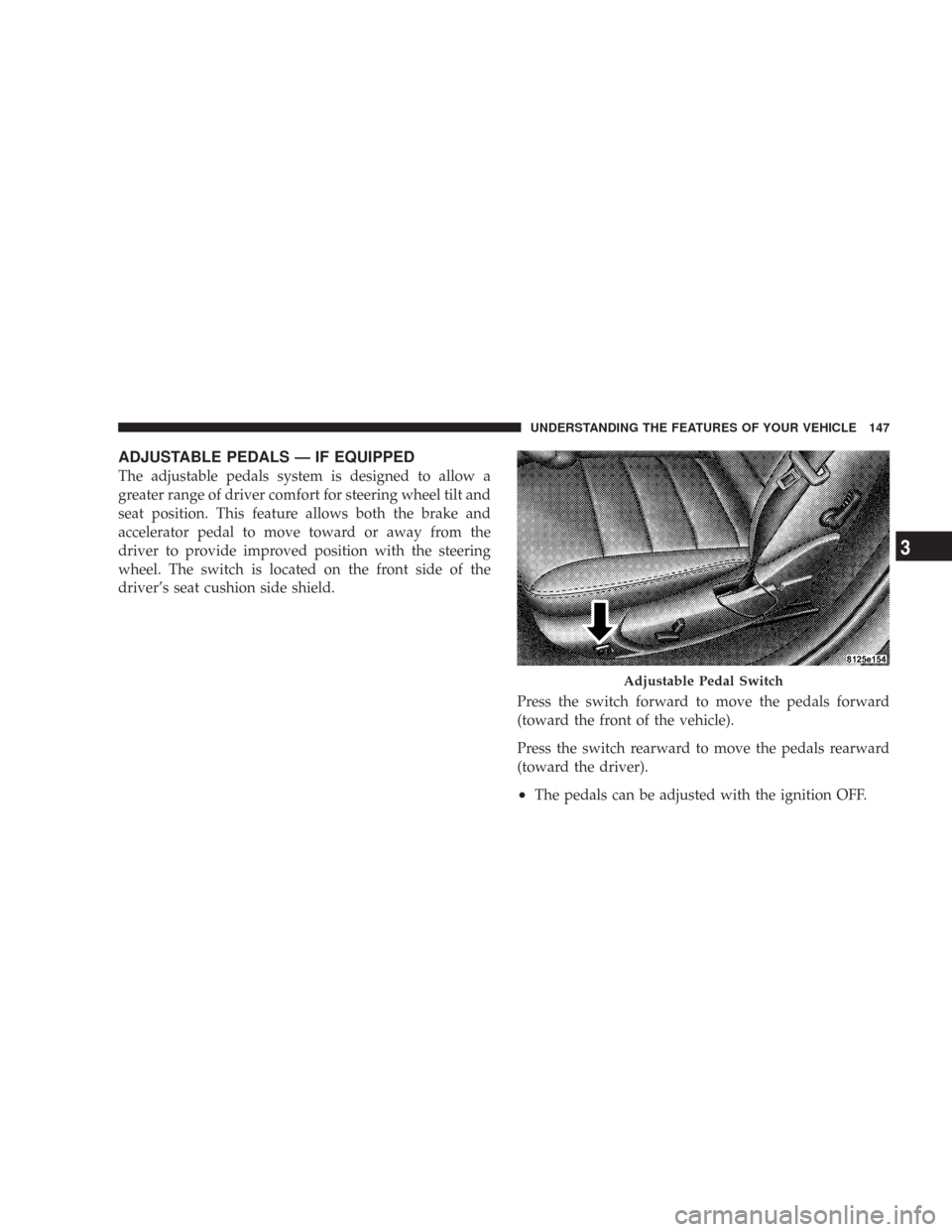
ADJUSTABLE PEDALS — IF EQUIPPED
The adjustable pedals system is designed to allow a
greater range of driver comfort for steering wheel tilt and
seat position. This feature allows both the brake and
accelerator pedal to move toward or away from the
driver to provide improved position with the steering
wheel. The switch is located on the front side of the
driver’s seat cushion side shield.
Press the switch forward to move the pedals forward
(toward the front of the vehicle).
Press the switch rearward to move the pedals rearward
(toward the driver).
•The pedals can be adjusted with the ignition OFF.
Adjustable Pedal Switch
UNDERSTANDING THE FEATURES OF YOUR VEHICLE 147
3
Page 151 of 520
To Set At A Desired Speed:
When the vehicle reaches the speed desired, push the
lever down and release (“SET DECEL”). Remove your
foot from the accelerator pedal and the vehicle will
operate at the selected speed.
NOTE:
•Speed control will only function in third, fourth, or
fifth gear when in the Autostick\2Mode (if equipped).
•The speed control may not engage if a different size
tire is installed on one wheel, such as the compact
spare tire.
To Deactivate:
The system will disable Electronic Speed Control without
erasing the memory if you:
•Softly tap the brake pedal.
•Depress the brake pedal.
•Pull the speed control lever toward you (“CANCEL”).
Pushing and releasing the (“ON/OFF”) button or turning
off the ignition erases the set speed from memory.
To Resume Speed:
If you deactivated the speed control without erasing the
set speed from memory and your vehicle speed is above
20 mph (32 km/h) you can resume the previous set
speed. To do so, push the lever up and release (“RESUME
ACCEL”), and then remove your foot from the accelera-
tor pedal.
To Vary the Speed Setting:
When the speed control is set, you can increase speed by
pushing up and holding the lever (“RESUME ACCEL”).
When the lever is released, a new set speed will be
established.
150 UNDERSTANDING THE FEATURES OF YOUR VEHICLE
Page 154 of 520

WARNING!
•Adaptive Cruise Control (ACC) is a convenience system. It is not a
substitute for active driving involvement. It is always the driver ’s
responsibility to be attentive of road, traffic, and weather conditions,
vehicle speed, distance to the vehicle ahead, and most importantly
brake operation to ensure safe operation of the vehicle under all road
conditions. Your complete attention is always required while driving
to maintain safe control of your vehicle. Failure to follow these
warnings can result in an accident or serious personal injury.
•The ACC system:
\25 Does not react to pedestrians, oncoming vehicles, and stationary
objects (i.e. a stopped vehicle in a traffic jam or a disabled vehicle).
\25 Does not predict the lane curvature or the movement of preceding
vehicles and will not compensate for such changes.
\25 Cannot take street, traffic, and weather conditions into account, and
may be limited upon adverse sight distance conditions.
\25 Does not always fully recognize complex driving conditions, which
can result in wrong or missing distance warnings.
\25 May not detect a vehicle ahead when strong light (for example,
sunrise or sunset) is directly shining on the front of the vehicle.
\25 Can only apply a maximum of 25% of the vehicle’s braking capability,
and will not bring the vehicle to a complete stop.
WARNING!
You should switch off the ACC system:
•When driving in fog; heavy rain; heavy snow;
sleet; heavy traffic; and complex driving situations
(i.e. in highway construction zones).
•When entering a turn lane or highway off ramp;
when driving on roads that are winding, icy,
snow-covered, slippery, or have steep uphill or
downhill slopes; and when towing a trailer.
•When circumstances do not allow safe driving at a
constant speed.
Failure to follow these warnings can result in an
accident or serious personal injury.
UNDERSTANDING THE FEATURES OF YOUR VEHICLE 153
3
Page 155 of 520
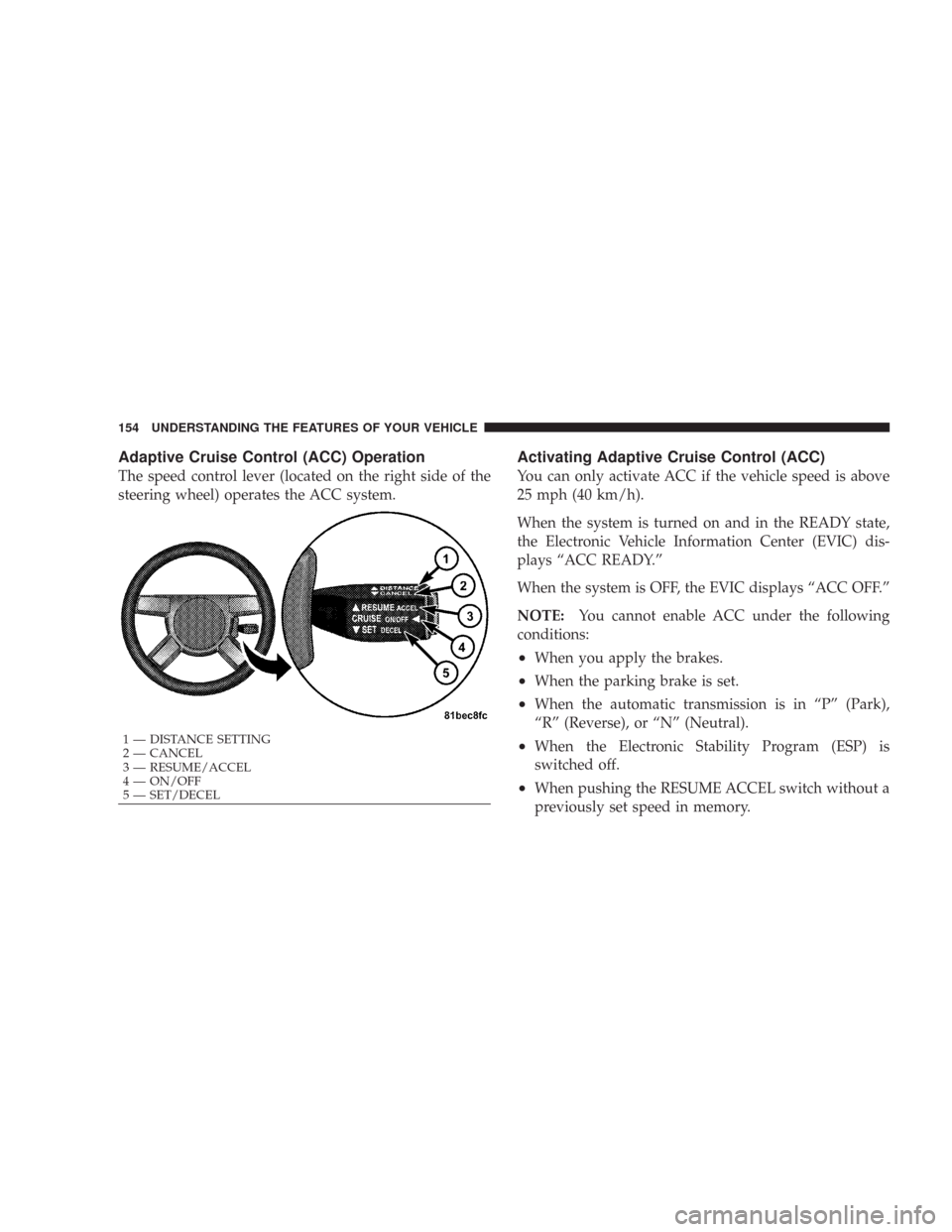
Adaptive Cruise Control (ACC) Operation
The speed control lever (located on the right side of the
steering wheel) operates the ACC system.
Activating Adaptive Cruise Control (ACC)
You can only activate ACC if the vehicle speed is above
25 mph (40 km/h).
When the system is turned on and in the READY state,
the Electronic Vehicle Information Center (EVIC) dis-
plays “ACC READY.”
When the system is OFF, the EVIC displays “ACC OFF.”
NOTE:You cannot enable ACC under the following
conditions:
•When you apply the brakes.
•When the parking brake is set.
•When the automatic transmission is in “P” (Park),
“R” (Reverse), or “N” (Neutral).
•When the Electronic Stability Program (ESP) is
switched off.
•When pushing the RESUME ACCEL switch without a
previously set speed in memory.
1 — DISTANCE SETTING
2 — CANCEL
3 — RESUME/ACCEL
4 — ON/OFF
5 — SET/DECEL 154 UNDERSTANDING THE FEATURES OF YOUR VEHICLE
Page 158 of 520

To Cancel:
The system will disable ACC without erasing the
memory if:
•You softly tap the brake pedal.
•You depress the brake pedal.
•You pull the speed control lever toward you (“CAN-
CEL”).
•The Electronic Stability Program / Traction Control
System (ESP/TCS) activates.
To Turn Off:
The system will turn off and erase the set speed in
memory if:
•You push and release the (“ON/OFF”) button.
•You turn off the ignition.
•You switch off ESP.
UNDERSTANDING THE FEATURES OF YOUR VEHICLE 157
3
Page 160 of 520

Tapping the lever down once will result ina1mph
(Canada 1 km/h) decrease in set speed. Each subsequent
tap of the lever results in a decrease of 1 mph (Canada
1 km/h).
NOTE:
•When you use the lever to decelerate, if the engine’s
braking power does not slow the vehicle sufficiently to
reach the set speed, the brake system will automati-
cally slow the vehicle.
•The ACC system maintains set speed when driving up
hill and down hill. However, a slight speed change on
moderate hills is normal. In addition, downshifting
may occur while climbing uphill or descending down-
hill. This is normal operation and necessary to main-
tain set speed.
Setting the Following Distance in ACC
The specified following distance for ACC can be set by
varying the distance setting between long, medium, and
short. Using this distance setting and the vehicle speed,
ACC calculates and sets the distance to the vehicle ahead.
This distance setting displays in the EVIC.
1 — Sensor Bars. Default Distance Setting is Three Bars = Long.UNDERSTANDING THE FEATURES OF YOUR VEHICLE 159
3