service CHRYSLER ASPEN 2009 2.G Owners Manual
[x] Cancel search | Manufacturer: CHRYSLER, Model Year: 2009, Model line: ASPEN, Model: CHRYSLER ASPEN 2009 2.GPages: 481, PDF Size: 9.28 MB
Page 6 of 481
INTRODUCTION
This Owner's Manual has been prepared with the assis-
tance of service and engineering specialists to acquaint
you with the operation and maintenance of your vehicle.
It is supplemented by a Warranty Information Booklet
and various customer-oriented documents. You are
urged to read these publications carefully. Following the
instructions and recommendations in this manual will
help assure safe and enjoyable operation of your vehicle.
NOTE: After you read the manual, it should be stored
in the vehicle for convenient reference and remain with
the vehicle when sold, so that the new owner will be
aware of all safety warnings.
When it comes to service, remember that your authorized
dealer knows your vehicle best, has the factory-trained
technicians and genuine Mopartparts, and is interested
in your satisfaction.
ROLLOVER WARNING
Utility vehicles have a significantly higher rollover rate
than other types of vehicles. This vehicle has a higher
ground clearance and a higher center of gravity than
many passenger cars. It is capable of performing better in
a wide variety of off-road applications. Driven in an
unsafe manner, all vehicles can go out of control. Because
of the higher center of gravity, if this vehicle is out of
control it may roll over when some other vehicles may
not.
Do not attempt sharp turns, abrupt maneuvers, or other
unsafe driving actions that can cause loss of vehicle
control. Failure to operate this vehicle safely may result
in an accident, rollover of the vehicle, and severe or fatal
injury. Drive carefully.
4 INTRODUCTION
Page 15 of 481
NOTE:If you try to remove the key before you place the
shift lever in PARK, the key may become trapped tem-
porarily in the ignition cylinder. If this occurs, rotate thekey to the right slightly, then remove the key as de-
scribed. If a malfunction occurs, the system will trap the
key in the ignition cylinder to warn you that this safety
feature is inoperable. The engine can be started and
stopped but the key cannot be removed until you obtain
service.
WARNING!
Never leave children alone in a vehicle. Leaving
unattended children in a vehicle is dangerous for a
number of reasons. A child or others could be seri-
ously or fatally injured. Don't leave the keys in the
ignition. A child could operate power windows,
other controls, or move the vehicle.
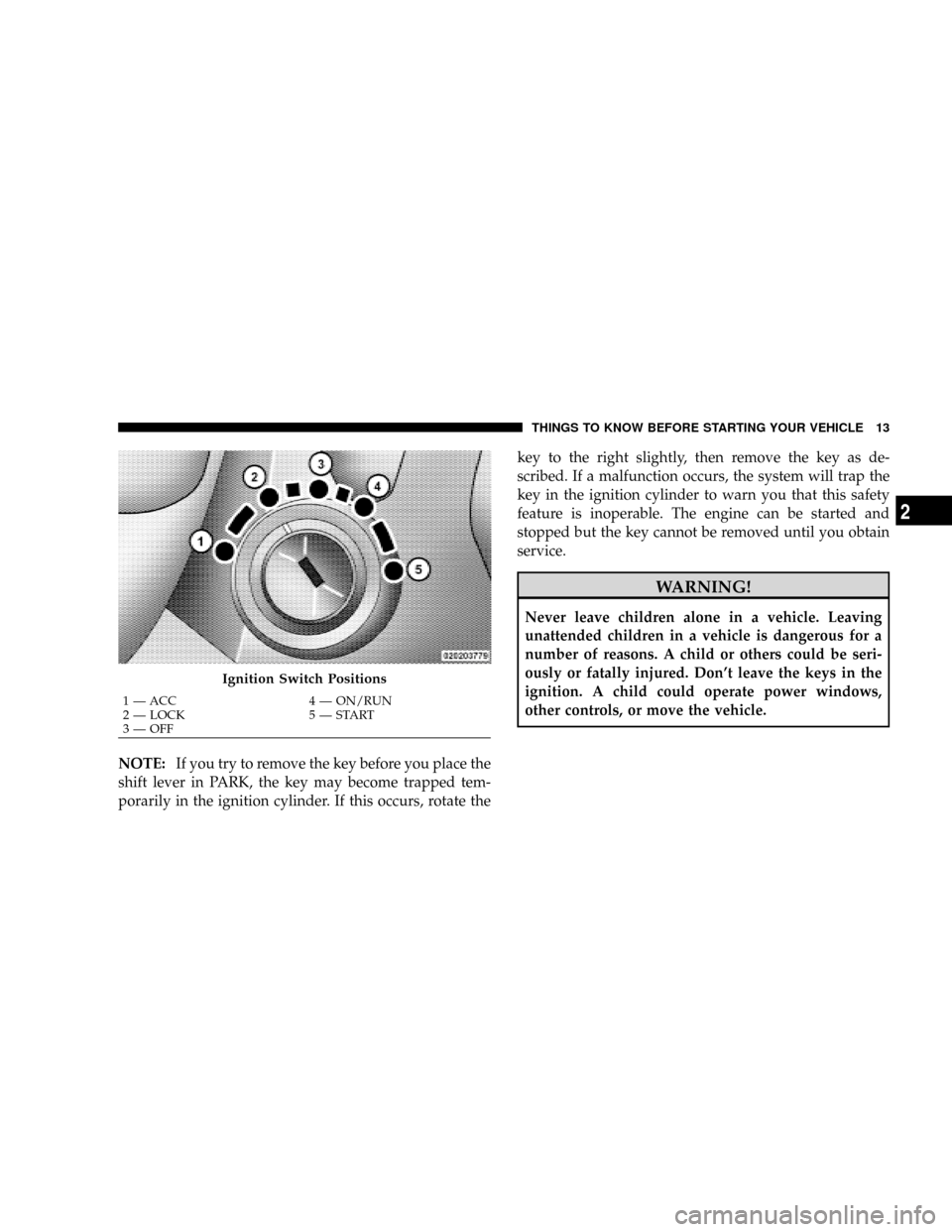
Ignition Switch Positions
1 Ð ACC 4 Ð ON/RUN
2 Ð LOCK 5 Ð START
3 Ð OFFTHINGS TO KNOW BEFORE STARTING YOUR VEHICLE 13
2
Page 19 of 481
Replacement Keys
NOTE:Only keys that are programmed to the vehicle
electronics can be used to start and operate the vehicle.
Once a Sentry Keytis programmed to a vehicle, it cannot
be programmed to any other vehicle.
CAUTION!
Always remove the Sentry Keystfrom the vehicle
and lock all doors when leaving the vehicle
unattended.
At the time of purchase, the original owner is provided
with a four-digit Personal Identification Number (PIN).
Keep the PIN in a secure location. This number is
required for authorized dealer replacement of keys. Du-
plication of keys may be performed at an authorized
dealer or by following the customer key programmingprocedure. This procedure consists of programming a
blank key to the vehicle electronics. A blank key is one
that has never been programmed.
NOTE:When having the Sentry KeytImmobilizer
System serviced, bring all vehicle keys with you to an
authorized dealer.
Customer Key Programming
If you have two valid Sentry Keyst, you can program
new Sentry Keystto the system by performing the
following procedure:
1. Cut the additional Sentry KeytTransponder blank(s)
to match the ignition switch lock cylinder key code.
2. Insert the first valid key into the ignition switch. Turn
the ignition switch to the ON position for at least three
seconds, but no longer than 15 seconds. Then, turn the
ignition switch to the LOCK position and remove the first
key.
THINGS TO KNOW BEFORE STARTING YOUR VEHICLE 17
2
Page 20 of 481
3. Insert the second valid key into the ignition switch.
Turn the ignition switch to the ON position within 15
seconds. After 10 seconds, a chime will sound. In addi-
tion, the Vehicle Security Alarm Indicator Light will
begin to flash. Turn the ignition switch to the LOCK
position and remove the second key.
4. Insert a blank Sentry Keytinto the ignition switch.
Turn the ignition switch to the ON position within 60
seconds. After 10 seconds, a single chime will sound. In
addition, the Vehicle Security Alarm Indicator Light will
stop flashing. To indicate that programming is complete,
the Vehicle Security Alarm Indicator Light will turn on
again for three seconds and then turn off.
The new Sentry Keytis programmed.The Remote
Keyless Entry (RKE) transmitter will also be pro-
grammed during this procedure.Repeat this procedure to program up to eight keys. If you
do not have a programmed Sentry Keyt, contact your
authorized dealer for details.
NOTE:If a programmed key is lost, see your authorized
dealer to have all remaining keys erased from the sys-
tem's memory. This will prevent the lost key from
starting your vehicle. The remaining keys must then be
reprogrammed. All vehicle keys must be taken to an
authorized dealer at the time of service to be
reprogrammed.
General Information
The Sentry Keytsystem complies with FCC rules Part 15
and with RSS-210 of Industry Canada. Operation is
subject to the following conditions:
²This device may not cause harmful interference.
18 THINGS TO KNOW BEFORE STARTING YOUR VEHICLE
Page 64 of 481
NOTE:Perchlorate Material ± special handling may ap-
ply. See www.dtsc.ca.gov/hazardouswaste/perchlorate.
Enhanced Accident Response System
If the airbags deploy after an impact and the electrical
system remains functional, vehicles equipped with
power door locks will unlock automatically, the engine
will shut off and the hazard lights will turn on. In
addition, approximately five seconds after the vehicle has
stopped moving, the interior lights will light until the
ignition switch is turned OFF.
Airbag Light
You will want to have the airbags ready to
inflate for your protection in an impact. While
the airbag system is designed to be mainte-
nance free, if any of the following occurs, have
an authorized dealer service the system promptly:
²The airbag light does not come on or flickers during
the 2.5 to 8 seconds when the ignition switch is first
turned ON.
²The light remains on or flickers after the 2.5 to 8
seconds interval.
²The light flickers or comes on and remains on while
driving.
NOTE:If the speedometer, tachometer or any engine
related gauges are not working, the airbag control mod-
ule may also be disabled. The airbags may not be ready
to inflate for your protection. Promptly check the fuse
block for blown fuses. Refer to ªFuse Blockº in Section 7.
See your authorized dealer if the fuse is good.
62 THINGS TO KNOW BEFORE STARTING YOUR VEHICLE
Page 66 of 481
particular driver, vehicle, or crash, will be treated confi-
dentially. Confidential data will not be disclosed by the
manufacturer to any third party except when:
1. Used for research purposes, such as to match data
with a particular crash record in an aggregate database,
provided confidentiality of personal data is thereafter
preserved
2. Used in defense of litigation involving a the manufac-
turer's product
3. Requested by police under a legal warrant
4. Otherwise required by law
Data parameters that may be recorded:
²Diagnostic trouble code(s) and warning light status for
electronically-controlled safety systems, including the
airbag system
²Airbag disable light status (if equipped)
²9Time9of airbag deployment (in terms of ignition
cycles and vehicle mileage)
²Airbag deployment level (if applicable)
²Impact acceleration and angle
²Seat belt status
²Brake status (service and parking brakes)
²Accelerator status (including vehicle speed)
²Engine control status (including engine speed)
²Transmission gear selection
²Cruise control status
²Traction/stability control status
²Tire pressure monitoring system (TPMS) status (if
equipped)
64 THINGS TO KNOW BEFORE STARTING YOUR VEHICLE
Page 84 of 481
mRear Park Assist System Ð If Equipped...... 158
NRear Park Assist Sensors............... 158
NRear Park Assist Warning Display......... 159
N
Enable/Disable The Rear Park Assist System. . 162
NService The Rear Park Assist System....... 162
NCleaning The Rear Park Assist System...... 163
mRear Backup Camera Ð If Equipped........ 163
mOverhead Console..................... 165
NCourtesy/Reading Lights............... 165
mOverhead Console With Electronic Vehicle
Information Center (EVIC) Ð If Equipped..... 166
NDome/Reading Lights................. 166
NElectronic Vehicle Information Center (EVIC)
Ð If Equipped....................... 167NCompass/Temperature Button........... 173
mGarage Door Opener Ð If Equipped........ 176
NProgramming HomeLinkt.............. 177
NGate Operator/Canadian Programming..... 180
NUsing HomeLinkt.................... 181
NReprogramming A Single HomeLinkt
Button............................ 181
NSecurity........................... 181
NTroubleshooting Tips.................. 182
NGeneral Information................... 182
mPower Sunroof Ð If Equipped............. 183
NExpress Open Feature................. 183
NWind Buffeting...................... 184
82 UNDERSTANDING THE FEATURES OF YOUR VEHICLE
Page 92 of 481
Phone Button
The rearview mirror contains the microphone
for the system (depending on the type of
mirror and radio equipped), and either the
radio or the mirror has the two control buttons
(PHONE Button and VOICE RECOGNITION button)
that will enable you to access the system.
Voice Recognition Button
Actual button location may vary with radio.
The individual buttons are described in the
ªOperationº section.
The UConnecttsystem can be used with any Hands-Free
Profile certified Bluetoothtcellular phone. See the
UConnecttwebsite for supported phones. If your cellu-
lar phone supports a different profile (e.g., Headset
Profile) you may not be able to use any UConnectt
features. Refer to your cellular service provider or the
phone manufacturer for details.The UConnecttsystem is fully integrated with the vehi-
cle's audio system. The volume of the UConnecttsystem
can be adjusted either from the radio volume control
knob or from the steering wheel radio control (right
switch), if so equipped.
The radio display will be used for visual prompts from
the UConnecttsystem such as9CELL9or caller ID on
certain radios.
Operation
Voice commands can be used to operate the UConnectt
system and to navigate through the UConnecttmenu
structure. Voice commands are required after most
UConnecttsystem prompts. You will be prompted for a
specific command and then guided through the available
options.
²Prior to giving a voice command, one must wait for
the beep, which follows the9Ready9prompt or another
prompt.
90 UNDERSTANDING THE FEATURES OF YOUR VEHICLE
Page 99 of 481
²After confirmation, the phonebook entries will be
deleted.
²Note that only the phonebook in the current language
is deleted.
List All Names in the UConnecttPhonebook
²
Press the PHONE button to begin.
²After the9Ready9prompt and the following beep, say
9Phonebook List Names.9
²The UConnecttsystem will play the names of all the
phonebook entries.
²To call one of the names in the list, press the ªVoice
Recognitionº button during the playing of the desired
name, and say9Call.9
NOTE:The user can also exercise9Edit9or9Delete9
operations at this point.
²The UConnecttsystem will then prompt you as to the
number designation you wish to call.
²The selected number will be dialed.
Phone Call Features
The following features can be accessed through the
UConnecttsystem if the feature(s) are available on your
cellular service plan. For example, if your cellular service
plan provides three-way calling, this feature can be
accessed through the UConnecttsystem. Check with
your cellular service provider for the features that you
have.
Answer or Reject an Incoming Call - No Call
Currently in Progress
When you receive a call on your cellular phone, the
UConnecttsystem will interrupt the vehicle audio sys-
tem, if on, and will ask if you would like to answer the
call. Press the PHONE button to accept the call. To reject
UNDERSTANDING THE FEATURES OF YOUR VEHICLE 97
3
Page 103 of 481
Emergency Assistance
If you are in an emergency and the mobile phone is
reachable:
²Pick up the phone and manually dial the emergency
number for your area.
If the phone is not reachable and the UConnecttsystem
is operational, you may reach the emergency number as
follows:
²Press the PHONE button to begin.
²After the9Ready9prompt and the following beep, say
9Emergency9and the UConnecttsystem will instruct
the paired cellular phone to call the emergency num-
ber. This feature is supported in the U.S., Canada, and
Mexico.
NOTE:The emergency number dialed is based on the
country where the vehicle is purchased (911 for the U.S.and Canada and 060 for Mexico). The number dialed may
not be applicable with the available cellular service and
area.
The UConnecttsystem does slightly lower your chances
of successfully making a phone call as to that for the cell
phone directly.
Your phone must be turned on and paired to the
UConnecttsystem to allow use of this vehicle feature in
emergency situations, when the cell phone has network
coverage and stays paired to the UConnecttsystem.Towing Assistance
If you need towing assistance:
²Press the PHONE button to begin.
²After the9Ready9prompt and the following beep, say
9Towing Assistance.9
UNDERSTANDING THE FEATURES OF YOUR VEHICLE 101
3