service CHRYSLER ASPEN 2009 2.G Owner's Manual
[x] Cancel search | Manufacturer: CHRYSLER, Model Year: 2009, Model line: ASPEN, Model: CHRYSLER ASPEN 2009 2.GPages: 481, PDF Size: 9.28 MB
Page 213 of 481
Brake Booster has been detected by the Anti-Lock Brake
System (ABS) / Electronic Stability Program (ESP) sys-
tem. In this case, the light will remain on until the
condition has been corrected. If the problem is related to
the brake booster, the ABS pump will run when applying
the brake and a brake pedal pulsation may be felt during
each stop.
The dual brake system provides a reserve braking capac-
ity in the event of a failure to a portion of the hydraulic
system. A leak in either half of the dual brake system is
indicated by the Brake Warning Light which will turn on
when the brake fluid level in the master cylinder has
dropped below a specified level.
The light will remain on until the cause is corrected.
NOTE:The light may flash momentarily during sharp
cornering maneuvers which change fluid level condi-
tions. The vehicle should have service performed, and
the brake fluid level checked.If brake failure is indicated, immediate repair is neces-
sary.
WARNING!
Driving a vehicle with the brake light on is danger-
ous. Part of the brake system may have failed. It will
take longer to stop the vehicle. You could have an
accident. Have the vehicle checked immediately.
Vehicles equipped with the Anti-Lock Brake System
(ABS), are also equipped with Electronic Brake Force
Distribution (EBD). In the event of an EBD failure, the
Brake Warning Light will turn on along with the ABS
Light. Immediate repair to the ABS system is required.
Operation of the Brake Warning Light can be checked by
turning the ignition switch from the OFF position to the
ON position. The light should illuminate for approxi-
mately two seconds. The light should then turn off unless
UNDERSTANDING YOUR INSTRUMENT PANEL 211
4
Page 215 of 481
If the MIL comes on and remains on while driving, it
suggests a potential engine control problem and the need
for system service. See an authorized dealer as soon as
possible.
Although your vehicle will usually be drivable and not
need towing, see an authorized dealer for service as soon
as possible.
CAUTION!
Prolonged driving with the MIL on could cause
damage to the engine control system. It also could
affect fuel economy and driveability.
If the MIL is flashing, severe catalytic converter
damage and power loss will soon occur. Immediate
service is required. See an authorized dealer for
service immediately.24. Tire Pressure Monitoring Telltale Light
Each tire, including the spare (if provided),
should be checked monthly when cold and
inflated to the inflation pressure recommended
by the vehicle manufacturer on the vehicle
placard or tire inflation pressure label. (If your vehicle
has tires of a different size than the size indicated on the
vehicle placard or tire inflation pressure label, you should
determine the proper tire inflation pressure for those
tires.)
UNDERSTANDING YOUR INSTRUMENT PANEL 213
4
Page 217 of 481
CAUTION!
The TPMS has been optimized for the original
equipment tires and wheels. TPMS pressures and
warning have been established for the tire size
equipped on your vehicle. Undesirable system opera-
tion or sensor damage may result when using re-
placement equipment that is not of the same size,
type, and/or style. Aftermarket wheels can cause
sensor damage. Do not use tire sealant from a can, or
balance beads if your vehicle is equipped with a
TPMS, as damage to the sensors may result.
25. Airbag Indicator
The airbag indicator light illuminates and re-
mains lit for six to eight seconds when the
ignition is first turned ON. If the light does not
come on when the ignition is first turned on, orthe light stays on or comes on while driving, have the
airbag system checked by an authorized dealer.
26. 4WD Indicator
The 4WD indicator light illuminates when the transfer
case is in 4WD position.
27. SVC (Service) 4WD Indicator
The SVC 4WD light will illuminate when the ignition key
is turned to the ON position and will stay on for two
seconds. If the light stays on or comes on during driving,
it means that the 4WD system is not functioning properly
and that service is required.
28. Cruise Light (Speed Control)
The cruise light indicator illuminates when the electronic
speed control system is turned on.
UNDERSTANDING YOUR INSTRUMENT PANEL 215
4
Page 248 of 481
²MUSIC TYPEbutton: TheMUSIC TYPEbutton is
another shortcut button to the genre listing on your
iPodt.
CAUTION!
²Leaving the iPodt(or any supported device) any-
where in the vehicle in extreme heat or cold can
alter the operation, or damage the device. Follow
the device manufacturer 's guidelines.
²Placing items on the iPodt, or connections to the
iPodtin the vehicle, can cause damage to the
device and/or to the connectors.
WARNING!
Do not plug in or remove the iPodtwhile driving.
Failure to following this warning could result in an
accident.
SATELLITE RADIO Ð IF EQUIPPED
(REN/REQ/RER/RES/REU RADIOS ONLY)
Satellite radio uses direct satellite-to-receiver broadcast-
ing technology to provide clear digital sound, coast to
coast. The subscription service provider is Sirius Satellite
Radio. This service offers over 130 channels of music,
sports, news, entertainment, and programming for chil-
dren, directly from its satellites and broadcasting studios.
NOTE:Sirius service is not available in Hawaii and has
limited coverage in Alaska.
System Activation
Sirius Satellite Radio service is pre-activated, and you
may begin listening immediately to the one year of audio
service that is included with the factory-installed satellite
radio system in your vehicle. Sirius will supply a wel-
come kit that contains general information, including
how to setup your on-line listening account at no addi-
tional charge. For further information, call the toll-free
246 UNDERSTANDING YOUR INSTRUMENT PANEL
Page 253 of 481
You may add a second channel to each pushbutton by
repeating the above procedure with this exception: Press
the SET button twice and SET 2 will show in the display
window. Each button can be set for SET 1 and SET 2. This
allows a total of 12 Satellite channels to be stored into
pushbutton memory. The channels stored in SET 2
memory can be selected by pressing the pushbutton
twice.
Every time a preset button is used, a corresponding
button number will display.
Buttons1-6
These buttons tune the radio to the channels that you
commit to pushbutton memory (12 Satellite stations).
Operating Instructions - Hands-Free Phone (If
Equipped)
Refer to ªHands-Free Communication (UConnectt)º in
Section 3.
Operating Instructions - Video Entertainment
System (VEST) (If Equipped)
Refer to separate ªVideo Entertainment System (VESt)
Guide.º
SIRIUS BACKSEAT TVŸ Ð IF EQUIPPED
Satellite video uses direct satellite receiver broadcasting
technology to provide streaming video coast to coast. The
subscription service provider is SIRIUS Satellite Radio.
SIRIUS Backseat TVŸ offers three video channels for
family entertainment, directly from its satellites and
broadcasting studios.
NOTE:SIRIUS service is not available in Hawaii and
has limited coverage in Alaska.
Refer to your Video Entertainment System (VES)t, RER
Navigation or REN Multimedia User Manuals for de-
tailed operating instructions.
UNDERSTANDING YOUR INSTRUMENT PANEL 251
4
Page 256 of 481
3. Do not apply paper or tape to the disc; avoid scratch-
ing the disc.
4. Do not use solvents such as benzine, thinner, cleaners,
or antistatic sprays.
5. Store the disc in its case after playing.
6. Do not expose the disc to direct sunlight.
7. Do not store the disc where temperatures may become
too high.
NOTE:If you experience difficulty in playing a particu-
lar disc, it may be damaged (i.e. scratched, reflective
coating removed, a hair, moisture or dew on the disc)
oversized, or have theft protection encoding. Try a
known good disc before considering disc player service.RADIO OPERATION AND CELLULAR PHONES
Under certain conditions, the cellular phone being ON in
your vehicle can cause erratic or noisy performance from
your radio. This condition may be lessened or eliminated
by relocating the cellular phone antenna. This condition
is not harmful to the radio. If your radio performance
does not satisfactorily ªclearº by the repositioning of the
antenna, it is recommended that the radio volume be
turned down or off during cellular phone operation.
254 UNDERSTANDING YOUR INSTRUMENT PANEL
Page 288 of 481
NOTE:The transfer case NEUTRAL position is to be
used for recreational towing only. Refer to ªRecreational
Towingº in this section for specific procedures on shifting
into and out of NEUTRAL.
Transfer Case Position Indicator Lights
Transfer case position indicator lights are located on the
instrument cluster. If there are no indicator lights on or
flashing, the transfer case position is four-wheel drive
(4WD) and indicates the current and desired transfer case
selection (4WD,4WD LOCK).
The ªSVC 4WD Warning Lightº monitors the electric
shift 4WD system. If this light remains on after engine
start up or illuminates during driving, it means that the
4WD system is not functioning properly and that service
is required. See your authorized dealer for service.
WARNING!
Always engage the parking brake when powering
down the vehicle if the(SVC 4WD Warning Lightº is
illuminated. Not engaging the parking brake may
allow the vehicle to roll, which may cause personal
injury.
NOTE:Do not attempt to make a shift while only the
front or rear wheels are spinning. The NV 244 Generation
II transfer case is not equipped with a synchronizer and
therefore the front and rear driveshaft speeds must be
equal for the shift to take place. Shifting while only the
front or rear wheels are spinning can cause damage to the
transfer case.
286 STARTING AND OPERATING
Page 295 of 481
POWER STEERING
The standard power steering system will give you good
vehicle response and increased ease of maneuverability
in tight spaces. The system will provide mechanical
steering capability if power assist is lost.
If for some reason the power assist is interrupted, it will
still be possible to steer your vehicle. Under these condi-
tions, you will observe a substantial increase in steering
effort, especially at very low vehicle speeds and during
parking maneuvers.
NOTE:Increased noise levels at the end of the steering
wheel travel are considered normal and do not indicate
that there is a problem with the power steering system.
Upon initial start-up in cold weather, the power steering
pump may make noise for a short amount of time. This is
due to the cold, thick fluid in the steering system. This
noise should be considered normal, and it does not in any
way damage the steering system.WARNING!
Continued operation with reduced power steering
assist could pose a safety risk to yourself and others.
Service should be obtained as soon as possible.
CAUTION!
Prolonged operation of the steering system at the end
of the steering wheel travel will increase the steering
fluid temperature and it should be avoided when
possible. Damage to the power steering pump may
occur.
STARTING AND OPERATING 293
5
Page 296 of 481
Power Steering Fluid Check
Checking the power steering fluid level at a defined
service interval is not required. The fluid should only be
checked if a leak is suspected, abnormal noises are
apparent, and/or the system is not functioning as antici-
pated. Coordinate inspection efforts through an autho-
rized dealer.
WARNING!
Fluid level should be checked on a level surface and
with the engine off to prevent injury from moving
parts and to ensure accurate fluid level reading. Do
not overfill. Use only manufacturers recommended
power steering fluid.
If necessary, add fluid to restore to the proper indicated
level. With a clean cloth, wipe any spilled fluid from allsurfaces. For correct fluid type, refer to ºPower Steering
Reservoirº under ªFluids, Lubricants, and Genuine
Partsº in this section.
MULTI-DISPLACEMENT SYSTEM (MDS) Ð 5.7L
ENGINE ONLY
This feature offers improved fuel economy by shutting
off four of the engine's eight cylinders during light load
and cruise conditions. The system is automatic with no
driver inputs or additional driving skills required.
NOTE:The MDS system may take some time to return
to full functionality after a battery disconnect.
PARKING BRAKE
The foot operated parking brake is positioned below the
lower left corner of the instrument panel. To release the
parking brake, pull the parking brake release handle.
294 STARTING AND OPERATING
Page 309 of 481
and the vehicle has been driven several miles at speeds
greater than 30 mph (48 km/h), see your authorized
dealer as soon as possible to have the problem diagnosed
and corrected.
NOTE:
²The ESP Indicator Light and the ESP/BAS Warning
Light come on momentarily each time the ignition
switch is turned ON.
²Each time the ignition is turned ON, the ESP System
will be ON even if it was turned off previously.
²The ESP Control System will make buzzing or clicking
sounds when it is active. This is normal; the sounds
will stop when ESP becomes inactive following the
maneuver that caused the ESP activation.
TIRE SAFETY INFORMATION
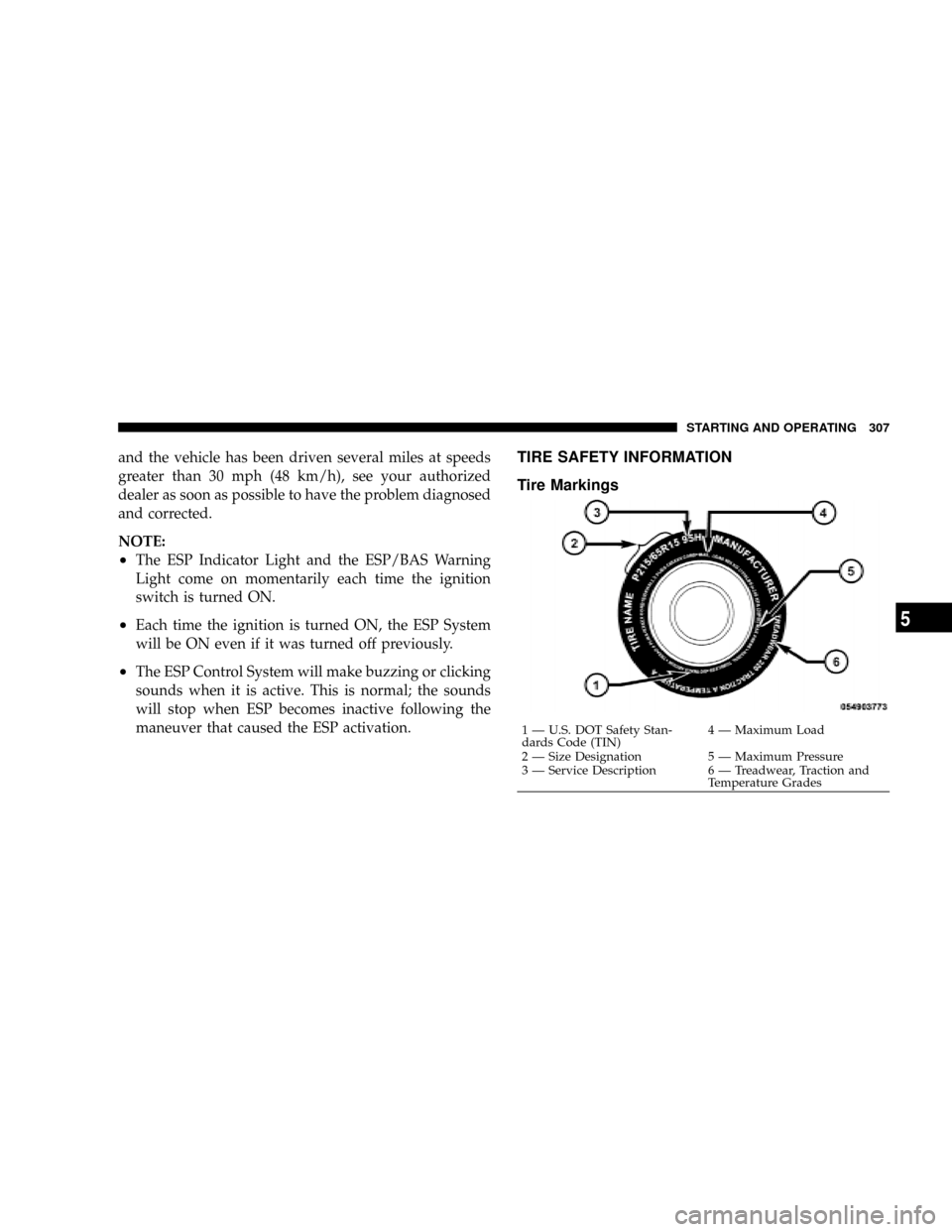
Tire Markings
1 Ð U.S. DOT Safety Stan-
dards Code (TIN)4 Ð Maximum Load
2 Ð Size Designation 5 Ð Maximum Pressure
3 Ð Service Description 6 Ð Treadwear, Traction and
Temperature Grades STARTING AND OPERATING 307
5