air bag CHRYSLER CARAVAN 2005 Workshop Manual
[x] Cancel search | Manufacturer: CHRYSLER, Model Year: 2005, Model line: CARAVAN, Model: CHRYSLER CARAVAN 2005Pages: 2339, PDF Size: 59.69 MB
Page 504 of 2339
CARE OF UNDEPLOYED AIRBAGS
WARNING: Airbags must be stored in their original
special container until used for service. At no time
should a source of electricity be permitted near the
inflator on the back of an airbag. When carrying or
handling an undeployed airbag, the trim side of the
airbag should be pointing toward the body to mini-
mize possibility of injury if accidental deployment
occurs. Do not place undeployed airbag face down
on a solid surface, the airbag will propel into the air
if accidental deployment occurs.
REMOVAL
DEPLOYED AIRBAG
(1) Clean powder residue from interior of vehicle
(Fig. 4).
(2) Position steering wheel and front wheels
straight ahead.
(3) Release hood latch and open hood.
(4) Disconnect and isolate the battery negative
cable.
(5)
WARNING: Wait two minutes for the airbag system
reserve capacitor to discharge before beginning
any airbag system or component service. Failure to
do so may result in accidental airbag deployment,
personal injury or death.
(6) Remove two screws retaining driver airbag to
steering wheel.
(7) Disconnect wire connectors from back of driver
airbag.
(8) Disconnect the 2±way connector from remote
radio control harness.
(9) Disconnect the 4±way harness connector from
the speed control/horn harness to the clockspring.
(10) Remove steering wheel (Refer to 19 - STEER-
ING/COLUMN/STEERING WHEEL - REMOVAL).
(11) Remove steering column shrouds and discon-
nect traction control wire connector (if equipped)
(Refer to 19 - STEERING/COLUMN/LOWER
SHROUD - REMOVAL).
(12) Disconnect 4-way and 6-way connectors
between the clockspring and the instrument panel
wiring harness.
(13) Remove clockspring from column assembly by
removing the two retaining screws that attach the
clockspring to the column.
WARNING: The clockspring, steering wheel, and
complete steering column assembly w/lower steer-
ing column coupler must be replaced also in theevent of a driver airbag deployment. Personal injury
or death may result if not replaced.
UNDEPLOYED AIRBAG
(1) Release hood latch and open hood.
(2) Disconnect and isolate the battery negative
cable.
WARNING: Wait two minutes for the system reserve
capacitor to discharge before beginning any airbag
component service. Personal injury or death may
result.
(3) Remove two screws retaining driver airbag to
steering wheel.
(4) Disconnect wire connectors from back of driver
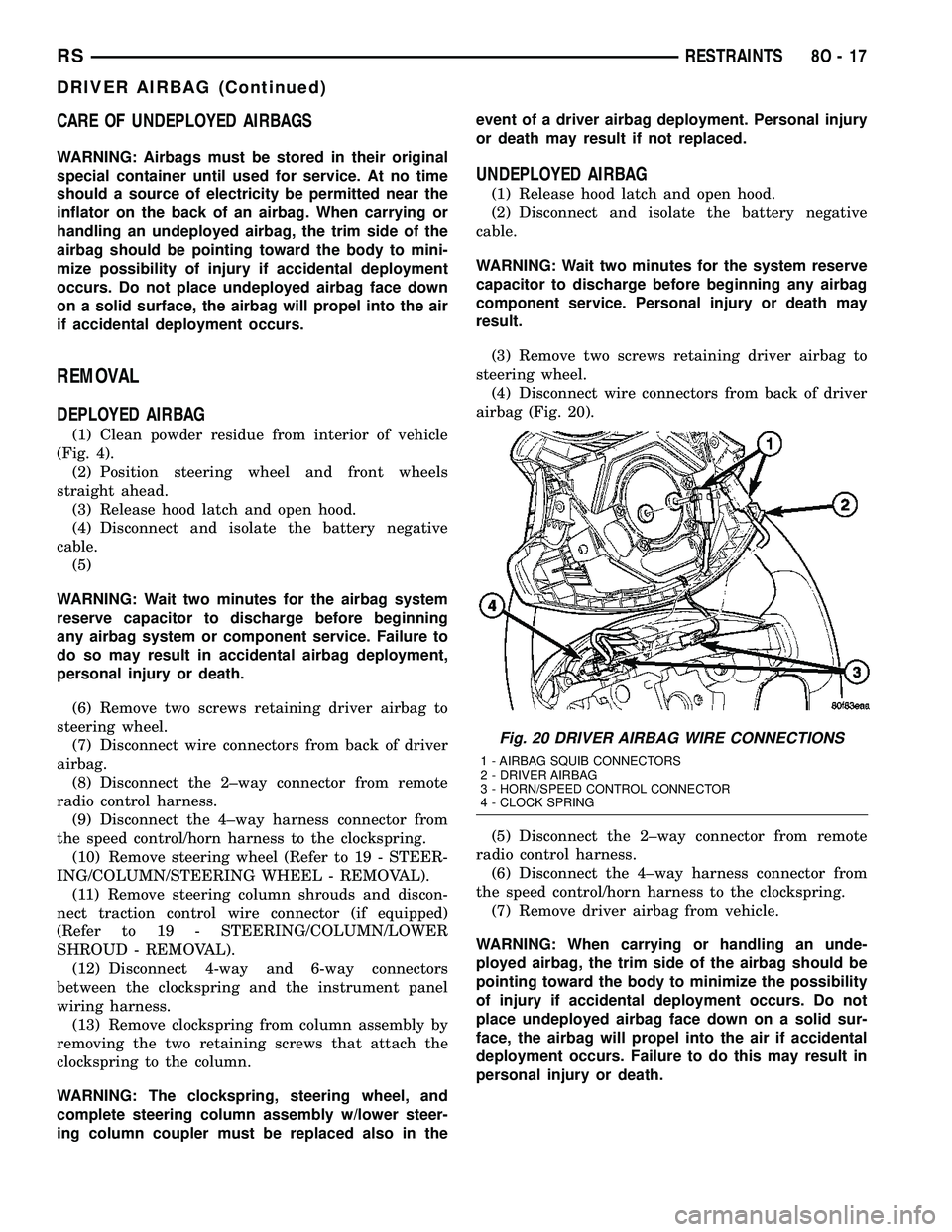
airbag (Fig. 20).
(5) Disconnect the 2±way connector from remote
radio control harness.
(6) Disconnect the 4±way harness connector from
the speed control/horn harness to the clockspring.
(7) Remove driver airbag from vehicle.
WARNING: When carrying or handling an unde-
ployed airbag, the trim side of the airbag should be
pointing toward the body to minimize the possibility
of injury if accidental deployment occurs. Do not
place undeployed airbag face down on a solid sur-
face, the airbag will propel into the air if accidental
deployment occurs. Failure to do this may result in
personal injury or death.
Fig. 20 DRIVER AIRBAG WIRE CONNECTIONS
1 - AIRBAG SQUIB CONNECTORS
2 - DRIVER AIRBAG
3 - HORN/SPEED CONTROL CONNECTOR
4 - CLOCK SPRING
RSRESTRAINTS8O-17
DRIVER AIRBAG (Continued)
Page 505 of 2339
INSTALLATION
DEPLOYED AIRBAG
(1) Perform clean up procedure (Refer to 8 - ELEC-
TRICAL/RESTRAINTS - STANDARD PROCEDURE
- SERVICE AFTER AN AIRBAG DEPLOYMENT).
(2) Install a new steering column assembly and
lower steering column coupler (Refer to 19 - STEER-
ING/COLUMN - INSTALLATION).
(3) Install the new clockspring.
(4) Connect the 4-way and 6-way connectors
between the clockspring and the instrument panel
wiring harness.
(5) Install the steering column shrouds and con-
nect traction control wire connector (if equipped)
(Refer to 19 - STEERING/COLUMN/LOWER
SHROUD - INSTALLATION).
(6) Install the steering wheel (Refer to 19 -
STEERING/COLUMN/STEERING WHEEL -
INSTALLATION).
(7) Connect the 4±way harness connector to the
speed control/horn harness to the clockspring.
(8) Connect the 2±way connector to the remote
radio control harness.
(9) Install the driver airbag and the two screws
retaining the airbag. Tighten screws to 10 N´m (90
in. lbs.)
WARNING: Do not connect the battery negative
cable (Refer to 8 - ELECTRICAL/RESTRAINTS -
DIAGNOSIS AND TESTING - AIRBAG SYSTEM). Per-
sonal injury or death may result if the system test
is not performed first.
UNDEPLOYED AIRBAG
(1) Connect the harness connector on the driver
airbag trim cover (horn, speed controls) to the clock-
spring.
(2) Connect the squib connectors to the driver air-
bag.
(3) Position the driver airbag into the steering
wheel.
(4) Install the two screws retaining the airbag.
Tighten screws to 10 N´m (90 in. lbs.)
WARNING: Do not connect the battery negative
cable (Refer to 8 - ELECTRICAL/RESTRAINTS -
DIAGNOSIS AND TESTING - AIRBAG SYSTEM). Per-
sonal injury or death may result if the system test
is not performed first.
IMPACT SENSOR
DESCRIPTION
FRONT IMPACT SENSORS
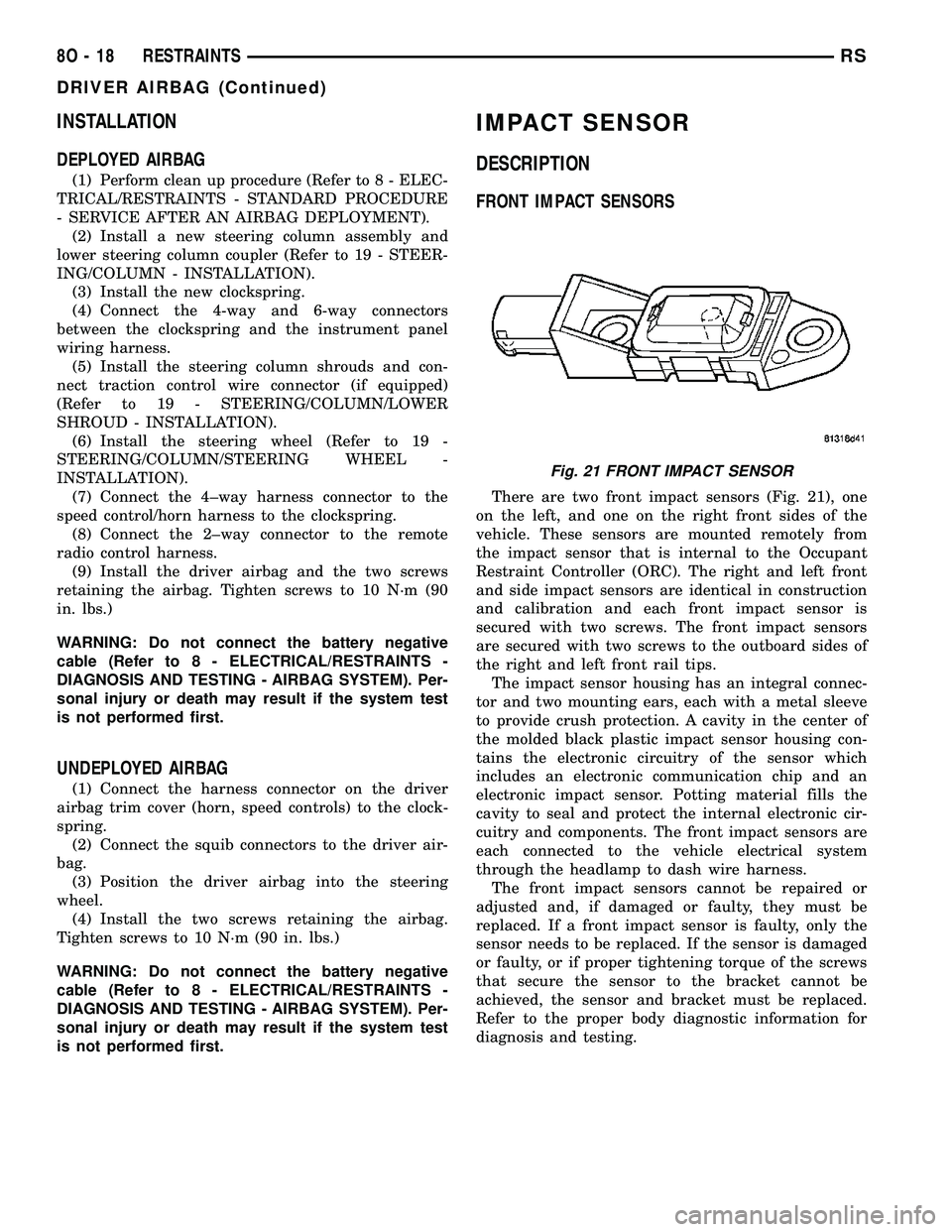
There are two front impact sensors (Fig. 21), one
on the left, and one on the right front sides of the
vehicle. These sensors are mounted remotely from
the impact sensor that is internal to the Occupant
Restraint Controller (ORC). The right and left front
and side impact sensors are identical in construction
and calibration and each front impact sensor is
secured with two screws. The front impact sensors
are secured with two screws to the outboard sides of
the right and left front rail tips.
The impact sensor housing has an integral connec-
tor and two mounting ears, each with a metal sleeve
to provide crush protection. A cavity in the center of
the molded black plastic impact sensor housing con-
tains the electronic circuitry of the sensor which
includes an electronic communication chip and an
electronic impact sensor. Potting material fills the
cavity to seal and protect the internal electronic cir-
cuitry and components. The front impact sensors are
each connected to the vehicle electrical system
through the headlamp to dash wire harness.
The front impact sensors cannot be repaired or
adjusted and, if damaged or faulty, they must be
replaced. If a front impact sensor is faulty, only the
sensor needs to be replaced. If the sensor is damaged
or faulty, or if proper tightening torque of the screws
that secure the sensor to the bracket cannot be
achieved, the sensor and bracket must be replaced.
Refer to the proper body diagnostic information for
diagnosis and testing.
Fig. 21 FRONT IMPACT SENSOR
8O - 18 RESTRAINTSRS
DRIVER AIRBAG (Continued)
Page 506 of 2339
SIDE IMPACT SENSORS
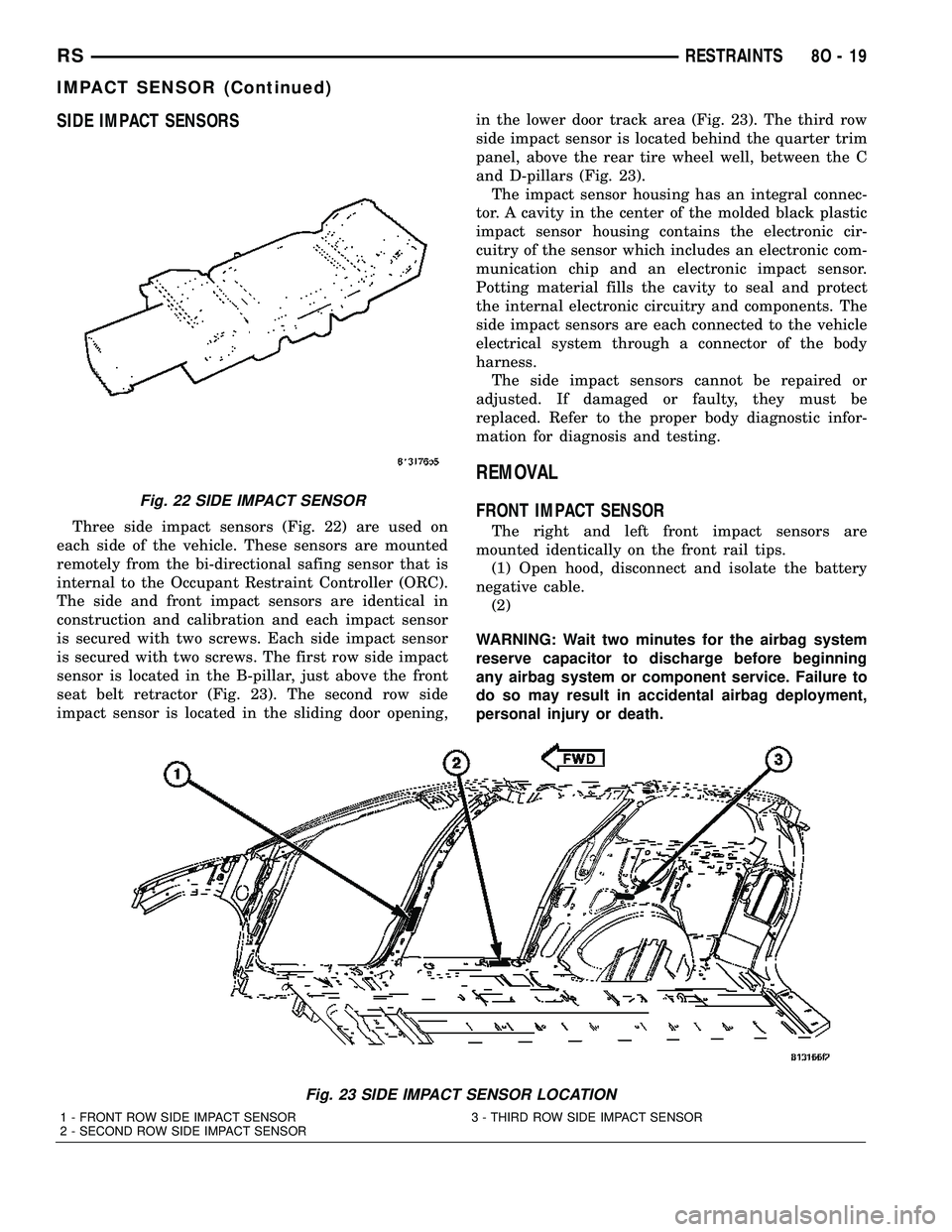
Three side impact sensors (Fig. 22) are used on
each side of the vehicle. These sensors are mounted
remotely from the bi-directional safing sensor that is
internal to the Occupant Restraint Controller (ORC).
The side and front impact sensors are identical in
construction and calibration and each impact sensor
is secured with two screws. Each side impact sensor
is secured with two screws. The first row side impact
sensor is located in the B-pillar, just above the front
seat belt retractor (Fig. 23). The second row side
impact sensor is located in the sliding door opening,in the lower door track area (Fig. 23). The third row
side impact sensor is located behind the quarter trim
panel, above the rear tire wheel well, between the C
and D-pillars (Fig. 23).
The impact sensor housing has an integral connec-
tor. A cavity in the center of the molded black plastic
impact sensor housing contains the electronic cir-
cuitry of the sensor which includes an electronic com-
munication chip and an electronic impact sensor.
Potting material fills the cavity to seal and protect
the internal electronic circuitry and components. The
side impact sensors are each connected to the vehicle
electrical system through a connector of the body
harness.
The side impact sensors cannot be repaired or
adjusted. If damaged or faulty, they must be
replaced. Refer to the proper body diagnostic infor-
mation for diagnosis and testing.
REMOVAL
FRONT IMPACT SENSOR
The right and left front impact sensors are
mounted identically on the front rail tips.
(1) Open hood, disconnect and isolate the battery
negative cable.
(2)
WARNING: Wait two minutes for the airbag system
reserve capacitor to discharge before beginning
any airbag system or component service. Failure to
do so may result in accidental airbag deployment,
personal injury or death.
Fig. 23 SIDE IMPACT SENSOR LOCATION
1 - FRONT ROW SIDE IMPACT SENSOR 3 - THIRD ROW SIDE IMPACT SENSOR
2 - SECOND ROW SIDE IMPACT SENSOR
Fig. 22 SIDE IMPACT SENSOR
RSRESTRAINTS8O-19
IMPACT SENSOR (Continued)
Page 507 of 2339

(3) Hoist vehicle.
(4) Disconnect electrical connector (Fig. 24).
(5) Remove the two screws attaching front impact
sensor to outer rails (Fig. 24).
(6) Remove sensor from vehicle.
SIDE IMPACT SENSORS
B-PILLAR MOUNTED
The right and left front row side impact sensors,
are mounted identically, on opposite sides of the vehi-
cle, in the b-pillar.
(1) Open hood, disconnect and isolate the battery
negative cable.
(2)
WARNING: Wait two minutes for the system reserve
capacitor to discharge before beginning any airbag
component service. Personal injury or death may
result.
(3) Remove the B-pillar lower trim for the side of
the vehicle that you are replacing the side impact
sensor (Refer to 23 - BODY/INTERIOR/B-PILLAR
LOWER TRIM - REMOVAL).
(4) Disconnect the electrical connector from the
impact sensor (Fig. 25).
(5) Remove the four retaining screws to the impact
sensor bracket (Fig. 25).
(6) Remove impact sensor from vehicle (Fig. 26).
SLIDING DOOR OPENING MOUNTED
The right and left second row side impact sensors,
are mounted identically, on opposite sides of the vehi-cle, in the sliding door opening lower rear where the
lower roller arm mounts in the lower door track.
(1) Open hood, disconnect and isolate the battery
negative cable.
(2)
Fig. 24 FRONT IMPACT SENSOR REMOVE/INSTALL
1 - FRONT IMPACT SENSOR WIRE HARNESS RETAINER
2 - FRONT IMPACT SENSOR RETAINING SCREW
3 - FRONT IMPACT SENSOR WIRE HARNESS
4 - FRONT IMPACT SENSOR
5 - LOWER RADIATOR SUPPORT
Fig. 25 FRONT ROW SIDE IMPACT SENSOR AND
BRACKET
1 - B-PILLAR
2 - FRONT ROW SIDE IMPACT SENSOR ELECTRICAL
CONNECTOR
3 - FRONT ROW SIDE IMPACT SENSOR AND MOUNTING
BRACKET
4 - FRONT ROW SIDE IMPACT SENSOR RETAINING SCREW
Fig. 26 FRONT ROW SIDE IMPACT SENSOR/
BRACKET
1 - FRONT ROW SIDE IMPACT SENSOR
2 - SENSOR TO BRACKET ATTACHMENT
3 - FRONT ROW SIDE IMPACT SENSOR MOUNTING BRACKET
8O - 20 RESTRAINTSRS
IMPACT SENSOR (Continued)
Page 508 of 2339

WARNING: Wait two minutes for the system reserve
capacitor to discharge before beginning any airbag
component service. Personal injury or death may
result.
(3) Open sliding door to the fullest open position.
(4) Remove the two retaining screws to the impact
sensor (Fig. 27).
(5) Disconnect the electrical connector from the
impact sensor and remove from vehicle (Fig. 27).
QUARTER PANEL MOUNTED
(1) Open hood, disconnect and isolate the battery
negative cable.
(2)
WARNING: Wait two minutes for the system reserve
capacitor to discharge before beginning any airbag
component service. Personal injury or death may
result.
(3) Remove the quarter trim panel for the side of
the vehicle that you are replacing the side impact
sensor (Refer to 23 - BODY/INTERIOR/QUARTER
TRIM PANEL - REMOVAL).
(4) Remove the two retaining screws to the impact
sensor (Fig. 28).
(5) Disconnect the electrical connector from the
impact sensor and remove from vehicle (Fig. 28).
INSTALLATION
FRONT IMPACT SENSOR
(1) Position sensor in vehicle (Fig. 24).
(2) Install the two retaining screws to the impact
sensor (Fig. 24). Torque screws to 7 N´m (62 in. lbs.).
(3) Connect electrical connector (Fig. 24).
(4) Lower vehicle from hoist.
WARNING: Do not connect the battery negative
cable (Refer to 8 - ELECTRICAL/RESTRAINTS -
DIAGNOSIS AND TESTING - AIRBAG SYSTEM). Per-
sonal injury or death may result if the system test
is not performed first.
(5) Verify vehicle and system operation.
(6) Close hood.
SIDE IMPACT SENSORS
B-PILLAR MOUNTED
(1) Position sensor bracket in vehicle (Fig. 25).
(2) Install the four retaining screws to the impact
sensor bracket (Fig. 25). Torque screws to 7 N´m (62
in. lbs.).
(3) Connect the electrical connector (Fig. 25).
(4) Install the B-pillar lower trim for the side of
the vehicle that you are replacing the side impact
sensor (Refer to 23 - BODY/INTERIOR/B-PILLAR
LOWER TRIM - INSTALLATION).
Fig. 27 2ND ROW SIDE IMPACT SENSOR
1 - 2ND ROW SIDE IMPACT SENSOR ELECTRICAL CONNECTOR
2 - 2ND ROW SIDE IMPACT SENSOR RETAINING SCREWS
3 - SLIDING DOOR LOWER ROLLER ARM
Fig. 28 3RD ROW SIDE IMPACT SENSOR
1 - 3RD ROW SIDE IMPACT SENSOR
2 - 3RD ROW SIDE IMPACT SENSOR MOUNTING SCREWS
3 - REAR SPEAKER
4 - REAR WHEEL WELL
RSRESTRAINTS8O-21
IMPACT SENSOR (Continued)
Page 509 of 2339
WARNING: Do not connect the battery negative
cable (Refer to 8 - ELECTRICAL/RESTRAINTS -
DIAGNOSIS AND TESTING - AIRBAG SYSTEM). Per-
sonal injury or death may result if the system test
is not performed first.
(5) Verify vehicle and system operation.
(6) Close hood.
SLIDING DOOR OPENING MOUNTED
(1) Connect electrical connector (Fig. 27).
(2) Position sensor in vehicle (Fig. 27).
(3) Install the two retaining screws to the impact
sensor (Fig. 27). Torque screws to 7 N´m (62 in. lbs.).
WARNING: Do not connect the battery negative
cable (Refer to 8 - ELECTRICAL/RESTRAINTS -
DIAGNOSIS AND TESTING - AIRBAG SYSTEM). Per-
sonal injury or death may result if the system test
is not performed first.
(4) Verify vehicle and system operation.
(5) Close hood.
QUARTER PANEL MOUNTED
(1) Position sensor in vehicle (Fig. 28).
(2) Connect electrical connector (Fig. 28).
(3) Install the two retaining screws to the impact
sensor (Fig. 28). Torque screws to 7 N´m (62 in. lbs.).
(4) Install the quarter trim panel for the side of
the vehicle that you are replacing the side impact
sensor (Refer to 23 - BODY/INTERIOR/QUARTER
TRIM PANEL - INSTALLATION).
WARNING: Do not connect the battery negative
cable (Refer to 8 - ELECTRICAL/RESTRAINTS -
DIAGNOSIS AND TESTING - AIRBAG SYSTEM). Per-
sonal injury or death may result if the system test
is not performed first.
(5) Verify vehicle and system operation.
(6) Close hood.
KNEE BLOCKER AIRBAG
DESCRIPTION
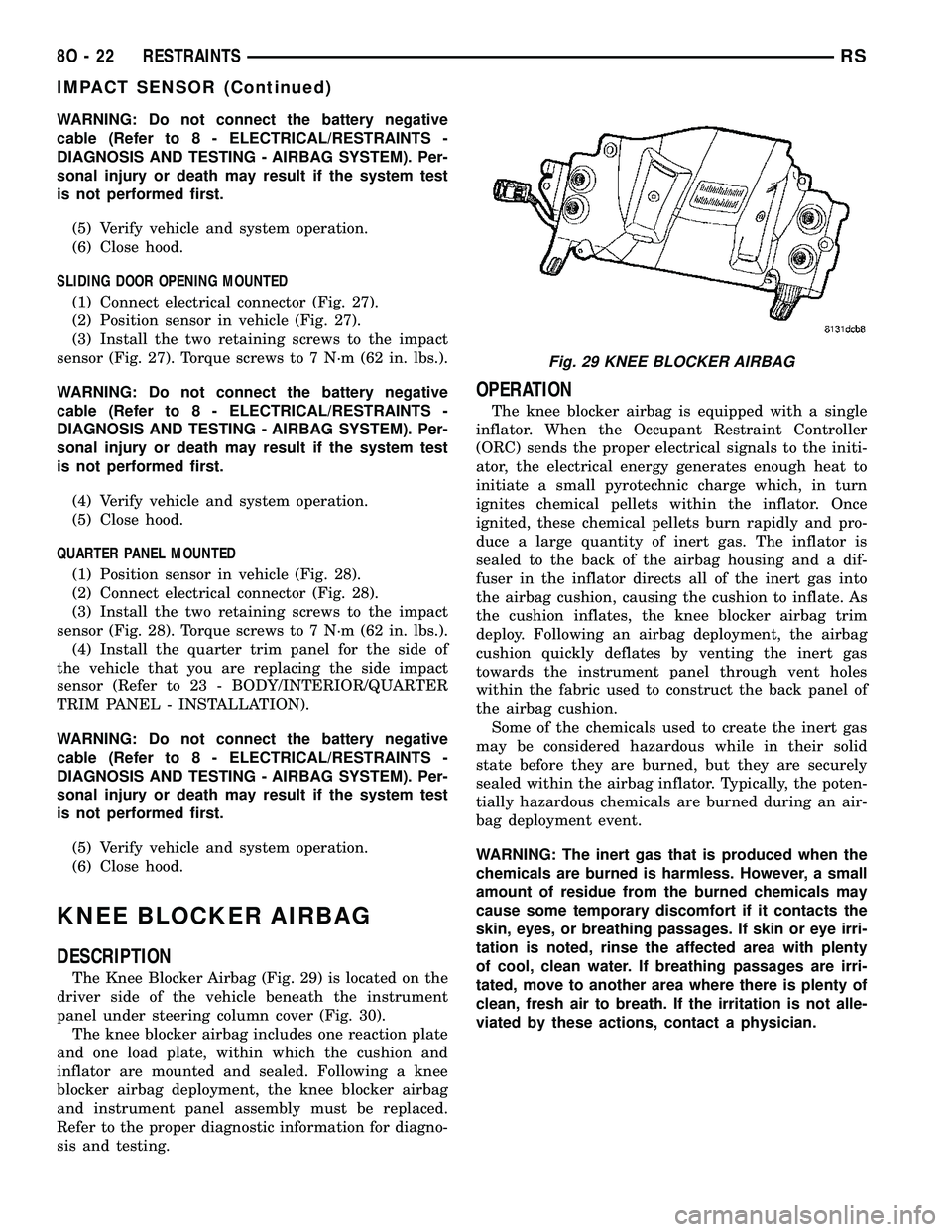
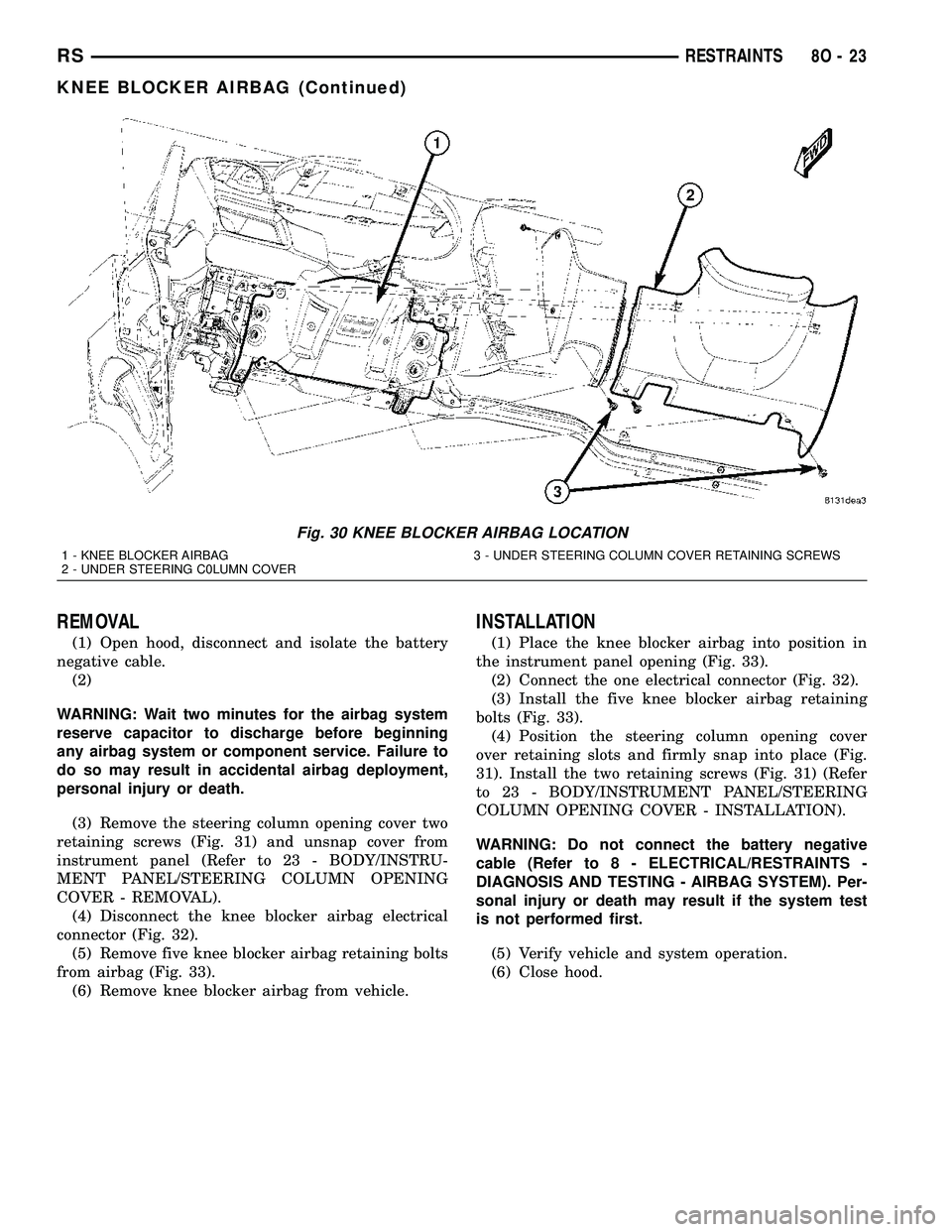
The Knee Blocker Airbag (Fig. 29) is located on the
driver side of the vehicle beneath the instrument
panel under steering column cover (Fig. 30).
The knee blocker airbag includes one reaction plate
and one load plate, within which the cushion and
inflator are mounted and sealed. Following a knee
blocker airbag deployment, the knee blocker airbag
and instrument panel assembly must be replaced.
Refer to the proper diagnostic information for diagno-
sis and testing.
OPERATION
The knee blocker airbag is equipped with a single
inflator. When the Occupant Restraint Controller
(ORC) sends the proper electrical signals to the initi-
ator, the electrical energy generates enough heat to
initiate a small pyrotechnic charge which, in turn
ignites chemical pellets within the inflator. Once
ignited, these chemical pellets burn rapidly and pro-
duce a large quantity of inert gas. The inflator is
sealed to the back of the airbag housing and a dif-
fuser in the inflator directs all of the inert gas into
the airbag cushion, causing the cushion to inflate. As
the cushion inflates, the knee blocker airbag trim
deploy. Following an airbag deployment, the airbag
cushion quickly deflates by venting the inert gas
towards the instrument panel through vent holes
within the fabric used to construct the back panel of
the airbag cushion.
Some of the chemicals used to create the inert gas
may be considered hazardous while in their solid
state before they are burned, but they are securely
sealed within the airbag inflator. Typically, the poten-
tially hazardous chemicals are burned during an air-
bag deployment event.
WARNING: The inert gas that is produced when the
chemicals are burned is harmless. However, a small
amount of residue from the burned chemicals may
cause some temporary discomfort if it contacts the
skin, eyes, or breathing passages. If skin or eye irri-
tation is noted, rinse the affected area with plenty
of cool, clean water. If breathing passages are irri-
tated, move to another area where there is plenty of
clean, fresh air to breath. If the irritation is not alle-
viated by these actions, contact a physician.
Fig. 29 KNEE BLOCKER AIRBAG
8O - 22 RESTRAINTSRS
IMPACT SENSOR (Continued)
Page 510 of 2339
REMOVAL
(1) Open hood, disconnect and isolate the battery
negative cable.
(2)
WARNING: Wait two minutes for the airbag system
reserve capacitor to discharge before beginning
any airbag system or component service. Failure to
do so may result in accidental airbag deployment,
personal injury or death.
(3) Remove the steering column opening cover two
retaining screws (Fig. 31) and unsnap cover from
instrument panel (Refer to 23 - BODY/INSTRU-
MENT PANEL/STEERING COLUMN OPENING
COVER - REMOVAL).
(4) Disconnect the knee blocker airbag electrical
connector (Fig. 32).
(5) Remove five knee blocker airbag retaining bolts
from airbag (Fig. 33).
(6) Remove knee blocker airbag from vehicle.
INSTALLATION
(1) Place the knee blocker airbag into position in
the instrument panel opening (Fig. 33).
(2) Connect the one electrical connector (Fig. 32).
(3) Install the five knee blocker airbag retaining
bolts (Fig. 33).
(4) Position the steering column opening cover
over retaining slots and firmly snap into place (Fig.
31). Install the two retaining screws (Fig. 31) (Refer
to 23 - BODY/INSTRUMENT PANEL/STEERING
COLUMN OPENING COVER - INSTALLATION).
WARNING: Do not connect the battery negative
cable (Refer to 8 - ELECTRICAL/RESTRAINTS -
DIAGNOSIS AND TESTING - AIRBAG SYSTEM). Per-
sonal injury or death may result if the system test
is not performed first.
(5) Verify vehicle and system operation.
(6) Close hood.
Fig. 30 KNEE BLOCKER AIRBAG LOCATION
1 - KNEE BLOCKER AIRBAG 3 - UNDER STEERING COLUMN COVER RETAINING SCREWS
2 - UNDER STEERING C0LUMN COVER
RSRESTRAINTS8O-23
KNEE BLOCKER AIRBAG (Continued)
Page 511 of 2339
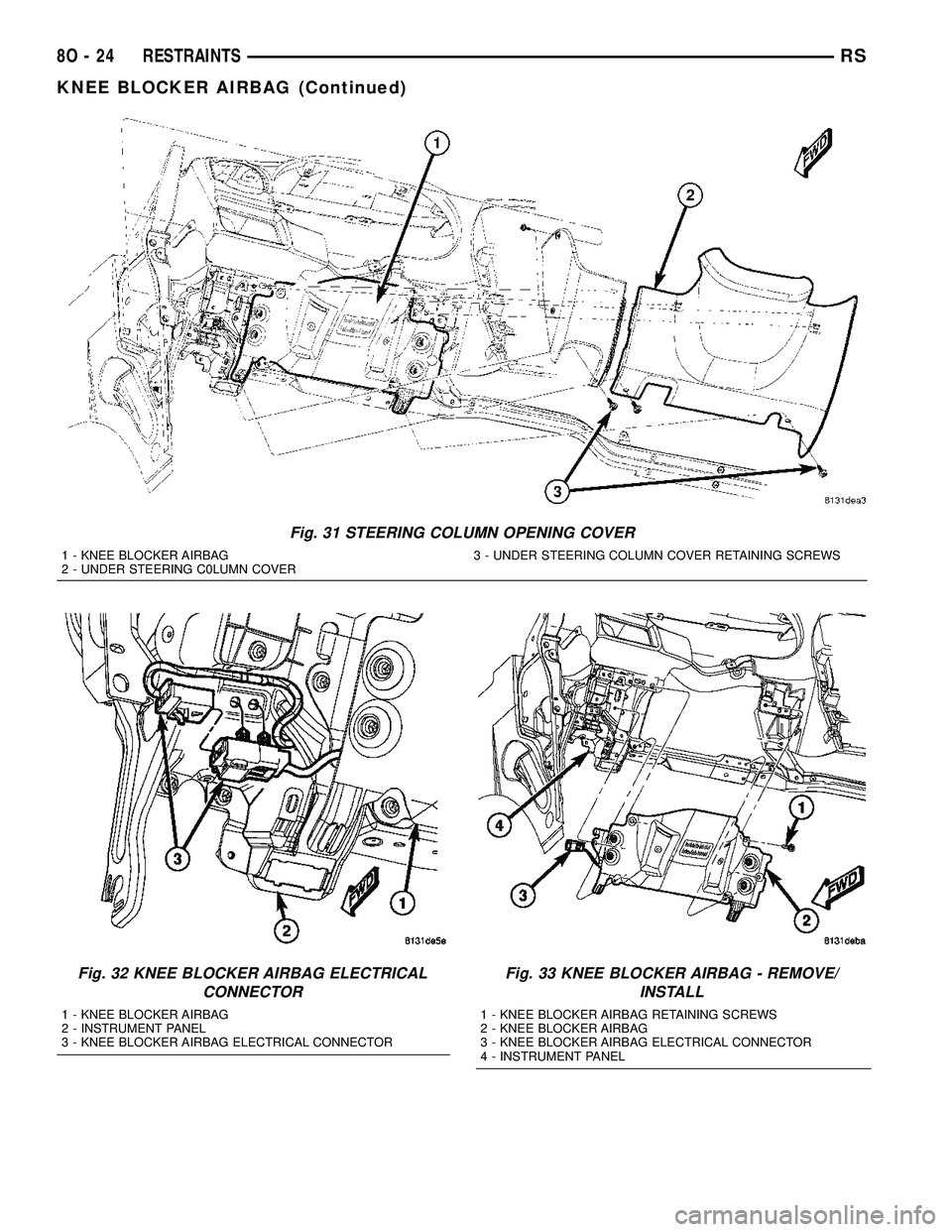
Fig. 31 STEERING COLUMN OPENING COVER
1 - KNEE BLOCKER AIRBAG 3 - UNDER STEERING COLUMN COVER RETAINING SCREWS
2 - UNDER STEERING C0LUMN COVER
Fig. 32 KNEE BLOCKER AIRBAG ELECTRICAL
CONNECTOR
1 - KNEE BLOCKER AIRBAG
2 - INSTRUMENT PANEL
3 - KNEE BLOCKER AIRBAG ELECTRICAL CONNECTOR
Fig. 33 KNEE BLOCKER AIRBAG - REMOVE/
INSTALL
1 - KNEE BLOCKER AIRBAG RETAINING SCREWS
2 - KNEE BLOCKER AIRBAG
3 - KNEE BLOCKER AIRBAG ELECTRICAL CONNECTOR
4 - INSTRUMENT PANEL
8O - 24 RESTRAINTSRS
KNEE BLOCKER AIRBAG (Continued)
Page 513 of 2339

anchor. The OCM then monitors the return voltage
from each of the sensors. The bladder pressure sen-
sor input allows the OCM to determine whether the
passenger front seat is occupied and the relative size
of the occupant by providing a weight-sensing refer-
ence to the load on the seat cushion. The belt tension
sensor provides an additional logic input to the OCM
microprocessor that allows it to distinguish between
the lower seat belt cinch loads of a belted occupant
and the higher loads associated with a belted child
seat.
Pre-programmed decision algorithms and OCS cal-
ibration allow the OCM microprocessor to determine
when the seat cushion load as signaled by the blad-
der pressure sensor and the seat belt cinch load as
signaled by the belt tension sensor indicate that pas-
senger airbag protection is appropriate. When the
programmed conditions are met, the OCM sends the
proper electronic occupant classification messages
over the PCI data bus to the Occupant Restraint
Controller (ORC), and the ORC enables or disables
the deployment circuits for the passenger front sup-
plemental restraints. The ORC also provides a con-
trol output for the Passenger Airbag Disabled (PAD)
indicator in the instrument panel center stack, based
upon the electronic occupant classification messages
it receives from the OCM.
The OCM microprocessor continuously monitors all
of the OCS electrical circuits and components to
determine the system readiness. If the OCM detects
a monitored system fault, it sets an active and stored
Diagnostic Trouble Code (DTC) and sends the appro-
priate electronic messages to the ORC over the PCI
data bus. Then the ORC sets a DTC and sends mes-
sages to control the airbag indicator operation
accordingly. An active fault only remains for the
duration of the fault, or in some cases for the dura-
tion of the current ignition switch cycle, while a
stored fault causes a DTC to be stored in memory by
the OCM and the ORC. For some DTC's, if a fault
does not recur for a number of ignition cycles, the
OCM will automatically erase the stored DTC. For
other internal faults, the stored DTC is latched for-
ever.
The OCM receives battery current from an IPM
high side driver (Run/Start). The OCM receives
ground through a ground circuit of the body wire
harness, which it shares with the ORC. These con-
nections allow the OCM to be operational whenever
the ignition switch is in the Start or ON positions.
To diagnose and test the OCS, use a scan tool and
the appropriate diagnostic information.
REMOVAL
Once any of the original factory-installed compo-
nents except the Occupant Classification Module(OCM) have been replaced with the service replace-
ment package components, the OCM can only be ser-
viced by replacing the entire passenger front seat
cushion unit with another complete service replace-
ment package (Refer to 23 - BODY/SEATS/SEAT
CUSHION - FRONT - REMOVAL).
WARNING: Never replace both the Occupant
Restraint Controller (ORC) and the Occupant Clas-
sification Module (OCM) at the same time. If both
require replacement, replace one, then perform the
Airbag System test (Refer to 8 - ELECTRICAL/RE-
STRAINTS - DIAGNOSIS AND TESTING - AIRBAG
SYSTEM) before replacing the other. Both the ORC
and the OCM store Occupant Classification System
(OCS) calibration data, which they transfer to one
another when one of them is replaced. If both are
replaced at the same time, an irreversible fault will
be set in both modules and the OCS may malfunc-
tion and result in personal injury or death.
(1) Disconnect and isolate the battery negative
cable.
(2)
WARNING: Wait two minutes for the airbag system
reserve capacitor to discharge before beginning
any airbag system or component service. Failure to
do so may result in accidental airbag deployment,
personal injury or death.
(3) Reach under the front edge of the passenger
side front seat cushion to access and remove the lock
pin from the connector lock tower on the Occupant
Classification Module (OCM) (Fig. 36).
(4) Disconnect the passenger front seat wire har-
ness connector for the OCM.
(5) Remove the two screws that secure the OCM to
the OCM bracket.
(6) Remove the OCM from under the passenger
front seat.
INSTALLATION
WARNING: To avoid personal injury or death on
vehicles equipped with the Occupant Classification
System (OCS), only the Occupant Classification
Module (OCM) and the seat cushion trim may be
serviced separately. All other components of the
passenger front seat cushion must be serviced only
as a complete factory-calibrated, assembled and
tamper-evident service replacement package.
Once any of the original factory-installed compo-
nents except the OCM have been replaced with the
service replacement package components, the OCM
can only be serviced by replacing the entire passen-
8O - 26 RESTRAINTSRS
OCCUPANT CLASSIFICATION MODULE (Continued)
Page 514 of 2339

ger side front seat cushion unit with another com-
plete service replacement package. (Refer to 23 -
BODY/SEATS/SEAT CUSHION - FRONT -
REMOVAL).
WARNING: Never replace both the Occupant
Restraint Controller (ORC) and the Occupant Clas-
sification Module (OCM) at the same time. If both
require replacement, replace one, then perform the
Airbag System test (Refer to 8 - ELECTRICAL/RE-
STRAINTS - DIAGNOSIS AND TESTING - AIRBAG
SYSTEM) before replacing the other. Both the ORC
and the OCM store Occupant Classification System
(OCS) calibration data, which they transfer to one
another when one of them is replaced. If both are
replaced at the same time, an irreversible fault will
be set in both modules and the OCS may malfunc-
tion may result in personal injury or death.
(1) Carefully position the Occupant Classification
Module (OCM) to the OCM bracket (Fig. 36). When
the OCM is correctly positioned, the connector on the
module will be pointed to right side of the vehicle.
(2) Install the two screws to the OCM. Torque the
screws to 2 N´m (20 in. lbs.).
(3) Connect the seat wire harness connector for the
OCM. Be certain that the latches on the connector
are each fully engaged.(4) Install the lock pin into the connector lock
tower on the OCM.
WARNING: Do not connect the battery negative
cable (Refer to 8 - ELECTRICAL/RESTRAINTS -
DIAGNOSIS AND TESTING - AIRBAG SYSTEM). Per-
sonal injury or death may result if the system test
is not performed first.
WARNING: Following successful completion of the
Airbag System test procedure, the Occupant Classi-
fication System Verification Test must be done
using a scan tool and the appropriate diagnostic
information.
(5) Verify vehicle and system operation.
(6) Close hood.
OCCUPANT RESTRAINT
CONTROLLER
DESCRIPTION
The Occupant Restraint Controller (ORC) (Fig. 37)
is also sometimes referred to as the Airbag Control
Module (ACM).
Fig. 36 OCM - REMOVE/INSTALL
1 - OCCUPANT CLASSIFICATION MODULE (OCM)
2 - LOCK TOWER
3 - LOCK PIN
4 - CONNECTOR
5 - SCREW (2)
6 - BRACKET
Fig. 37 OCCUPANT RESTRAINT CONTROLLER -
TYPICAL
1 - ORC
2 - ORIENTATION ARROW UPON INSTALLATION
3 - LABEL
4 - ORC ELECTRICAL CONNECTORS
RSRESTRAINTS8O-27
OCCUPANT CLASSIFICATION MODULE (Continued)