Door CHRYSLER PACIFICA 2020 Owners Manual
[x] Cancel search | Manufacturer: CHRYSLER, Model Year: 2020, Model line: PACIFICA, Model: CHRYSLER PACIFICA 2020Pages: 516, PDF Size: 28.69 MB
Page 426 of 516
424MULTIMEDIA
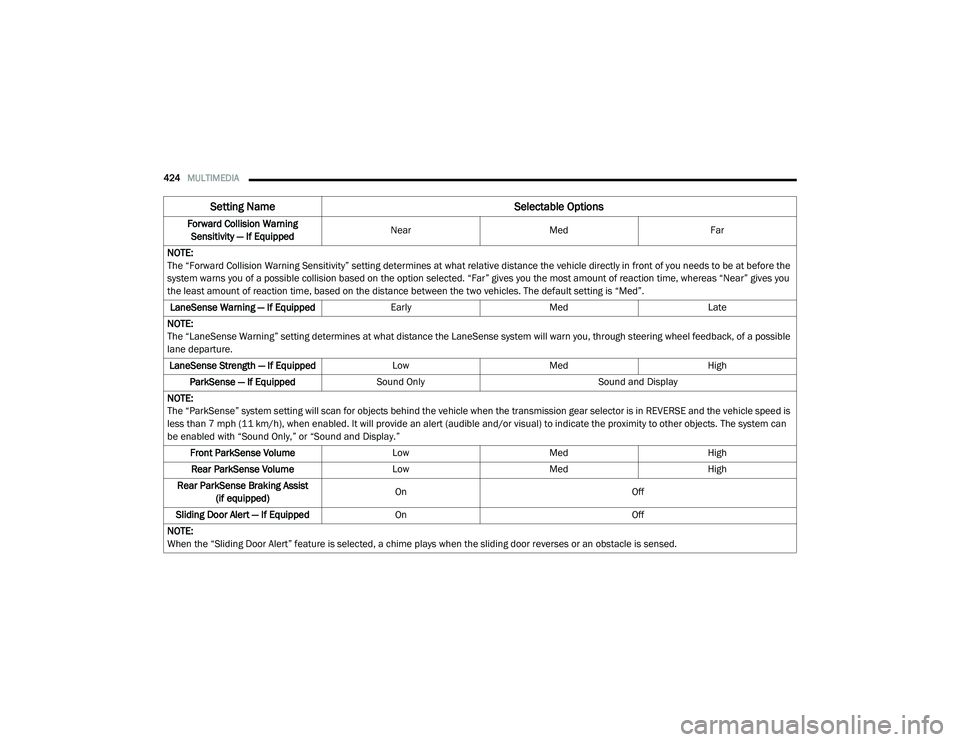
Forward Collision Warning
Sensitivity — If Equipped Near
Med Far
NOTE:
The “Forward Collision Warning Sensitivity” setting determines at what relative distance the vehicle directly in front of you needs to be at before the
system warns you of a possible collision based on the option selected. “Far” gives you the most amount of reaction time, whereas “Near” gives you
the least amount of reaction time, based on the distance between the two vehicles. The default setting is “Med”. LaneSense Warning — If Equipped EarlyMedLate
NOTE:
The “LaneSense Warning” setting determines at what distance the LaneSense system will warn you, through steering wheel feedback, of a possible
lane departure. LaneSense Strength — If Equipped LowMed High
ParkSense — If Equipped Sound Only Sound and Display
NOTE:
The “ParkSense” system setting will scan for objects behind the vehicle when the transmission gear selector is in REVERSE and the vehicle speed is
less than 7 mph (11 km/h), when enabled. It will provide an alert (audible and/or visual) to indicate the proximity to other objects. The system can
be enabled with “Sound Only,” or “Sound and Display.” Front ParkSense Volume LowMed High
Rear ParkSense Volume LowMed High
Rear ParkSense Braking Assist (if equipped) On
Off
Sliding Door Alert — If Equipped On Off
NOTE:
When the “Sliding Door Alert” feature is selected, a chime plays when the sliding door reverses or an obstacle is sensed.
Setting Name Selectable Options
20_RU_OM_EN_US_t.book Page 424
Page 429 of 516
MULTIMEDIA427
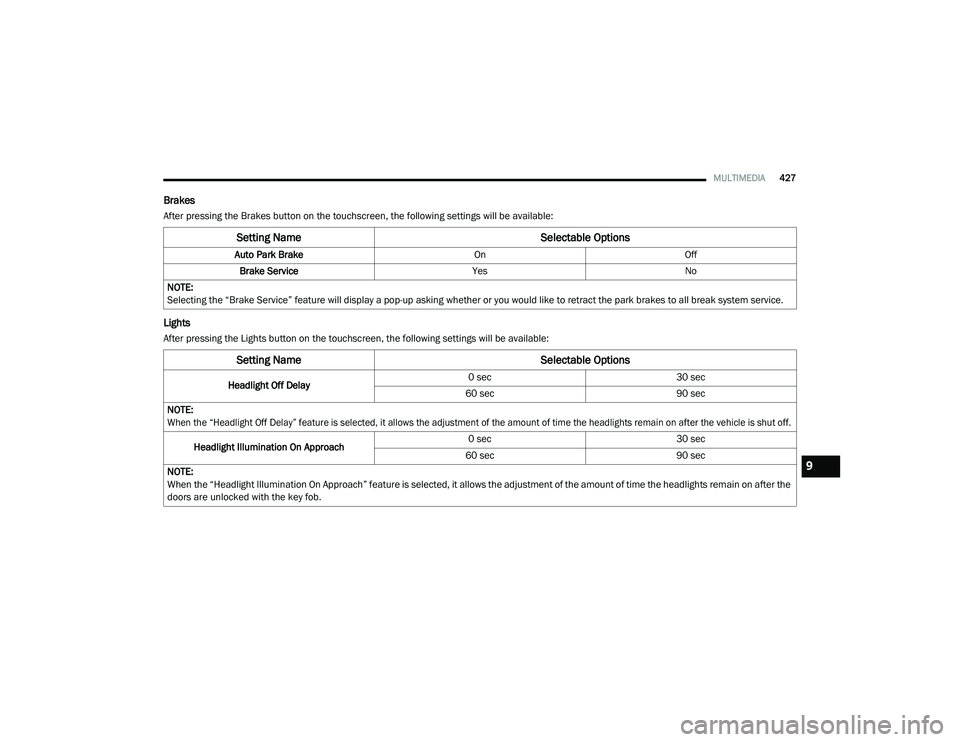
Brakes
After pressing the Brakes button on the touchscreen, the following settings will be available:
Lights
After pressing the Lights button on the touchscreen, the following settings will be available:
Setting Name Selectable Options
Auto Park BrakeOnOff
Brake Service YesNo
NOTE:
Selecting the “Brake Service” feature will display a pop-up asking whether or you would like to retract the park brakes to all break system service.
Setting Name Selectable Options
Headlight Off Delay0 sec
30 sec
60 sec 90 sec
NOTE:
When the “Headlight Off Delay” feature is selected, it allows the adjustment of the amount of time the headlights remain on after the vehicle is shut off.
Headlight Illumination On Approach 0 sec
30 sec
60 sec 90 sec
NOTE:
When the “Headlight Illumination On Approach” feature is selected, it allows the adjustment of the amount of time the headlights remain on after the
doors are unlocked with the key fob.
9
20_RU_OM_EN_US_t.book Page 427
Page 430 of 516
428MULTIMEDIA
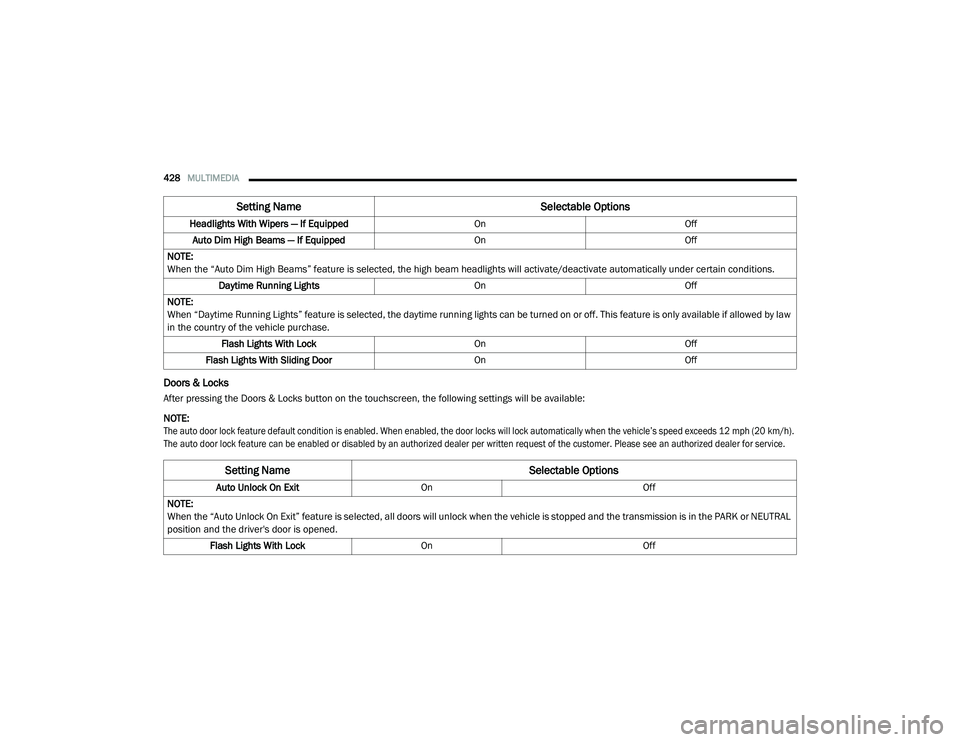
Doors & Locks
After pressing the Doors & Locks button on the touchscreen, the following settings will be available:
NOTE:
The auto door lock feature default condition is enabled. When enabled, the door locks will lock automatically when the vehicle’s speed exceeds 12 mph (20 km/h).
The auto door lock feature can be enabled or disabled by an authorized dealer per written request of the customer. Please see an authorized dealer for service.
Headlights With Wipers — If Equipped
OnOff
Auto Dim High Beams — If Equipped OnOff
NOTE:
When the “Auto Dim High Beams” feature is selected, the high beam headlights will activate/deactivate automatically under certain conditions. Daytime Running Lights OnOff
NOTE:
When “Daytime Running Lights” feature is selected, the daytime running lights can be turned on or off. This feature is only available if allowed by law
in the country of the vehicle purchase. Flash Lights With Lock OnOff
Flash Lights With Sliding Door OnOff
Setting Name Selectable Options
Setting NameSelectable Options
Auto Unlock On ExitOn Off
NOTE:
When the “Auto Unlock On Exit” feature is selected, all doors will unlock when the vehicle is stopped and the transmission is in the PARK or NEUTRAL
position and the driver's door is opened. Flash Lights With Lock On Off
20_RU_OM_EN_US_t.book Page 428
Page 431 of 516
MULTIMEDIA429
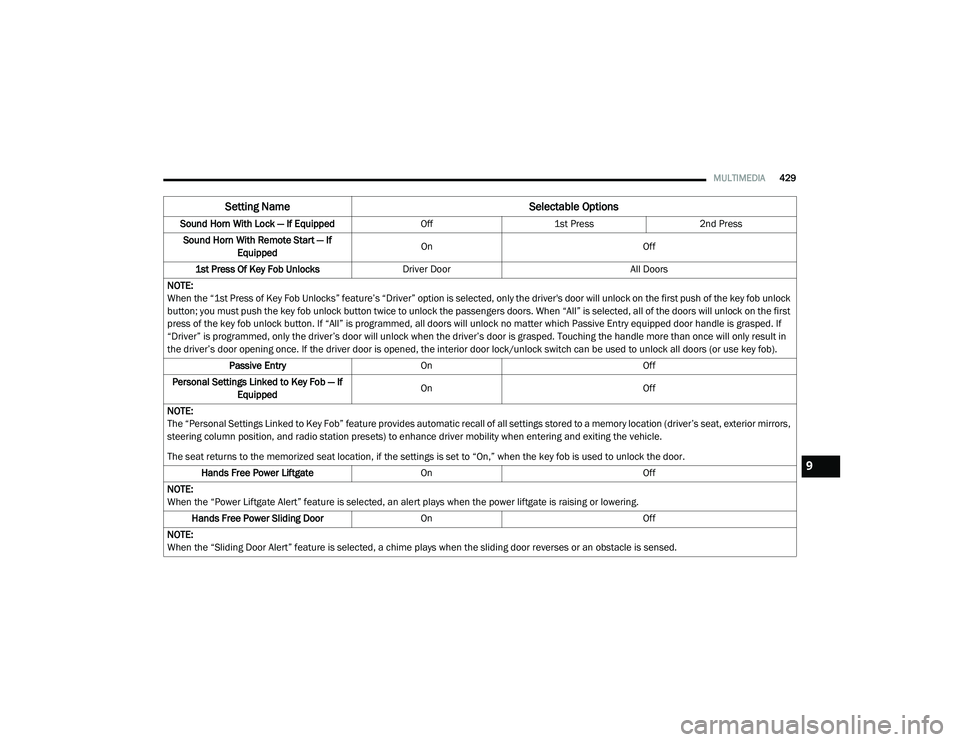
Sound Horn With Lock — If Equipped Off1st Press 2nd Press
Sound Horn With Remote Start — If Equipped On
Off
1st Press Of Key Fob Unlocks Driver Door All Doors
NOTE:
When the “1st Press of Key Fob Unlocks” feature’s “Driver” option is selected, only the driver's door will unlock on the first push of the key fob unlock
button; you must push the key fob unlock button twice to unlock the passengers doors. When “All” is selected, all of the doors will unlock on the first
press of the key fob unlock button. If “All” is programmed, all doors will unlock no matter which Passive Entry equipped door handle is grasped. If
“Driver” is programmed, only the driver’s door will unlock when the driver’s door is grasped. Touching the handle more than once will only result in
the driver’s door opening once. If the driver door is opened, the interior door lock/unlock switch can be used to unlock all doors (or use key fob). Passive Entry On Off
Personal Settings Linked to Key Fob — If Equipped On
Off
NOTE:
The “Personal Settings Linked to Key Fob” feature provides automatic recall of all settings stored to a memory location (driver’s seat, exterior mirrors,
steering column position, and radio station presets) to enhance driver mobility when entering and exiting the vehicle.
The seat returns to the memorized seat location, if the settings is set to “On,” when the key fob is used to unlock the door. Hands Free Power Liftgate On Off
NOTE:
When the “Power Liftgate Alert” feature is selected, an alert plays when the power liftgate is raising or lowering. Hands Free Power Sliding Door OnOff
NOTE:
When the “Sliding Door Alert” feature is selected, a chime plays when the sliding door reverses or an obstacle is sensed.
Setting Name Selectable Options
9
20_RU_OM_EN_US_t.book Page 429
Page 432 of 516
430MULTIMEDIA
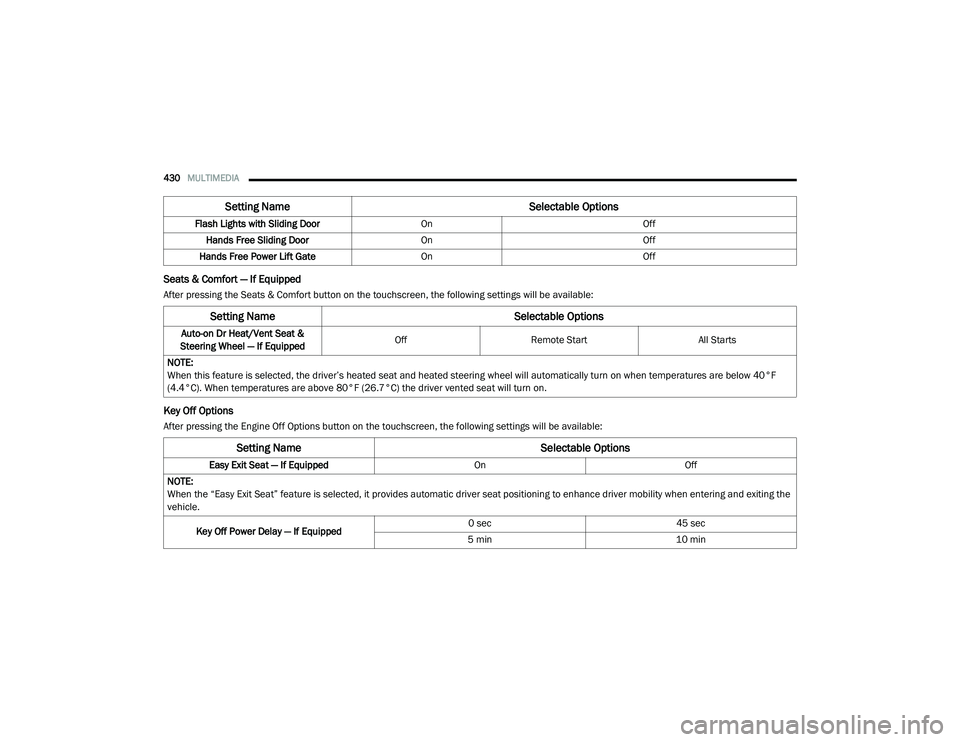
Seats & Comfort — If Equipped
After pressing the Seats & Comfort button on the touchscreen, the following settings will be available:
Key Off Options
After pressing the Engine Off Options button on the touchscreen, the following settings will be available:Flash Lights with Sliding Door
OnOff
Hands Free Sliding Door On Off
Hands Free Power Lift Gate On Off
Setting Name Selectable Options
Setting NameSelectable Options
Auto-on Dr Heat/Vent Seat &
Steering Wheel — If Equipped Off
Remote Start All Starts
NOTE:
When this feature is selected, the driver’s heated seat and heated steering wheel will automatically turn on when temperatures are below 40°F
(4.4°C). When temperatures are above 80°F (26.7°C) the driver vented seat will turn on.
Setting Name Selectable Options
Easy Exit Seat — If EquippedOnOff
NOTE:
When the “Easy Exit Seat” feature is selected, it provides automatic driver seat positioning to enhance driver mobility when entering and exiting the
vehicle.
Key Off Power Delay — If Equipped 0 sec
45 sec
5 min 10 min
20_RU_OM_EN_US_t.book Page 430
Page 433 of 516
MULTIMEDIA431
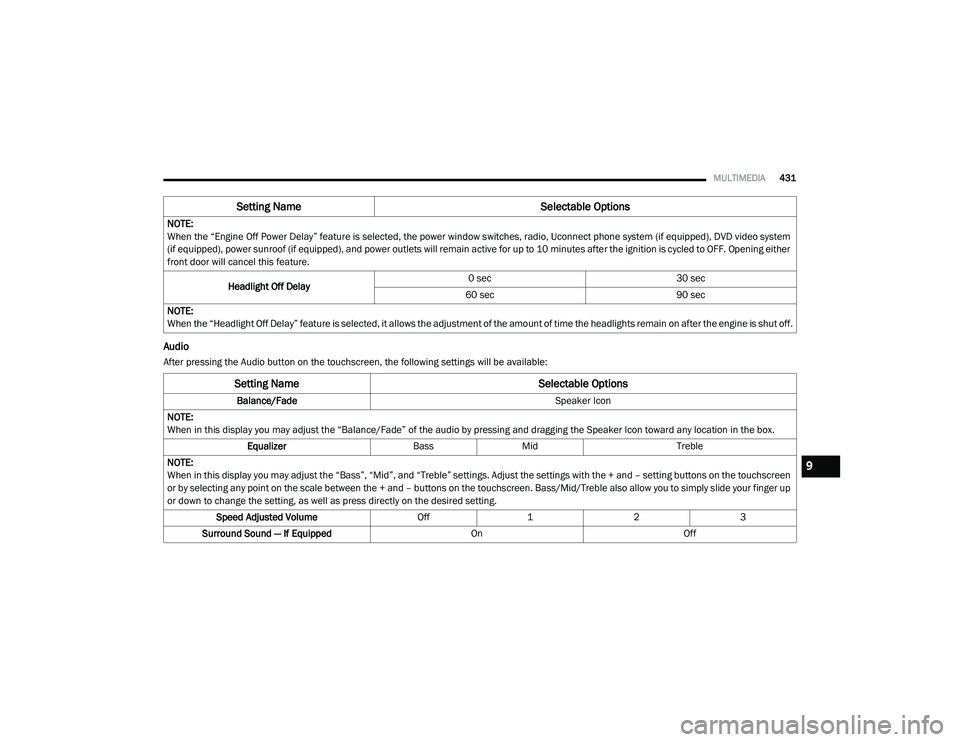
Audio
After pressing the Audio button on the touchscreen, the following settings will be available:NOTE:
When the “Engine Off Power Delay” feature is selected, the power window switches, radio, Uconnect phone system (if equipped), DVD video system
(if equipped), power sunroof (if equipped), and power outlets will remain active for up to 10 minutes after the ignition is cycled to OFF. Opening either
front door will cancel this feature.
Headlight Off Delay 0 sec
30 sec
60 sec 90 sec
NOTE:
When the “Headlight Off Delay” feature is selected, it allows the adjustment of the amount of time the headlights remain on after the engine is shut off.
Setting Name Selectable Options
Setting NameSelectable Options
Balance/Fade Speaker Icon
NOTE:
When in this display you may adjust the “Balance/Fade” of the audio by pressing and dragging the Speaker Icon toward any location in the box. Equalizer BassMid Treble
NOTE:
When in this display you may adjust the “Bass”, “Mid”, and “Treble” settings. Adjust the settings with the + and – setting buttons on the touchscreen
or by selecting any point on the scale between the + and – buttons on the touchscreen. Bass/Mid/Treble also allow you to simply slide your finger up
or down to change the setting, as well as press directly on the desired setting. Speed Adjusted Volume Off123
Surround Sound — If Equipped OnOff
9
20_RU_OM_EN_US_t.book Page 431
Page 446 of 516
444MULTIMEDIA
Select Teams
Press the Select Teams button on the
touchscreen to activate the League Scroll list.
Press the chosen league and a scroll list of all
teams within the league will appear, then you
can select a team by pressing the
corresponding box. A check mark appears for all
teams that are chosen.
Remove Selection
Press the Remove Selection tab at the top of the
screen. Press the Delete All button on the
touchscreen to delete all of the Selections or
press the Trash Can Icon next to the Selection to
be deleted.
Alert Settings
Press the Alert Setting tab at the top of the
screen. The Alert Settings menu allows you to
choose from “Alert me to on-air games upon
start” or “Alert upon score update” or both when
one or more of your selections is airing on any
of the SiriusXM® channels.
Featured
Press the Featured button, located on the left of
the Browse screen. This feature provides a list
of your featured favorite stations.Audio Settings
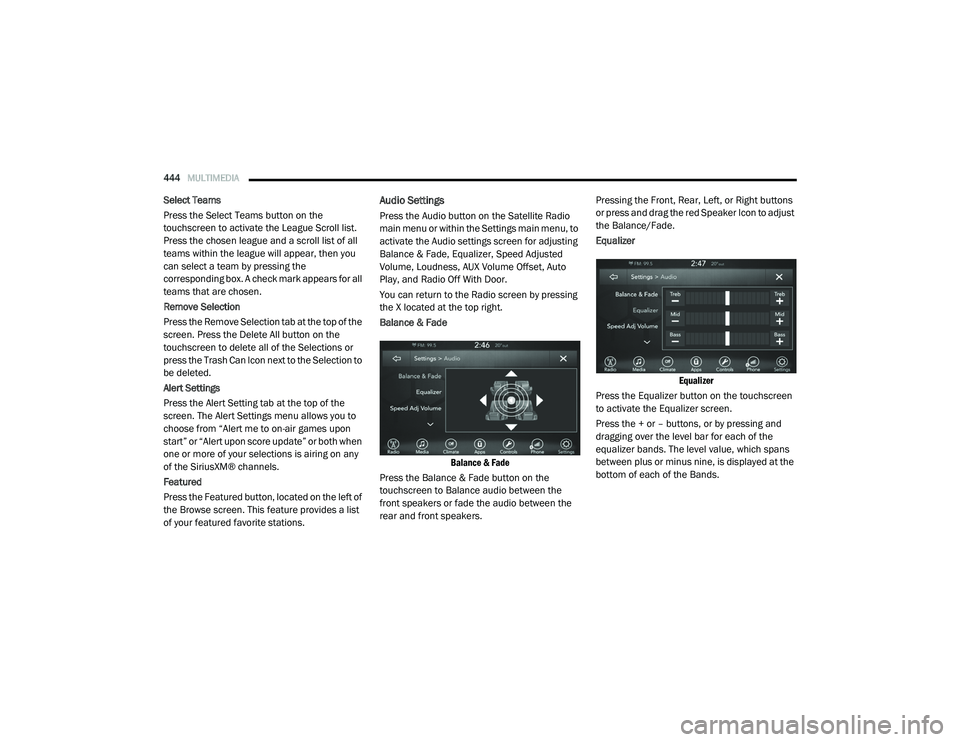
Press the Audio button on the Satellite Radio
main menu or within the Settings main menu, to
activate the Audio settings screen for adjusting
Balance & Fade, Equalizer, Speed Adjusted
Volume, Loudness, AUX Volume Offset, Auto
Play, and Radio Off With Door.
You can return to the Radio screen by pressing
the X located at the top right.
Balance & Fade
Balance & Fade
Press the Balance & Fade button on the
touchscreen to Balance audio between the
front speakers or fade the audio between the
rear and front speakers. Pressing the Front, Rear, Left, or Right buttons
or press and drag the red Speaker Icon to adjust
the Balance/Fade.
Equalizer
Equalizer
Press the Equalizer button on the touchscreen
to activate the Equalizer screen.
Press the + or – buttons, or by pressing and
dragging over the level bar for each of the
equalizer bands. The level value, which spans
between plus or minus nine, is displayed at the
bottom of each of the Bands.
20_RU_OM_EN_US_t.book Page 444
Page 448 of 516
446MULTIMEDIA
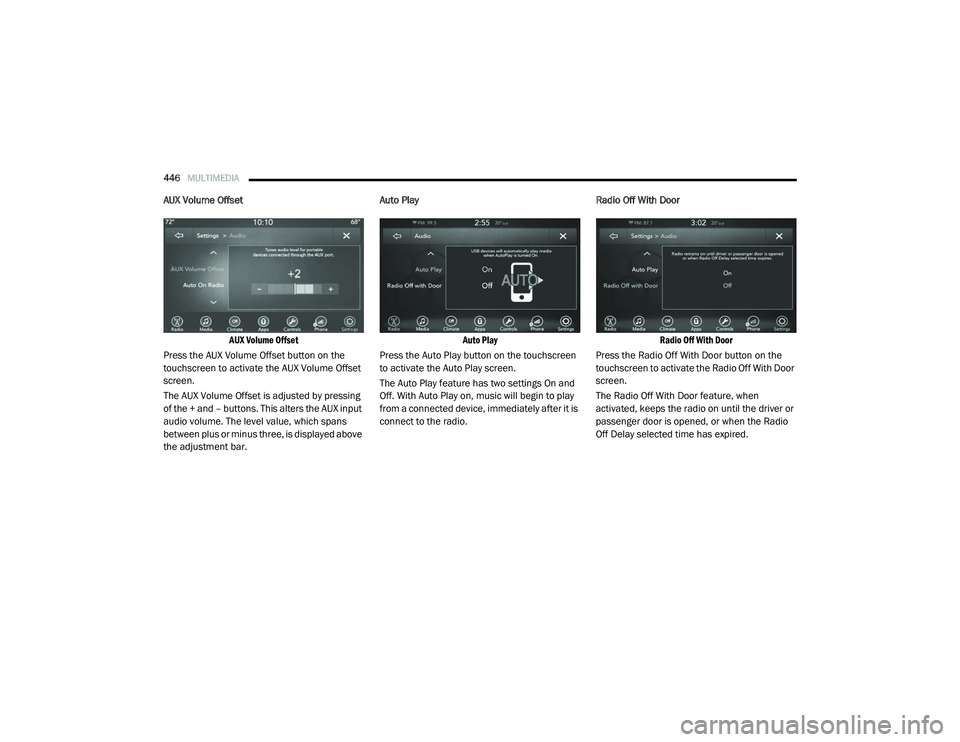
AUX Volume Offset
AUX Volume Offset
Press the AUX Volume Offset button on the
touchscreen to activate the AUX Volume Offset
screen.
The AUX Volume Offset is adjusted by pressing
of the + and – buttons. This alters the AUX input
audio volume. The level value, which spans
between plus or minus three, is displayed above
the adjustment bar. Auto Play
Auto Play
Press the Auto Play button on the touchscreen
to activate the Auto Play screen.
The Auto Play feature has two settings On and
Off. With Auto Play on, music will begin to play
from a connected device, immediately after it is
connect to the radio. Radio Off With Door
Radio Off With Door
Press the Radio Off With Door button on the
touchscreen to activate the Radio Off With Door
screen.
The Radio Off With Door feature, when
activated, keeps the radio on until the driver or
passenger door is opened, or when the Radio
Off Delay selected time has expired.
20_RU_OM_EN_US_t.book Page 446
Page 507 of 516
505
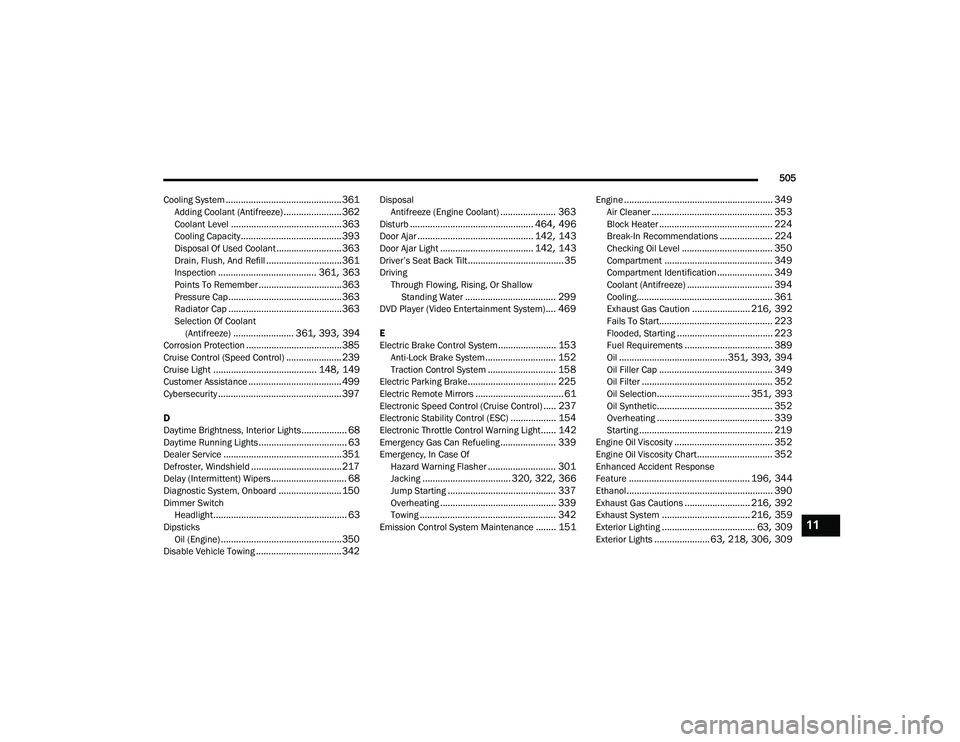
Cooling System
.............................................. 361Adding Coolant (Antifreeze)....................... 362Coolant Level............................................ 363Cooling Capacity........................................ 393Disposal Of Used Coolant.......................... 363Drain, Flush, And Refill.............................. 361Inspection....................................... 361, 363Points To Remember................................. 363Pressure Cap............................................. 363Radiator Cap............................................. 363Selection Of Coolant (Antifreeze)........................ 361, 393, 394Corrosion Protection...................................... 385Cruise Control (Speed Control)...................... 239Cruise Light......................................... 148, 149Customer Assistance..................................... 499Cybersecurity................................................. 397
D
Daytime Brightness, Interior Lights.................. 68Daytime Running Lights................................... 63Dealer Service............................................... 351Defroster, Windshield.................................... 217Delay (Intermittent) Wipers.............................. 68Diagnostic System, Onboard......................... 150Dimmer SwitchHeadlight..................................................... 63DipsticksOil (Engine)................................................ 350Disable Vehicle Towing.................................. 342
DisposalAntifreeze (Engine Coolant)...................... 363Disturb................................................. 464, 496Door Ajar.............................................. 142, 143Door Ajar Light..................................... 142, 143Driver’s Seat Back Tilt...................................... 35DrivingThrough Flowing, Rising, Or ShallowStanding Water
.................................... 299DVD Player (Video Entertainment System).... 469
E
Electric Brake Control System....................... 153Anti-Lock Brake System............................ 152Traction Control System........................... 158Electric Parking Brake................................... 225Electric Remote Mirrors................................... 61Electronic Speed Control (Cruise Control)..... 237Electronic Stability Control (ESC).................. 154Electronic Throttle Control Warning Light...... 142Emergency Gas Can Refueling...................... 339Emergency, In Case OfHazard Warning Flasher........................... 301Jacking................................... 320, 322, 366Jump Starting........................................... 337Overheating.............................................. 339Towing...................................................... 342Emission Control System Maintenance........ 151
Engine........................................................... 349Air Cleaner................................................ 353Block Heater............................................. 224Break-In Recommendations..................... 224Checking Oil Level.................................... 350Compartment........................................... 349Compartment Identification...................... 349Coolant (Antifreeze).................................. 394Cooling...................................................... 361Exhaust Gas Caution....................... 216, 392Fails To Start............................................. 223Flooded, Starting...................................... 223Fuel Requirements................................... 389Oil...........................................351, 393, 394Oil Filler Cap............................................. 349Oil Filter.................................................... 352Oil Selection..................................... 351, 393Oil Synthetic.............................................. 352Overheating.............................................. 339Starting..................................................... 219Engine Oil Viscosity....................................... 352Engine Oil Viscosity Chart.............................. 352Enhanced Accident Response
Feature................................................ 196, 344Ethanol.......................................................... 390Exhaust Gas Cautions.......................... 216, 392Exhaust System................................... 216, 359Exterior Lighting..................................... 63, 309Exterior Lights...................... 63, 218, 306, 309
11
20_RU_OM_EN_US_t.book Page 505
Page 508 of 516
506
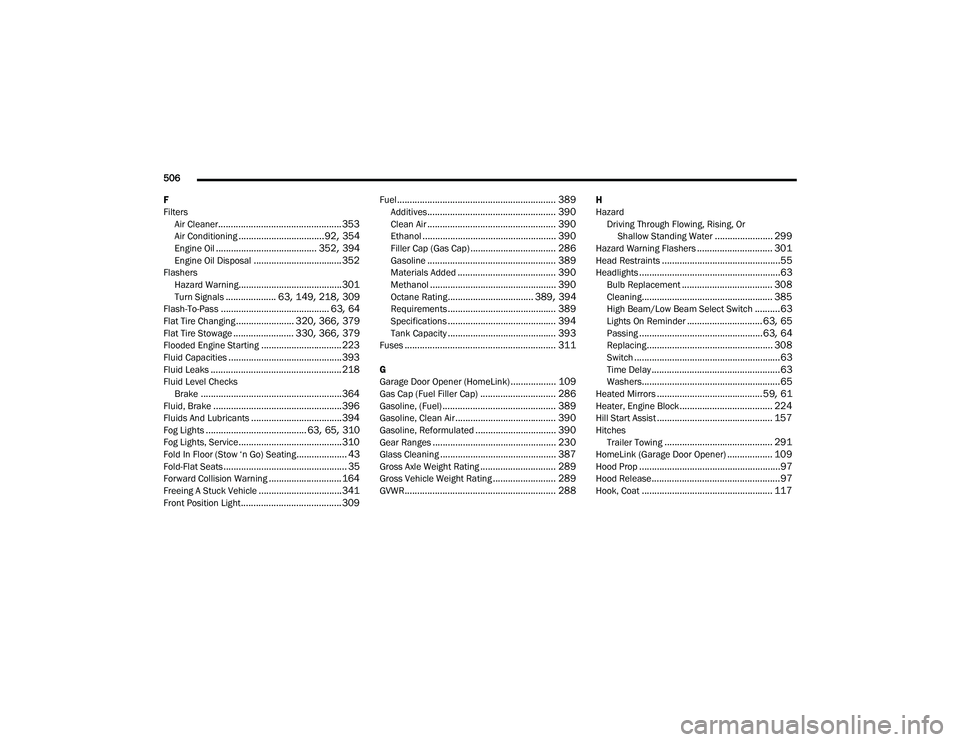
F
Filters Air Cleaner
................................................. 353Air Conditioning.................................. 92, 354Engine Oil........................................ 352, 394Engine Oil Disposal................................... 352FlashersHazard Warning......................................... 301Turn Signals.................... 63, 149, 218, 309Flash-To-Pass........................................... 63, 64Flat Tire Changing....................... 320, 366, 379Flat Tire Stowage........................ 330, 366, 379Flooded Engine Starting................................ 223Fluid Capacities............................................. 393Fluid Leaks.................................................... 218Fluid Level ChecksBrake........................................................ 364Fluid, Brake................................................... 396Fluids And Lubricants.................................... 394Fog Lights........................................ 63, 65, 310Fog Lights, Service......................................... 310Fold In Floor (Stow ‘n Go) Seating.................... 43Fold-Flat Seats................................................. 35Forward Collision Warning............................. 164Freeing A Stuck Vehicle................................. 341Front Position Light........................................ 309
Fuel............................................................... 389Additives................................................... 390Clean Air................................................... 390Ethanol..................................................... 390Filler Cap (Gas Cap).................................. 286Gasoline................................................... 389Materials Added....................................... 390Methanol.................................................. 390Octane Rating.................................. 389, 394Requirements........................................... 389Specifications........................................... 394Tank Capacity........................................... 393Fuses............................................................ 311
G
Garage Door Opener (HomeLink).................. 109Gas Cap (Fuel Filler Cap).............................. 286Gasoline, (Fuel)............................................. 389Gasoline, Clean Air........................................ 390Gasoline, Reformulated................................ 390Gear Ranges................................................. 230Glass Cleaning.............................................. 387Gross Axle Weight Rating.............................. 289Gross Vehicle Weight Rating......................... 289GVWR............................................................ 288
H
HazardDriving Through Flowing, Rising, Or Shallow Standing Water
....................... 299Hazard Warning Flashers.............................. 301Head Restraints...............................................55Headlights........................................................63Bulb Replacement.................................... 308Cleaning.................................................... 385High Beam/Low Beam Select Switch..........63Lights On Reminder..............................63, 65Passing.................................................63, 64Replacing.................................................. 308Switch..........................................................63Time Delay...................................................63Washers.......................................................65Heated Mirrors..........................................59, 61Heater, Engine Block..................................... 224Hill Start Assist.............................................. 157HitchesTrailer Towing........................................... 291HomeLink (Garage Door Opener).................. 109Hood Prop........................................................97Hood Release...................................................97Hook, Coat.................................................... 117
20_RU_OM_EN_US_t.book Page 506