Door CHRYSLER PACIFICA 2020 Repair Manual
[x] Cancel search | Manufacturer: CHRYSLER, Model Year: 2020, Model line: PACIFICA, Model: CHRYSLER PACIFICA 2020Pages: 516, PDF Size: 28.69 MB
Page 220 of 516
218SAFETY
(Continued)
Periodic Safety Checks You Should Make
Outside The Vehicle
Tires
Examine tires for excessive tread wear and
uneven wear patterns. Check for stones, nails,
glass, or other objects lodged in the tread or
sidewall. Inspect the tread for cuts and cracks. Inspect sidewalls for cuts, cracks, and bulges.
Check the wheel nuts for tightness. Check the
tires (including spare) for proper cold inflation
pressure.
Lights
Have someone observe the operation of brake
lights and exterior lights while you work the
controls. Check turn signal and high beam
indicator lights on the instrument panel.
Door Latches
Check for proper closing, latching, and locking.
Fluid Leaks
Check area under the vehicle after overnight
parking for fuel, coolant, oil, or other fluid leaks.
Also, if gasoline fumes are detected or if fuel, or
brake fluid leaks are suspected, the cause
should be located and corrected immediately.
ONLY use the driver’s side floor mat on the
driver’s side floor area. To check for inter
-
ference, with the vehicle properly parked
with the engine off, fully depress the accel -
erator, the brake, and the clutch pedal (if
present) to check for interference. If your
floor mat interferes with the operation of
any pedal, or is not secure to the floor,
remove the floor mat from the vehicle and
place the floor mat in your trunk.
ONLY use the passenger’s side floor mat on
the passenger’s side floor area.
ALWAYS make sure objects cannot fall or
slide into the driver’s side floor area when
the vehicle is moving. Objects can become
trapped under accelerator, brake, or clutch
pedals and could cause a loss of vehicle
control.
NEVER place any objects under the floor
mat (e.g., towels, keys, etc.). These objects
could change the position of the floor mat
and may cause interference with the accel -
erator, brake, or clutch pedals.
WARNING! (Continued)
If the vehicle carpet has been removed and
re-installed, always properly attach carpet
to the floor and check the floor mat
fasteners are secure to the vehicle carpet.
Fully depress each pedal to check for inter -
ference with the accelerator, brake, or
clutch pedals then re-install the floor mats.
It is recommended to only use mild soap
and water to clean your floor mats. After
cleaning, always check your floor mat has
been properly installed and is secured to
your vehicle using the floor mat fasteners
by lightly pulling mat.
WARNING! (Continued)
20_RU_OM_EN_US_t.book Page 218
Page 223 of 516
STARTING AND OPERATING221
(Continued)
activated the instrument cluster will display the
message “AutoPark Engaged”
AutoPark will engage when all of these
conditions are met:
Vehicle is equipped with a rotary selector
Vehicle is not in PARK
Vehicle speed is 1.2 mph (1.9 km/h) or less
Driver has pushed the ENGINE START/STOP
BUTTON
If the vehicle is not in PARK and the driver exits
the vehicle with the engine running, if certain
conditions are met, the vehicle will AutoPark,
automatically shifting the vehicle’s
transmission to the PARK position. The Electric
Park Brake SAFE HOLD feature will also activate
in some conditions. Please reference SAFE
HOLD pages for additional information
regarding this function. AutoPark will engage when all of these
conditions are met:
Vehicle is equipped with a rotary selector
Vehicle is not in PARK
Vehicle speed is 1.2 mph (1.9 km/h) or less
Driver’s door is ajar
Driver’s seat belt is unbuckled
Brake pedal is not depressed
The MESSAGE “ AutoPark Engaged ” will display
in the instrument cluster.
AutoPark In Stop/Start Autostop Mode
AutoPark will engage when all of these condi -
tions are met:
Vehicle is equipped with a rotary shifter
Vehicle is not in PARK
Vehicle speed is 1.2 mph (1.9 km/h) or less
Driver’s door is ajar
Driver’s seat belt is unbuckled or Brake Pedal
is not depressed
The MESSAGE “ AutoPark Engaged ” will display
in the instrument cluster.
CAUTION!
Engine will remain running.
WARNING!
Never use the PARK position as a substi -
tute for the parking brake. Always apply the
parking brake fully when exiting the vehicle
to guard against vehicle movement and
possible injury or damage.
Your vehicle could move and injure you and
others if it is not in PARK. Check by trying to
move the transmission gear selector out of
PARK with the brake pedal released. Make
sure the transmission is in PARK before
exiting the vehicle.
The transmission may not engage PARK if
the vehicle is moving. Always bring the
vehicle to a complete stop before shifting to
PARK, and verify that the transmission gear
position indicator solidly indicates PARK (P)
without blinking. Ensure that the vehicle is
completely stopped, and the PARK position
is properly indicated, before exiting the
vehicle.
5
20_RU_OM_EN_US_t.book Page 221
Page 229 of 516
STARTING AND OPERATING227
If exceptional circumstances should make it
necessary to engage the park brake while the
vehicle is in motion, push on the electric park
brake switch for as long as engagement is
desired. The BRAKE warning lamp will
illuminate, and a continuous chime will sound.
The rear stop lamps will also be illuminated
automatically while the vehicle remains in
motion. To disengage the park brake while the vehicle is
in motion, release the switch. If the vehicle is
brought to a complete stop using the park
brake, when the vehicle reaches approximately
3 mph (4.8 km/h), the park brake will remain
engaged.
In the unlikely event of a malfunction of the
Electric Park Brake system, a yellow EPB fault
lamp will illuminate. This may be accompanied
by the BRAKE warning lamp flashing. In this
case, urgent service of the electric park brake
system is required. Do not rely on the park
brake to hold the vehicle stationary.
Auto Park Brake
The Electric Park Brake can be programmed to
be applied automatically whenever the vehicle
is at a standstill and the automatic transmission
is placed in PARK. Auto Park Brake is enabled
and disabled by customer selection through the
“Customer Programmable Features” section of
the “Uconnect Settings”.
SafeHold
SafeHold is a safety feature of the Electric Park
Brake System that will engage the park brake
automatically if the vehicle is left unsecured. If
the automatic transmission is not in PARK, the
seat belt is unbuckled, the driver door is open,
the vehicle is at a standstill, and there is no
attempt to depress the brake pedal or
accelerator pedal, the park brake will
automatically engage to prevent the vehicle
from rolling.
SafeHold can be temporarily bypassed by
pushing the Electric Park Brake Switch while the
driver door is open and brake pedal is pressed.
Once manually bypassed, SafeHold will be
enabled again once the vehicle reaches
12 mph (20 km/h) or the ignition is cycled to
the OFF position and back to ON again.
Brake Service Mode
We recommend having your brakes serviced by
an authorized dealer. You should only make
repairs for which you have the knowledge and
the right equipment. You should only enter
Brake Service Mode during brake service.
When servicing your rear brakes, it may be
necessary for you or your technician to push the
rear piston into the rear caliper bore. With the
Driving the vehicle with the parking brake
engaged, or repeated use of the parking
brake to slow the vehicle may cause
serious damage to the brake system.
CAUTION!
If the Brake System Warning Light remains on
with the parking brake released, a brake
system malfunction is indicated. Have the
brake system serviced by an authorized
dealer immediately.
WARNING!
(Continued)
5
20_RU_OM_EN_US_t.book Page 227
Page 237 of 516
STARTING AND OPERATING235
STOP/START SYSTEM — IF EQUIPPED
The Stop/Start function is developed to reduce
fuel consumption. The system will stop the
engine automatically during a vehicle stop if the
required conditions are met. Releasing the
brake pedal, pressing the accelerator pedal or
shifting out of DRIVE (D) will automatically
re-start the engine.
This vehicle has been upgraded with a heavy
duty starter, enhanced battery, and other
upgraded engine parts to handle the additional
engine starts.
Auto Stop/Start
The Stop/Start feature is enabled
after every normal customer engine
start. At that time, the system will go
into STOP/START READY and if all
other conditions are met, can go into a STOP/
START AUTOSTOP ACTIVE.
To Activate Auto STOP/START, The Following
Must Occur:
The system must be in STOP/START READY
state. A STOP/START READY message will be
displayed in the instrument cluster within the Stop/Start section. Refer to “Instrument
Cluster Display” in “Getting To Know Your
Instrument Panel” for further information.
The vehicle must be completely stopped.
The shifter must be in a forward gear and the
brake pedal depressed.
The engine will shut down, the tachometer will
move to the zero position and the Stop/Start
telltale will illuminate indicating you are in
Autostop. Customer settings will be maintained
throughout the Auto Stop/Start process.
Possible Reasons The Engine Does Not
Autostop
Prior to engine shut down, the system will check
many safety and comfort conditions for Stop/
Start and ensure they are fulfilled. Detailed
information about the operation of the Stop/
Start system may be viewed in the instrument
cluster display Stop/Start screen. In the
following situations the engine will not stop:
If Stop/Start is manually disabled by the
Stop/Start OFF button.
Driver’s seat belt is not buckled.
Driver’s door is not closed.
Battery temperature is too warm or cold.
Battery charge is low. During this time a
message will display "Stop/Start Not Ready
Battery Charging".
The vehicle is on a steep grade.
Cabin heating or cooling is in process and an
acceptable cabin temperature has not been
achieved.
HVAC is set to full defrost mode at a high
blower speed.
HVAC set to MAX A/C.
Engine has not reached normal operating
temperature.
The transmission is not in a forward gear.
Hood is open.
Brake pedal is not pressed with sufficient
pressure.
5
20_RU_OM_EN_US_t.book Page 235
Page 243 of 516
STARTING AND OPERATING241
Adaptive Cruise Control (ACC) Operation
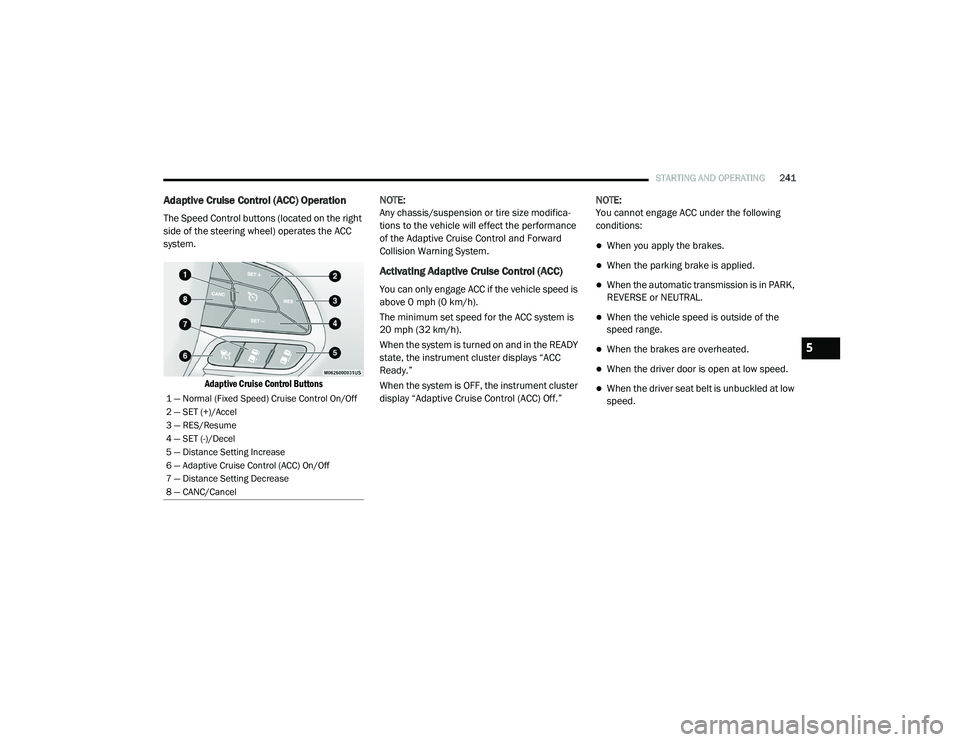
The Speed Control buttons (located on the right
side of the steering wheel) operates the ACC
system.
Adaptive Cruise Control Buttons
NOTE:
Any chassis/suspension or tire size modifica
-
tions to the vehicle will effect the performance
of the Adaptive Cruise Control and Forward
Collision Warning System.
Activating Adaptive Cruise Control (ACC)
You can only engage ACC if the vehicle speed is
above 0 mph (0 km/h).
The minimum set speed for the ACC system is
20 mph (32 km/h).
When the system is turned on and in the READY
state, the instrument cluster displays “ACC
Ready.”
When the system is OFF, the instrument cluster
display “Adaptive Cruise Control (ACC) Off.” NOTE:
You cannot engage ACC under the following
conditions:
When you apply the brakes.
When the parking brake is applied.
When the automatic transmission is in PARK,
REVERSE or NEUTRAL.
When the vehicle speed is outside of the
speed range.
When the brakes are overheated.
When the driver door is open at low speed.
When the driver seat belt is unbuckled at low
speed.1 — Normal (Fixed Speed) Cruise Control On/Off
2 — SET (+)/Accel
3 — RES/Resume
4 — SET (-)/Decel
5 — Distance Setting Increase
6 — Adaptive Cruise Control (ACC) On/Off
7 — Distance Setting Decrease
8 — CANC/Cancel
5
20_RU_OM_EN_US_t.book Page 241
Page 245 of 516
STARTING AND OPERATING243
To Cancel
The following conditions cancel the system:
The brake pedal is applied.
The CANC (cancel) button is pushed.
An Anti-Lock Brake System (ABS) event
occurs.
The gear selector is removed from the DRIVE
position.
The Electronic Stability Control/Traction
Control System (ESC/TCS) activates.
The vehicle parking brake is applied.
Driver seat belt is unbuckled at low speeds.
Driver door is opened at low speeds.
To Turn Off
The system will turn off and clear the set speed
in memory if:
The Adaptive Cruise Control (ACC) on/off
button is pushed.
The Normal (Fixed Speed) Cruise Control on/
off button is pushed.
The ignition is placed in the OFF position.
To Resume
If there is a set speed in memory, push the RES
(resume) button and then remove your foot
from the accelerator pedal. The instrument
cluster display will display the last set speed.
NOTE:
If your vehicle stays at standstill for longer
than two seconds, then the driver will either
have to push the RES (resume) button, or
apply the accelerator pedal to reengage the
ACC to the existing set speed.
ACC cannot be resumed if there is a
stationary vehicle in-front of your vehicle in
close proximity.
To Vary The Speed Setting
To Increase Speed
While ACC is set, you can increase the set speed
by pushing the SET (+) button.
The driver's preferred units can be selected
through the instrument cluster. Refer to
“Instrument Cluster Display” in “Getting To
Know Your Instrument Panel” for more
information. The speed increment shown is
dependent on the chosen speed unit of U.S.
(mph) or Metric (km/h):
U.S. Speed (mph)
Pushing the SET (+) button once will result in
a 1 mph increase in set speed. Each subse -
quent tap of the button results in an increase
of 1 mph.
If the button is continually pushed, the set
speed will continue to increase in 5 mph
increments until the button is released. The
increase in set speed is reflected in the
instrument cluster display.WARNING!
The Resume function should only be used if
traffic and road conditions permit. Resuming
a set speed that is too high or too low for
prevailing traffic and road conditions could
cause the vehicle to accelerate or decelerate
too sharply for safe operation. Failure to
follow these warnings can result in a collision
and death or serious personal injury.
5
20_RU_OM_EN_US_t.book Page 243
Page 248 of 516
246STARTING AND OPERATING
The vehicle will then maintain the set distance
until:
The vehicle ahead accelerates to a speed
above the set speed.
The vehicle ahead moves out of your lane or
view of the sensor.
The distance setting is changed.
The system disengages. (Refer to the infor -
mation on ACC Activation).
The maximum braking applied by ACC is limited;
however, the driver can always apply the brakes
manually, if necessary.
NOTE:
The brake lights will illuminate whenever the
ACC system applies the brakes.
A Proximity Warning will alert the driver if ACC
predicts that its maximum braking level is not
sufficient to maintain the set distance. If this
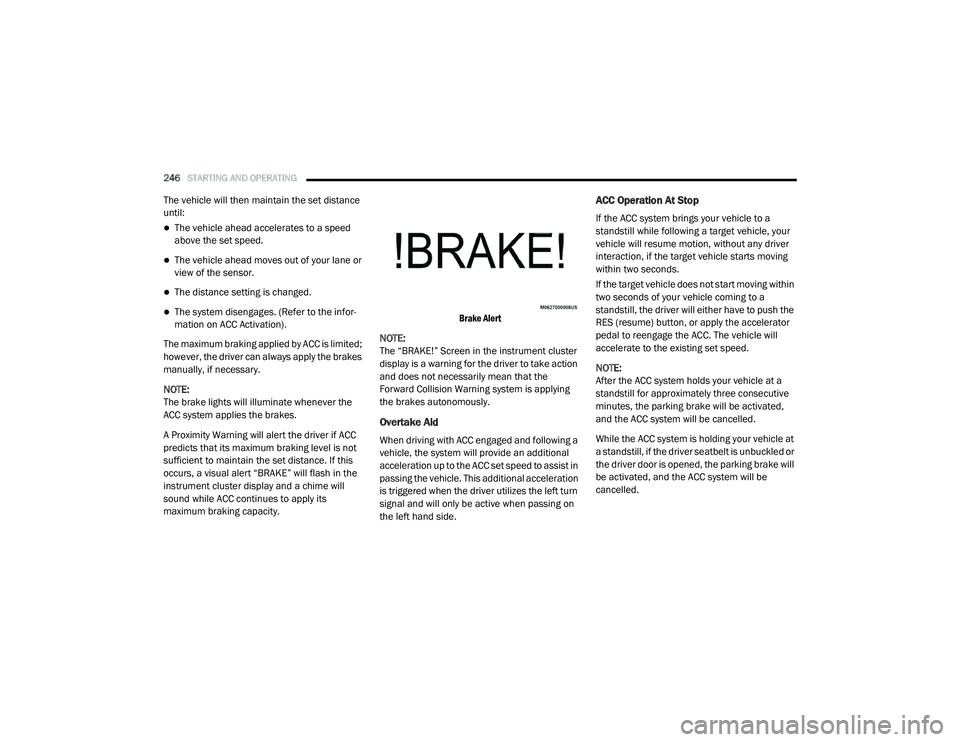
occurs, a visual alert “BRAKE” will flash in the
instrument cluster display and a chime will
sound while ACC continues to apply its
maximum braking capacity.
Brake Alert
NOTE:
The “BRAKE!” Screen in the instrument cluster
display is a warning for the driver to take action
and does not necessarily mean that the
Forward Collision Warning system is applying
the brakes autonomously.
Overtake Aid
When driving with ACC engaged and following a
vehicle, the system will provide an additional
acceleration up to the ACC set speed to assist in
passing the vehicle. This additional acceleration
is triggered when the driver utilizes the left turn
signal and will only be active when passing on
the left hand side.
ACC Operation At Stop
If the ACC system brings your vehicle to a
standstill while following a target vehicle, your
vehicle will resume motion, without any driver
interaction, if the target vehicle starts moving
within two seconds.
If the target vehicle does not start moving within
two seconds of your vehicle coming to a
standstill, the driver will either have to push the
RES (resume) button, or apply the accelerator
pedal to reengage the ACC. The vehicle will
accelerate to the existing set speed.
NOTE:
After the ACC system holds your vehicle at a
standstill for approximately three consecutive
minutes, the parking brake will be activated,
and the ACC system will be cancelled.
While the ACC system is holding your vehicle at
a standstill, if the driver seatbelt is unbuckled or
the driver door is opened, the parking brake will
be activated, and the ACC system will be
cancelled.
20_RU_OM_EN_US_t.book Page 246
Page 271 of 516
STARTING AND OPERATING269
Vehicle speed greater than 5 mph (7 km/h)
during active steering guidance into the
parking space.
Touching the steering wheel during active
steering guidance into the parking space.
Pushing the ParkSense Front and Rear Park
Assist switch.
The driver’s door is opened.
The liftgate is opened.
Electronic Stability Control/Anti-Lock Braking
System intervention.
The ParkSense Active Park Assist system will
allow a maximum of eight shifts between
DRIVE and REVERSE. If the maneuver cannot
be completed within eight shifts, the system
will cancel and the instrument cluster display
will instruct the driver to complete the
maneuver manually. The ParkSense Active Park Assist system will
only operate and search for a parking space
when the following conditions are present:
The gear position is in DRIVE.
The ignition is in the RUN position.
The ParkSense Active Park Assist switch is
activated.
The driver’s door is closed.
The liftgate is closed.
Vehicle speed is less than 15 mph (25 km/h).
NOTE:
If the vehicle is driven above approximately
15 mph (25 km/h), the instrument cluster
display will instruct the driver to slow down. If the
vehicle is driven above approximately 18 mph
(30 km/h), the system will cancel. The driver
must then reactivate the system by pushing the
ParkSense Active Park Assist switch.
The outer surface and the underside of the
front and rear fascias/bumpers are clean
and clear of snow, ice, mud, dirt or other
obstruction.
When pushed, the LED on the ParkSense Active
Park Assist switch will blink momentarily, and
then the LED will turn off if any of the above
conditions are not present.
Parallel Parking Space Assistance
Operation/Display
When the ParkSense Active Park Assist system
is enabled the “Active ParkSense Searching -
Push OK for Perpendicular Park” message will
appear in the instrument cluster display. You
may switch to perpendicular parking if you
desire. Push the OK button on the left side
steering wheel switch to change your parking
space setting.5
20_RU_OM_EN_US_t.book Page 269
Page 286 of 516
284STARTING AND OPERATING
(Continued)
NOTE:
If snow, ice, mud, or any foreign substance
builds up on the camera lens, clean the lens,
rinse with water, and dry with a soft cloth. Do
not cover the lens.
SURROUND VIEW CAMERA SYSTEM — IF
EQUIPPED
Your vehicle may be equipped with the
Surround View Camera System that allows you
to see an on-screen image of the surroundings
and top view of your vehicle whenever the gear
selector is put into REVERSE or a different view
is selected through the "on screen soft buttons".
The top view of the vehicle will show which
doors are open. The image will be displayed on
the touchscreen display along with a caution
note “Check Entire Surroundings” across the
top of the screen. After five seconds, this note
will disappear. The Surround View Camera
System is comprised of four sequential
cameras located in the front grille, rear liftgate
and side mirrors. NOTE:
The Surround View Camera System has program
-
mable settings that may be selected through the
Uconnect System. Refer to “Uconnect Settings”
in “Multimedia” for further information.
When the vehicle is shifted into REVERSE, the
rear camera view and top view is the default view
of the system.
When the vehicle is shifted out of REVERSE (with
camera delay turned on), the camera image will
continue to be displayed for up to 10 seconds
after shifting out of REVERSE unless the vehicle
speed exceeds 8 mph (13 km/h), the vehicle is
shifted into PARK or the ignition is placed in the
OFF position. There is a touchscreen button “X”
to disable the display of the camera image.
When the vehicle is shifted out of REVERSE (with
camera delay turned off), the Surround View
Camera mode is exited and the last known
screen appears again.
When enabled, active guide lines are overlaid on
the image to illustrate the width of the vehicle,
including the side view mirrors and its projected
backup path based on the steering wheel position.
Different colored zones indicate the distance to
the rear of the vehicle.
WARNING!
Drivers must be careful when backing up
even when using the ParkView Rear Back Up
Camera. Always check carefully behind your
vehicle, and be sure to check for pedestrians,
animals, other vehicles, obstructions, or blind
spots before backing up. You are responsible
for the safety of your surroundings and must
continue to pay attention while backing up.
Failure to do so can result in serious injury or
death.
CAUTION!
To avoid vehicle damage, ParkView should
only be used as a parking aid. The ParkView
camera is unable to view every obstacle or
object in your drive path.
To avoid vehicle damage, the vehicle must
be driven slowly when using ParkView to be
able to stop in time when an obstacle is
seen. It is recommended that the driver
look frequently over his/her shoulder when
using ParkView.
CAUTION! (Continued)
20_RU_OM_EN_US_t.book Page 284
Page 287 of 516
STARTING AND OPERATING285
The following table shows the approximate
distances for each zone:
Modes Of Operation
“Manual” activation of the Surround View
camera is selected by pressing the Surround
View Camera soft key located in the “Controls”
screen within the Uconnect system. Top View
The Top view will show in the Uconnect System
with Rear View and Front View in a split view
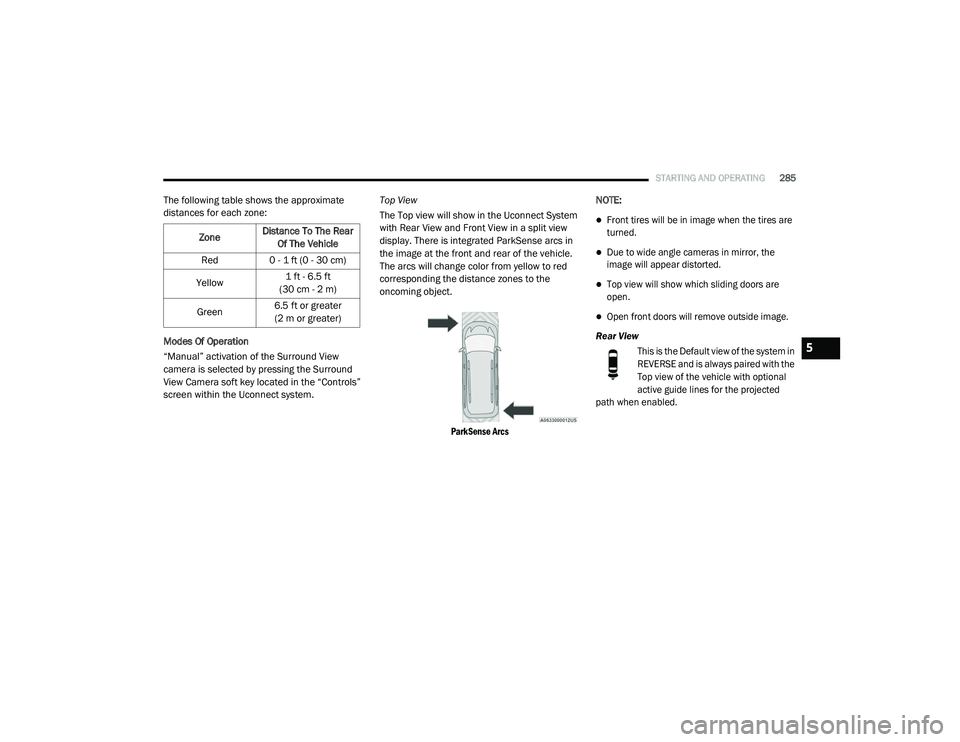
display. There is integrated ParkSense arcs in
the image at the front and rear of the vehicle.
The arcs will change color from yellow to red
corresponding the distance zones to the
oncoming object.
ParkSense Arcs
NOTE:
Front tires will be in image when the tires are
turned.
Due to wide angle cameras in mirror, the
image will appear distorted.
Top view will show which sliding doors are
open.
Open front doors will remove outside image.
Rear View This is the Default view of the system in
REVERSE and is always paired with the
Top view of the vehicle with optional
active guide lines for the projected
path when enabled.
Zone
Distance To The Rear
Of The Vehicle
Red 0 - 1 ft (0 - 30 cm)
Yellow 1 ft - 6.5 ft
(30 cm - 2 m)
Green 6.5 ft or greater
(2 m or greater)
5
20_RU_OM_EN_US_t.book Page 285