Door CHRYSLER PACIFICA 2020 Manual PDF
[x] Cancel search | Manufacturer: CHRYSLER, Model Year: 2020, Model line: PACIFICA, Model: CHRYSLER PACIFICA 2020Pages: 516, PDF Size: 28.69 MB
Page 288 of 516

286STARTING AND OPERATING
(Continued)
Rear Cross Path ViewPressing the Rear Cross Path soft key
will give the driver a wider angle view of
the rear camera system. The Top view
will be disabled when this is selected
Front View The Front view will show you what is
immediately in front of the vehicle and
is always paired with the Top view of
the vehicle.
Front Cross Path View
Pressing the Front Cross Path soft key will
give the driver a wider angle view of the
front camera system. The Top view will be
disabled when this is selected.
Deactivation
The system can be deactivated in the following
conditions:
The speed of the vehicle reaches greater
than 8 mph (13 km/h).
The vehicle shifted into PARK from a different
gear.
If the vehicle is in any gear other than
REVERSE, press the “X” button.
The camera delay system is turned off manu -
ally through the Uconnect settings menu.
Refer to “Uconnect Settings” in “Multimedia”
for further information.
NOTE:
If snow, ice, mud, or any foreign substance
builds up on the camera lenses, clean the
lenses, rinse with water, and dry with a soft
cloth. Do not cover the lenses.
If a malfunction with the system has
occurred, see an authorized dealer.REFUELING THE VEHICLE
There is no fuel filler cap. Two flapper doors
inside the pipe seal the system.
WARNING!
Drivers must be careful when backing up even
when using the Surround View Camera. Always
check carefully behind your vehicle, and be
sure to check for pedestrians, animals, other
vehicles, obstructions, or blind spots before
backing up. You are responsible for the safety
of your surroundings and must continue to pay
attention while backing up. Failure to do so can
result in serious injury or death.
CAUTION!
To avoid vehicle damage, Surround View
should only be used as a parking aid. The
Surround View camera is unable to view
every obstacle or object in your drive path.
To avoid vehicle damage, the vehicle must
be driven slowly when using Surround View
to be able to stop in time when an obstacle
is seen. It is recommended that the driver
look frequently over his/her shoulder when
using Surround View.
WARNING!
Never have any smoking materials lit in or
near the vehicle when the fuel door is open
or the tank is being filled.
Never add fuel when the engine is running.
This is in violation of most state and federal
fire regulations and may cause the
“Malfunction Indicator Light” to turn on.
20_RU_OM_EN_US_t.book Page 286
Page 289 of 516
STARTING AND OPERATING287
1. Put the vehicle in park and switch the
ignition off.
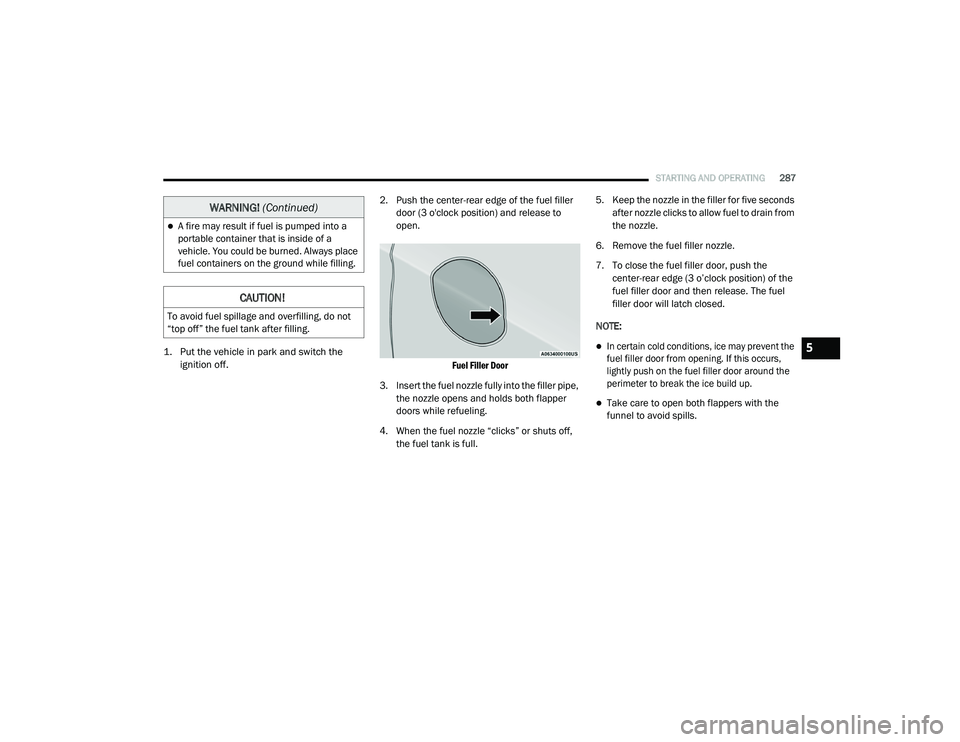
2. Push the center-rear edge of the fuel filler
door (3 o'clock position) and release to
open.
Fuel Filler Door
3. Insert the fuel nozzle fully into the filler pipe, the nozzle opens and holds both flapper
doors while refueling.
4. When the fuel nozzle “clicks” or shuts off, the fuel tank is full. 5. Keep the nozzle in the filler for five seconds
after nozzle clicks to allow fuel to drain from
the nozzle.
6. Remove the fuel filler nozzle.
7. To close the fuel filler door, push the center-rear edge (3 o’clock position) of the
fuel filler door and then release. The fuel
filler door will latch closed.
NOTE:
In certain cold conditions, ice may prevent the
fuel filler door from opening. If this occurs,
lightly push on the fuel filler door around the
perimeter to break the ice build up.
Take care to open both flappers with the
funnel to avoid spills.
A fire may result if fuel is pumped into a
portable container that is inside of a
vehicle. You could be burned. Always place
fuel containers on the ground while filling.
CAUTION!
To avoid fuel spillage and overfilling, do not
“top off” the fuel tank after filling.
WARNING! (Continued)
5
20_RU_OM_EN_US_t.book Page 287
Page 290 of 516
288STARTING AND OPERATING
VEHICLE LOADING
Certification Label
As required by National Highway Traffic Safety
Administration regulations, your vehicle has a
certification label affixed to the driver's side
door or pillar.
This label contains the month and year of
manufacture, Gross Vehicle Weight Rating
(GVWR), Gross Axle Weight Rating (GAWR) front
and rear, and Vehicle Identification Number
(VIN). A Month-Day-Hour (MDH) number is
included on this label and indicates the Month,
Day and Hour of manufacture. The bar code
that appears on the bottom of the label is your
VIN.
Gross Vehicle Weight Rating (GVWR)
The GVWR is the total permissible weight of your
vehicle including driver, passengers, vehicle,
options and cargo. The label also specifies
maximum capacities of front and rear axle
systems (GAWR). Total load must be limited so
GVWR and front and rear GAWR are not
exceeded.
Payload
The payload of a vehicle is defined as the
allowable load weight a truck can carry,
including the weight of the driver, all
passengers, options and cargo.
Gross Axle Weight Rating (GAWR)
The GAWR is the maximum permissible load on
the front and rear axles. The load must be
distributed in the cargo area so that the GAWR
of each axle is not exceeded.
Each axle GAWR is determined by the
components in the system with the lowest load
carrying capacity (axle, springs, tires or wheels).
Heavier axles or suspension components
sometimes specified by purchasers for
increased durability does not necessarily
increase the vehicle's GVWR.
Tire Size
The tire size on the Vehicle Certification Label
represents the actual tire size on your vehicle.
Replacement tires must be equal to the load
capacity of this tire size.
Rim Size
This is the rim size that is appropriate for the tire
size listed.
Inflation Pressure
This is the cold tire inflation pressure for your
vehicle for all loading conditions up to full
GAWR.
Curb Weight
The curb weight of a vehicle is defined as the
total weight of the vehicle with all fluids,
including vehicle fuel, at full capacity
conditions, and with no occupants or cargo
loaded into the vehicle. The front and rear curb
weight values are determined by weighing your
vehicle on a commercial scale before any
occupants or cargo are added.
Loading
The actual total weight and the weight of the
front and rear of your vehicle at the ground can
best be determined by weighing it when it is
loaded and ready for operation.
The entire vehicle should first be weighed on a
commercial scale to ensure that the GVWR has
not been exceeded. The weight on the front and
rear of the vehicle should then be determined
20_RU_OM_EN_US_t.book Page 288
Page 296 of 516
294STARTING AND OPERATING
(Continued)
Make sure loading does not exceed GAWR of
front or rear axles.
GAWR is found on sticker in Driver’s Side
Door Jamb.
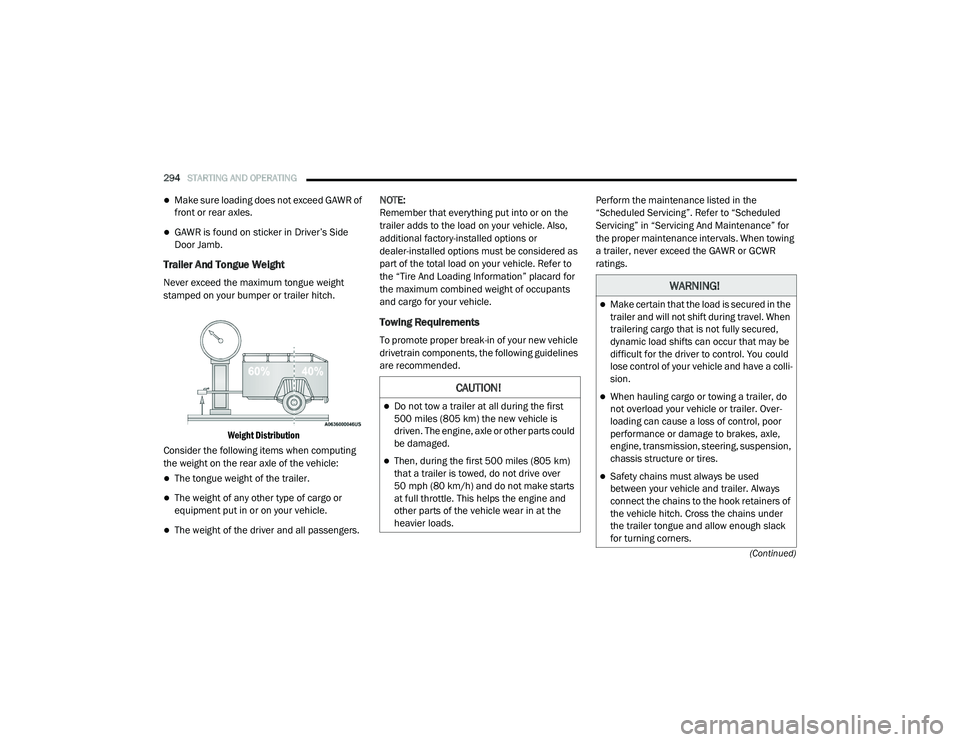
Trailer And Tongue Weight
Never exceed the maximum tongue weight
stamped on your bumper or trailer hitch.
Weight Distribution
Consider the following items when computing
the weight on the rear axle of the vehicle:
The tongue weight of the trailer.
The weight of any other type of cargo or
equipment put in or on your vehicle.
The weight of the driver and all passengers. NOTE:
Remember that everything put into or on the
trailer adds to the load on your vehicle. Also,
additional factory-installed options or
dealer-installed options must be considered as
part of the total load on your vehicle. Refer to
the “Tire And Loading Information” placard for
the maximum combined weight of occupants
and cargo for your vehicle.
Towing Requirements
To promote proper break-in of your new vehicle
drivetrain components, the following guidelines
are recommended.
Perform the maintenance listed in the
“Scheduled Servicing”. Refer to “Scheduled
Servicing” in “Servicing And Maintenance” for
the proper maintenance intervals. When towing
a trailer, never exceed the GAWR or GCWR
ratings.
CAUTION!
Do not tow a trailer at all during the first
500 miles (805 km) the new vehicle is
driven. The engine, axle or other parts could
be damaged.
Then, during the first 500 miles (805 km) that a trailer is towed, do not drive over
50 mph (80 km/h) and do not make starts
at full throttle. This helps the engine and
other parts of the vehicle wear in at the
heavier loads.
WARNING!
Make certain that the load is secured in the
trailer and will not shift during travel. When
trailering cargo that is not fully secured,
dynamic load shifts can occur that may be
difficult for the driver to control. You could
lose control of your vehicle and have a colli -
sion.
When hauling cargo or towing a trailer, do
not overload your vehicle or trailer. Over -
loading can cause a loss of control, poor
performance or damage to brakes, axle,
engine, transmission, steering, suspension,
chassis structure or tires.
Safety chains must always be used
between your vehicle and trailer. Always
connect the chains to the hook retainers of
the vehicle hitch. Cross the chains under
the trailer tongue and allow enough slack
for turning corners.
20_RU_OM_EN_US_t.book Page 294
Page 308 of 516
306IN CASE OF EMERGENCY
BULB REPLACEMENT
Replacement Bulbs
Interior Bulbs
Lamps Bulb Number
Center & Rear Dome Lamp LED (Serviced At An Authorized Dealer)
Center & Rear Reading Lamps LED (Serviced At An Authorized Dealer)
Front Door Courtesy Lamp LED (Serviced At An Authorized Dealer)
Front Header Reading Lamps – If Equipped LED (Serviced At An Authorized Dealer)
Instrument Cluster Lamps LED (Serviced At An Authorized Dealer)
Liftgate Lamp(s) LED (Serviced At An Authorized Dealer)
Overhead Console Reading Lamps LED (Serviced At An Authorized Dealer)
Removable Console Lamp – If Equipped LED (Serviced At An Authorized Dealer)
Visor Vanity Lamps 6501966
Exterior Bulbs
Lamps Bulb Number
High Intensity Discharge Headlamp Low Beam - D3S
High Beam - 9005LL
Halogen Headlamp Reflector Low Beam - H11LL
Projector Halogen Low Beam - 9005HL+ All High Beams - 9005LL
20_RU_OM_EN_US_t.book Page 306
Page 316 of 516
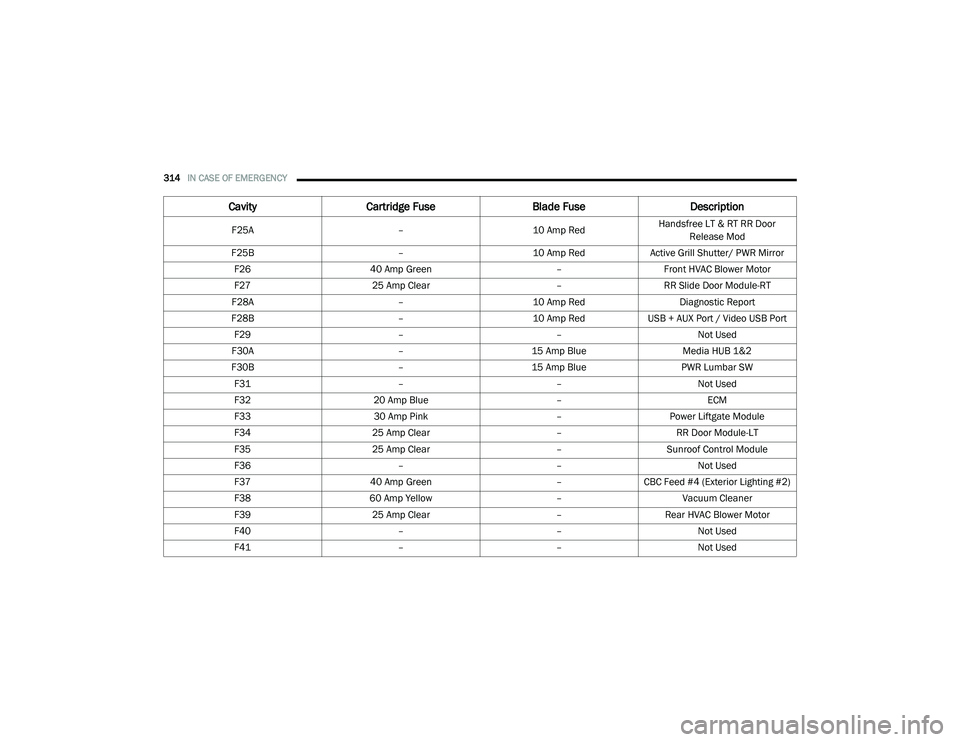
314IN CASE OF EMERGENCY
F25A –10 Amp RedHandsfree LT & RT RR Door
Release Mod
F25B –10 Amp RedActive Grill Shutter/ PWR Mirror
F26 40 Amp Green –Front HVAC Blower Motor
F27 25 Amp Clear –RR Slide Door Module-RT
F28A –10 Amp Red Diagnostic Report
F28B –10 Amp RedUSB + AUX Port / Video USB Port
F29 ––Not Used
F30A –15 Amp Blue Media HUB 1&2
F30B –15 Amp Blue PWR Lumbar SW
F31 ––Not Used
F32 20 Amp Blue –ECM
F33 30 Amp Pink –Power Liftgate Module
F34 25 Amp Clear –RR Door Module-LT
F35 25 Amp Clear –Sunroof Control Module
F36 ––Not Used
F37 40 Amp Green –CBC Feed #4 (Exterior Lighting #2)
F38 60 Amp Yellow –Vacuum Cleaner
F39 25 Amp Clear –Rear HVAC Blower Motor
F40 ––Not Used
F41 ––Not Used
CavityCartridge Fuse Blade FuseDescription
20_RU_OM_EN_US_t.book Page 314
Page 317 of 516
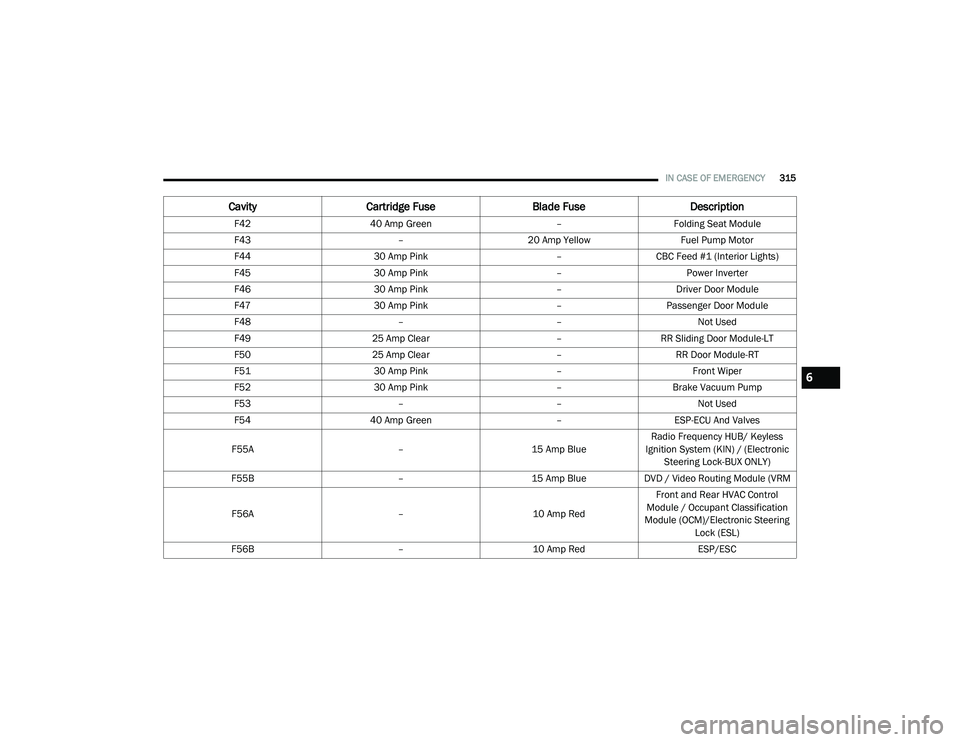
IN CASE OF EMERGENCY315
F42 40 Amp Green –Folding Seat Module
F43 –20 Amp Yellow Fuel Pump Motor
F44 30 Amp Pink –CBC Feed #1 (Interior Lights)
F45 30 Amp Pink –Power Inverter
F46 30 Amp Pink –Driver Door Module
F47 30 Amp Pink –Passenger Door Module
F48 ––Not Used
F49 25 Amp Clear –RR Sliding Door Module-LT
F50 25 Amp Clear –RR Door Module-RT
F51 30 Amp Pink –Front Wiper
F52 30 Amp Pink –Brake Vacuum Pump
F53 ––Not Used
F54 40 Amp Green –ESP-ECU And Valves
F55A –15 Amp BlueRadio Frequency HUB/ Keyless
Ignition System (KIN) / (Electronic Steering Lock-BUX ONLY)
F55B –15 Amp BlueDVD / Video Routing Module (VRM
F56A –10 Amp RedFront and Rear HVAC Control
Module / Occupant Classification
Module (OCM)/Electronic Steering Lock (ESL)
F56B –10 Amp Red ESP/ESC
CavityCartridge Fuse Blade FuseDescription
6
20_RU_OM_EN_US_t.book Page 315
Page 319 of 516
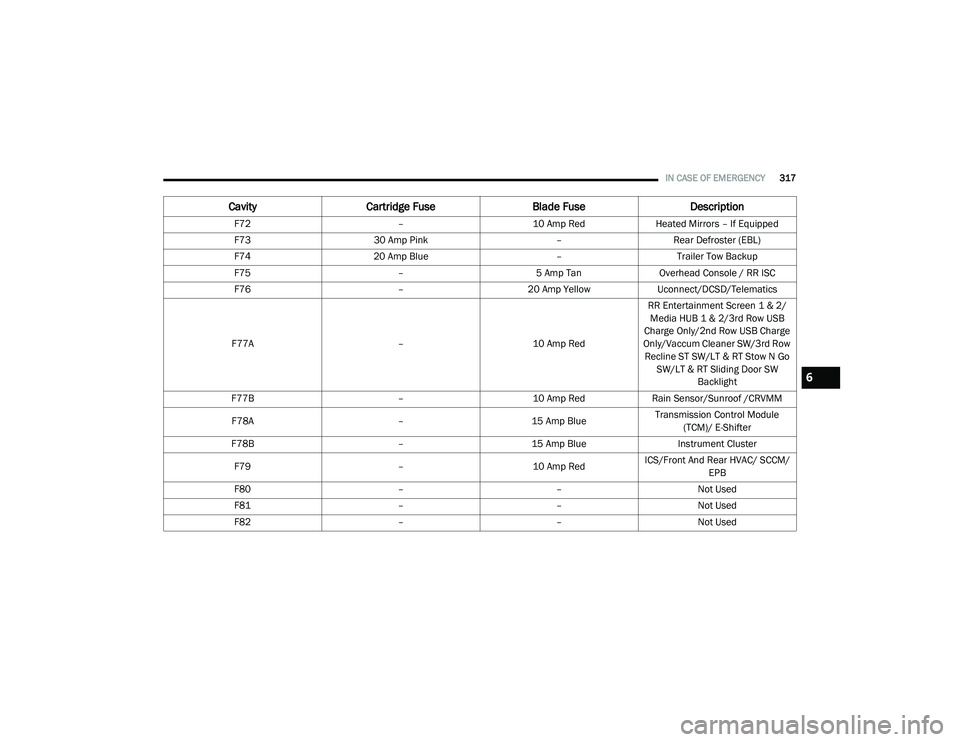
IN CASE OF EMERGENCY317
F72 –10 Amp RedHeated Mirrors – If Equipped
F73 30 Amp Pink –Rear Defroster (EBL)
F74 20 Amp Blue –Trailer Tow Backup
F75 –5 Amp TanOverhead Console / RR ISC
F76 –20 Amp YellowUconnect/DCSD/Telematics
F77A –10 Amp RedRR Entertainment Screen 1 & 2/
Media HUB 1 & 2/3rd Row USB
Charge Only/2nd Row USB Charge
Only/Vaccum Cleaner SW/3rd Row Recline ST SW/LT & RT Stow N Go SW/LT & RT Sliding Door SW Backlight
F77B –10 Amp RedRain Sensor/Sunroof /CRVMM
F78A –15 Amp BlueTransmission Control Module
(TCM)/ E-Shifter
F78B –15 Amp Blue Instrument Cluster
F79 –10 Amp RedICS/Front And Rear HVAC/ SCCM/
EPB
F80 ––Not Used
F81 ––Not Used
F82 ––Not Used
CavityCartridge Fuse Blade FuseDescription
6
20_RU_OM_EN_US_t.book Page 317
Page 321 of 516

IN CASE OF EMERGENCY319
* 30 Amp mini fuse is substituted for 25 Amp Circuit Breaker.F98
–15 Amp Blue Left HID Headlamp
F99 30 Amp Pink –Trailer Tow Module - If Equipped
F100A –10 Amp Red AHLM
F100B –10 Amp RedRear Camera/LBSS/RBSS/CVPM/
Humidity Sensor/In Vehicle Temperature Sensor
Circuit Breakers
CB1 25 AmpPower Seats (Driver)
CB2 25 Amp *Power Seats (Pass)
CB3 25 AmpFRT PWR Window W/O Door Nodes
+ RR PWR Window Lockout
Cavity Cartridge Fuse Blade FuseDescription
6
20_RU_OM_EN_US_t.book Page 319
Page 329 of 516
IN CASE OF EMERGENCY327
(Continued)
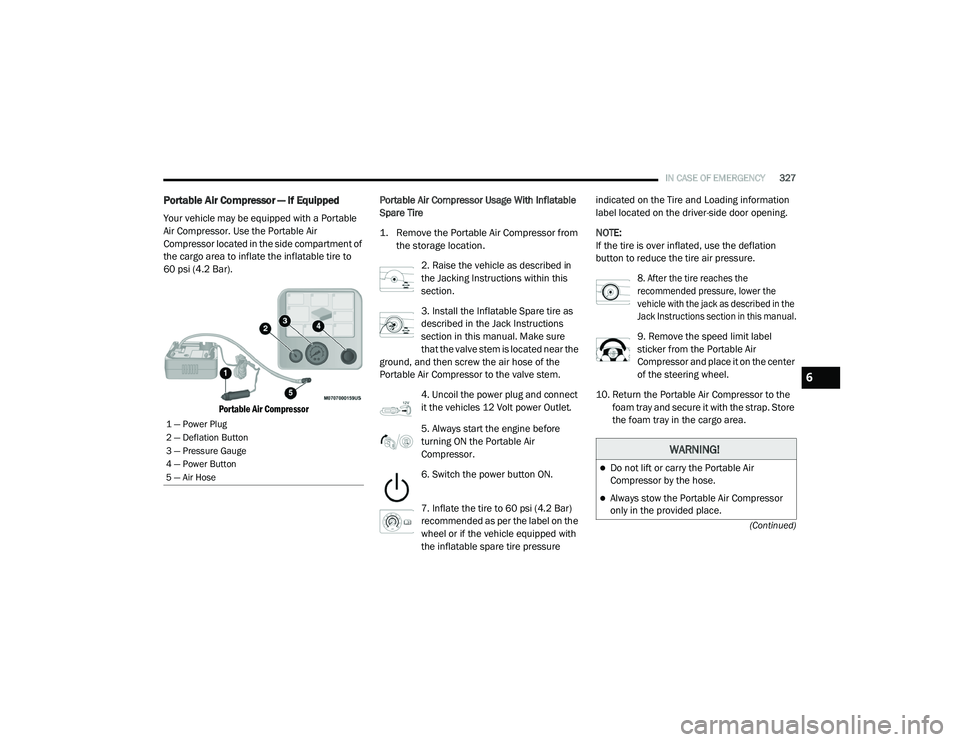
Portable Air Compressor — If Equipped
Your vehicle may be equipped with a Portable
Air Compressor. Use the Portable Air
Compressor located in the side compartment of
the cargo area to inflate the inflatable tire to
60 psi (4.2 Bar).
Portable Air Compressor
Portable Air Compressor Usage With Inflatable
Spare Tire
1. Remove the Portable Air Compressor from
the storage location.
2. Raise the vehicle as described in
the Jacking Instructions within this
section.
3. Install the Inflatable Spare tire as
described in the Jack Instructions
section in this manual. Make sure
that the valve stem is located near the
ground, and then screw the air hose of the
Portable Air Compressor to the valve stem.
4. Uncoil the power plug and connect
it the vehicles 12 Volt power Outlet.
5. Always start the engine before
turning ON the Portable Air
Compressor.
6. Switch the power button ON.
7. Inflate the tire to 60 psi (4.2 Bar)
recommended as per the label on the
wheel or if the vehicle equipped with
the inflatable spare tire pressure indicated on the Tire and Loading information
label located on the driver-side door opening.
NOTE:
If the tire is over inflated, use the deflation
button to reduce the tire air pressure.
8. After the tire reaches the
recommended pressure, lower the
vehicle with the jack as described in the
Jack Instructions section in this manual.
9. Remove the speed limit label
sticker from the Portable Air
Compressor and place it on the center
of the steering wheel.
10. Return the Portable Air Compressor to the foam tray and secure it with the strap. Store
the foam tray in the cargo area.
1 — Power Plug
2 — Deflation Button
3 — Pressure Gauge
4 — Power Button
5 — Air Hose
WARNING!
Do not lift or carry the Portable Air
Compressor by the hose.
Always stow the Portable Air Compressor
only in the provided place.
6
20_RU_OM_EN_US_t.book Page 327