Eco CHRYSLER PACIFICA 2020 Workshop Manual
[x] Cancel search | Manufacturer: CHRYSLER, Model Year: 2020, Model line: PACIFICA, Model: CHRYSLER PACIFICA 2020Pages: 516, PDF Size: 28.69 MB
Page 96 of 516
94GETTING TO KNOW YOUR VEHICLE
Auto Up Reset — If Equipped
To reactivate the Auto Up feature, perform the
following steps after vehicle power is restored:
1. Pull the window control up to close the
window completely and continue to hold
the control up for an additional two
seconds after the window is closed.
2. Push the window control down firmly to the second detent to open the window
completely and continue to hold the control
down for an additional two seconds after
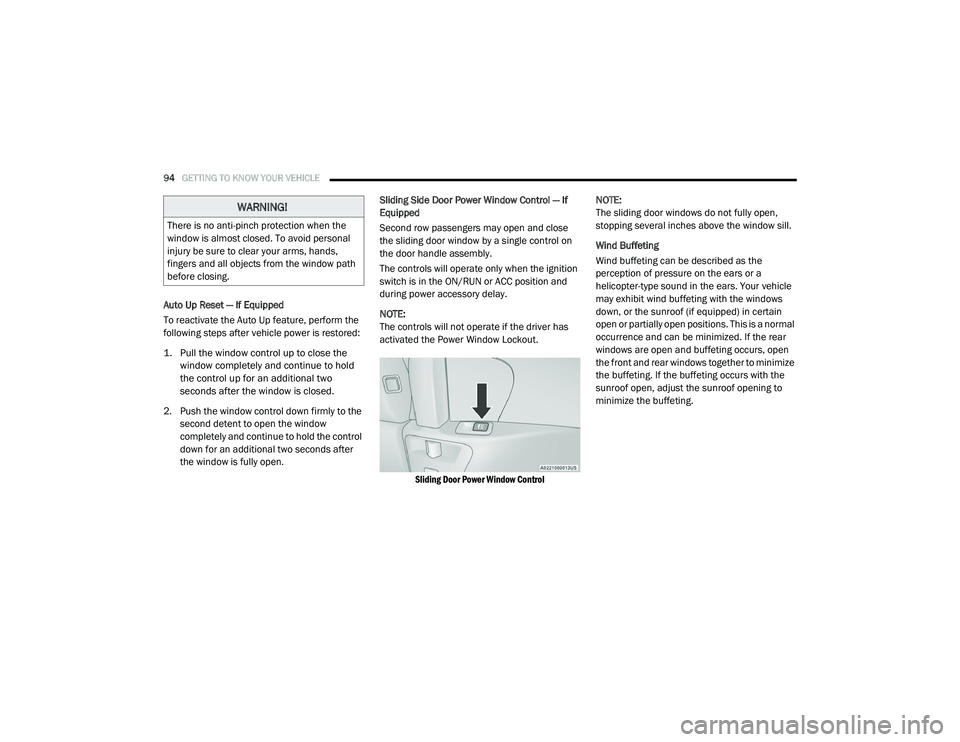
the window is fully open. Sliding Side Door Power Window Control — If
Equipped
Second row passengers may open and close
the sliding door window by a single control on
the door handle assembly.
The controls will operate only when the ignition
switch is in the ON/RUN or ACC position and
during power accessory delay.
NOTE:
The controls will not operate if the driver has
activated the Power Window Lockout.
Sliding Door Power Window Control
NOTE:
The sliding door windows do not fully open,
stopping several inches above the window sill.
Wind Buffeting
Wind buffeting can be described as the
perception of pressure on the ears or a
helicopter-type sound in the ears. Your vehicle
may exhibit wind buffeting with the windows
down, or the sunroof (if equipped) in certain
open or partially open positions. This is a normal
occurrence and can be minimized. If the rear
windows are open and buffeting occurs, open
the front and rear windows together to minimize
the buffeting. If the buffeting occurs with the
sunroof open, adjust the sunroof opening to
minimize the buffeting.
WARNING!
There is no anti-pinch protection when the
window is almost closed. To avoid personal
injury be sure to clear your arms, hands,
fingers and all objects from the window path
before closing.
20_RU_OM_EN_US_t.book Page 94
Page 97 of 516
GETTING TO KNOW YOUR VEHICLE95
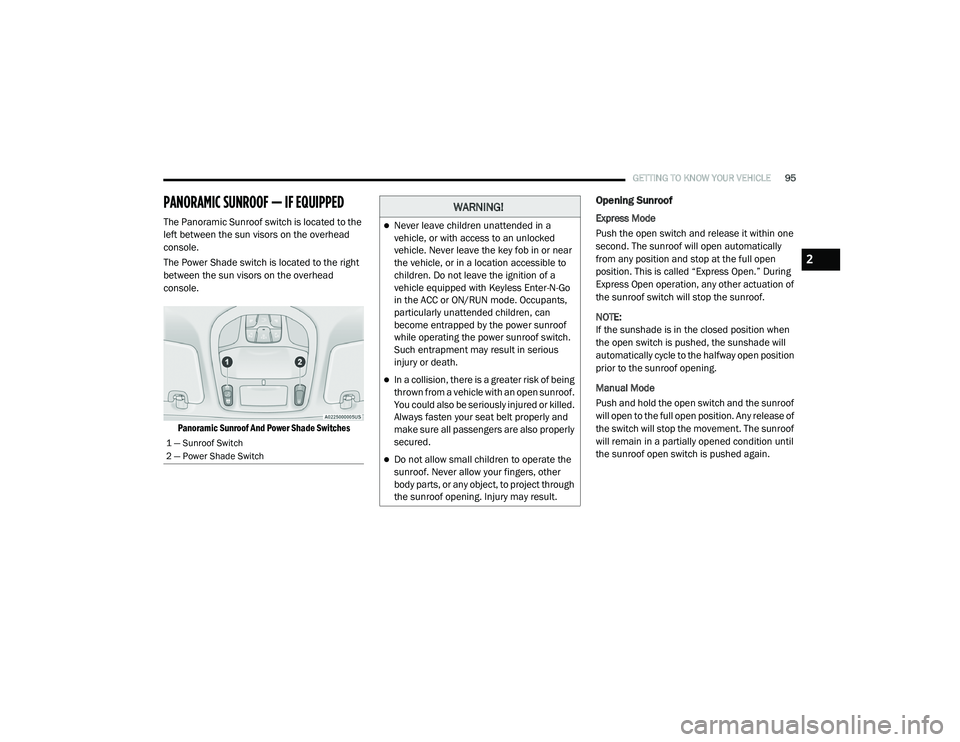
PANORAMIC SUNROOF — IF EQUIPPED
The Panoramic Sunroof switch is located to the
left between the sun visors on the overhead
console.
The Power Shade switch is located to the right
between the sun visors on the overhead
console.
Panoramic Sunroof And Power Shade Switches
Opening Sunroof
Express Mode
Push the open switch and release it within one
second. The sunroof will open automatically
from any position and stop at the full open
position. This is called “Express Open.” During
Express Open operation, any other actuation of
the sunroof switch will stop the sunroof.
NOTE:
If the sunshade is in the closed position when
the open switch is pushed, the sunshade will
automatically cycle to the halfway open position
prior to the sunroof opening.
Manual Mode
Push and hold the open switch and the sunroof
will open to the full open position. Any release of
the switch will stop the movement. The sunroof
will remain in a partially opened condition until
the sunroof open switch is pushed again.
1 — Sunroof Switch
2 — Power Shade Switch
WARNING!
Never leave children unattended in a
vehicle, or with access to an unlocked
vehicle. Never leave the key fob in or near
the vehicle, or in a location accessible to
children. Do not leave the ignition of a
vehicle equipped with Keyless Enter-N-Go
in the ACC or ON/RUN mode. Occupants,
particularly unattended children, can
become entrapped by the power sunroof
while operating the power sunroof switch.
Such entrapment may result in serious
injury or death.
In a collision, there is a greater risk of being
thrown from a vehicle with an open sunroof.
You could also be seriously injured or killed.
Always fasten your seat belt properly and
make sure all passengers are also properly
secured.
Do not allow small children to operate the
sunroof. Never allow your fingers, other
body parts, or any object, to project through
the sunroof opening. Injury may result.
2
20_RU_OM_EN_US_t.book Page 95
Page 98 of 516
96GETTING TO KNOW YOUR VEHICLE
Venting Sunroof — Express
Push and release the "Vent" button within one
second and the sunroof will open to the vent
position. This is called “Express Vent”, and it will
occur regardless of sunroof position.
NOTE:
If the sunshade is in the closed position when
the vent switch is pushed, the sunshade will
automatically cycle to the halfway open position
prior to the sunroof opening to the Vent posi -
tion.
Closing Sunroof
Express Mode
Push the close switch and release it within one
second and the sunroof will close automatically
from any position. The sunroof will close fully
and stop automatically. This is called “Express
Close.” During Express Close operation, any
other actuation of the switch will stop the
sunroof.
Manual Mode
To close the sunroof, push and hold the close
switch. Any release of the switch will stop the
movement and the sunroof will remain in a
partially closed condition until the sunroof
switch is pushed again.
Wind Buffeting
Wind buffeting can be described as the
perception of pressure on the ears or a
helicopter-type sound in the ears. Your vehicle
may exhibit wind buffeting with the windows
down, or the sunroof (if equipped) in certain
open or partially open positions. This is a normal
occurrence and can be minimized. If the
buffeting occurs with the rear windows open,
open the front and rear windows together to
minimize the buffeting. If the buffeting occurs
with the sunroof open, adjust the sunroof
opening to minimize the buffeting or open any
window.
Power Sunshade — If Equipped
The sunshade has two programmed open
positions: half-open and full-open. When
opening the sunshade from the closed position,
the sunshade will always stop at the half-open
position regardless of express or manual open
operation. The switch must be actuated again
to continue to the full-open position.
Opening Power Shade — Express Mode
Push the sunshade open switch and release it
within one second and the sunshade will open
to the half-open position and stop
automatically. Push and release the sunshade open switch again from the half-open position
and the sunshade will open to the full-open
position and stop automatically. This is called
“Express Open.” During Express open
operation, any movement of the sunshade
switch will stop the shade.
Opening Power Shade — Manual Mode
Push and hold the sunshade open switch and
the shade will open to the half-open position
and stop automatically. Push and hold the
sunshade open switch again and the shade will
open automatically to the full-open position. Any
release of the switch will stop the movement
and the sunshade will remain in a partially
opened condition until the switch is pushed
again.
Closing Power Shade — Express Mode
Push the sunshade close switch and release it
within one second and the shade will close
automatically from any position. If the sunroof is
completely closed the shade will close fully and
stop automatically. This is called “Express
Close”. During Express Close operation, any
other actuation of the switch will stop the
shade.
20_RU_OM_EN_US_t.book Page 96
Page 99 of 516
GETTING TO KNOW YOUR VEHICLE97
NOTE:
If the sunroof is open, the shade will close to the
half-open position. Pushing the shade close
button again will automatically close both the
sunroof and shade completely.
Closing Power Shade — Manual Mode
To close the shade, push and hold the
sunshade close switch. Any release of the
switch will stop the movement and the shade
will remain in a partially closed condition until
the switch is pushed again.
Pinch Protect Feature
This feature will detect an obstruction in the
closing of the sunroof during the Express Close
operation. If an obstruction in the path of the
sunroof is detected, the sunroof will
automatically retract. Remove the obstruction if
this occurs. NOTE:
If three consecutive sunroof close attempts
result in Pinch Protect reversals, Pinch Protect
will disable and the sunroof must be closed in
Manual Mode.
Sunroof Maintenance
Use only a non-abrasive cleaner and a soft cloth
to clean the glass panel. Periodically check for
and clear out any debris that may have
collected in the tracks.
Ignition Off Operation
The power sunroof switch will remain active for
up to approximately 10 minutes after the
ignition switch is placed in the OFF position.
Opening either front door will cancel this
feature.
NOTE:
Ignition off time is programmable through the
Uconnect System. Refer to “Uconnect Settings”
in “Multimedia” for further information.
HOOD
Opening
If applicable, refer to the “Hybrid Supplement”
for additional information.
The hood release lever (to open the primary
latch) and safety latch (to open the secondary
latch) must be released to open the hood.
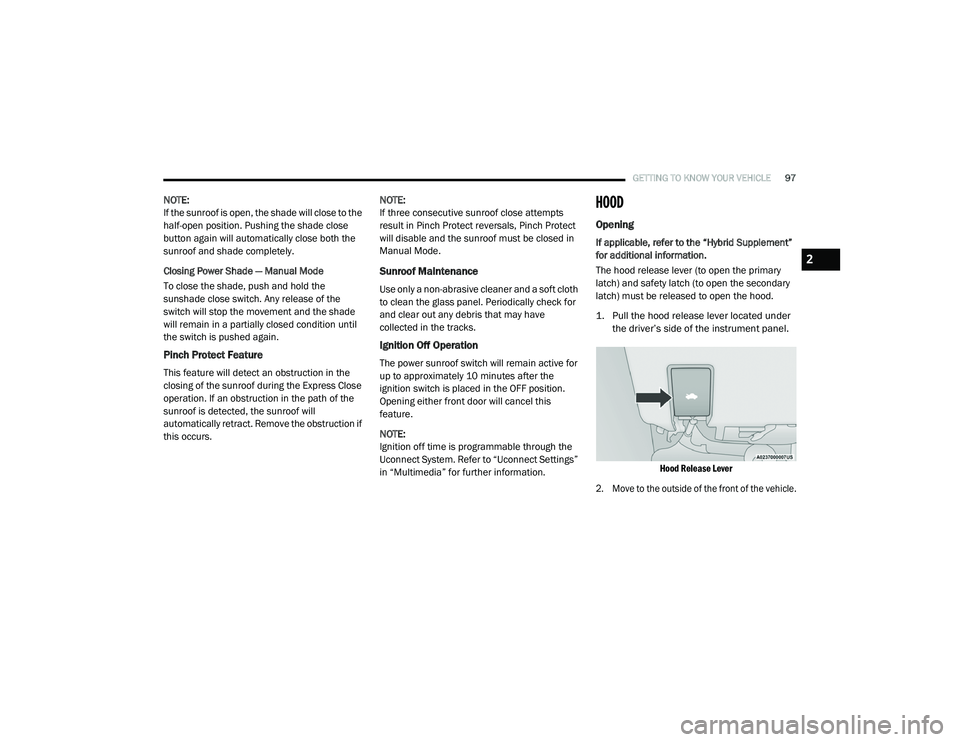
1. Pull the hood release lever located under
the driver’s side of the instrument panel.
Hood Release Lever
2. Move to the outside of the front of the vehicle.
2
20_RU_OM_EN_US_t.book Page 97
Page 101 of 516
GETTING TO KNOW YOUR VEHICLE99
LIFTGATE
Opening
To Unlock/Enter The Liftgate
The liftgate may be released in several ways:
Overhead console liftgate button
Key fob
Outside handle
Push the liftgate button on the key fob twice
within five seconds to release the liftgate.
The key fob and the overhead console button
will release the liftgate when the liftgate is
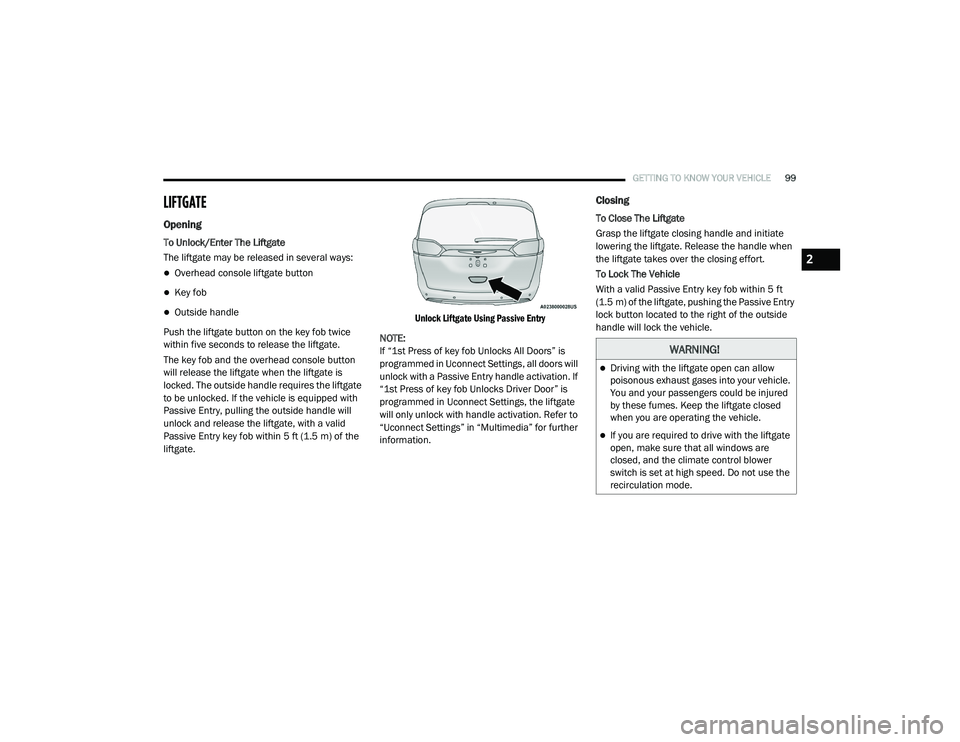
locked. The outside handle requires the liftgate
to be unlocked. If the vehicle is equipped with
Passive Entry, pulling the outside handle will
unlock and release the liftgate, with a valid
Passive Entry key fob within 5 ft (1.5 m) of the
liftgate.
Unlock Liftgate Using Passive Entry
NOTE:
If “1st Press of key fob Unlocks All Doors” is
programmed in Uconnect Settings, all doors will
unlock with a Passive Entry handle activation. If
“1st Press of key fob Unlocks Driver Door” is
programmed in Uconnect Settings, the liftgate
will only unlock with handle activation. Refer to
“Uconnect Settings” in “Multimedia” for further
information.
Closing
To Close The Liftgate
Grasp the liftgate closing handle and initiate
lowering the liftgate. Release the handle when
the liftgate takes over the closing effort.
To Lock The Vehicle
With a valid Passive Entry key fob within 5 ft
(1.5 m) of the liftgate, pushing the Passive Entry
lock button located to the right of the outside
handle will lock the vehicle.
WARNING!
Driving with the liftgate open can allow
poisonous exhaust gases into your vehicle.
You and your passengers could be injured
by these fumes. Keep the liftgate closed
when you are operating the vehicle.
If you are required to drive with the liftgate
open, make sure that all windows are
closed, and the climate control blower
switch is set at high speed. Do not use the
recirculation mode.
2
20_RU_OM_EN_US_t.book Page 99
Page 102 of 516
100GETTING TO KNOW YOUR VEHICLE
Power Liftgate — If Equipped
The power liftgate may be opened or closed in
several ways:
Overhead console liftgate button
Key fob
Outside handle (opens liftgate only)
Button just inside the liftgate on the upper
left trim (when liftgate is open)
Hands-Free Liftgate (if equipped) — opens lift -
gate only
Using the above ways:
When the liftgate is fully closed, the liftgate
will open
When the liftgate is fully open, the liftgate will
close
When the liftgate is moving, the liftgate will
reverse Push the Power Liftgate button on the overhead
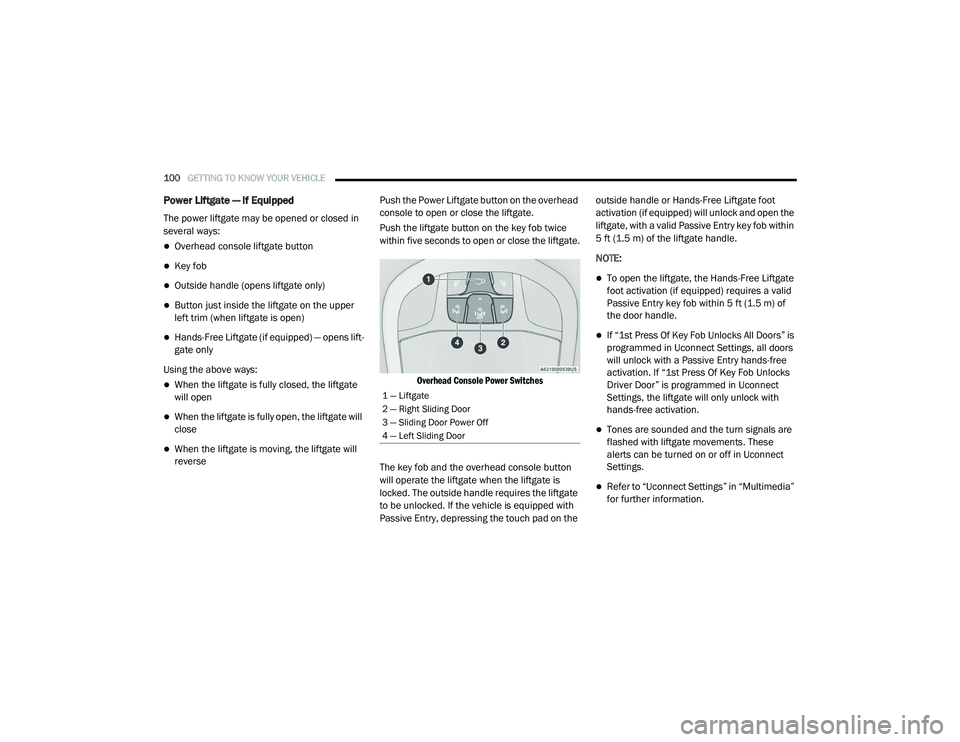
console to open or close the liftgate.
Push the liftgate button on the key fob twice
within five seconds to open or close the liftgate.
Overhead Console Power Switches
The key fob and the overhead console button
will operate the liftgate when the liftgate is
locked. The outside handle requires the liftgate
to be unlocked. If the vehicle is equipped with
Passive Entry, depressing the touch pad on the outside handle or Hands-Free Liftgate foot
activation (if equipped) will unlock and open the
liftgate, with a valid Passive Entry key fob within
5 ft (1.5 m) of the liftgate handle.
NOTE:
To open the liftgate, the Hands-Free Liftgate
foot activation (if equipped) requires a valid
Passive Entry key fob within 5 ft (1.5 m) of
the door handle.
If “1st Press Of Key Fob Unlocks All Doors” is
programmed in Uconnect Settings, all doors
will unlock with a Passive Entry hands-free
activation. If “1st Press Of Key Fob Unlocks
Driver Door” is programmed in Uconnect
Settings, the liftgate will only unlock with
hands-free activation.
Tones are sounded and the turn signals are
flashed with liftgate movements. These
alerts can be turned on or off in Uconnect
Settings.
Refer to “Uconnect Settings” in “Multimedia”
for further information.
1 — Liftgate
2 — Right Sliding Door
3 — Sliding Door Power Off
4 — Left Sliding Door
20_RU_OM_EN_US_t.book Page 100
Page 103 of 516
GETTING TO KNOW YOUR VEHICLE101
To Close The Liftgate
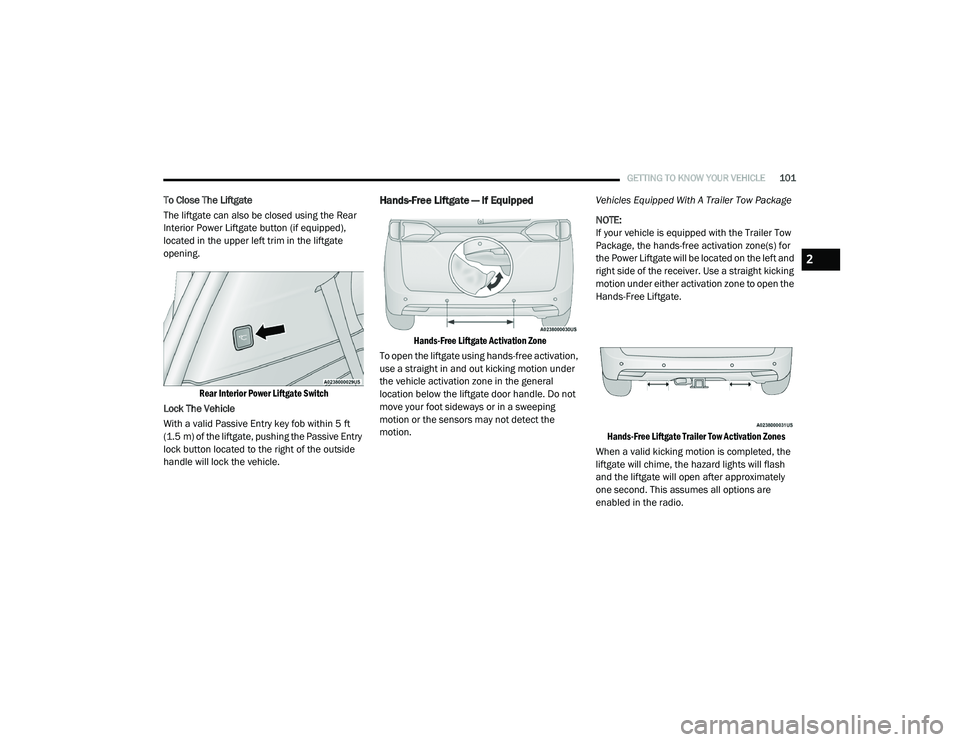
The liftgate can also be closed using the Rear
Interior Power Liftgate button (if equipped),
located in the upper left trim in the liftgate
opening.
Rear Interior Power Liftgate Switch
Lock The Vehicle
With a valid Passive Entry key fob within 5 ft
(1.5 m) of the liftgate, pushing the Passive Entry
lock button located to the right of the outside
handle will lock the vehicle.Hands-Free Liftgate — If Equipped
Hands-Free Liftgate Activation Zone
To open the liftgate using hands-free activation,
use a straight in and out kicking motion under
the vehicle activation zone in the general
location below the liftgate door handle. Do not
move your foot sideways or in a sweeping
motion or the sensors may not detect the
motion. Vehicles Equipped With A Trailer Tow Package
NOTE:
If your vehicle is equipped with the Trailer Tow
Package, the hands-free activation zone(s) for
the Power Liftgate will be located on the left and
right side of the receiver. Use a straight kicking
motion under either activation zone to open the
Hands-Free Liftgate.
Hands-Free Liftgate Trailer Tow Activation Zones
When a valid kicking motion is completed, the
liftgate will chime, the hazard lights will flash
and the liftgate will open after approximately
one second. This assumes all options are
enabled in the radio.
2
20_RU_OM_EN_US_t.book Page 101
Page 109 of 516
GETTING TO KNOW YOUR VEHICLE107
5. When finished, push power button to turn
vacuum off and store vacuum hose and any
attachments.
6. Before exiting the vehicle:
If the ignition is in the ACC position, push
the START/STOP ignition button to place
ignition in the OFF position, remove key
fob from the vehicle, and lock the vehicle.
If the engine is running, raise all of the
windows, push the START/STOP ignition
button to place ignition in the OFF posi -tion, remove key fob from the vehicle,
close all of the doors and the liftgate and
lock the vehicle.
Vacuum Troubleshooting
DO NOT use with any opening blocked. If an
object becomes lodged in the hose, attempt
to fully extend the hose in a straight line while
the vacuum motor is running. If this does not
dislodge the object, turn the vacuum OFF and
remove the hose from the vehicle following
the removal instructions below. If the filter is
clogged, follow the emptying debris bin
procedure and lightly tap the filter on the
collection bin to remove any collected debris
from the filter. Both the bin and the filter can
be rinsed with water if needed. To avoid mold
and stale odors, allow both to dry completely
before reinstalling in your vehicle. If the filter
has tears, holes or other damage and needs
to be replaced, please contact an authorized
dealer.
If there are any other issues with your
vacuum, contact an authorized dealer. Your
vacuum has no user serviceable parts. Debris Bin
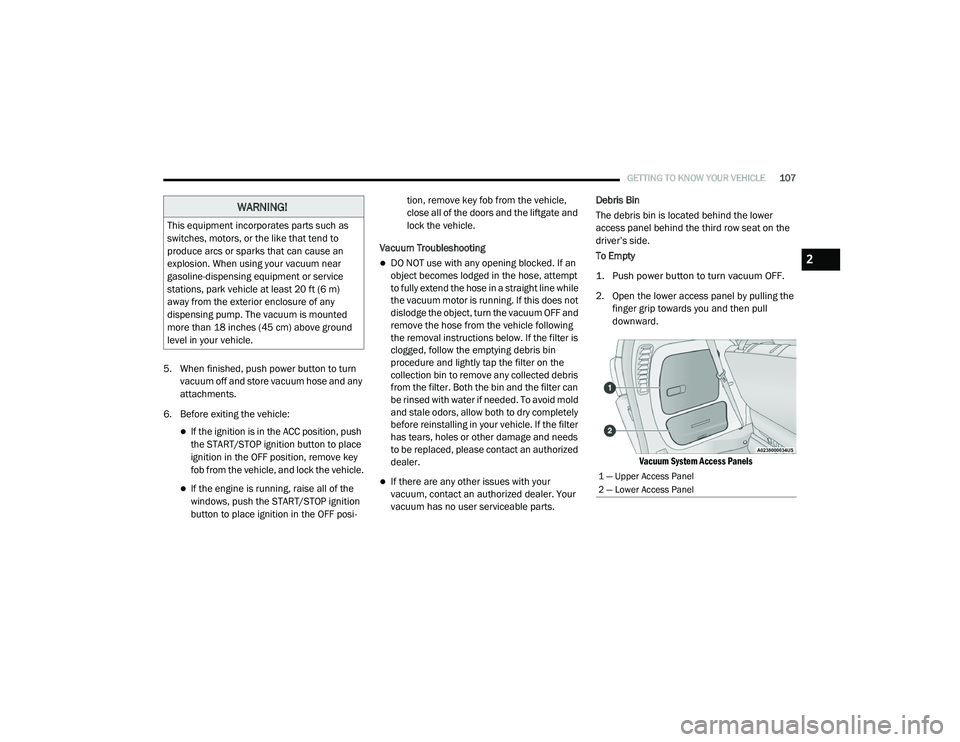
The debris bin is located behind the lower
access panel behind the third row seat on the
driver’s side.
To Empty
1. Push power button to turn vacuum OFF.
2. Open the lower access panel by pulling the
finger grip towards you and then pull
downward.
Vacuum System Access Panels
WARNING!
This equipment incorporates parts such as
switches, motors, or the like that tend to
produce arcs or sparks that can cause an
explosion. When using your vacuum near
gasoline-dispensing equipment or service
stations, park vehicle at least 20 ft (6 m)
away from the exterior enclosure of any
dispensing pump. The vacuum is mounted
more than 18 inches (45 cm) above ground
level in your vehicle.
1 — Upper Access Panel
2 — Lower Access Panel
2
20_RU_OM_EN_US_t.book Page 107
Page 111 of 516
GETTING TO KNOW YOUR VEHICLE109
GARAGE DOOR OPENER — IF EQUIPPED
HomeLink® replaces up to three hand-held
transmitters that operate devices such as
garage door openers, motorized gates, lighting
or home security systems. The HomeLink® unit
is powered by your vehicle’s 12 Volt battery.
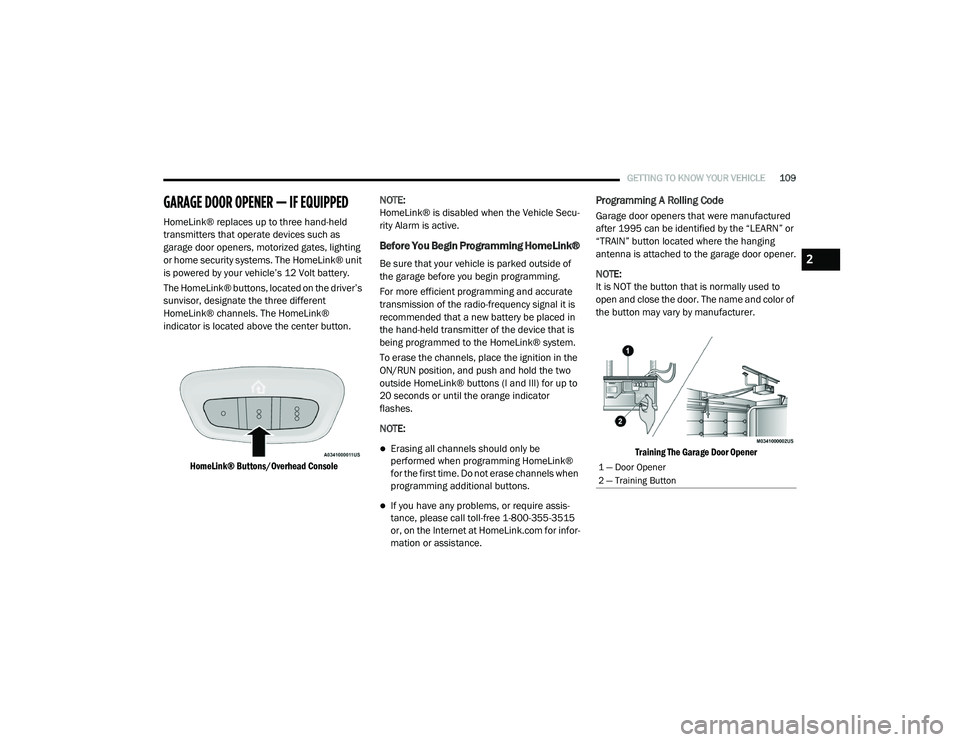
The HomeLink® buttons, located on the driver’s
sunvisor, designate the three different
HomeLink® channels. The HomeLink®
indicator is located above the center button.
HomeLink® Buttons/Overhead Console
NOTE:
HomeLink® is disabled when the Vehicle Secu
-
rity Alarm is active.
Before You Begin Programming HomeLink®
Be sure that your vehicle is parked outside of
the garage before you begin programming.
For more efficient programming and accurate
transmission of the radio-frequency signal it is
recommended that a new battery be placed in
the hand-held transmitter of the device that is
being programmed to the HomeLink® system.
To erase the channels, place the ignition in the
ON/RUN position, and push and hold the two
outside HomeLink® buttons (I and III) for up to
20 seconds or until the orange indicator
flashes.
NOTE:
Erasing all channels should only be
performed when programming HomeLink®
for the first time. Do not erase channels when
programming additional buttons.
If you have any problems, or require assis -
tance, please call toll-free 1-800-355-3515
or, on the Internet at HomeLink.com for infor -
mation or assistance.
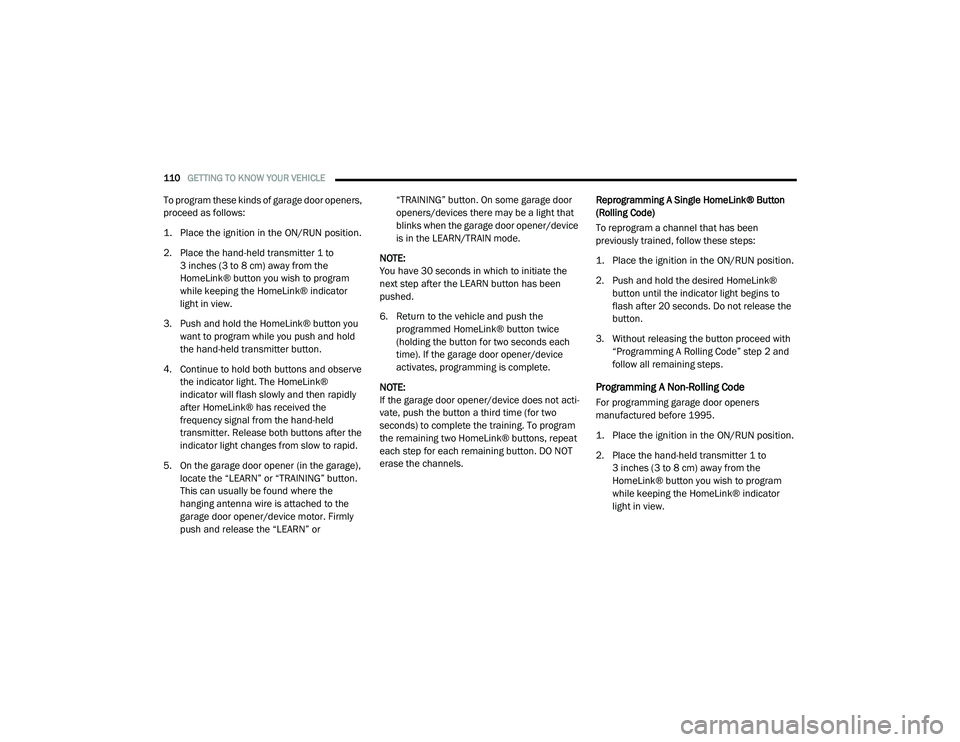
Programming A Rolling Code
Garage door openers that were manufactured
after 1995 can be identified by the “LEARN” or
“TRAIN” button located where the hanging
antenna is attached to the garage door opener.
NOTE:
It is NOT the button that is normally used to
open and close the door. The name and color of
the button may vary by manufacturer.
Training The Garage Door Opener
1 — Door Opener
2 — Training Button
2
20_RU_OM_EN_US_t.book Page 109
Page 112 of 516
110GETTING TO KNOW YOUR VEHICLE
To program these kinds of garage door openers,
proceed as follows:
1. Place the ignition in the ON/RUN position.
2. Place the hand-held transmitter 1 to
3 inches (3 to 8 cm) away from the
HomeLink® button you wish to program
while keeping the HomeLink® indicator
light in view.
3. Push and hold the HomeLink® button you want to program while you push and hold
the hand-held transmitter button.
4. Continue to hold both buttons and observe the indicator light. The HomeLink®
indicator will flash slowly and then rapidly
after HomeLink® has received the
frequency signal from the hand-held
transmitter. Release both buttons after the
indicator light changes from slow to rapid.
5. On the garage door opener (in the garage), locate the “LEARN” or “TRAINING” button.
This can usually be found where the
hanging antenna wire is attached to the
garage door opener/device motor. Firmly
push and release the “LEARN” or “TRAINING” button. On some garage door
openers/devices there may be a light that
blinks when the garage door opener/device
is in the LEARN/TRAIN mode.
NOTE:
You have 30 seconds in which to initiate the
next step after the LEARN button has been
pushed.
6. Return to the vehicle and push the programmed HomeLink® button twice
(holding the button for two seconds each
time). If the garage door opener/device
activates, programming is complete.
NOTE:
If the garage door opener/device does not acti -
vate, push the button a third time (for two
seconds) to complete the training. To program
the remaining two HomeLink® buttons, repeat
each step for each remaining button. DO NOT
erase the channels. Reprogramming A Single HomeLink® Button
(Rolling Code)
To reprogram a channel that has been
previously trained, follow these steps:
1. Place the ignition in the ON/RUN position.
2. Push and hold the desired HomeLink®
button until the indicator light begins to
flash after 20 seconds. Do not release the
button.
3. Without releasing the button proceed with “Programming A Rolling Code” step 2 and
follow all remaining steps.
Programming A Non-Rolling Code
For programming garage door openers
manufactured before 1995.
1. Place the ignition in the ON/RUN position.
2. Place the hand-held transmitter 1 to 3 inches (3 to 8 cm) away from the
HomeLink® button you wish to program
while keeping the HomeLink® indicator
light in view.
20_RU_OM_EN_US_t.book Page 110