ECO mode CHRYSLER PACIFICA 2021 User Guide
[x] Cancel search | Manufacturer: CHRYSLER, Model Year: 2021, Model line: PACIFICA, Model: CHRYSLER PACIFICA 2021Pages: 401, PDF Size: 26.88 MB
Page 69 of 401
GETTING TO KNOW YOUR VEHICLE67
NOTE:
Before exiting the vehicle, make sure that the
interior lights are turned off. This will prevent the
battery from discharging once the doors are
closed.
If a light is left on, it will automatically be turned
off approximately 10 minutes after the ignition
is in the OFF position.
Rear Courtesy/Reading Lights —
If Equipped
Located above the rear passengers are
courtesy/reading lights. The lights turn on when a
front door, a sliding door or the liftgate is opened.
If your vehicle is equipped with Remote Keyless
Entry (RKE) the lights will also turn on when the
unlock button on the key fob is pushed.
The courtesy lights also function as reading lights.
Push the lens to turn these lights on while inside
the vehicle. Push the lens a second time to turn
each light off.
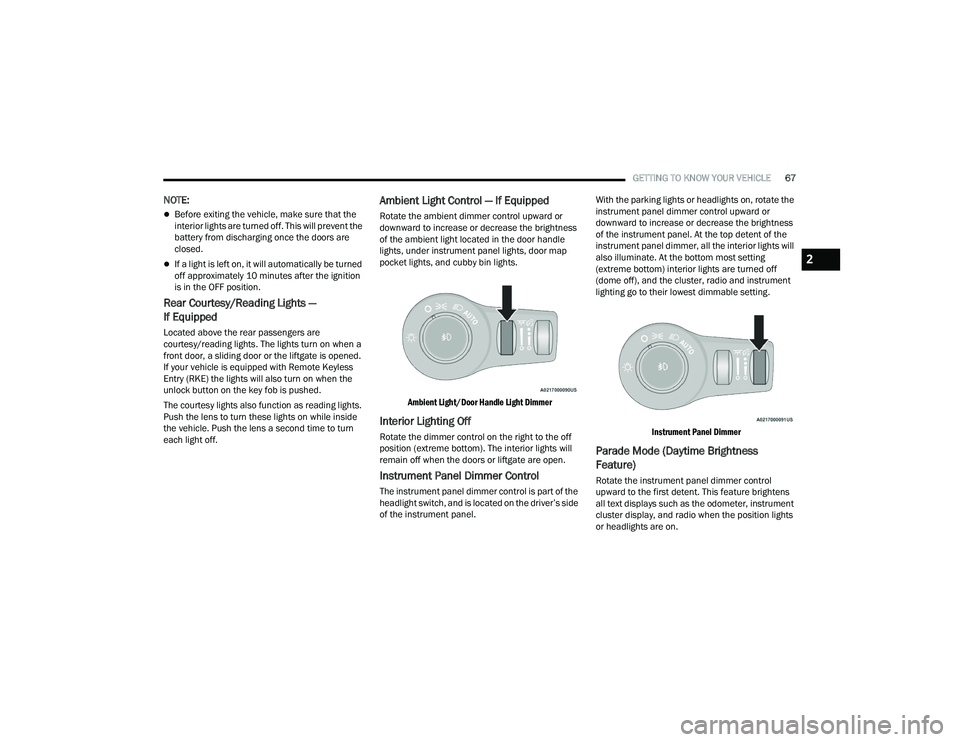
Ambient Light Control — If Equipped
Rotate the ambient dimmer control upward or
downward to increase or decrease the brightness
of the ambient light located in the door handle
lights, under instrument panel lights, door map
pocket lights, and cubby bin lights.
Ambient Light/Door Handle Light Dimmer
Interior Lighting Off
Rotate the dimmer control on the right to the off
position (extreme bottom). The interior lights will
remain off when the doors or liftgate are open.
Instrument Panel Dimmer Control
The instrument panel dimmer control is part of the
headlight switch, and is located on the driver’s side
of the instrument panel. With the parking lights or headlights on, rotate the
instrument panel dimmer control upward or
downward to increase or decrease the brightness
of the instrument panel. At the top detent of the
instrument panel dimmer, all the interior lights will
also illuminate. At the bottom most setting
(extreme bottom) interior lights are turned off
(dome off), and the cluster, radio and instrument
lighting go to their lowest dimmable setting.
Instrument Panel Dimmer
Parade Mode (Daytime Brightness
Feature)
Rotate the instrument panel dimmer control
upward to the first detent. This feature brightens
all text displays such as the odometer, instrument
cluster display, and radio when the position lights
or headlights are on.
2
21_RUP_OM_EN_USC_t.book Page 67
Page 71 of 401

GETTING TO KNOW YOUR VEHICLE69
Mist
Push the lever upward to the MIST position and
release for a single wiping cycle.
NOTE:The Mist feature does not activate the washer
pump; therefore, no washer fluid will be sprayed on
the windshield. The wash function must be used in
order to spray the windshield with washer fluid.
For information on wiper care and replacement,
see Ú page 337.
RAIN SENSING WIPERS — IF EQUIPPED
This feature senses rain or snowfall on the
windshield and automatically activates the wipers.
Rotate the end of the windshield wiper lever to one
of the four detent positions to activate this feature.
The sensitivity of the system is adjustable from the
windshield wiper lever. Wiper sensitivity position
1 is the least sensitive, and wiper sensitivity
position 4 is the most sensitive.
NOTE:
The Rain Sensing feature will not operate when
the wiper switch is in the low or high position.
The Rain Sensing feature may not function prop -
erly when ice or dried saltwater is present on the
windshield.
Use of Rain-X or products containing wax or sili-
cone may reduce rain sensor performance.
The Rain Sensing feature can be turned on and
off through the Uconnect system Ú page 189.
The Rain Sensing system has protective features
for the wiper blades and arms. It will not operate
under the following conditions:
Low Temperature Wipe Inhibit — The Rain
Sensing feature will not operate when the igni -
tion is first placed in the ON position, when the
vehicle is stationary and the outside tempera -
ture is below 32°F (0°C), unless the wiper
control on the windshield wiper lever is moved,
the vehicle speed becomes greater than 3 mph
(5 km/h) or the outside temperature rises
above freezing.
Neutral Wipe Inhibit — The Rain Sensing
feature will not operate when the ignition is ON,
when the transmission gear selector is in the
NEUTRAL position and the vehicle speed is less
than 3 mph (5 km/h), unless the wiper control
on the windshield wiper lever is moved, the
vehicle speed is greater than 3 mph (5 km/h) or the gear selector is moved out of the NEUTRAL
position.
Remote Start Mode Inhibit — On vehicles
equipped with the Remote Start system, Rain
Sensing wipers are not operational when the
vehicle is in the Remote Start mode. Once the
operator is in the vehicle and has placed the
ignition switch in the ON/RUN position, rain
sensing wiper operation can resume, if it has
been selected, and no other inhibit conditions
(mentioned previously) exist.
REAR WIPER AND WASHER
Rear Window Wiper Operation
Rotate the windshield wiper lever center ring
upwards to operate one of two modes for the rear
window wiper:
First detent — intermittent mode.
Second detent — continuous mode.
Rear Window Washer Operation
Pushing the windshield wiper lever forward
activates the rear window washer. If the lever is
pushed while on the intermittent setting, the
wipers will turn on and operate for several wipe
cycles after the lever is released, and then resume
the intermittent interval previously selected. If the
lever is pushed while the wipers are in the off
position, the wipers will operate several wipe
cycles, then turn off.
2
21_RUP_OM_EN_USC_t.book Page 69
Page 72 of 401
70GETTING TO KNOW YOUR VEHICLE
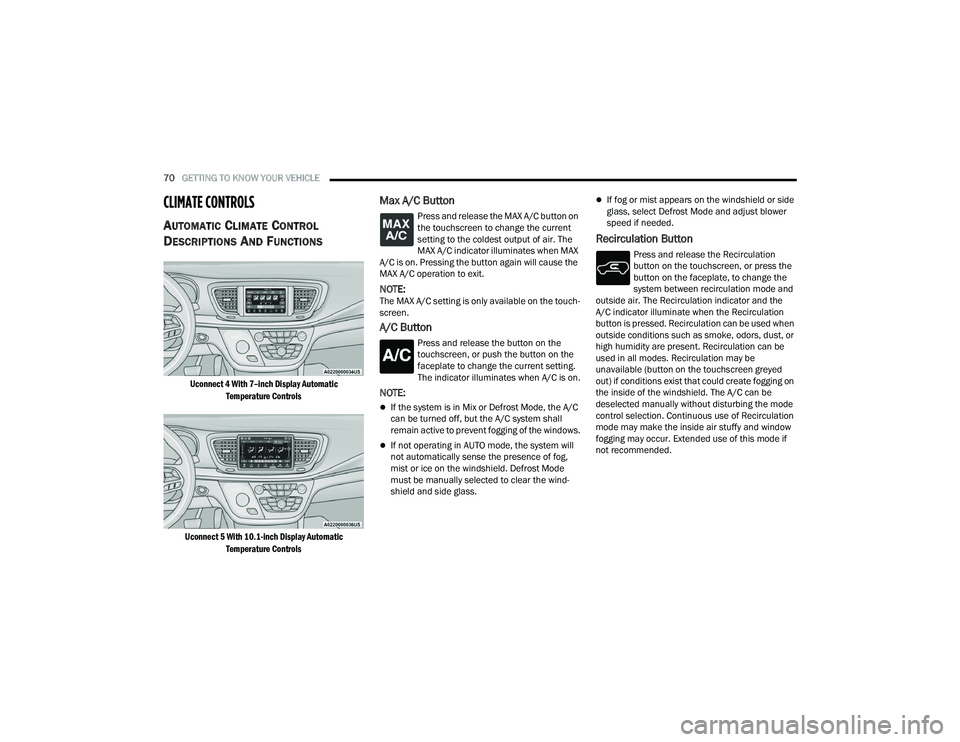
CLIMATE CONTROLS
AUTOMATIC CLIMATE CONTROL
D
ESCRIPTIONS AND FUNCTIONS
Uconnect 4 With 7–inch Display Automatic
Temperature Controls
Uconnect 5 With 10.1-inch Display Automatic Temperature Controls
Max A/C Button
Press and release the MAX A/C button on
the touchscreen to change the current
setting to the coldest output of air. The
MAX A/C indicator illuminates when MAX
A/C is on. Pressing the button again will cause the
MAX A/C operation to exit.
NOTE:The MAX A/C setting is only available on the touch -
screen.
A/C Button
Press and release the button on the
touchscreen, or push the button on the
faceplate to change the current setting.
The indicator illuminates when A/C is on.
NOTE:
If the system is in Mix or Defrost Mode, the A/C
can be turned off, but the A/C system shall
remain active to prevent fogging of the windows.
If not operating in AUTO mode, the system will
not automatically sense the presence of fog,
mist or ice on the windshield. Defrost Mode
must be manually selected to clear the wind -
shield and side glass.
If fog or mist appears on the windshield or side
glass, select Defrost Mode and adjust blower
speed if needed.
Recirculation Button
Press and release the Recirculation
button on the touchscreen, or press the
button on the faceplate, to change the
system between recirculation mode and
outside air. The Recirculation indicator and the
A/C indicator illuminate when the Recirculation
button is pressed. Recirculation can be used when
outside conditions such as smoke, odors, dust, or
high humidity are present. Recirculation can be
used in all modes. Recirculation may be
unavailable (button on the touchscreen greyed
out) if conditions exist that could create fogging on
the inside of the windshield. The A/C can be
deselected manually without disturbing the mode
control selection. Continuous use of Recirculation
mode may make the inside air stuffy and window
fogging may occur. Extended use of this mode if
not recommended.
21_RUP_OM_EN_USC_t.book Page 70
Page 73 of 401
GETTING TO KNOW YOUR VEHICLE71
AUTO Button
Set your desired temperature and press
the AUTO button on the touchscreen, or
push the button on the faceplate. AUTO
will achieve and maintain your desired
temperature by automatically adjusting the blower
speed and air distribution. AUTO mode is highly
recommended for efficiency. You can turn AUTO on
in one of two ways:
Press and release this button on the touch -
screen
Push the button on the faceplate
Toggling this function will cause the system to
switch between manual mode and automatic
mode Ú page 81.
Front Defrost Button
Press and release the Front Defrost
button on the touchscreen, or push the
button on the faceplate to change the
current airflow setting to Defrost mode.
The indicator illuminates when this feature is on.
Air comes from the windshield and side window
demist outlets. When the defrost button is
selected, the blower level may increase. Use
Defrost mode with maximum temperature settings
for best windshield and side window defrosting and defogging. Performing this function will cause
the Automatic Temperature Control (ATC) to switch
into manual mode. If the Front Defrost mode is
turned off the climate system will return to the
previous setting.
Rear Defrost Button
Press and release the Rear Defrost
Control button to turn on the rear window
defroster and the heated outside mirrors
(if equipped). An indicator will illuminate
when the rear window defroster is on. The rear
window defroster automatically turns off after
15 minutes.
Front Temperature Control
These buttons provide the driver and passenger
with independent temperature control.
Push the red button on the faceplate or
touchscreen or press and slide the
temperature bar towards the red arrow
button on the touchscreen for warmer
temperature settings.
Push the blue button on the faceplate or
touchscreen or press and slide the
temperature bar towards the blue arrow
button on the touchscreen for cooler
temperature settings.
NOTE:If your vehicle is equipped with a Uconnect 5 radio,
the temperature can be adjusted by pressing the
Temperature readout on the top left and right
corners of the status bar.
SYNC Button
Press the SYNC button on the
touchscreen to toggle the SYNC feature
on/off. The SYNC indicator is illuminated
when this feature is enabled. SYNC is
used to synchronize the front and rear passenger
temperature settings with the driver temperature
setting. Changing the front or rear passenger
temperature setting while in SYNC will
automatically exit this feature.
CAUTION!
Failure to follow these cautions can cause
damage to the heating elements:
Use care when washing the inside of the rear
window. Do not use abrasive window cleaners
on the interior surface of the window. Use a
soft cloth and a mild washing solution, wiping
parallel to the heating elements. Labels can
be peeled off after soaking with warm water.
Do not use scrapers, sharp instruments, or
abrasive window cleaners on the interior
surface of the window.
Keep all objects a safe distance from the
window.
2
21_RUP_OM_EN_USC_t.book Page 71
Page 76 of 401
74GETTING TO KNOW YOUR VEHICLE
SYNC BUTTON
Press the “SYNC To Driver” button on the
touchscreen to toggle the SYNC feature
on/off. The SYNC indicator is illuminated
when this feature is enabled. SYNC is
used to synchronize the front and rear passenger
temperature settings with the driver temperature
setting. Changing the front or rear passenger
temperature/mode/blower settings while in SYNC
will automatically exit this feature.
NOTE:The SYNC setting is only available on the touch -
screen.
BLOWER CONTROL
Blower Control is used to regulate the
amount of air forced through the Climate
Control system. There are seven blower
speeds available. Adjusting the blower
causes automatic mode to switch to manual
operation. The speeds can be selected using the
buttons on the touchscreen.
PANEL MODE
Press this button on the touchscreen to
change the air distribution mode to Panel
Mode. In Panel Mode, air comes from the
outlets in the headliner. Each of these
outlets can be individually adjusted to direct the
flow of air. Moving the air vanes of the outlets to
one side will shut off the airflow.
BI-LEVEL MODE
Press this button on the touchscreen to
change the air distribution mode to
Bi-Level Mode. In Bi-Level Mode, air
comes from both the headliner outlets
and the floor outlets.
NOTE:Bi-Level mode is designed under comfort condi -
tions to provide cooler air out of the panel outlets
and warmer air from the floor outlets.
FLOOR MODE
Press this button on the touchscreen to
change the air distribution mode to Floor
Mode. In Floor Mode, air comes from the
floor outlets.
REAR PASSENGER CLIMATE CONTROL OFF
BUTTON
Press and release this button to turn the
Rear Climate Controls off.
Rear Automatic Temperature Control
(ATC) — If Equipped
The rear Automatic Temperature Control (ATC)
system has floor air outlets underneath the
passengers’ seats, and overhead outlets at each
outboard rear seating position. The system
provides heated air through the floor outlets or
cool, dehumidified air through the headliner
outlets.
Rear second row occupants can only adjust the
rear ATC control when the Rear Temperature Lock
button is turned off.
21_RUP_OM_EN_USC_t.book Page 74
Page 79 of 401
GETTING TO KNOW YOUR VEHICLE77
Recirculation may be unavailable (button on the
touchscreen greyed out) if conditions exist that
could create fogging on the inside of the
windshield. The A/C (Air Conditioning) can be
deselected manually without disturbing the mode
control selection. Continuous use of the
Recirculation mode may make the inside air stuffy
and window fogging may occur. Extended use of
this mode is not recommended. On systems with
Manual Climate Controls, the Recirculation mode
(if equipped) is not allowed in Defrost mode to
improve window clearing operation. Recirculation
is disabled automatically if this mode is selected.
Attempting to use Recirculation while in this mode
causes the LED on the control button to blink and
then turn off.
Front Defrost Button
Press and release the Front Defrost
button to change the current airflow
setting to Defrost mode. The indicator
illuminates when this feature is on. Air
comes from the windshield and side window
demist outlets. When the defrost button is
selected, the blower level may increase. Use
Defrost mode with maximum temperature settings
for best windshield and side window defrosting
and defogging. Performing this function will cause
the Automatic Temperature Control (ATC) to switch
into manual mode. If the Front Defrost mode is turned off the climate
system will return the previous setting.
Rear Defrost Button
Push and release the Rear Defrost
Control button to turn on the rear window
defroster and the heated outside mirrors
(if equipped). An indicator will illuminate
when the rear window defroster is on. The rear
window defroster automatically turns off after
15 minutes.
Front Temperature Control
These buttons provide the driver and passenger
with independent temperature control.
Push the red button on the faceplate or
touchscreen or press and slide the
temperature bar towards the red arrow
button on the touchscreen for warmer
temperature settings.
Push the blue button on the faceplate or
touchscreen or press and slide the
temperature bar towards the blue arrow
button on the touchscreen for cooler
temperature settings.
SYNC Button
Press the SYNC button on the
touchscreen to toggle the Sync feature
on/off. The SYNC indicator is illuminated
when this feature is enabled. SYNC is
used to synchronize the front and rear passenger
temperature settings with the driver temperature
setting. Changing the front or rear passenger
temperature setting while in SYNC will
automatically exit this feature. Pressing SYNC on
the touchscreen while in the Front Climate screen
synchronizes the driver and passenger
temperatures only. In order to SYNC rear
temperature to driver temperature, the
touchscreen must be on the Rear Climate screen.
CAUTION!
Failure to follow these cautions can cause
damage to the heating elements:
Use care when washing the inside of the rear
window. Do not use abrasive window cleaners
on the interior surface of the window. Use a
soft cloth and a mild washing solution, wiping
parallel to the heating elements. Labels can
be peeled off after soaking with warm water.
Do not use scrapers, sharp instruments, or
abrasive window cleaners on the interior
surface of the window.
Keep all objects a safe distance from the
window.
2
21_RUP_OM_EN_USC_t.book Page 77
Page 84 of 401
82GETTING TO KNOW YOUR VEHICLE
To provide you with maximum comfort in the
Automatic mode during cold start-ups, the blower
fan will remain on low until the engine warms up.
The blower will increase in speed and transition
into Auto mode.
Manual Operation Override
This system offers a full complement of manual
override features. The AUTO symbol in the front
Automatic Temperature Control (ATC) display will
be turned off when the system is being used in the
manual mode.
CLIMATE VOICE COMMANDS
Adjust vehicle temperatures hands-free and keep
everyone comfortable while you keep moving
ahead. (If vehicle is equipped with climate control.)
Push the VR button on the steering wheel. After the
beep, say one of the following commands:
“Set driver temperature to 70 degrees ”
“Set passenger temperature to 70 degrees ”
Did you know : Voice Command for Climate may
only be used to adjust the interior temperature of
your vehicle. Voice Command will not work to
adjust the heated seats or steering wheel if
equipped.
OPERATING TIPS
NOTE:Refer to the chart at the end of this section for
suggested control settings for various weather
conditions.
Summer Operation
The engine cooling system must be protected with
a high-quality antifreeze coolant to provide proper
corrosion protection and to protect against engine
overheating. OAT coolant (conforming to
MS.90032) is recommended Ú page 382.
Winter Operation
To ensure the best possible heater and defroster
performance, make sure the engine cooling
system is functioning properly and the proper
amount, type, and concentration of coolant is
used. Use of the Air Recirculation mode during
Winter months is not recommended, because it
may cause window fogging.
Vacation/Storage
For information on maintaining the Climate Control
system when the vehicle is being stored for an
extended period of time, see Úpage 373.
Window Fogging
Vehicle windows tend to fog on the inside in mild,
rainy, and/or humid weather. To clear the
windows, select Defrost or Mix mode and increase
the front blower speed. Do not use the
Recirculation mode without A/C (Air Conditioning)
for long periods, as fogging may occur.
Outside Air Intake
Make sure the air intake, located directly in front of
the windshield, is free of obstructions such as
leaves. Leaves collected in the air intake may
reduce airflow, and if they enter the plenum, they
could plug the water drains. In Winter months,
make sure the air intake is clear of ice, slush, and
snow.
Cabin Air Filter
The Climate Control system filters out dust and
pollen from the air. Contact an authorized dealer to
service your cabin air filter, and to have it replaced
when needed
21_RUP_OM_EN_USC_t.book Page 82
Page 98 of 401
96GETTING TO KNOW YOUR VEHICLE
OPENING AND CLOSING THE POWER
S
UNSHADE — IF EQUIPPED
The sunshade has two programmed open
positions: half-open and full-open. When opening
the sunshade from the closed position, the
sunshade will always stop at the half-open position
regardless of express or manual open operation.
The switch must be actuated again to continue to
the full-open position.
Express Open/Close
Push the sunshade open switch and release it
within one second and the sunshade will open to
the half-open position and stop automatically.
Push and release the sunshade open switch again
from the half-open position and the sunshade will
open to the full-open position and stop
automatically. This is called Express Open.
Push the sunshade close switch and release it
within one second and the sunshade will close
automatically from any position. If the sunroof is
completely closed, the shade will close fully and
stop automatically. This is called Express Close.
NOTE:
During Express Open or Express Close opera -
tion, any movement of the sunshade switch will
stop the shade.
If the sunroof is open, the shade will close to the
half-open position. Pushing the shade close
button again will automatically close both the
sunroof and shade completely.
Manual Open/Close
Push and hold the sunshade open switch and the
shade will open to the half-open position and stop
automatically. Push and hold the sunshade open
switch again and the shade will open automatically
to the full-open position.
To close the shade, push and hold the sunshade
close switch.
Any release of the switch will stop the movement
and the sunshade will remain in a partially opened
condition until the switch is pushed again.
PINCH PROTECT FEATURE
This feature will detect an obstruction in the
closing of the sunroof during the Express Close
operation. If an obstruction in the path of the
sunroof is detected, the sunroof will automatically
retract. Remove the obstruction if this occurs.
NOTE:If three consecutive sunroof close attempts result
in Pinch Protect reversals, Pinch Protect will
disable and the sunroof must be closed in Manual
Mode.
VENTING SUNROOF
Push and release the "Vent" button within one
second and the sunroof will open to the vent
position. This is called “Express Vent”, and it will
occur regardless of sunroof position.
NOTE:If the sunshade is in the closed position when the
vent switch is pushed, the sunshade will automati -
cally cycle to the halfway open position prior to the
sunroof opening to the Vent position.
IGNITION OFF OPERATION
The power sunroof switch will remain active for up
to approximately 10 minutes after the ignition
switch is placed in the OFF position. Opening either
front door will cancel this feature.
NOTE:Ignition off time is programmable through the
Uconnect system Ú page 189.
SUNROOF MAINTENANCE
Use only a non-abrasive cleaner and a soft cloth to
clean the glass panel. Periodically check for and
clear out any debris that may have collected in the
tracks.
21_RUP_OM_EN_USC_t.book Page 96
Page 100 of 401
98GETTING TO KNOW YOUR VEHICLE
LIFTGATE
TO UNLOCK/OPEN THE LIFTGATE
The liftgate may be released in several ways:
Key fob
Outside handle
Button on overhead console
Push the liftgate button on the key fob twice within
five seconds to release the liftgate.
The key fob and the overhead console button will
release the liftgate when the liftgate is locked. The
outside handle requires the liftgate to be unlocked.
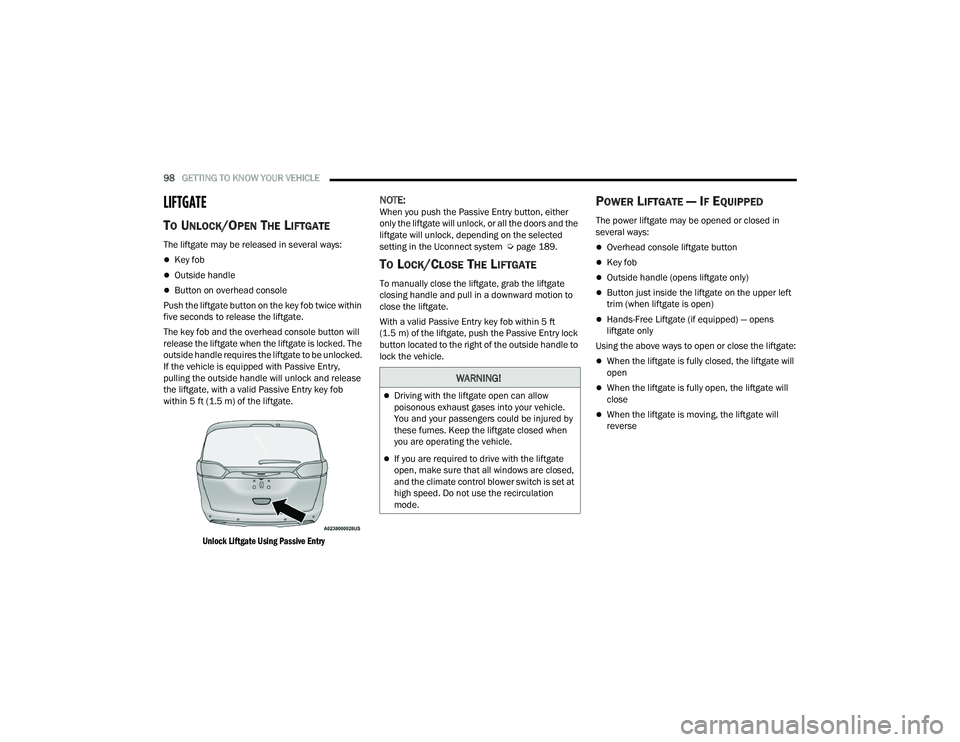
If the vehicle is equipped with Passive Entry,
pulling the outside handle will unlock and release
the liftgate, with a valid Passive Entry key fob
within 5 ft (1.5 m) of the liftgate.
Unlock Liftgate Using Passive Entry
NOTE:When you push the Passive Entry button, either
only the liftgate will unlock, or all the doors and the
liftgate will unlock, depending on the selected
setting in the Uconnect system Ú page 189.
TO LOCK/CLOSE THE LIFTGATE
To manually close the liftgate, grab the liftgate
closing handle and pull in a downward motion to
close the liftgate.
With a valid Passive Entry key fob within 5 ft
(1.5 m) of the liftgate, push the Passive Entry lock
button located to the right of the outside handle to
lock the vehicle.
POWER LIFTGATE — IF EQUIPPED
The power liftgate may be opened or closed in
several ways:
Overhead console liftgate button
Key fob
Outside handle (opens liftgate only)
Button just inside the liftgate on the upper left
trim (when liftgate is open)
Hands-Free Liftgate (if equipped) — opens
liftgate only
Using the above ways to open or close the liftgate:
When the liftgate is fully closed, the liftgate will
open
When the liftgate is fully open, the liftgate will
close
When the liftgate is moving, the liftgate will
reverse
WARNING!
Driving with the liftgate open can allow
poisonous exhaust gases into your vehicle.
You and your passengers could be injured by
these fumes. Keep the liftgate closed when
you are operating the vehicle.
If you are required to drive with the liftgate
open, make sure that all windows are closed,
and the climate control blower switch is set at
high speed. Do not use the recirculation
mode.
21_RUP_OM_EN_USC_t.book Page 98
Page 123 of 401

GETTING TO KNOW YOUR INSTRUMENT PANEL121
Speed Warning — If Equipped
Push and release the up or down arrow
button until Speed Warning is highlighted in the
instrument cluster display. Push and release the
OK button to enter Speed Warning. Use the
up or down arrow button to turn the Speed
Warning ON or OFF, then push and release the OK
button to confirm the selection. If the ON status is
selected, use the up or down arrow button
to set the desired speed, then push the OK button
to set the speed for the Speed Warning. A Speed
Warning telltale will illuminate in the instrument
cluster, with a number matching the set speed,
with a pop-up message to inform the driver that the
Speed Warning has been set to the desired speed.
Each time the set speed is exceeded, a single
chime will sound and a pop-up warning message
will display. If the set speed is exceeded more than
2 mph (3 km/h), a continuous chime will sound for
up to 10 seconds, or until the speed is no longer
exceeded. The telltale in the instrument cluster will
also change from white to yellow, and a pop-up
warning message will pop-up on the instrument
cluster display.
NOTE:Speed Warning is unavailable while KeySense is
in use.
BATTERY SAVER ON/BATTERY SAVER
M
ODE MESSAGE — ELECTRICAL LOAD
R
EDUCTION ACTIONS — IF EQUIPPED
This vehicle is equipped with an Intelligent Battery
Sensor (IBS) to perform additional monitoring of
the electrical system and status of the vehicle
battery.
In cases when the IBS detects charging system
failure, or the 12 Volt vehicle battery conditions are
deteriorating, electrical load reduction actions will
take place to extend the driving time and distance
of the vehicle. This is done by reducing power to or
turning off non-essential 12 Volt electrical loads.
Load reduction will be functional when the vehicle
propulsion system is active.
The vehicle may not be running depending on the
High Voltage (HV) battery State Of Charge (SOC) or
temperature. It will display a message if there is a
risk of battery depletion to the point where the
vehicle may stall due to lack of electrical supply, or
will not restart after the current drive cycle.
When 12 Volt load reduction is activated, the
message “Battery Saver On” or “Battery Saver
Mode” will appear in the instrument cluster
display. These messages indicate the vehicle battery has a
low state of charge and continues to lose electrical
charge at a rate that the charging system cannot
sustain.NOTE:
The charging system is independent from load
reduction. The charging system performs a diag
-
nostic on the charging system continuously.
If the Battery Charge Warning Light is on it may
indicate a problem with the charging system
Ú page 123.
The electrical loads that may be switched off (if
equipped), and vehicle functions which can be
effected by load reduction:
Heated Seat/Vented Seats/Heated Wheel
Heated/Cooled Cup Holders — If Equipped
Rear Defroster And Heated Mirrors
HVAC System
115 Volts AC Power Inverter System
Audio and Telematics System
3
21_RUP_OM_EN_USC_t.book Page 121