brake CHRYSLER TOWN AND COUNTRY 2015 5.G User Guide
[x] Cancel search | Manufacturer: CHRYSLER, Model Year: 2015, Model line: TOWN AND COUNTRY, Model: CHRYSLER TOWN AND COUNTRY 2015 5.GPages: 164, PDF Size: 22.47 MB
Page 6 of 164
VEHICLES SOLD IN CANADA
With respect to any vehicles sold in Canada, the name Chrysler Group LLC shall be deemed to
be deleted and the name Chrysler Canada Inc. used in substitution (excluding legal lines).
WARNING!
•Pedalsthatcannotmovefreelycancauselossofvehiclecontrolandincreasetheriskof
serious personal injury.
•Alwaysmakesurethatobjectscannotfallintothedriverfootwellwhilethevehicleis
moving. Objects can become trapped under the brake pedal and accelerator pedal
causing a loss of vehicle control.
• Failure to properly follow floor mat installation or mounting can cause interference with
the brake pedal and accelerator pedal operation causing loss of control of the vehicle.
•Neverleavechildrenaloneinavehicle,orwithaccesstoanunlockedvehicle.Allowing
children to be in a vehicle unattended is dangerous for a number of reasons. A child or
others could be seriously or fatally injured. Children should be warned not to touch the
parking brake, brake pedal or the shift lever/transmission gear selector.
•Donotleavethekeyfobinornearthevehicle,orinalocationaccessibletochildren,and
do not leave the ignition of a vehicle equipped with Keyless Enter-N-Go in the ACC or
ON/RUN mode. A child could operate power windows, other controls, or move the
vehicle.
•Neverusethe“PARK”positionasasubstitutefortheparkingbrake.Alwaysapplythe
parking brake fully when parked to guard against vehicle movement and possible injury or
damage.
•RefertoyourOwner'sManualontheDVDforfurtherdetails.
INTRODUCTION/WELCOME
4
Page 9 of 164
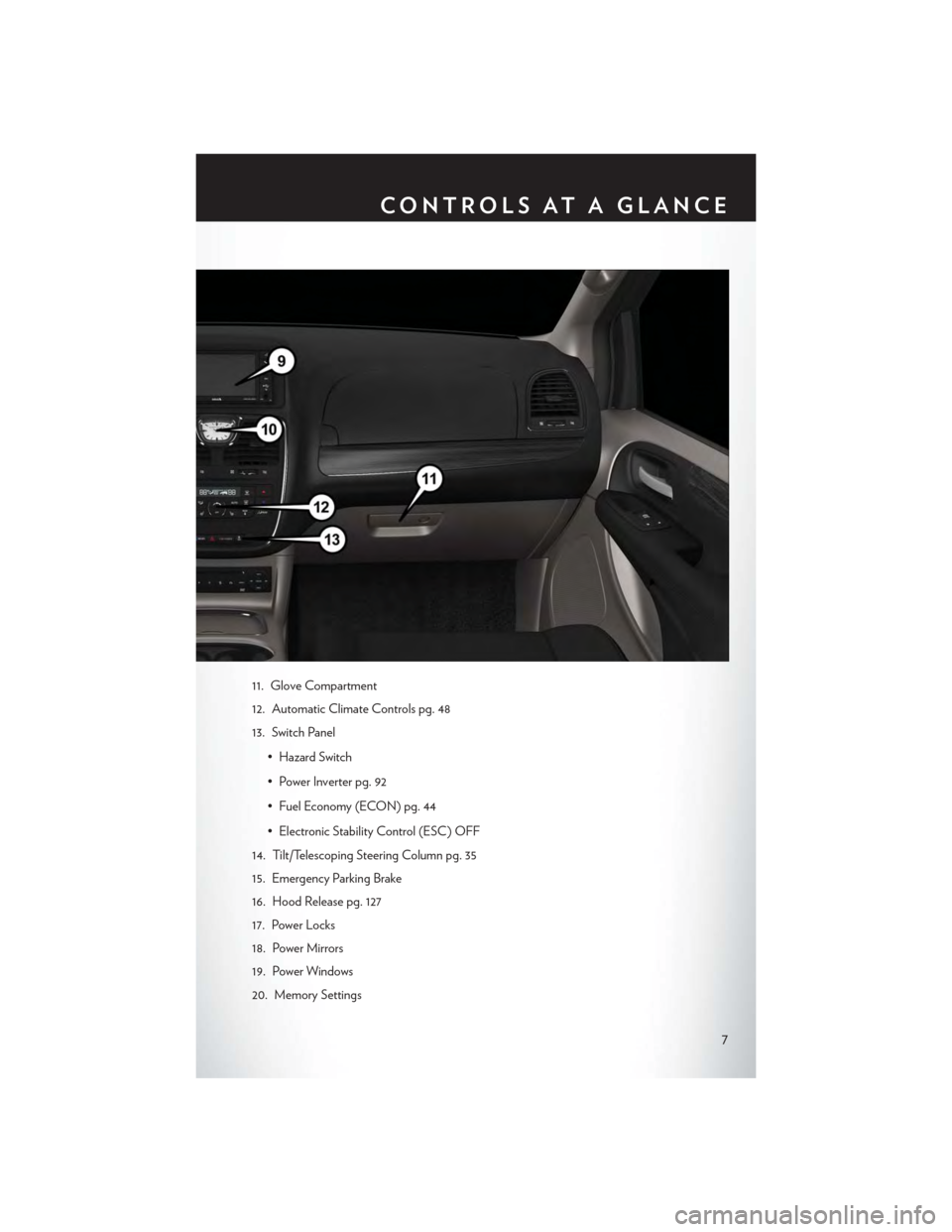
11. Glove Compartment
12. Automatic Climate Controls pg. 48
13. Switch Panel
• Hazard Switch
•PowerInverterpg.92
• Fuel Economy (ECON) pg. 44
• Electronic Stability Control (ESC) OFF
14. Tilt/Telescoping Steering Column pg. 35
15. Emergency Parking Brake
16. Hood Release pg. 127
17. Power Locks
18. Power Mirrors
19. Power Windows
20. Memory Settings
CONTROLS AT A GLANCE
7
Page 14 of 164
WARNING!
•Neverleavechildrenaloneinavehicle,orwithaccesstoanunlockedvehicle.Allowing
children to be in a vehicle unattended is dangerous for a number of reasons. A child or
others could be severely injured or killed. Children should be warned not to touch the
parking brake, brake pedal, or the transmission gear selector. Do not leave the Key Fob
inside the vehicle, or in a location accessible to children, and do not leave the ignition of a
vehicle equipped with Keyless Enter-N-Go™ in the ACC or ON/RUN mode. A child
could start the vehicle, operate power windows, other controls, or move the vehicle.
•Donotleavechildrenoranimalsinsideparkedvehiclesinhotweather.Interiorheat
build-up may cause them to be severely injured or killed.
•KeepKeyFobtransmittersawayfromchildren.OperationoftheRemoteStartSystem,
windows, door locks or other controls could cause serious injury or death.
•Drivingwiththeliftgateopencanallowpoisonousexhaustgasesintoyourvehicle.You
and your passengers could be injured by these fumes. Keep the flipper glass closed when
you are operating the vehicle.
REMOTE START
• Push the REMOTE START buttonx2on the Key Fob twice within five seconds. Pushing the
REMOTE START button a third time shuts the engine off.
•Todrivethevehicle,pushtheUNLOCKbutton,inserttheKeyFobintheignitionandturnto
the ON/RUN position.
• With remote start, the engine will only run for 15 minutes (timeout) unless the ignition Key Fob
is placed in the ON/RUN position.
•ThevehiclemustbestartedwiththeKeyFobaftertwoconsecutivetimeouts.
WARNING!
• Do not start or run an engine in a closed garage or confined area. Exhaust gas contains
Carbon Monoxide (CO) which is odorless and colorless. Carbon Monoxide is poisonous
and can cause you or others to be severely injured or killed when inhaled.
•KeepKeyFobtransmittersawayfromchildren.OperationoftheRemoteStartSystem,
windows, door locks or other controls could cause you and others to be severely injured or
killed.
KEYLESS ENTER-N-GO™
The Keyless Enter-N-Go™ system is an enhancement to the vehicle’s Remote Keyless Entry
(RKE) feature. This feature allows you to lock and unlock the vehicle's door(s) and liftgate
without having to push the Key Fob lock or unlock buttons, as well as starting and stopping the
vehicle with the push of a button.
GETTING STARTED
12
Page 17 of 164
2. While pushing the brake pedal, push the ENGINE START/STOP button once. If the engine
fails to start, the starter will disengage automatically after 10 seconds.
3. To stop the cranking of the engine prior to the engine starting, push the button again.
Stopping
1. Bring the vehicle to a complete stop.
2. Shift the transmission to PARK (P).
3. Push the ENGINE START/STOP button once. The ignition switch will return to the OFF
position.
NOTE:
If the transmission is not in PARK and the vehicle is in motion, the ENGINE START/STOP
button must be held for two seconds with the vehicle speed above 5 mph (8 km/h) before the
engine will shut off.
Accessory Positions With Engine Off
NOTE:
The following functions are with the driver’s foot OFF the Brake Pedal (transmission in PARK or
NEUTRAL).
Beginning With The Ignition Switch In The OFF Position:
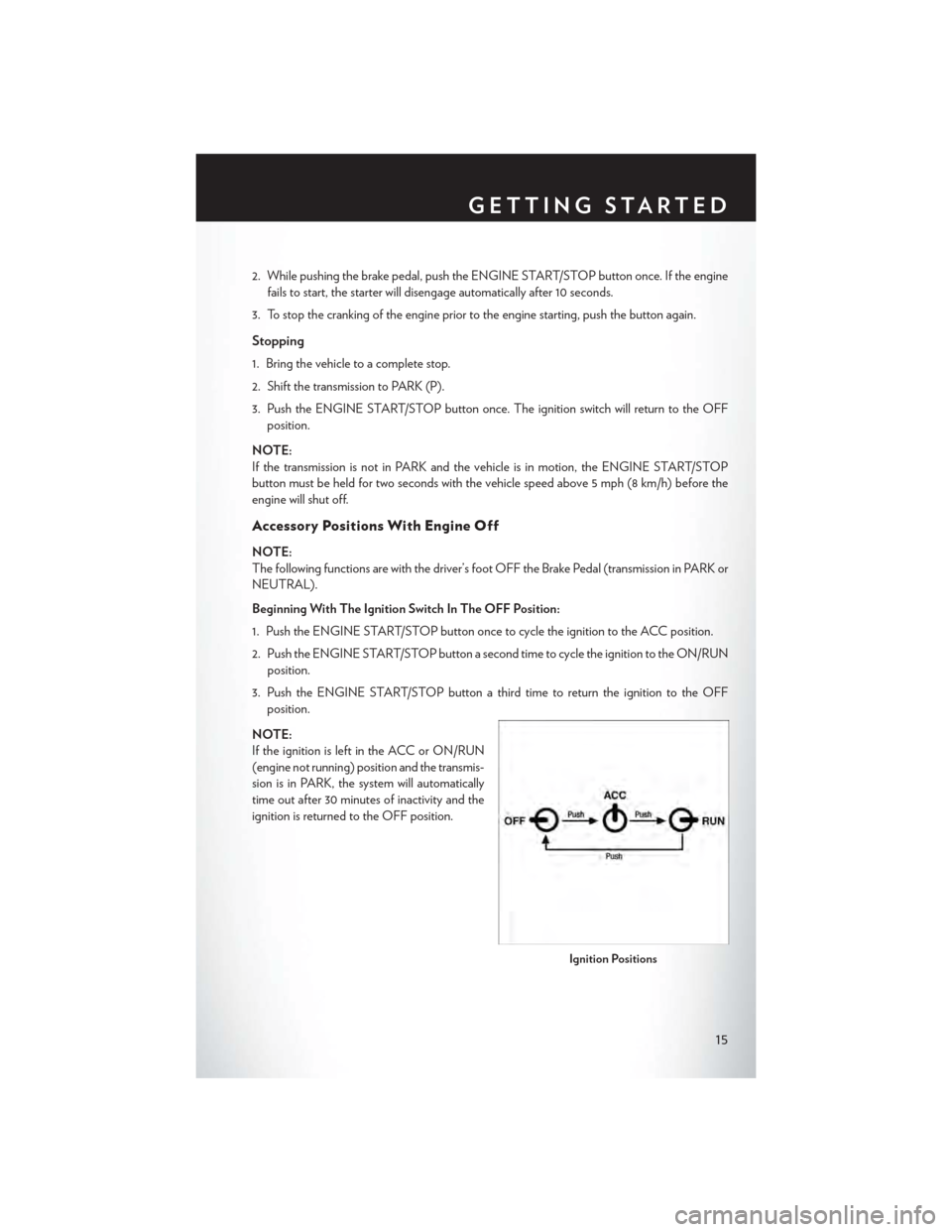
1. Push the ENGINE START/STOP button once to cycle the ignition to the ACC position.
2. Push the ENGINE START/STOP button a second time to cycle the ignition to the ON/RUN
position.
3. Push the ENGINE START/STOP button a third time to return the ignition to the OFF
position.
NOTE:
If the ignition is left in the ACC or ON/RUN
(engine not running) position and the transmis-
sion is in PARK, the system will automatically
time out after 30 minutes of inactivity and the
ignition is returned to the OFF position.
Ignition Positions
GETTING STARTED
15
Page 30 of 164
Memory Seat
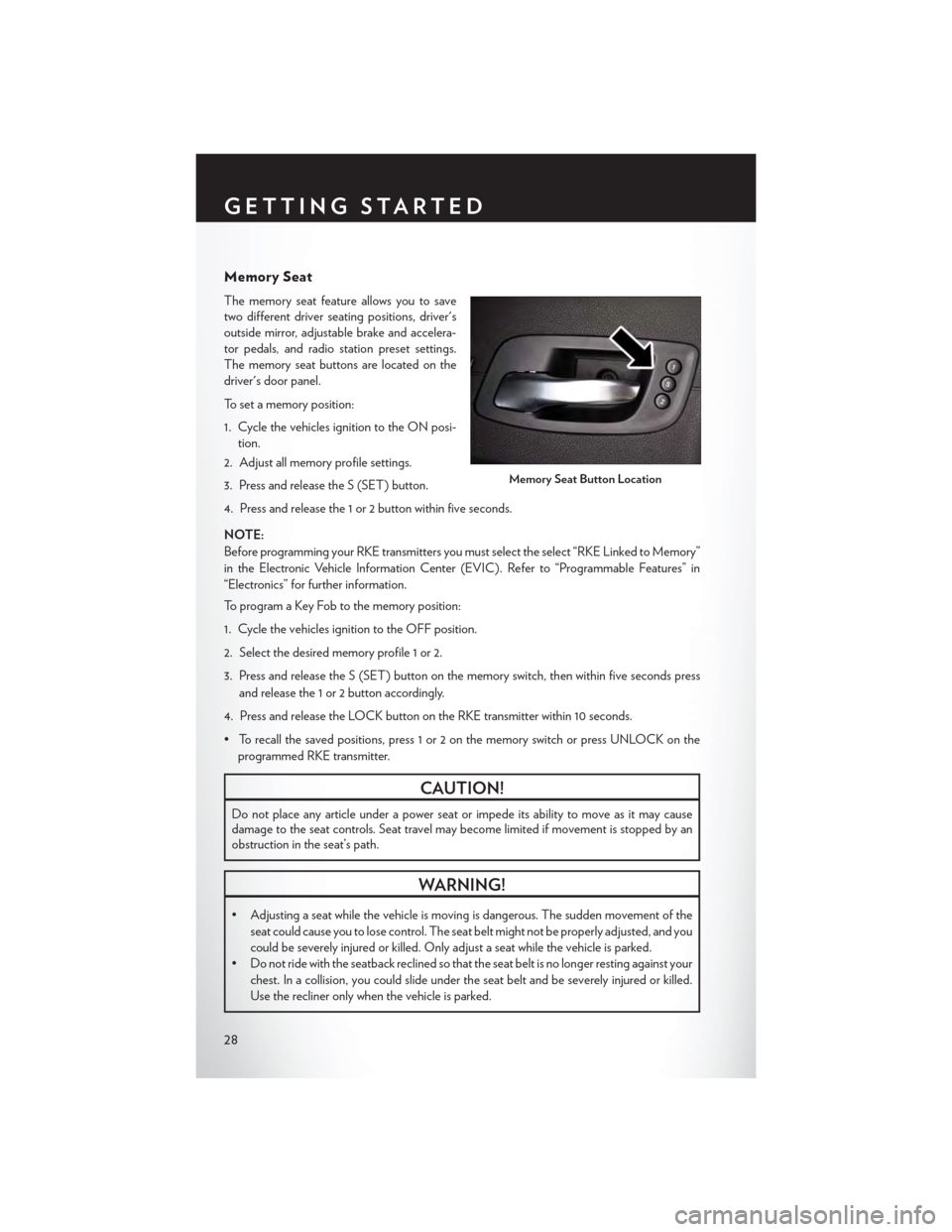
The memory seat feature allows you to save
two different driver seating positions, driver's
outside mirror, adjustable brake and accelera-
tor pedals, and radio station preset settings.
The memory seat buttons are located on the
driver's door panel.
To set a memory position:
1. Cycle the vehicles ignition to the ON posi-
tion.
2. Adjust all memory profile settings.
3. Press and release the S (SET) button.
4. Press and release the 1 or 2 button within five seconds.
NOTE:
Before programming your RKE transmitters you must select the select “RKE Linked to Memory”
in the Electronic Vehicle Information Center (EVIC). Refer to “Programmable Features” in
“Electronics” for further information.
To program a Key Fob to the memory position:
1. Cycle the vehicles ignition to the OFF position.
2. Select the desired memory profile 1 or 2.
3. Press and release the S (SET) button on the memory switch, then within five seconds press
and release the 1 or 2 button accordingly.
4. Press and release the LOCK button on the RKE transmitter within 10 seconds.
•Torecallthesavedpositions,press1or2onthememoryswitchorpressUNLOCKonthe
programmed RKE transmitter.
CAUTION!
Do not place any article under a power seat or impede its ability to move as it may causedamage to the seat controls. Seat travel may become limited if movement is stopped by anobstruction in the seat’s path.
WARNING!
•Adjustingaseatwhilethevehicleismovingisdangerous.Thesuddenmovementofthe
seat could cause you to lose control. The seat belt might not be properly adjusted, and you
could be severely injured or killed. Only adjust a seat while the vehicle is parked.
•Donotridewiththeseatbackreclinedsothattheseatbeltisnolongerrestingagainstyour
chest. In a collision, you could slide under the seat belt and be severely injured or killed.
Use the recliner only when the vehicle is parked.
Memory Seat Button Location
GETTING STARTED
28
Page 38 of 164

ADJUSTABLE PEDALS
• Press the switch located on the left side of
the steering column forward to move the
brake and accelerator pedals away from the
driver and press the switch rearward to move
the pedals closer to the driver.
NOTE:
The pedals cannot be adjusted when the vehicle
is in REVERSE or when the Electronic Speed
Control is set.
CAUTION!
Do not place any article under the adjustable pedals or impede its ability to move, as it may
cause damage to the pedal controls. Pedal travel may become limited if movement is stopped
by an obstruction in the adjustable pedal's path.
WARNING!
Do not adjust the pedals while the vehicle is moving. You could lose control and have a
collision. Always adjust the pedals while the vehicle is parked.
Adjustable Pedal Switch
GETTING STARTED
36
Page 44 of 164

To Decrease Speed
When the Electronic Speed Control is set, you can decrease speed by pushing the SET-button.
The drivers preferred units can be selected through the instrument panel settings if equipped.
Refer to “ Understanding Your Instrument Panel” for more information. The speed decrement
shown is dependant on the chosen speed unit of U.S. (MPH) or Metric (km/h):
U.S. Speed (MPH)
• Pushing the SET-button once will result in a 1 MPH decrease in set speed. Each
subsequent tap of the button results in a decrease of 1 MPH.
• If the button is continually pushed, the set speed will continue to decrease until the button
is released, then the new set speed will be established.
Metric Speed (km/h)
• Pushing the SET-button once will result in a 1 km/h decrease in set speed. Each
subsequent tap of the button results in a decrease of 1 km/h.
• If the button is continually pushed, the set speed will continue to decrease until the button
is released, then the new set speed will be established.
Resume
To resume a previously selected set speed in memory, push the RES + button and release.
Cancel
Push the CANCEL button, or apply the brakes to cancel the set speed and maintain the set
speed memory.
Push the ON/OFF button to turn the system off and erase the set speed memory.
WARNING!
•LeavingtheElectronicSpeedControlsystemonwhennotinuseisdangerous.Youcould
accidentally set the system or cause it to go faster than you want. You could lose control
and have a collision. Always leave the Electronic Speed Control system off when you are
not using it.
•ElectronicSpeedControlcanbedangerouswherethesystemcannotmaintainaconstant
speed. Your vehicle could go too fast for the conditions, and you could lose control. A
collision could be the result. Do not use Electronic Speed Control in heavy traffic or on
roads that are winding, icy, snow-covered or slippery.
OPERATING YOUR VEHICLE
42
Page 99 of 164

RECREATIONAL TOWING
(BEHIND MOTORHOME, ETC.)
Towing Condition Wheels OFF the GroundAll Models
Flat TowNONENOT ALLOWED
Dolly TowFrontOK
RearNOT ALLOWED
On TrailerALLOK
Recreational Towing — All Models
Recreational towing is allowed ONLY if the front wheels are OFF the ground. This may be
accomplished using a tow dolly or vehicle trailer. If using a tow dolly, follow this procedure:
1. Properly secure the dolly to the tow vehicle, following the dolly manufacturer's instructions.
2. Drive the front wheels onto the tow dolly.
3. Firmly apply the parking brake. Place the transmission in PARK.
4. Properly secure the front wheels to the dolly, following the dolly manufacturer's instructions.
5. Release the parking brake.
CAUTION!
•DONOTflattowthisvehicle.Damagetothedrivetrainwillresult.
•Towingthisvehicleinviolationoftheaboverequirementscancauseseveretransmission
damage. Damage from improper towing is not covered under the New Vehicle Limited
Warranty.
UTILITY
97
Page 100 of 164

ROADSIDE ASSISTANCE
Dial toll-free 1-800-521-2779 for U.S. Residents or 1-800-363-4869 for Canadian Residents.
•Provideyourname,vehicleidentificationnumber,licenseplatenumber,andyourlocation,
including the telephone number from which you are calling.
• Briefly describe the nature of the problem and answer a few simple questions.
•Youwillbegiventhenameoftheserviceproviderandanestimatedtimeofarrival.Ifyoufeel
you are in an “unsafe situation”, please let us know. With your consent, we will contact local
police or safety authorities.
INSTRUMENT CLUSTER WARNING LIGHTS
-LowFuelWarningLight
This warning light indicates when the fuel level reaches approximately 2.0 gal (7.8 L), this light will
turn on and a single chime will sound.
-ChargingSystemLight
This light shows the status of the electrical charging system. If the charging system light remains
on, it means that the vehicle is experiencing a problem with the charging system.
We r e c o m m e n d y o u d o n o t c o n t i n u e d r i v i n g i f t h e c h a r g i n g s y s t e m l i g h t i s o n . H a v e t h e v e h i c l e
serviced immediately.
-OilPressureWarningLight
This light indicates low engine oil pressure. If the light turns on while driving, stop the vehicle and
shut off the engine as soon as possible. A chime will sound when this light turns on.
We r e c o m m e n d y o u d o n o t o p e r a t e t h e v e h i c l e o r e n g i n e d a m a g e w i l l o c c u r. H a v e t h e v e h i c l e
serviced immediately.
-Anti-LockBrake(ABS)Light
This light monitors the Anti-Lock Brake System (ABS).
If the light is not on during starting, stays on, or turns on while driving, we recommend you contact
the nearest authorized dealer and have the vehicle serviced immediately.
-AirBagWarningLight
If the light is not on during starting, stays on, or turns on while driving, have the vehicle serviced
by an authorized dealer immediately.
-ElectronicThrottleControl(ETC)IndicatorLight
This light informs you of a problem with the system.
If a problem is detected, the light will come on while the engine is running. Cycle the ignition
when the vehicle has completely stopped and the shift lever is placed in the PARK position; the
light should turn off.
WHAT TO DO IN EMERGENCIES
98
Page 102 of 164
NOTE:
Tire pressures change by approximately 1 psi (7 kPa) per 12° F (7° C) of air temperature change.
Keep this in mind when checking tire pressure inside a garage, especially in the Winter. Example:
If garage temperature is 68°F (20°C) and the outside temperature is 32°F (0°C), then the cold
tire inflation pressure should be increased by 3 psi (21 kPa), which equals 1 psi (7 kPa) for every
12°F (7°C) for this outside temperature condition.
CAUTION!
The TPMS has been optimized for the original equipment tires and wheels. TPMS pressures
and warning have been established for the tire size equipped on your vehicle. Undesirable
system operation or sensor damage may result when using replacement equipment that is not
of the same size, type, and/or style. Aftermarket wheels can cause sensor damage. Do not use
tire sealant from a can, or balance beads if your vehicle is equipped with a TPMS, as damage
to the sensors may result.
-EngineTemperatureWarningLight
•Thislightwarnsofanoverheatedenginecondition.
•Ifthelightturnsonorflashescontinuouslywhiledriving,safelypulloverandstopthevehicle.
If the A/C system is on, turn it off. Also, shift the transmission into NEUTRAL and idle the
vehicle. If the temperature reading does not return to normal, turn the engine off immediately
and call for service.
•Werecommendthatyoudonotoperatethevehicleorenginedamagewilloccur.Havethe
vehicle serviced immediately.
WARNING!
Ahotenginecoolingsystemisdangerous.Youorotherscouldbebadlyburnedbysteamor
boiling coolant.
-SeatBeltReminderLight
When the ignition switch is first turned to the ON/RUN position, this light will turn on for four to
eight seconds as a bulb check. During the bulb check, if the driver's seat belt is unbuckled, a
chime will sound. After the bulb check or when driving, if the driver or front passenger seat belt
remains unbuckled, the Seat Belt Indicator Light will flash or remain on continuously. Refer to
“Seat Belt Systems” in “Things To Know Before Starting” in the OM on your DVD for further
information.
-BrakeWarningLight
This light monitors various brake functions, including brake fluid level and parking brake appli-
cation. If the brake light turns on it may indicate that the parking brake is applied, that the brake
fluid level is low, or that there is a problem with the anti-lock brake system reservoir.
WHAT TO DO IN EMERGENCIES
100