steering CHRYSLER VOYAGER 1996 Owners Manual
[x] Cancel search | Manufacturer: CHRYSLER, Model Year: 1996, Model line: VOYAGER, Model: CHRYSLER VOYAGER 1996Pages: 1938, PDF Size: 55.84 MB
Page 392 of 1938
(5) Remove the screws holding printed circuit
board to the cluster shell.
(6) Remove the printed circuit board from the clus-
ter.
INSTALLATION
For installation, reverse the above procedures.
After installing the print circuit board it will have to
be calibrated using a scan tool (DRB III). Refer to the
proper Body Diagnostic Procedure Manual for cali-
bration procedures.
NOTE: Speedometer and/or Tachometer will not
operate properly until all gauges have been cali-
brated
INSTRUMENT CLUSTER SUBDIAL
REMOVAL
(1) Remove instrument cluster.
(2) Remove cluster lens.
(3) Disconnect temperature/fuel gauge and tachom-
eter terminals from connectors in cluster by pulling
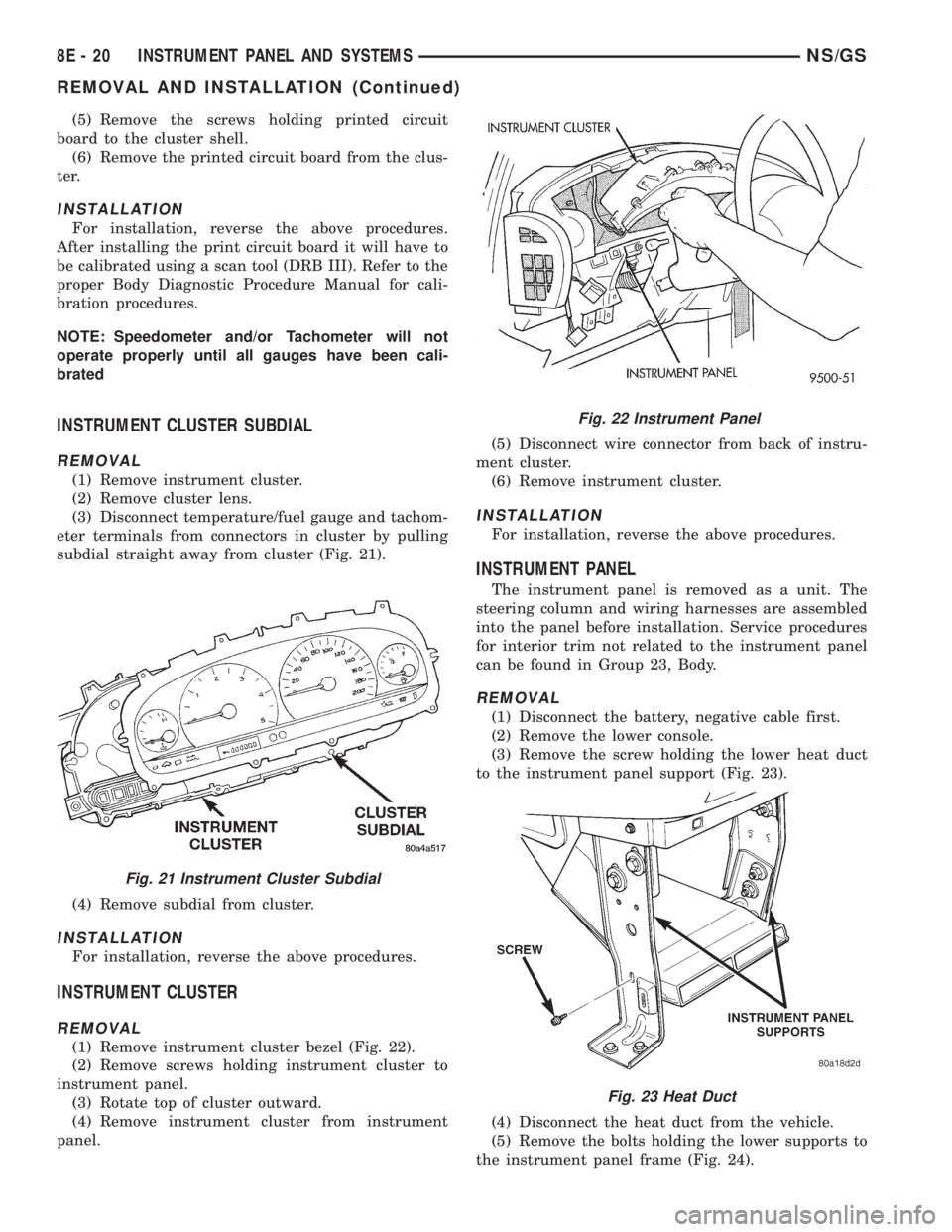
subdial straight away from cluster (Fig. 21).
(4) Remove subdial from cluster.
INSTALLATION
For installation, reverse the above procedures.
INSTRUMENT CLUSTER
REMOVAL
(1) Remove instrument cluster bezel (Fig. 22).
(2) Remove screws holding instrument cluster to
instrument panel.
(3) Rotate top of cluster outward.
(4) Remove instrument cluster from instrument
panel.(5) Disconnect wire connector from back of instru-
ment cluster.
(6) Remove instrument cluster.
INSTALLATION
For installation, reverse the above procedures.
INSTRUMENT PANEL
The instrument panel is removed as a unit. The
steering column and wiring harnesses are assembled
into the panel before installation. Service procedures
for interior trim not related to the instrument panel
can be found in Group 23, Body.
REMOVAL
(1) Disconnect the battery, negative cable first.
(2) Remove the lower console.
(3) Remove the screw holding the lower heat duct
to the instrument panel support (Fig. 23).
(4) Disconnect the heat duct from the vehicle.
(5) Remove the bolts holding the lower supports to
the instrument panel frame (Fig. 24).
Fig. 21 Instrument Cluster Subdial
Fig. 22 Instrument Panel
Fig. 23 Heat Duct
8E - 20 INSTRUMENT PANEL AND SYSTEMSNS/GS
REMOVAL AND INSTALLATION (Continued)
Page 393 of 1938
(6) Remove the bolts holding the lower supports to
the floor pan.
(7) Remove the right and left end covers.
(8) Disconnect the wire connectors from the Pas-
senger Airbag Module.
(9) Remove the front door sill trim covers.
(10) Remove the A-pillar trim covers.
(11) Remove the glove box.
(12) Disconnect the antenna lead connector from
behind the glove box.
(13) Remove the lower steering column cover.
(14) Remove the knee blocker panel.
(15) Disconnect the lower two, forty pin wire har-
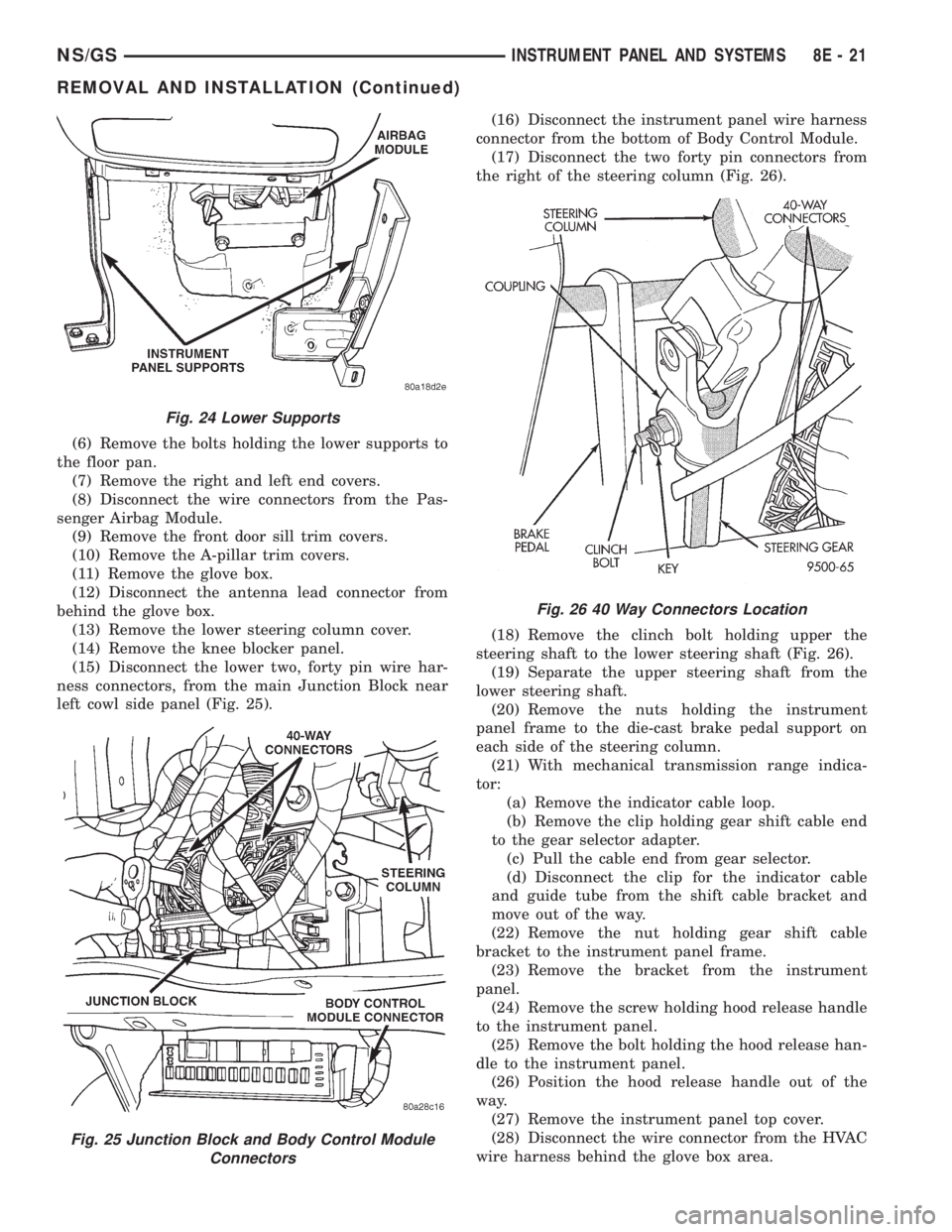
ness connectors, from the main Junction Block near
left cowl side panel (Fig. 25).(16) Disconnect the instrument panel wire harness
connector from the bottom of Body Control Module.
(17) Disconnect the two forty pin connectors from
the right of the steering column (Fig. 26).
(18) Remove the clinch bolt holding upper the
steering shaft to the lower steering shaft (Fig. 26).
(19) Separate the upper steering shaft from the
lower steering shaft.
(20) Remove the nuts holding the instrument
panel frame to the die-cast brake pedal support on
each side of the steering column.
(21) With mechanical transmission range indica-
tor:
(a) Remove the indicator cable loop.
(b) Remove the clip holding gear shift cable end
to the gear selector adapter.
(c) Pull the cable end from gear selector.
(d) Disconnect the clip for the indicator cable
and guide tube from the shift cable bracket and
move out of the way.
(22) Remove the nut holding gear shift cable
bracket to the instrument panel frame.
(23) Remove the bracket from the instrument
panel.
(24) Remove the screw holding hood release handle
to the instrument panel.
(25) Remove the bolt holding the hood release han-
dle to the instrument panel.
(26) Position the hood release handle out of the
way.
(27) Remove the instrument panel top cover.
(28) Disconnect the wire connector from the HVAC
wire harness behind the glove box area.
Fig. 24 Lower Supports
Fig. 25 Junction Block and Body Control Module
Connectors
Fig. 26 40 Way Connectors Location
NS/GSINSTRUMENT PANEL AND SYSTEMS 8E - 21
REMOVAL AND INSTALLATION (Continued)
Page 394 of 1938
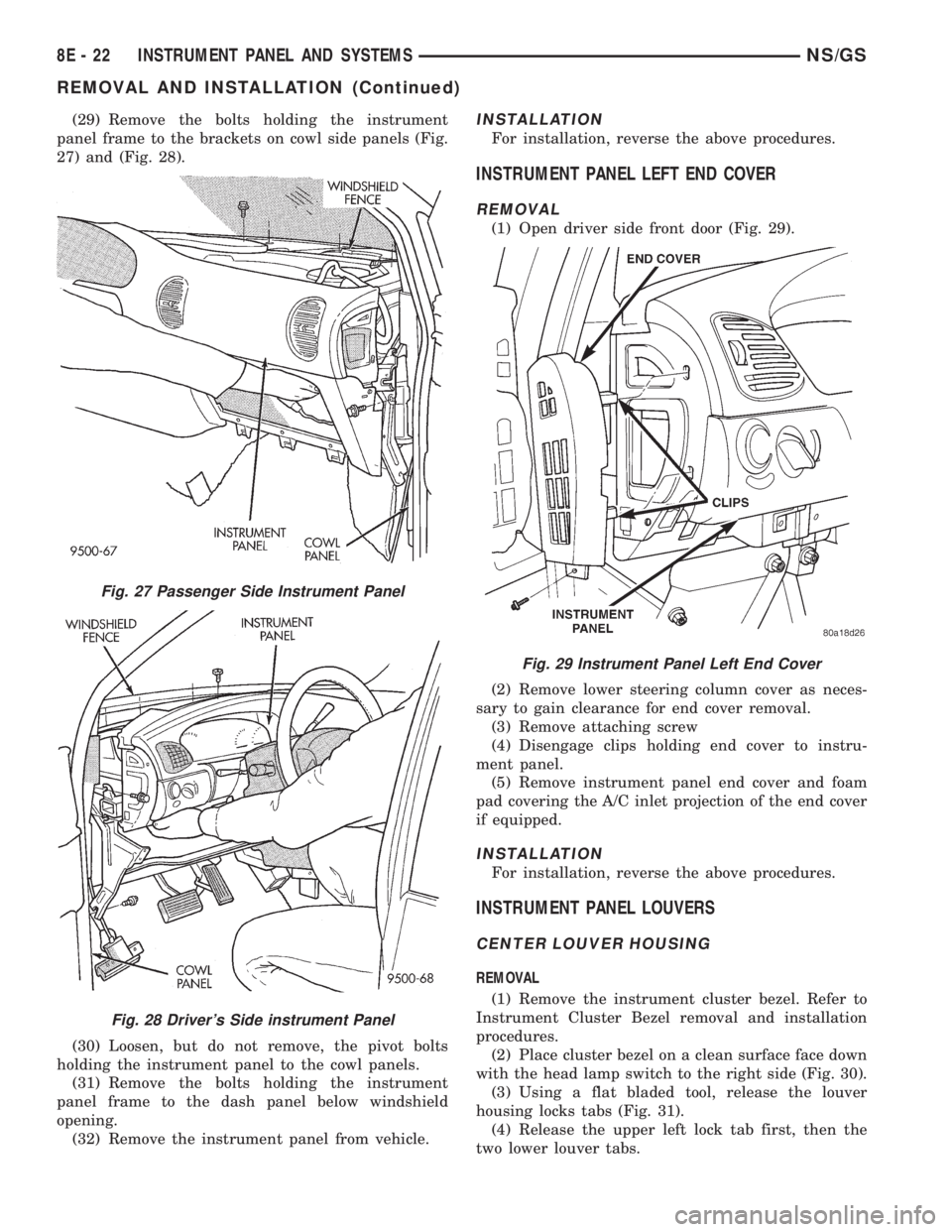
(29) Remove the bolts holding the instrument
panel frame to the brackets on cowl side panels (Fig.
27) and (Fig. 28).
(30) Loosen, but do not remove, the pivot bolts
holding the instrument panel to the cowl panels.
(31) Remove the bolts holding the instrument
panel frame to the dash panel below windshield
opening.
(32) Remove the instrument panel from vehicle.INSTALLATION
For installation, reverse the above procedures.
INSTRUMENT PANEL LEFT END COVER
REMOVAL
(1) Open driver side front door (Fig. 29).
(2) Remove lower steering column cover as neces-
sary to gain clearance for end cover removal.
(3) Remove attaching screw
(4) Disengage clips holding end cover to instru-
ment panel.
(5) Remove instrument panel end cover and foam
pad covering the A/C inlet projection of the end cover
if equipped.
INSTALLATION
For installation, reverse the above procedures.
INSTRUMENT PANEL LOUVERS
CENTER LOUVER HOUSING
REMOVAL
(1) Remove the instrument cluster bezel. Refer to
Instrument Cluster Bezel removal and installation
procedures.
(2) Place cluster bezel on a clean surface face down
with the head lamp switch to the right side (Fig. 30).
(3) Using a flat bladed tool, release the louver
housing locks tabs (Fig. 31).
(4) Release the upper left lock tab first, then the
two lower louver tabs.
Fig. 27 Passenger Side Instrument Panel
Fig. 28 Driver's Side instrument Panel
Fig. 29 Instrument Panel Left End Cover
8E - 22 INSTRUMENT PANEL AND SYSTEMSNS/GS
REMOVAL AND INSTALLATION (Continued)
Page 397 of 1938
INSTALLATION
(1) Place instrument panel top cover in position on
vehicle.
(2) Push top cover forward to engage hooks to hold
front of top cover to instrument panel.
(3) Connect wire harness to message center.
(4) Engage clips to hold rear edge of top cover to
instrument panel.
(5) Pull top cover rearward.
(6) Install A-pillar trim.
INSTRUMENT PANEL RIGHT END COVER
REMOVAL
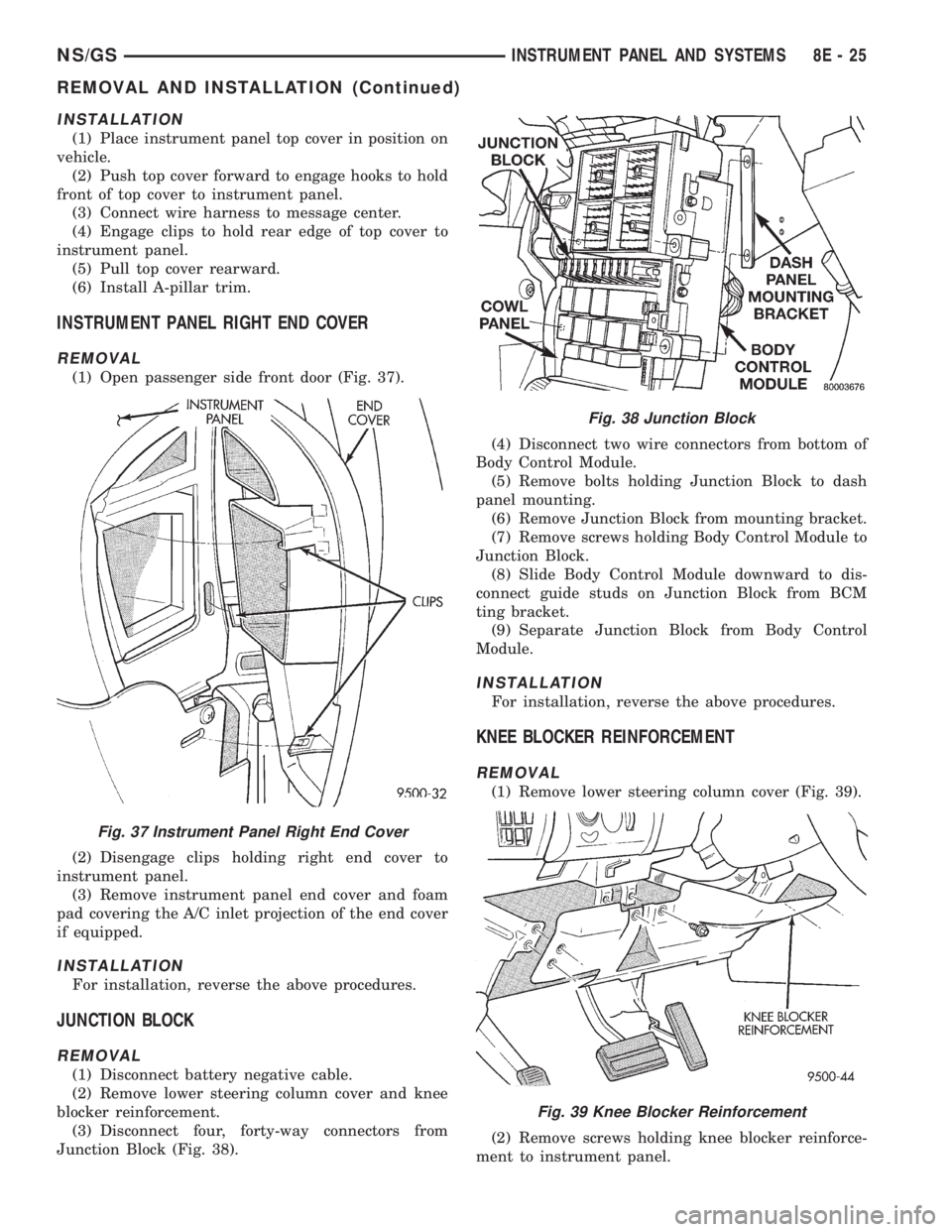
(1) Open passenger side front door (Fig. 37).
(2) Disengage clips holding right end cover to
instrument panel.
(3) Remove instrument panel end cover and foam
pad covering the A/C inlet projection of the end cover
if equipped.
INSTALLATION
For installation, reverse the above procedures.
JUNCTION BLOCK
REMOVAL
(1) Disconnect battery negative cable.
(2) Remove lower steering column cover and knee
blocker reinforcement.
(3) Disconnect four, forty-way connectors from
Junction Block (Fig. 38).(4) Disconnect two wire connectors from bottom of
Body Control Module.
(5) Remove bolts holding Junction Block to dash
panel mounting.
(6) Remove Junction Block from mounting bracket.
(7) Remove screws holding Body Control Module to
Junction Block.
(8) Slide Body Control Module downward to dis-
connect guide studs on Junction Block from BCM
ting bracket.
(9) Separate Junction Block from Body Control
Module.
INSTALLATION
For installation, reverse the above procedures.
KNEE BLOCKER REINFORCEMENT
REMOVAL
(1) Remove lower steering column cover (Fig. 39).
(2) Remove screws holding knee blocker reinforce-
ment to instrument panel.
Fig. 37 Instrument Panel Right End Cover
Fig. 38 Junction Block
Fig. 39 Knee Blocker Reinforcement
NS/GSINSTRUMENT PANEL AND SYSTEMS 8E - 25
REMOVAL AND INSTALLATION (Continued)
Page 398 of 1938
(3) Remove reinforcement.
INSTALLATION
(1) Place reinforcement in position.
(2) Install screws to hold knee blocker reinforce-
ment to instrument panel.
(3) Install lower steering column cover.
LOWER CONSOLE
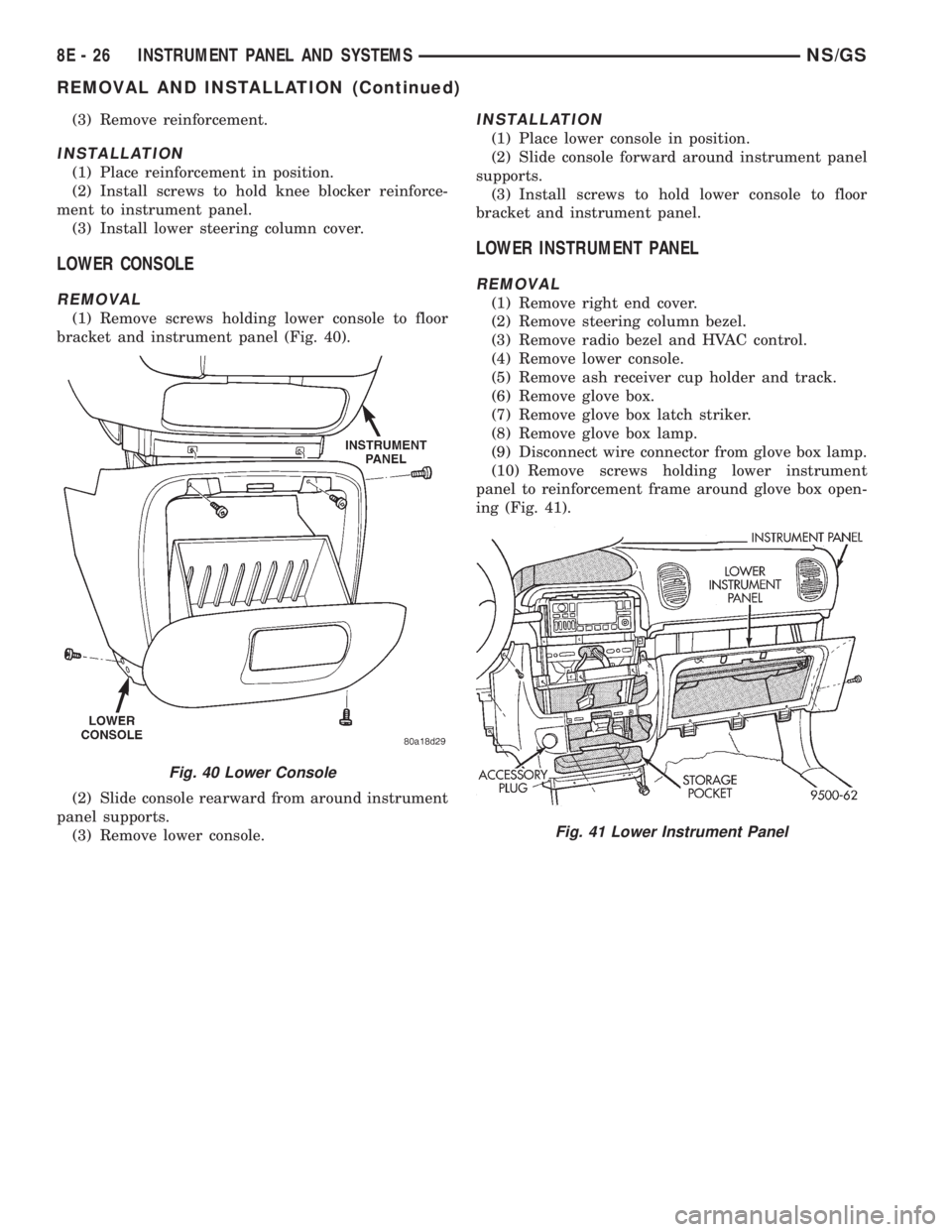
REMOVAL
(1) Remove screws holding lower console to floor
bracket and instrument panel (Fig. 40).
(2) Slide console rearward from around instrument
panel supports.
(3) Remove lower console.
INSTALLATION
(1) Place lower console in position.
(2) Slide console forward around instrument panel
supports.
(3) Install screws to hold lower console to floor
bracket and instrument panel.
LOWER INSTRUMENT PANEL
REMOVAL
(1) Remove right end cover.
(2) Remove steering column bezel.
(3) Remove radio bezel and HVAC control.
(4) Remove lower console.
(5) Remove ash receiver cup holder and track.
(6) Remove glove box.
(7) Remove glove box latch striker.
(8) Remove glove box lamp.
(9) Disconnect wire connector from glove box lamp.
(10) Remove screws holding lower instrument
panel to reinforcement frame around glove box open-
ing (Fig. 41).
Fig. 40 Lower Console
Fig. 41 Lower Instrument Panel
8E - 26 INSTRUMENT PANEL AND SYSTEMSNS/GS
REMOVAL AND INSTALLATION (Continued)
Page 399 of 1938
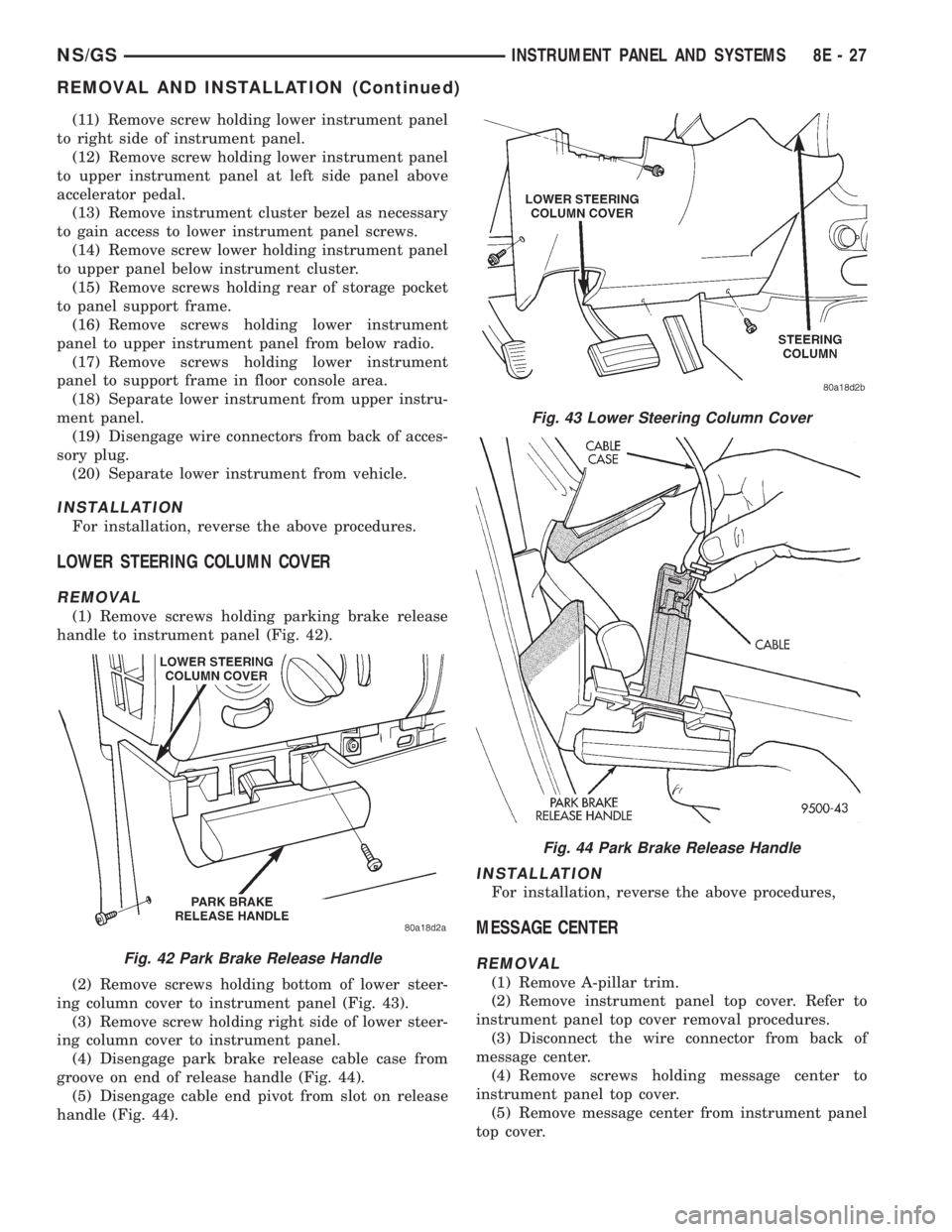
(11) Remove screw holding lower instrument panel
to right side of instrument panel.
(12) Remove screw holding lower instrument panel
to upper instrument panel at left side panel above
accelerator pedal.
(13) Remove instrument cluster bezel as necessary
to gain access to lower instrument panel screws.
(14) Remove screw lower holding instrument panel
to upper panel below instrument cluster.
(15) Remove screws holding rear of storage pocket
to panel support frame.
(16) Remove screws holding lower instrument
panel to upper instrument panel from below radio.
(17) Remove screws holding lower instrument
panel to support frame in floor console area.
(18) Separate lower instrument from upper instru-
ment panel.
(19) Disengage wire connectors from back of acces-
sory plug.
(20) Separate lower instrument from vehicle.
INSTALLATION
For installation, reverse the above procedures.
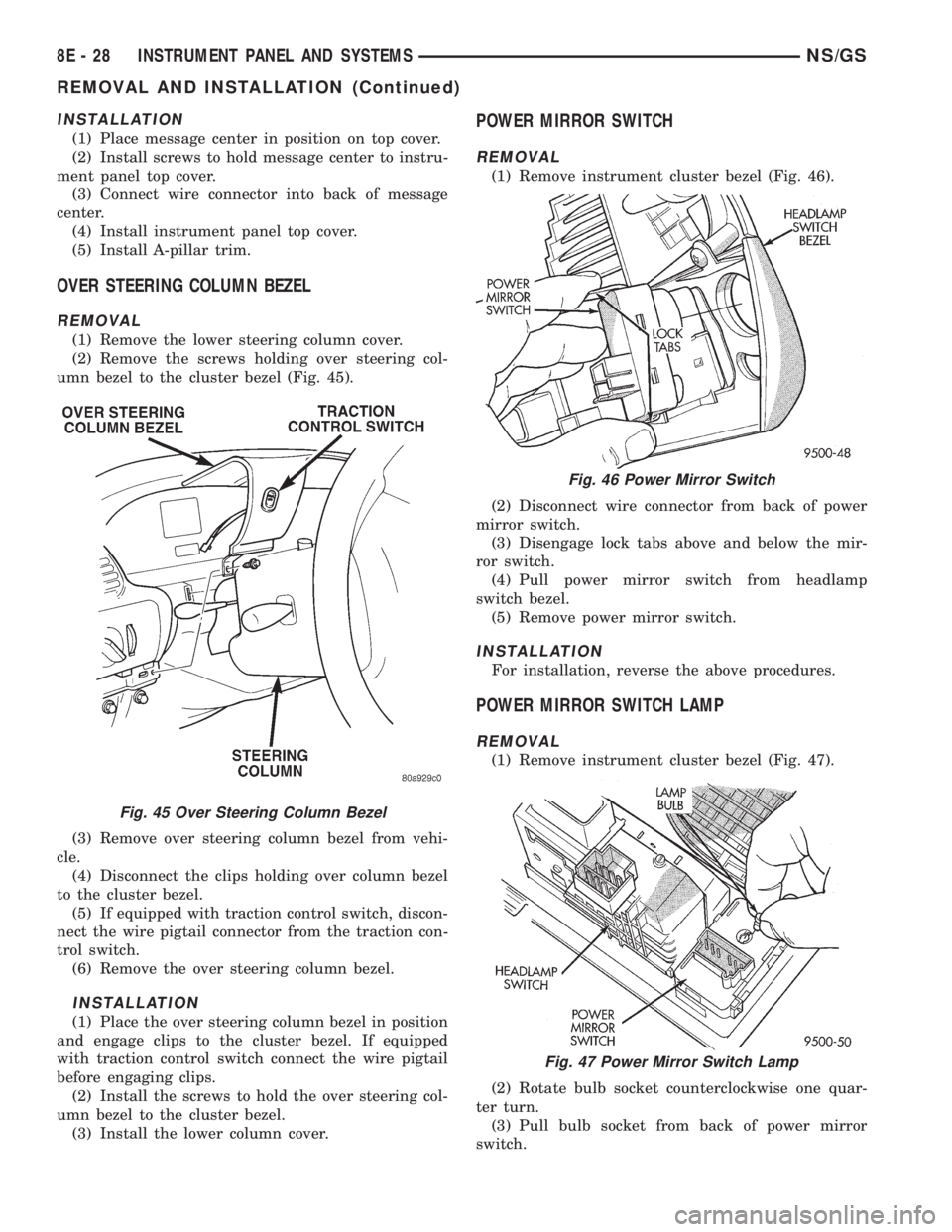
LOWER STEERING COLUMN COVER
REMOVAL
(1) Remove screws holding parking brake release
handle to instrument panel (Fig. 42).
(2) Remove screws holding bottom of lower steer-
ing column cover to instrument panel (Fig. 43).
(3) Remove screw holding right side of lower steer-
ing column cover to instrument panel.
(4) Disengage park brake release cable case from
groove on end of release handle (Fig. 44).
(5) Disengage cable end pivot from slot on release
handle (Fig. 44).
INSTALLATION
For installation, reverse the above procedures,
MESSAGE CENTER
REMOVAL
(1) Remove A-pillar trim.
(2) Remove instrument panel top cover. Refer to
instrument panel top cover removal procedures.
(3) Disconnect the wire connector from back of
message center.
(4) Remove screws holding message center to
instrument panel top cover.
(5) Remove message center from instrument panel
top cover.
Fig. 42 Park Brake Release Handle
Fig. 43 Lower Steering Column Cover
Fig. 44 Park Brake Release Handle
NS/GSINSTRUMENT PANEL AND SYSTEMS 8E - 27
REMOVAL AND INSTALLATION (Continued)
Page 400 of 1938
INSTALLATION
(1) Place message center in position on top cover.
(2) Install screws to hold message center to instru-
ment panel top cover.
(3) Connect wire connector into back of message
center.
(4) Install instrument panel top cover.
(5) Install A-pillar trim.
OVER STEERING COLUMN BEZEL
REMOVAL
(1) Remove the lower steering column cover.
(2) Remove the screws holding over steering col-
umn bezel to the cluster bezel (Fig. 45).
(3) Remove over steering column bezel from vehi-
cle.
(4) Disconnect the clips holding over column bezel
to the cluster bezel.
(5) If equipped with traction control switch, discon-
nect the wire pigtail connector from the traction con-
trol switch.
(6) Remove the over steering column bezel.
INSTALLATION
(1) Place the over steering column bezel in position
and engage clips to the cluster bezel. If equipped
with traction control switch connect the wire pigtail
before engaging clips.
(2) Install the screws to hold the over steering col-
umn bezel to the cluster bezel.
(3) Install the lower column cover.
POWER MIRROR SWITCH
REMOVAL
(1) Remove instrument cluster bezel (Fig. 46).
(2) Disconnect wire connector from back of power
mirror switch.
(3) Disengage lock tabs above and below the mir-
ror switch.
(4) Pull power mirror switch from headlamp
switch bezel.
(5) Remove power mirror switch.
INSTALLATION
For installation, reverse the above procedures.
POWER MIRROR SWITCH LAMP
REMOVAL
(1) Remove instrument cluster bezel (Fig. 47).
(2) Rotate bulb socket counterclockwise one quar-
ter turn.
(3) Pull bulb socket from back of power mirror
switch.
Fig. 45 Over Steering Column Bezel
Fig. 46 Power Mirror Switch
Fig. 47 Power Mirror Switch Lamp
8E - 28 INSTRUMENT PANEL AND SYSTEMSNS/GS
REMOVAL AND INSTALLATION (Continued)
Page 405 of 1938

bracket behind the junction block/body control mod-
ule (Fig. 5).
REMOTE RADIO SWITCHES
A remote radio control switch option is available on
LXI models sold in North America with the AM/FM/
cassette/5-band graphic equalizer with CD changer
control feature (RBN sales code), or the AM/FM/CD/
cassette/3-band graphic equalizer (RAZ sales code)
radio receivers. Two rocker-type switches are
mounted on the back (instrument panel side) of the
steering wheel spokes. The switch on the left spoke is
the seek switch and has seek up, seek down, and pre-
set station advance functions. The switch on the
right spoke is the volume control switch and has vol-
ume up, and volume down functions (Fig. 6).
These switches are resistor multiplexed units that
are hard-wired to the Body Control Module (BCM)
through the clockspring. The BCM sends the propermessages on the Chrysler Collision Detection (CCD)
data bus network to the radio receiver. For diagnosis
of the BCM or the CCD data bus, the use of a DRB
scan tool and the proper Diagnostic Procedures man-
ual are recommended. For more information on the
operation of the remote radio switch controls, refer to
the owner's manual in the vehicle glove box.
NAME BRAND SPEAKER RELAY
Relay is located in the junction block. To test relay
refer to the Audio Diagnostic Test Procedures or use
a known good relay.
DIAGNOSIS AND TESTING
ANTENNA
WARNING: ON VEHICLES EQUIPPED WITH AIR-
BAGS, REFER TO GROUP 8M - PASSIVE
RESTRAINT SYSTEMS BEFORE ATTEMPTING ANY
STEERING WHEEL, STEERING COLUMN, OR
INSTRUMENT PANEL COMPONENT DIAGNOSIS OR
SERVICE. FAILURE TO TAKE THE PROPER PRE-
CAUTIONS COULD RESULT IN ACCIDENTAL AIR-
BAG DEPLOYMENT AND POSSIBLE PERSONAL
INJURY.
The following four tests are used to diagnose the
antenna with an ohmmeter:
²Test 1- Mast to ground test
²Test 2- Tip-of-mast to tip-of-conductor test
²Test 3- Body ground to battery ground test
²Test 4- Body ground to coaxial shield test.
The ohmmeter test lead connections for each test
are shown in Antenna Tests (Fig. 7).
NOTE: This model has a two-piece antenna coaxial
cable. Tests 2 and 4 must be conducted in two
steps to isolate a coaxial cable problem; from the
coaxial cable connection under the right end of the
instrument panel near the right cowl side panel to
the antenna base, and then from the coaxial cable
connection to the radio chassis connection.
TEST 1
Test 1 determines if the antenna mast is insulated
from the base. Proceed as follows:
(1) Unplug the antenna coaxial cable connector
from the radio chassis and isolate.
(2) Connect one ohmmeter test lead to the tip of
the antenna mast. Connect the other test lead to the
antenna base. Check for continuity.
(3) There should be no continuity. If continuity is
found, replace the faulty or damaged antenna base
and cable assembly.
Fig. 5 Choke Location
Fig. 6 Remote Radio Switch Operational View
NSAUDIO SYSTEMS 8F - 3
DESCRIPTION AND OPERATION (Continued)
Page 406 of 1938
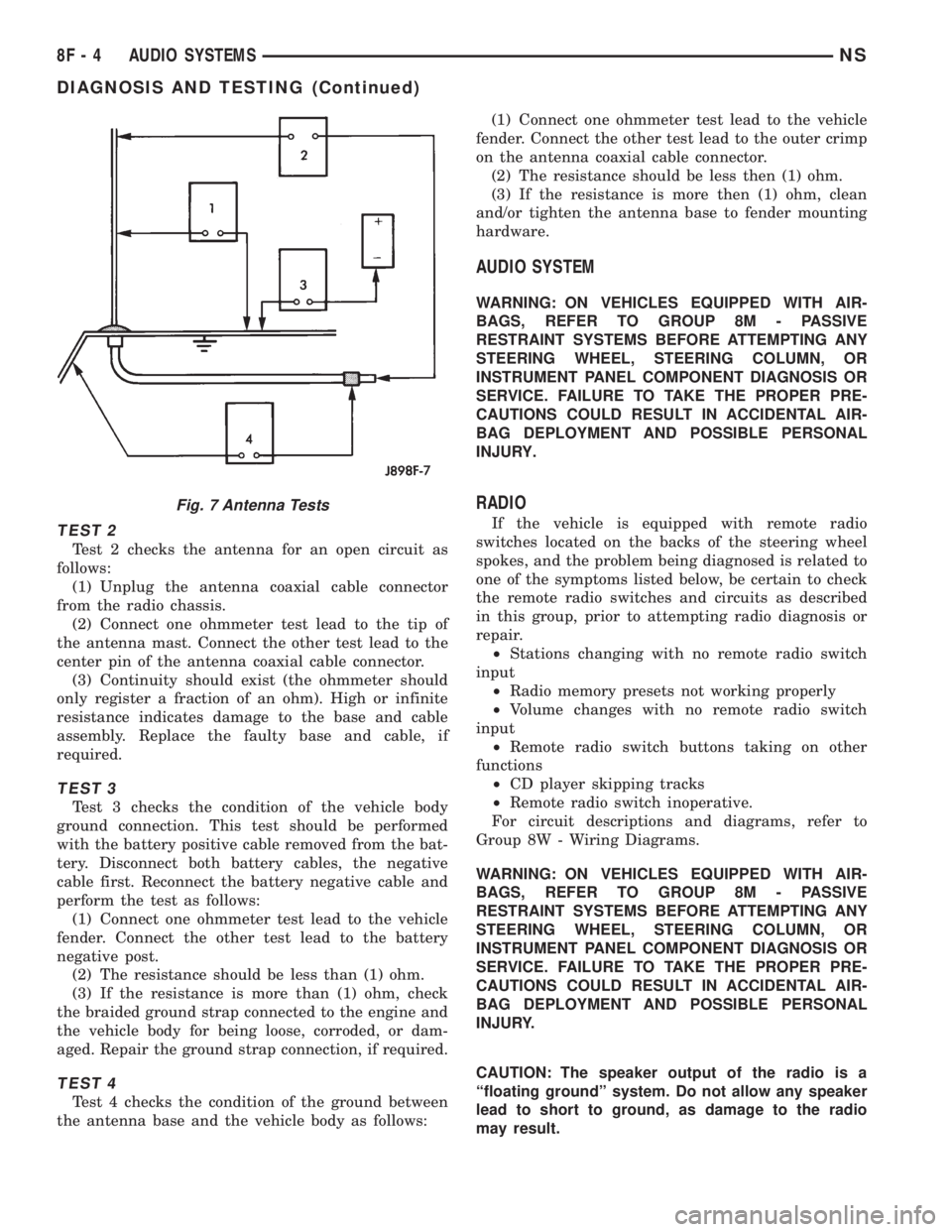
TEST 2
Test 2 checks the antenna for an open circuit as
follows:
(1) Unplug the antenna coaxial cable connector
from the radio chassis.
(2) Connect one ohmmeter test lead to the tip of
the antenna mast. Connect the other test lead to the
center pin of the antenna coaxial cable connector.
(3) Continuity should exist (the ohmmeter should
only register a fraction of an ohm). High or infinite
resistance indicates damage to the base and cable
assembly. Replace the faulty base and cable, if
required.
TEST 3
Test 3 checks the condition of the vehicle body
ground connection. This test should be performed
with the battery positive cable removed from the bat-
tery. Disconnect both battery cables, the negative
cable first. Reconnect the battery negative cable and
perform the test as follows:
(1) Connect one ohmmeter test lead to the vehicle
fender. Connect the other test lead to the battery
negative post.
(2) The resistance should be less than (1) ohm.
(3) If the resistance is more than (1) ohm, check
the braided ground strap connected to the engine and
the vehicle body for being loose, corroded, or dam-
aged. Repair the ground strap connection, if required.
TEST 4
Test 4 checks the condition of the ground between
the antenna base and the vehicle body as follows:(1) Connect one ohmmeter test lead to the vehicle
fender. Connect the other test lead to the outer crimp
on the antenna coaxial cable connector.
(2) The resistance should be less then (1) ohm.
(3) If the resistance is more then (1) ohm, clean
and/or tighten the antenna base to fender mounting
hardware.
AUDIO SYSTEM
WARNING: ON VEHICLES EQUIPPED WITH AIR-
BAGS, REFER TO GROUP 8M - PASSIVE
RESTRAINT SYSTEMS BEFORE ATTEMPTING ANY
STEERING WHEEL, STEERING COLUMN, OR
INSTRUMENT PANEL COMPONENT DIAGNOSIS OR
SERVICE. FAILURE TO TAKE THE PROPER PRE-
CAUTIONS COULD RESULT IN ACCIDENTAL AIR-
BAG DEPLOYMENT AND POSSIBLE PERSONAL
INJURY.
RADIO
If the vehicle is equipped with remote radio
switches located on the backs of the steering wheel
spokes, and the problem being diagnosed is related to
one of the symptoms listed below, be certain to check
the remote radio switches and circuits as described
in this group, prior to attempting radio diagnosis or
repair.
²Stations changing with no remote radio switch
input
²Radio memory presets not working properly
²Volume changes with no remote radio switch
input
²Remote radio switch buttons taking on other
functions
²CD player skipping tracks
²Remote radio switch inoperative.
For circuit descriptions and diagrams, refer to
Group 8W - Wiring Diagrams.
WARNING: ON VEHICLES EQUIPPED WITH AIR-
BAGS, REFER TO GROUP 8M - PASSIVE
RESTRAINT SYSTEMS BEFORE ATTEMPTING ANY
STEERING WHEEL, STEERING COLUMN, OR
INSTRUMENT PANEL COMPONENT DIAGNOSIS OR
SERVICE. FAILURE TO TAKE THE PROPER PRE-
CAUTIONS COULD RESULT IN ACCIDENTAL AIR-
BAG DEPLOYMENT AND POSSIBLE PERSONAL
INJURY.
CAUTION: The speaker output of the radio is a
ªfloating groundº system. Do not allow any speaker
lead to short to ground, as damage to the radio
may result.
Fig. 7 Antenna Tests
8F - 4 AUDIO SYSTEMSNS
DIAGNOSIS AND TESTING (Continued)
Page 408 of 1938
(1) Check the fuse(s) in the junction block and the
Power Distribution Center (PDC). If OK, go to Step
2. If not OK, repair the shorted circuit or component
as required and replace the faulty fuse(s).
(2) Check for battery voltage at the fuse in the
PDC. If OK, go to Step 3. If not OK, repair the open
circuit to the battery as required.
(3) Turn the ignition switch to the ON position.
Check for battery voltage at the fuse in the junction
block. If OK, go to Step 4. If not OK, repair the open
circuit to the ignition switch as required.
(4) Turn the ignition switch to the OFF position.
Disconnect and isolate the battery negative cable.
Remove the instrument cluster center bezel. Remove
the radio, but do not unplug the wire harness connec-
tors. Check for continuity between the radio chassis
and a good ground. There should be continuity. If
OK, go to Step 5. If not OK, repair the open radio
chassis ground circuit as required.
(5) Connect the battery negative cable. Turn the
ignition switch to the ON position. Check for battery
voltage at the fused ignition switch output circuit
cavity of the left (gray) radio wire harness connector.
If OK, go to Step 6. If not OK, repair the open circuit
as required.
(6) Turn the ignition switch to the OFF position.
Check for battery voltage at the fused B(+) circuit
cavity of the left (gray) radio wire harness connector.
If OK, replace the faulty radio. If not OK, repair the
open circuit to the Ignition-Off Draw (IOD) fuse as
required.
REMOTE RADIO SWITCHES
WARNING: ON VEHICLES EQUIPPED WITH AIR-
BAGS, REFER TO GROUP 8M - PASSIVE
RESTRAINT SYSTEMS BEFORE ATTEMPTING ANY
STEERING WHEEL, STEERING COLUMN, OR
INSTRUMENT PANEL COMPONENT DIAGNOSIS OR
SERVICE. FAILURE TO TAKE THE PROPER PRE-
CAUTIONS COULD RESULT IN ACCIDENTAL AIR-
BAG DEPLOYMENT AND POSSIBLE PERSONAL
INJURY.
(1) Disconnect and isolate the battery negative
cable. Wait two minutes for the airbag system capac-
itor to discharge before further service.
(2) Remove the remote radio switch(es) from the
steering wheel.
(3) Use an ohmmeter to check the switch resis-
tance as shown in the Remote Radio Switch Test
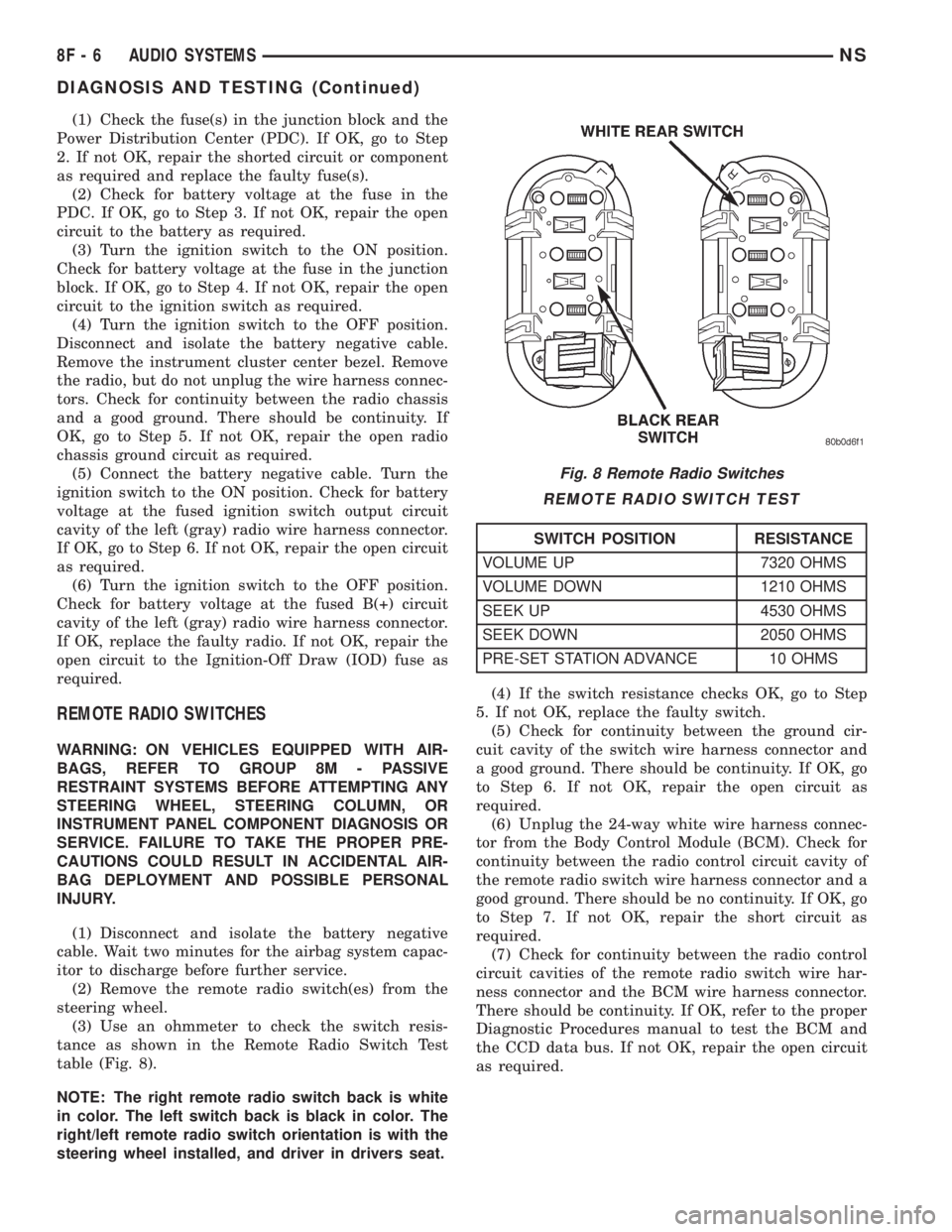
table (Fig. 8).
NOTE: The right remote radio switch back is white
in color. The left switch back is black in color. The
right/left remote radio switch orientation is with the
steering wheel installed, and driver in drivers seat.(4) If the switch resistance checks OK, go to Step
5. If not OK, replace the faulty switch.
(5) Check for continuity between the ground cir-
cuit cavity of the switch wire harness connector and
a good ground. There should be continuity. If OK, go
to Step 6. If not OK, repair the open circuit as
required.
(6) Unplug the 24-way white wire harness connec-
tor from the Body Control Module (BCM). Check for
continuity between the radio control circuit cavity of
the remote radio switch wire harness connector and a
good ground. There should be no continuity. If OK, go
to Step 7. If not OK, repair the short circuit as
required.
(7) Check for continuity between the radio control
circuit cavities of the remote radio switch wire har-
ness connector and the BCM wire harness connector.
There should be continuity. If OK, refer to the proper
Diagnostic Procedures manual to test the BCM and
the CCD data bus. If not OK, repair the open circuit
as required.
Fig. 8 Remote Radio Switches
REMOTE RADIO SWITCH TEST
SWITCH POSITION RESISTANCE
VOLUME UP 7320 OHMS
VOLUME DOWN 1210 OHMS
SEEK UP 4530 OHMS
SEEK DOWN 2050 OHMS
PRE-SET STATION ADVANCE 10 OHMS
8F - 6 AUDIO SYSTEMSNS
DIAGNOSIS AND TESTING (Continued)